













WORKING DRWAINGS
By Dr. EBTEHAL GALAL
Introduction
Lecture 1
3
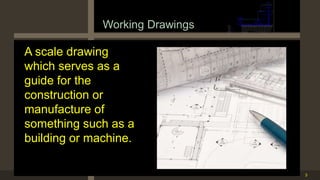
Working Drawings
A scale drawing
which serves as a
guide for the
construction or
manufacture of
something such as a
building or machine.
4
5
6
7
8
9
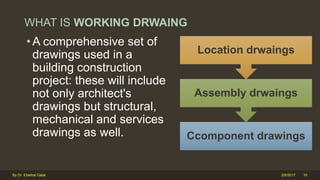
WHAT IS WORKING DRWAING
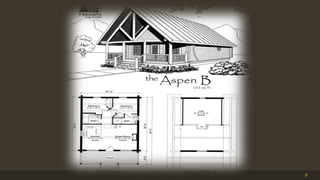
• A comprehensive set of
drawings used in a
building construction
project: these will include
not only architect's
drawings but structural,
mechanical and services
drawings as well. Ccomponent drawings
Assembly drwaings
Location drwaings
2/6/2017 10By Dr. Ebtehal Galal
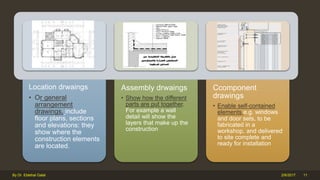
Location drwaings
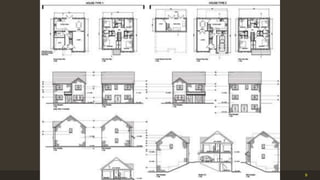
• Or general
arrangement
drawings, include
floor plans, sections
and elevations: they
show where the
construction elements
are located.
Assembly drwaings
• Show how the different
parts are put together.
For example a wall
detail will show the
layers that make up the
construction
Ccomponent
drawings
• Enable self-contained
elements e.g. windows
and door sets, to be
fabricated in a
workshop, and delivered
to site complete and
ready for installation
2/6/2017 11By Dr. Ebtehal Galal
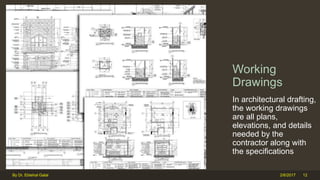
Working
Drawings
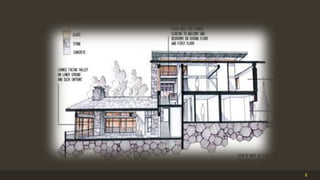
In architectural drafting,
the working drawings
are all plans,
elevations, and details
needed by the
contractor along with
the specifications
2/6/2017By Dr. Ebtehal Galal 12
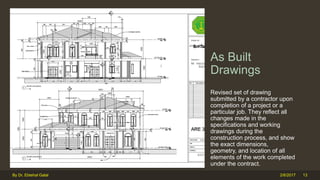
As Built
Drawings
Revised set of drawing
submitted by a contractor upon
completion of a project or a
particular job. They reflect all
changes made in the
specifications and working
drawings during the
construction process, and show
the exact dimensions,
geometry, and location of all
elements of the work completed
under the contract.
2/6/2017By Dr. Ebtehal Galal 13
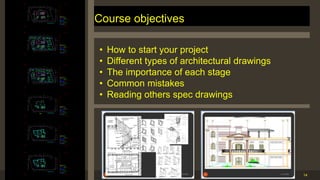
Course objectives
14
JUMA HUSSAIN
Eng , M BAAL BAKI
T YPICAL FL OOR PL AN
JUMA HUSSAIN
Eng , M BAAL BAKI
GROUN DFL OOR PL AN
JUMA HUSSAIN
Eng , M BAAL BAKI
BASE MEN T FL OOR PL AN
JUMA HUSSAIN
Eng , M BAAL BAKI
MEZ Z ANE EN FL OOR PL AN
JUMA HUSSAIN
Eng , M BAAL BAKI
T YPICAL FL OOR PL AN
JUMA HUSSAIN
Eng , M BAAL BAKI
T YPICAL FL OOR PL AN
• How to start your project
• Different types of architectural drawings
• The importance of each stage
• Common mistakes
• Reading others spec drawings
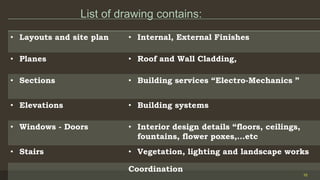
List of drawing contains:
15
• Layouts and site plan • Internal, External Finishes
• Planes • Roof and Wall Cladding,
• Sections • Building services “Electro-Mechanics ”
• Elevations • Building systems
• Windows - Doors • Interior design details “floors, ceilings,
fountains, flower poxes,…etc
• Stairs • Vegetation, lighting and landscape works
Coordination
16
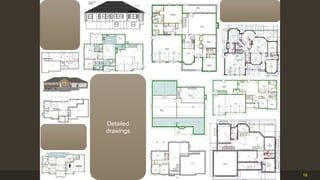
Detailed
drawings
End of part 1
WORKING DRWAINGS
By Dr. EBTEHAL GALAL
Plan View Drwaings.
Lecture 2
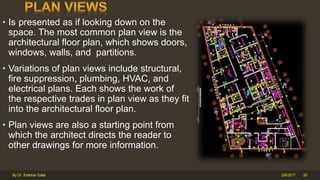
• Is presented as if looking down on the
space. The most common plan view is the
architectural floor plan, which shows doors,
windows, walls, and partitions.
• Variations of plan views include structural,
fire suppression, plumbing, HVAC, and
electrical plans. Each shows the work of
the respective trades in plan view as they fit
into the architectural floor plan.
• Plan views are also a starting point from
which the architect directs the reader to
other drawings for more information.
2/6/2017By Dr. Ebtehal Galal 20
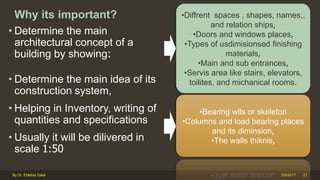
Why its important?
• Determine the main
architectural concept of a
building by showing:
• Determine the main idea of its
construction system,
• Helping in Inventory, writing of
quantities and specifications
• Usually it will be dilivered in
scale 1:50
2/6/2017By Dr. Ebtehal Galal 21
•Diffrent spaces , shapes, names,,
and relation ships,
•Doors and windows places,
•Types of usdimisionsed finishing
materials,
•Main and sub entrances,
•Servis area like stairs, elevators,
toilites, and michanical rooms.
•Bearing wlls or skeleton
•Columns and load bearing places
and its diminsion,
•The walls thiknis,
2/6/2017By Dr. Ebtehal Galal 22
1-Basic information
for plane drawing
2-
-Data to be signed
on drawings
3-
Considerations
must be taken
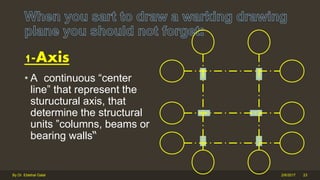
1-Axis
• A continuous “center
line” that represent the
stuructural axis, that
determine the structural
units ”columns, beams or
bearing walls“
2/6/2017By Dr. Ebtehal Galal 23
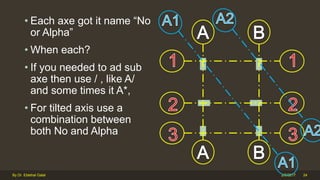
• Each axe got it name “No
or Alpha”
• When each?
• If you needed to ad sub
axe then use / , like A/
and some times it A*,
• For tilted axis use a
combination between
both No and Alpha
2/6/2017By Dr. Ebtehal Galal 24
2/6/2017By Dr. Ebtehal Galal 25
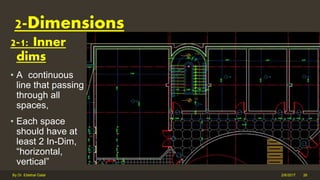
2-1: Inner
dims
• A continuous
line that passing
through all
spaces,
• Each space
should have at
least 2 In-Dim,
“horizontal,
vertical”
2/6/2017By Dr. Ebtehal Galal 26
2-Dimensions
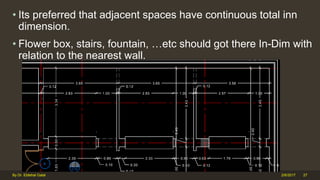
• Its preferred that adjacent spaces have continuous total inn
dimension.
• Flower box, stairs, fountain, …etc should got there In-Dim with
relation to the nearest wall.
2/6/2017By Dr. Ebtehal Galal 27
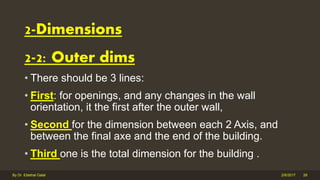
2-2: Outer dims
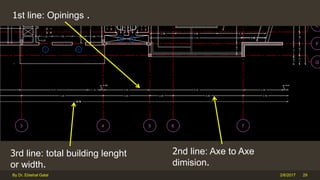
• There should be 3 lines:
• First: for openings, and any changes in the wall
orientation, it the first after the outer wall,
• Second for the dimension between each 2 Axis, and
between the final axe and the end of the building.
• Third one is the total dimension for the building .
2/6/2017By Dr. Ebtehal Galal 28
2-Dimensions
2/6/2017By Dr. Ebtehal Galal 29
1st line: Opinings .
3rd line: total building lenght
or width.
2nd line: Axe to Axe
dimision.
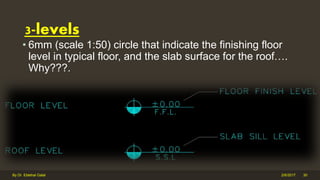
• 6mm (scale 1:50) circle that indicate the finishing floor
level in typical floor, and the slab surface for the roof….
Why???.
2/6/2017By Dr. Ebtehal Galal 30
3-levels
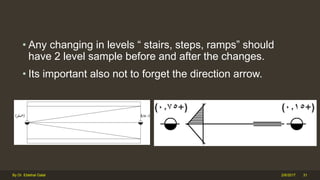
• Any changing in levels “ stairs, steps, ramps” should
have 2 level sample before and after the changes.
• Its important also not to forget the direction arrow.
2/6/2017By Dr. Ebtehal Galal 31
2/6/2017By Dr. Ebtehal Galal 32
1-Basic information for
plane drawing
2--Data to be signed
on drawings
3-Considerations
must be taken
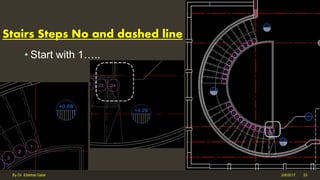
Stairs Steps No and dashed line
• Start with 1…..
2/6/2017By Dr. Ebtehal Galal 33
2/6/2017By Dr. Ebtehal Galal 34
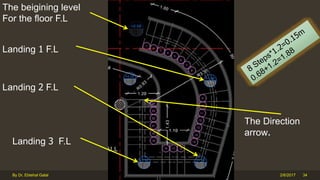
The Direction
arrow.
The beigining level
For the floor F.L
Landing 1 F.L
Landing 2 F.L
Landing 3 F.L
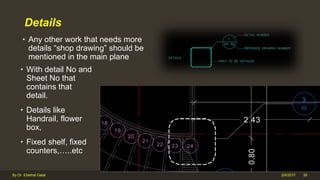
Details
• Any other work that needs more
details “shop drawing” should be
mentioned in the main plane
2/6/2017By Dr. Ebtehal Galal 35
• With detail No and
Sheet No that
contains that
detail.
• Details like
Handrail, flower
box,
• Fixed shelf, fixed
counters,…..etc
2/6/2017By Dr. Ebtehal Galal 36
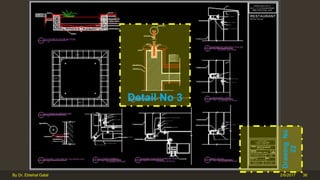
Detail No 3
DrawingNo
22
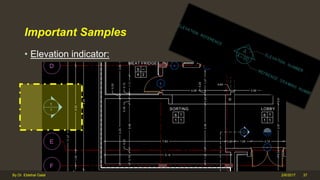
Important Samples
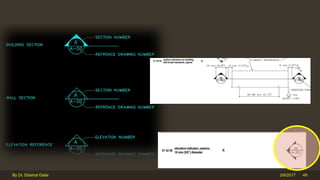
• Elevation indicator:
2/6/2017By Dr. Ebtehal Galal 37
2/6/2017By Dr. Ebtehal Galal 38
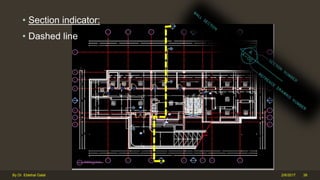
• Section indicator:
• Dashed line
2/6/2017By Dr. Ebtehal Galal 39
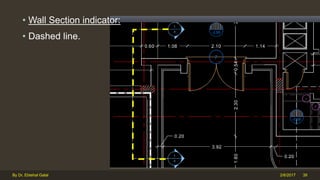
• Wall Section indicator:
• Dashed line.
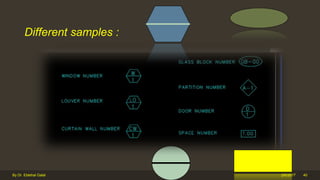
Different samples :
2/6/2017By Dr. Ebtehal Galal 40
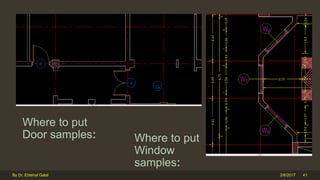
Where to put
Door samples:
2/6/2017By Dr. Ebtehal Galal 41
Where to put
Window
samples:
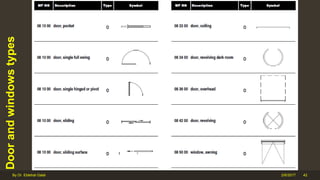
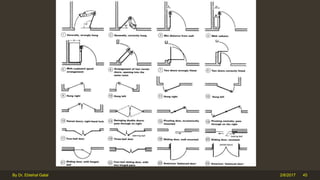
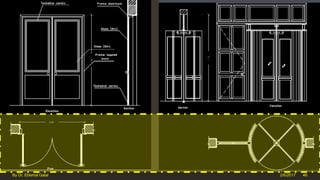
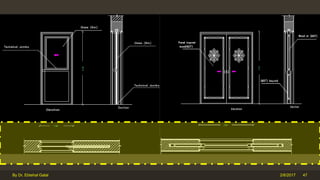
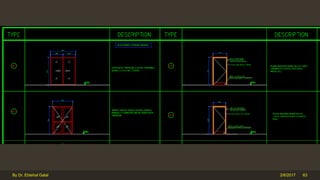
Doorandwindowstypes
2/6/2017By Dr. Ebtehal Galal 42
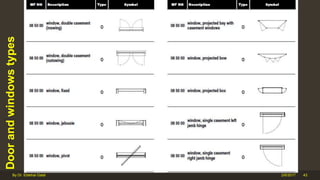
Doorandwindowstypes
2/6/2017By Dr. Ebtehal Galal 43
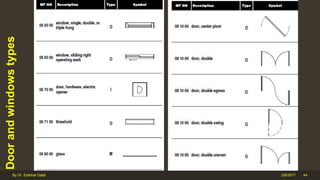
Doorandwindowstypes
2/6/2017By Dr. Ebtehal Galal 44
2/6/2017By Dr. Ebtehal Galal 45
2/6/2017By Dr. Ebtehal Galal 46
2/6/2017By Dr. Ebtehal Galal 47
2/6/2017By Dr. Ebtehal Galal 48
2/6/2017By Dr. Ebtehal Galal 49
2/6/2017By Dr. Ebtehal Galal 50
1-Basic information for
plane drawing
2-Data to be signed on
drawings
3-
consideratio
ns must be
taken
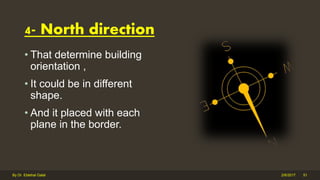
• That determine building
orientation ,
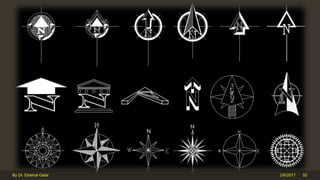
• It could be in different
shape.
• And it placed with each
plane in the border.
2/6/2017By Dr. Ebtehal Galal 51
4- North direction
2/6/2017By Dr. Ebtehal Galal 52
2/6/2017By Dr. Ebtehal Galal 53
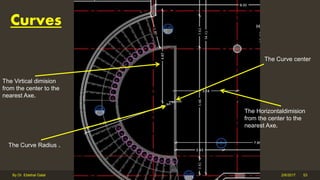
Curves
The Virtical dimision
from the center to the
nearest Axe.
The Curve center
The Horizontaldimision
from the center to the
nearest Axe.
The Curve Radius .
2/6/2017By Dr. Ebtehal Galal 54
2/6/2017By Dr. Ebtehal Galal 55
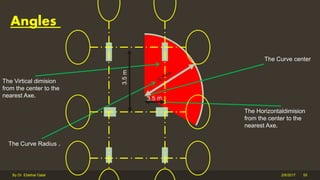
Angles
The Virtical dimision
from the center to the
nearest Axe.
The Curve center
The Horizontaldimision
from the center to the
nearest Axe.
The Curve Radius .
3.5m
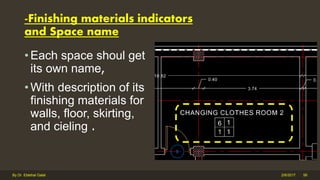
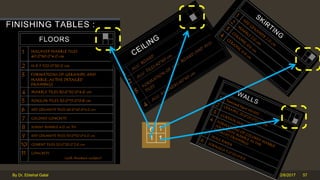
-Finishing materials indicators
and Space name
• Each space shoul get
its own name,
• With description of its
finishing materials for
walls, floor, skirting,
and cieling .
2/6/2017By Dr. Ebtehal Galal 56
2/6/2017By Dr. Ebtehal Galal 57
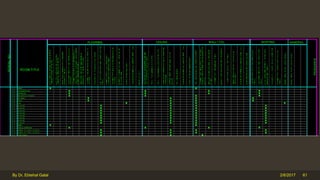
12-Schedules
• The objective of the
Schedules Module is to
provide a consistent
format for written
information in
• the form of schedules.
Formats are provided for
typical schedules used in
building construction.
2/6/2017By Dr. Ebtehal Galal 58
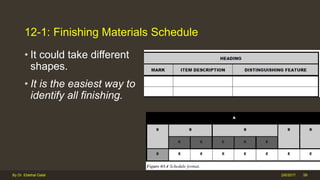
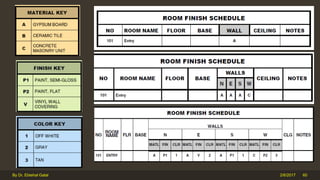
12-1: Finishing Materials Schedule
• It could take different
shapes.
• It is the easiest way to
identify all finishing.
2/6/2017By Dr. Ebtehal Galal 59
2/6/2017By Dr. Ebtehal Galal 60
2/6/2017By Dr. Ebtehal Galal 61
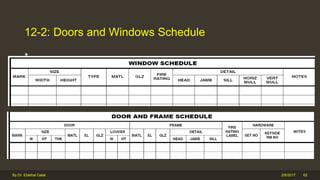
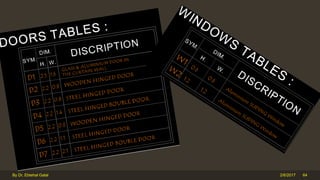
12-2: Doors and Windows Schedule
• …………..
2/6/2017By Dr. Ebtehal Galal 62
2/6/2017By Dr. Ebtehal Galal 63
2/6/2017By Dr. Ebtehal Galal 64
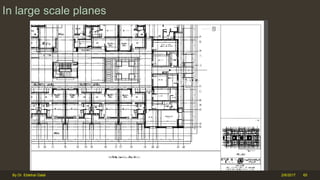
In large scale planes
2/6/2017By Dr. Ebtehal Galal 65
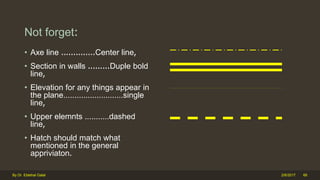
Not forget:
• Axe line ..............Center line,
• Section in walls .........Duple bold
line,
• Elevation for any things appear in
the plane...........................single
line,
• Upper elemnts ...........dashed
line,
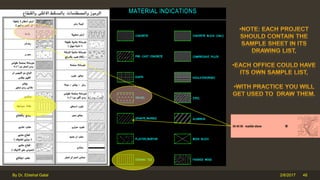
• Hatch should match what
mentioned in the general
appriviaton.
2/6/2017By Dr. Ebtehal Galal 66
TIME TO DISCUSS
REAL PROJECTS……..
End of part 2
WORKING DRWAINGS
By Dr. EBTEHAL GALAL
National CAD Standard
LECTURE 3
• Everything you will need to assemble a concise set of documents
/drawings for the built environment.
• It is a guide to what is required by todays Computer Aided Design
software tools to create the necessary documentation for construction.
• It includes: Layering standards, symbols, line styles, document
formatting, abbreviations, and everything needed to present your
design in an easy to understand standard for construction.
• This will result in reducing the costs of developing and maintaining
individual office standards, and transferring building data from design
applications to facility management applications.
•
2/6/2017 71By Dr. Ebtehal Galal
2/6/2017By Dr. Ebtehal Galal 72
https://www.youtube.com/watch?v=5-DrHhWROxU
https://www.nationalcadstandard.org/ncs6/ordering.php
to Clients and
Owners
Consistent organization of
data for all projects, from
all sources.
Greater clarity of
communication of design
intent to the client.
Streamlined construction
document checking
process.
to Design
Professionals
Consistent data classification
for all projects, regardless of
the project type or client.
Seamless transfer of
information among architects,
engineers, and other design
team members.
Reduced staff training time to
teach "office standards."
to Contractors
and
Subcontractors
Consistent drawing sheet
order and sheet
organization; information
appears in the same place
in all drawing sets.
Consistent detail reference
system.
Consistent organization of
data for all projects, from
all sources.
2/6/2017 73By Dr. Ebtehal Galal

working drawings for beginners

  • 1.
  • 2.
  • 3.
    3 Working Drawings A scaledrawing which serves as a guide for the construction or manufacture of something such as a building or machine.
  • 4.
  • 5.
  • 6.
  • 7.
  • 8.
  • 9.
  • 10.
    WHAT IS WORKINGDRWAING • A comprehensive set of drawings used in a building construction project: these will include not only architect's drawings but structural, mechanical and services drawings as well. Ccomponent drawings Assembly drwaings Location drwaings 2/6/2017 10By Dr. Ebtehal Galal
  • 11.
    Location drwaings • Orgeneral arrangement drawings, include floor plans, sections and elevations: they show where the construction elements are located. Assembly drwaings • Show how the different parts are put together. For example a wall detail will show the layers that make up the construction Ccomponent drawings • Enable self-contained elements e.g. windows and door sets, to be fabricated in a workshop, and delivered to site complete and ready for installation 2/6/2017 11By Dr. Ebtehal Galal
  • 12.
    Working Drawings In architectural drafting, theworking drawings are all plans, elevations, and details needed by the contractor along with the specifications 2/6/2017By Dr. Ebtehal Galal 12
  • 13.
    As Built Drawings Revised setof drawing submitted by a contractor upon completion of a project or a particular job. They reflect all changes made in the specifications and working drawings during the construction process, and show the exact dimensions, geometry, and location of all elements of the work completed under the contract. 2/6/2017By Dr. Ebtehal Galal 13
  • 14.
    Course objectives 14 JUMA HUSSAIN Eng, M BAAL BAKI T YPICAL FL OOR PL AN JUMA HUSSAIN Eng , M BAAL BAKI GROUN DFL OOR PL AN JUMA HUSSAIN Eng , M BAAL BAKI BASE MEN T FL OOR PL AN JUMA HUSSAIN Eng , M BAAL BAKI MEZ Z ANE EN FL OOR PL AN JUMA HUSSAIN Eng , M BAAL BAKI T YPICAL FL OOR PL AN JUMA HUSSAIN Eng , M BAAL BAKI T YPICAL FL OOR PL AN • How to start your project • Different types of architectural drawings • The importance of each stage • Common mistakes • Reading others spec drawings
  • 15.
    List of drawingcontains: 15 • Layouts and site plan • Internal, External Finishes • Planes • Roof and Wall Cladding, • Sections • Building services “Electro-Mechanics ” • Elevations • Building systems • Windows - Doors • Interior design details “floors, ceilings, fountains, flower poxes,…etc • Stairs • Vegetation, lighting and landscape works Coordination
  • 16.
  • 17.
  • 18.
  • 19.
  • 20.
    • Is presentedas if looking down on the space. The most common plan view is the architectural floor plan, which shows doors, windows, walls, and partitions. • Variations of plan views include structural, fire suppression, plumbing, HVAC, and electrical plans. Each shows the work of the respective trades in plan view as they fit into the architectural floor plan. • Plan views are also a starting point from which the architect directs the reader to other drawings for more information. 2/6/2017By Dr. Ebtehal Galal 20
  • 21.
    Why its important? •Determine the main architectural concept of a building by showing: • Determine the main idea of its construction system, • Helping in Inventory, writing of quantities and specifications • Usually it will be dilivered in scale 1:50 2/6/2017By Dr. Ebtehal Galal 21 •Diffrent spaces , shapes, names,, and relation ships, •Doors and windows places, •Types of usdimisionsed finishing materials, •Main and sub entrances, •Servis area like stairs, elevators, toilites, and michanical rooms. •Bearing wlls or skeleton •Columns and load bearing places and its diminsion, •The walls thiknis,
  • 22.
    2/6/2017By Dr. EbtehalGalal 22 1-Basic information for plane drawing 2- -Data to be signed on drawings 3- Considerations must be taken
  • 23.
    1-Axis • A continuous“center line” that represent the stuructural axis, that determine the structural units ”columns, beams or bearing walls“ 2/6/2017By Dr. Ebtehal Galal 23
  • 24.
    • Each axegot it name “No or Alpha” • When each? • If you needed to ad sub axe then use / , like A/ and some times it A*, • For tilted axis use a combination between both No and Alpha 2/6/2017By Dr. Ebtehal Galal 24
  • 25.
  • 26.
    2-1: Inner dims • Acontinuous line that passing through all spaces, • Each space should have at least 2 In-Dim, “horizontal, vertical” 2/6/2017By Dr. Ebtehal Galal 26 2-Dimensions
  • 27.
    • Its preferredthat adjacent spaces have continuous total inn dimension. • Flower box, stairs, fountain, …etc should got there In-Dim with relation to the nearest wall. 2/6/2017By Dr. Ebtehal Galal 27
  • 28.
    2-2: Outer dims •There should be 3 lines: • First: for openings, and any changes in the wall orientation, it the first after the outer wall, • Second for the dimension between each 2 Axis, and between the final axe and the end of the building. • Third one is the total dimension for the building . 2/6/2017By Dr. Ebtehal Galal 28 2-Dimensions
  • 29.
    2/6/2017By Dr. EbtehalGalal 29 1st line: Opinings . 3rd line: total building lenght or width. 2nd line: Axe to Axe dimision.
  • 30.
    • 6mm (scale1:50) circle that indicate the finishing floor level in typical floor, and the slab surface for the roof…. Why???. 2/6/2017By Dr. Ebtehal Galal 30 3-levels
  • 31.
    • Any changingin levels “ stairs, steps, ramps” should have 2 level sample before and after the changes. • Its important also not to forget the direction arrow. 2/6/2017By Dr. Ebtehal Galal 31
  • 32.
    2/6/2017By Dr. EbtehalGalal 32 1-Basic information for plane drawing 2--Data to be signed on drawings 3-Considerations must be taken
  • 33.
    Stairs Steps Noand dashed line • Start with 1….. 2/6/2017By Dr. Ebtehal Galal 33
  • 34.
    2/6/2017By Dr. EbtehalGalal 34 The Direction arrow. The beigining level For the floor F.L Landing 1 F.L Landing 2 F.L Landing 3 F.L
  • 35.
    Details • Any otherwork that needs more details “shop drawing” should be mentioned in the main plane 2/6/2017By Dr. Ebtehal Galal 35 • With detail No and Sheet No that contains that detail. • Details like Handrail, flower box, • Fixed shelf, fixed counters,…..etc
  • 36.
    2/6/2017By Dr. EbtehalGalal 36 Detail No 3 DrawingNo 22
  • 37.
    Important Samples • Elevationindicator: 2/6/2017By Dr. Ebtehal Galal 37
  • 38.
    2/6/2017By Dr. EbtehalGalal 38 • Section indicator: • Dashed line
  • 39.
    2/6/2017By Dr. EbtehalGalal 39 • Wall Section indicator: • Dashed line.
  • 40.
    Different samples : 2/6/2017ByDr. Ebtehal Galal 40
  • 41.
    Where to put Doorsamples: 2/6/2017By Dr. Ebtehal Galal 41 Where to put Window samples:
  • 42.
  • 43.
  • 44.
  • 45.
  • 46.
  • 47.
  • 48.
  • 49.
  • 50.
    2/6/2017By Dr. EbtehalGalal 50 1-Basic information for plane drawing 2-Data to be signed on drawings 3- consideratio ns must be taken
  • 51.
    • That determinebuilding orientation , • It could be in different shape. • And it placed with each plane in the border. 2/6/2017By Dr. Ebtehal Galal 51 4- North direction
  • 52.
  • 53.
    2/6/2017By Dr. EbtehalGalal 53 Curves The Virtical dimision from the center to the nearest Axe. The Curve center The Horizontaldimision from the center to the nearest Axe. The Curve Radius .
  • 54.
  • 55.
    2/6/2017By Dr. EbtehalGalal 55 Angles The Virtical dimision from the center to the nearest Axe. The Curve center The Horizontaldimision from the center to the nearest Axe. The Curve Radius . 3.5m
  • 56.
    -Finishing materials indicators andSpace name • Each space shoul get its own name, • With description of its finishing materials for walls, floor, skirting, and cieling . 2/6/2017By Dr. Ebtehal Galal 56
  • 57.
  • 58.
    12-Schedules • The objectiveof the Schedules Module is to provide a consistent format for written information in • the form of schedules. Formats are provided for typical schedules used in building construction. 2/6/2017By Dr. Ebtehal Galal 58
  • 59.
    12-1: Finishing MaterialsSchedule • It could take different shapes. • It is the easiest way to identify all finishing. 2/6/2017By Dr. Ebtehal Galal 59
  • 60.
  • 61.
  • 62.
    12-2: Doors andWindows Schedule • ………….. 2/6/2017By Dr. Ebtehal Galal 62
  • 63.
  • 64.
  • 65.
    In large scaleplanes 2/6/2017By Dr. Ebtehal Galal 65
  • 66.
    Not forget: • Axeline ..............Center line, • Section in walls .........Duple bold line, • Elevation for any things appear in the plane...........................single line, • Upper elemnts ...........dashed line, • Hatch should match what mentioned in the general appriviaton. 2/6/2017By Dr. Ebtehal Galal 66
  • 67.
    TIME TO DISCUSS REALPROJECTS……..
  • 68.
  • 69.
  • 70.
  • 71.
    • Everything youwill need to assemble a concise set of documents /drawings for the built environment. • It is a guide to what is required by todays Computer Aided Design software tools to create the necessary documentation for construction. • It includes: Layering standards, symbols, line styles, document formatting, abbreviations, and everything needed to present your design in an easy to understand standard for construction. • This will result in reducing the costs of developing and maintaining individual office standards, and transferring building data from design applications to facility management applications. • 2/6/2017 71By Dr. Ebtehal Galal
  • 72.
    2/6/2017By Dr. EbtehalGalal 72 https://www.youtube.com/watch?v=5-DrHhWROxU https://www.nationalcadstandard.org/ncs6/ordering.php
  • 73.
    to Clients and Owners Consistentorganization of data for all projects, from all sources. Greater clarity of communication of design intent to the client. Streamlined construction document checking process. to Design Professionals Consistent data classification for all projects, regardless of the project type or client. Seamless transfer of information among architects, engineers, and other design team members. Reduced staff training time to teach "office standards." to Contractors and Subcontractors Consistent drawing sheet order and sheet organization; information appears in the same place in all drawing sets. Consistent detail reference system. Consistent organization of data for all projects, from all sources. 2/6/2017 73By Dr. Ebtehal Galal

Editor's Notes

  • #12 http://en.wikipedia.org/wiki/Architectural_drawing#Working_drawings Location drawings, also called Assembly drawings, how they are fixed to structural elements, how to finish the edges of openings, and how prefabricated components are to be fitted. Component drawings. Larger components may include roof trusses, cladding panels, cupboards and kitchens. Complete rooms, especially hotel bedrooms and bathrooms, may be made as prefabricated pods complete with internal decorations and fittings. Traditionally, working drawings would typically combine plans, sections, elevations and some details to provide a complete explanation of a building on one sheet. That was possible because little detail was included, the building techniques involved being common knowledge amongst building professionals. Modern working drawings are much more detailed and it is standard practice to isolate each view on a separate sheet. Notes included on drawings are brief, referring to standardised specification documents for more information. Understanding the layout and construction of a modern building involves studying an often-sizeable set of drawings and documents.
  • #46 neufert3th
  • #48 Auol-working-lectures-doors
  • #72 building owners and building design and construction professionals faced the difficulty of comprehending and organizing electronic building design data produced in a multitude of formats.