www.researchdesignlab.com Page 1
Micro SD Memory card Interface
for 3.3V MCU
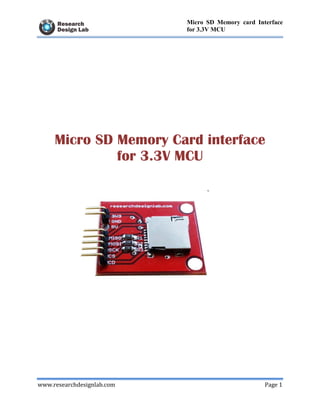
Micro SD Memory Card interface
for 3.3V MCU
www.researchdesignlab.com Page 2
Micro SD Memory card Interface
for 3.3V MCU
Table of Contents
OVERVIEW ................................................................................................................................... 3
INTRODUCTION ...................................................................................................................... 3
FEATURES ................................................................................................................................ 3
APPLICATIONS........................................................................................................................ 4
SPECIFICATIONS..................................................................................................................... 4
CIRCUIT DIAGRAM ................................................................................................................ 5
ARDUINO CODE ...................................................................................................................... 5
RELATED PRODUCTS ............................................................................................................ 9
Micro SD Memory Card interface for 3.3V MCU SanDisk Memory Card................................ 9
MicroSDHC 4GB............................................................................................................................ 9
Data Logger Sheild Compatible for Arduino.................................................................................. 9
www.researchdesignlab.com Page 3
Micro SD Memory card Interface
for 3.3V MCU
OVERVIEW
INTRODUCTION
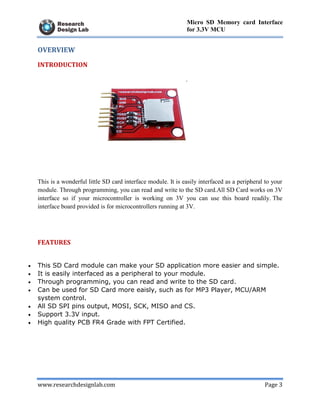
This is a wonderful little SD card interface module. It is easily interfaced as a peripheral to your
module. Through programming, you can read and write to the SD card.All SD Card works on 3V
interface so if your microcontroller is working on 3V you can use this board readily. The
interface board provided is for microcontrollers running at 3V.
FEATURES
 This SD Card module can make your SD application more easier and simple.
 It is easily interfaced as a peripheral to your module.
 Through programming, you can read and write to the SD card.
 Can be used for SD Card more eaisly, such as for MP3 Player, MCU/ARM
system control.
 All SD SPI pins output, MOSI, SCK, MISO and CS.
 Support 3.3V input.
 High quality PCB FR4 Grade with FPT Certified.
www.researchdesignlab.com Page 4
Micro SD Memory card Interface
for 3.3V MCU
APPLICATIONS
 MP3 player.
 MCU/Arm system control.
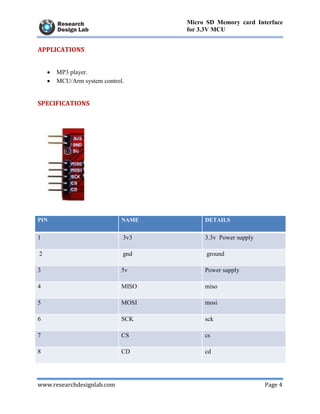
SPECIFICATIONS
PIN NAME DETAILS
1 3v3 3.3v Power supply
2 gnd ground
3 5v Power supply
4 MISO miso
5 MOSI mosi
6 SCK sck
7 CS cs
8 CD cd
www.researchdesignlab.com Page 5
Micro SD Memory card Interface
for 3.3V MCU
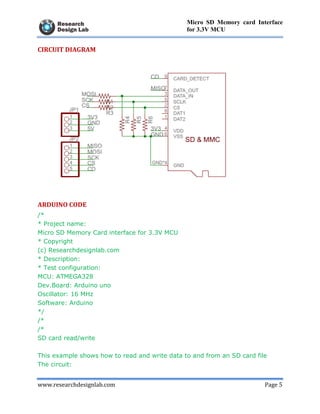
CIRCUIT DIAGRAM
ARDUINO CODE
/*
* Project name:
Micro SD Memory Card interface for 3.3V MCU
* Copyright
(c) Researchdesignlab.com
* Description:
* Test configuration:
MCU: ATMEGA328
Dev.Board: Arduino uno
Oscillator: 16 MHz
Software: Arduino
*/
/*
/*
SD card read/write
This example shows how to read and write data to and from an SD card file
The circuit:
www.researchdesignlab.com Page 6
Micro SD Memory card Interface
for 3.3V MCU
* SD card attached to SPI bus as follows:
** MOSI - pin 11
** MISO - pin 12
** CLK - pin 13
** CS - pin 4
created Nov 2010
by David A. Mellis
modified 9 Apr 2012
by Tom Igoe
This example code is in the public domain.
*/
#include <SD.h>
File myFile;
void setup()
{
// Open serial communications and wait for port to open:
Serial.begin(9600);
while (!Serial) {
; // wait for serial port to connect.
}
Serial.print("Initializing SD card...");
// On the Ethernet Shield, CS is pin 4. It's set as an output by default.
// Note that even if it's not used as the CS pin, the hardware SS pin
// (10 on most Arduino boards, 53 on the Mega) must be left as an output
// or the SD library functions will not work.
pinMode(10, OUTPUT);
if (!SD.begin(4)) {
Serial.println("initialization failed!");
return;
}
www.researchdesignlab.com Page 7
Micro SD Memory card Interface
for 3.3V MCU
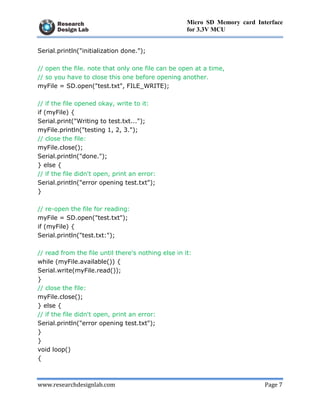
Serial.println("initialization done.");
// open the file. note that only one file can be open at a time,
// so you have to close this one before opening another.
myFile = SD.open("test.txt", FILE_WRITE);
// if the file opened okay, write to it:
if (myFile) {
Serial.print("Writing to test.txt...");
myFile.println("testing 1, 2, 3.");
// close the file:
myFile.close();
Serial.println("done.");
} else {
// if the file didn't open, print an error:
Serial.println("error opening test.txt");
}
// re-open the file for reading:
myFile = SD.open("test.txt");
if (myFile) {
Serial.println("test.txt:");
// read from the file until there's nothing else in it:
while (myFile.available()) {
Serial.write(myFile.read());
}
// close the file:
myFile.close();
} else {
// if the file didn't open, print an error:
Serial.println("error opening test.txt");
}
}
void loop()
{
www.researchdesignlab.com Page 8
Micro SD Memory card Interface
for 3.3V MCU
// nothing happens after setup
}
www.researchdesignlab.com Page 9
Micro SD Memory card Interface
for 3.3V MCU
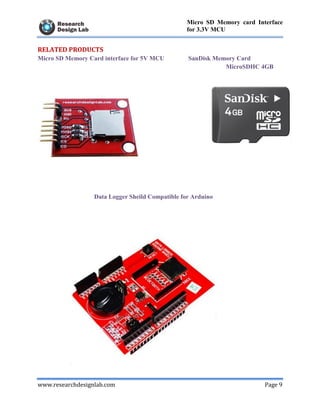
RELATED PRODUCTS
Micro SD Memory Card interface for 5V MCU SanDisk Memory Card
MicroSDHC 4GB
Data Logger Sheild Compatible for Arduino

Micro SD Memory Card Interface for 3.3V MCU

  • 1.
    www.researchdesignlab.com Page 1 MicroSD Memory card Interface for 3.3V MCU Micro SD Memory Card interface for 3.3V MCU
  • 2.
    www.researchdesignlab.com Page 2 MicroSD Memory card Interface for 3.3V MCU Table of Contents OVERVIEW ................................................................................................................................... 3 INTRODUCTION ...................................................................................................................... 3 FEATURES ................................................................................................................................ 3 APPLICATIONS........................................................................................................................ 4 SPECIFICATIONS..................................................................................................................... 4 CIRCUIT DIAGRAM ................................................................................................................ 5 ARDUINO CODE ...................................................................................................................... 5 RELATED PRODUCTS ............................................................................................................ 9 Micro SD Memory Card interface for 3.3V MCU SanDisk Memory Card................................ 9 MicroSDHC 4GB............................................................................................................................ 9 Data Logger Sheild Compatible for Arduino.................................................................................. 9
  • 3.
    www.researchdesignlab.com Page 3 MicroSD Memory card Interface for 3.3V MCU OVERVIEW INTRODUCTION This is a wonderful little SD card interface module. It is easily interfaced as a peripheral to your module. Through programming, you can read and write to the SD card.All SD Card works on 3V interface so if your microcontroller is working on 3V you can use this board readily. The interface board provided is for microcontrollers running at 3V. FEATURES  This SD Card module can make your SD application more easier and simple.  It is easily interfaced as a peripheral to your module.  Through programming, you can read and write to the SD card.  Can be used for SD Card more eaisly, such as for MP3 Player, MCU/ARM system control.  All SD SPI pins output, MOSI, SCK, MISO and CS.  Support 3.3V input.  High quality PCB FR4 Grade with FPT Certified.
  • 4.
    www.researchdesignlab.com Page 4 MicroSD Memory card Interface for 3.3V MCU APPLICATIONS  MP3 player.  MCU/Arm system control. SPECIFICATIONS PIN NAME DETAILS 1 3v3 3.3v Power supply 2 gnd ground 3 5v Power supply 4 MISO miso 5 MOSI mosi 6 SCK sck 7 CS cs 8 CD cd
  • 5.
    www.researchdesignlab.com Page 5 MicroSD Memory card Interface for 3.3V MCU CIRCUIT DIAGRAM ARDUINO CODE /* * Project name: Micro SD Memory Card interface for 3.3V MCU * Copyright (c) Researchdesignlab.com * Description: * Test configuration: MCU: ATMEGA328 Dev.Board: Arduino uno Oscillator: 16 MHz Software: Arduino */ /* /* SD card read/write This example shows how to read and write data to and from an SD card file The circuit:
  • 6.
    www.researchdesignlab.com Page 6 MicroSD Memory card Interface for 3.3V MCU * SD card attached to SPI bus as follows: ** MOSI - pin 11 ** MISO - pin 12 ** CLK - pin 13 ** CS - pin 4 created Nov 2010 by David A. Mellis modified 9 Apr 2012 by Tom Igoe This example code is in the public domain. */ #include <SD.h> File myFile; void setup() { // Open serial communications and wait for port to open: Serial.begin(9600); while (!Serial) { ; // wait for serial port to connect. } Serial.print("Initializing SD card..."); // On the Ethernet Shield, CS is pin 4. It's set as an output by default. // Note that even if it's not used as the CS pin, the hardware SS pin // (10 on most Arduino boards, 53 on the Mega) must be left as an output // or the SD library functions will not work. pinMode(10, OUTPUT); if (!SD.begin(4)) { Serial.println("initialization failed!"); return; }
  • 7.
    www.researchdesignlab.com Page 7 MicroSD Memory card Interface for 3.3V MCU Serial.println("initialization done."); // open the file. note that only one file can be open at a time, // so you have to close this one before opening another. myFile = SD.open("test.txt", FILE_WRITE); // if the file opened okay, write to it: if (myFile) { Serial.print("Writing to test.txt..."); myFile.println("testing 1, 2, 3."); // close the file: myFile.close(); Serial.println("done."); } else { // if the file didn't open, print an error: Serial.println("error opening test.txt"); } // re-open the file for reading: myFile = SD.open("test.txt"); if (myFile) { Serial.println("test.txt:"); // read from the file until there's nothing else in it: while (myFile.available()) { Serial.write(myFile.read()); } // close the file: myFile.close(); } else { // if the file didn't open, print an error: Serial.println("error opening test.txt"); } } void loop() {
  • 8.
    www.researchdesignlab.com Page 8 MicroSD Memory card Interface for 3.3V MCU // nothing happens after setup }
  • 9.
    www.researchdesignlab.com Page 9 MicroSD Memory card Interface for 3.3V MCU RELATED PRODUCTS Micro SD Memory Card interface for 5V MCU SanDisk Memory Card MicroSDHC 4GB Data Logger Sheild Compatible for Arduino