3
4
5
6
7
8
9
10
11
Data Flow Diagrams
Presented by Sarah Saad El deen
12
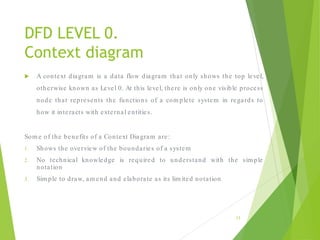
DFD LEVEL 0.
Context diagram
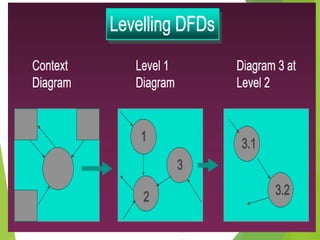
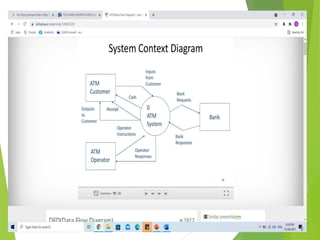
 A context diagram is a data flow diagram that only shows the top level,
otherwise known as Level 0. At this level, there is only one visible process
node that represents the functions of a com plete system in regards to
how it interacts with external entities.
Som e of the benefits of a Context Diagram are:
1. Shows the overview of the boundaries of a system
2. No technical knowledge is required to understand with the sim ple
notation
3. Sim ple to draw, am end and elaborate as its lim ited notation
13
14
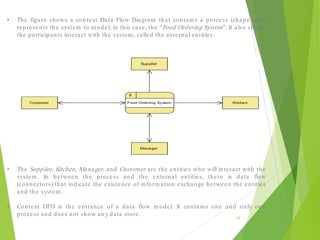
• The figure shows a context Data Flow Diagram that contains a process (shape) that
represents the system to m odel, in this case, the "Food Ordering System". It also shows
the participants interact with the system , called the external entities.
• The Supplier, Kitchen, Manager, and Customer are the entities who will interact with the
system . In between the process and the external entities, there is data flow
(connectors) that indicate the existence of inform ation exchange between the entities
and the system .
• Context DFD is the entrance of a data flow m odel. It contains one and only one
process and does not show any data store.
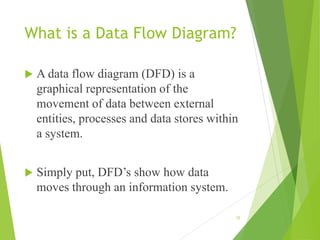
What is a Data Flow Diagram?
 A data flow diagram (DFD) is a
graphical representation of the
movement of data between external
entities, processes and data stores within
a system.
 Simply put, DFD’s show how data
moves through an information system.
15
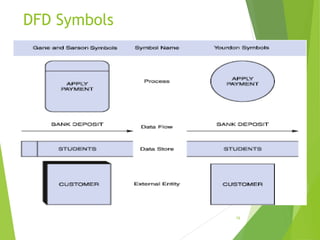
DFD Symbols
16
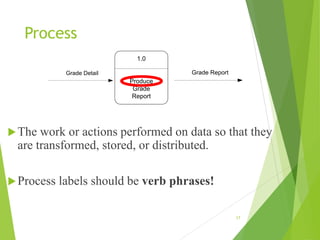
Process
The work or actions performed on data so that they
are transformed, stored, or distributed.
Process labels should be verb phrases!
17
1.0
Produce
Grade
Report
Grade Detail Grade Report
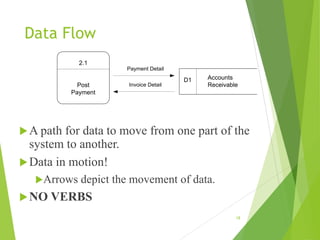
Data Flow
A path for data to move from one part of the
system to another.
Data in motion!
Arrows depict the movement of data.
NO VERBS
18
2.1
Post
Payment
Accounts
Receivable
D1
Payment Detail
Invoice Detail
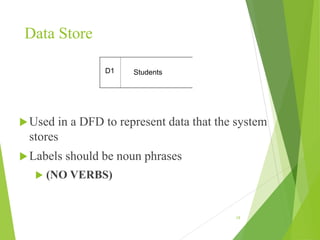
Data Store
Used in a DFD to represent data that the system
stores
Labels should be noun phrases
 (NO VERBS)
19
Students
D1
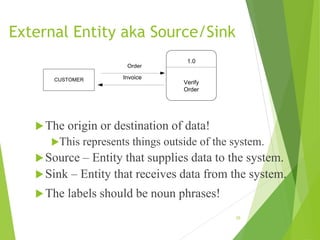
External Entity aka Source/Sink
The origin or destination of data!
This represents things outside of the system.
Source – Entity that supplies data to the system.
Sink – Entity that receives data from the system.
The labels should be noun phrases!
20
CUSTOMER
1.0
Verify
Order
Order
Invoice
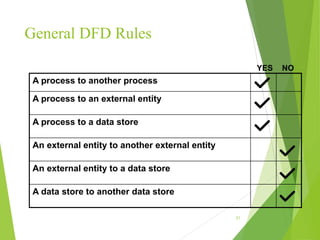
General DFD Rules
21
YES NO
A process to another process
A process to an external entity
A process to a data store
An external entity to another external entity
An external entity to a data store
A data store to another data store
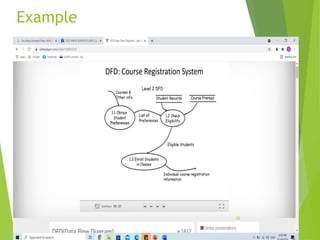
Example
22
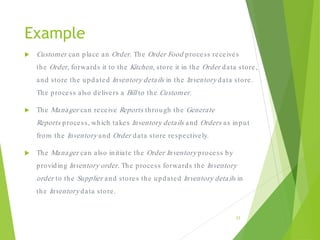
Example
 Customer can place an Order. The Order Food process receives
the Order, forwards it to the Kitchen, store it in the Order data store,
and store the updated Inventory details in the Inventory data store.
The process also delivers a Bill to the Customer.
 The Manager can receive Reports through the Generate
Reports process, which takes Inventory details and Orders as input
from the Inventory and Order data store respectively.
 The Manager can also initiate the Order Inventory process by
providing Inventory order. The process forwards the Inventory
order to the Supplier and stores the updated Inventory details in
the Inventory data store.
23
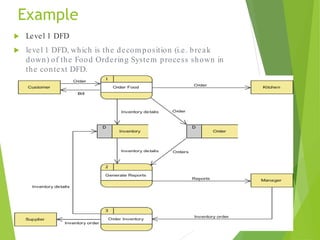
Example
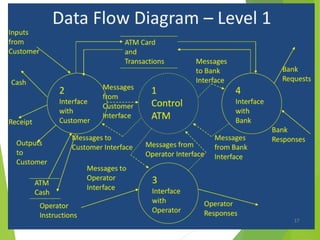
 Level 1 DFD
 level 1 DFD, which is the decom position (i.e. break
down) of the Food Ordering System process shown in
the context DFD.
24
Data Flow Diagram Tips and Cautions
1. Process labels should be verb phrases; data stores are represented by
nouns
2. A data store m ust be associated with at least a process
3. An external entity m ust be associated with at least a process
4. Don't let it get too com plex; norm ally 5 - 7 average people can
m anage processes
5. DFD is non-determ inistic - The num bering does not necessarily
indicate sequence, it's useful in identifying the processes when
discussing with users
6. Datastores should not be connected to an external entity, otherwise, it
would m ean that you're giving an external entity direct access to your
data files
7. Data flows should not exist between 2 external entities without going
through a process
8. A process that has inputs but without outputs is considered to be a
black-hole process
25
26
27
28
Advantages of DFDs
 Simple graphical techniques which are
easy to understand
 Helps define the boundaries of the
system
 Useful for communicating current
system knowledge to users
 Explains the logic behind the data flow
within the system
 Used as the part of system
documentation file
29
Exercise
30
Activity diagram
31
32
33

data flow diagram DFD 0 AND dfd 1 FOR mis

  • 3.
  • 4.
  • 5.
  • 6.
  • 7.
  • 8.
  • 9.
  • 10.
  • 11.
  • 12.
    Data Flow Diagrams Presentedby Sarah Saad El deen 12
  • 13.
    DFD LEVEL 0. Contextdiagram  A context diagram is a data flow diagram that only shows the top level, otherwise known as Level 0. At this level, there is only one visible process node that represents the functions of a com plete system in regards to how it interacts with external entities. Som e of the benefits of a Context Diagram are: 1. Shows the overview of the boundaries of a system 2. No technical knowledge is required to understand with the sim ple notation 3. Sim ple to draw, am end and elaborate as its lim ited notation 13
  • 14.
    14 • The figureshows a context Data Flow Diagram that contains a process (shape) that represents the system to m odel, in this case, the "Food Ordering System". It also shows the participants interact with the system , called the external entities. • The Supplier, Kitchen, Manager, and Customer are the entities who will interact with the system . In between the process and the external entities, there is data flow (connectors) that indicate the existence of inform ation exchange between the entities and the system . • Context DFD is the entrance of a data flow m odel. It contains one and only one process and does not show any data store.
  • 15.
    What is aData Flow Diagram?  A data flow diagram (DFD) is a graphical representation of the movement of data between external entities, processes and data stores within a system.  Simply put, DFD’s show how data moves through an information system. 15
  • 16.
  • 17.
    Process The work oractions performed on data so that they are transformed, stored, or distributed. Process labels should be verb phrases! 17 1.0 Produce Grade Report Grade Detail Grade Report
  • 18.
    Data Flow A pathfor data to move from one part of the system to another. Data in motion! Arrows depict the movement of data. NO VERBS 18 2.1 Post Payment Accounts Receivable D1 Payment Detail Invoice Detail
  • 19.
    Data Store Used ina DFD to represent data that the system stores Labels should be noun phrases  (NO VERBS) 19 Students D1
  • 20.
    External Entity akaSource/Sink The origin or destination of data! This represents things outside of the system. Source – Entity that supplies data to the system. Sink – Entity that receives data from the system. The labels should be noun phrases! 20 CUSTOMER 1.0 Verify Order Order Invoice
  • 21.
    General DFD Rules 21 YESNO A process to another process A process to an external entity A process to a data store An external entity to another external entity An external entity to a data store A data store to another data store
  • 22.
  • 23.
    Example  Customer canplace an Order. The Order Food process receives the Order, forwards it to the Kitchen, store it in the Order data store, and store the updated Inventory details in the Inventory data store. The process also delivers a Bill to the Customer.  The Manager can receive Reports through the Generate Reports process, which takes Inventory details and Orders as input from the Inventory and Order data store respectively.  The Manager can also initiate the Order Inventory process by providing Inventory order. The process forwards the Inventory order to the Supplier and stores the updated Inventory details in the Inventory data store. 23
  • 24.
    Example  Level 1DFD  level 1 DFD, which is the decom position (i.e. break down) of the Food Ordering System process shown in the context DFD. 24
  • 25.
    Data Flow DiagramTips and Cautions 1. Process labels should be verb phrases; data stores are represented by nouns 2. A data store m ust be associated with at least a process 3. An external entity m ust be associated with at least a process 4. Don't let it get too com plex; norm ally 5 - 7 average people can m anage processes 5. DFD is non-determ inistic - The num bering does not necessarily indicate sequence, it's useful in identifying the processes when discussing with users 6. Datastores should not be connected to an external entity, otherwise, it would m ean that you're giving an external entity direct access to your data files 7. Data flows should not exist between 2 external entities without going through a process 8. A process that has inputs but without outputs is considered to be a black-hole process 25
  • 26.
  • 27.
  • 28.
  • 29.
    Advantages of DFDs Simple graphical techniques which are easy to understand  Helps define the boundaries of the system  Useful for communicating current system knowledge to users  Explains the logic behind the data flow within the system  Used as the part of system documentation file 29
  • 30.
  • 31.
  • 32.
  • 33.