DESIGN OF ASSEMBLY
METHODS
Guided By:
Prof. D.K Patel
Presented By:
Aman Kumar Parshad
160280708001
1
TABLEOFCONTENTS
OBJECTIVE OF DESIGN
FOR ASSEMBLY
TYPES OF ASSEMBLY
METHODS
MANUAL ASSEMBLY
AUTOMATED ASSEMBLY
ROBOTIC ASSEMBLY
REFERENCES
SELECTION OF
ASSEMBLY METHODS
COMPARISON OF
ASSEMBLY METHODS
1
2
3
4
5
6
7
8
3
“The aim of DESIGN FOR ASSEMBLY
(DFA) is to simplify the product so
that the cost of assembly is reduced.”
[1]
Further,
 It also improved quality and reliability and,
 It helps in reduction in production equipment and
part inventory.
OBJECTIVES OF DESIGN FOR ASSEMBLY (DFA)
4
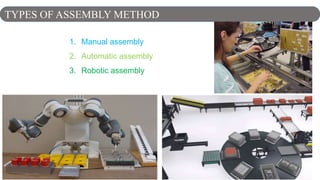
1. Manual assembly
2. Automatic assembly
3. Robotic assembly
TYPES OF ASSEMBLY METHOD
5
2. Manual Assembly
6
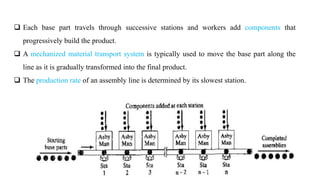
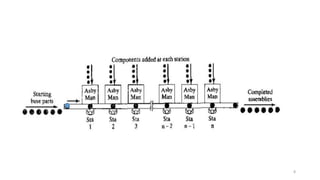
 A Manual assembly line is a production line that consists of a sequence of workstations.
 At each workstation Product are assembled by human workers as they move along the line.
 At each station, a portion of the total work is performed on each unit.
 The common practice is to "launch" base parts onto the beginning of the line at regular
intervals.
WHAT IS MANUAL ASSEMBLY ? [3]
7
 Each base part travels through successive stations and workers add components that
progressively build the product.
 A mechanized material transport system is typically used to move the base part along the
line as it is gradually transformed into the final product.
 The production rate of an assembly line is determined by its slowest station.
8
9
 In manual assembly, the operations are carried out manually with or without the aid of
simple, general purpose tools like screwdrivers and pliers.
 Individual components are transferred to the workbench either manually or by employing
mechanical equipment such as parts feeds or transfer lines and then are manually
assembled.
 Bins with typically un-oriented parts. Simple clamping fixtures.
 This assembly method is characterized by its flexibility and adaptability.
 The assembly cost per product is nearly constant.
 Cost is not a function of volume. Instead, function of labour rate.
 Good for low to high volume. Very low capital investment
CHARACTERISTICS OF ASSEMBLY METHODS [1]
10
• Eliminate the need for workers to make decisions or adjustments
• Ensure accessibility and visibility
• Eliminate the need for assembly tools and gauges (self-locating parts)
• Minimize the number of different parts - use "standard" parts
• Minimize the number of parts
• Avoid or minimize part orientation during assembly (symmetrical parts)
• Prefer easily handled parts that do not tangle or nest within one another
Many such products are sold as "ready-to-assemble" kits or
require that assembly be shifted to cheaper labor markets.
DESIGN GUIDELINES FOR MANUAL ASSEMBLY [1]
11
• The process of manual assembly can be divided into two
separate areas:
1. Handling (acquiring, orienting, and moving the parts)
2. Insertion and Fastening (mating a part to another part
or group of parts)
GENERAL DESIGN GUIDELINES FOR MANUALASSEMBLY [1]
12
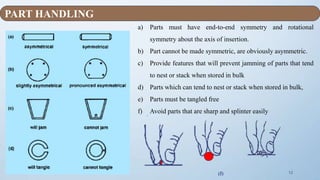
a) Parts must have end-to-end symmetry and rotational
symmetry about the axis of insertion.
b) Part cannot be made symmetric, are obviously asymmetric.
c) Provide features that will prevent jamming of parts that tend
to nest or stack when stored in bulk
d) Parts which can tend to nest or stack when stored in bulk,
e) Parts must be tangled free
f) Avoid parts that are sharp and splinter easily.
(f)
PART HANDLING
13
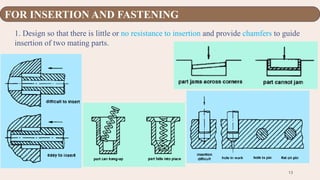
1. Design so that there is little or no resistance to insertion and provide chamfers to guide
insertion of two mating parts.
FOR INSERTION AND FASTENING
14
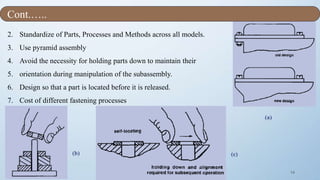
2. Standardize of Parts, Processes and Methods across all models.
3. Use pyramid assembly
4. Avoid the necessity for holding parts down to maintain their
5. orientation during manipulation of the subassembly.
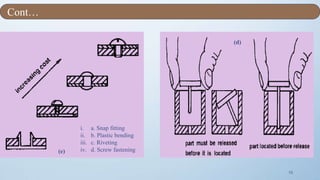
6. Design so that a part is located before it is released.
7. Cost of different fastening processes
.
(c)(b)
(a)
Cont.…..
15
(d)
(e)
i. a. Snap fitting
ii. b. Plastic bending
iii. c. Riveting
iv. d. Screw fastening
Cont…
16
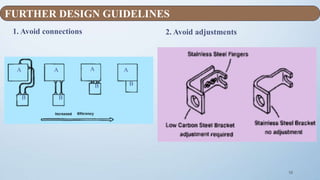
1. Avoid connections 2. Avoid adjustments
A
B
A A A
B
B B
FURTHER DESIGN GUIDELINES
17
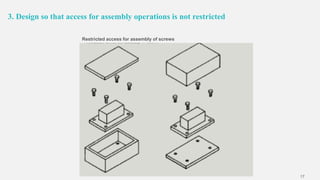
3. Design so that access for assembly operations is not restricted
Restricted access for assembly of screws
18
1. For small parts placed within easy reach of assembly
worker, handling times given in Fig. are adequate if
employing:
 bench assembly
 multi-station assembly
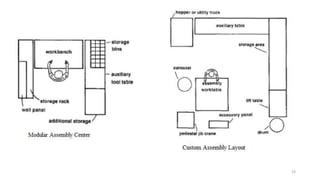
2. For Large Part, It will not be possible to place an
adequate supply of parts within easy arm's reach of
assembly worker for volumes that:
 Do not justify transfer systems
 Assembly contains several parts that weigh more
than 5 lb or are over 12” in size.
 Largest part is less than 35” in size
 No part weighs more than 30 lb
 In this case, modular assembly center might be used.
TYPES OF MANUALASSEMBLY METHODS [2]
19
20
 Application of Adhesive
 Application of Sealants
 Arc Welding
 Brazing
 Insertion of Component
 Press Fitting
 Riveting
 Soldering
 Spot Welding, etc.
Assembly Processes in Manual Assembly
21
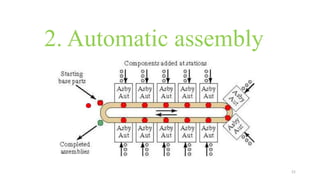
2. Automatic assembly
22
Fixed automation usually:- Most automated
assembly systems are designed to perform a fixed
sequence of assembly steps on a specific product that is
produced in very large quantities.
Where is automated assembly appropriate:
 High product demand
 Stable product design
 The assembly consists of no more than a limited
number of components
 The product is designed for automated assembly
AUTOMATED ASSEMBLY[2]
“The use of mechanized and
automated devices to
perform the various
assembly tasks in an
assembly line or cell”
23
 Mainly referred to as fixed automation or the Detroit type.
 Either synchronous indexing machines and automatic feeders or non-synchronous
machines where parts are handled by a free-transfer device are used.
 Machines are dedicated for the production/assembly of a product.
 These systems lack any flexibility to accommodate tangible changes in the design of
the product.
 Requires a large-scale capital investment, as well as considerable time and
engineering work before actual production can be started.
CHARACTERISTICS OF AUTOMATED ASSEMBLY METHODS
24
Use self-aligning and self-locating features.
Avoid screws/bolts.
Use the largest and most rigid part as the assembly base and fixture.
Perform assembly in a layered, bottom-up manner.
Use standard components and materials.
Avoid tangling or nesting parts.
Avoid flexible and fragile parts.
Avoid parts that require orientation.
Use parts that can be fed automatically.
Design parts with a low center of gravity.
AUTOMATED ASSEMBLY GUIDELINES (HARD AUTOMATION ) [1][3]
25
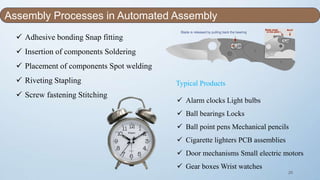
 Adhesive bonding Snap fitting
 Insertion of components Soldering
 Placement of components Spot welding
 Riveting Stapling
 Screw fastening Stitching
Typical Products
 Alarm clocks Light bulbs
 Ball bearings Locks
 Ball point pens Mechanical pencils
 Cigarette lighters PCB assemblies
 Door mechanisms Small electric motors
 Gear boxes Wrist watches
Assembly Processes in Automated Assembly
Blade is released by pulling back the bearing
26
Based on physical configuration:
1. In-line assembly machine
2. Dial indexing machine
3. Carousel assembly system
4. Single-station assembly cell
TYPES OF AUTOMATED ASSEMBLY SYSTEMS[3]
27
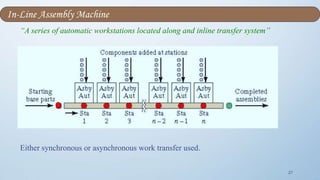
“A series of automatic workstations located along and inline transfer system”
Either synchronous or asynchronous work transfer used.
In-Line Assembly Machine
28
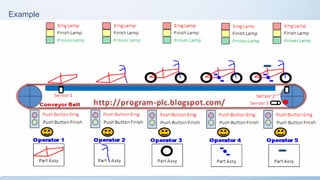
Example
29
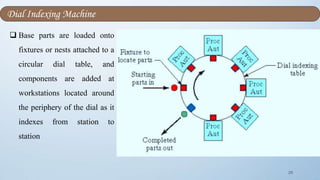
 Base parts are loaded onto
fixtures or nests attached to a
circular dial table, and
components are added at
workstations located around
the periphery of the dial as it
indexes from station to
station
Dial Indexing Machine
30
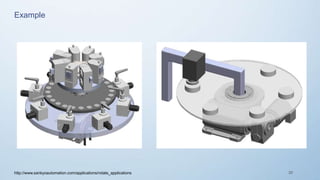
Example
http://www.sankyoautomation.com/applications/rotate_applications
31
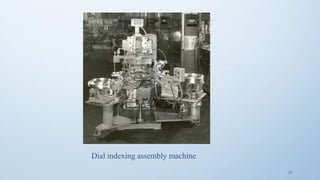
Dial indexing assembly machine
32
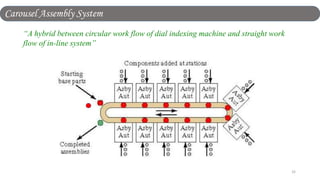
“A hybrid between circular work flow of dial indexing machine and straight work
flow of in-line system”
Carousel Assembly System
33
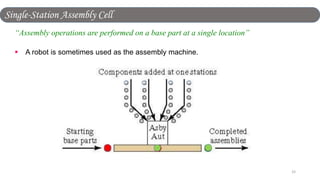
“Assembly operations are performed on a base part at a single location”
 A robot is sometimes used as the assembly machine.
Single-Station Assembly Cell
34
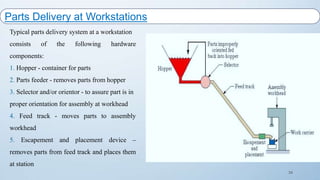
Typical parts delivery system at a workstation
consists of the following hardware
components:
1. Hopper - container for parts
2. Parts feeder - removes parts from hopper
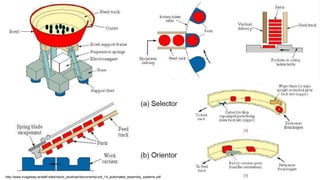
3. Selector and/or orientor - to assure part is in
proper orientation for assembly at workhead
4. Feed track - moves parts to assembly
workhead
5. Escapement and placement device –
removes parts from feed track and places them
at station
Parts Delivery at Workstations
35http://www.nuigalway.ie/staff-sites/david_osullivan/documents/unit_14_automated_assembly_systems.pdf
36
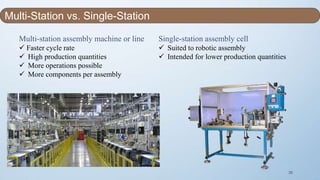
Multi-station assembly machine or line
 Faster cycle rate
 High production quantities
 More operations possible
 More components per assembly
Single-station assembly cell
 Suited to robotic assembly
 Intended for lower production quantities
Multi-Station vs. Single-Station
37
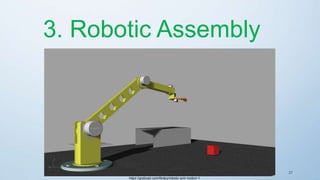
3. Robotic Assembly
https://grabcad.com/library/robotic-arm-motion-1
38
Production volume is higher than that of a manual assembly
system but lower than that of an automatic assembly system
(Fixed automation).
Common forms of Robotic Assembly:
1. One-arm robot operating at a single
workstation that includes parts feeders,
magazines, etc.
CHARACTERISTICS OF ASSEMBLY METHODS [3]
new.math.uiuc.edu
39
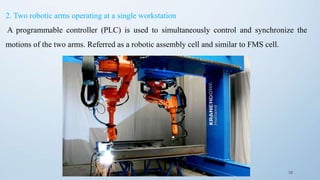
2. Two robotic arms operating at a single workstation
A programmable controller (PLC) is used to simultaneously control and synchronize the
motions of the two arms. Referred as a robotic assembly cell and similar to FMS cell.
40
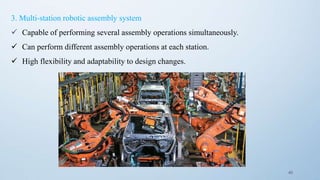
3. Multi-station robotic assembly system
 Capable of performing several assembly operations simultaneously.
 Can perform different assembly operations at each station.
 High flexibility and adaptability to design changes.
41
The product design rules for robotic assembly are basically the same as those for manual and/or automatic
assembly.
Two very important and crucial considerations
that have to be taken into account when
designing components for robotic assembly:
1. Design a component so that it can be grasped,
oriented, and inserted by that robot's end
effector. Failure to do so will result in the need
for an additional robot and, consequently,
higher assembly cost.
DESIGN FOR ROBOTIC ASSEMBLY [3]
42
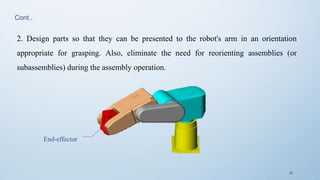
End-effector
2. Design parts so that they can be presented to the robot's arm in an orientation
appropriate for grasping. Also, eliminate the need for reorienting assemblies (or
subassemblies) during the assembly operation.
Cont..
43
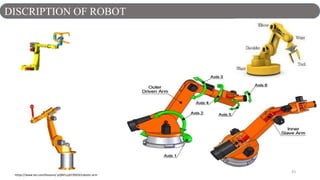
DISCRIPTION OF ROBOT
https://www.tes.com/lessons/-pQNFLLpECBSEA/robotic-arm
44
Factors affecting selection of an assembly method:
 Cost of assembly
 Annual production volume (or production
rate)
 Number of individual components to be
assembled in a product
 Number of different versions of a product / s
 Availability of labour (with cost
consideration)
 Payback period
SELECTION OF ASSEMBLY METHOD [1][4]
45
1. Manual assembly requires the least capital
investment followed by the two simplest forms
of robotic assembly.
2. Multi-station robotic assembly system
compares to Automatic system with special-
purpose machines requires more capital
investment for a large production volume but
less capital investment for a moderate
production volume.
3. Assembly cost per product is constant for
manual assembly
Comparison of Assembly Methods [1][4]
46
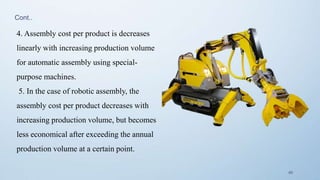
4. Assembly cost per product is decreases
linearly with increasing production volume
for automatic assembly using special-
purpose machines.
5. In the case of robotic assembly, the
assembly cost per product decreases with
increasing production volume, but becomes
less economical after exceeding the annual
production volume at a certain point.
Cont..
47
1. Assembly Automation and Product Design G. Boothroyd, Marcell Dekker, Inc. 1992
2. Product Design for Manufacture and Assembly G. Boothroyd and P. Dewhurst, Boothroyd
Dewhurst, Inc. 1989 Marcell Dekker, Inc. 1994
3. Mechanical Assemblies: Their design, manufacturing and role in product Development, D. E
Whitney, Oxford Press
4. Product Design for Assembly: The Methodology Applied G. Lewis and H. Connelly
References
48

Design for assembly methods

  • 1.
    DESIGN OF ASSEMBLY METHODS GuidedBy: Prof. D.K Patel Presented By: Aman Kumar Parshad 160280708001 1
  • 2.
    TABLEOFCONTENTS OBJECTIVE OF DESIGN FORASSEMBLY TYPES OF ASSEMBLY METHODS MANUAL ASSEMBLY AUTOMATED ASSEMBLY ROBOTIC ASSEMBLY REFERENCES SELECTION OF ASSEMBLY METHODS COMPARISON OF ASSEMBLY METHODS 1 2 3 4 5 6 7 8
  • 3.
    3 “The aim ofDESIGN FOR ASSEMBLY (DFA) is to simplify the product so that the cost of assembly is reduced.” [1] Further,  It also improved quality and reliability and,  It helps in reduction in production equipment and part inventory. OBJECTIVES OF DESIGN FOR ASSEMBLY (DFA)
  • 4.
    4 1. Manual assembly 2.Automatic assembly 3. Robotic assembly TYPES OF ASSEMBLY METHOD
  • 5.
  • 6.
    6  A Manualassembly line is a production line that consists of a sequence of workstations.  At each workstation Product are assembled by human workers as they move along the line.  At each station, a portion of the total work is performed on each unit.  The common practice is to "launch" base parts onto the beginning of the line at regular intervals. WHAT IS MANUAL ASSEMBLY ? [3]
  • 7.
    7  Each basepart travels through successive stations and workers add components that progressively build the product.  A mechanized material transport system is typically used to move the base part along the line as it is gradually transformed into the final product.  The production rate of an assembly line is determined by its slowest station.
  • 8.
  • 9.
    9  In manualassembly, the operations are carried out manually with or without the aid of simple, general purpose tools like screwdrivers and pliers.  Individual components are transferred to the workbench either manually or by employing mechanical equipment such as parts feeds or transfer lines and then are manually assembled.  Bins with typically un-oriented parts. Simple clamping fixtures.  This assembly method is characterized by its flexibility and adaptability.  The assembly cost per product is nearly constant.  Cost is not a function of volume. Instead, function of labour rate.  Good for low to high volume. Very low capital investment CHARACTERISTICS OF ASSEMBLY METHODS [1]
  • 10.
    10 • Eliminate theneed for workers to make decisions or adjustments • Ensure accessibility and visibility • Eliminate the need for assembly tools and gauges (self-locating parts) • Minimize the number of different parts - use "standard" parts • Minimize the number of parts • Avoid or minimize part orientation during assembly (symmetrical parts) • Prefer easily handled parts that do not tangle or nest within one another Many such products are sold as "ready-to-assemble" kits or require that assembly be shifted to cheaper labor markets. DESIGN GUIDELINES FOR MANUAL ASSEMBLY [1]
  • 11.
    11 • The processof manual assembly can be divided into two separate areas: 1. Handling (acquiring, orienting, and moving the parts) 2. Insertion and Fastening (mating a part to another part or group of parts) GENERAL DESIGN GUIDELINES FOR MANUALASSEMBLY [1]
  • 12.
    12 a) Parts musthave end-to-end symmetry and rotational symmetry about the axis of insertion. b) Part cannot be made symmetric, are obviously asymmetric. c) Provide features that will prevent jamming of parts that tend to nest or stack when stored in bulk d) Parts which can tend to nest or stack when stored in bulk, e) Parts must be tangled free f) Avoid parts that are sharp and splinter easily. (f) PART HANDLING
  • 13.
    13 1. Design sothat there is little or no resistance to insertion and provide chamfers to guide insertion of two mating parts. FOR INSERTION AND FASTENING
  • 14.
    14 2. Standardize ofParts, Processes and Methods across all models. 3. Use pyramid assembly 4. Avoid the necessity for holding parts down to maintain their 5. orientation during manipulation of the subassembly. 6. Design so that a part is located before it is released. 7. Cost of different fastening processes . (c)(b) (a) Cont.…..
  • 15.
    15 (d) (e) i. a. Snapfitting ii. b. Plastic bending iii. c. Riveting iv. d. Screw fastening Cont…
  • 16.
    16 1. Avoid connections2. Avoid adjustments A B A A A B B B FURTHER DESIGN GUIDELINES
  • 17.
    17 3. Design sothat access for assembly operations is not restricted Restricted access for assembly of screws
  • 18.
    18 1. For smallparts placed within easy reach of assembly worker, handling times given in Fig. are adequate if employing:  bench assembly  multi-station assembly 2. For Large Part, It will not be possible to place an adequate supply of parts within easy arm's reach of assembly worker for volumes that:  Do not justify transfer systems  Assembly contains several parts that weigh more than 5 lb or are over 12” in size.  Largest part is less than 35” in size  No part weighs more than 30 lb  In this case, modular assembly center might be used. TYPES OF MANUALASSEMBLY METHODS [2]
  • 19.
  • 20.
    20  Application ofAdhesive  Application of Sealants  Arc Welding  Brazing  Insertion of Component  Press Fitting  Riveting  Soldering  Spot Welding, etc. Assembly Processes in Manual Assembly
  • 21.
  • 22.
    22 Fixed automation usually:-Most automated assembly systems are designed to perform a fixed sequence of assembly steps on a specific product that is produced in very large quantities. Where is automated assembly appropriate:  High product demand  Stable product design  The assembly consists of no more than a limited number of components  The product is designed for automated assembly AUTOMATED ASSEMBLY[2] “The use of mechanized and automated devices to perform the various assembly tasks in an assembly line or cell”
  • 23.
    23  Mainly referredto as fixed automation or the Detroit type.  Either synchronous indexing machines and automatic feeders or non-synchronous machines where parts are handled by a free-transfer device are used.  Machines are dedicated for the production/assembly of a product.  These systems lack any flexibility to accommodate tangible changes in the design of the product.  Requires a large-scale capital investment, as well as considerable time and engineering work before actual production can be started. CHARACTERISTICS OF AUTOMATED ASSEMBLY METHODS
  • 24.
    24 Use self-aligning andself-locating features. Avoid screws/bolts. Use the largest and most rigid part as the assembly base and fixture. Perform assembly in a layered, bottom-up manner. Use standard components and materials. Avoid tangling or nesting parts. Avoid flexible and fragile parts. Avoid parts that require orientation. Use parts that can be fed automatically. Design parts with a low center of gravity. AUTOMATED ASSEMBLY GUIDELINES (HARD AUTOMATION ) [1][3]
  • 25.
    25  Adhesive bondingSnap fitting  Insertion of components Soldering  Placement of components Spot welding  Riveting Stapling  Screw fastening Stitching Typical Products  Alarm clocks Light bulbs  Ball bearings Locks  Ball point pens Mechanical pencils  Cigarette lighters PCB assemblies  Door mechanisms Small electric motors  Gear boxes Wrist watches Assembly Processes in Automated Assembly Blade is released by pulling back the bearing
  • 26.
    26 Based on physicalconfiguration: 1. In-line assembly machine 2. Dial indexing machine 3. Carousel assembly system 4. Single-station assembly cell TYPES OF AUTOMATED ASSEMBLY SYSTEMS[3]
  • 27.
    27 “A series ofautomatic workstations located along and inline transfer system” Either synchronous or asynchronous work transfer used. In-Line Assembly Machine
  • 28.
  • 29.
    29  Base partsare loaded onto fixtures or nests attached to a circular dial table, and components are added at workstations located around the periphery of the dial as it indexes from station to station Dial Indexing Machine
  • 30.
  • 31.
  • 32.
    32 “A hybrid betweencircular work flow of dial indexing machine and straight work flow of in-line system” Carousel Assembly System
  • 33.
    33 “Assembly operations areperformed on a base part at a single location”  A robot is sometimes used as the assembly machine. Single-Station Assembly Cell
  • 34.
    34 Typical parts deliverysystem at a workstation consists of the following hardware components: 1. Hopper - container for parts 2. Parts feeder - removes parts from hopper 3. Selector and/or orientor - to assure part is in proper orientation for assembly at workhead 4. Feed track - moves parts to assembly workhead 5. Escapement and placement device – removes parts from feed track and places them at station Parts Delivery at Workstations
  • 35.
  • 36.
    36 Multi-station assembly machineor line  Faster cycle rate  High production quantities  More operations possible  More components per assembly Single-station assembly cell  Suited to robotic assembly  Intended for lower production quantities Multi-Station vs. Single-Station
  • 37.
  • 38.
    38 Production volume ishigher than that of a manual assembly system but lower than that of an automatic assembly system (Fixed automation). Common forms of Robotic Assembly: 1. One-arm robot operating at a single workstation that includes parts feeders, magazines, etc. CHARACTERISTICS OF ASSEMBLY METHODS [3] new.math.uiuc.edu
  • 39.
    39 2. Two roboticarms operating at a single workstation A programmable controller (PLC) is used to simultaneously control and synchronize the motions of the two arms. Referred as a robotic assembly cell and similar to FMS cell.
  • 40.
    40 3. Multi-station roboticassembly system  Capable of performing several assembly operations simultaneously.  Can perform different assembly operations at each station.  High flexibility and adaptability to design changes.
  • 41.
    41 The product designrules for robotic assembly are basically the same as those for manual and/or automatic assembly. Two very important and crucial considerations that have to be taken into account when designing components for robotic assembly: 1. Design a component so that it can be grasped, oriented, and inserted by that robot's end effector. Failure to do so will result in the need for an additional robot and, consequently, higher assembly cost. DESIGN FOR ROBOTIC ASSEMBLY [3]
  • 42.
    42 End-effector 2. Design partsso that they can be presented to the robot's arm in an orientation appropriate for grasping. Also, eliminate the need for reorienting assemblies (or subassemblies) during the assembly operation. Cont..
  • 43.
  • 44.
    44 Factors affecting selectionof an assembly method:  Cost of assembly  Annual production volume (or production rate)  Number of individual components to be assembled in a product  Number of different versions of a product / s  Availability of labour (with cost consideration)  Payback period SELECTION OF ASSEMBLY METHOD [1][4]
  • 45.
    45 1. Manual assemblyrequires the least capital investment followed by the two simplest forms of robotic assembly. 2. Multi-station robotic assembly system compares to Automatic system with special- purpose machines requires more capital investment for a large production volume but less capital investment for a moderate production volume. 3. Assembly cost per product is constant for manual assembly Comparison of Assembly Methods [1][4]
  • 46.
    46 4. Assembly costper product is decreases linearly with increasing production volume for automatic assembly using special- purpose machines. 5. In the case of robotic assembly, the assembly cost per product decreases with increasing production volume, but becomes less economical after exceeding the annual production volume at a certain point. Cont..
  • 47.
    47 1. Assembly Automationand Product Design G. Boothroyd, Marcell Dekker, Inc. 1992 2. Product Design for Manufacture and Assembly G. Boothroyd and P. Dewhurst, Boothroyd Dewhurst, Inc. 1989 Marcell Dekker, Inc. 1994 3. Mechanical Assemblies: Their design, manufacturing and role in product Development, D. E Whitney, Oxford Press 4. Product Design for Assembly: The Methodology Applied G. Lewis and H. Connelly References
  • 48.

Editor's Notes

  • #3 © Copyright Showeet.com
  • #4 DFA recognizes the need to analyze both the part design and the whole product for any assembly problems early in the design process. We may define DFA as "a process for improving product design for easy and low-cost assembly, focusing on functionality and on assembly - ability concurrently”. Sophisticated products involves a large number off individual components and subassemblies. 70 to 80 percent off the cost off manufacturing a product is determined during the design phase. A rational design for easy and low cost assembly is the selection off the most appropriate method for assembling these product. So, design Engineer should be concerned with the ease and cost off assembly. Thus, the concept off design for assembly (DFA) emerged.
  • #7 A manual assembly line is a production line that consists of a sequence of workstations where assembly tasks are performed by human workers, as depicted in Figure Products are assembled as they move along the line, At each station, a portion of the total work is performed on each unit. The common practice is to "launch" base parts onto the beginning of the line at regular intervals. Each base part travels through successive stations and workers add components that progressively build the product. A mechanized material transport system is typically used to move the base part along the line as it is gradually transformed into the final product. However, in some manual lines, the product is simply moved manually from station-to-station. The production rate of an assembly line is determined by its slowest station. Stations capable of working faster are ultimately limited by the slowest station.
  • #13 1 . Design parts that have end-to-end symmetry and rotational symmetry about the axis of insertion. If this cannot be achieved, try to design parts having the maximum possible symmetry (see Fig. a). 2. Design parts that, in those instances where the part cannot be made symmetric, are obviously asymmetric (see Fig. b). 3. Provide features that will prevent jamming of parts that tend to nest or stack when stored in bulk (see Fig. c). 4. Avoid features that will allow tangling of parts when stored in bulk (see Fig. d). 5. Avoid parts that stick together or are slippery, delicate, flexible, very small, or very large or that are hazardous to the handler (i.e., parts that are sharp, splinter easily, etc.) (see Fig. f)
  • #14 Design so that there is little or no resistance to insertion and provide chamfers to guide insertion of two mating parts. Generous clearance should be provided, but care must be taken to avoid clearances that will result in a tendency for parts to jam or hang-up during insertion (see Figs.).
  • #15 2. Standardize by using common parts, processes, and methods across all models and even across product lines to permit the use of higher volume processes that normally result in lower product cost (see Fig. a). 3. Use pyramid assembly—provide for progressive assembly about one axis of reference. In general, it is best to assemble from above (see Fig. b) 4. Avoid, where possible, the necessity for holding parts down to maintain their orientation during manipulation of the subassembly or during the placement of another part (see Fig. c). If holding down is required, then try to design so that the part is secured as soon as possible after it has been inserted.
  • #16 5. Design so that a part is located before it is released. A potential source of problems arises from a part being placed where, due to design constraints, it must be released before it is positively located in the assembly. Under these circumstances, reliance is placed on the trajectory of the part being sufficiently repeatable to locate it consistently (see Fig. d). 6. When common mechanical fasteners are used the following sequence indicates the relative cost of different fastening processes, listed in order of increasing manual assembly cost (Fig. e). 7. Avoid the need to reposition the partially completed assembly in the fixture (see Fig. f).
  • #17 If the only purpose of a part or assembly is to connect A to B, then try to locate A and B at the same point
  • #28 The in-line assembly machine consists of a series of automatic work stations located along an in-line transfer system. It is the automated version of the manual assembly line. Continuous, synchronous, or asynchronous transfer systems can be used with the in-line configuration. The in-line configuration assembly system consists of a sequence of workstations in a more-or-less straight-line arrangement as shown in figure . An example of an in-line transfer machine used for metal-cutting operations is illustrated in Figure . The in-line assembly machine consists of a series of automatic workstations located along an in-line transfer system. It is the automated version of the manual assembly line. Continuous, synchronous, or asynchronous transfer systems can be used with the in-line configuration.
  • #30 The dial-type machine, the base partare indexed around a circular table or dial. The workstations are stationary and usually located around the outside periphery of the dial. The parts ride on the rotating table and arc registered or positioned, in turn, at each station a new component is added to base part. This type of equipment is often referred to as an indexing machine or dial index machine and the configuration is shown in Figure and example of six station rotary shown in next slide figure.
  • #33 In a sense, the carousel assembly system represents a hybrid between the circular flow of work provided by the dial assembly machine and the straight work flow of the in-line system. The carousel configuration is illustrated in Figure . This type assembly system can be operated with continuous, synchronous, or asynchronous transfer mechanisms to move the work around the carousel. The carousel configuration with synchronous transfer of work is often used in partially automated assembly systems.
  • #36 Vibrator bowl System: Most versatile of hopper feeders for small parts Consists of bowl and helical track  Parts are poured into bowl  Helical track moves part from bottom of bowl to outlet Vibration applied by electromagnetic base  Oscillation of bowl is constrained so that parts climb upward along helical track Selector and/or Orientor Purpose - to establish the proper orientation of the components for the assembly workhead Selector  Acts as a filter  Only parts in proper orientation are allowed to pass through to feed track Orientor  Allows properly oriented parts to pass  Reorients parts that are not properly oriented Feed Track  Moves parts from hopper to assembly workhead  Categories: 1. Gravity - hopper and feeder are located at higher elevation than workhead 2. Powered - uses air or vibration to move parts toward Workhead Escapement and Placement Devices Escapement device  Removes parts from feed track at time intervals that are consistent with the cycle time of the assembly workhead Placement device  Physically places the parts in the correct location at the assembly workstation Escapement and placement devices are sometimes the same device, sometimes different devices
  • #43 * The robot's last link. The robot uses the end-effector to accomplish a task. The end-effector may be holding a tool, or the end-effector itself may be a tool. The end-effector is loosely comparable to a human's hand.