Hacking SQL Server on
Scale with PowerShell
DerbyCon 6.0
Speaker Information
Name: Scott Sutherland
Job: Network & Application Pentester @ NetSPI
Twitter: @_nullbind
Slides: http://slideshare.net/nullbind
http://slideshare.net/netspi
Blogs: https://blog.netspi.com/author/scott-sutherland/
Code: https://github.com/netspi/PowerUpSQL
https://github.com/nullbind
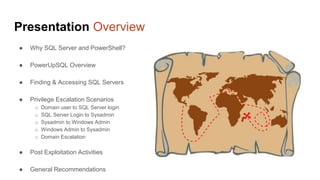
Presentation Overview
● Why SQL Server and PowerShell?
● PowerUpSQL Overview
● Finding & Accessing SQL Servers
● Privilege Escalation Scenarios
o Domain user to SQL Server login
o SQL Server Login to Sysadmin
o Sysadmin to Windows Admin
o Windows Admin to Sysadmin
o Domain Escalation
● Post Exploitation Activities
● General Recommendations
Why SQL Server?
● Used in most enterprise environments
● Supports local Windows and Domain authentication
● Integrates with lots of Windows applications
Why PowerShell?
● Native to Windows
● Run commands in memory
● Run managed .net code
● Run unmanaged code
● Avoid detection by legacy Anti-virus
● Already flagged as "trusted" by most
application whitelist solutions
● A medium used to write many open source
Pentest toolkits
PowerUpSQL
PowerUpSQL Overview: Project Goals
Project Goals (Get-Abilities) 
● Scalability via runspace threading
● Flexibility via pipeline support
● Portability
● No SMO dependancies
● .Net Framework libraries
● PowerShell v.2 compliant (in theory)
● Single file
Functional Goals
● Discover SQL Servers from different attacker perspectives
● Inventory SQL Servers quickly
● Audit SQL Servers for common insecure configurations
● Escalate privileges quickly on SQL Servers
● Support authentication using SQL Login or Windows Credential
PowerUpSQL Overview: Functions
Primary Attack Functions
● Invoke-SQLDumpInfo
● Invoke-SQLAudit
● Invoke-SQLPrivEsc
● Invoke-SQLOsCmd
Function list and dev roadmap is on the wiki
https://github.com/NetSPI/PowerUpSQL/wiki
Currently 59 Functions
PowerUpSQL Overview: Where can I get it?
Github
https://github.com/netspi/PowerUpSQL
PowerShell Gallery
https://www.powershellgallery.com/packages/PowerUpSQL/
PowerUpSQL Overview: How to I install it?
Github
Import-Module PowerUpSQL.psd1
IEX(New-Object
System.Net.WebClient).DownloadString("https://raw.githubusercontent.com/NetSPI/PowerUpSQL/master/P
owerUpSQL.ps1")
Execute policy work arounds
https://blog.netspi.com/15-ways-to-bypass-the-powershell-execution-policy/
PowerShell Gallery
Install-Module -Name PowerUpSQL
SQL
Server
Basics
SQL Server Basics
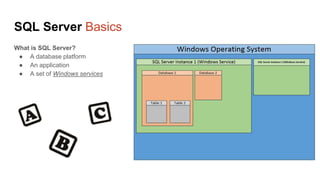
What is SQL Server?
● A database platform
● An application
● A set of Windows services
SQL Server Basics: Account Types
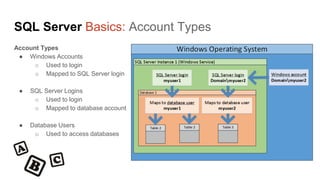
Account Types
● Windows Accounts
o Used to login
o Mapped to SQL Server login
● SQL Server Logins
o Used to login
o Mapped to database account
● Database Users
o Used to access databases
SQL Server Basics: Common Roles
Important SQL Server Roles
● Sysadmin role
○ Database administrator account
○ Think of it as the “Administrators” Windows group,
but in SQL Server
● Public role
○ Only provides CONNECT permission
○ Think of it as the “Everyone” Windows group, but
in SQL Server
Finding
SQL Servers
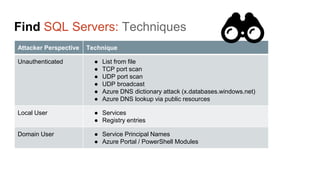
Find SQL Servers: Techniques
Attacker Perspective Technique
Unauthenticated ● List from file
● TCP port scan
● UDP port scan
● UDP broadcast
● Azure DNS dictionary attack (x.databases.windows.net)
● Azure DNS lookup via public resources
Local User ● Services
● Registry entries
Domain User ● Service Principal Names
● Azure Portal / PowerShell Modules
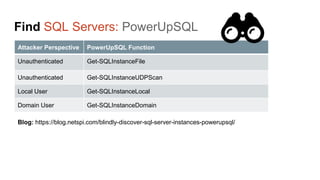
Find SQL Servers: PowerUpSQL
Attacker Perspective PowerUpSQL Function
Unauthenticated Get-SQLInstanceFile
Unauthenticated Get-SQLInstanceUDPScan
Local User Get-SQLInstanceLocal
Domain User Get-SQLInstanceDomain
Blog: https://blog.netspi.com/blindly-discover-sql-server-instances-powerupsql/
Escalating
Privileges
Domain User to SQL Login
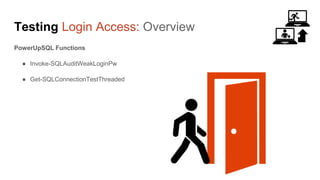
Testing Login Access: Overview
PowerUpSQL Functions
● Invoke-SQLAuditWeakLoginPw
● Get-SQLConnectionTestThreaded
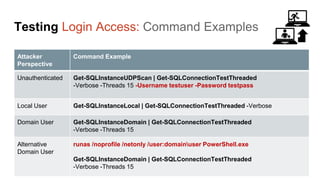
Testing Login Access: Command Examples
Attacker
Perspective
Command Example
Unauthenticated Get-SQLInstanceUDPScan | Get-SQLConnectionTestThreaded
-Verbose -Threads 15 -Username testuser -Password testpass
Local User Get-SQLInstanceLocal | Get-SQLConnectionTestThreaded -Verbose
Domain User Get-SQLInstanceDomain | Get-SQLConnectionTestThreaded
-Verbose -Threads 15
Alternative
Domain User
runas /noprofile /netonly /user:domainuser PowerShell.exe
Get-SQLInstanceDomain | Get-SQLConnectionTestThreaded
-Verbose -Threads 15
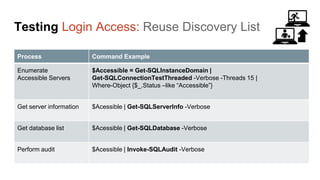
Testing Login Access: Reuse Discovery List
Process Command Example
Enumerate
Accessible Servers
$Accessible = Get-SQLInstanceDomain |
Get-SQLConnectionTestThreaded -Verbose -Threads 15 |
Where-Object {$_.Status –like “Accessible”}
Get server information $Acessible | Get-SQLServerInfo -Verbose
Get database list $Acessible | Get-SQLDatabase -Verbose
Perform audit $Acessible | Invoke-SQLAudit -Verbose
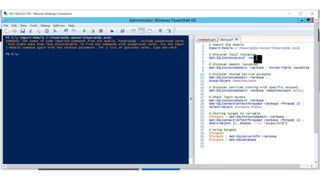
Testing Login Access: Domain User Access
DEMO
Testing Login Access: Demo
DEMO
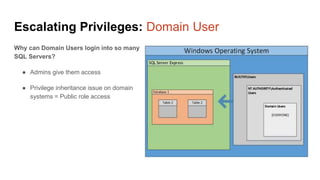
Escalating Privileges: Domain User
Why can Domain Users login into so many
SQL Servers?
● Admins give them access
● Privilege inheritance issue on domain
systems = Public role access
Escalating
Privileges
SQL Login to SysAdmin
Escalating Privileges: Getting Sysadmin Privs
How can I get sysadmin privileges?
● Weak Passwords
o Blind user enumeration
o Default vendor passwords
o Weak passwords
● SQL Injection in Stored Procedures
o EXECUTE AS LOGIN
o Signed procedures
● Excessive Privileges
o Roles: DB_OWNER, DB_DDLADMIN, etc
o Permissions: Impersonation, agent jobs,
triggers, xp_cmdshell, importing assemblies
o Write access to autorun procedures
Escalating Privileges: DEMO
DEMO
Invoke-SQLAudit
Escalating Privileges: Invoke-SQLPrivEsc
Whooray for Automation Demo!
Escalating Privileges: DEMO
DEMO
Invoke-SQLPrivEsc
Escalating Privileges: Invoke-SQLPrivEsc
DEMO
Escalating
Privileges
SysAdmin to Service Account
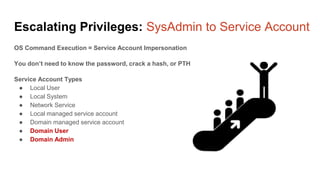
Escalating Privileges: SysAdmin to Service Account
OS Command Execution = Service Account Impersonation
You don’t need to know the password, crack a hash, or PTH
Service Account Types
● Local User
● Local System
● Network Service
● Local managed service account
● Domain managed service account
● Domain User
● Domain Admin
Escalating Privileges: SysAdmin to Service Account
OS Command Execution = Service Account Impersonation
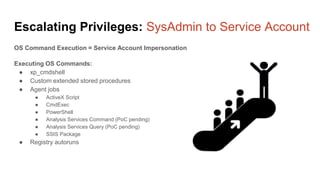
Executing OS Commands:
● xp_cmdshell
● Custom extended stored procedures
● Agent jobs
● ActiveX Script
● CmdExec
● PowerShell
● Analysis Services Command (PoC pending)
● Analysis Services Query (PoC pending)
● SSIS Package
● Registry autoruns
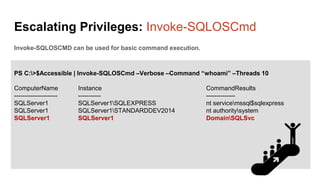
Escalating Privileges: Invoke-SQLOSCmd
Invoke-SQLOSCMD can be used for basic command execution.
PS C:>$Accessible | Invoke-SQLOSCmd –Verbose –Command “whoami” –Threads 10
ComputerName Instance CommandResults
--------------------- ----------- --------------
SQLServer1 SQLServer1SQLEXPRESS nt servicemssql$sqlexpress
SQLServer1 SQLServer1STANDARDDEV2014 nt authoritysystem
SQLServer1 SQLServer1 DomainSQLSvc
Escalating
Privileges
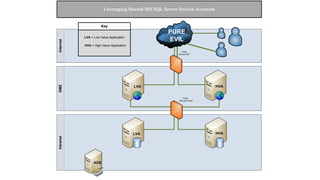
Shared Service Accounts
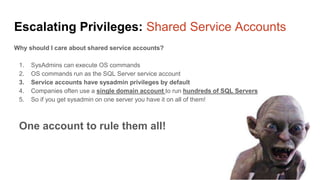
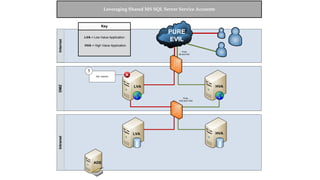
Escalating Privileges: Shared Service Accounts
Why should I care about shared service accounts?
1. SysAdmins can execute OS commands
2. OS commands run as the SQL Server service account
3. Service accounts have sysadmin privileges by default
4. Companies often use a single domain account to run hundreds of SQL Servers
5. So if you get sysadmin on one server you have it on all of them!
One account to rule them all!
InternetDMZIntranet
LRA HVA
LVA
ADS
LVA
Ports
80 and 443
Ports
1433 and 1434
HVA
PURE
EVIL
Key
HVA = High Value Application
LVA = Low Value Application
Leveraging Shared MS SQL Server Service Accounts
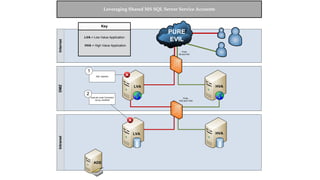
InternetDMZIntranet
LRA HVA
LVA
ADS
LVA
Ports
80 and 443
Ports
1433 and 1434
HVA
PURE
EVIL
Captain Evil
SQL Injection
1
Key
HVA = High Value Application
LVA = Low Value Application
Leveraging Shared MS SQL Server Service Accounts
InternetDMZIntranet
LRA HVA
LVA
ADS
LVA
Ports
80 and 443
Ports
1433 and 1434
HVA
PURE
EVIL
Captain Evil
SQL Injection
1
Execute Local Command
via xp_cmdshell
2
Key
HVA = High Value Application
LVA = Low Value Application
Leveraging Shared MS SQL Server Service Accounts
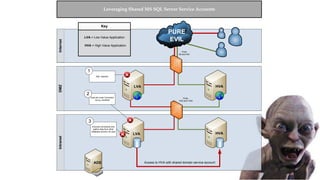
InternetDMZIntranet
LRA HVA
LVA
ADS
LVA
Ports
80 and 443
Ports
1433 and 1434
HVA
PURE
EVIL
Captain Evil
SQL Injection
1
Execute Local Command
via xp_cmdshell
2
Access to HVA with shared domain service account
Key
HVA = High Value Application
LVA = Low Value Application
Execute commands and
gather data from other
database servers via osql
3
Leveraging Shared MS SQL Server Service Accounts
Escalating
Privileges
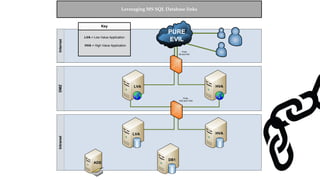
Crawling Database Links
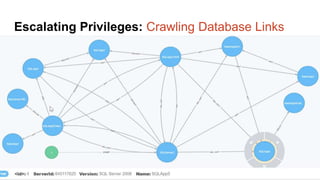
Escalating Privileges: Crawling Database Links
What’s a database link?
● Database links are basically persistent database connections for SQL Servers.
Why should I care?
● Short answer = privilege escalation
● Public role can use links to execute queries on remote servers (impersonation)
SELECT * FROM OpenQuery([SQLSERVER2],’SELECT @@Version’)
● Stored procedures can be executed (xp_cmdshell)
● Links can be crawled
InternetDMZIntranet
LRA HVA
LVA
ADS
Ports
80 and 443
Ports
1433 and 1434
HVA
PURE
EVIL
Captain EvilKey
HVA = High Value Application
LVA = Low Value Application
Leveraging MS SQL Database links
DB1
LVA
InternetDMZIntranet
LRA HVA
LVA
ADS
Ports
80 and 443
Ports
1433 and 1434
HVA
PURE
EVIL
Captain Evil
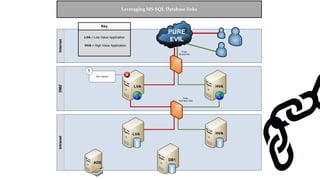
SQL Injection
1
Key
HVA = High Value Application
LVA = Low Value Application
Leveraging MS SQL Database links
DB1
LVA
InternetDMZIntranet
LRA HVA
LVA
ADS
Ports
80 and 443
Ports
1433 and 1434
HVA
PURE
EVIL
Captain Evil
SQL Injection
1
Key
HVA = High Value Application
LVA = Low Value Application
Leveraging MS SQL Database links
D
B
Link
w
ith
LeastPrivileges
DB1
LVA
InternetDMZIntranet
LRA HVA
LVA
ADS
Ports
80 and 443
Ports
1433 and 1434
HVA
PURE
EVIL
Captain Evil
SQL Injection
1
Key
HVA = High Value Application
LVA = Low Value Application
Leveraging MS SQL Database links
D
B
Link
w
ith
LeastPrivileges
DB Link with
SA account
DB1
LVA
Execute SQL queries and
local commands on
database servers via
nested linked services
2
Escalating Privileges: Crawling Database Links
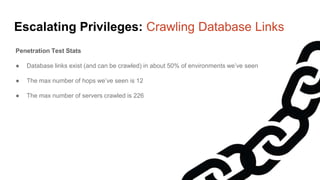
Penetration Test Stats
● Database links exist (and can be crawled) in about 50% of environments we’ve seen
● The max number of hops we’ve seen is 12
● The max number of servers crawled is 226
Escalating Privileges: Crawling Database Links
Old Script
● 2012 - https://www.rapid7.com/db/modules/exploit/windows/mssql/mssql_linkcrawler
New Script
● /scripts/pending/Get-SqlServerLinkCrawl.ps1
● Author: Antti Rantasaari
Escalating Privileges: Crawling Database Links
DEMO
Escalating Privileges: Database Links
DEMO
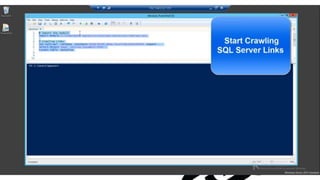
Escalating Privileges: Crawling Database Links
Escalating
Privileges
UNC Path Injection
Escalating Privileges: UNC Path Injection
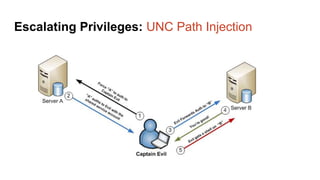
UNC Path Injection Summary
● UNC paths are used for accessing remote file servers like so 192.168.1.4file
● Almost all procedures that accept a file path in SQL Server, support UNC paths
● UNC paths can be used to force the SQL Server service account to authenticate to an attacker
● An attacker can then capture the NetNTLM password hash and crack or relay it
● Relay becomes pretty easy when you know which SQL Servers are using shared accounts
Escalating Privileges: UNC Path Injection
Oh yeah…
By DEFAULT, the PUBLIC role can execute (at least) two procedures that accept a file path
xp_dirtree
xp_fileexists
Escalating Privileges: UNC Path Injection
So, in summary…
The PUBLIC role can access the
SQL Server service account
password hash by default!!
Escalating Privileges: UNC Path Injection
But who really has
Public role access?
Oh yeah, a ton of domain users 
Escalating Privileges: DEMO
DEMO
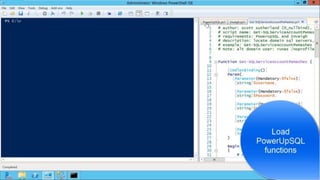
Get-SQLServiceAccountPwHashes
…what? It’s self descriptive 
Escalating Privileges: UNC Path Injection
DEMO
Escalating
Privileges
OS Admin to SysAdmin
Escalating Privileges: OS Admin to SysAdmin
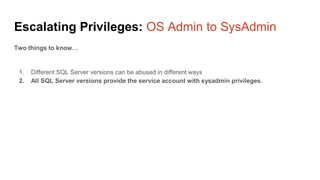
Two things to know…
1. Different SQL Server versions can be abused in different ways
2. All SQL Server versions provide the service account with sysadmin privileges.
Escalating Privileges: OS Admin to SysAdmin
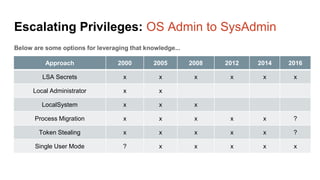
Approach 2000 2005 2008 2012 2014 2016
LSA Secrets x x x x x x
Local Administrator x x
LocalSystem x x x
Process Migration x x x x x ?
Token Stealing x x x x x ?
Single User Mode ? x x x x x
Below are some options for leveraging that knowledge...
Escalating Privileges: OS Admin to SysAdmin
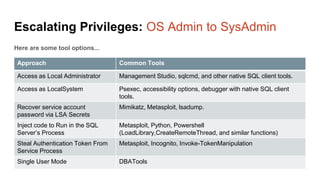
Here are some tool options...
Approach Common Tools
Access as Local Administrator Management Studio, sqlcmd, and other native SQL client tools.
Access as LocalSystem Psexec, accessibility options, debugger with native SQL client
tools.
Recover service account
password via LSA Secrets
Mimikatz, Metasploit, lsadump.
Inject code to Run in the SQL
Server’s Process
Metasploit, Python, Powershell
(LoadLibrary,CreateRemoteThread, and similar functions)
Steal Authentication Token From
Service Process
Metasploit, Incognito, Invoke-TokenManipulation
Single User Mode DBATools
Common
Post
Exploitation
Activities
Post Exploitation: Overview
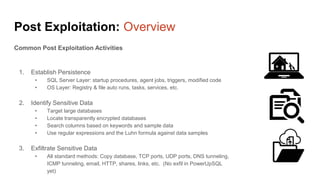
Common Post Exploitation Activities
1. Establish Persistence
• SQL Server Layer: startup procedures, agent jobs, triggers, modified code
• OS Layer: Registry & file auto runs, tasks, services, etc.
2. Identify Sensitive Data
• Target large databases
• Locate transparently encrypted databases
• Search columns based on keywords and sample data
• Use regular expressions and the Luhn formula against data samples
3. Exfiltrate Sensitive Data
• All standard methods: Copy database, TCP ports, UDP ports, DNS tunneling,
ICMP tunneling, email, HTTP, shares, links, etc. (No exfil in PowerUpSQL
yet)
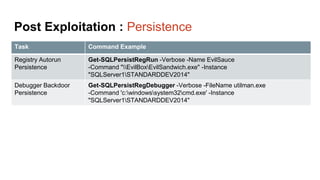
Post Exploitation : Persistence
Task Command Example
Registry Autorun
Persistence
Get-SQLPersistRegRun -Verbose -Name EvilSauce
-Command "EvilBoxEvilSandwich.exe" -Instance
"SQLServer1STANDARDDEV2014"
Debugger Backdoor
Persistence
Get-SQLPersistRegDebugger -Verbose -FileName utilman.exe
-Command 'c:windowssystem32cmd.exe' -Instance
"SQLServer1STANDARDDEV2014"
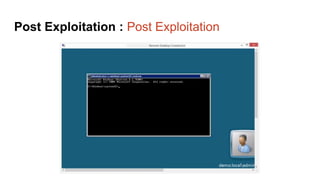
Post Exploitation : Post Exploitation
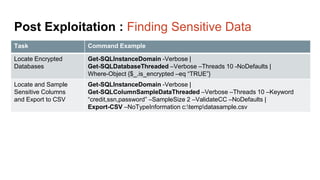
Post Exploitation : Finding Sensitive Data
Task Command Example
Locate Encrypted
Databases
Get-SQLInstanceDomain -Verbose |
Get-SQLDatabaseThreaded –Verbose –Threads 10 -NoDefaults |
Where-Object {$_.is_encrypted –eq “TRUE”}
Locate and Sample
Sensitive Columns
and Export to CSV
Get-SQLInstanceDomain -Verbose |
Get-SQLColumnSampleDataThreaded –Verbose –Threads 10 –Keyword
“credit,ssn,password” –SampleSize 2 –ValidateCC –NoDefaults |
Export-CSV –NoTypeInformation c:tempdatasample.csv
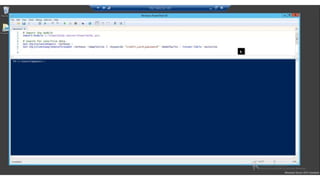
Post Exploitation: Finding Sensitive Data
DEMO
Post Exploitation: Finding Sensitive Data
DEMO
General
Recommendations
General Recommendations
Things to do…
1. Enforce least privilege everywhere!
2. Disable dangerous default stored procedures.
3. Audit and fix insecure configurations.
4. Use policy based management for standardizing configurations.
5. Enable auditing at the server and database levels, and monitor for potentially malicious activity.
PowerUpSQL Overview: Thanks!
Individual Third Party Code / Direct Contributors
Boe Prox Runspace blogs
Warren F. ( RamblingCookieMonster) Invoke-Parallel function
Oyvind Kallstad Test-IsLuhnValid function
Kevin Robertson Invoke-Inveigh
Joe Bialek Invoke-TokenManipulation
Antti Rantasaari, Eric Gruber, and Alexander Leary Contributions and QA
Khai Tran Design advice
NetSPI assessment team and dev team Design advice
Name: Scott Sutherland
Job: Network & Application Pentester @ NetSPI
Twitter: @_nullbind
Slides: http://slideshare.net/nullbind
http://slideshare.net/netspi
Blogs: https://blog.netspi.com/author/scott-sutherland/
Code: https://github.com/netspi/PowerUpSQL
https://github.com/nullbind
Hacking SQL Server on Scale with PowerShell

DerbyCon2016 - Hacking SQL Server on Scale with PowerShell

  • 1.
    Hacking SQL Serveron Scale with PowerShell DerbyCon 6.0
  • 2.
    Speaker Information Name: ScottSutherland Job: Network & Application Pentester @ NetSPI Twitter: @_nullbind Slides: http://slideshare.net/nullbind http://slideshare.net/netspi Blogs: https://blog.netspi.com/author/scott-sutherland/ Code: https://github.com/netspi/PowerUpSQL https://github.com/nullbind
  • 3.
    Presentation Overview ● WhySQL Server and PowerShell? ● PowerUpSQL Overview ● Finding & Accessing SQL Servers ● Privilege Escalation Scenarios o Domain user to SQL Server login o SQL Server Login to Sysadmin o Sysadmin to Windows Admin o Windows Admin to Sysadmin o Domain Escalation ● Post Exploitation Activities ● General Recommendations
  • 4.
    Why SQL Server? ●Used in most enterprise environments ● Supports local Windows and Domain authentication ● Integrates with lots of Windows applications
  • 5.
    Why PowerShell? ● Nativeto Windows ● Run commands in memory ● Run managed .net code ● Run unmanaged code ● Avoid detection by legacy Anti-virus ● Already flagged as "trusted" by most application whitelist solutions ● A medium used to write many open source Pentest toolkits
  • 6.
  • 7.
    PowerUpSQL Overview: ProjectGoals Project Goals (Get-Abilities)  ● Scalability via runspace threading ● Flexibility via pipeline support ● Portability ● No SMO dependancies ● .Net Framework libraries ● PowerShell v.2 compliant (in theory) ● Single file Functional Goals ● Discover SQL Servers from different attacker perspectives ● Inventory SQL Servers quickly ● Audit SQL Servers for common insecure configurations ● Escalate privileges quickly on SQL Servers ● Support authentication using SQL Login or Windows Credential
  • 8.
    PowerUpSQL Overview: Functions PrimaryAttack Functions ● Invoke-SQLDumpInfo ● Invoke-SQLAudit ● Invoke-SQLPrivEsc ● Invoke-SQLOsCmd Function list and dev roadmap is on the wiki https://github.com/NetSPI/PowerUpSQL/wiki Currently 59 Functions
  • 9.
    PowerUpSQL Overview: Wherecan I get it? Github https://github.com/netspi/PowerUpSQL PowerShell Gallery https://www.powershellgallery.com/packages/PowerUpSQL/
  • 10.
    PowerUpSQL Overview: Howto I install it? Github Import-Module PowerUpSQL.psd1 IEX(New-Object System.Net.WebClient).DownloadString("https://raw.githubusercontent.com/NetSPI/PowerUpSQL/master/P owerUpSQL.ps1") Execute policy work arounds https://blog.netspi.com/15-ways-to-bypass-the-powershell-execution-policy/ PowerShell Gallery Install-Module -Name PowerUpSQL
  • 11.
  • 12.
    SQL Server Basics Whatis SQL Server? ● A database platform ● An application ● A set of Windows services
  • 13.
    SQL Server Basics:Account Types Account Types ● Windows Accounts o Used to login o Mapped to SQL Server login ● SQL Server Logins o Used to login o Mapped to database account ● Database Users o Used to access databases
  • 14.
    SQL Server Basics:Common Roles Important SQL Server Roles ● Sysadmin role ○ Database administrator account ○ Think of it as the “Administrators” Windows group, but in SQL Server ● Public role ○ Only provides CONNECT permission ○ Think of it as the “Everyone” Windows group, but in SQL Server
  • 15.
  • 16.
    Find SQL Servers:Techniques Attacker Perspective Technique Unauthenticated ● List from file ● TCP port scan ● UDP port scan ● UDP broadcast ● Azure DNS dictionary attack (x.databases.windows.net) ● Azure DNS lookup via public resources Local User ● Services ● Registry entries Domain User ● Service Principal Names ● Azure Portal / PowerShell Modules
  • 17.
    Find SQL Servers:PowerUpSQL Attacker Perspective PowerUpSQL Function Unauthenticated Get-SQLInstanceFile Unauthenticated Get-SQLInstanceUDPScan Local User Get-SQLInstanceLocal Domain User Get-SQLInstanceDomain Blog: https://blog.netspi.com/blindly-discover-sql-server-instances-powerupsql/
  • 18.
  • 19.
    Testing Login Access:Overview PowerUpSQL Functions ● Invoke-SQLAuditWeakLoginPw ● Get-SQLConnectionTestThreaded
  • 20.
    Testing Login Access:Command Examples Attacker Perspective Command Example Unauthenticated Get-SQLInstanceUDPScan | Get-SQLConnectionTestThreaded -Verbose -Threads 15 -Username testuser -Password testpass Local User Get-SQLInstanceLocal | Get-SQLConnectionTestThreaded -Verbose Domain User Get-SQLInstanceDomain | Get-SQLConnectionTestThreaded -Verbose -Threads 15 Alternative Domain User runas /noprofile /netonly /user:domainuser PowerShell.exe Get-SQLInstanceDomain | Get-SQLConnectionTestThreaded -Verbose -Threads 15
  • 21.
    Testing Login Access:Reuse Discovery List Process Command Example Enumerate Accessible Servers $Accessible = Get-SQLInstanceDomain | Get-SQLConnectionTestThreaded -Verbose -Threads 15 | Where-Object {$_.Status –like “Accessible”} Get server information $Acessible | Get-SQLServerInfo -Verbose Get database list $Acessible | Get-SQLDatabase -Verbose Perform audit $Acessible | Invoke-SQLAudit -Verbose
  • 22.
    Testing Login Access:Domain User Access DEMO
  • 23.
  • 24.
    Escalating Privileges: DomainUser Why can Domain Users login into so many SQL Servers? ● Admins give them access ● Privilege inheritance issue on domain systems = Public role access
  • 25.
  • 26.
    Escalating Privileges: GettingSysadmin Privs How can I get sysadmin privileges? ● Weak Passwords o Blind user enumeration o Default vendor passwords o Weak passwords ● SQL Injection in Stored Procedures o EXECUTE AS LOGIN o Signed procedures ● Excessive Privileges o Roles: DB_OWNER, DB_DDLADMIN, etc o Permissions: Impersonation, agent jobs, triggers, xp_cmdshell, importing assemblies o Write access to autorun procedures
  • 27.
  • 28.
  • 29.
  • 30.
  • 31.
  • 32.
    Escalating Privileges: SysAdminto Service Account OS Command Execution = Service Account Impersonation You don’t need to know the password, crack a hash, or PTH Service Account Types ● Local User ● Local System ● Network Service ● Local managed service account ● Domain managed service account ● Domain User ● Domain Admin
  • 33.
    Escalating Privileges: SysAdminto Service Account OS Command Execution = Service Account Impersonation Executing OS Commands: ● xp_cmdshell ● Custom extended stored procedures ● Agent jobs ● ActiveX Script ● CmdExec ● PowerShell ● Analysis Services Command (PoC pending) ● Analysis Services Query (PoC pending) ● SSIS Package ● Registry autoruns
  • 34.
    Escalating Privileges: Invoke-SQLOSCmd Invoke-SQLOSCMDcan be used for basic command execution. PS C:>$Accessible | Invoke-SQLOSCmd –Verbose –Command “whoami” –Threads 10 ComputerName Instance CommandResults --------------------- ----------- -------------- SQLServer1 SQLServer1SQLEXPRESS nt servicemssql$sqlexpress SQLServer1 SQLServer1STANDARDDEV2014 nt authoritysystem SQLServer1 SQLServer1 DomainSQLSvc
  • 35.
  • 36.
    Escalating Privileges: SharedService Accounts Why should I care about shared service accounts? 1. SysAdmins can execute OS commands 2. OS commands run as the SQL Server service account 3. Service accounts have sysadmin privileges by default 4. Companies often use a single domain account to run hundreds of SQL Servers 5. So if you get sysadmin on one server you have it on all of them! One account to rule them all!
  • 37.
    InternetDMZIntranet LRA HVA LVA ADS LVA Ports 80 and443 Ports 1433 and 1434 HVA PURE EVIL Key HVA = High Value Application LVA = Low Value Application Leveraging Shared MS SQL Server Service Accounts
  • 38.
    InternetDMZIntranet LRA HVA LVA ADS LVA Ports 80 and443 Ports 1433 and 1434 HVA PURE EVIL Captain Evil SQL Injection 1 Key HVA = High Value Application LVA = Low Value Application Leveraging Shared MS SQL Server Service Accounts
  • 39.
    InternetDMZIntranet LRA HVA LVA ADS LVA Ports 80 and443 Ports 1433 and 1434 HVA PURE EVIL Captain Evil SQL Injection 1 Execute Local Command via xp_cmdshell 2 Key HVA = High Value Application LVA = Low Value Application Leveraging Shared MS SQL Server Service Accounts
  • 40.
    InternetDMZIntranet LRA HVA LVA ADS LVA Ports 80 and443 Ports 1433 and 1434 HVA PURE EVIL Captain Evil SQL Injection 1 Execute Local Command via xp_cmdshell 2 Access to HVA with shared domain service account Key HVA = High Value Application LVA = Low Value Application Execute commands and gather data from other database servers via osql 3 Leveraging Shared MS SQL Server Service Accounts
  • 41.
  • 42.
    Escalating Privileges: CrawlingDatabase Links What’s a database link? ● Database links are basically persistent database connections for SQL Servers. Why should I care? ● Short answer = privilege escalation ● Public role can use links to execute queries on remote servers (impersonation) SELECT * FROM OpenQuery([SQLSERVER2],’SELECT @@Version’) ● Stored procedures can be executed (xp_cmdshell) ● Links can be crawled
  • 43.
    InternetDMZIntranet LRA HVA LVA ADS Ports 80 and443 Ports 1433 and 1434 HVA PURE EVIL Captain EvilKey HVA = High Value Application LVA = Low Value Application Leveraging MS SQL Database links DB1 LVA
  • 44.
    InternetDMZIntranet LRA HVA LVA ADS Ports 80 and443 Ports 1433 and 1434 HVA PURE EVIL Captain Evil SQL Injection 1 Key HVA = High Value Application LVA = Low Value Application Leveraging MS SQL Database links DB1 LVA
  • 45.
    InternetDMZIntranet LRA HVA LVA ADS Ports 80 and443 Ports 1433 and 1434 HVA PURE EVIL Captain Evil SQL Injection 1 Key HVA = High Value Application LVA = Low Value Application Leveraging MS SQL Database links D B Link w ith LeastPrivileges DB1 LVA
  • 46.
    InternetDMZIntranet LRA HVA LVA ADS Ports 80 and443 Ports 1433 and 1434 HVA PURE EVIL Captain Evil SQL Injection 1 Key HVA = High Value Application LVA = Low Value Application Leveraging MS SQL Database links D B Link w ith LeastPrivileges DB Link with SA account DB1 LVA Execute SQL queries and local commands on database servers via nested linked services 2
  • 47.
    Escalating Privileges: CrawlingDatabase Links Penetration Test Stats ● Database links exist (and can be crawled) in about 50% of environments we’ve seen ● The max number of hops we’ve seen is 12 ● The max number of servers crawled is 226
  • 48.
    Escalating Privileges: CrawlingDatabase Links Old Script ● 2012 - https://www.rapid7.com/db/modules/exploit/windows/mssql/mssql_linkcrawler New Script ● /scripts/pending/Get-SqlServerLinkCrawl.ps1 ● Author: Antti Rantasaari
  • 49.
  • 50.
  • 51.
  • 52.
  • 53.
    Escalating Privileges: UNCPath Injection UNC Path Injection Summary ● UNC paths are used for accessing remote file servers like so 192.168.1.4file ● Almost all procedures that accept a file path in SQL Server, support UNC paths ● UNC paths can be used to force the SQL Server service account to authenticate to an attacker ● An attacker can then capture the NetNTLM password hash and crack or relay it ● Relay becomes pretty easy when you know which SQL Servers are using shared accounts
  • 54.
  • 55.
    Escalating Privileges: UNCPath Injection Oh yeah… By DEFAULT, the PUBLIC role can execute (at least) two procedures that accept a file path xp_dirtree xp_fileexists
  • 56.
    Escalating Privileges: UNCPath Injection So, in summary… The PUBLIC role can access the SQL Server service account password hash by default!!
  • 57.
    Escalating Privileges: UNCPath Injection But who really has Public role access? Oh yeah, a ton of domain users 
  • 58.
  • 59.
    Escalating Privileges: UNCPath Injection DEMO
  • 60.
  • 61.
    Escalating Privileges: OSAdmin to SysAdmin Two things to know… 1. Different SQL Server versions can be abused in different ways 2. All SQL Server versions provide the service account with sysadmin privileges.
  • 62.
    Escalating Privileges: OSAdmin to SysAdmin Approach 2000 2005 2008 2012 2014 2016 LSA Secrets x x x x x x Local Administrator x x LocalSystem x x x Process Migration x x x x x ? Token Stealing x x x x x ? Single User Mode ? x x x x x Below are some options for leveraging that knowledge...
  • 63.
    Escalating Privileges: OSAdmin to SysAdmin Here are some tool options... Approach Common Tools Access as Local Administrator Management Studio, sqlcmd, and other native SQL client tools. Access as LocalSystem Psexec, accessibility options, debugger with native SQL client tools. Recover service account password via LSA Secrets Mimikatz, Metasploit, lsadump. Inject code to Run in the SQL Server’s Process Metasploit, Python, Powershell (LoadLibrary,CreateRemoteThread, and similar functions) Steal Authentication Token From Service Process Metasploit, Incognito, Invoke-TokenManipulation Single User Mode DBATools
  • 64.
  • 65.
    Post Exploitation: Overview CommonPost Exploitation Activities 1. Establish Persistence • SQL Server Layer: startup procedures, agent jobs, triggers, modified code • OS Layer: Registry & file auto runs, tasks, services, etc. 2. Identify Sensitive Data • Target large databases • Locate transparently encrypted databases • Search columns based on keywords and sample data • Use regular expressions and the Luhn formula against data samples 3. Exfiltrate Sensitive Data • All standard methods: Copy database, TCP ports, UDP ports, DNS tunneling, ICMP tunneling, email, HTTP, shares, links, etc. (No exfil in PowerUpSQL yet)
  • 66.
    Post Exploitation :Persistence Task Command Example Registry Autorun Persistence Get-SQLPersistRegRun -Verbose -Name EvilSauce -Command "EvilBoxEvilSandwich.exe" -Instance "SQLServer1STANDARDDEV2014" Debugger Backdoor Persistence Get-SQLPersistRegDebugger -Verbose -FileName utilman.exe -Command 'c:windowssystem32cmd.exe' -Instance "SQLServer1STANDARDDEV2014"
  • 67.
    Post Exploitation :Post Exploitation
  • 68.
    Post Exploitation :Finding Sensitive Data Task Command Example Locate Encrypted Databases Get-SQLInstanceDomain -Verbose | Get-SQLDatabaseThreaded –Verbose –Threads 10 -NoDefaults | Where-Object {$_.is_encrypted –eq “TRUE”} Locate and Sample Sensitive Columns and Export to CSV Get-SQLInstanceDomain -Verbose | Get-SQLColumnSampleDataThreaded –Verbose –Threads 10 –Keyword “credit,ssn,password” –SampleSize 2 –ValidateCC –NoDefaults | Export-CSV –NoTypeInformation c:tempdatasample.csv
  • 69.
    Post Exploitation: FindingSensitive Data DEMO
  • 70.
    Post Exploitation: FindingSensitive Data DEMO
  • 71.
  • 72.
    General Recommendations Things todo… 1. Enforce least privilege everywhere! 2. Disable dangerous default stored procedures. 3. Audit and fix insecure configurations. 4. Use policy based management for standardizing configurations. 5. Enable auditing at the server and database levels, and monitor for potentially malicious activity.
  • 73.
    PowerUpSQL Overview: Thanks! IndividualThird Party Code / Direct Contributors Boe Prox Runspace blogs Warren F. ( RamblingCookieMonster) Invoke-Parallel function Oyvind Kallstad Test-IsLuhnValid function Kevin Robertson Invoke-Inveigh Joe Bialek Invoke-TokenManipulation Antti Rantasaari, Eric Gruber, and Alexander Leary Contributions and QA Khai Tran Design advice NetSPI assessment team and dev team Design advice
  • 74.
    Name: Scott Sutherland Job:Network & Application Pentester @ NetSPI Twitter: @_nullbind Slides: http://slideshare.net/nullbind http://slideshare.net/netspi Blogs: https://blog.netspi.com/author/scott-sutherland/ Code: https://github.com/netspi/PowerUpSQL https://github.com/nullbind Hacking SQL Server on Scale with PowerShell

Editor's Notes

  • #5 More integrated than Oracle, db2, and mysql
  • #8 COMMON USE CASES phishing - clickonce, java applet, macro in office Sql injection download craddle
  • #9 Skip
  • #10 Skip
  • #11 Skip
  • #21 Just touch on alternative user.
  • #22 Skip
  • #27 Cornucopia of excessive privileges.
  • #28 Cornucopia of excessive privileges.
  • #30 Cornucopia of excessive privileges.
  • #37 Cornucopia of excessive privileges. You get sysadmins.
  • #38 Architecture overview.
  • #39 SQL injection.
  • #40 Scenario Database account with excessive privileges Shared service account Use xp_cmdshell to verify local command execution
  • #41  Use xp_cmdshell and OSQL to: Enumerate databases on the internal network Issues queries on remote HVA database server that is configured with the same service account. No alerts – using trusted account and non destructive native functionality No logs (or few logs) – No account creation or group modification No accountability!
  • #43 Another REALLY COOL lateral movement / privilege escalation technique.
  • #44 Architecture overview.
  • #45 Scenario No sysadmin role No excessive service account access No shared service account access Enumerate linked servers Find link to DB1 - Used to transmit marketing metrics to DB1
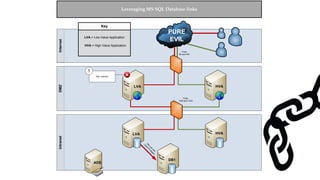
  • #46 Connect to DB1 (linked server) via OPENQUERY Has least privilege Enumerate linked servers Find link to HVA - Used to pull marketing metrics to DB1
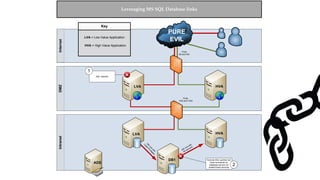
  • #47 Connect to HVA (linked server) via NESTED OPENQUERY Configured with the SA account HVA could have access to other resources Nesting can continue Nested  Shared service account with excessive privs Linked database can be direct between high value and low value Other server not on the diagram Can be nested many times
  • #52 Neo4j Bloodhound pending
  • #54 Here’s the good one 
  • #59 Cornucopia of excessive privileges.
  • #74 Skip