Defragmentation


  http://improvec.blogspot.in/   1
Disk Defragmentation


    http://improvec.blogspot.in/   2
Definition

 Defragmentation is a technique that puts all related data
  together pertaining to a file
 In order to speed up accessing, the free space is
  consolidated in one contiguous black
 That is free contiguous memory locations are available to
  store future data


                       http://improvec.blogspot.in/    3
Example
 A group of students along with their teacher go to a
  concert if they reserve seats early then they sit together
  in the same row
 Accessing them by the teacher is fast and easy
 Other wise they have to take whatever sets are still
  available scattered about the auditorium
 Then accessing them by the teacher is difficult


                     http://improvec.blogspot.in/          4
Contd..
                       Example

 If scattered the group can be defragmented by
  rearranging the seats such that all students take seats

  together

 This is called Defragmentation


                     http://improvec.blogspot.in/             5
Defragmentation

Whenever we delete a file from our hard disk and
whenever windows removes a temporary file, a storage
area on the disk becomes free for reuse again

 the next time we save a file, windows uses its free
area to store as much of the file as fit


                     http://improvec.blogspot.in/   6
Defragmentation

   As we delete old files and insert new files over a period
of time, they begin to be distributed on the hard disk as a
piece here, piece there, another piece somewhere else


                     http://improvec.blogspot.in/         7
Defragmentation


      It   tends   to       slow          file         accessing   because
  the system has to go to several locations to pick up one
file


                         http://improvec.blogspot.in/                     8
Advantages

    We can speed up the hard disk response time by
running the Disk Defragmenter program

This program rearranges the files so that all parts of a
file are stored together in one location


                      http://improvec.blogspot.in/      9
Advantages                    Contd..


 Large sections of free space are also put together

 So we can improve the performance of our computer
      by defragmenting our hard disk


                   http://improvec.blogspot.in/             10
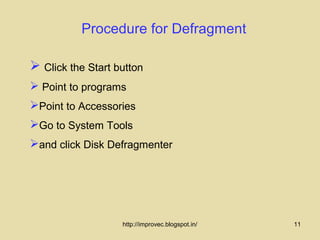
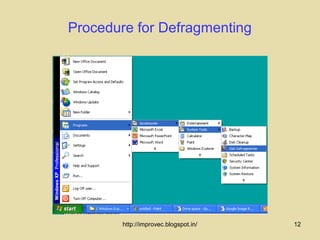
Procedure for Defragment

 Click the Start button
 Point to programs
Point to Accessories
Go to System Tools
and click Disk Defragmenter


                   http://improvec.blogspot.in/   11
Procedure for Defragmenting


        http://improvec.blogspot.in/   12
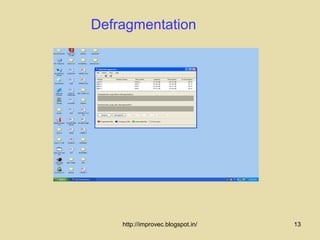
Defragmentation


    http://improvec.blogspot.in/   13
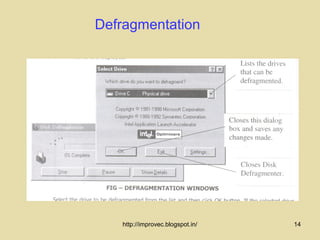
Defragmentation


   http://improvec.blogspot.in/   14
Defragmentation

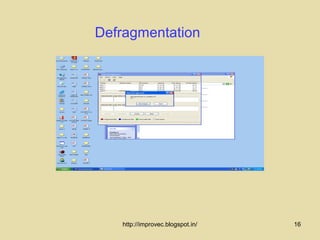
 Select the Drive

 Click OK to start the defragmentation


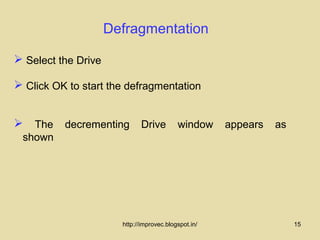
 The decrementing Drive window appears as
 shown


                       http://improvec.blogspot.in/   15
Defragmentation


   http://improvec.blogspot.in/   16
Contd..

                  Defragmentation

  Defragmenter starts to defrayment files on the
 selected drive and displays its progress


 We can choose to stop it, pause it or show details to see
Disk Defragmenter in action


                     http://improvec.blogspot.in/             17
Contd..

                   Defragmentation

 A dialog box appears when the defragmentation
 of the hard disk is complete

 Click Yes to close Disk Defragmenter


                      http://improvec.blogspot.in/             18
Summary

   In this lecture you have learned about


 Defragmentation
 Advantages of defragmentation
 Method to defragment


               http://improvec.blogspot.in/   19
Frequently asked questions

1.What is meant by defragmemtation? What is the need of
  defragmentation ?

2. Why would you need to defragmentation your hard disk?

3. What are the advantages of defragmentation?


                      http://improvec.blogspot.in/     20
Quiz

1.   A technique that puts all related date together

        (a) fragmentation
        (b) defragmentation
        (c) delete & save


                      http://improvec.blogspot.in/     21
Quiz

2. After defragmentation the accessing becomes


       (a) slow
       (b) same
       (c) fast


                    http://improvec.blogspot.in/   22

Defragmentation.46

  • 1.
  • 2.
    Disk Defragmentation http://improvec.blogspot.in/ 2
  • 3.
    Definition  Defragmentation isa technique that puts all related data together pertaining to a file  In order to speed up accessing, the free space is consolidated in one contiguous black  That is free contiguous memory locations are available to store future data http://improvec.blogspot.in/ 3
  • 4.
    Example  A groupof students along with their teacher go to a concert if they reserve seats early then they sit together in the same row  Accessing them by the teacher is fast and easy  Other wise they have to take whatever sets are still available scattered about the auditorium  Then accessing them by the teacher is difficult http://improvec.blogspot.in/ 4
  • 5.
    Contd.. Example  If scattered the group can be defragmented by rearranging the seats such that all students take seats together  This is called Defragmentation http://improvec.blogspot.in/ 5
  • 6.
    Defragmentation Whenever we deletea file from our hard disk and whenever windows removes a temporary file, a storage area on the disk becomes free for reuse again  the next time we save a file, windows uses its free area to store as much of the file as fit http://improvec.blogspot.in/ 6
  • 7.
    Defragmentation  As we delete old files and insert new files over a period of time, they begin to be distributed on the hard disk as a piece here, piece there, another piece somewhere else http://improvec.blogspot.in/ 7
  • 8.
    Defragmentation  It tends to slow file accessing because the system has to go to several locations to pick up one file http://improvec.blogspot.in/ 8
  • 9.
    Advantages  We can speed up the hard disk response time by running the Disk Defragmenter program This program rearranges the files so that all parts of a file are stored together in one location http://improvec.blogspot.in/ 9
  • 10.
    Advantages Contd..  Large sections of free space are also put together  So we can improve the performance of our computer by defragmenting our hard disk http://improvec.blogspot.in/ 10
  • 11.
    Procedure for Defragment Click the Start button  Point to programs Point to Accessories Go to System Tools and click Disk Defragmenter http://improvec.blogspot.in/ 11
  • 12.
    Procedure for Defragmenting http://improvec.blogspot.in/ 12
  • 13.
    Defragmentation http://improvec.blogspot.in/ 13
  • 14.
    Defragmentation http://improvec.blogspot.in/ 14
  • 15.
    Defragmentation  Select theDrive  Click OK to start the defragmentation  The decrementing Drive window appears as shown http://improvec.blogspot.in/ 15
  • 16.
    Defragmentation http://improvec.blogspot.in/ 16
  • 17.
    Contd.. Defragmentation  Defragmenter starts to defrayment files on the selected drive and displays its progress  We can choose to stop it, pause it or show details to see Disk Defragmenter in action http://improvec.blogspot.in/ 17
  • 18.
    Contd.. Defragmentation  A dialog box appears when the defragmentation of the hard disk is complete  Click Yes to close Disk Defragmenter http://improvec.blogspot.in/ 18
  • 19.
    Summary In this lecture you have learned about  Defragmentation  Advantages of defragmentation  Method to defragment http://improvec.blogspot.in/ 19
  • 20.
    Frequently asked questions 1.Whatis meant by defragmemtation? What is the need of defragmentation ? 2. Why would you need to defragmentation your hard disk? 3. What are the advantages of defragmentation? http://improvec.blogspot.in/ 20
  • 21.
    Quiz 1. A technique that puts all related date together (a) fragmentation (b) defragmentation (c) delete & save http://improvec.blogspot.in/ 21
  • 22.
    Quiz 2. After defragmentationthe accessing becomes (a) slow (b) same (c) fast http://improvec.blogspot.in/ 22