Windows 8
Disk Deduplication Deep Dive
         Ronald Beekelaar
         Virsoft Solutions
      ronald@beekelaar.com

                             Schiphol, 19 jan 2012
Introductions
• Presenter
   – MVP Security
   – MVP Virtual Machine Technology
   – E-mail: ronald@beekelaar.com

• Work
   –   Security consultancy
   –   Virtualization consultancy
   –   Create many VM-based labs and demos
   –   Software to optimize, manage and run VM
   –   Maintain four datacenters world-wide
        • Running Hyper-V labs for customers (MOC, training and demo purposes)
Objectives
• Discuss one interesting new aspect of
  Windows 8: Disk Deduplication
What is Disk Deduplication ?
• Goal:
  – Use less storage space


• Method:
  – Ensure that identical content in multiple (large) files is
    only stored once


• Is block-based, post-process, transparant solution
Standard deduplication modes
• "Source"
   – Prevent transferring data, if duplicate
       • Used by Remote Differential Compression
• "Inline"
   – Perform deduplication when data is written
       • Used by NTFS file compression
       • Write process is slowed down
• "Post-Process" (or "Background")
   – Perform deduplication later, in background, when idle
       • Used by Windows 8 Data Deduplication
Other methods to save disk space
• SIS (single-instance-store) in Win2000
   – Is file-based, not block-based

• NTFS file compression
   – Is inline, not post-process
   – Much more CPU intensive

• NTFS hard links
   – Is not transparent
   – Is file-based, not block-based
NTFS Hard Links
• Multiple file entries pointing to same data
• Manage
  – Create: mklink /h link.ext target.ext
  – List: fsutil hardlink list file.ext
• Is not transparent
  – Edit one hardlink file, also changes other files
• Windows uses thousands of hard links (!)
  – Good reason not to touch C:Windowswinsxs
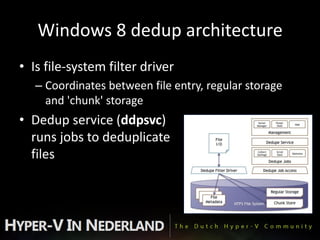
Windows 8 dedup architecture
• Is file-system filter driver
   – Coordinates between file entry, regular storage
     and 'chunk' storage
• Dedup service (ddpsvc)
  runs jobs to deduplicate
  files
How does Windows 8 dedup work?
• Dedup service recognizes common 'chunks' in
  files, and places those in Chunk Store
   – In System Volume Information folder
• Dedup filter driver ensures that applications read
  correct file content

• File "size" (= content length) does not change in
  Explorer
   – Explorer reports "size-on-disk" as 4 KB
How does Windows 8 dedup work?
Windows 8 dedup details
• Dedup works per volume
  – Also works on portable disks
  – Dedup does NOT work on C: (Windows) volume
• Chunk size is 32-128 KB (average 80 KB)
• By default
  – Chunks are compressed in chunk store
     • Avoids re-compressing compressed files (zip, etc)
  – Dedup service ignores files < 64 KB
  – Dedup service ignores files changed in last 30 days
  – Dedup service ignores NTFS encrypted files
Savings?
• Depends on file content of course
• Microsoft reported averages:
  – General: 50-60% savings
     • Documents: 30-50% saving
     • Application library: 70-80% savings
     • VHD library: 80-95% savings
Performance?
• Write has no direct performance hit
  – Dedup operations are done post-process

• Read has a ~3% performance hit (if not in cache)
  – Due to more disk head operations
  – Compare with disk fragmentation

• Windows caching is dedup-aware (!)
  – Dedup improves caching efficience
Reliable?
• My opinion: Yes - 100%

• Data is check-summed
    – Means: invalid data is detected
• Operations are crash consistent
    – Means: can interrupt/crash operation at any time without losing
      data
• Data is self-describing
    – Means: it can be read without external data
• Popular 'chunks' (>100x) are stored multiple times
    – Means: avoids creating IO hotspots on disk


January 20, 2012       NIC 2012
How to enable Windows 8 dedup?
• Install Data Deduplication role service
• Start Data Duplication Service (ddpsvc)
• Powershell
    – import-module Deduplication
    – help dedup

    – enable-dedupvolume D:
    – set-dedupvolume D: -minimumfileagedays 0
        • Default is 30 days
    – start-dedupjob D: -type Optimization
        • Use Unoptimization to undo

    – get-dedupjob
    – get-dedupstatus
    – get-dedupmetadata
Questions ?
• Thanks for your attention

Windows 8 dddd (beekelaar)

  • 1.
    Windows 8 Disk DeduplicationDeep Dive Ronald Beekelaar Virsoft Solutions ronald@beekelaar.com Schiphol, 19 jan 2012
  • 2.
    Introductions • Presenter – MVP Security – MVP Virtual Machine Technology – E-mail: ronald@beekelaar.com • Work – Security consultancy – Virtualization consultancy – Create many VM-based labs and demos – Software to optimize, manage and run VM – Maintain four datacenters world-wide • Running Hyper-V labs for customers (MOC, training and demo purposes)
  • 3.
    Objectives • Discuss oneinteresting new aspect of Windows 8: Disk Deduplication
  • 4.
    What is DiskDeduplication ? • Goal: – Use less storage space • Method: – Ensure that identical content in multiple (large) files is only stored once • Is block-based, post-process, transparant solution
  • 5.
    Standard deduplication modes •"Source" – Prevent transferring data, if duplicate • Used by Remote Differential Compression • "Inline" – Perform deduplication when data is written • Used by NTFS file compression • Write process is slowed down • "Post-Process" (or "Background") – Perform deduplication later, in background, when idle • Used by Windows 8 Data Deduplication
  • 6.
    Other methods tosave disk space • SIS (single-instance-store) in Win2000 – Is file-based, not block-based • NTFS file compression – Is inline, not post-process – Much more CPU intensive • NTFS hard links – Is not transparent – Is file-based, not block-based
  • 7.
    NTFS Hard Links •Multiple file entries pointing to same data • Manage – Create: mklink /h link.ext target.ext – List: fsutil hardlink list file.ext • Is not transparent – Edit one hardlink file, also changes other files • Windows uses thousands of hard links (!) – Good reason not to touch C:Windowswinsxs
  • 8.
    Windows 8 deduparchitecture • Is file-system filter driver – Coordinates between file entry, regular storage and 'chunk' storage • Dedup service (ddpsvc) runs jobs to deduplicate files
  • 9.
    How does Windows8 dedup work? • Dedup service recognizes common 'chunks' in files, and places those in Chunk Store – In System Volume Information folder • Dedup filter driver ensures that applications read correct file content • File "size" (= content length) does not change in Explorer – Explorer reports "size-on-disk" as 4 KB
  • 10.
    How does Windows8 dedup work?
  • 11.
    Windows 8 dedupdetails • Dedup works per volume – Also works on portable disks – Dedup does NOT work on C: (Windows) volume • Chunk size is 32-128 KB (average 80 KB) • By default – Chunks are compressed in chunk store • Avoids re-compressing compressed files (zip, etc) – Dedup service ignores files < 64 KB – Dedup service ignores files changed in last 30 days – Dedup service ignores NTFS encrypted files
  • 12.
    Savings? • Depends onfile content of course • Microsoft reported averages: – General: 50-60% savings • Documents: 30-50% saving • Application library: 70-80% savings • VHD library: 80-95% savings
  • 13.
    Performance? • Write hasno direct performance hit – Dedup operations are done post-process • Read has a ~3% performance hit (if not in cache) – Due to more disk head operations – Compare with disk fragmentation • Windows caching is dedup-aware (!) – Dedup improves caching efficience
  • 14.
    Reliable? • My opinion:Yes - 100% • Data is check-summed – Means: invalid data is detected • Operations are crash consistent – Means: can interrupt/crash operation at any time without losing data • Data is self-describing – Means: it can be read without external data • Popular 'chunks' (>100x) are stored multiple times – Means: avoids creating IO hotspots on disk January 20, 2012 NIC 2012
  • 15.
    How to enableWindows 8 dedup? • Install Data Deduplication role service • Start Data Duplication Service (ddpsvc) • Powershell – import-module Deduplication – help dedup – enable-dedupvolume D: – set-dedupvolume D: -minimumfileagedays 0 • Default is 30 days – start-dedupjob D: -type Optimization • Use Unoptimization to undo – get-dedupjob – get-dedupstatus – get-dedupmetadata
  • 16.
    Questions ? • Thanksfor your attention