Process Management
Prepared by,
V.SANTHI
Asst.Prof , Dept. of BCA
Bon secours college for women,
Thanjavur.
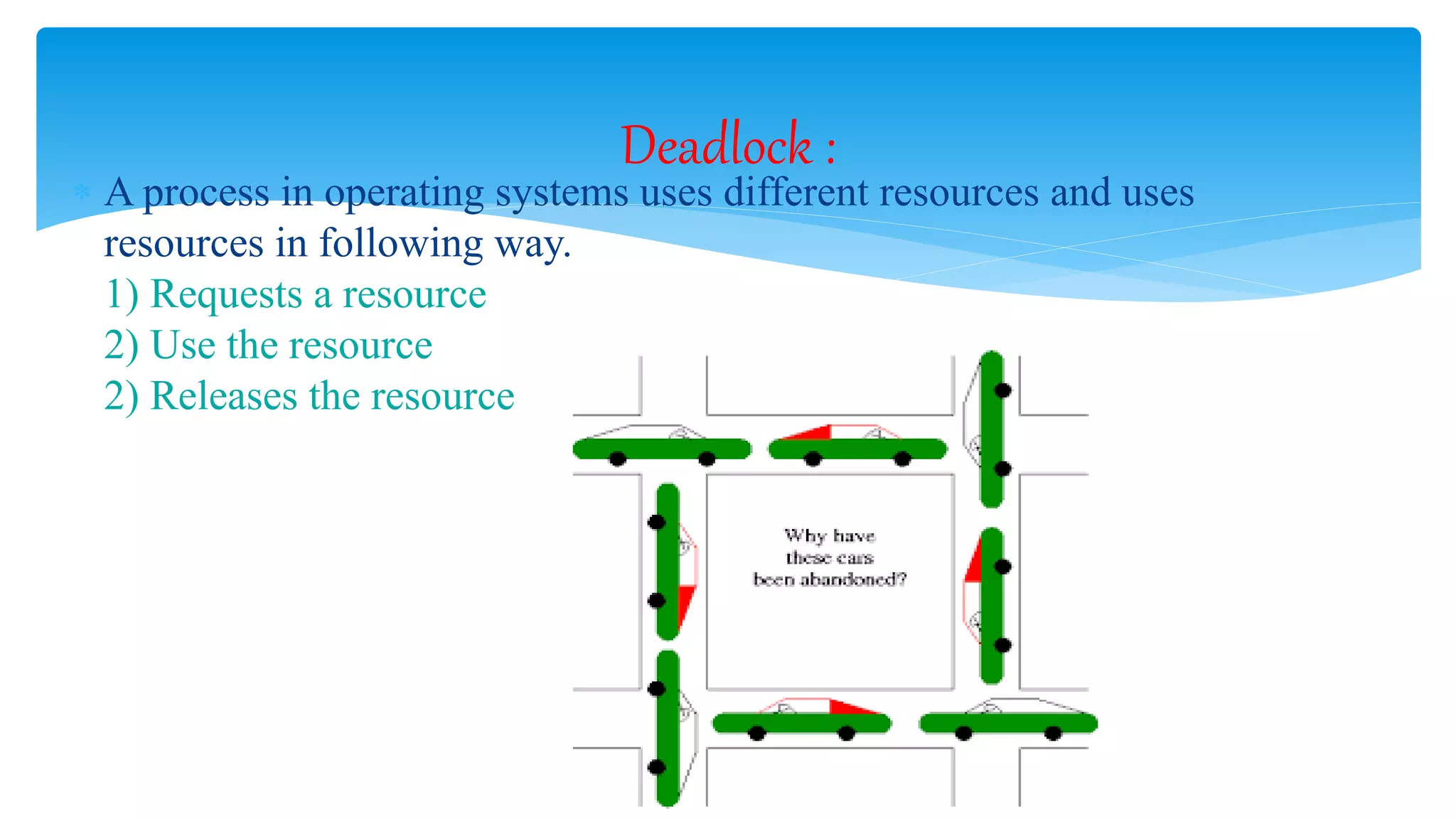
 A process in operating systems uses different resources and uses
resources in following way.
1) Requests a resource
2) Use the resource
2) Releases the resource
Deadlock :
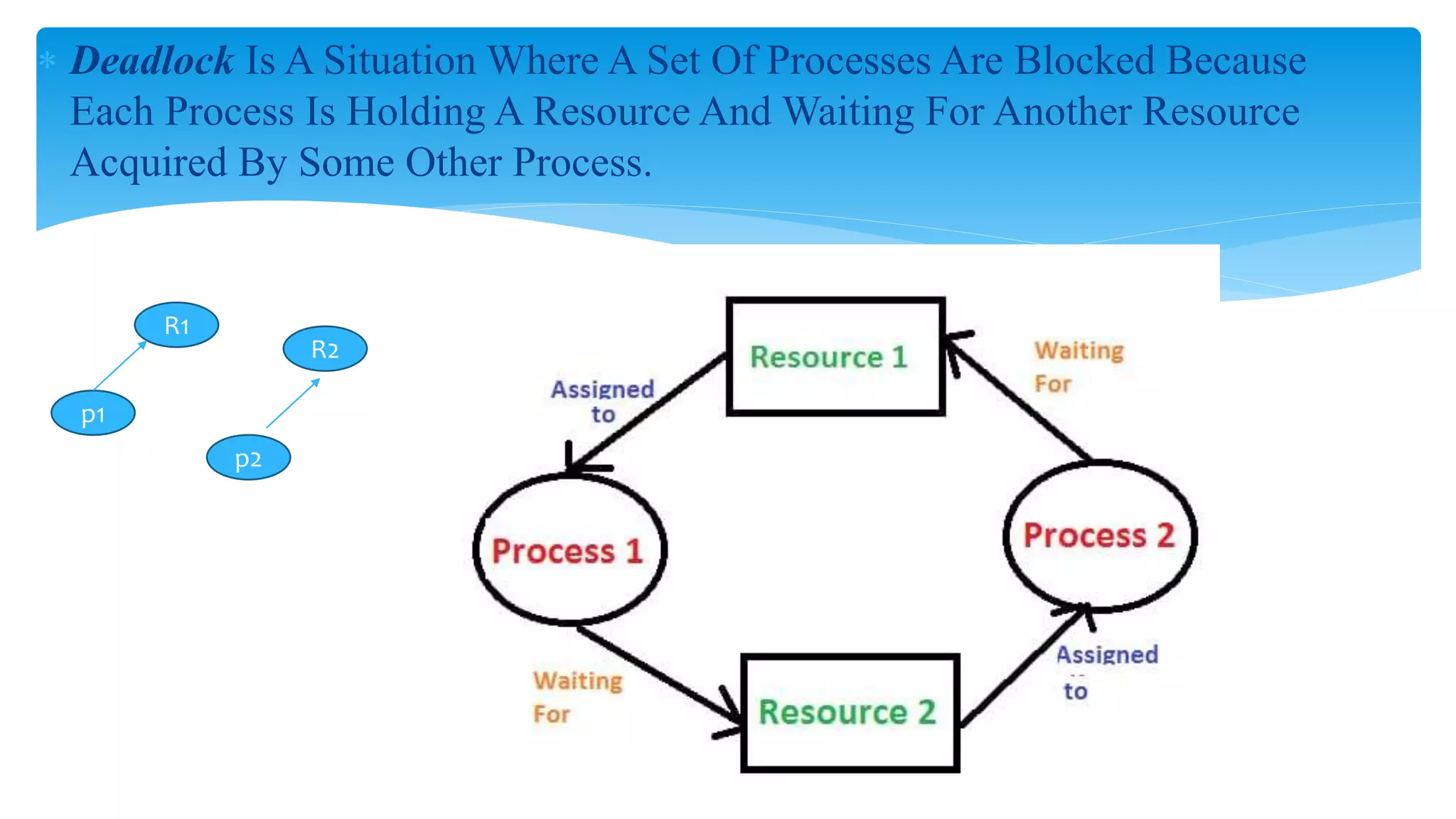
 Deadlock Is A Situation Where A Set Of Processes Are Blocked Because
Each Process Is Holding A Resource And Waiting For Another Resource
Acquired By Some Other Process.
R1
p1
p2
R2
There are 7 cases in Deadlock:
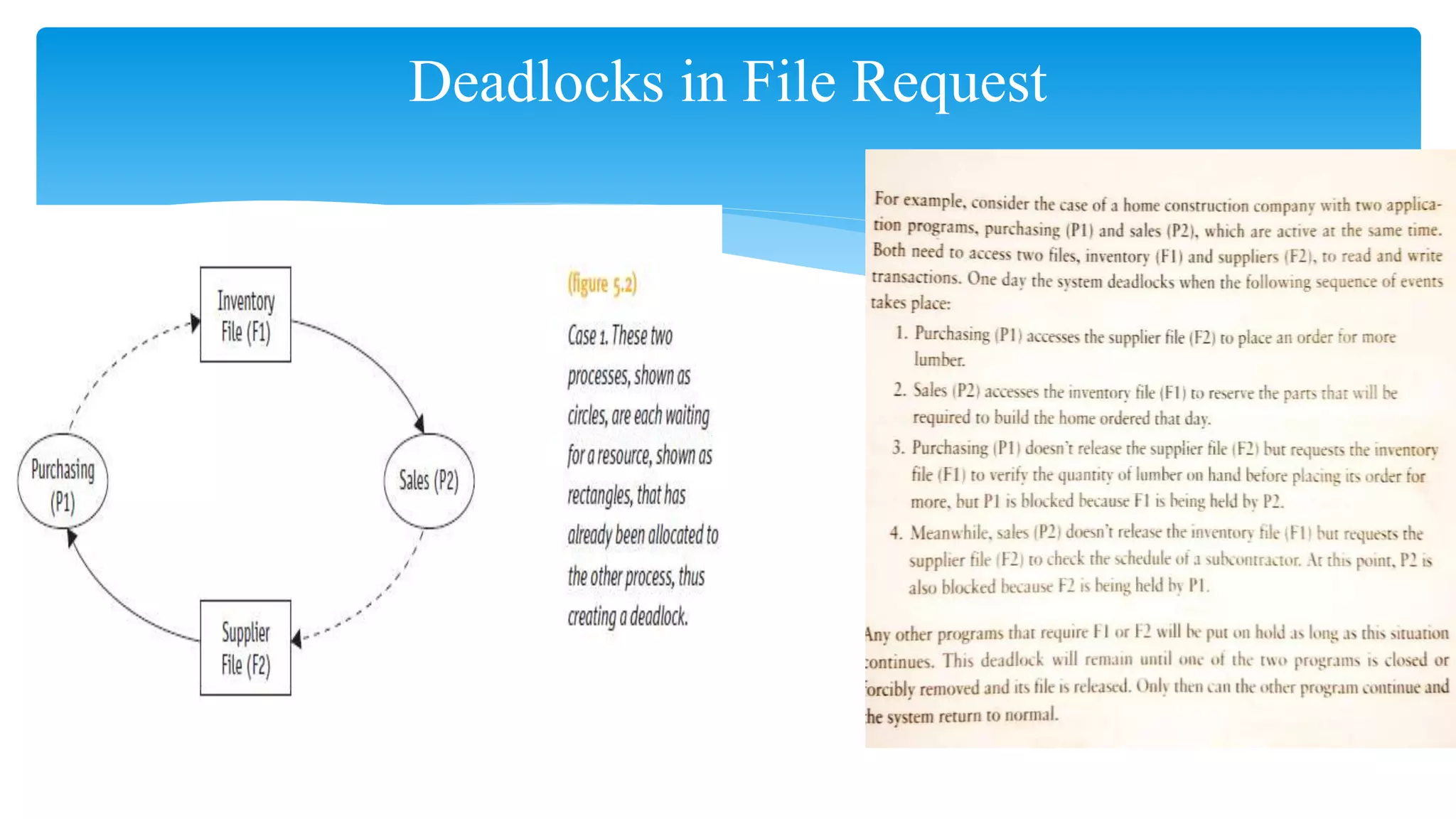
1. Deadlocks in File Request
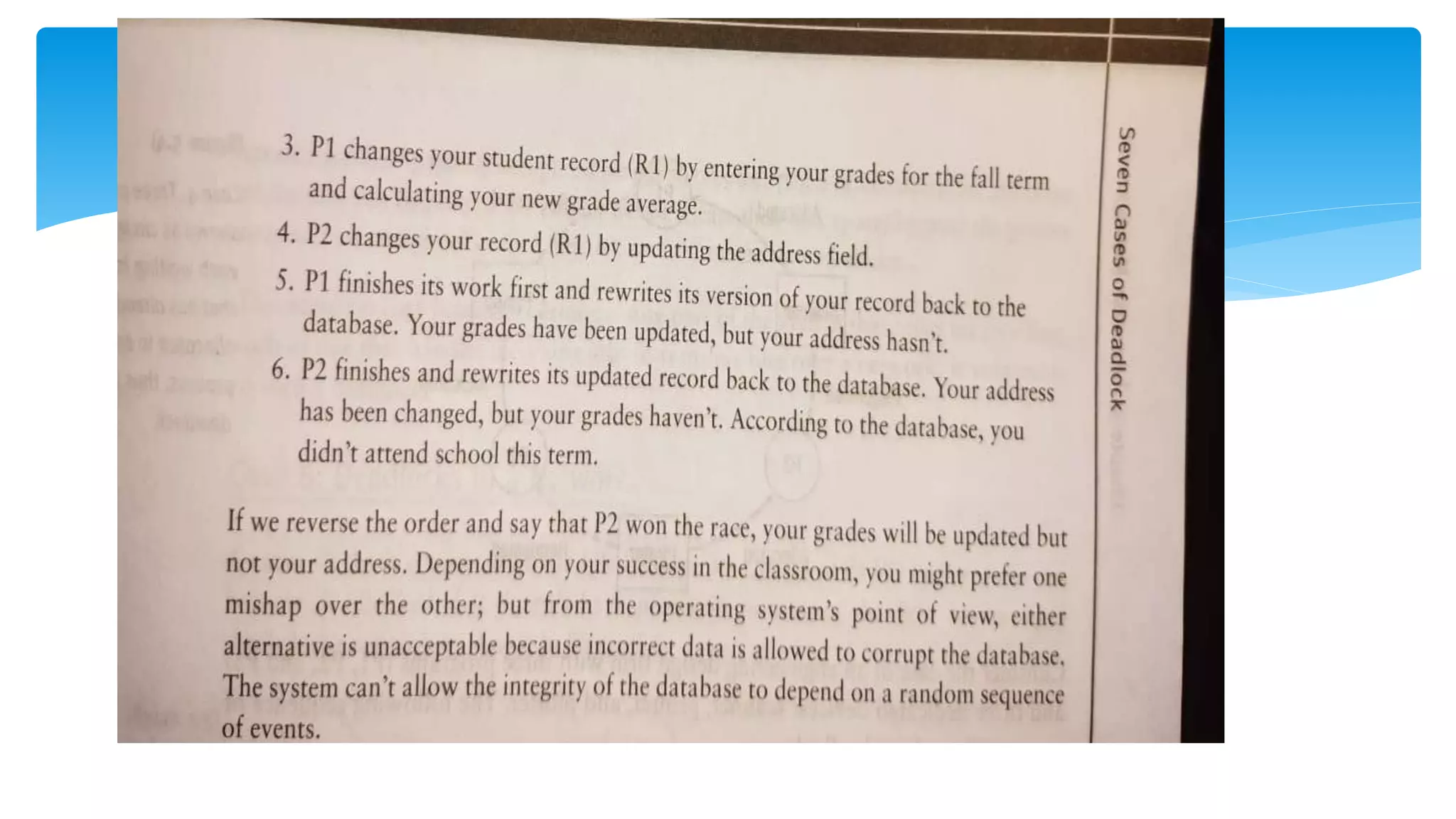
2. Deadlocks in Database
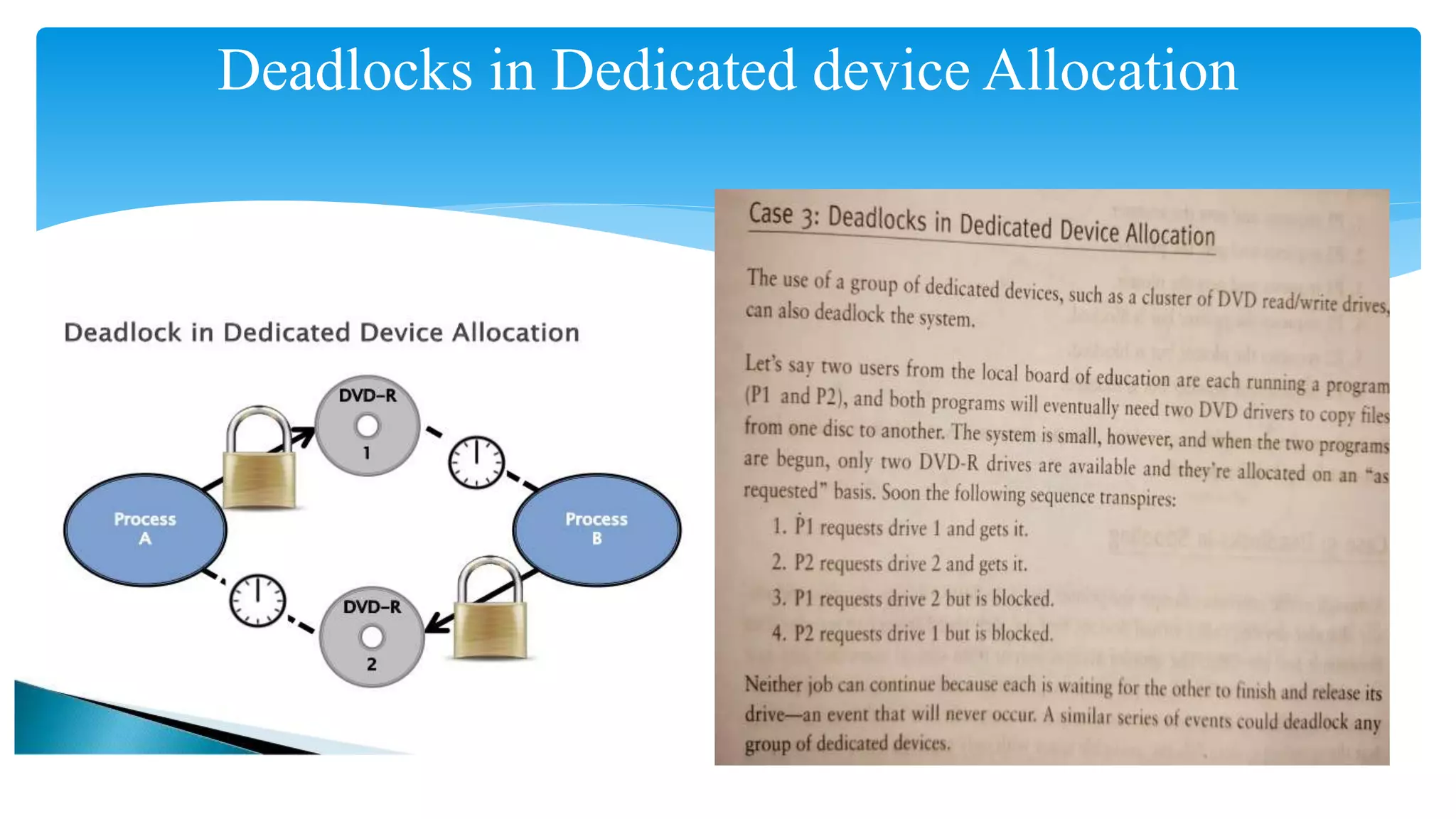
3. Deadlocks in Dedicated device Allocation
4. Deadlocks in Multiple device allocation
5. Deadlocks in Spooling
6. Deadlocks in a Network
7. Deadlocks in Disk Sharing
Cases Of DEADLOCK:
Deadlocks in File Request
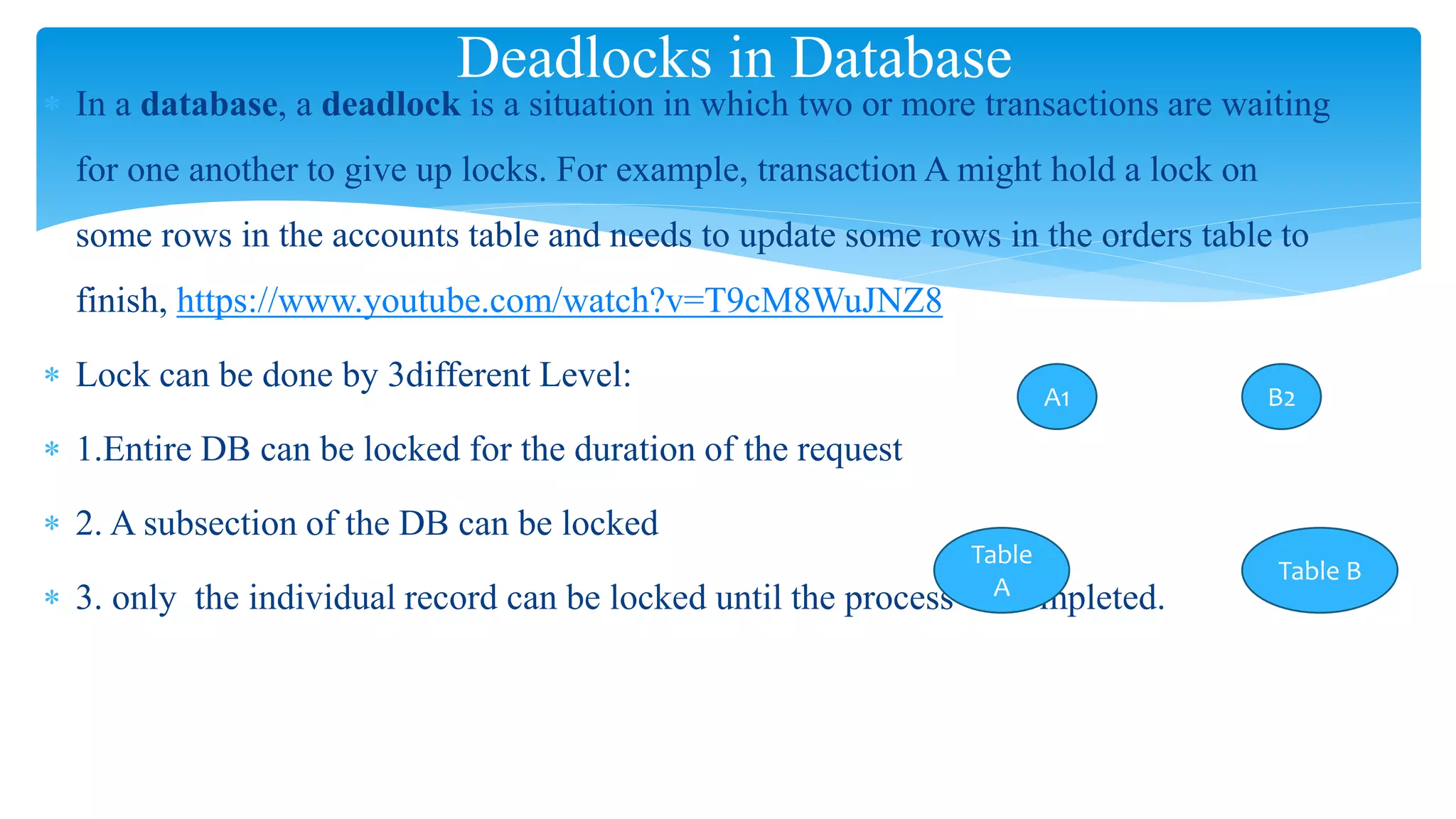
 In a database, a deadlock is a situation in which two or more transactions are waiting
for one another to give up locks. For example, transaction A might hold a lock on
some rows in the accounts table and needs to update some rows in the orders table to
finish, https://www.youtube.com/watch?v=T9cM8WuJNZ8
 Lock can be done by 3different Level:
 1.Entire DB can be locked for the duration of the request
 2. A subsection of the DB can be locked
 3. only the individual record can be locked until the process is completed.
Deadlocks in Database
A1 B2
Table
A
Table B
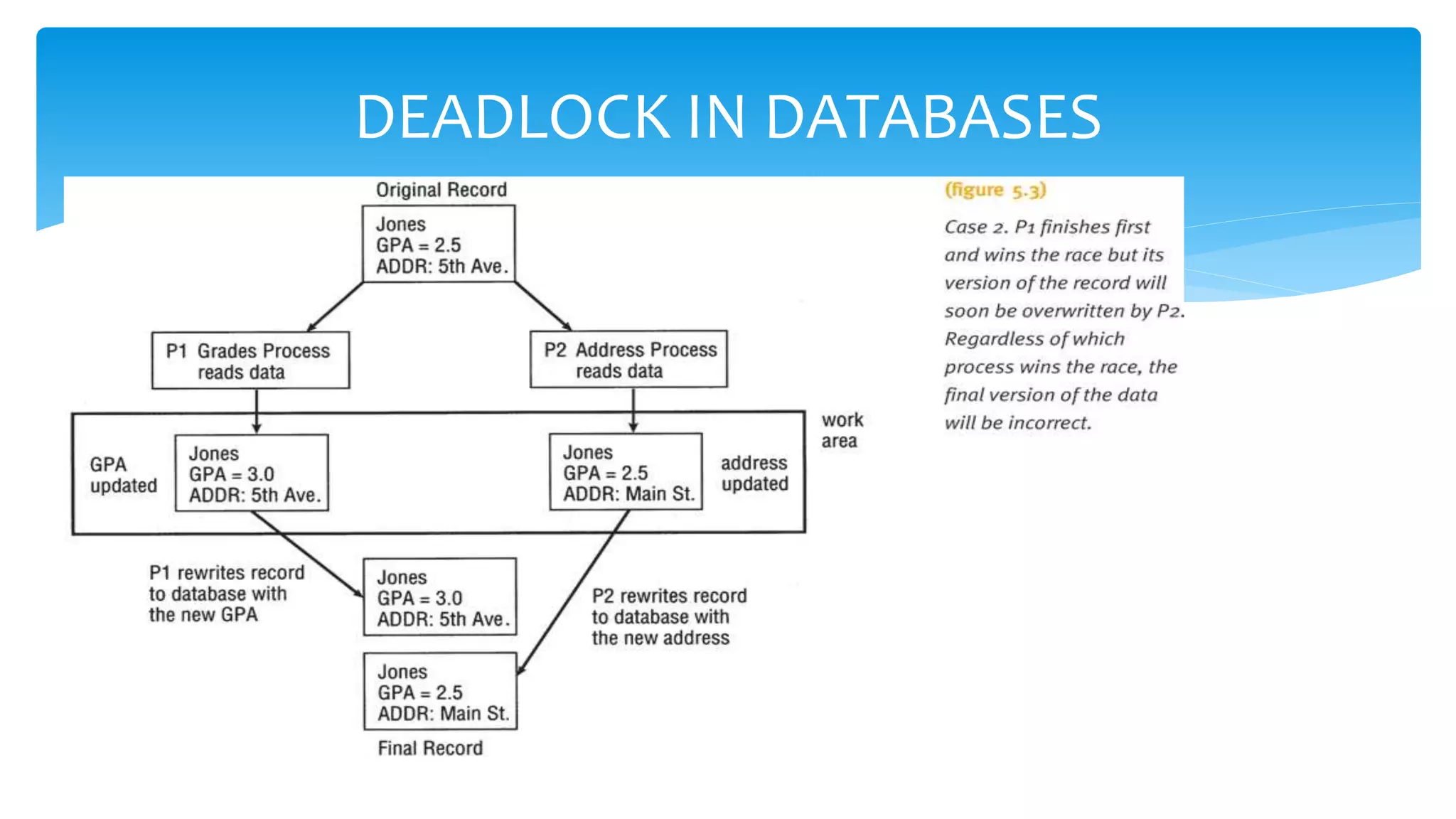
DEADLOCK IN DATABASES
Deadlocks in Dedicated device Allocation
 Deadlocks can happen when several processes request, and hold on to, several
dedicated devices.
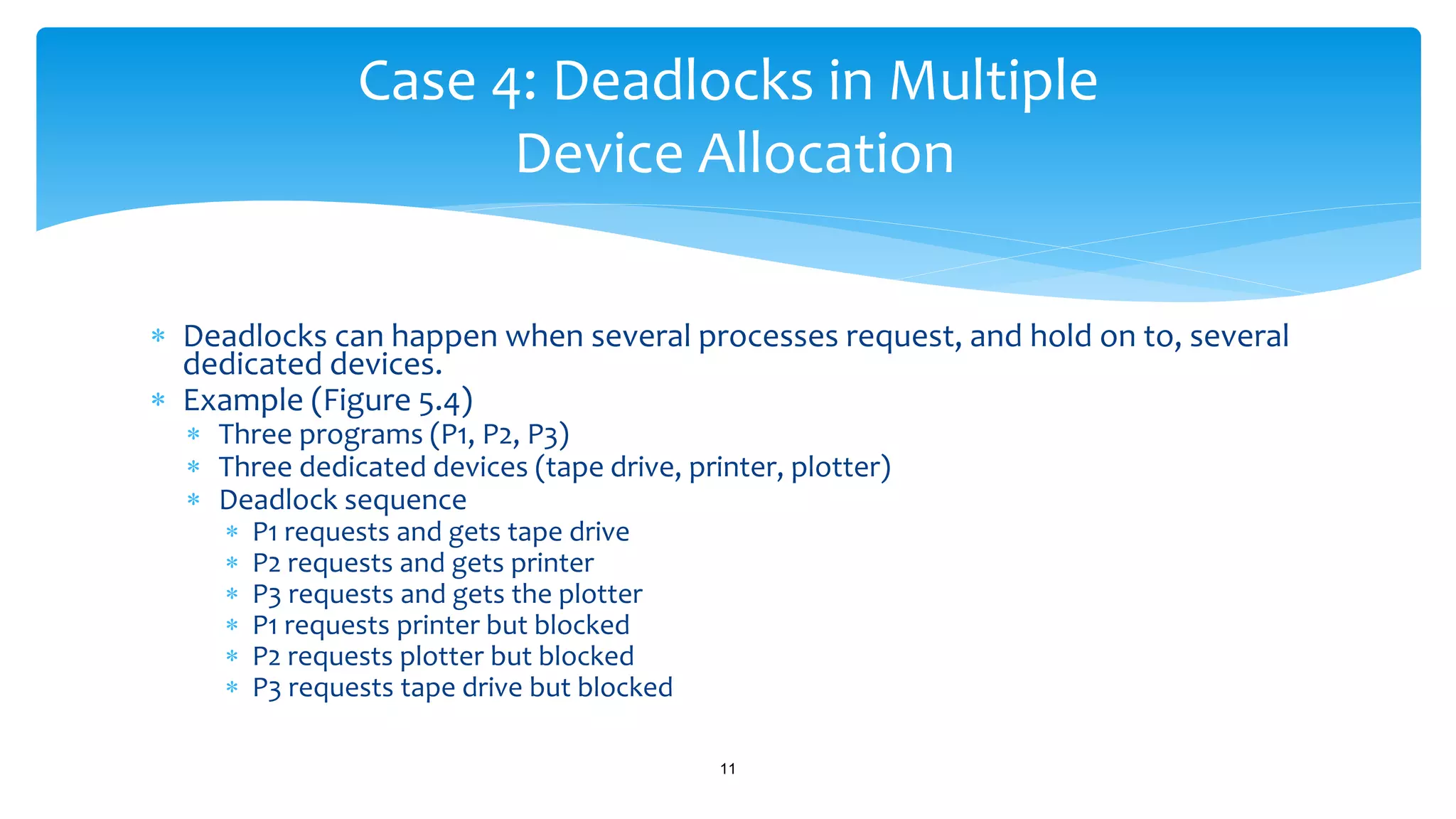
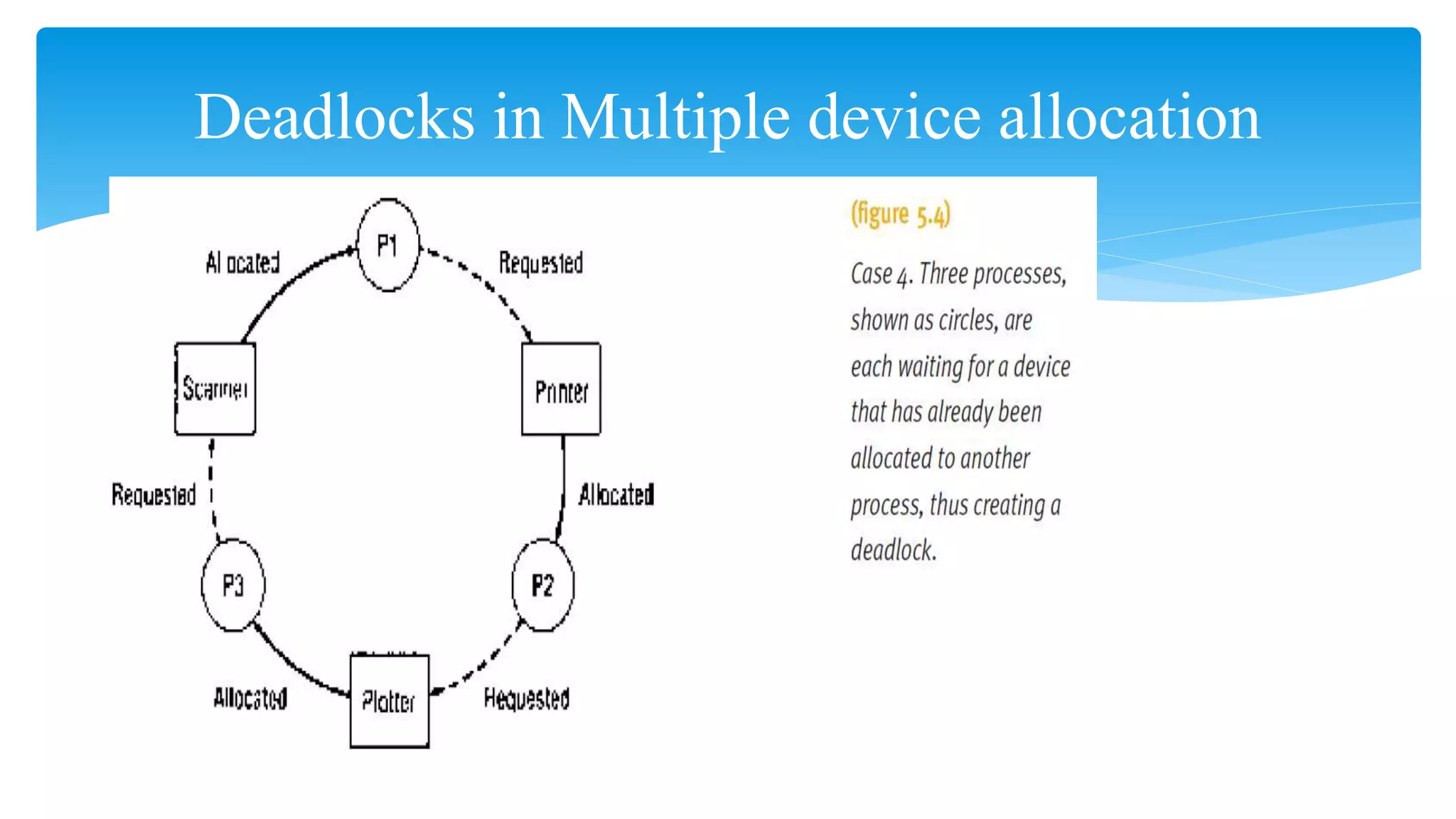
 Example (Figure 5.4)
 Three programs (P1, P2, P3)
 Three dedicated devices (tape drive, printer, plotter)
 Deadlock sequence
 P1 requests and gets tape drive
 P2 requests and gets printer
 P3 requests and gets the plotter
 P1 requests printer but blocked
 P2 requests plotter but blocked
 P3 requests tape drive but blocked
11
Case 4: Deadlocks in Multiple
Device Allocation
Deadlocks in Multiple device allocation
 Printers are usually sharable devices (Virtual devices) that use high-
speed storage to transfer data between it and the CPU.
 The spooler accepts output from several users and acts as a temporary
storage area for all output until the printer is ready to accept it
(spooling).
 If the printer needs all of a job’s output before it will begin printing, but
the spooling system fills the available space with only partially completed
output, a deadlock can occur.
Understanding Operating Systems, Sixth Edition 13
Case 5: Deadlocks in Spooling
 Deadlock Sequence:
 Printer needs all job output before printing begins
 Spooling system fills disk space area
 No one job has entire print output in spool area
 Results in partially completed output for all jobs
 Results in deadlock
 Any part of the system that relies on spooling, such as one that handles
incoming jobs or transfers files over a network, is vulnerable to such a
deadlock.
Understanding Operating Systems, Sixth Edition 14
Case 5: Deadlocks in Spooling (cont'd.)
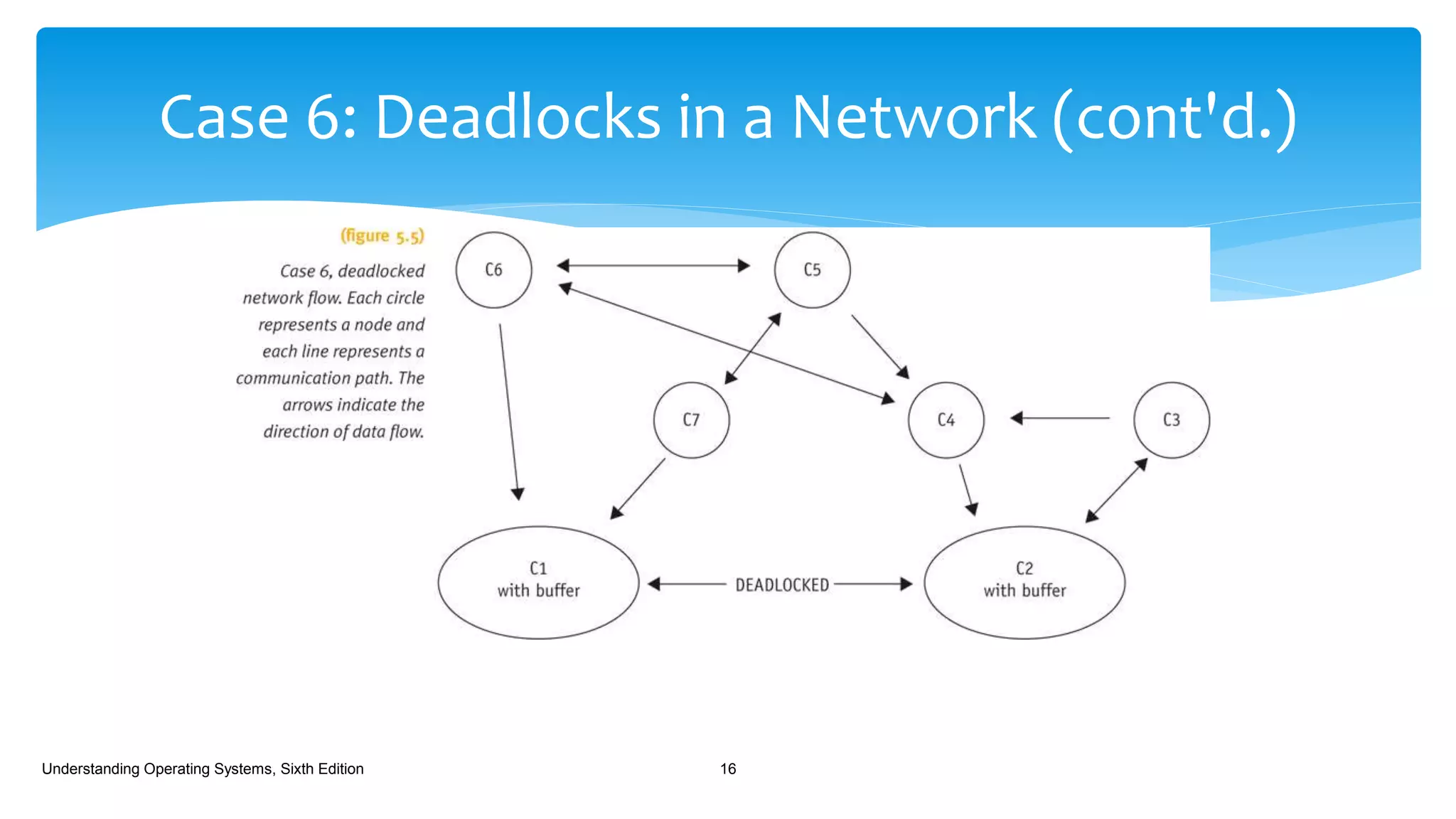
 A network that’s congested or has filled a large percentage of its I/O buffer
space can become deadlocked if it doesn’t have protocols to control the flow of
messages through the network.
 Example (Figure 5.5)
 Seven computers on network
 Each on different nodes
 Direction of arrows
 Indicates message flow
 Deadlock sequence
 All available buffer space fills
Understanding Operating Systems, Sixth Edition 15
Case 6: Deadlocks in a Network
Case 6: Deadlocks in a Network (cont'd.)
Understanding Operating Systems, Sixth Edition 16
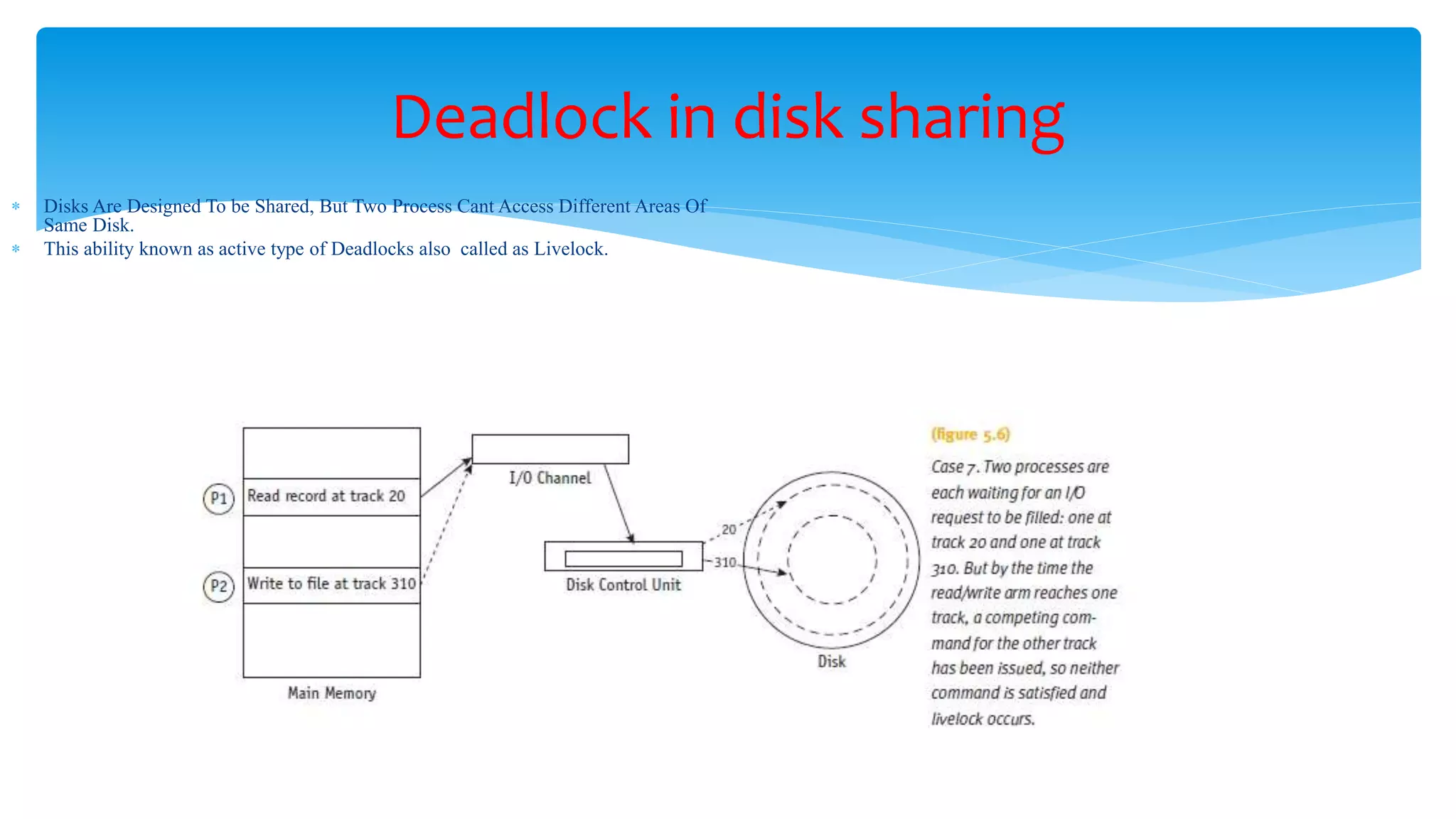
Deadlock in disk sharing
 Disks Are Designed To be Shared, But Two Process Cant Access Different Areas Of
Same Disk.
 This ability known as active type of Deadlocks also called as Livelock.
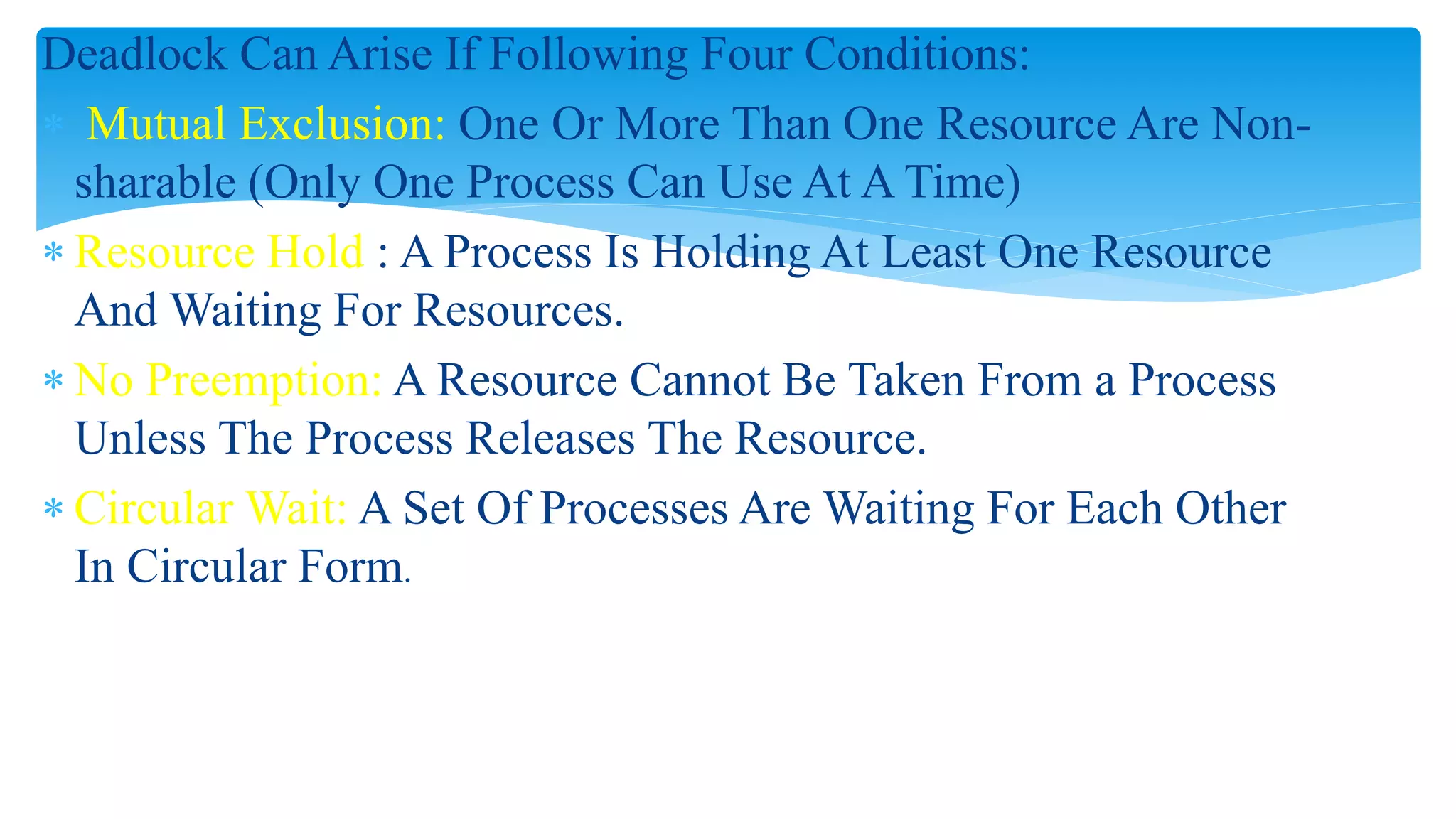
Deadlock Can Arise If Following Four Conditions:
 Mutual Exclusion: One Or More Than One Resource Are Non-
sharable (Only One Process Can Use At A Time)
 Resource Hold : A Process Is Holding At Least One Resource
And Waiting For Resources.
 No Preemption: A Resource Cannot Be Taken From a Process
Unless The Process Releases The Resource.
 Circular Wait: A Set Of Processes Are Waiting For Each Other
In Circular Form.
 In each of these seven cases, the deadlock (or livelock)
involved several processes and resources.
 Each deadlock was preceded by the simultaneous
occurrence of four conditions that the OS (or other
systems) could have recognized:
 Mutual exclusion
 Resource holding
 No preemption
 Circular wait
 Each of these four conditions is necessary for the OS to
work smoothly.
Understanding Operating Systems, Sixth Edition 19
Conditions for Deadlock
 None of them can be removed easily without causing the
system’s overall functioning to suffer.
 The system needs to recognize the combination of
conditions before they occur and threaten to cause the
system to lock up.
Understanding Operating Systems, Sixth Edition 20
Conditions for Deadlock (cont’d)
 Mutual exclusion
 Allowing only one process access to a dedicated resource.
 The first condition for deadlock.
 Resource holding
 Holding resource and not releasing it
 Waiting for other job to retreat
 The second condition for deadlock.
 No preemption
 Lack of temporary reallocation of resources.
 The third condition for deadlock.
Understanding Operating Systems, Sixth Edition 21
Conditions for Deadlock (cont'd.)
 Circular wait
 Each process involved in the impasse is waiting for another to voluntarily
release the resource so that at least one will be able to continue on and
eventually arrive at the destination.
 Fourth condition for deadlock.
 All four conditions are required for the deadlock to occur.
 Deadlock remains until one condition removed
Understanding Operating Systems, Sixth Edition 22
Conditions for Deadlock (cont'd.)
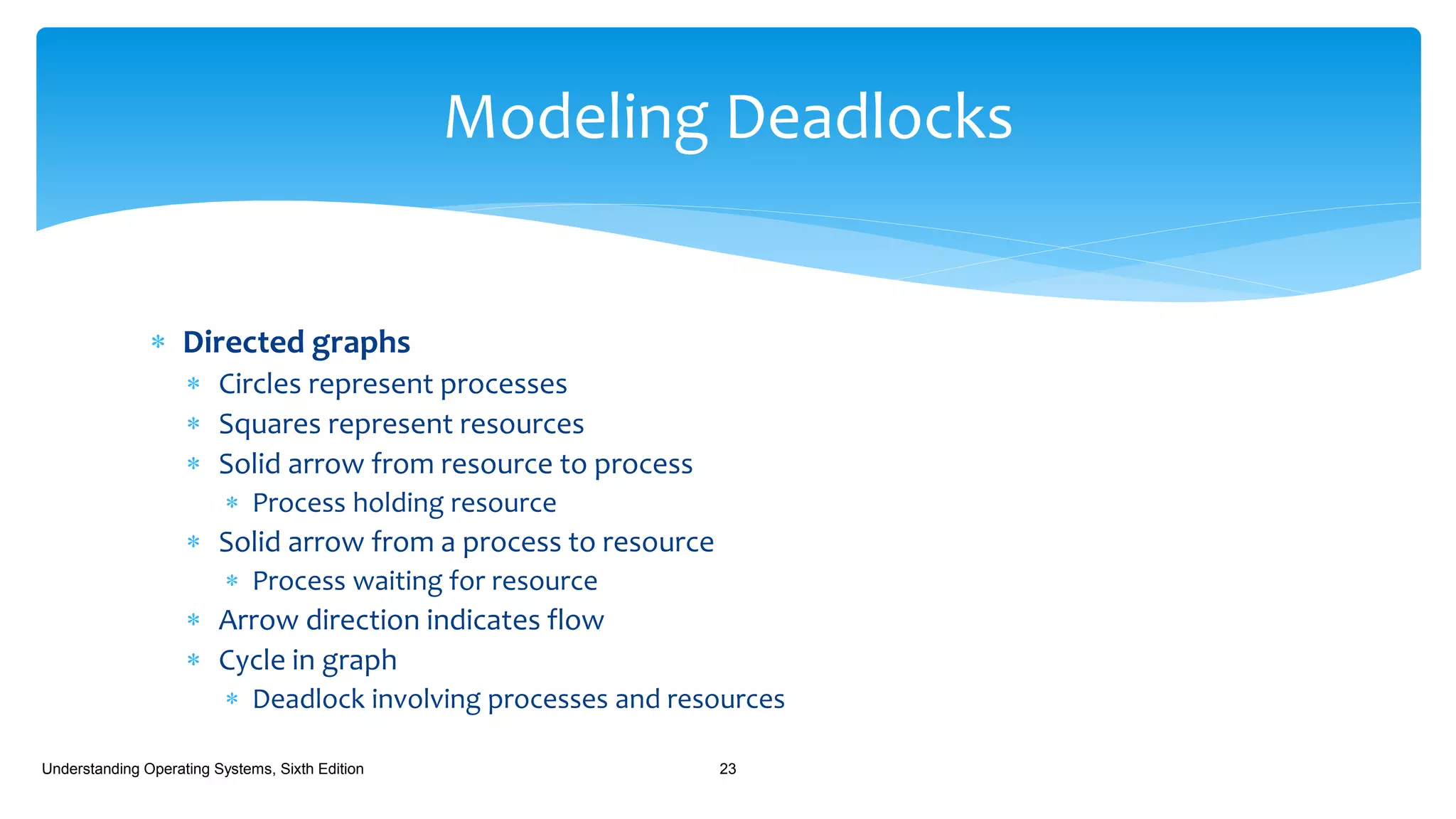
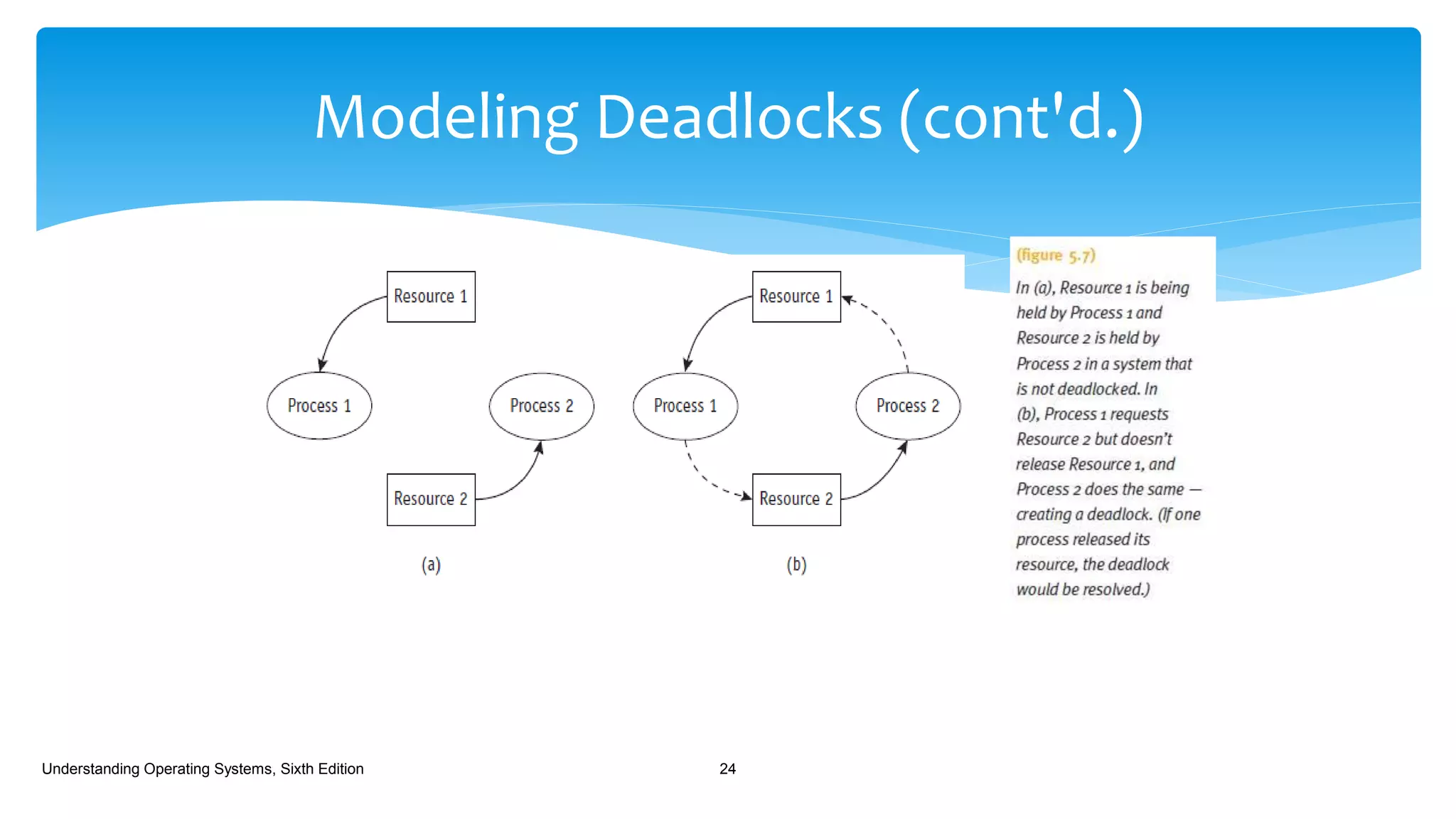
 Directed graphs
 Circles represent processes
 Squares represent resources
 Solid arrow from resource to process
 Process holding resource
 Solid arrow from a process to resource
 Process waiting for resource
 Arrow direction indicates flow
 Cycle in graph
 Deadlock involving processes and resources
Understanding Operating Systems, Sixth Edition 23
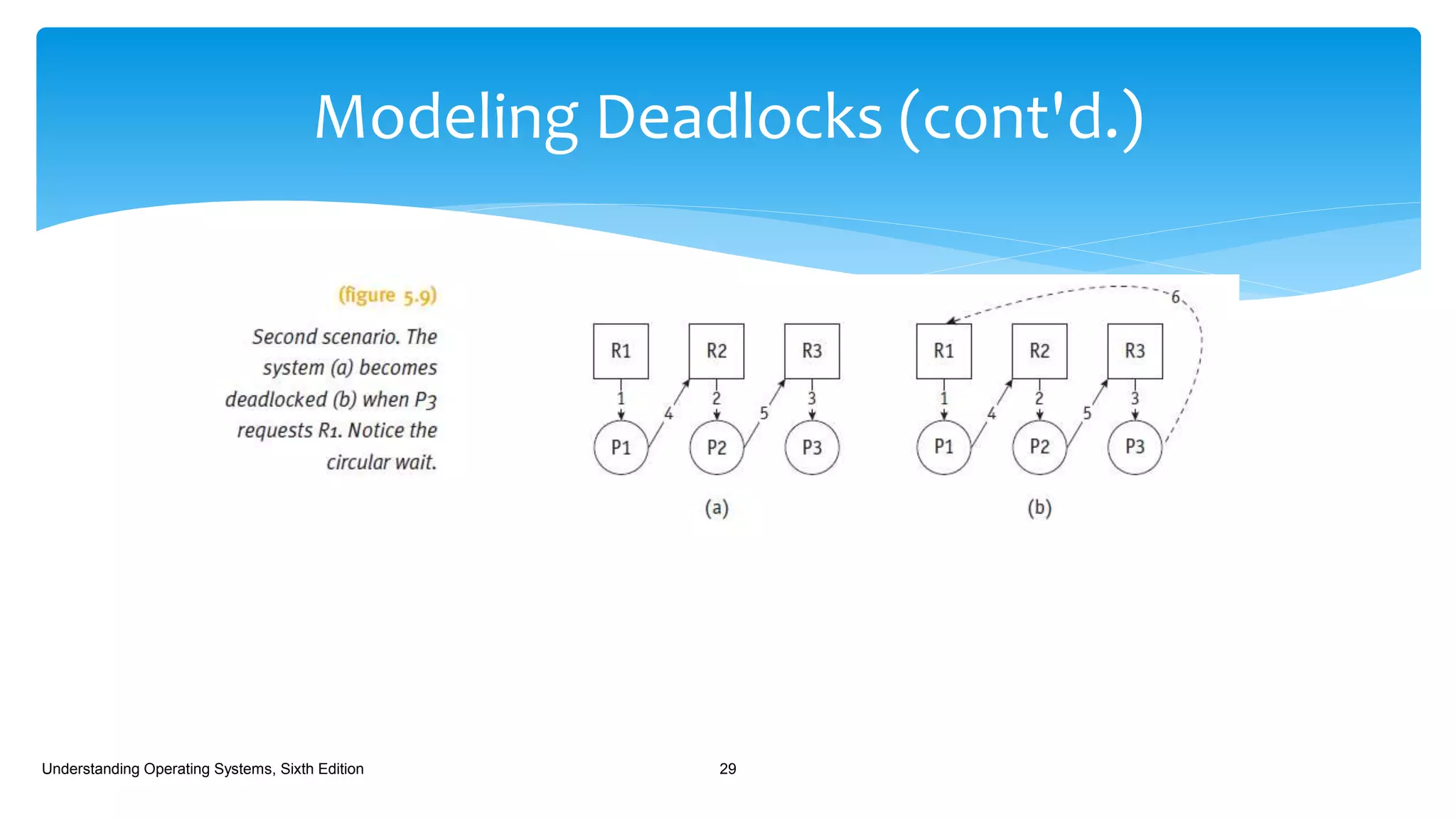
Modeling Deadlocks
Modeling Deadlocks (cont'd.)
Understanding Operating Systems, Sixth Edition 24
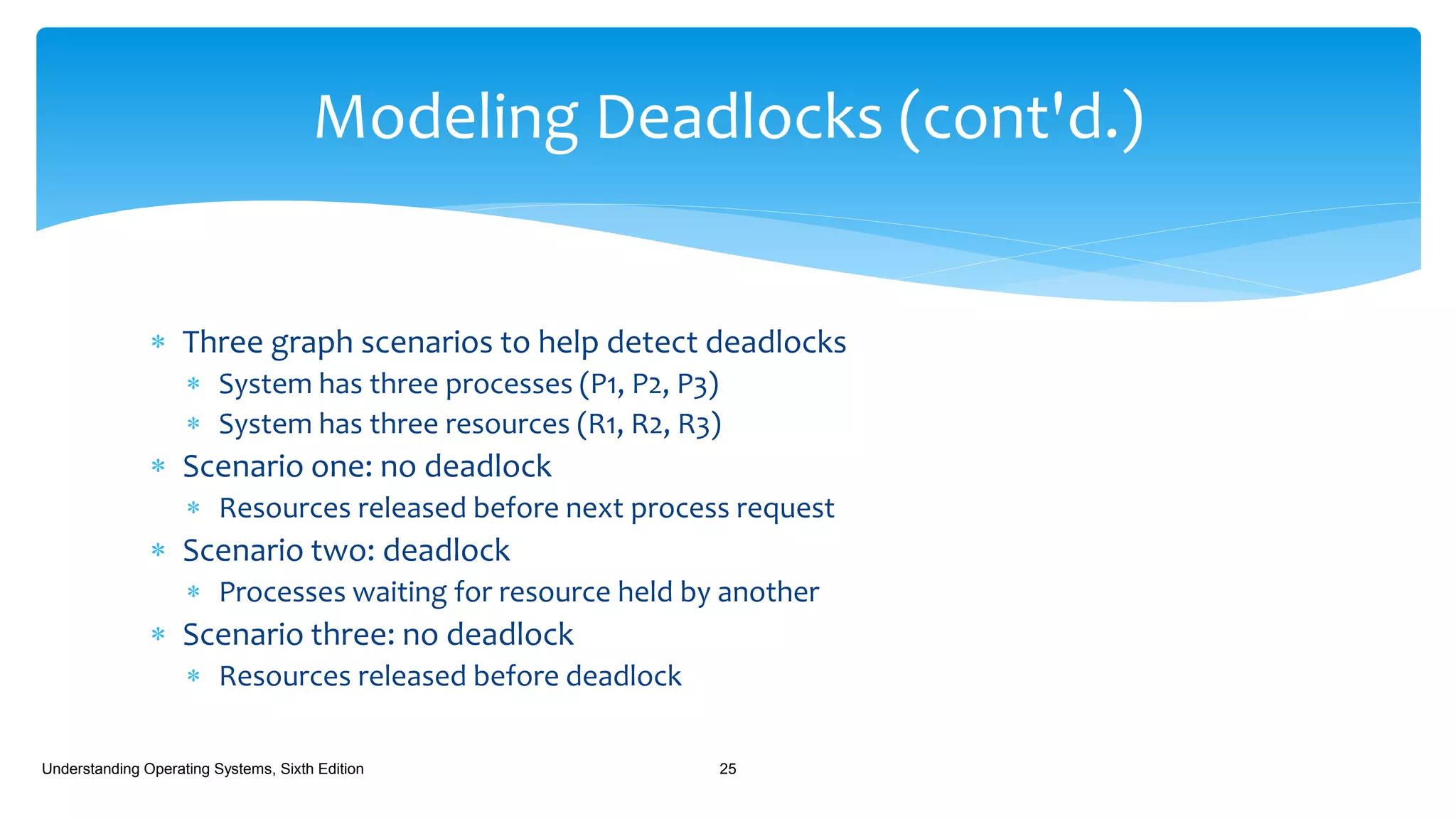
 Three graph scenarios to help detect deadlocks
 System has three processes (P1, P2, P3)
 System has three resources (R1, R2, R3)
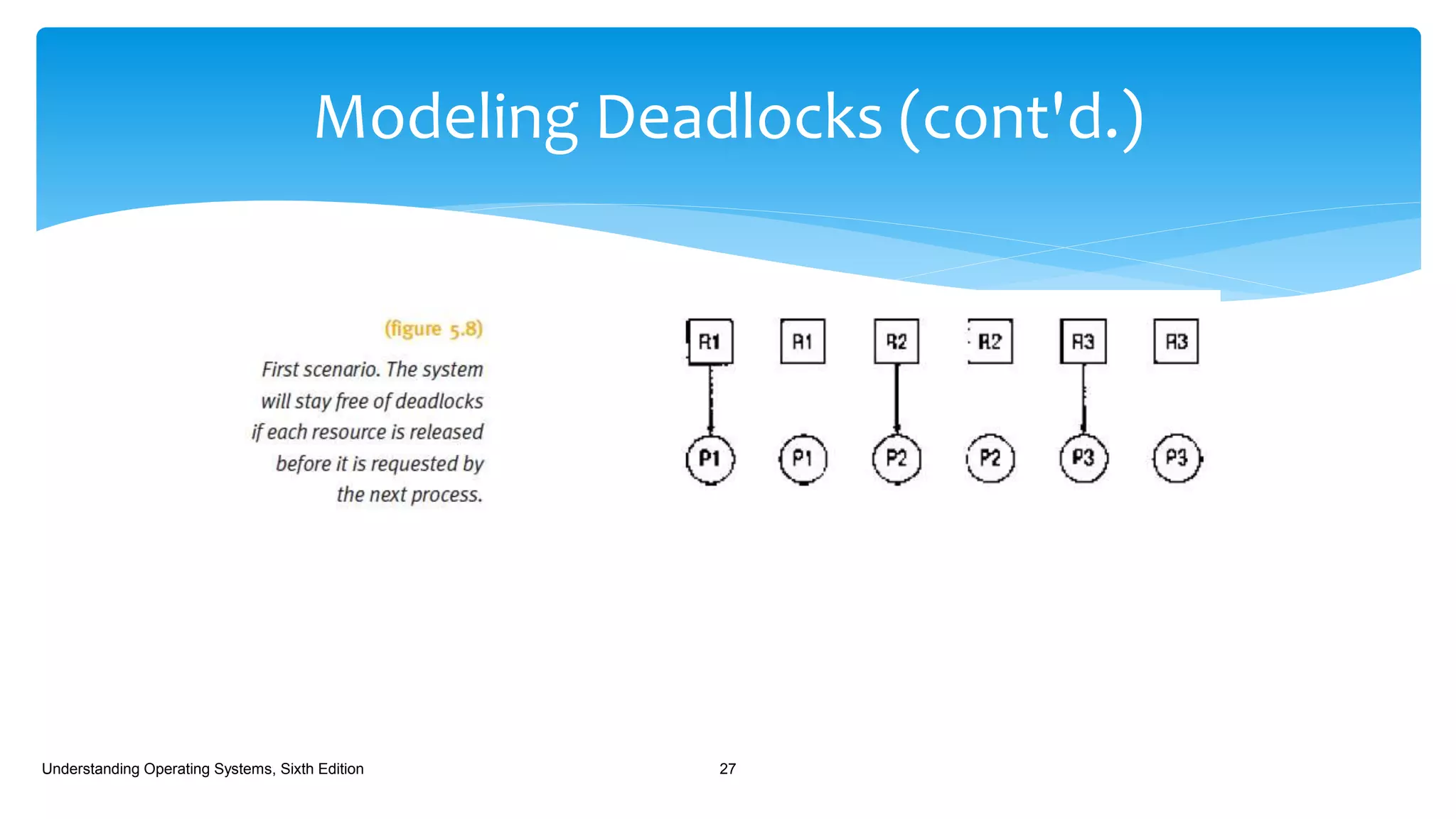
 Scenario one: no deadlock
 Resources released before next process request
 Scenario two: deadlock
 Processes waiting for resource held by another
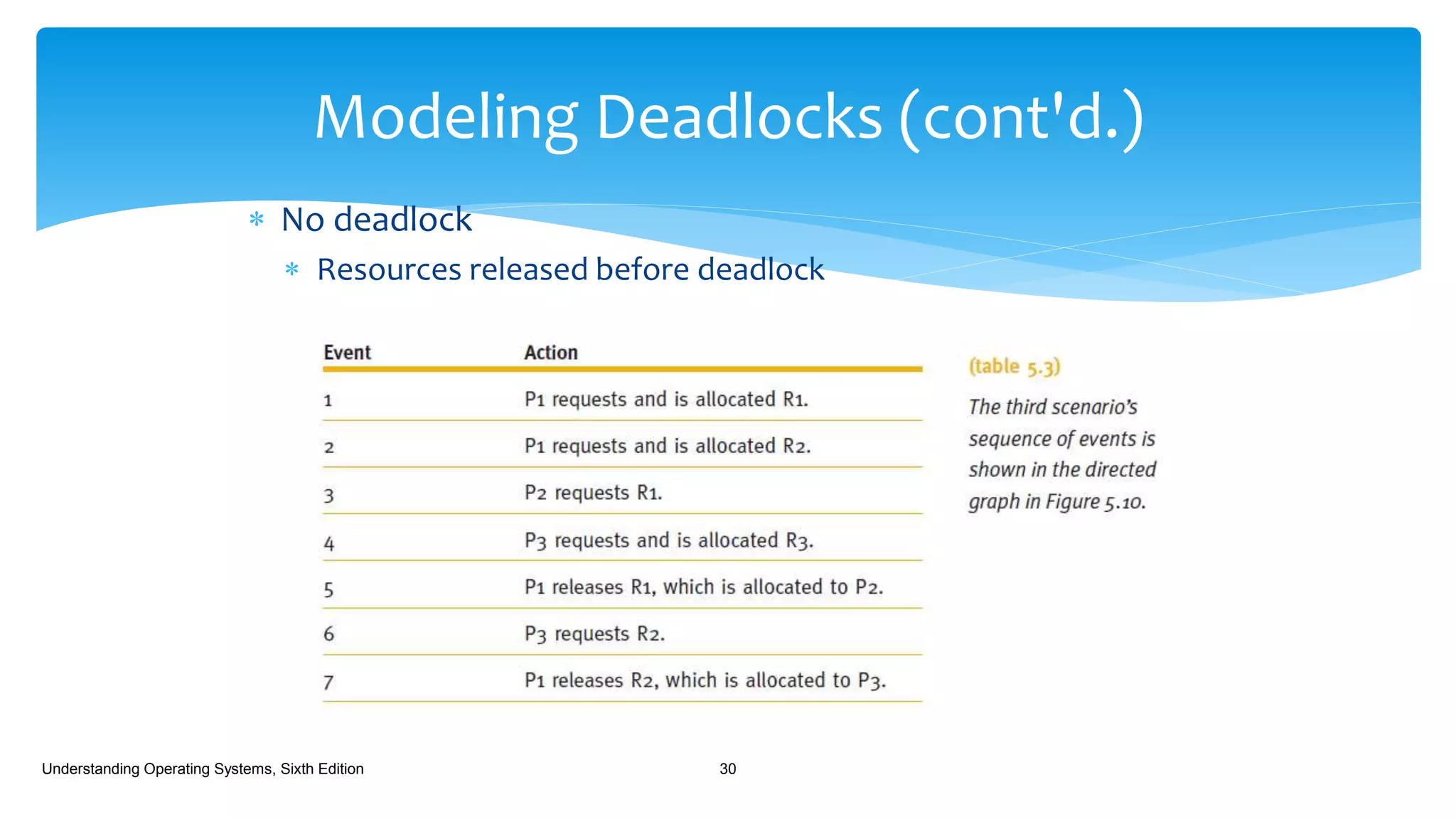
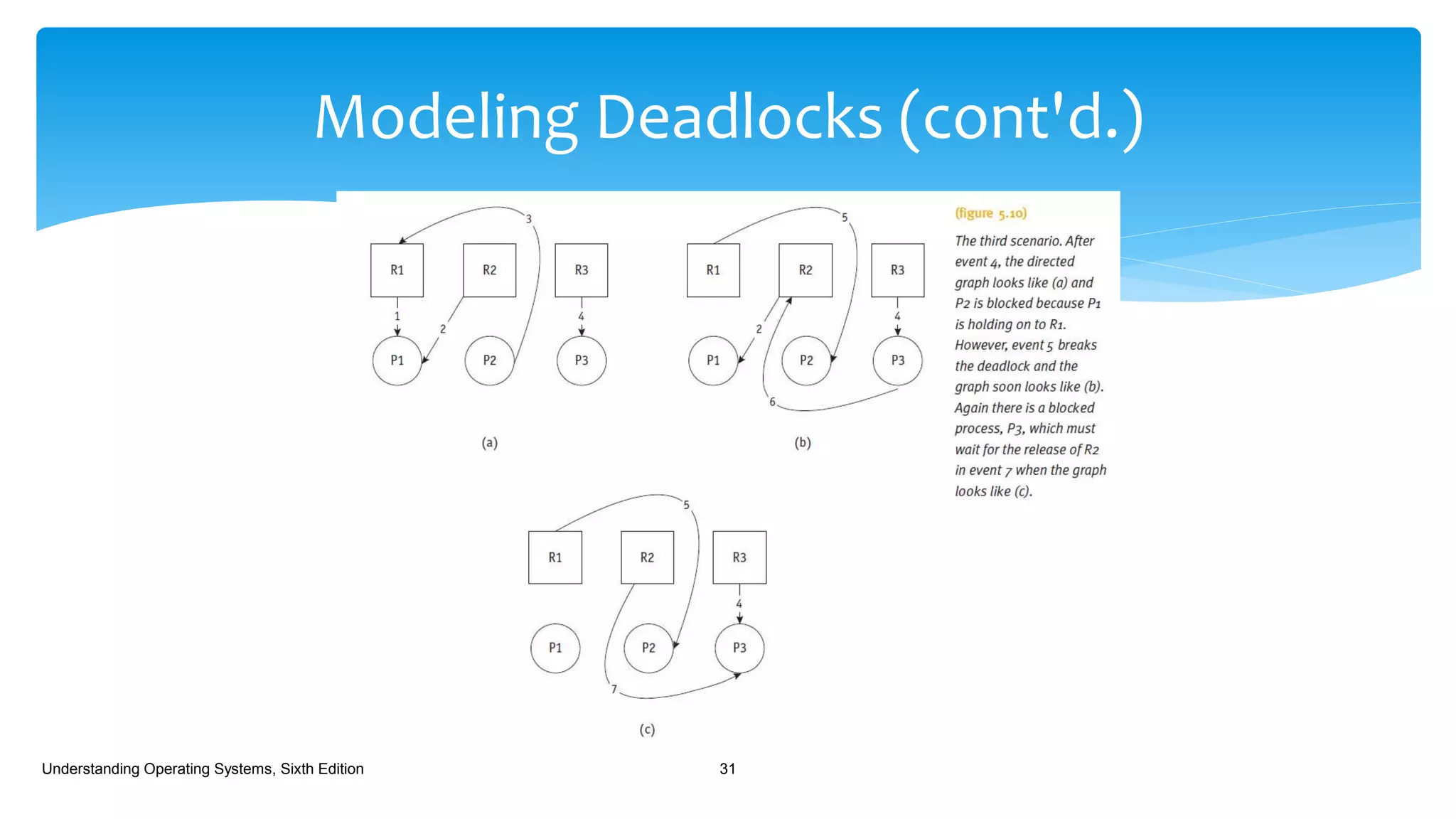
 Scenario three: no deadlock
 Resources released before deadlock
Understanding Operating Systems, Sixth Edition 25
Modeling Deadlocks (cont'd.)
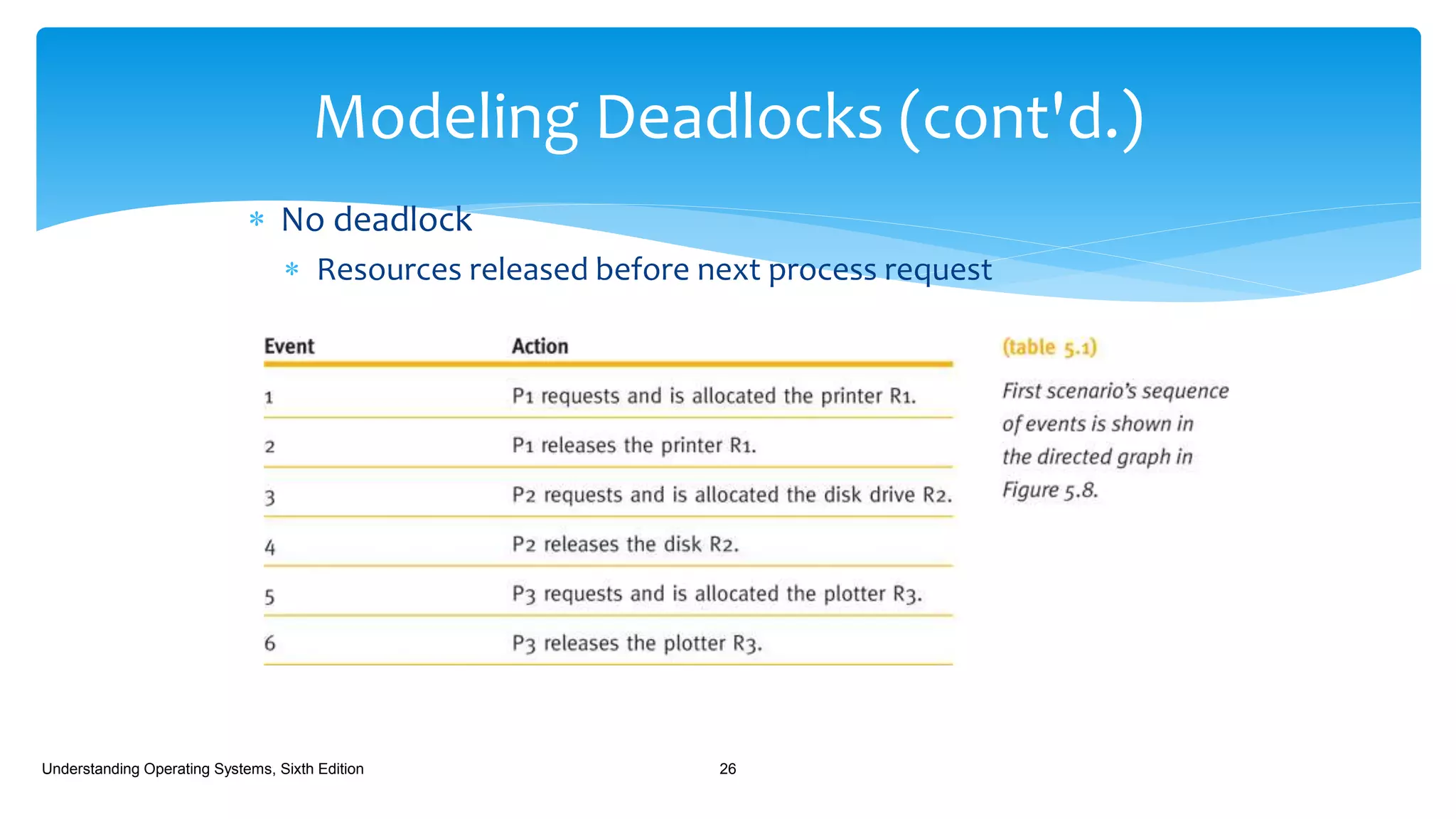
 No deadlock
 Resources released before next process request
Understanding Operating Systems, Sixth Edition 26
Modeling Deadlocks (cont'd.)
Understanding Operating Systems, Sixth Edition 27
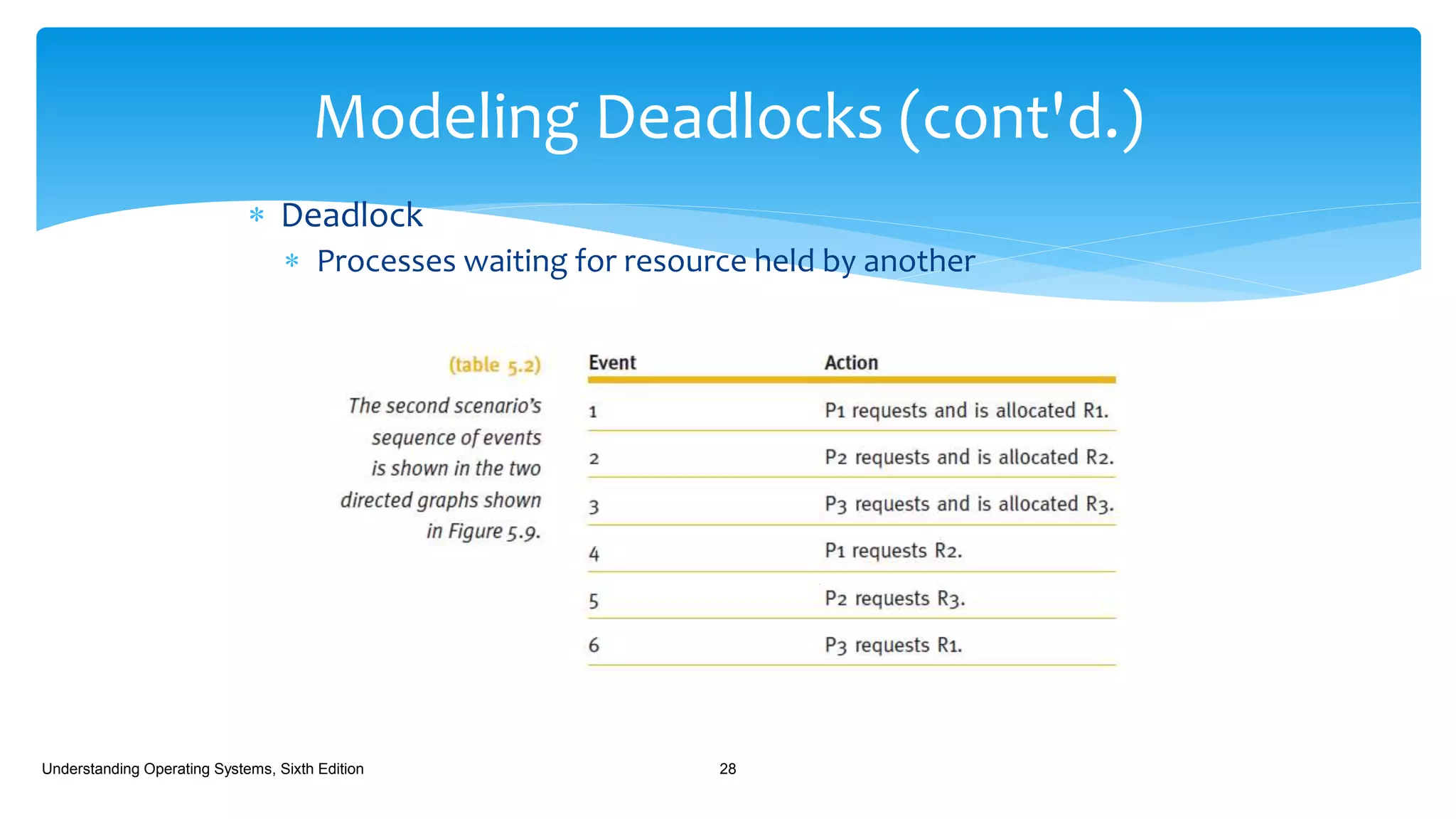
 Deadlock
 Processes waiting for resource held by another
Understanding Operating Systems, Sixth Edition 28
Modeling Deadlocks (cont'd.)
Understanding Operating Systems, Sixth Edition 29
 No deadlock
 Resources released before deadlock
Understanding Operating Systems, Sixth Edition 30
Modeling Deadlocks (cont'd.)
Understanding Operating Systems, Sixth Edition 31
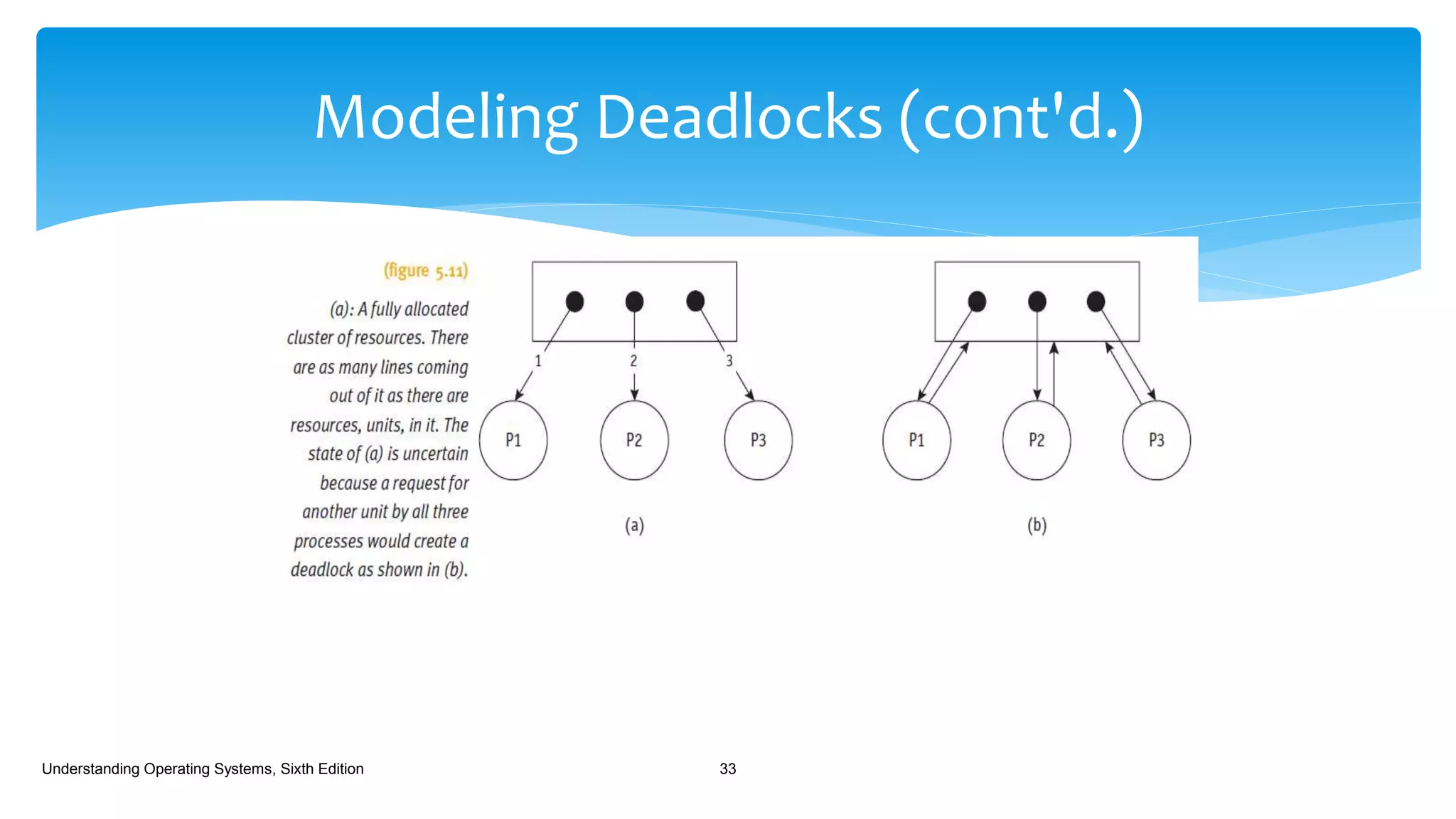
 Another example
 Resources of same type
 Allocated individually or grouped in same process
 Graph clusters devices into one entity
 Allocated individually or grouped in different process
 Graph clusters devices into one entity
Understanding Operating Systems, Sixth Edition 32
Modeling Deadlocks (cont'd.)
Understanding Operating Systems, Sixth Edition 33
 The requests and releases are received in an unpredictable order, which
makes it very difficult to design a foolproof preventive policy.
 OSs use one of three strategies to deal with deadlocks:
 Prevent one of the four conditions from occurring.
 Avoid the deadlock if it becomes probable.
 Detect the deadlock when it occurs and recover from it gracefully.
Understanding Operating Systems, Sixth Edition 34
Strategies for Handling Deadlocks
 Prevention:
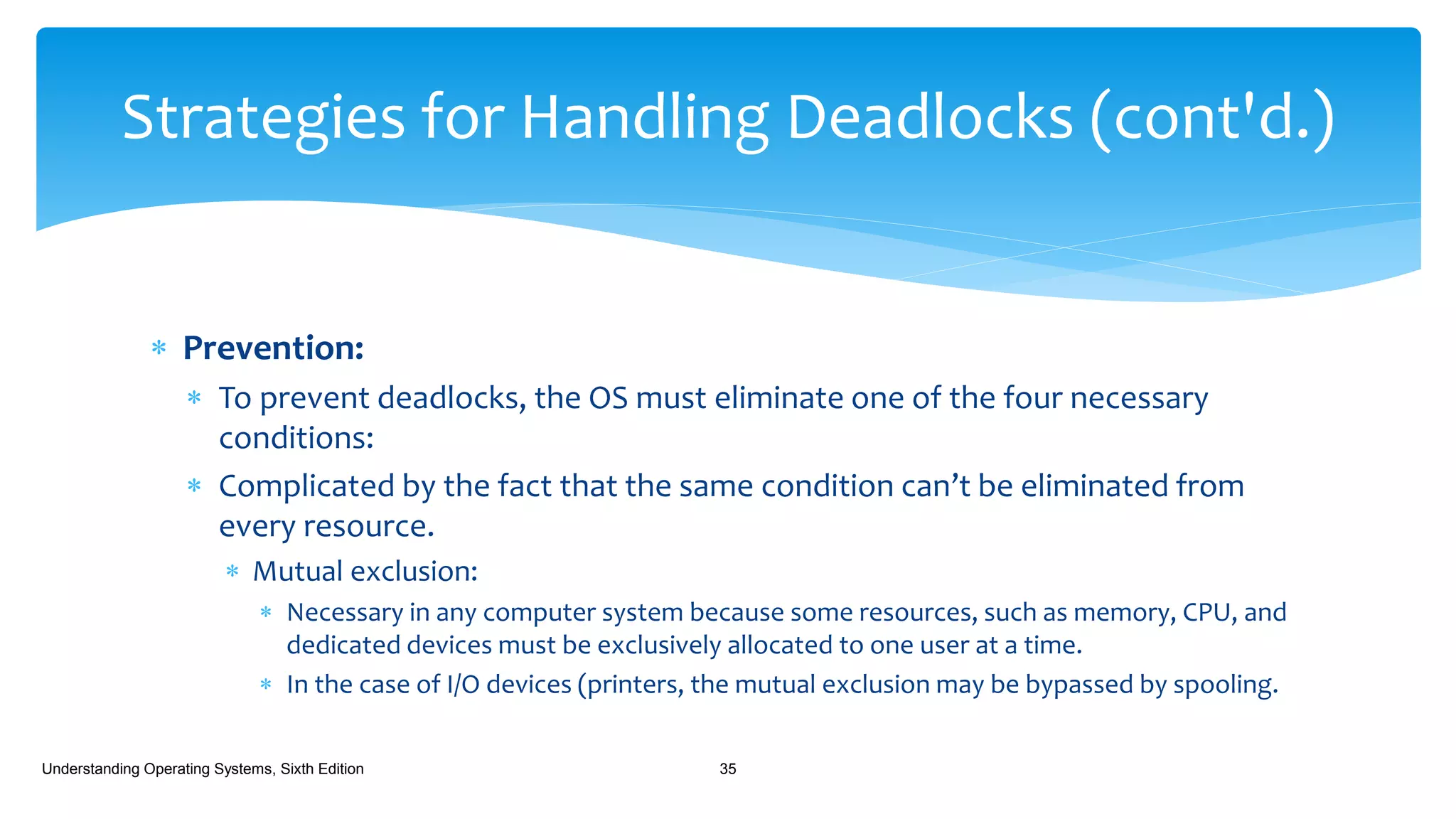
 To prevent deadlocks, the OS must eliminate one of the four necessary
conditions:
 Complicated by the fact that the same condition can’t be eliminated from
every resource.
 Mutual exclusion:
 Necessary in any computer system because some resources, such as memory, CPU, and
dedicated devices must be exclusively allocated to one user at a time.
 In the case of I/O devices (printers, the mutual exclusion may be bypassed by spooling.
Understanding Operating Systems, Sixth Edition 35
Strategies for Handling Deadlocks (cont'd.)
 Prevention:
 Resource Holding:
 A job holds on to one resource while waiting for another one that’s not
yet available.
 Could be sidestepped by forcing each job to request, at creation time,
every resource it will need to run to completion.
 If every job in a batch system is given as much memory as it needs, then
the number of active jobs will be dictated by how many can fit in
memory.
 Would significantly decrease the degree of multiprogramming.
 Peripheral devices would be idle because they would be allocated to a
job even though they wouldn’t be use all the time.
Understanding Operating Systems, Sixth Edition 36
Strategies for Handling Deadlocks (cont'd.)
 Prevention:
 Resource Holding:
 Used successfully in batch environments although it:
 Reduced the effective use of resources;
 Restricted the amount of multiprogramming.
 Doesn’t work well in interactive systems.
Understanding Operating Systems, Sixth Edition 37
Strategies for Handling Deadlocks (cont'd.)
 Prevention (cont'd.)
 No preemption:
 Could be bypassed by allowing the OS to deallocate resources from jobs.
 Can be done if the state of the job can be easily saved and restored.
 As when a job is preempted in a round robin environment or a page is swapped to
secondary storage in a virtual memory system.
 Preemption of a dedicated I/O device, during the modification process, however,
can require some extremely unpleasant recovery tasks. Not accepted to preempt
dedicated I/O device or files during modification.
Understanding Operating Systems, Sixth Edition 38
Strategies for Handling Deadlocks (cont'd.)
 Prevention (cont'd.)
 Circular Wait:
 Hierarchical Ordering:
 Based on a numbering system for the resources:
 Printer = 1;
 Disk = 2;
 Tape = 3;
 Plotter = 4;
 And so on.
Understanding Operating Systems, Sixth Edition 39
Strategies for Handling Deadlocks (cont'd.)
 Prevention (cont'd.)
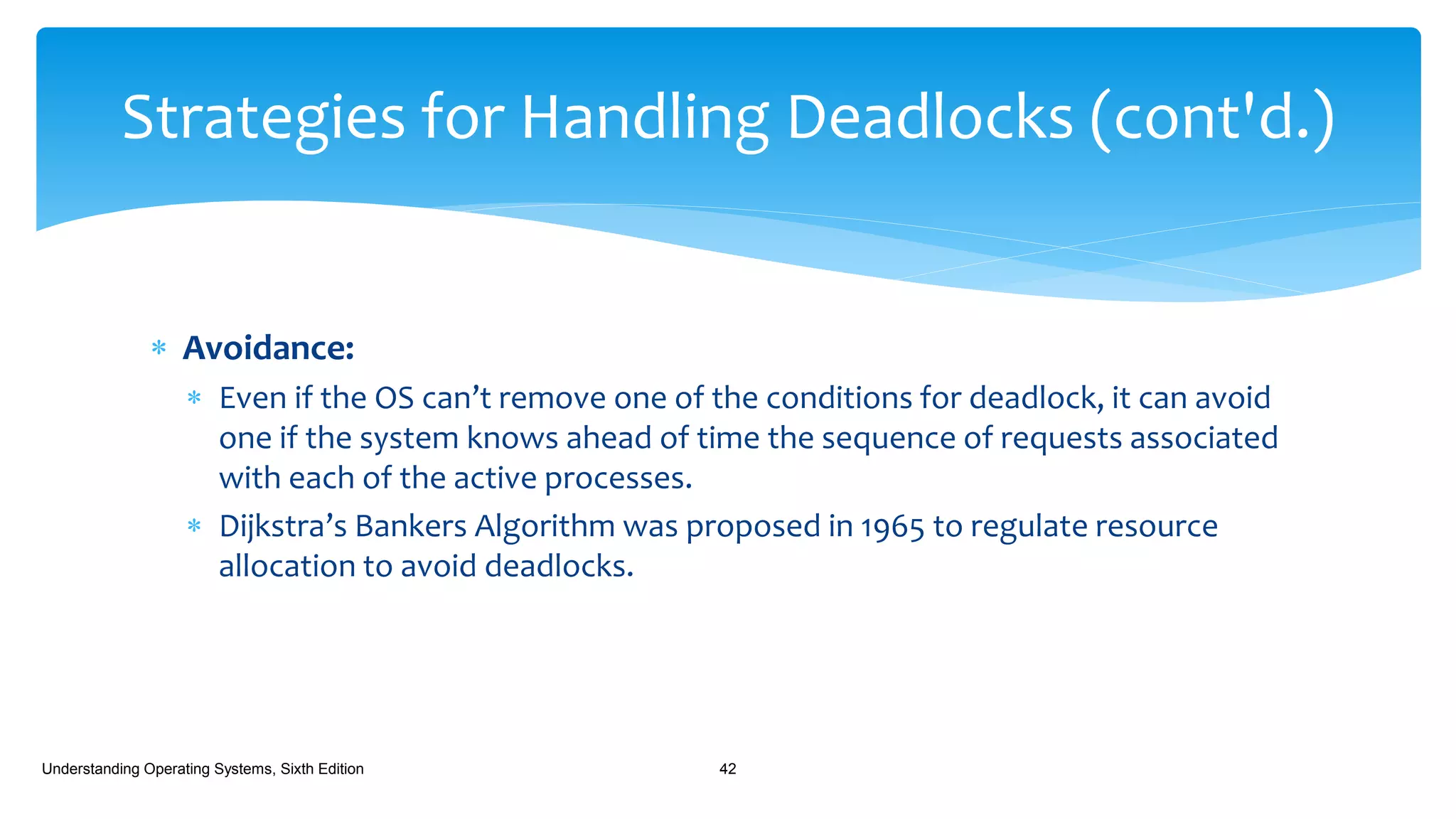
 The system forces each job to request its resources in
ascending order.
 If a job needed a printer and then a plotter, it would request them
in that order.
 Printer (#1)
 Plotter (#4)
 If the job required the plotter first and then a plotter, it would still
request the printer first even though it wouldn’t be used right
away.
 A job could request a printer (#1) and then a disk (#2) and then a
tape (#3); but if it needed another printer (#1) late in its processing,
it would still have to anticipate that need when it requested the
first one, and before it requested the disk.
Understanding Operating Systems, Sixth Edition 40
Strategies for Handling Deadlocks
(cont'd.)
 Prevention (cont'd.)
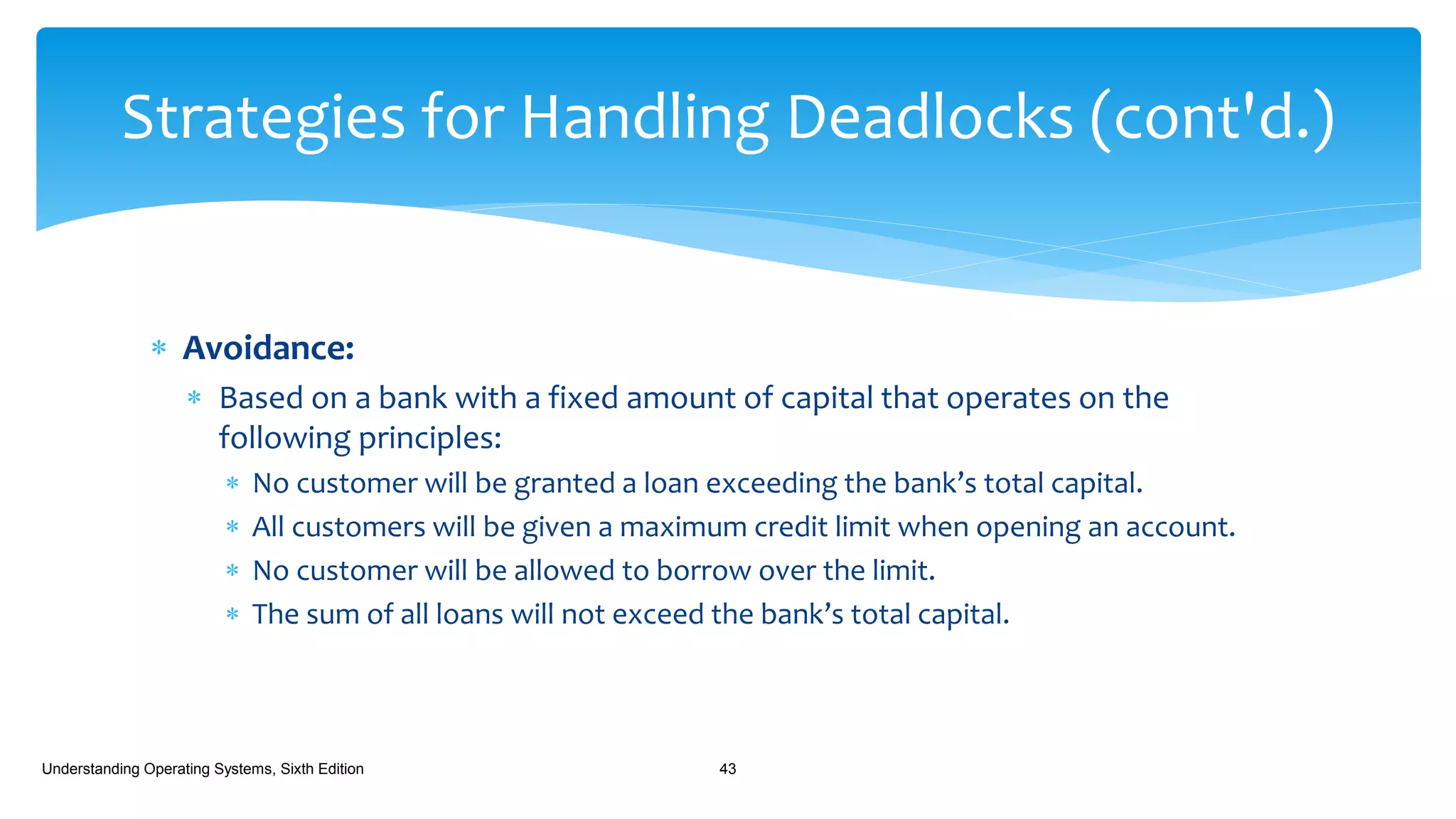
 This scheme of “hierarchical ordering” removes the possibility of a circular wait
and, therefore, guarantees the removal of deadlocks. It doesn’t require that jobs
state their maximum needs in advance, but it does require that the jobs anticipate
the order in which they will request resources.
 From the perspective of a system designer, one of the difficulties of this scheme is
discovering the best order for the resources so that the needs of the majority of
the users are satisfied.
 Another difficulty is that of assigning a ranking to nonphysical resources such as
files or locked database records where there is no basis for assigning a higher
number to one over the other.
Understanding Operating Systems, Sixth Edition 41
Strategies for Handling Deadlocks (cont'd.)
 Avoidance:
 Even if the OS can’t remove one of the conditions for deadlock, it can avoid
one if the system knows ahead of time the sequence of requests associated
with each of the active processes.
 Dijkstra’s Bankers Algorithm was proposed in 1965 to regulate resource
allocation to avoid deadlocks.
Understanding Operating Systems, Sixth Edition 42
Strategies for Handling Deadlocks (cont'd.)
 Avoidance:
 Based on a bank with a fixed amount of capital that operates on the
following principles:
 No customer will be granted a loan exceeding the bank’s total capital.
 All customers will be given a maximum credit limit when opening an account.
 No customer will be allowed to borrow over the limit.
 The sum of all loans will not exceed the bank’s total capital.
Understanding Operating Systems, Sixth Edition 43
Strategies for Handling Deadlocks (cont'd.)
 Avoidance:
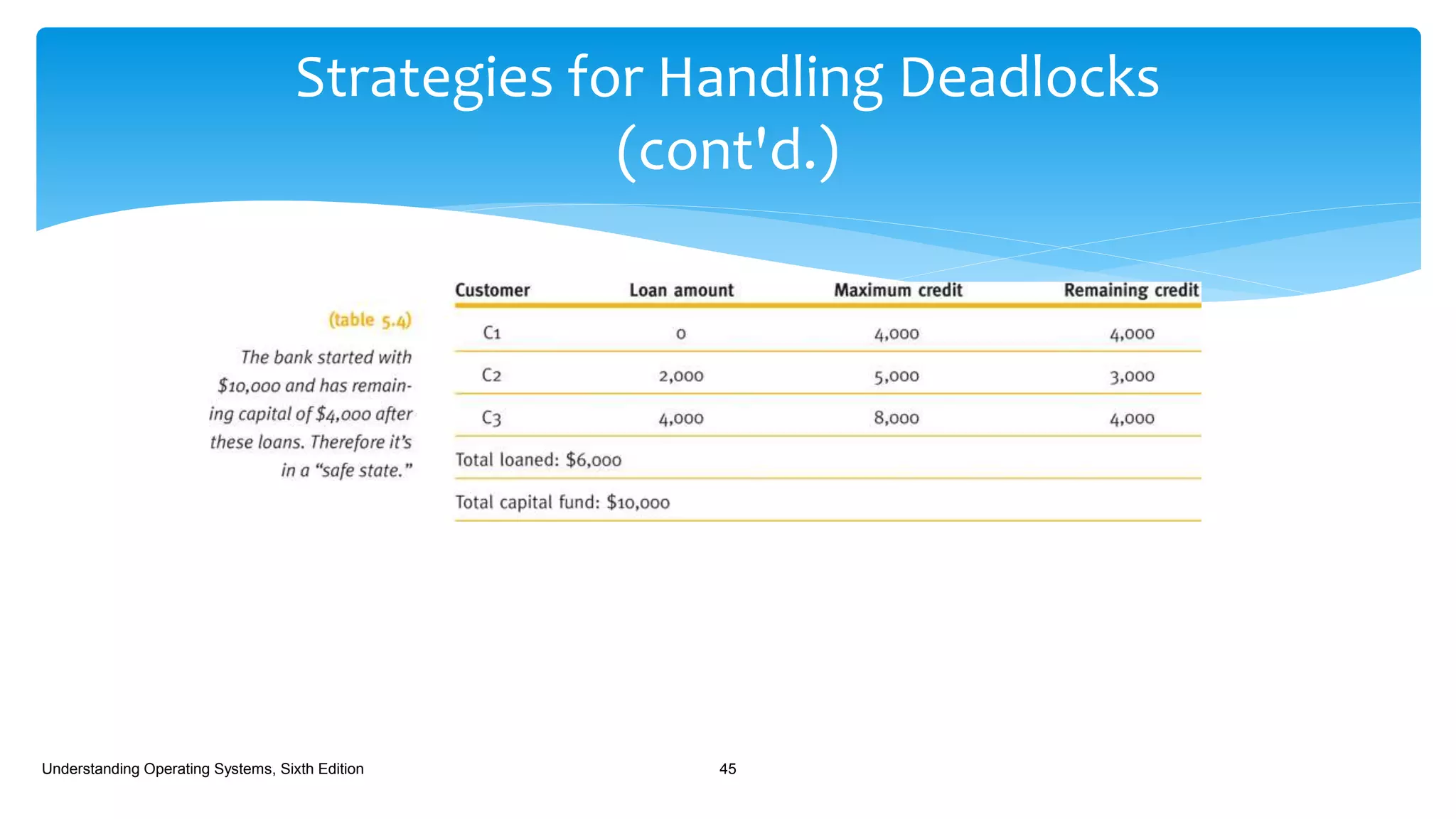
 The bank has total capital of $10,000 and has three customers, C1, C2, and C3,
who have maximum credit limits of $4,000, $5,000, and $8,000, respectively.
Understanding Operating Systems, Sixth Edition 44
Strategies for Handling Deadlocks (cont'd.)
Strategies for Handling Deadlocks
(cont'd.)
Understanding Operating Systems, Sixth Edition 45
 Avoidance:
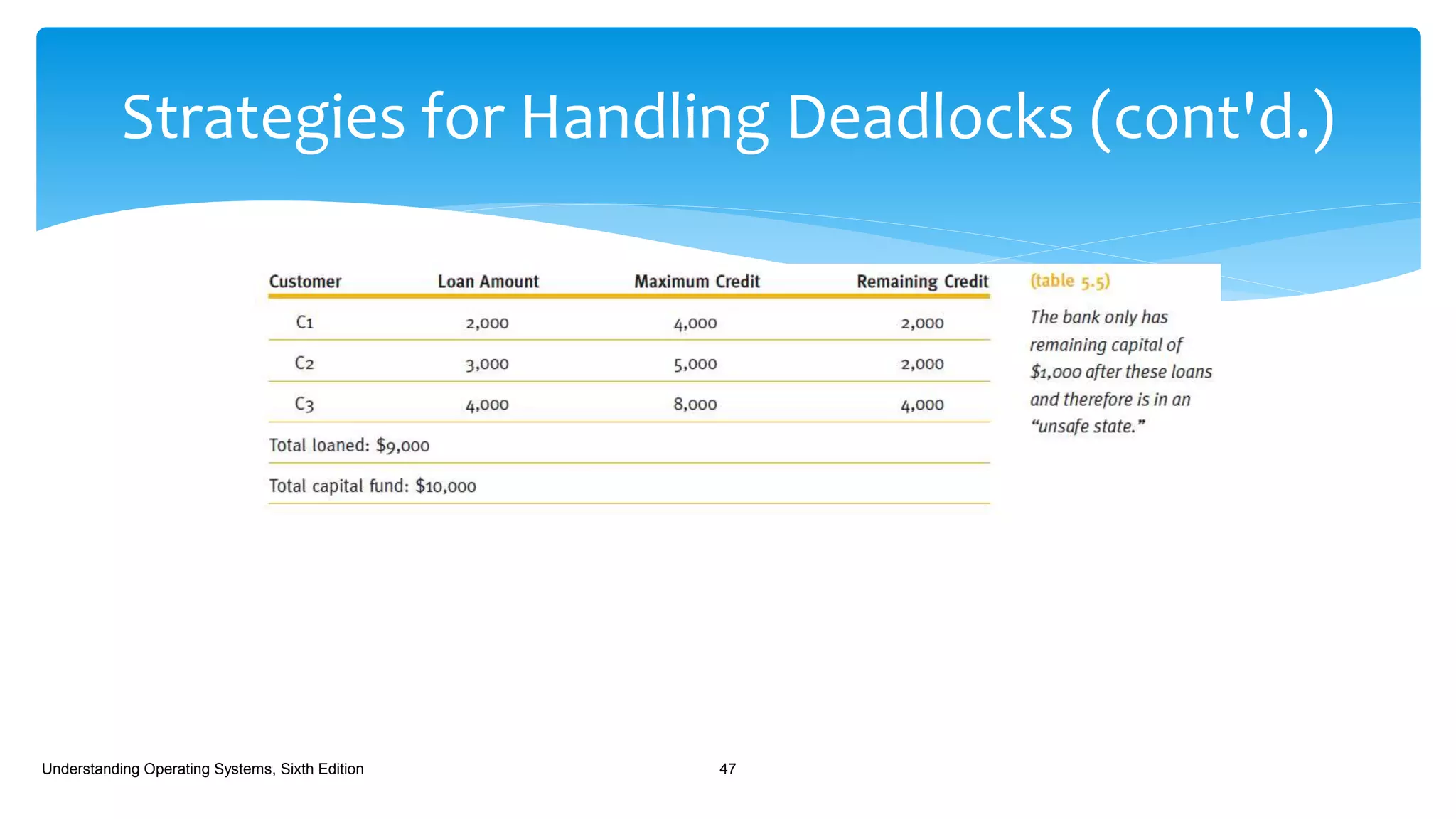
 A few weeks later after more loans have been made, and some have been
repaid -
Understanding Operating Systems, Sixth Edition 46
Strategies for Handling Deadlocks (cont'd.)
Understanding Operating Systems, Sixth Edition 47
 Avoidance:
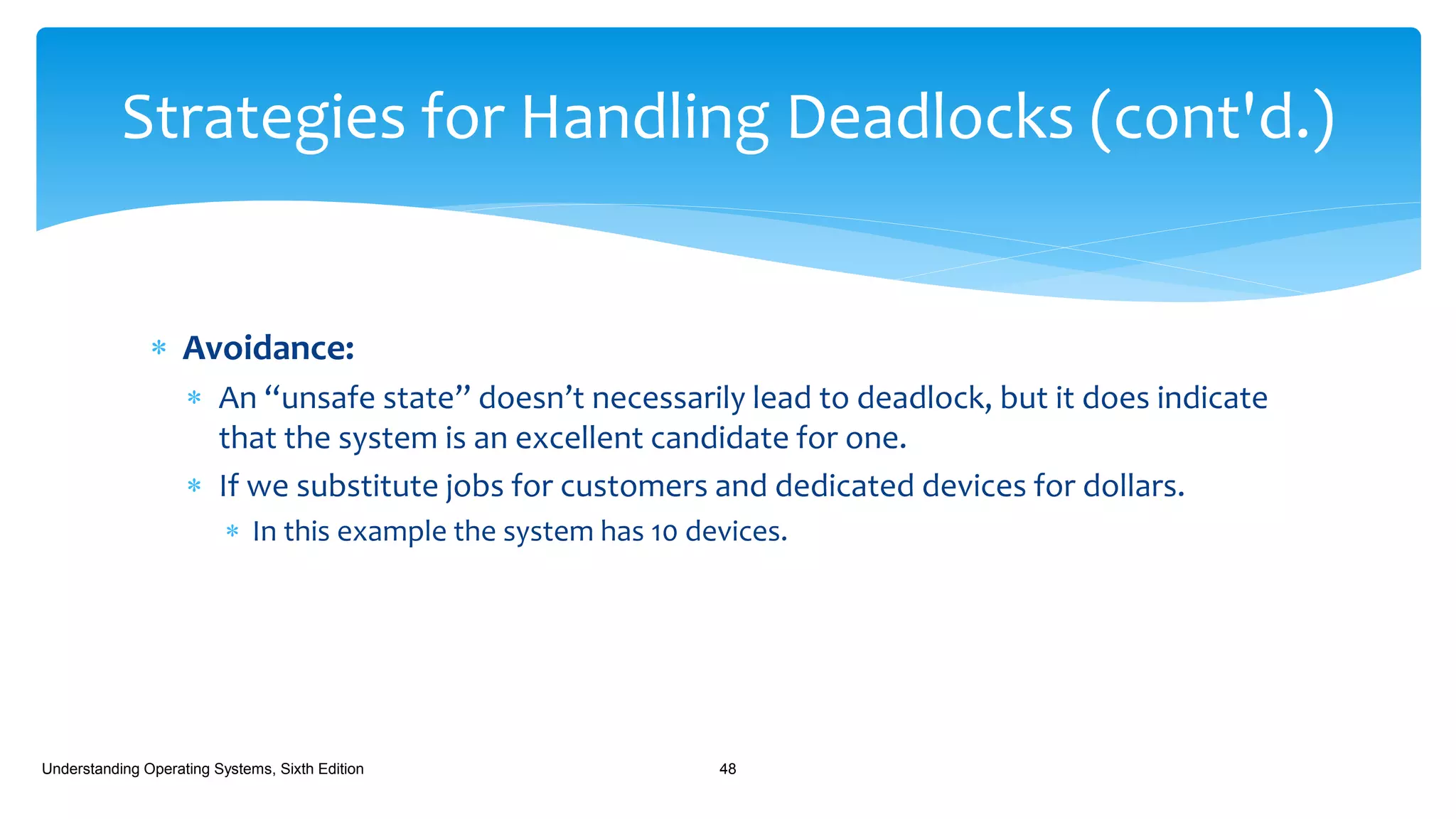
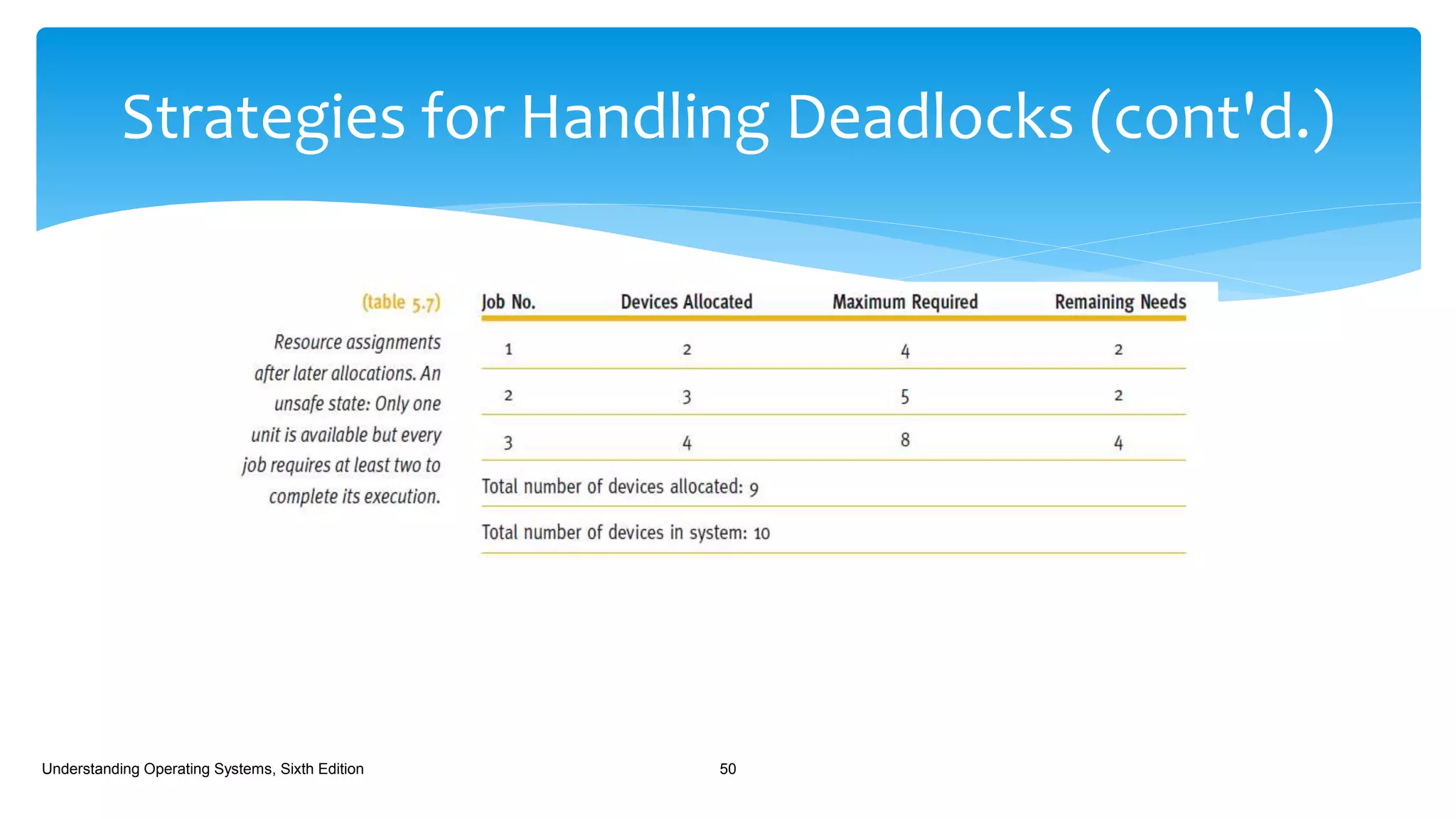
 An “unsafe state” doesn’t necessarily lead to deadlock, but it does indicate
that the system is an excellent candidate for one.
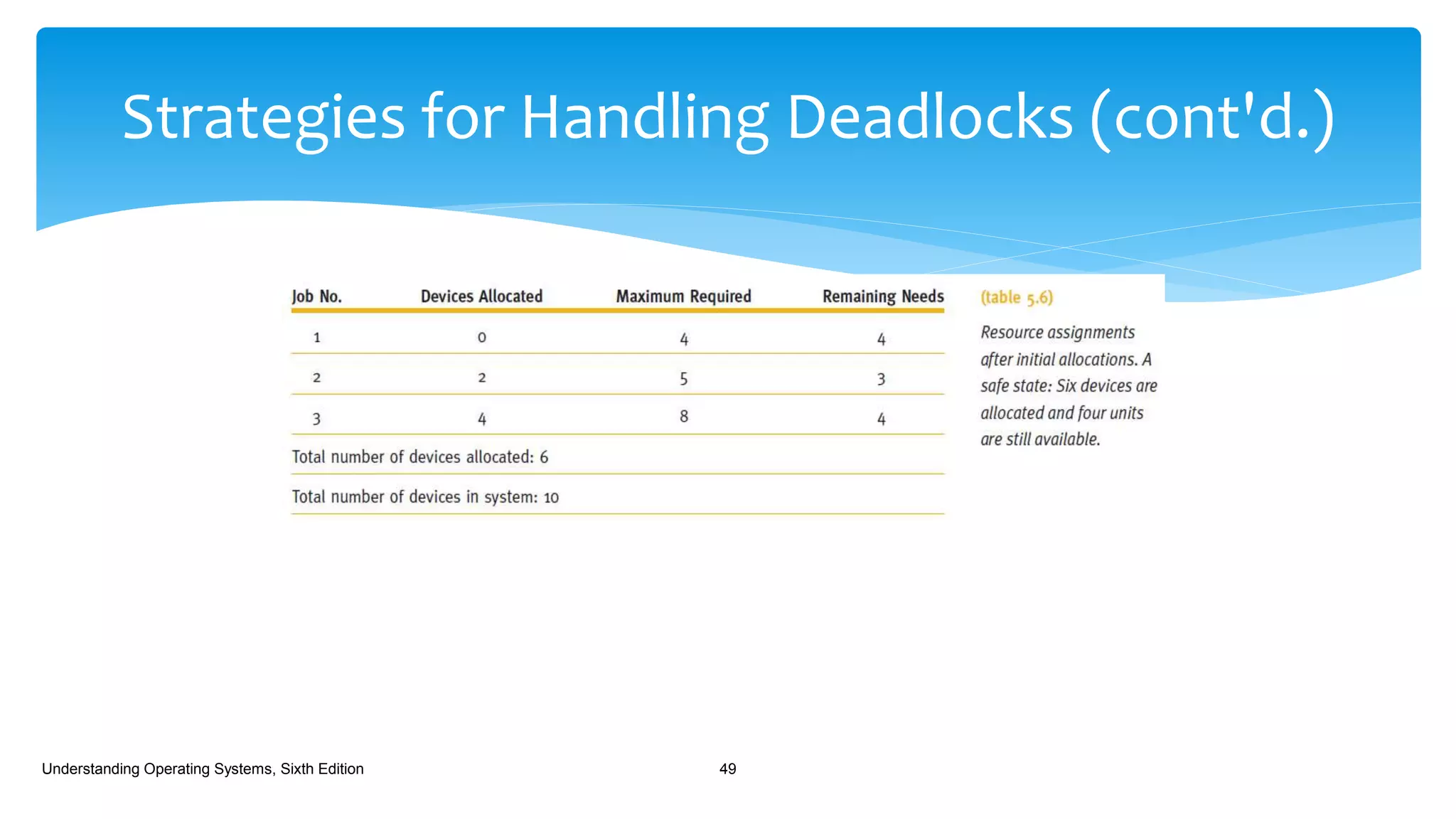
 If we substitute jobs for customers and dedicated devices for dollars.
 In this example the system has 10 devices.
Understanding Operating Systems, Sixth Edition 48
Strategies for Handling Deadlocks (cont'd.)
Understanding Operating Systems, Sixth Edition 49
Strategies for Handling Deadlocks (cont'd.)
Understanding Operating Systems, Sixth Edition 50
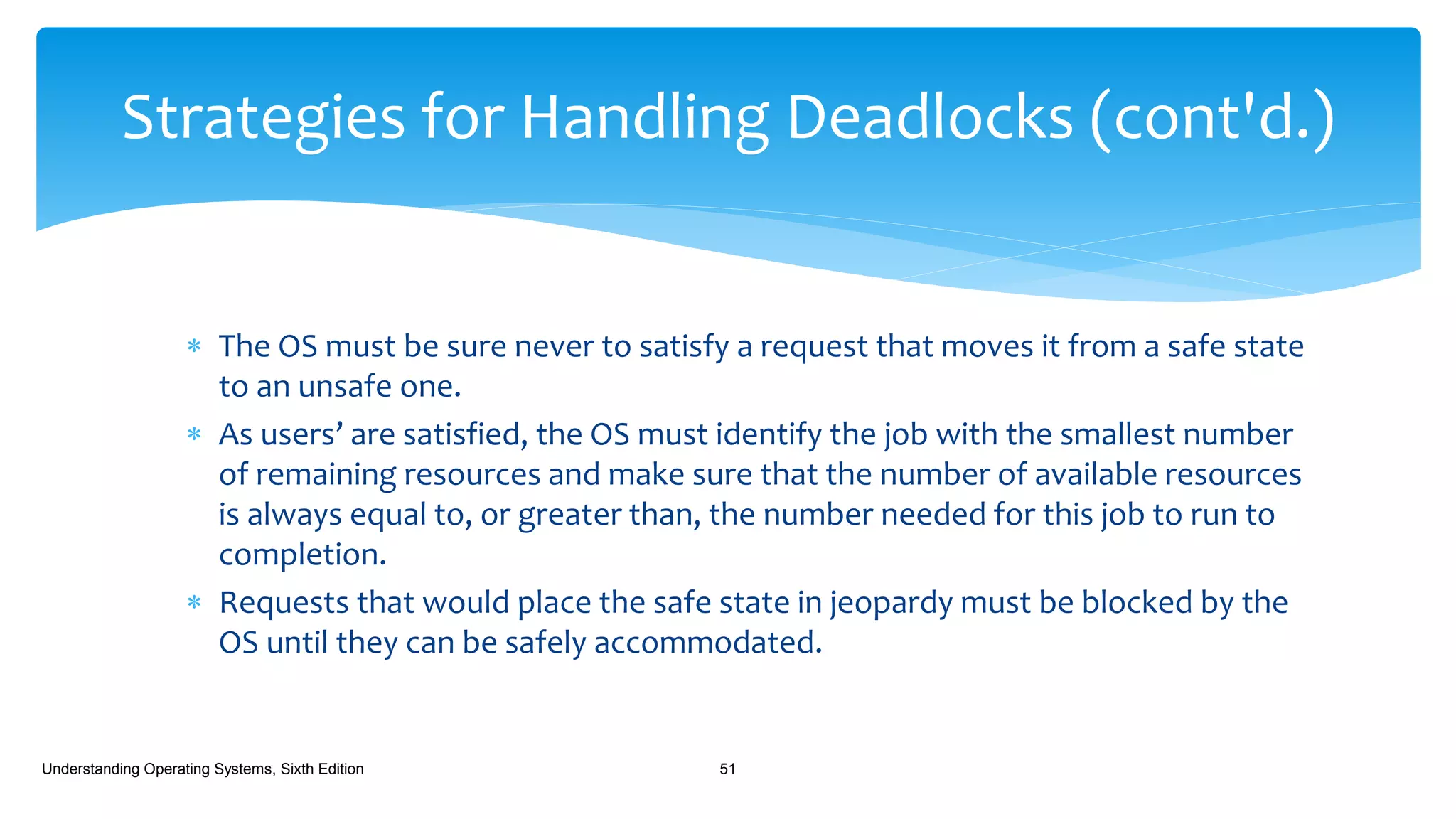
 The OS must be sure never to satisfy a request that moves it from a safe state
to an unsafe one.
 As users’ are satisfied, the OS must identify the job with the smallest number
of remaining resources and make sure that the number of available resources
is always equal to, or greater than, the number needed for this job to run to
completion.
 Requests that would place the safe state in jeopardy must be blocked by the
OS until they can be safely accommodated.
Understanding Operating Systems, Sixth Edition 51
Strategies for Handling Deadlocks (cont'd.)
 If this solution is expanded to work with several classes of resources, the
system sets up a “resource assignment table” for each type of resource and
tracks each table to keep the system in a safe state.
Understanding Operating Systems, Sixth Edition 52
Strategies for Handling Deadlocks (cont'd.)
 Although the Banker’s Algorithm has been used to avoid deadlocks in
systems with a few resources, it isn’t always practical for most systems:
 As they enter the system, jobs must predict the maximum number resources
needed.
 Not practical in interactive systems.
 The number of total resources for each class must remain constant.
 If a device breaks and becomes unavailable, the algorithm won’t work.
Understanding Operating Systems, Sixth Edition 53
Strategies for Handling Deadlocks (cont'd.)
 The number of jobs must remain fixed.
 Isn’t possible in interactive systems where the number of active jobs is constantly
changing.
 The overhead cost incurred by running the avoidance algorithm can be quite
high when there are many active jobs and many devices because it has to be
invoked for every request.
 Resources aren’t well utilized because the algorithm assumes the worst case
and keeps vital resources unavailable to guard against unsafe states.
 Scheduling suffers as a result of the poor utilization and jobs are kept waiting
for resource allocation.
Understanding Operating Systems, Sixth Edition 54
Strategies for Handling Deadlocks (cont'd.)
 Detection
 Deadlocks can be detected by building directed resource graphs and looking
for cycles.
 The algorithm used to detect circularity can be executed whenever it is
appropriate every hour, one a day, only when the operator notices that
throughput has deteriorated, or when an angry user complains.
Understanding Operating Systems, Sixth Edition 55
Strategies for Handling Deadlocks (cont'd.)
 Detection algorithm
1. Find a process that is currently using a resource and not waiting for one.
 This process can be removed from the graph
 Disconnecting the link tying the resource to the process.
 The resource can be returned to the “available list”.
 This is possible because the process would eventually finish and return the
resource.
Understanding Operating Systems, Sixth Edition 56
Strategies for Handling Deadlocks (cont'd.)
 Detection algorithm
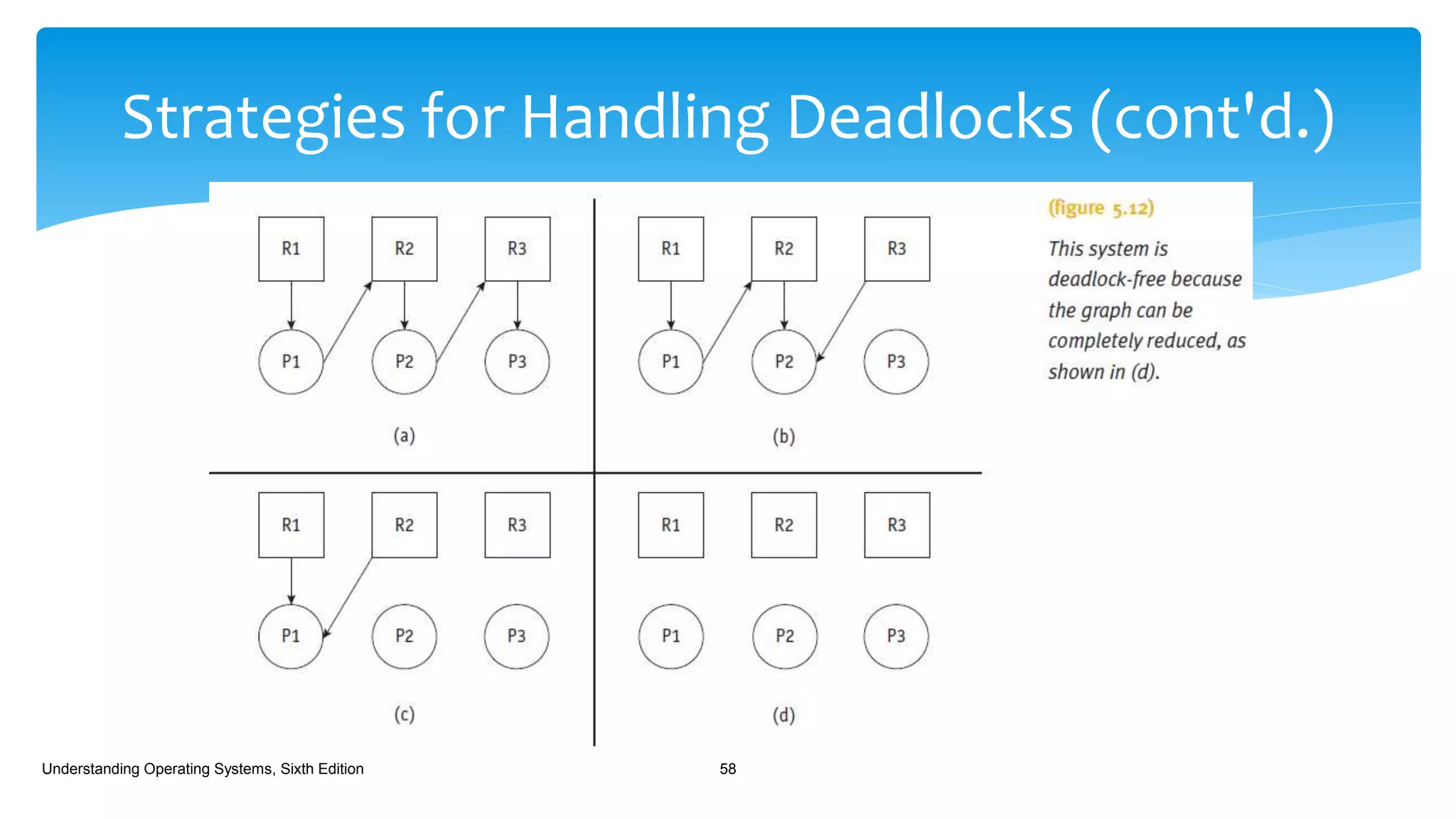
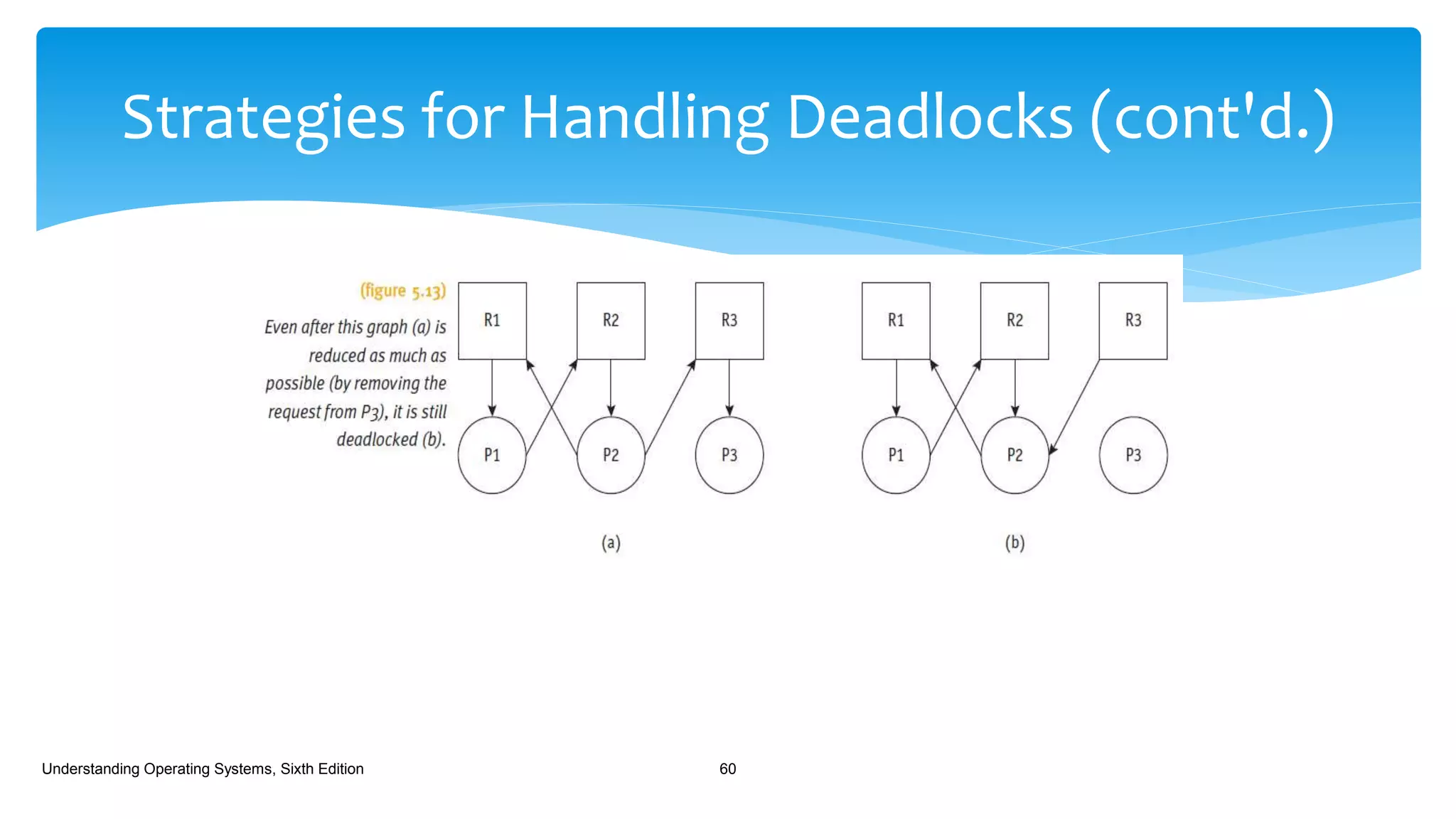
2. Find a process that’s waiting only for resource classes that aren’t fully
allocated
(P2, 5.12(c)).
 This process isn’t contributing to deadlock since it would eventually get the
resource it’s waiting for, finish its work, and return the resource to the
“available list”.
3. Go back to step 1 and continue with steps 1 and 2 until all lines connecting
resources have been removed (5.12(d)).
Understanding Operating Systems, Sixth Edition 57
Strategies for Handling Deadlocks (cont'd.)
Understanding Operating Systems, Sixth Edition 58
 Detection algorithm
 If there are any lines left, this indicates that the request of the process in
question can’t be satisfied and that a deadlock exists.
Understanding Operating Systems, Sixth Edition 59
Strategies for Handling Deadlocks (cont'd.)
Understanding Operating Systems, Sixth Edition 60
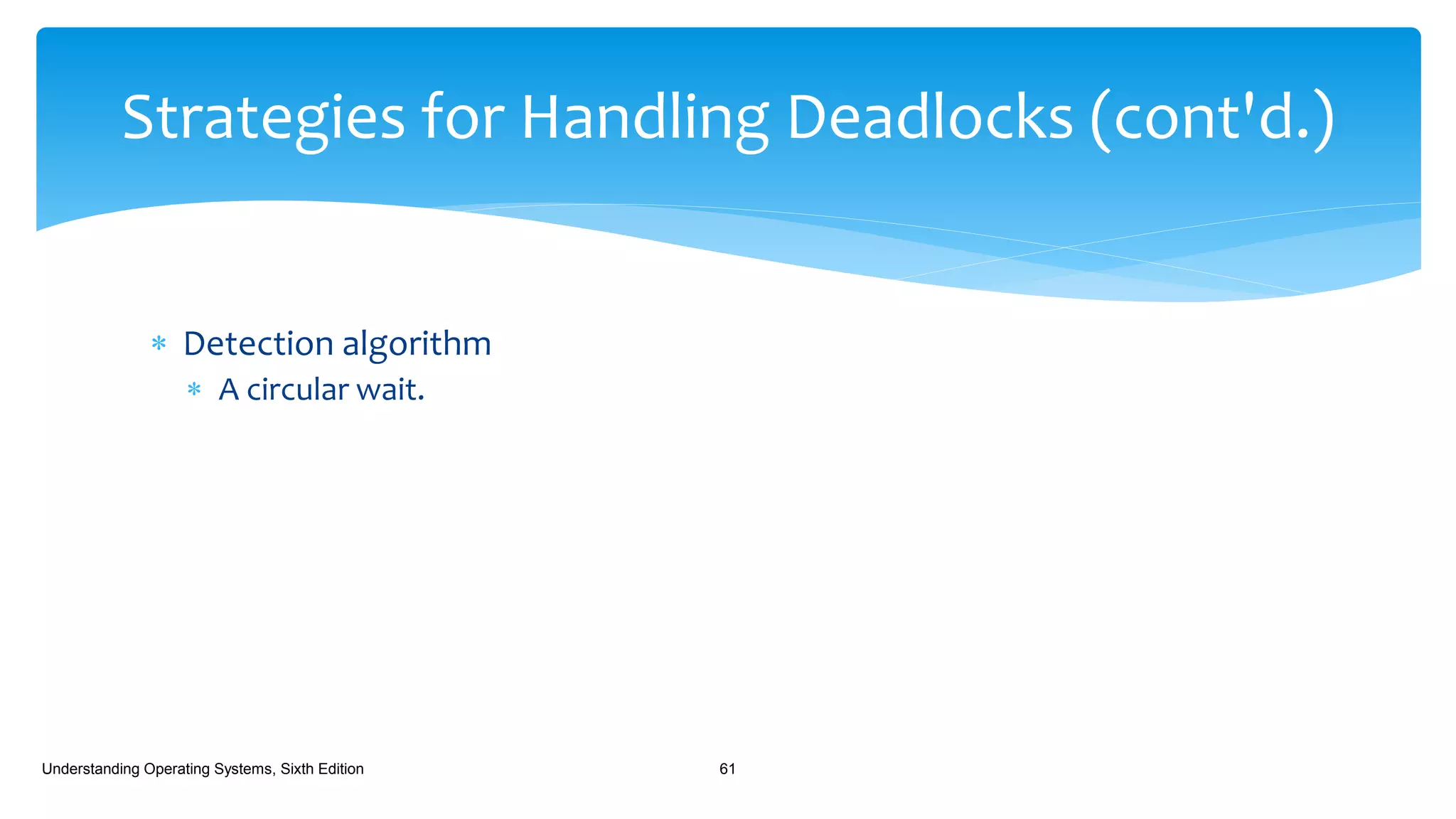
 Detection algorithm
 A circular wait.
Understanding Operating Systems, Sixth Edition 61
Strategies for Handling Deadlocks (cont'd.)
 Recovery
 Once a deadlock has been detected, it must be untangled and the system
returned to normal as quickly as possible.
 There are several recovery algorithms, but they have one feature in
common:
 They all require at least one victim, an expendable job which, when removed
from the deadlock, will free the system.
Understanding Operating Systems, Sixth Edition 62
Strategies for Handling Deadlocks (cont'd.)
 Recovery
 Recovery Methods:
 The first and simplest recovery method, and the most drastic, is to
terminate every job that’s active in the system and restart them
from the beginning.
 The second method is to terminate only the jobs involved in the
deadlock and ask their users to resubmit them.
 The third method is to identify which jobs are involved in the
deadlock and terminate them one at a time, checking to see if the
deadlock is eliminated after each removal, until the deadlock has
been resolved.
 Once the system is free, the remaining jobs are allowed to complete
their processing and later the halted jobs are started again from the
beginning.
Understanding Operating Systems, Sixth Edition 63
Strategies for Handling Deadlocks (cont'd.)
 Recovery
 Recovery Methods:
 The fourth method can be put into effect only if the job keeps a
record, a snapshot, of its progress so it can be interrupted and
then continued without starting again from the beginning of its
execution.
 This method is favored for long-running jobs to help them make a
speedy recovery.
 The fifth method selects a nondeadlocked job, preempts the
resources it’s holding and allocates them to a deadlocked process
so it can resume execution, thus breaking the deadlock.
Understanding Operating Systems, Sixth Edition 64
Strategies for Handling Deadlocks (cont'd.)
 Recovery
 Recovery Methods:
 The sixth method stops new jobs from entering the system, which
allows the nondeadlocked jobs to run to completion so they’ll
release their resources.
 Eventually, with fewer jobs in the system, competition for resources is
curtailed so the deadlocked processes get the resources they need to
run to completion.
 The only method that doesn’t rely on a victim.
 Not guaranteed to work unless the number of available resources
surpasses that needed by at least one of the deadlocked jobs to run.
 Several factors must be considered to select the victim that
will have the least-negative effect on the system.
Understanding Operating Systems, Sixth Edition 65
Strategies for Handling Deadlocks (cont'd.)
 The most common are:
 The priority of the job under consideration:
 High-priority jobs are usually untouched.
 CPU time used by the job:
 Jobs close to completion are usually left alone.
 The number of other jobs that would be affected if this job were selected as
the victim.
 Jobs that are modifying data shouldn’t be selected for termination because
the consistency and validity of the database would be jeopardized.
Understanding Operating Systems, Sixth Edition 66
Strategies for Handling Deadlocks (cont'd.)
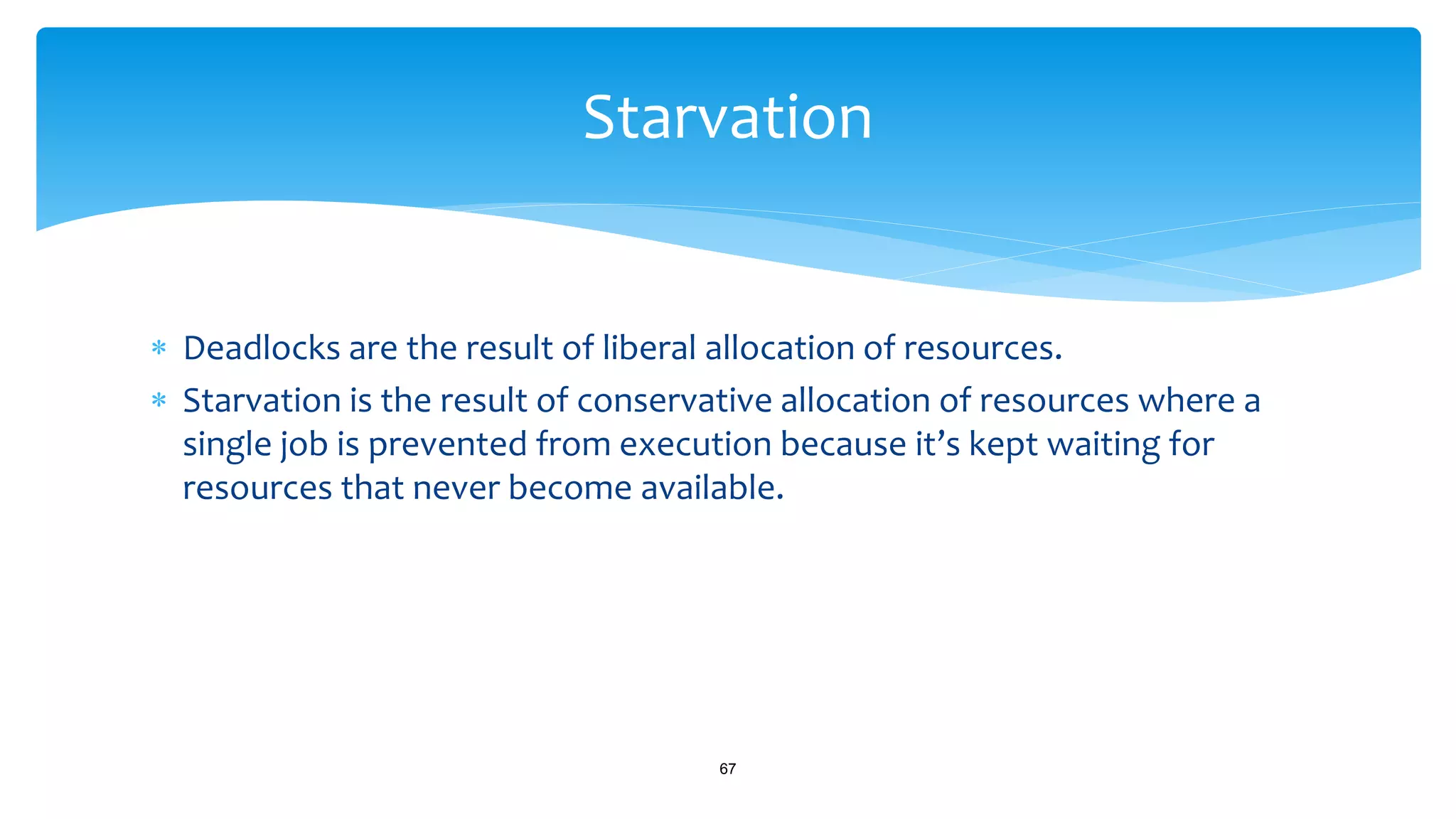
 Deadlocks are the result of liberal allocation of resources.
 Starvation is the result of conservative allocation of resources where a
single job is prevented from execution because it’s kept waiting for
resources that never become available.
67
Starvation
 “The dining philosophers” by Dijkstra (1968)
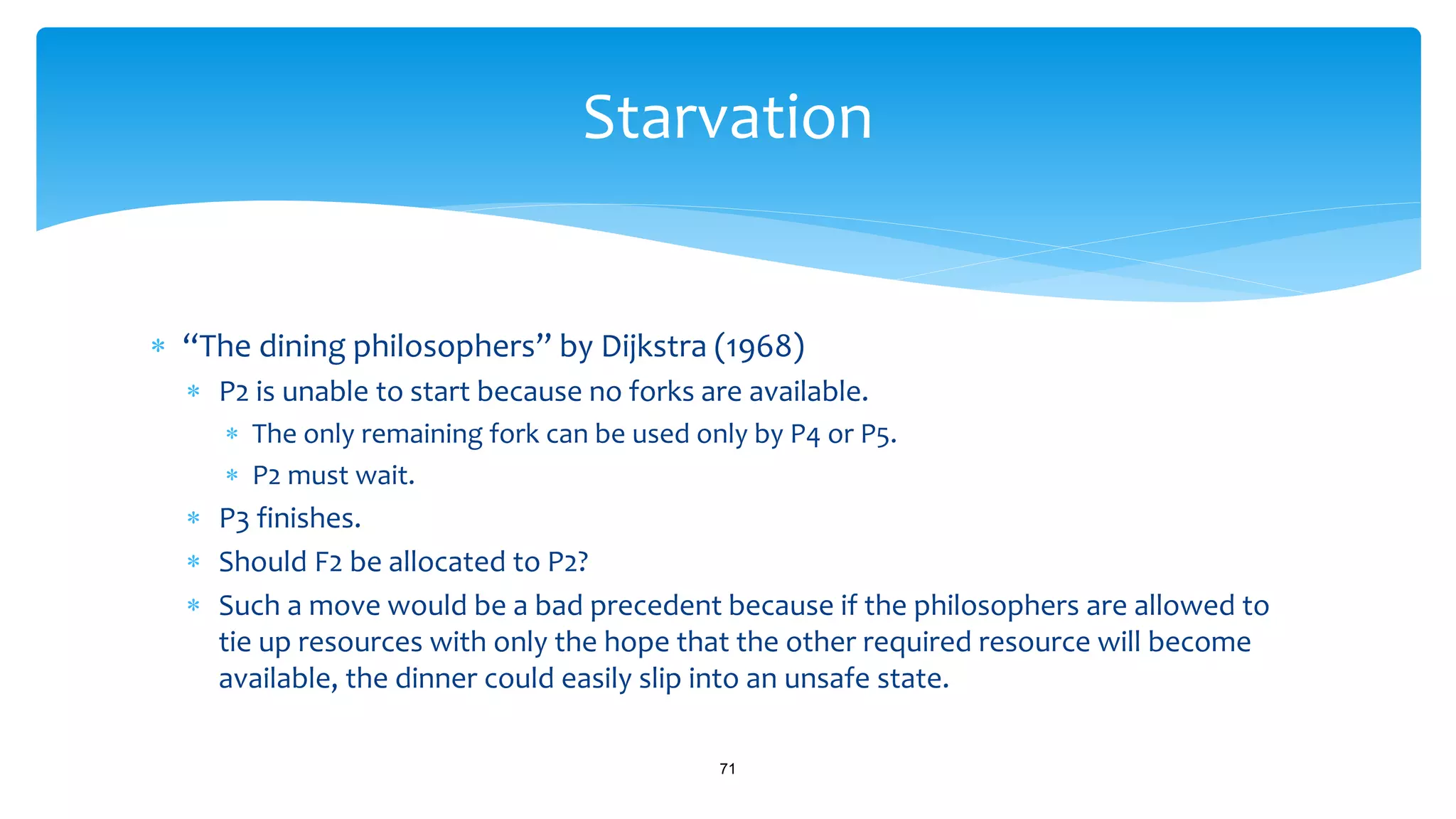
 Five philosophers are sitting at a round table.
 In the center lies a bowl of spaghetti that is accessible to everyone.
 There are forks on the table – one between each philosopher (Figure 5.14).
68
Starvation
Starvation (cont'd.)
69
 “The dining philosophers” by Dijkstra (1968)
 Local custom dictates that each philosopher must use two forks - the forks on
either side of the plate – to eat the spaghetti.
 There are only five forks - not the 10 it would require for all five philosophers.
 That’s a problem for Philosopher 2.
 When they sit down to dinner, P1 is the first to take the two forks , F1 and F5,
on either side of the plate and begins to eat.
 P3 does likewise, using F2 and F3.
70
Starvation
 “The dining philosophers” by Dijkstra (1968)
 P2 is unable to start because no forks are available.
 The only remaining fork can be used only by P4 or P5.
 P2 must wait.
 P3 finishes.
 Should F2 be allocated to P2?
 Such a move would be a bad precedent because if the philosophers are allowed to
tie up resources with only the hope that the other required resource will become
available, the dinner could easily slip into an unsafe state.
71
Starvation
 “The dining philosophers” by Dijkstra (1968)
 It would be only a matter of time, before each philosopher held a single fork
– and nobody could eat.
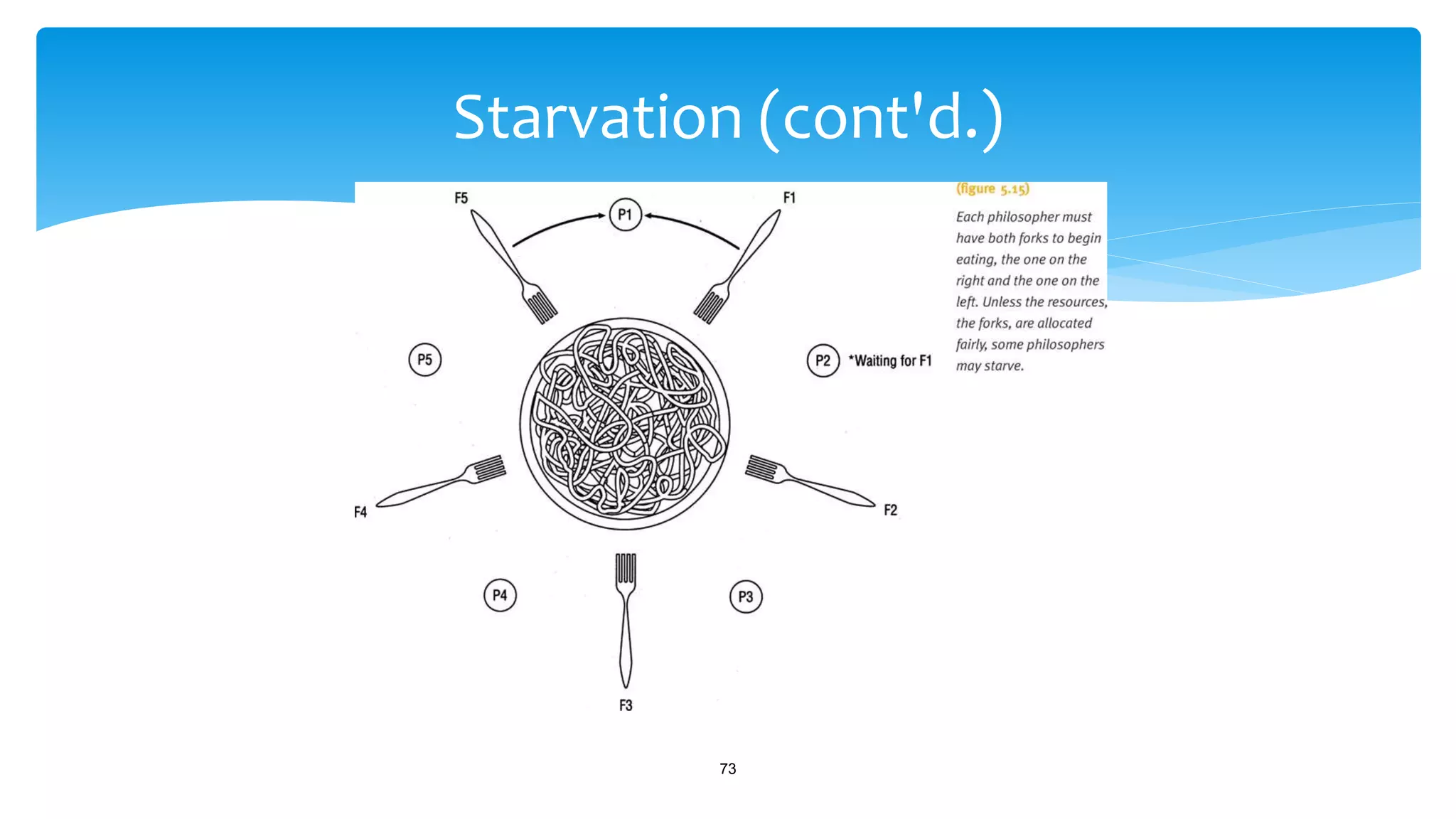
 The resources are allocated to the philosophers only when both forks are
available at the same time (Figure 5.15)
72
Starvation
Starvation (cont'd.)
73
 In a computer environment, the resources are like forks and the
competing processes are like dining philosophers.
 If the resource manager doesn’t watch for starving processes and jobs,
and plan for their eventual completion, they could remain in the system
forever waiting for the right combination of resources.
 To address this problem, an algorithm designed to detect starving jobs
can be implemented, which tracks how long each job has been waiting
for resources (aging).
74
Starvation
 Once starvation has been detected, the system can block new jobs until
the starving jobs have been satisfied.
 However:
 If monitoring is done too often, then new jobs will be blocked too frequently
and throughput will be diminished.
 If it’s not done often enough, then starving jobs will remain in the system for
an unacceptably long period of time.
75
Starvation

Deadlock in Operating System

  • 1.
    Process Management Prepared by, V.SANTHI Asst.Prof, Dept. of BCA Bon secours college for women, Thanjavur.
  • 2.
     A processin operating systems uses different resources and uses resources in following way. 1) Requests a resource 2) Use the resource 2) Releases the resource Deadlock :
  • 3.
     Deadlock IsA Situation Where A Set Of Processes Are Blocked Because Each Process Is Holding A Resource And Waiting For Another Resource Acquired By Some Other Process. R1 p1 p2 R2
  • 4.
    There are 7cases in Deadlock: 1. Deadlocks in File Request 2. Deadlocks in Database 3. Deadlocks in Dedicated device Allocation 4. Deadlocks in Multiple device allocation 5. Deadlocks in Spooling 6. Deadlocks in a Network 7. Deadlocks in Disk Sharing Cases Of DEADLOCK:
  • 5.
  • 6.
     In adatabase, a deadlock is a situation in which two or more transactions are waiting for one another to give up locks. For example, transaction A might hold a lock on some rows in the accounts table and needs to update some rows in the orders table to finish, https://www.youtube.com/watch?v=T9cM8WuJNZ8  Lock can be done by 3different Level:  1.Entire DB can be locked for the duration of the request  2. A subsection of the DB can be locked  3. only the individual record can be locked until the process is completed. Deadlocks in Database A1 B2 Table A Table B
  • 8.
  • 10.
    Deadlocks in Dedicateddevice Allocation
  • 11.
     Deadlocks canhappen when several processes request, and hold on to, several dedicated devices.  Example (Figure 5.4)  Three programs (P1, P2, P3)  Three dedicated devices (tape drive, printer, plotter)  Deadlock sequence  P1 requests and gets tape drive  P2 requests and gets printer  P3 requests and gets the plotter  P1 requests printer but blocked  P2 requests plotter but blocked  P3 requests tape drive but blocked 11 Case 4: Deadlocks in Multiple Device Allocation
  • 12.
    Deadlocks in Multipledevice allocation
  • 13.
     Printers areusually sharable devices (Virtual devices) that use high- speed storage to transfer data between it and the CPU.  The spooler accepts output from several users and acts as a temporary storage area for all output until the printer is ready to accept it (spooling).  If the printer needs all of a job’s output before it will begin printing, but the spooling system fills the available space with only partially completed output, a deadlock can occur. Understanding Operating Systems, Sixth Edition 13 Case 5: Deadlocks in Spooling
  • 14.
     Deadlock Sequence: Printer needs all job output before printing begins  Spooling system fills disk space area  No one job has entire print output in spool area  Results in partially completed output for all jobs  Results in deadlock  Any part of the system that relies on spooling, such as one that handles incoming jobs or transfers files over a network, is vulnerable to such a deadlock. Understanding Operating Systems, Sixth Edition 14 Case 5: Deadlocks in Spooling (cont'd.)
  • 15.
     A networkthat’s congested or has filled a large percentage of its I/O buffer space can become deadlocked if it doesn’t have protocols to control the flow of messages through the network.  Example (Figure 5.5)  Seven computers on network  Each on different nodes  Direction of arrows  Indicates message flow  Deadlock sequence  All available buffer space fills Understanding Operating Systems, Sixth Edition 15 Case 6: Deadlocks in a Network
  • 16.
    Case 6: Deadlocksin a Network (cont'd.) Understanding Operating Systems, Sixth Edition 16
  • 17.
    Deadlock in disksharing  Disks Are Designed To be Shared, But Two Process Cant Access Different Areas Of Same Disk.  This ability known as active type of Deadlocks also called as Livelock.
  • 18.
    Deadlock Can AriseIf Following Four Conditions:  Mutual Exclusion: One Or More Than One Resource Are Non- sharable (Only One Process Can Use At A Time)  Resource Hold : A Process Is Holding At Least One Resource And Waiting For Resources.  No Preemption: A Resource Cannot Be Taken From a Process Unless The Process Releases The Resource.  Circular Wait: A Set Of Processes Are Waiting For Each Other In Circular Form.
  • 19.
     In eachof these seven cases, the deadlock (or livelock) involved several processes and resources.  Each deadlock was preceded by the simultaneous occurrence of four conditions that the OS (or other systems) could have recognized:  Mutual exclusion  Resource holding  No preemption  Circular wait  Each of these four conditions is necessary for the OS to work smoothly. Understanding Operating Systems, Sixth Edition 19 Conditions for Deadlock
  • 20.
     None ofthem can be removed easily without causing the system’s overall functioning to suffer.  The system needs to recognize the combination of conditions before they occur and threaten to cause the system to lock up. Understanding Operating Systems, Sixth Edition 20 Conditions for Deadlock (cont’d)
  • 21.
     Mutual exclusion Allowing only one process access to a dedicated resource.  The first condition for deadlock.  Resource holding  Holding resource and not releasing it  Waiting for other job to retreat  The second condition for deadlock.  No preemption  Lack of temporary reallocation of resources.  The third condition for deadlock. Understanding Operating Systems, Sixth Edition 21 Conditions for Deadlock (cont'd.)
  • 22.
     Circular wait Each process involved in the impasse is waiting for another to voluntarily release the resource so that at least one will be able to continue on and eventually arrive at the destination.  Fourth condition for deadlock.  All four conditions are required for the deadlock to occur.  Deadlock remains until one condition removed Understanding Operating Systems, Sixth Edition 22 Conditions for Deadlock (cont'd.)
  • 23.
     Directed graphs Circles represent processes  Squares represent resources  Solid arrow from resource to process  Process holding resource  Solid arrow from a process to resource  Process waiting for resource  Arrow direction indicates flow  Cycle in graph  Deadlock involving processes and resources Understanding Operating Systems, Sixth Edition 23 Modeling Deadlocks
  • 24.
    Modeling Deadlocks (cont'd.) UnderstandingOperating Systems, Sixth Edition 24
  • 25.
     Three graphscenarios to help detect deadlocks  System has three processes (P1, P2, P3)  System has three resources (R1, R2, R3)  Scenario one: no deadlock  Resources released before next process request  Scenario two: deadlock  Processes waiting for resource held by another  Scenario three: no deadlock  Resources released before deadlock Understanding Operating Systems, Sixth Edition 25 Modeling Deadlocks (cont'd.)
  • 26.
     No deadlock Resources released before next process request Understanding Operating Systems, Sixth Edition 26 Modeling Deadlocks (cont'd.)
  • 27.
    Modeling Deadlocks (cont'd.) UnderstandingOperating Systems, Sixth Edition 27
  • 28.
     Deadlock  Processeswaiting for resource held by another Understanding Operating Systems, Sixth Edition 28 Modeling Deadlocks (cont'd.)
  • 29.
    Modeling Deadlocks (cont'd.) UnderstandingOperating Systems, Sixth Edition 29
  • 30.
     No deadlock Resources released before deadlock Understanding Operating Systems, Sixth Edition 30 Modeling Deadlocks (cont'd.)
  • 31.
    Modeling Deadlocks (cont'd.) UnderstandingOperating Systems, Sixth Edition 31
  • 32.
     Another example Resources of same type  Allocated individually or grouped in same process  Graph clusters devices into one entity  Allocated individually or grouped in different process  Graph clusters devices into one entity Understanding Operating Systems, Sixth Edition 32 Modeling Deadlocks (cont'd.)
  • 33.
    Modeling Deadlocks (cont'd.) UnderstandingOperating Systems, Sixth Edition 33
  • 34.
     The requestsand releases are received in an unpredictable order, which makes it very difficult to design a foolproof preventive policy.  OSs use one of three strategies to deal with deadlocks:  Prevent one of the four conditions from occurring.  Avoid the deadlock if it becomes probable.  Detect the deadlock when it occurs and recover from it gracefully. Understanding Operating Systems, Sixth Edition 34 Strategies for Handling Deadlocks
  • 35.
     Prevention:  Toprevent deadlocks, the OS must eliminate one of the four necessary conditions:  Complicated by the fact that the same condition can’t be eliminated from every resource.  Mutual exclusion:  Necessary in any computer system because some resources, such as memory, CPU, and dedicated devices must be exclusively allocated to one user at a time.  In the case of I/O devices (printers, the mutual exclusion may be bypassed by spooling. Understanding Operating Systems, Sixth Edition 35 Strategies for Handling Deadlocks (cont'd.)
  • 36.
     Prevention:  ResourceHolding:  A job holds on to one resource while waiting for another one that’s not yet available.  Could be sidestepped by forcing each job to request, at creation time, every resource it will need to run to completion.  If every job in a batch system is given as much memory as it needs, then the number of active jobs will be dictated by how many can fit in memory.  Would significantly decrease the degree of multiprogramming.  Peripheral devices would be idle because they would be allocated to a job even though they wouldn’t be use all the time. Understanding Operating Systems, Sixth Edition 36 Strategies for Handling Deadlocks (cont'd.)
  • 37.
     Prevention:  ResourceHolding:  Used successfully in batch environments although it:  Reduced the effective use of resources;  Restricted the amount of multiprogramming.  Doesn’t work well in interactive systems. Understanding Operating Systems, Sixth Edition 37 Strategies for Handling Deadlocks (cont'd.)
  • 38.
     Prevention (cont'd.) No preemption:  Could be bypassed by allowing the OS to deallocate resources from jobs.  Can be done if the state of the job can be easily saved and restored.  As when a job is preempted in a round robin environment or a page is swapped to secondary storage in a virtual memory system.  Preemption of a dedicated I/O device, during the modification process, however, can require some extremely unpleasant recovery tasks. Not accepted to preempt dedicated I/O device or files during modification. Understanding Operating Systems, Sixth Edition 38 Strategies for Handling Deadlocks (cont'd.)
  • 39.
     Prevention (cont'd.) Circular Wait:  Hierarchical Ordering:  Based on a numbering system for the resources:  Printer = 1;  Disk = 2;  Tape = 3;  Plotter = 4;  And so on. Understanding Operating Systems, Sixth Edition 39 Strategies for Handling Deadlocks (cont'd.)
  • 40.
     Prevention (cont'd.) The system forces each job to request its resources in ascending order.  If a job needed a printer and then a plotter, it would request them in that order.  Printer (#1)  Plotter (#4)  If the job required the plotter first and then a plotter, it would still request the printer first even though it wouldn’t be used right away.  A job could request a printer (#1) and then a disk (#2) and then a tape (#3); but if it needed another printer (#1) late in its processing, it would still have to anticipate that need when it requested the first one, and before it requested the disk. Understanding Operating Systems, Sixth Edition 40 Strategies for Handling Deadlocks (cont'd.)
  • 41.
     Prevention (cont'd.) This scheme of “hierarchical ordering” removes the possibility of a circular wait and, therefore, guarantees the removal of deadlocks. It doesn’t require that jobs state their maximum needs in advance, but it does require that the jobs anticipate the order in which they will request resources.  From the perspective of a system designer, one of the difficulties of this scheme is discovering the best order for the resources so that the needs of the majority of the users are satisfied.  Another difficulty is that of assigning a ranking to nonphysical resources such as files or locked database records where there is no basis for assigning a higher number to one over the other. Understanding Operating Systems, Sixth Edition 41 Strategies for Handling Deadlocks (cont'd.)
  • 42.
     Avoidance:  Evenif the OS can’t remove one of the conditions for deadlock, it can avoid one if the system knows ahead of time the sequence of requests associated with each of the active processes.  Dijkstra’s Bankers Algorithm was proposed in 1965 to regulate resource allocation to avoid deadlocks. Understanding Operating Systems, Sixth Edition 42 Strategies for Handling Deadlocks (cont'd.)
  • 43.
     Avoidance:  Basedon a bank with a fixed amount of capital that operates on the following principles:  No customer will be granted a loan exceeding the bank’s total capital.  All customers will be given a maximum credit limit when opening an account.  No customer will be allowed to borrow over the limit.  The sum of all loans will not exceed the bank’s total capital. Understanding Operating Systems, Sixth Edition 43 Strategies for Handling Deadlocks (cont'd.)
  • 44.
     Avoidance:  Thebank has total capital of $10,000 and has three customers, C1, C2, and C3, who have maximum credit limits of $4,000, $5,000, and $8,000, respectively. Understanding Operating Systems, Sixth Edition 44 Strategies for Handling Deadlocks (cont'd.)
  • 45.
    Strategies for HandlingDeadlocks (cont'd.) Understanding Operating Systems, Sixth Edition 45
  • 46.
     Avoidance:  Afew weeks later after more loans have been made, and some have been repaid - Understanding Operating Systems, Sixth Edition 46 Strategies for Handling Deadlocks (cont'd.)
  • 47.
    Strategies for HandlingDeadlocks (cont'd.) Understanding Operating Systems, Sixth Edition 47
  • 48.
     Avoidance:  An“unsafe state” doesn’t necessarily lead to deadlock, but it does indicate that the system is an excellent candidate for one.  If we substitute jobs for customers and dedicated devices for dollars.  In this example the system has 10 devices. Understanding Operating Systems, Sixth Edition 48 Strategies for Handling Deadlocks (cont'd.)
  • 49.
    Strategies for HandlingDeadlocks (cont'd.) Understanding Operating Systems, Sixth Edition 49
  • 50.
    Strategies for HandlingDeadlocks (cont'd.) Understanding Operating Systems, Sixth Edition 50
  • 51.
     The OSmust be sure never to satisfy a request that moves it from a safe state to an unsafe one.  As users’ are satisfied, the OS must identify the job with the smallest number of remaining resources and make sure that the number of available resources is always equal to, or greater than, the number needed for this job to run to completion.  Requests that would place the safe state in jeopardy must be blocked by the OS until they can be safely accommodated. Understanding Operating Systems, Sixth Edition 51 Strategies for Handling Deadlocks (cont'd.)
  • 52.
     If thissolution is expanded to work with several classes of resources, the system sets up a “resource assignment table” for each type of resource and tracks each table to keep the system in a safe state. Understanding Operating Systems, Sixth Edition 52 Strategies for Handling Deadlocks (cont'd.)
  • 53.
     Although theBanker’s Algorithm has been used to avoid deadlocks in systems with a few resources, it isn’t always practical for most systems:  As they enter the system, jobs must predict the maximum number resources needed.  Not practical in interactive systems.  The number of total resources for each class must remain constant.  If a device breaks and becomes unavailable, the algorithm won’t work. Understanding Operating Systems, Sixth Edition 53 Strategies for Handling Deadlocks (cont'd.)
  • 54.
     The numberof jobs must remain fixed.  Isn’t possible in interactive systems where the number of active jobs is constantly changing.  The overhead cost incurred by running the avoidance algorithm can be quite high when there are many active jobs and many devices because it has to be invoked for every request.  Resources aren’t well utilized because the algorithm assumes the worst case and keeps vital resources unavailable to guard against unsafe states.  Scheduling suffers as a result of the poor utilization and jobs are kept waiting for resource allocation. Understanding Operating Systems, Sixth Edition 54 Strategies for Handling Deadlocks (cont'd.)
  • 55.
     Detection  Deadlockscan be detected by building directed resource graphs and looking for cycles.  The algorithm used to detect circularity can be executed whenever it is appropriate every hour, one a day, only when the operator notices that throughput has deteriorated, or when an angry user complains. Understanding Operating Systems, Sixth Edition 55 Strategies for Handling Deadlocks (cont'd.)
  • 56.
     Detection algorithm 1.Find a process that is currently using a resource and not waiting for one.  This process can be removed from the graph  Disconnecting the link tying the resource to the process.  The resource can be returned to the “available list”.  This is possible because the process would eventually finish and return the resource. Understanding Operating Systems, Sixth Edition 56 Strategies for Handling Deadlocks (cont'd.)
  • 57.
     Detection algorithm 2.Find a process that’s waiting only for resource classes that aren’t fully allocated (P2, 5.12(c)).  This process isn’t contributing to deadlock since it would eventually get the resource it’s waiting for, finish its work, and return the resource to the “available list”. 3. Go back to step 1 and continue with steps 1 and 2 until all lines connecting resources have been removed (5.12(d)). Understanding Operating Systems, Sixth Edition 57 Strategies for Handling Deadlocks (cont'd.)
  • 58.
    Strategies for HandlingDeadlocks (cont'd.) Understanding Operating Systems, Sixth Edition 58
  • 59.
     Detection algorithm If there are any lines left, this indicates that the request of the process in question can’t be satisfied and that a deadlock exists. Understanding Operating Systems, Sixth Edition 59 Strategies for Handling Deadlocks (cont'd.)
  • 60.
    Strategies for HandlingDeadlocks (cont'd.) Understanding Operating Systems, Sixth Edition 60
  • 61.
     Detection algorithm A circular wait. Understanding Operating Systems, Sixth Edition 61 Strategies for Handling Deadlocks (cont'd.)
  • 62.
     Recovery  Oncea deadlock has been detected, it must be untangled and the system returned to normal as quickly as possible.  There are several recovery algorithms, but they have one feature in common:  They all require at least one victim, an expendable job which, when removed from the deadlock, will free the system. Understanding Operating Systems, Sixth Edition 62 Strategies for Handling Deadlocks (cont'd.)
  • 63.
     Recovery  RecoveryMethods:  The first and simplest recovery method, and the most drastic, is to terminate every job that’s active in the system and restart them from the beginning.  The second method is to terminate only the jobs involved in the deadlock and ask their users to resubmit them.  The third method is to identify which jobs are involved in the deadlock and terminate them one at a time, checking to see if the deadlock is eliminated after each removal, until the deadlock has been resolved.  Once the system is free, the remaining jobs are allowed to complete their processing and later the halted jobs are started again from the beginning. Understanding Operating Systems, Sixth Edition 63 Strategies for Handling Deadlocks (cont'd.)
  • 64.
     Recovery  RecoveryMethods:  The fourth method can be put into effect only if the job keeps a record, a snapshot, of its progress so it can be interrupted and then continued without starting again from the beginning of its execution.  This method is favored for long-running jobs to help them make a speedy recovery.  The fifth method selects a nondeadlocked job, preempts the resources it’s holding and allocates them to a deadlocked process so it can resume execution, thus breaking the deadlock. Understanding Operating Systems, Sixth Edition 64 Strategies for Handling Deadlocks (cont'd.)
  • 65.
     Recovery  RecoveryMethods:  The sixth method stops new jobs from entering the system, which allows the nondeadlocked jobs to run to completion so they’ll release their resources.  Eventually, with fewer jobs in the system, competition for resources is curtailed so the deadlocked processes get the resources they need to run to completion.  The only method that doesn’t rely on a victim.  Not guaranteed to work unless the number of available resources surpasses that needed by at least one of the deadlocked jobs to run.  Several factors must be considered to select the victim that will have the least-negative effect on the system. Understanding Operating Systems, Sixth Edition 65 Strategies for Handling Deadlocks (cont'd.)
  • 66.
     The mostcommon are:  The priority of the job under consideration:  High-priority jobs are usually untouched.  CPU time used by the job:  Jobs close to completion are usually left alone.  The number of other jobs that would be affected if this job were selected as the victim.  Jobs that are modifying data shouldn’t be selected for termination because the consistency and validity of the database would be jeopardized. Understanding Operating Systems, Sixth Edition 66 Strategies for Handling Deadlocks (cont'd.)
  • 67.
     Deadlocks arethe result of liberal allocation of resources.  Starvation is the result of conservative allocation of resources where a single job is prevented from execution because it’s kept waiting for resources that never become available. 67 Starvation
  • 68.
     “The diningphilosophers” by Dijkstra (1968)  Five philosophers are sitting at a round table.  In the center lies a bowl of spaghetti that is accessible to everyone.  There are forks on the table – one between each philosopher (Figure 5.14). 68 Starvation
  • 69.
  • 70.
     “The diningphilosophers” by Dijkstra (1968)  Local custom dictates that each philosopher must use two forks - the forks on either side of the plate – to eat the spaghetti.  There are only five forks - not the 10 it would require for all five philosophers.  That’s a problem for Philosopher 2.  When they sit down to dinner, P1 is the first to take the two forks , F1 and F5, on either side of the plate and begins to eat.  P3 does likewise, using F2 and F3. 70 Starvation
  • 71.
     “The diningphilosophers” by Dijkstra (1968)  P2 is unable to start because no forks are available.  The only remaining fork can be used only by P4 or P5.  P2 must wait.  P3 finishes.  Should F2 be allocated to P2?  Such a move would be a bad precedent because if the philosophers are allowed to tie up resources with only the hope that the other required resource will become available, the dinner could easily slip into an unsafe state. 71 Starvation
  • 72.
     “The diningphilosophers” by Dijkstra (1968)  It would be only a matter of time, before each philosopher held a single fork – and nobody could eat.  The resources are allocated to the philosophers only when both forks are available at the same time (Figure 5.15) 72 Starvation
  • 73.
  • 74.
     In acomputer environment, the resources are like forks and the competing processes are like dining philosophers.  If the resource manager doesn’t watch for starving processes and jobs, and plan for their eventual completion, they could remain in the system forever waiting for the right combination of resources.  To address this problem, an algorithm designed to detect starving jobs can be implemented, which tracks how long each job has been waiting for resources (aging). 74 Starvation
  • 75.
     Once starvationhas been detected, the system can block new jobs until the starving jobs have been satisfied.  However:  If monitoring is done too often, then new jobs will be blocked too frequently and throughput will be diminished.  If it’s not done often enough, then starving jobs will remain in the system for an unacceptably long period of time. 75 Starvation