ICT Literacy For Secondary School
                              Topic : Database (Ms Access 2007)

1) Meaning of Database
A database is the computer equivalent of an organized list of information. Typically, this
information has a common subject or purpose, such as the list of employees, phonebook guide or
a classmates address book. Microsoft Access 2003 (Access 2003) is a database system
management (database programs).

2) The Uses Of Database
It can store, manage, manipulate, analyze, retrieve, display or publish information from database.


3) The example which application of database is used
Sistem Analisa Peperiksaan, Sistem e-Disiplin, Facebook, Yahoo, Gmail, etc

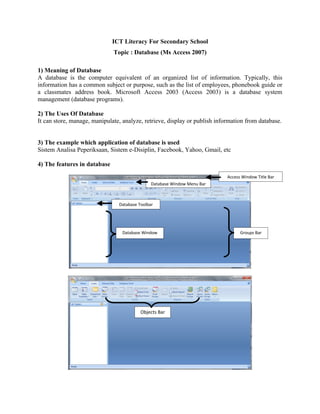
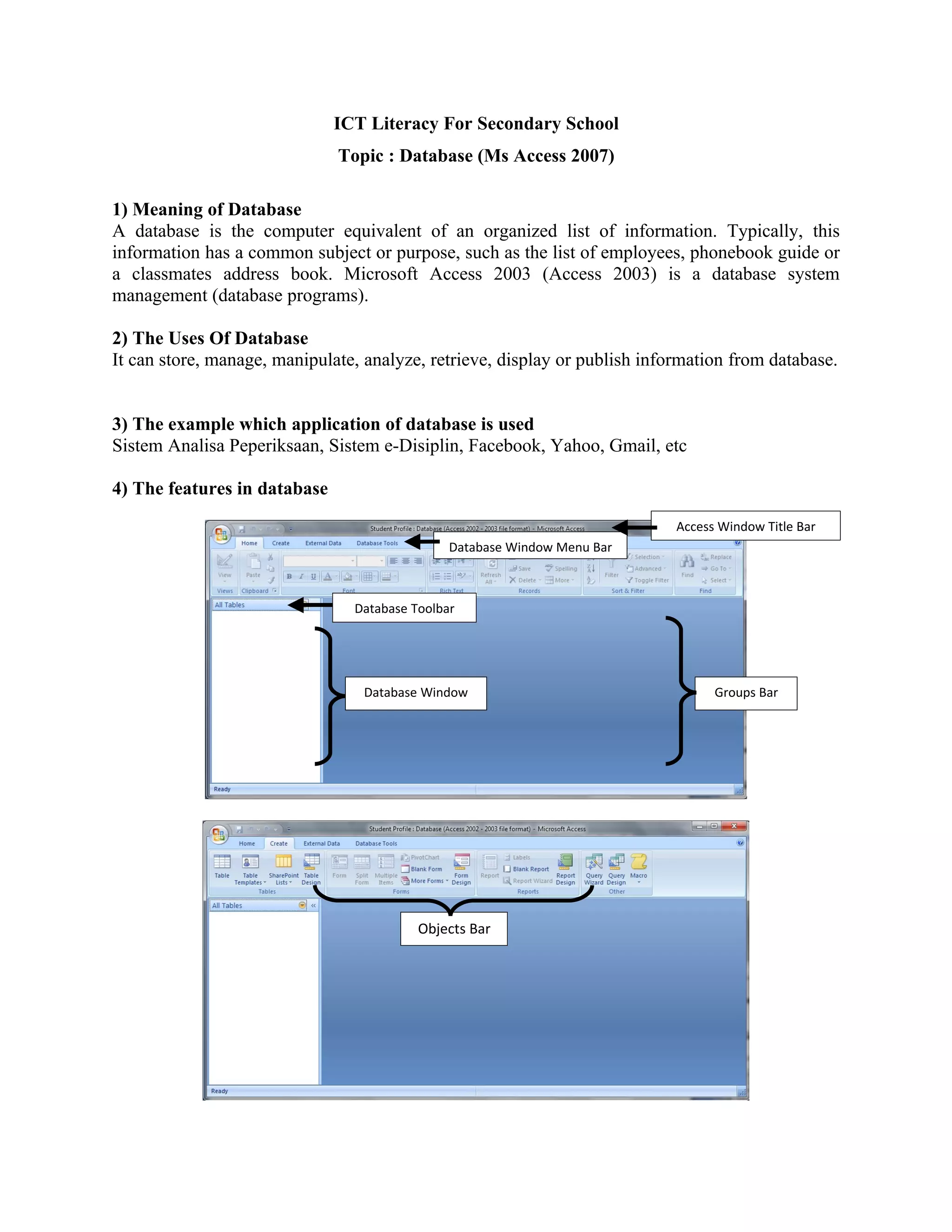
4) The features in database
                                                                            Access Window Title Bar
                                               Database Window Menu Bar


                                Database Toolbar


                                  Database Window                                 Groups Bar


                                          Objects Bar
5) Objects
  There are 4 important objects as stated in the table below :
  Objects Bar                                           Function
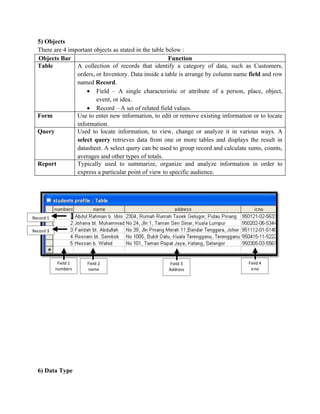
  Table          A collection of records that identify a category of data, such as Customers,
                 orders, or Inventory. Data inside a table is arrange by column name field and row
                 named Record.
                     • Field – A single characteristic or attribute of a person, place, object,
                         event, or idea.
                     • Record – A set of related field values.
  Form           Use to enter new information, to edit or remove existing information or to locate
                 information.
  Query          Used to locate information, to view, change or analyze it in various ways. A
                 select query retrieves data from one or more tables and displays the result in
                 datasheet. A select query can be used to group record and calculate sums, counts,
                 averages and other types of totals.
  Report         Typically used to summarize, organize and analyze information in order to
                 express a particular point of view to specific audience.


Record 1

Record 3


            Field 1   Field 2                        Field 3                        Field 4
           numbers    name                           Address                         icno


  6) Data Type
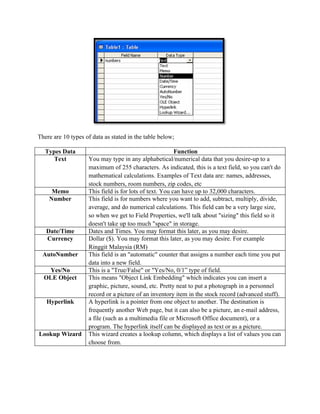
There are 10 types of data as stated in the table below;

   Types Data                                            Function
      Text          You may type in any alphabetical/numerical data that you desire-up to a
                    maximum of 255 characters. As indicated, this is a text field, so you can't do
                    mathematical calculations. Examples of Text data are: names, addresses,
                    stock numbers, room numbers, zip codes, etc
     Memo           This field is for lots of text. You can have up to 32,000 characters.
    Number          This field is for numbers where you want to add, subtract, multiply, divide,
                    average, and do numerical calculations. This field can be a very large size,
                    so when we get to Field Properties, we'll talk about "sizing" this field so it
                    doesn't take up too much "space" in storage.
   Date/Time        Dates and Times. You may format this later, as you may desire.
   Currency         Dollar ($). You may format this later, as you may desire. For example
                    Ringgit Malaysia (RM)
 AutoNumber         This field is an "automatic" counter that assigns a number each time you put
                    data into a new field.
   Yes/No           This is a "True/False" or "Yes/No, 0/1” type of field.
  OLE Object        This means "Object Link Embedding" which indicates you can insert a
                    graphic, picture, sound, etc. Pretty neat to put a photograph in a personnel
                    record or a picture of an inventory item in the stock record (advanced stuff).
   Hyperlink        A hyperlink is a pointer from one object to another. The destination is
                    frequently another Web page, but it can also be a picture, an e-mail address,
                    a file (such as a multimedia file or Microsoft Office document), or a
                    program. The hyperlink itself can be displayed as text or as a picture.
Lookup Wizard       This wizard creates a lookup column, which displays a list of values you can
                    choose from.

Database notes ICTL

  • 1.
    ICT Literacy ForSecondary School Topic : Database (Ms Access 2007) 1) Meaning of Database A database is the computer equivalent of an organized list of information. Typically, this information has a common subject or purpose, such as the list of employees, phonebook guide or a classmates address book. Microsoft Access 2003 (Access 2003) is a database system management (database programs). 2) The Uses Of Database It can store, manage, manipulate, analyze, retrieve, display or publish information from database. 3) The example which application of database is used Sistem Analisa Peperiksaan, Sistem e-Disiplin, Facebook, Yahoo, Gmail, etc 4) The features in database Access Window Title Bar Database Window Menu Bar Database Toolbar Database Window Groups Bar Objects Bar
  • 2.
    5) Objects There are 4 important objects as stated in the table below : Objects Bar Function Table A collection of records that identify a category of data, such as Customers, orders, or Inventory. Data inside a table is arrange by column name field and row named Record. • Field – A single characteristic or attribute of a person, place, object, event, or idea. • Record – A set of related field values. Form Use to enter new information, to edit or remove existing information or to locate information. Query Used to locate information, to view, change or analyze it in various ways. A select query retrieves data from one or more tables and displays the result in datasheet. A select query can be used to group record and calculate sums, counts, averages and other types of totals. Report Typically used to summarize, organize and analyze information in order to express a particular point of view to specific audience. Record 1 Record 3 Field 1 Field 2 Field 3 Field 4 numbers name Address icno 6) Data Type
  • 3.
    There are 10types of data as stated in the table below; Types Data Function Text You may type in any alphabetical/numerical data that you desire-up to a maximum of 255 characters. As indicated, this is a text field, so you can't do mathematical calculations. Examples of Text data are: names, addresses, stock numbers, room numbers, zip codes, etc Memo This field is for lots of text. You can have up to 32,000 characters. Number This field is for numbers where you want to add, subtract, multiply, divide, average, and do numerical calculations. This field can be a very large size, so when we get to Field Properties, we'll talk about "sizing" this field so it doesn't take up too much "space" in storage. Date/Time Dates and Times. You may format this later, as you may desire. Currency Dollar ($). You may format this later, as you may desire. For example Ringgit Malaysia (RM) AutoNumber This field is an "automatic" counter that assigns a number each time you put data into a new field. Yes/No This is a "True/False" or "Yes/No, 0/1” type of field. OLE Object This means "Object Link Embedding" which indicates you can insert a graphic, picture, sound, etc. Pretty neat to put a photograph in a personnel record or a picture of an inventory item in the stock record (advanced stuff). Hyperlink A hyperlink is a pointer from one object to another. The destination is frequently another Web page, but it can also be a picture, an e-mail address, a file (such as a multimedia file or Microsoft Office document), or a program. The hyperlink itself can be displayed as text or as a picture. Lookup Wizard This wizard creates a lookup column, which displays a list of values you can choose from.