Database Fundamentals Module 7 Lesson 1
What is a Database? An organized collection of related information.
What is a Database Management System? Software that allows the computer to create a database; add, change, and delete data in the database; sort the data; retrieve the data; and create forms and reports using the data in the database.
Have you ever used a database? Printed Address books Dictionaries Encyclopedias Library card catalogs Telephone directories Electronic Cell phone contacts Google FaceBook NetFlix GameLibrary Amazon.com
NetFlix is a Database? Yes! NetFlix stores its movie titles in a database that is easily searched and sorted to find the perfect movie for you. Search by Genre, Actor, Director, Rating Sort by Production Date, Stars
Cell Phone Contacts are in a  Database? Yes! All of the information you enter about your contacts goes into a database stored on your phone.  You can store names, phone numbers, email addresses and lots of other information. Your contacts can easily be searched and sorted
Electronic v. Print Why is a computerized database better than a print database? Accurate, quick and efficient arrangement of data in alphabetical or numerical order Ability to find and retrieve data Ability to generate reports on the database Ease of editing existing data
What can you put in a Database? Any information that is related. Major League Baseball Colleges Nutrition Countries Endangered Species Dictionary
Databases about you Did you know that your doctor and your school also keep data (information) about you in a database? What type of data do you think they store?   Your name (both) Your address (both) Your date of birth (both) Vaccination Shot records (medical record)  Medicines that you may be allergic to (medical record) Grades (School Record) Certificates (School)  Social Security Number (both)  As you can see, not only do you use a database, but information about you is also in a database or two J.
Steps to creating a Database Plan and design the database according to needs and requirements Determine the fields or categories that will be used in the database Determine field properties to include size and type
How do I enter data into a Database? Keyboard Mouse PDA’s Scanners Speech Recognition Software Web forms
Parts of a Database An  entry  is data that is in a field A  field  is one category of information (A  field name  is the title that is assigned to a field) A  record  is a group of related fields of one item of information in the database A  file  is the collection of related records. Click the button for a brief video.  A new website will open, be sure to return to this presentation.
Example The phone book is a  file  which contains a  record  for each subscriber. Each subscriber record contains three  fields:  name, address, and phone number. The records are sorted alphabetically by the name field, which is called the  key field--or primary key.
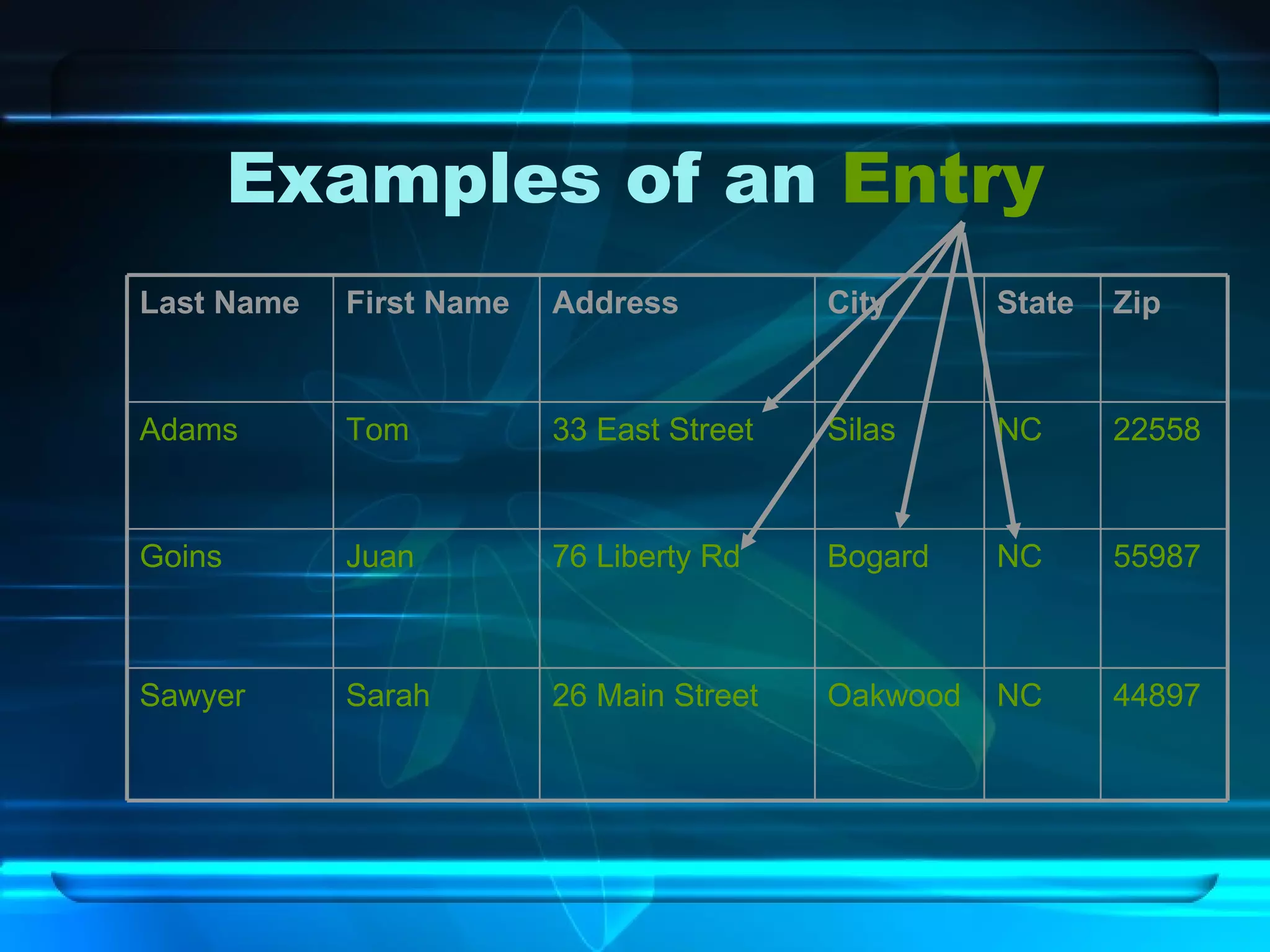
Examples of an  Entry 44897 NC Oakwood 26 Main Street Sarah Sawyer 55987 NC Bogard 76 Liberty Rd Juan Goins 22558 NC Silas 33 East Street Tom Adams Zip State City Address First Name Last Name
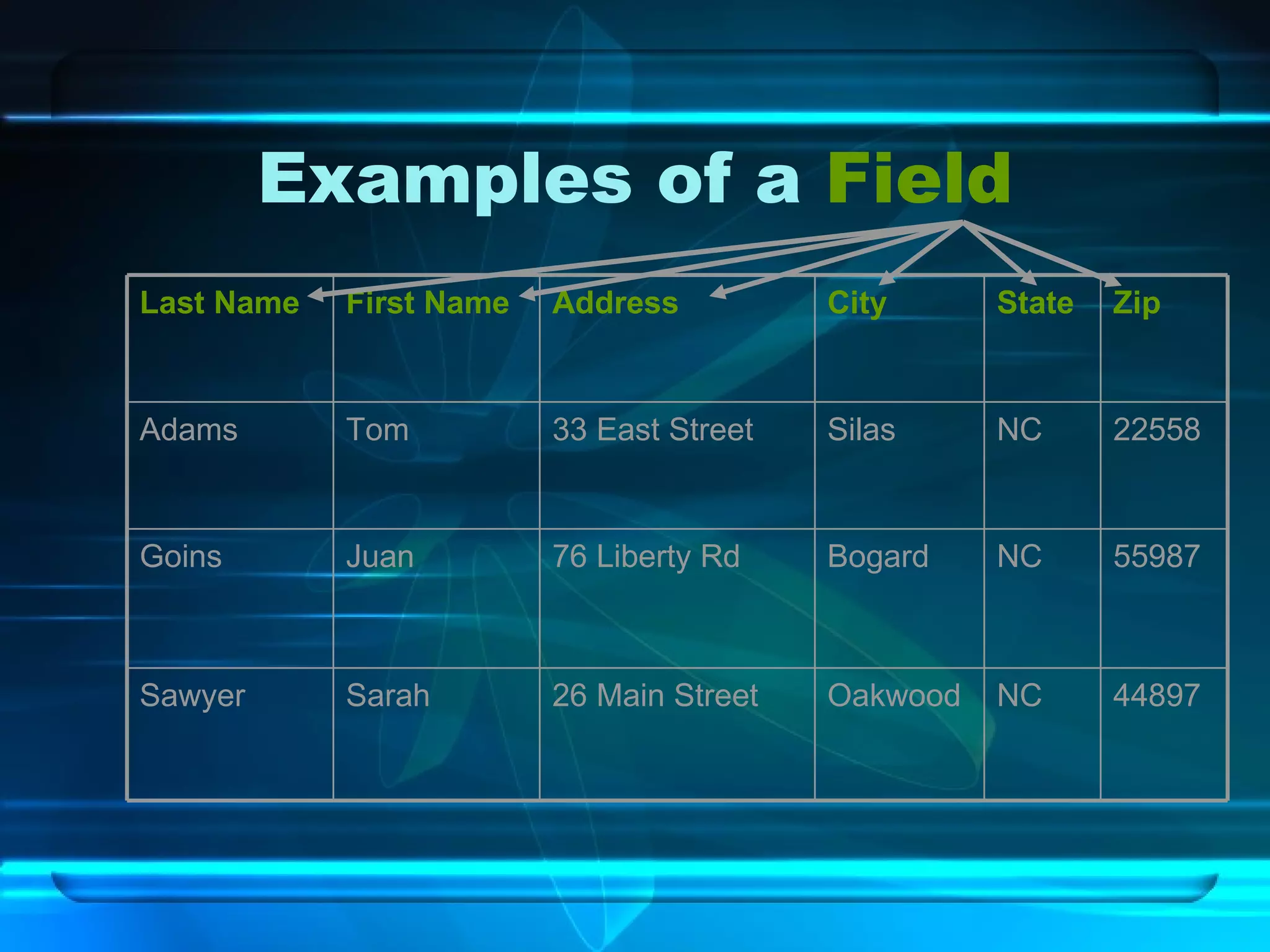
Examples of a  Field 44897 NC Oakwood 26 Main Street Sarah Sawyer 55987 NC Bogard 76 Liberty Rd Juan Goins 22558 NC Silas 33 East Street Tom Adams Zip State City Address First Name Last Name
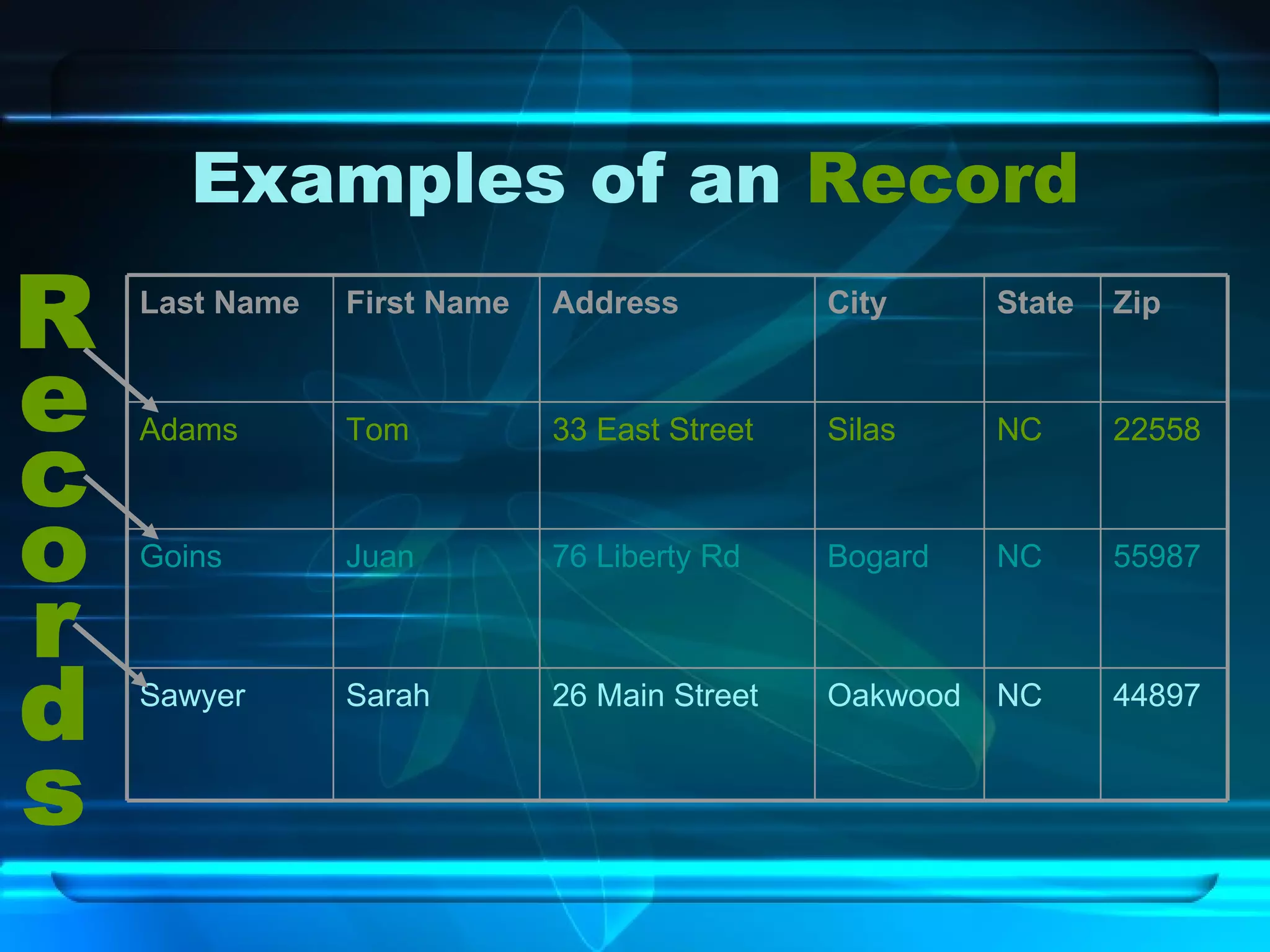
Examples of an  Record Records 44897 NC Oakwood 26 Main Street Sarah Sawyer 55987 NC Bogard 76 Liberty Rd Juan Goins 22558 NC Silas 33 East Street Tom Adams Zip State City Address First Name Last Name
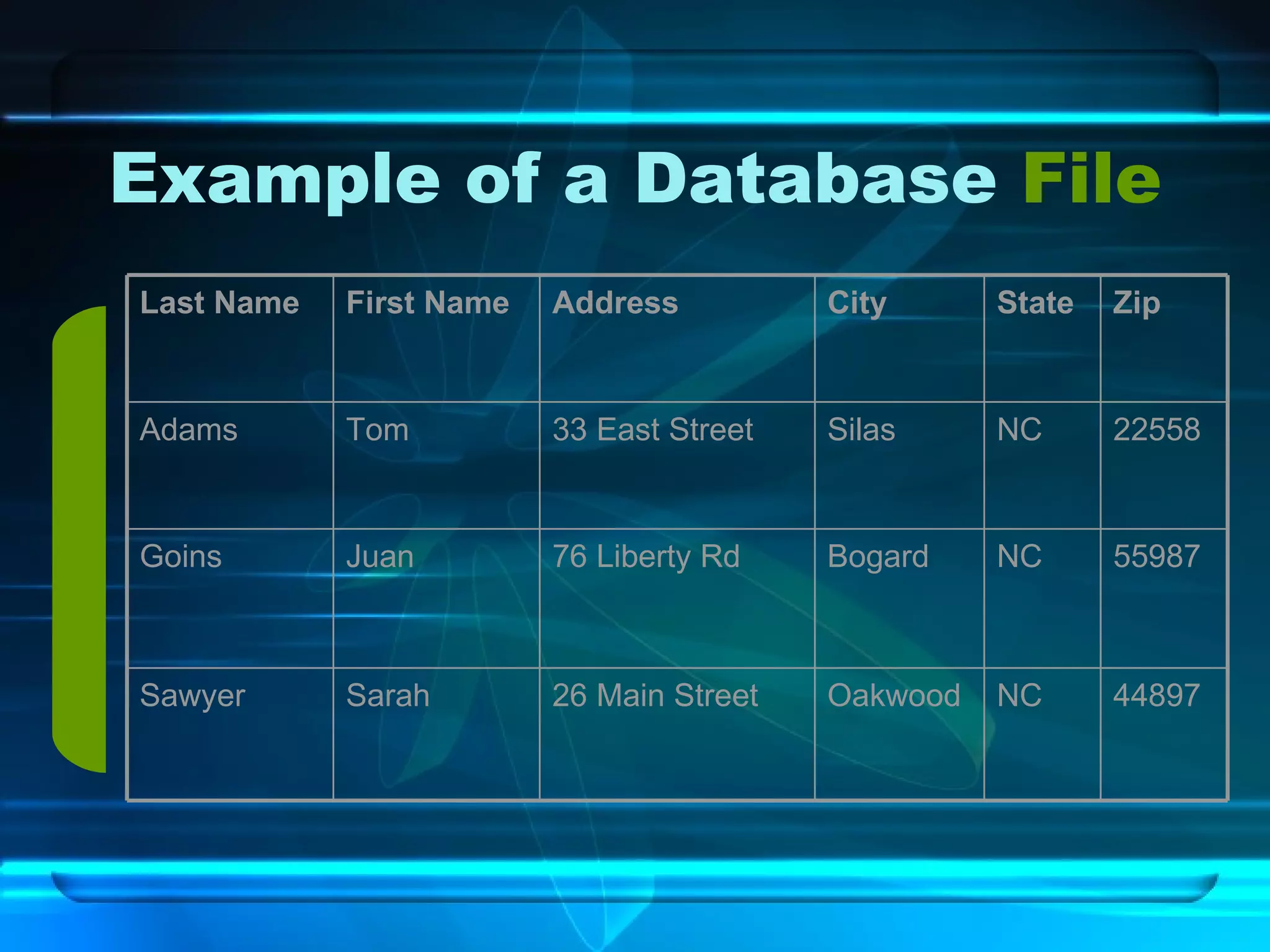
Example of a Database  File 44897 NC Oakwood 26 Main Street Sarah Sawyer 55987 NC Bogard 76 Liberty Rd Juan Goins 22558 NC Silas 33 East Street Tom Adams Zip State City Address First Name Last Name
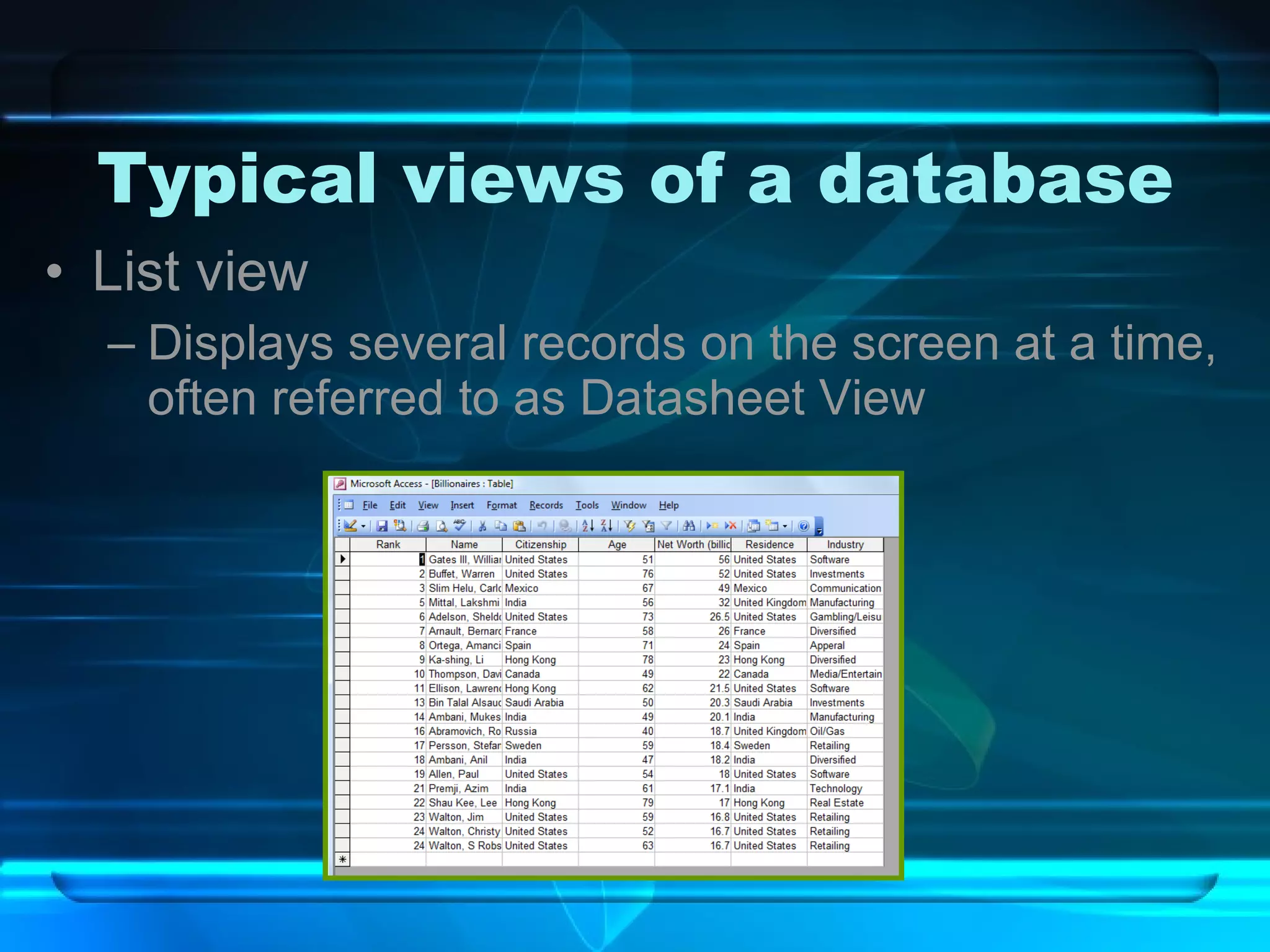
Typical views of a database List view Displays several records on the screen at a time, often referred to as Datasheet View
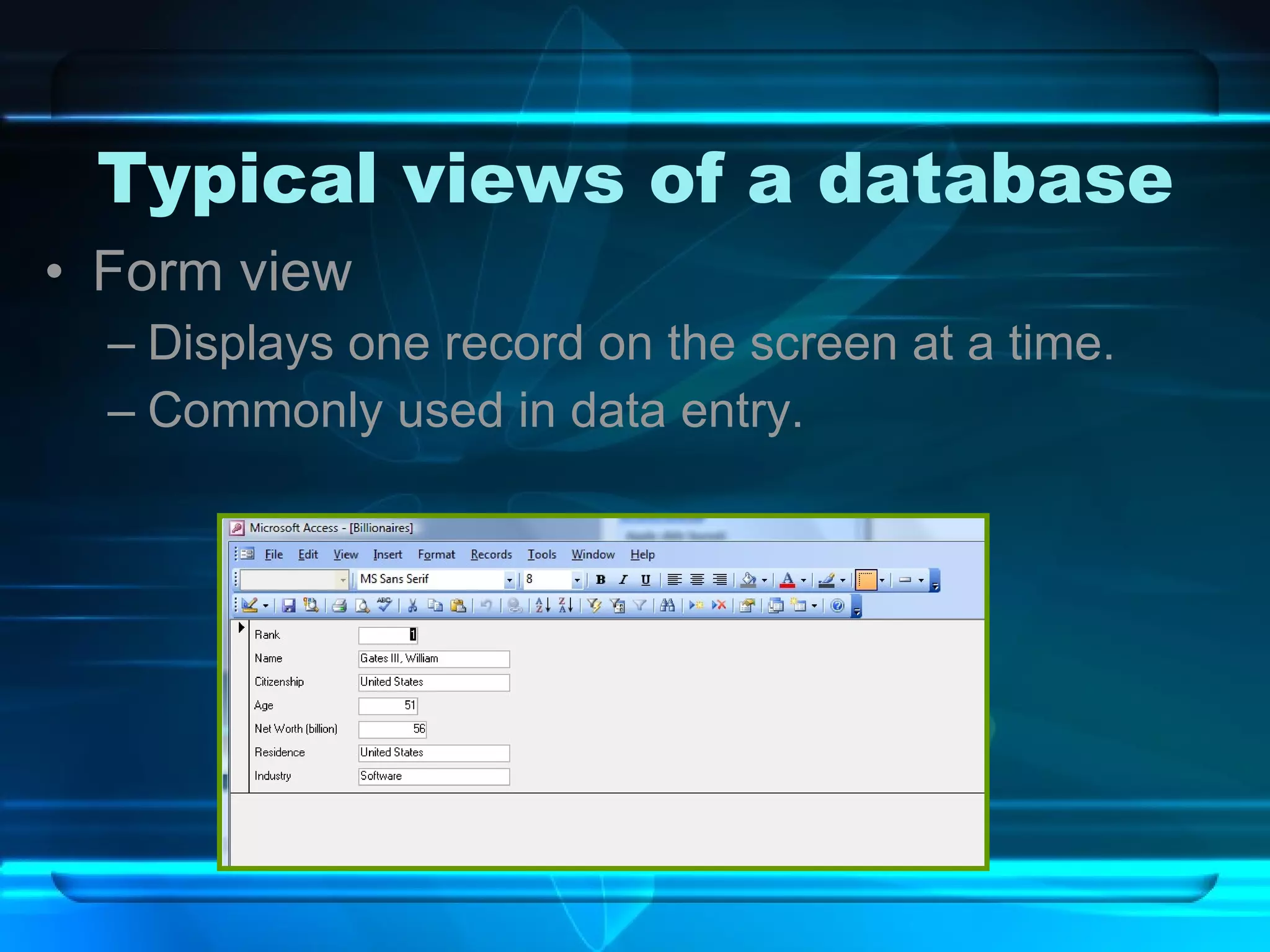
Typical views of a database Form view Displays one record on the screen at a time. Commonly used in data entry.
General data types Currency  ($9.99) Date  (03/03/03 or March 3, 2003) Numeric  (450 or 4,500,000) These numbers can be used in calculations I.E.  Gross pay, basketball statistics, etc. Text /General (Smith or 910-555-5468) Numbers may used, but would not be computed I.E.  Social security numbers, telephone numbers, etc.
What can you do with a Database? Sort Ascending (A, B, C or 1, 2, 3) Descending (Z, Y, X or 3, 2, 1) Search Filter Query Reports
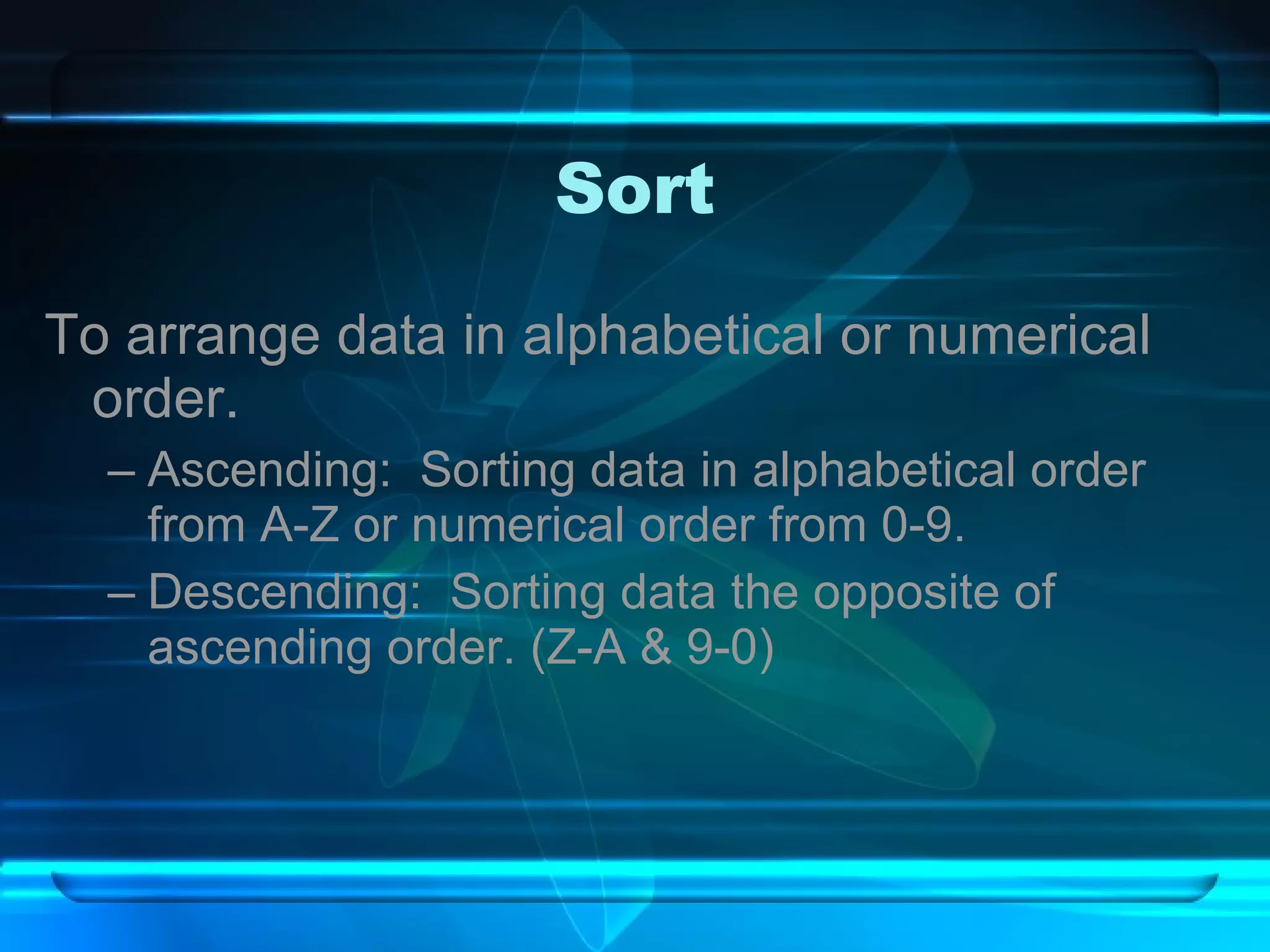
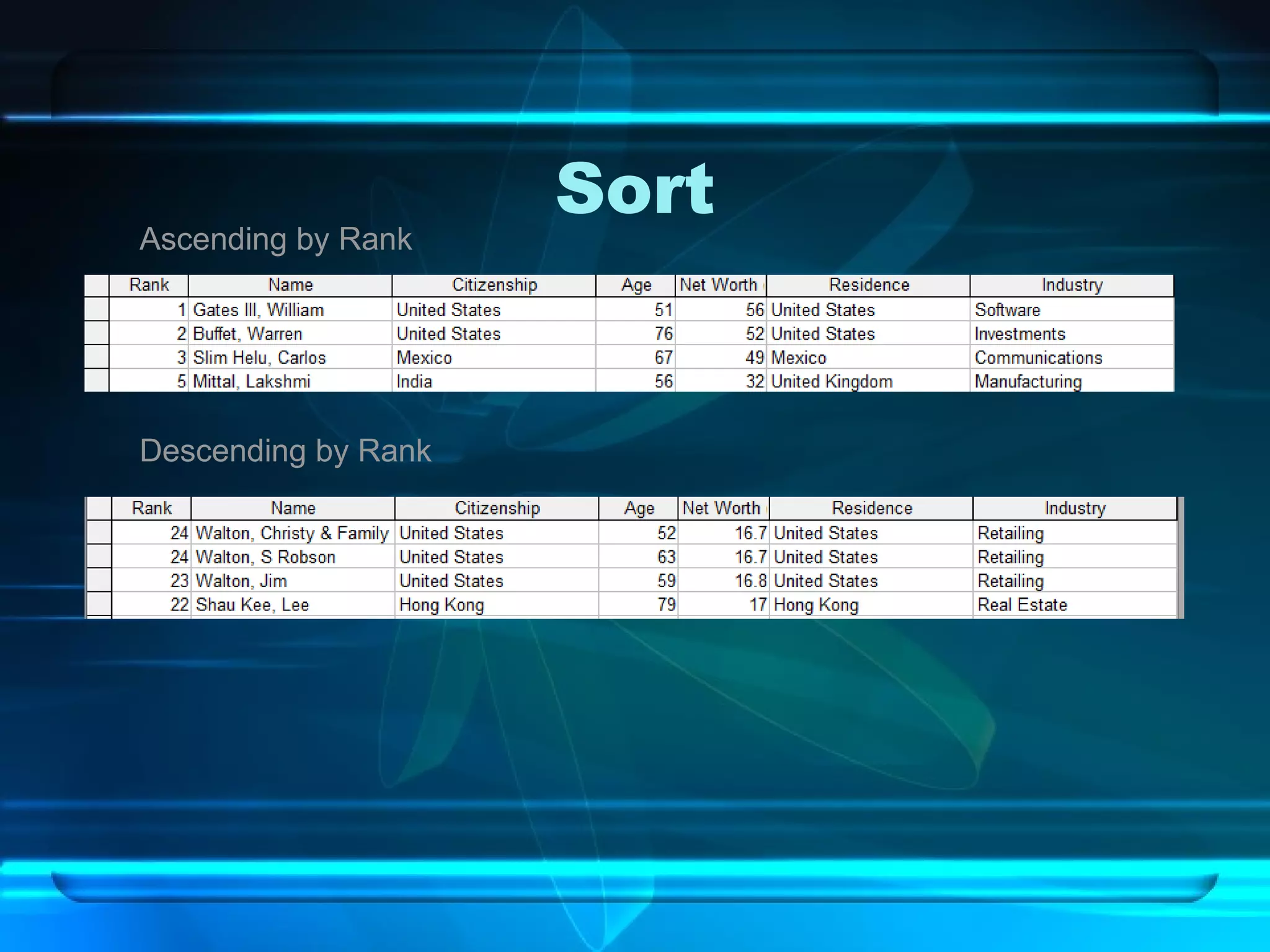
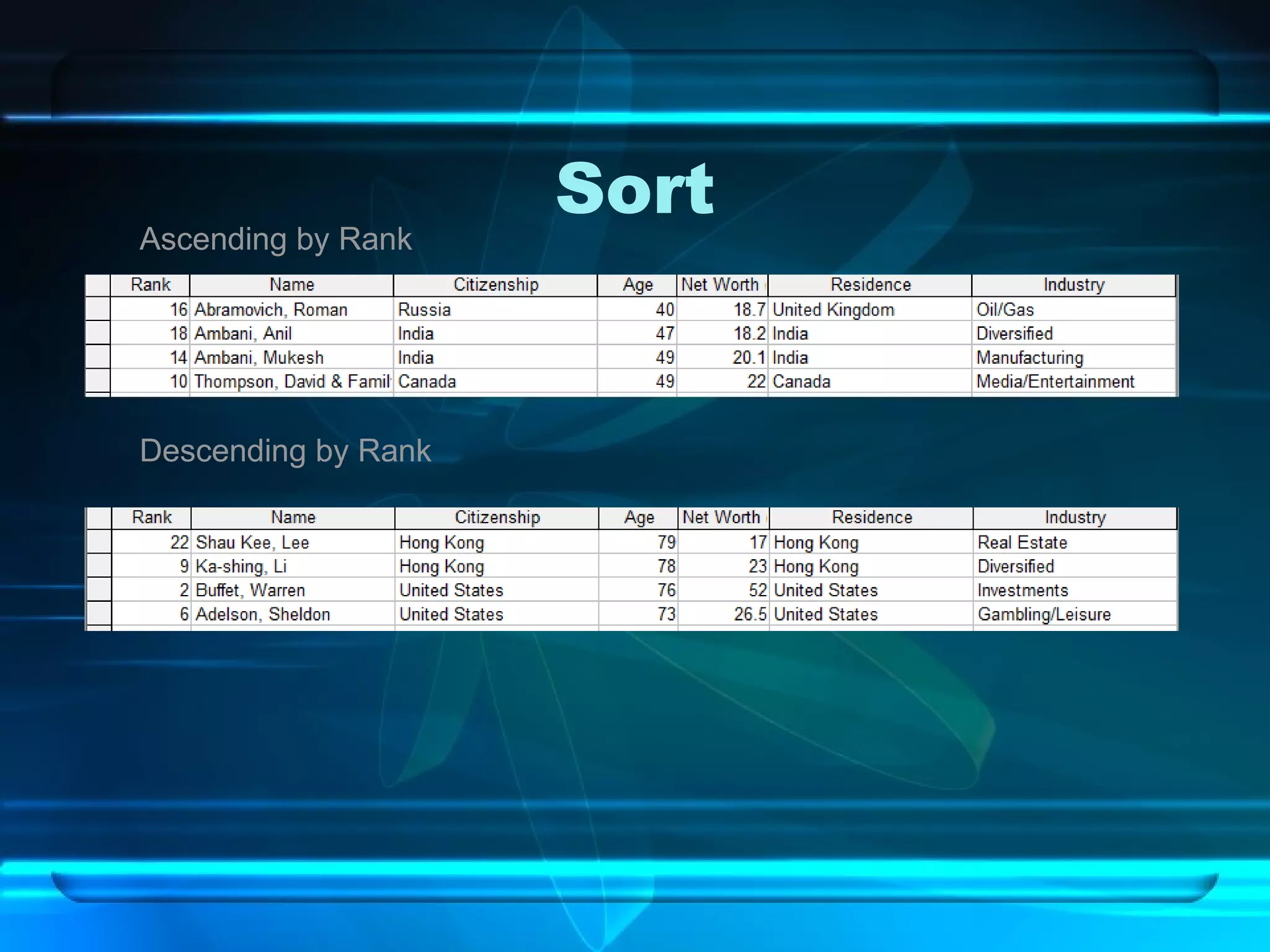
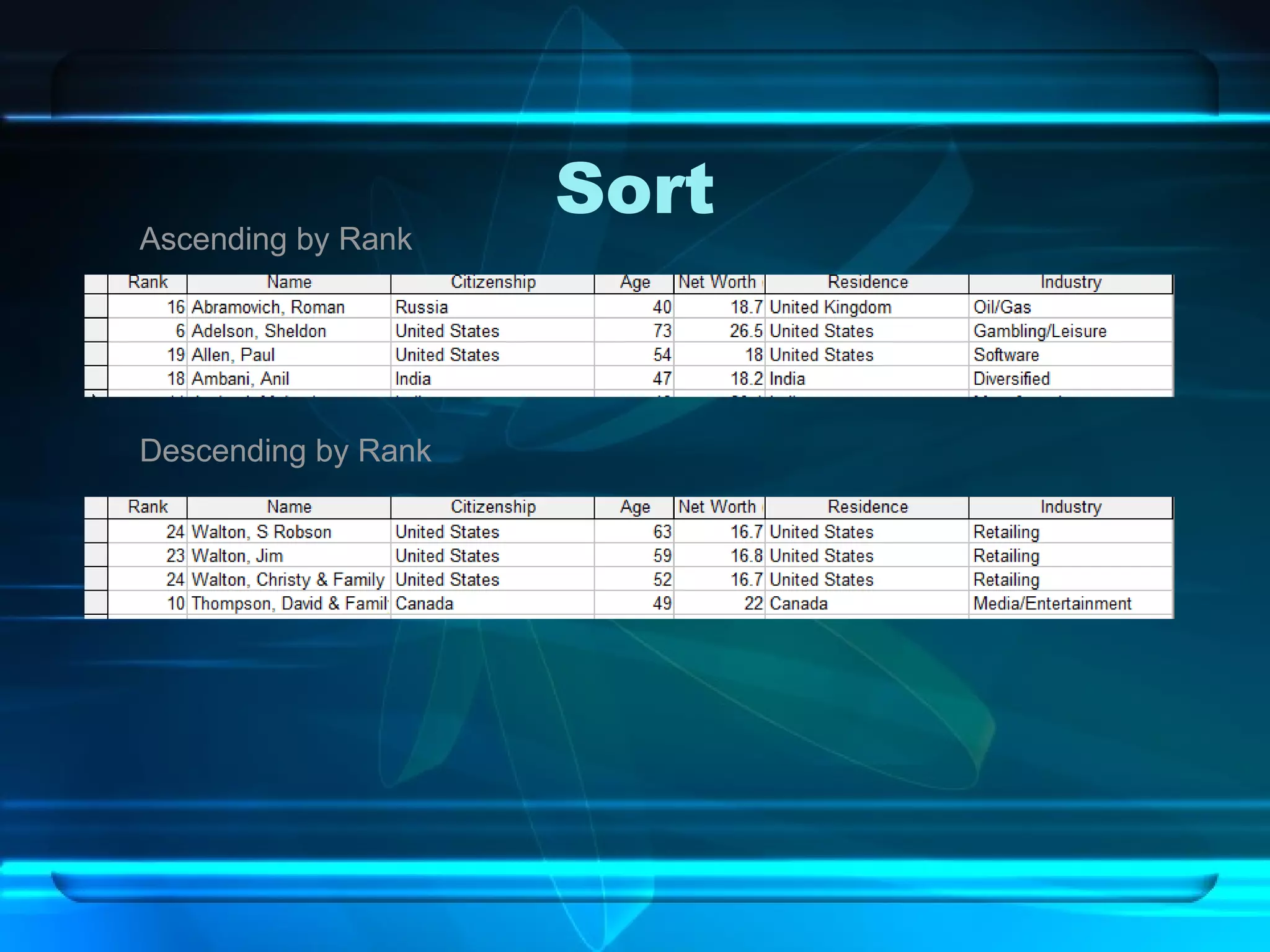
Sort To arrange data in alphabetical or numerical order. Ascending:  Sorting data in alphabetical order from A-Z or numerical order from 0-9. Descending:  Sorting data the opposite of ascending order. (Z-A & 9-0)
Sort Ascending by Rank Descending by Rank
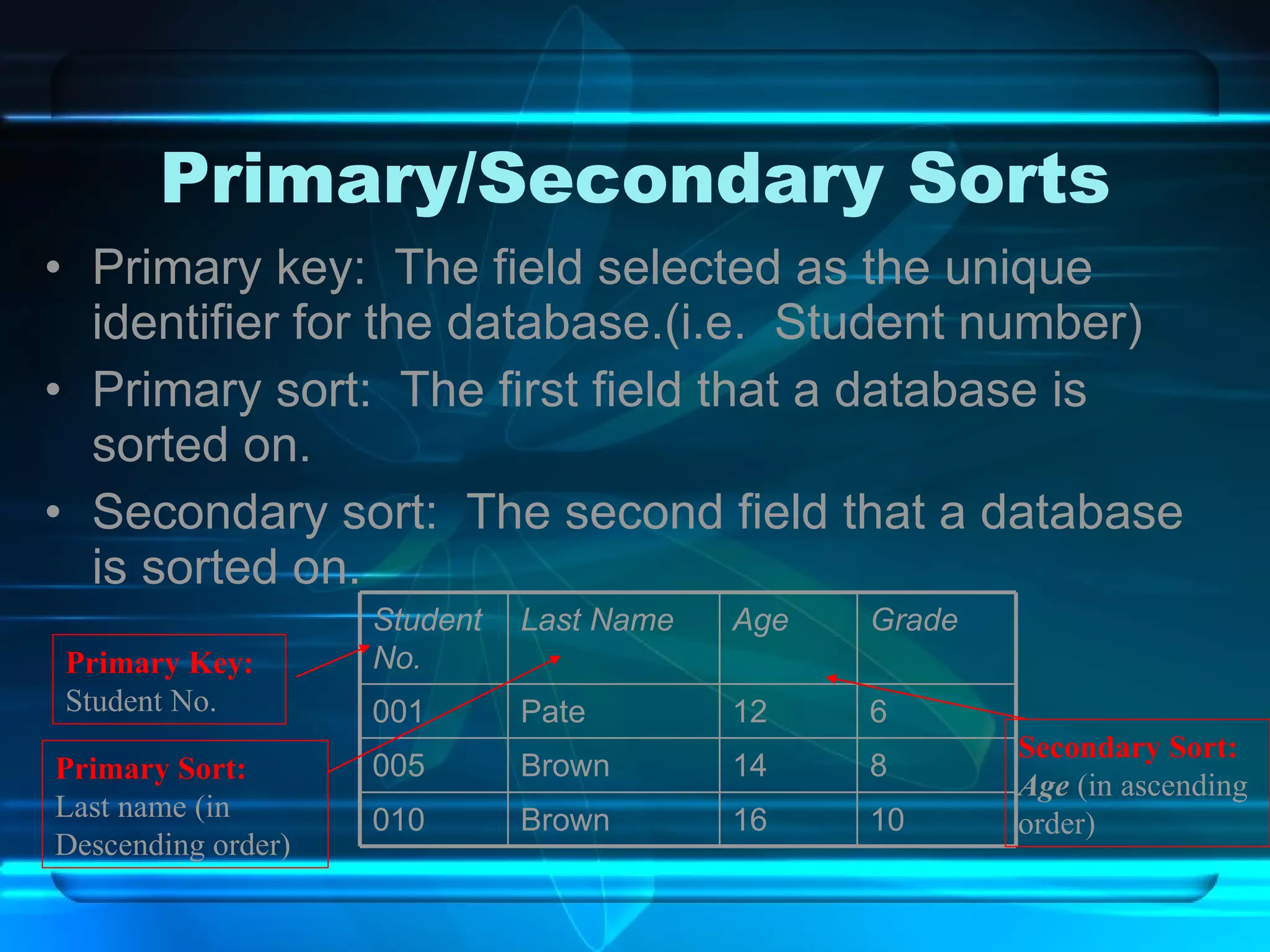
Primary/Secondary Sorts Primary key:  The field selected as the unique identifier for the database.(i.e.  Student number) Primary sort:  The first field that a database is sorted on.  Secondary sort:  The second field that a database is sorted on. Primary Key: Student No. Primary Sort: Last name (in  Descending order) Secondary Sort: Age  (in ascending order) 010 005 001 Student No. 10 16 Brown 8 14 Brown 6 12 Pate Grade Age Last Name
Search:  Filter v Query A method to find specific data within a database that meets certain criteria. The difference?  Queries can be saved and printed.
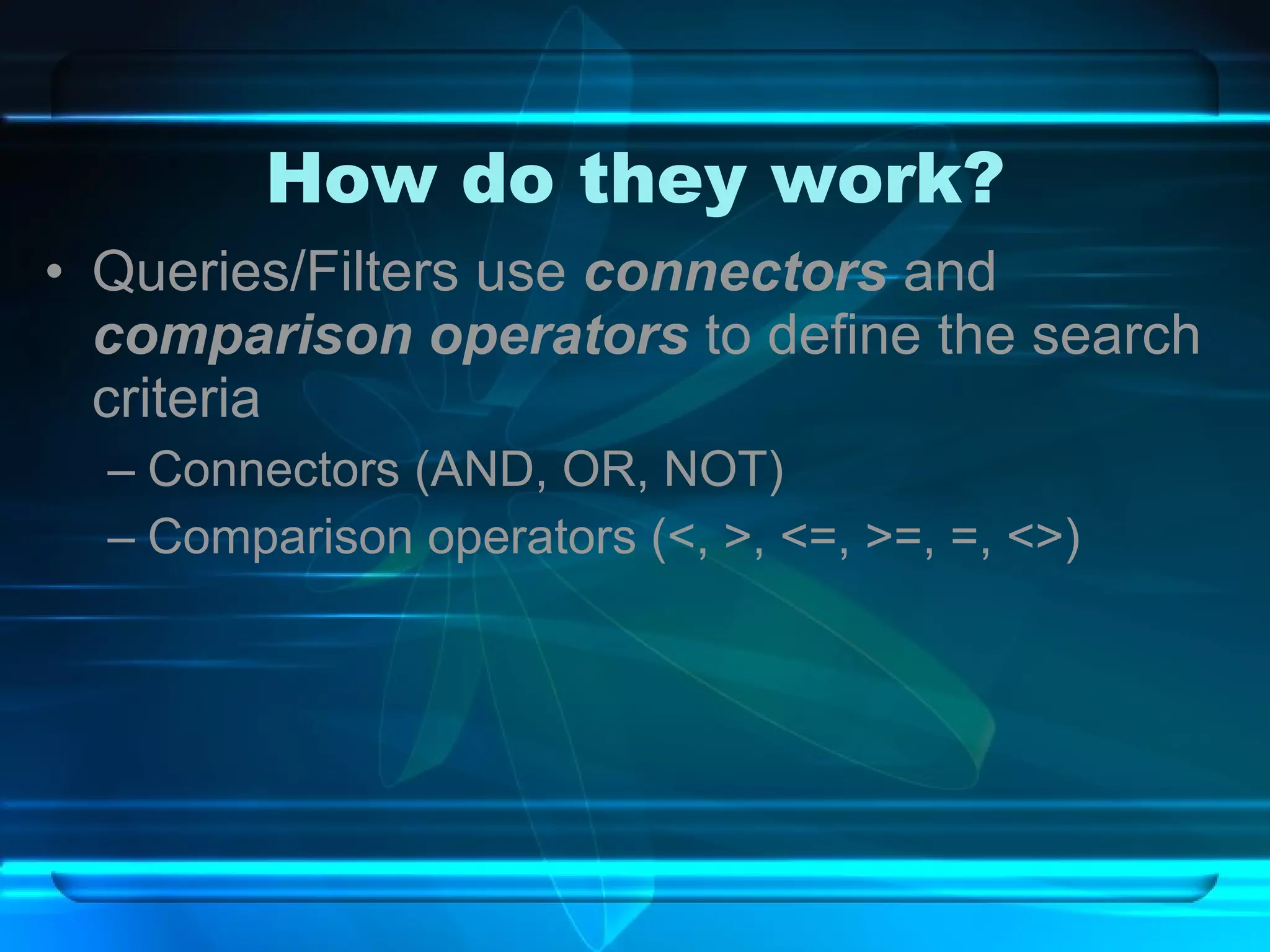
How do they work? Queries/Filters use  connectors  and  comparison operators  to define the search criteria Connectors (AND, OR, NOT) Comparison operators (<, >, <=, >=, =, <>)
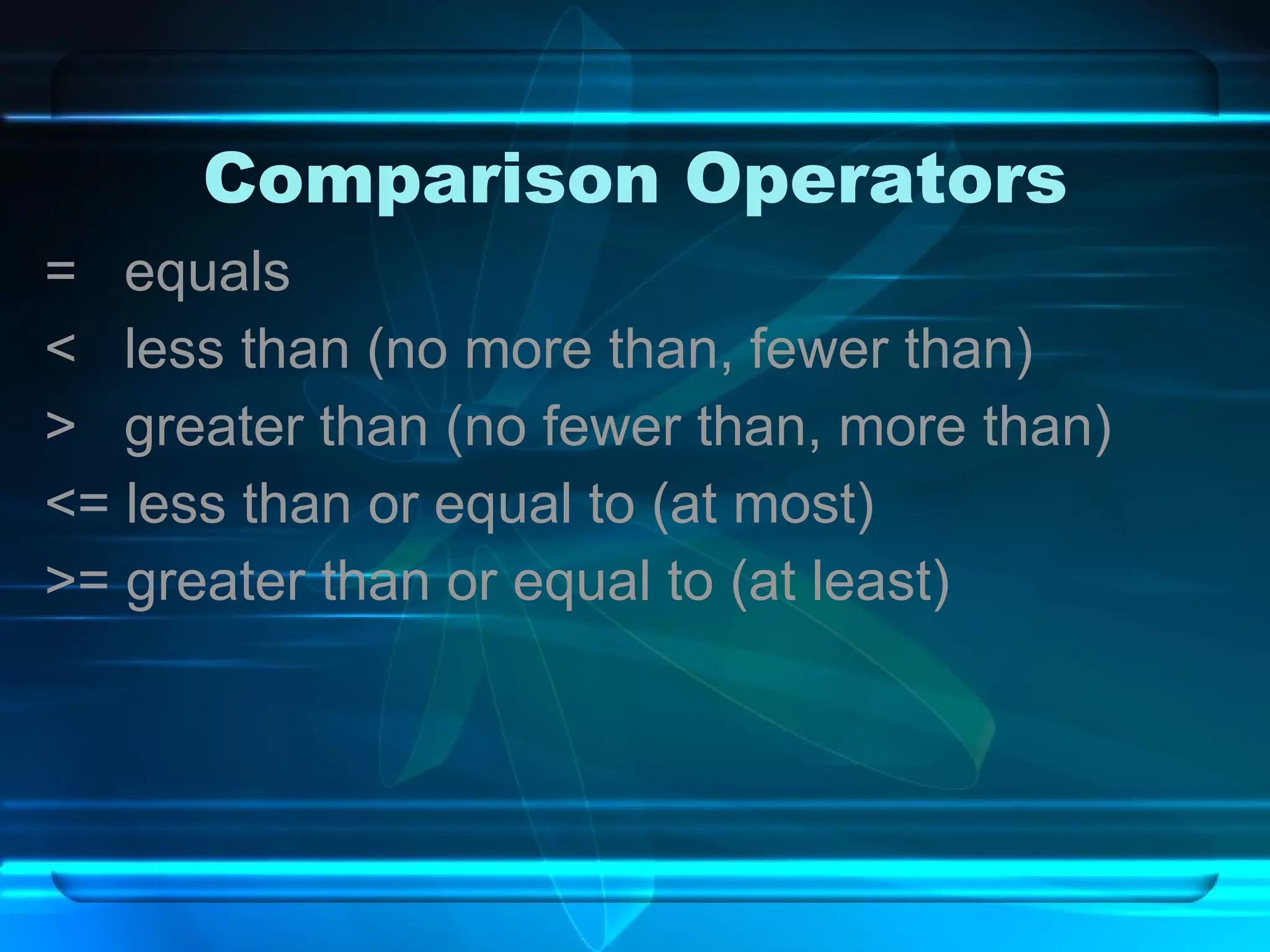
Comparison Operators =  equals <  less than (no more than, fewer than) >  greater than (no fewer than, more than) <= less than or equal to (at most) >= greater than or equal to (at least)
Connectors And—must meet both criteria, yields fewer results Or—must meet either criteria, yields more results Not—except

Database fundamentals

  • 1.
  • 2.
    What is aDatabase? An organized collection of related information.
  • 3.
    What is aDatabase Management System? Software that allows the computer to create a database; add, change, and delete data in the database; sort the data; retrieve the data; and create forms and reports using the data in the database.
  • 4.
    Have you everused a database? Printed Address books Dictionaries Encyclopedias Library card catalogs Telephone directories Electronic Cell phone contacts Google FaceBook NetFlix GameLibrary Amazon.com
  • 5.
    NetFlix is aDatabase? Yes! NetFlix stores its movie titles in a database that is easily searched and sorted to find the perfect movie for you. Search by Genre, Actor, Director, Rating Sort by Production Date, Stars
  • 6.
    Cell Phone Contactsare in a Database? Yes! All of the information you enter about your contacts goes into a database stored on your phone. You can store names, phone numbers, email addresses and lots of other information. Your contacts can easily be searched and sorted
  • 7.
    Electronic v. PrintWhy is a computerized database better than a print database? Accurate, quick and efficient arrangement of data in alphabetical or numerical order Ability to find and retrieve data Ability to generate reports on the database Ease of editing existing data
  • 8.
    What can youput in a Database? Any information that is related. Major League Baseball Colleges Nutrition Countries Endangered Species Dictionary
  • 9.
    Databases about youDid you know that your doctor and your school also keep data (information) about you in a database? What type of data do you think they store?   Your name (both) Your address (both) Your date of birth (both) Vaccination Shot records (medical record)  Medicines that you may be allergic to (medical record) Grades (School Record) Certificates (School)  Social Security Number (both)  As you can see, not only do you use a database, but information about you is also in a database or two J.
  • 10.
    Steps to creatinga Database Plan and design the database according to needs and requirements Determine the fields or categories that will be used in the database Determine field properties to include size and type
  • 11.
    How do Ienter data into a Database? Keyboard Mouse PDA’s Scanners Speech Recognition Software Web forms
  • 12.
    Parts of aDatabase An entry is data that is in a field A field is one category of information (A field name is the title that is assigned to a field) A record is a group of related fields of one item of information in the database A file is the collection of related records. Click the button for a brief video. A new website will open, be sure to return to this presentation.
  • 13.
    Example The phonebook is a file which contains a record for each subscriber. Each subscriber record contains three fields: name, address, and phone number. The records are sorted alphabetically by the name field, which is called the key field--or primary key.
  • 14.
    Examples of an Entry 44897 NC Oakwood 26 Main Street Sarah Sawyer 55987 NC Bogard 76 Liberty Rd Juan Goins 22558 NC Silas 33 East Street Tom Adams Zip State City Address First Name Last Name
  • 15.
    Examples of a Field 44897 NC Oakwood 26 Main Street Sarah Sawyer 55987 NC Bogard 76 Liberty Rd Juan Goins 22558 NC Silas 33 East Street Tom Adams Zip State City Address First Name Last Name
  • 16.
    Examples of an Record Records 44897 NC Oakwood 26 Main Street Sarah Sawyer 55987 NC Bogard 76 Liberty Rd Juan Goins 22558 NC Silas 33 East Street Tom Adams Zip State City Address First Name Last Name
  • 17.
    Example of aDatabase File 44897 NC Oakwood 26 Main Street Sarah Sawyer 55987 NC Bogard 76 Liberty Rd Juan Goins 22558 NC Silas 33 East Street Tom Adams Zip State City Address First Name Last Name
  • 18.
    Typical views ofa database List view Displays several records on the screen at a time, often referred to as Datasheet View
  • 19.
    Typical views ofa database Form view Displays one record on the screen at a time. Commonly used in data entry.
  • 20.
    General data typesCurrency ($9.99) Date (03/03/03 or March 3, 2003) Numeric (450 or 4,500,000) These numbers can be used in calculations I.E. Gross pay, basketball statistics, etc. Text /General (Smith or 910-555-5468) Numbers may used, but would not be computed I.E. Social security numbers, telephone numbers, etc.
  • 21.
    What can youdo with a Database? Sort Ascending (A, B, C or 1, 2, 3) Descending (Z, Y, X or 3, 2, 1) Search Filter Query Reports
  • 22.
    Sort To arrangedata in alphabetical or numerical order. Ascending: Sorting data in alphabetical order from A-Z or numerical order from 0-9. Descending: Sorting data the opposite of ascending order. (Z-A & 9-0)
  • 23.
    Sort Ascending byRank Descending by Rank
  • 24.
    Sort Ascending byRank Descending by Rank
  • 25.
    Sort Ascending byRank Descending by Rank
  • 26.
    Primary/Secondary Sorts Primarykey: The field selected as the unique identifier for the database.(i.e. Student number) Primary sort: The first field that a database is sorted on. Secondary sort: The second field that a database is sorted on. Primary Key: Student No. Primary Sort: Last name (in Descending order) Secondary Sort: Age (in ascending order) 010 005 001 Student No. 10 16 Brown 8 14 Brown 6 12 Pate Grade Age Last Name
  • 27.
    Search: Filterv Query A method to find specific data within a database that meets certain criteria. The difference? Queries can be saved and printed.
  • 28.
    How do theywork? Queries/Filters use connectors and comparison operators to define the search criteria Connectors (AND, OR, NOT) Comparison operators (<, >, <=, >=, =, <>)
  • 29.
    Comparison Operators = equals < less than (no more than, fewer than) > greater than (no fewer than, more than) <= less than or equal to (at most) >= greater than or equal to (at least)
  • 30.
    Connectors And—must meetboth criteria, yields fewer results Or—must meet either criteria, yields more results Not—except