Ch-2
Log on to Access 2007
Made by:
Sandhya Jeswani Panjwani
1
1. Database and its components
2. Types of database
3. Database objects
4. Microsoft Access and its features
5. Creating a blank database
6. Creating a database using Templates
7. Career in IT
Contents
2
An organized collection of information or data is called database which is stored
in the files. Some examples of database are:
DATABASE
Attendance register of your class
Log book of your class
A telephone directory
Your class time-table
A dictionary
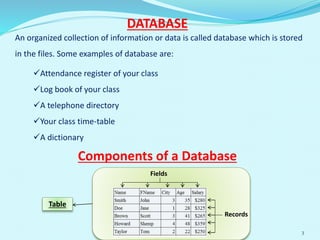
Components of a Database
Fields
Records
Table
3
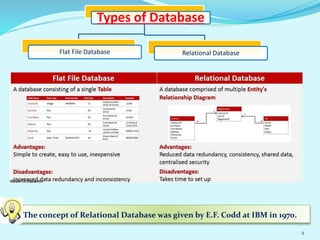
Types of Database
Flat File Database Relational Database
The concept of Relational Database was given by E.F. Codd at IBM in 1970.
4
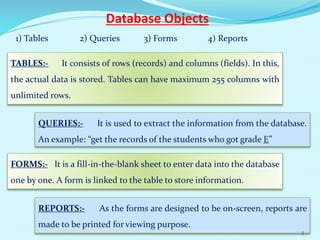
Database Objects
1) Tables 2) Queries 3) Forms 4) Reports
TABLES:- It consists of rows (records) and columns (fields). In this,
the actual data is stored. Tables can have maximum 255 columns with
unlimited rows.
QUERIES:- It is used to extract the information from the database.
An example: “get the records of the students who got grade E”
FORMS:- It is a fill-in-the-blank sheet to enter data into the database
one by one. A form is linked to the table to store information.
REPORTS:- As the forms are designed to be on-screen, reports are
made to be printed for viewing purpose.
5
Microsoft Access & its features
MS-Access is a popular RDBMS (Relational Database
Management System) software. It is widely used for creation
and manipulation of database for the Microsoft Windows
family of Operating Systems.
The features are:-
 Facilitates to break large information into small parts in the form of
tables.
Data redundancy is reduced.
Increases efficiency and speed in searching and accessing information.
Facilitates data security and sharing of data
Helps to create forms, queries and reports on the database. 6
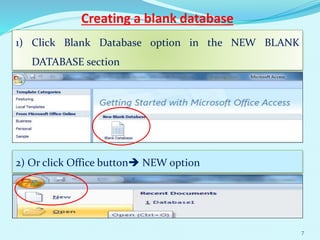
Creating a blank database
1) Click Blank Database option in the NEW BLANK
DATABASE section
2) Or click Office button NEW option
7
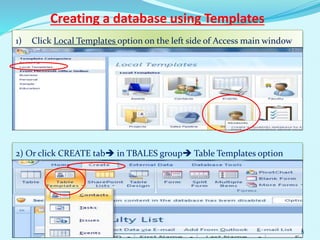
Creating a database using Templates
1) Click Local Templates option on the left side of Access main window
2) Or click CREATE tab in TBALES group Table Templates option
8
Let’s Know More
Microsoft SQL Server is a DBMS that serves database requests
from multiple users.
The standard extension of an Access database is
.accdb
Templates are pre-built database focused on specific task. You
can download or use built-in templates for your use.
A Relational Database is a set of tables containing
data. Some of the RDBMS software are Oracle,
FoxPro, MS-Access, SQL, Sybase.
9
Career in IT
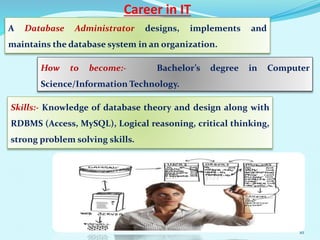
A Database Administrator designs, implements and
maintains the database system in an organization.
How to become:- Bachelor’s degree in Computer
Science/Information Technology.
Skills:- Knowledge of database theory and design along with
RDBMS (Access, MySQL), Logical reasoning, critical thinking,
strong problem solving skills.
10

Class viii ch-2 log on to access

  • 1.
    Ch-2 Log on toAccess 2007 Made by: Sandhya Jeswani Panjwani 1
  • 2.
    1. Database andits components 2. Types of database 3. Database objects 4. Microsoft Access and its features 5. Creating a blank database 6. Creating a database using Templates 7. Career in IT Contents 2
  • 3.
    An organized collectionof information or data is called database which is stored in the files. Some examples of database are: DATABASE Attendance register of your class Log book of your class A telephone directory Your class time-table A dictionary Components of a Database Fields Records Table 3
  • 4.
    Types of Database FlatFile Database Relational Database The concept of Relational Database was given by E.F. Codd at IBM in 1970. 4
  • 5.
    Database Objects 1) Tables2) Queries 3) Forms 4) Reports TABLES:- It consists of rows (records) and columns (fields). In this, the actual data is stored. Tables can have maximum 255 columns with unlimited rows. QUERIES:- It is used to extract the information from the database. An example: “get the records of the students who got grade E” FORMS:- It is a fill-in-the-blank sheet to enter data into the database one by one. A form is linked to the table to store information. REPORTS:- As the forms are designed to be on-screen, reports are made to be printed for viewing purpose. 5
  • 6.
    Microsoft Access &its features MS-Access is a popular RDBMS (Relational Database Management System) software. It is widely used for creation and manipulation of database for the Microsoft Windows family of Operating Systems. The features are:-  Facilitates to break large information into small parts in the form of tables. Data redundancy is reduced. Increases efficiency and speed in searching and accessing information. Facilitates data security and sharing of data Helps to create forms, queries and reports on the database. 6
  • 7.
    Creating a blankdatabase 1) Click Blank Database option in the NEW BLANK DATABASE section 2) Or click Office button NEW option 7
  • 8.
    Creating a databaseusing Templates 1) Click Local Templates option on the left side of Access main window 2) Or click CREATE tab in TBALES group Table Templates option 8
  • 9.
    Let’s Know More MicrosoftSQL Server is a DBMS that serves database requests from multiple users. The standard extension of an Access database is .accdb Templates are pre-built database focused on specific task. You can download or use built-in templates for your use. A Relational Database is a set of tables containing data. Some of the RDBMS software are Oracle, FoxPro, MS-Access, SQL, Sybase. 9
  • 10.
    Career in IT ADatabase Administrator designs, implements and maintains the database system in an organization. How to become:- Bachelor’s degree in Computer Science/Information Technology. Skills:- Knowledge of database theory and design along with RDBMS (Access, MySQL), Logical reasoning, critical thinking, strong problem solving skills. 10