Chapter 18: Database System Architectures 
 Centralized Systems 
 Client--Server Systems 
 Parallel Systems 
 Distributed Systems 
 Network Types 
Database System Concepts 18.1 ©Silberschatz, Korth and Sudarshan
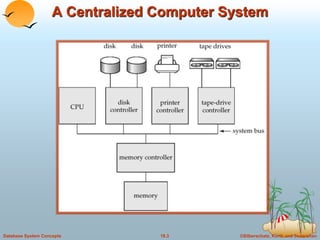
Centralized Systems 
 Run on a single computer system and do not interact with other 
computer systems. 
 General-purpose computer system: one to a few CPUs and a 
number of device controllers that are connected through a 
common bus that provides access to shared memory. 
 Single-user system (e.g., personal computer or workstation): 
desk-top unit, single user, usually has only one CPU and one or 
two hard disks; the OS may support only one user. 
 Multi-user system: more disks, more memory, multiple CPUs, 
and a multi-user OS. Serve a large number of users who are 
connected to the system vie terminals. Often called server 
systems. 
Database System Concepts 18.2 ©Silberschatz, Korth and Sudarshan
A Centralized Computer System 
Database System Concepts 18.3 ©Silberschatz, Korth and Sudarshan
Client-Server Systems 
 Server systems satisfy requests generated at m client systems, whose 
general structure is shown below: 
Database System Concepts 18.4 ©Silberschatz, Korth and Sudarshan
Client-Server Systems (Cont.) 
 Database functionality can be divided into: 
 Back-end: manages access structures, query evaluation and 
optimization, concurrency control and recovery. 
 Front-end: consists of tools such as forms, report-writers, and 
graphical user interface facilities. 
 The interface between the front-end and the back-end is through 
SQL or through an application program interface. 
Database System Concepts 18.5 ©Silberschatz, Korth and Sudarshan
Client-Server Systems (Cont.) 
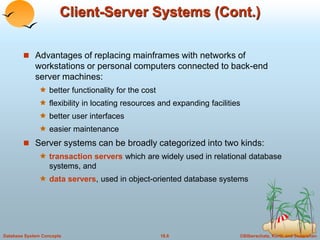
 Advantages of replacing mainframes with networks of 
workstations or personal computers connected to back-end 
server machines: 
 better functionality for the cost 
 flexibility in locating resources and expanding facilities 
 better user interfaces 
 easier maintenance 
 Server systems can be broadly categorized into two kinds: 
 transaction servers which are widely used in relational database 
systems, and 
 data servers, used in object-oriented database systems 
Database System Concepts 18.6 ©Silberschatz, Korth and Sudarshan
Transaction Servers 
 Also called query server systems or SQL server systems; 
clients send requests to the server system where the 
transactions are executed, and results are shipped back to the 
client. 
 Requests specified in SQL, and communicated to the server 
through a remote procedure call (RPC) mechanism. 
 Transactional RPC allows many RPC calls to collectively form a 
transaction. 
 Open Database Connectivity (ODBC) is a C language 
application program interface standard from Microsoft for 
connecting to a server, sending SQL requests, and receiving 
results. 
 JDBC standard similar to ODBC, for Java 
Database System Concepts 18.7 ©Silberschatz, Korth and Sudarshan
Transaction Server Process Structure 
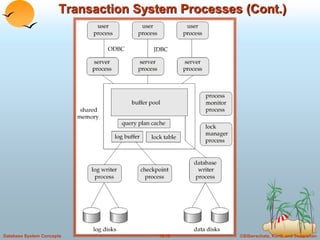
 A typical transaction server consists of multiple processes 
accessing data in shared memory. 
 Server processes 
 These receive user queries (transactions), execute them and send 
results back 
 Processes may be multithreaded, allowing a single process to 
execute several user queries concurrently 
 Typically multiple multithreaded server processes 
 Lock manager process 
 More on this later 
 Database writer process 
 Output modified buffer blocks to disks continually 
Database System Concepts 18.8 ©Silberschatz, Korth and Sudarshan
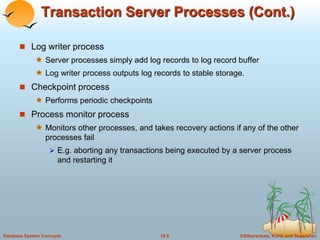
Transaction Server Processes (Cont.) 
 Log writer process 
 Server processes simply add log records to log record buffer 
 Log writer process outputs log records to stable storage. 
 Checkpoint process 
 Performs periodic checkpoints 
 Process monitor process 
 Monitors other processes, and takes recovery actions if any of the other 
processes fail 
 E.g. aborting any transactions being executed by a server process 
and restarting it 
Database System Concepts 18.9 ©Silberschatz, Korth and Sudarshan
Transaction System Processes (Cont.) 
Database System Concepts 18.10 ©Silberschatz, Korth and Sudarshan
Transaction System Processes (Cont.) 
 Shared memory contains shared data 
 Buffer pool 
 Lock table 
 Log buffer 
 Cached query plans (reused if same query submitted again) 
 All database processes can access shared memory 
 To ensure that no two processes are accessing the same data 
structure at the same time, databases systems implement 
mutual exclusion using either 
 Operating system semaphores 
 Atomic instructions such as test-and-set 
Database System Concepts 18.11 ©Silberschatz, Korth and Sudarshan
Transaction System Processes (Cont.) 
 To avoid overhead of interprocess communication for lock request/grant, 
each database process operates directly on the lock table data structure 
(Section 16.1.4) instead of sending requests to lock manager process 
 Mutual exclusion ensured on the lock table using semaphores, or more 
commonly, atomic instructions 
 If a lock can be obtained, the lock table is updated directly in shared memory 
 If a lock cannot be immediately obtained, a lock request is noted in the lock table 
and the process (or thread) then waits for lock to be granted 
 When a lock is released, releasing process updates lock table to record release of 
lock, as well as grant of lock to waiting requests (if any) 
 Process/thread waiting for lock may either: 
 Continually scan lock table to check for lock grant, or 
 Use operating system semaphore mechanism to wait on a semaphore. 
– Semaphore identifier is recorded in the lock table 
– When a lock is granted, the releasing process signals the 
semaphore to tell the waiting process/thread to proceed 
 Lock manager process still used for deadlock detection 
Database System Concepts 18.12 ©Silberschatz, Korth and Sudarshan
Data Servers 
 Used in LANs, where there is a very high speed connection 
between the clients and the server, the client machines are 
comparable in processing power to the server machine, and the 
tasks to be executed are compute intensive. 
 Ship data to client machines where processing is performed, and 
then ship results back to the server machine. 
 This architecture requires full back-end functionality at the 
clients. 
 Used in many object-oriented database systems 
 Issues: 
 Page-Shipping versus Item-Shipping 
 Locking 
 Data Caching 
 Lock Caching 
Database System Concepts 18.13 ©Silberschatz, Korth and Sudarshan
Data Servers (Cont.) 
 Page-Shipping versus Item-Shipping 
 Smaller unit of shipping  more messages 
 Worth prefetching related items along with requested item 
 Page shipping can be thought of as a form of prefetching 
 Locking 
 Overhead of requesting and getting locks from server is high due to 
message delays 
 Can grant locks on requested and prefetched items; with page 
shipping, transaction is granted lock on whole page. 
 Locks on a prefetched item can be P{called back} by the server, and 
returned by client transaction if the prefetched item has not been 
used. 
 Locks on the page can be deescalated to locks on items in the 
page when there are lock conflicts. Locks on unused items can then 
be returned to server. 
Database System Concepts 18.14 ©Silberschatz, Korth and Sudarshan
Data Servers (Cont.) 
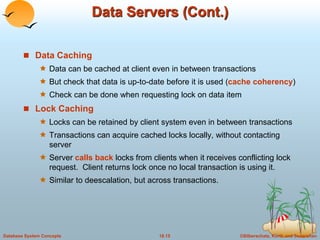
 Data Caching 
 Data can be cached at client even in between transactions 
 But check that data is up-to-date before it is used (cache coherency) 
 Check can be done when requesting lock on data item 
 Lock Caching 
 Locks can be retained by client system even in between transactions 
 Transactions can acquire cached locks locally, without contacting 
server 
 Server calls back locks from clients when it receives conflicting lock 
request. Client returns lock once no local transaction is using it. 
 Similar to deescalation, but across transactions. 
Database System Concepts 18.15 ©Silberschatz, Korth and Sudarshan
Parallel Systems 
 Parallel database systems consist of multiple processors and 
multiple disks connected by a fast interconnection network. 
 A coarse-grain parallel machine consists of a small number of 
powerful processors 
 A massively parallel or fine grain parallel machine utilizes 
thousands of smaller processors. 
 Two main performance measures: 
 throughput --- the number of tasks that can be completed in a 
given time interval 
 response time --- the amount of time it takes to complete a single 
task from the time it is submitted 
Database System Concepts 18.16 ©Silberschatz, Korth and Sudarshan
Speed-Up and Scale-Up 
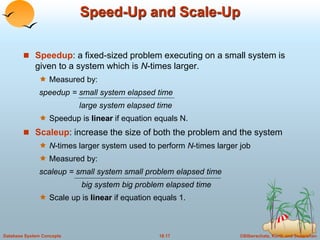
 Speedup: a fixed-sized problem executing on a small system is 
given to a system which is N-times larger. 
 Measured by: 
speedup = small system elapsed time 
large system elapsed time 
 Speedup is linear if equation equals N. 
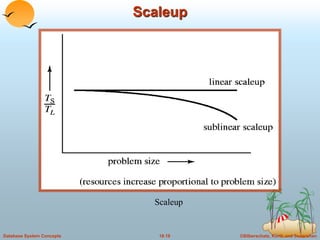
 Scaleup: increase the size of both the problem and the system 
 N-times larger system used to perform N-times larger job 
 Measured by: 
scaleup = small system small problem elapsed time 
big system big problem elapsed time 
 Scale up is linear if equation equals 1. 
Database System Concepts 18.17 ©Silberschatz, Korth and Sudarshan
Speedup 
Speedup 
Database System Concepts 18.18 ©Silberschatz, Korth and Sudarshan
Scaleup 
Scaleup 
Database System Concepts 18.19 ©Silberschatz, Korth and Sudarshan
Batch and Transaction Scaleup 
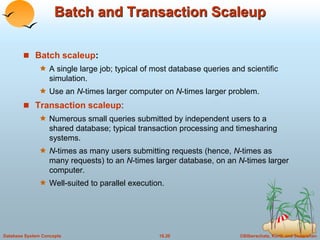
 Batch scaleup: 
 A single large job; typical of most database queries and scientific 
simulation. 
 Use an N-times larger computer on N-times larger problem. 
 Transaction scaleup: 
 Numerous small queries submitted by independent users to a 
shared database; typical transaction processing and timesharing 
systems. 
 N-times as many users submitting requests (hence, N-times as 
many requests) to an N-times larger database, on an N-times larger 
computer. 
 Well-suited to parallel execution. 
Database System Concepts 18.20 ©Silberschatz, Korth and Sudarshan
Factors Limiting Speedup and Scaleup 
Speedup and scaleup are often sublinear due to: 
 Startup costs: Cost of starting up multiple processes may 
dominate computation time, if the degree of parallelism is high. 
 Interference: Processes accessing shared resources 
(e.g.,system bus, disks, or locks) compete with each other, thus 
spending time waiting on other processes, rather than performing 
useful work. 
 Skew: Increasing the degree of parallelism increases the 
variance in service times of parallely executing tasks. Overall 
execution time determined by slowest of parallely executing 
tasks. 
Database System Concepts 18.21 ©Silberschatz, Korth and Sudarshan
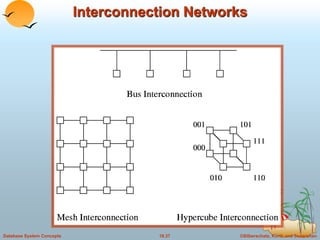
Interconnection Network Architectures 
 Bus. System components send data on and receive data from a 
single communication bus; 
 Does not scale well with increasing parallelism. 
 Mesh. Components are arranged as nodes in a grid, and each 
component is connected to all adjacent components 
 Communication links grow with growing number of components, and 
so scales better. 
 But may require 2n hops to send message to a node (or n with 
wraparound connections at edge of grid). 
 Hypercube. Components are numbered in binary; components 
are connected to one another if their binary representations differ 
in exactly one bit. 
 n components are connected to log(n) other components and can 
reach each other via at most log(n) links; reduces communication 
delays. 
Database System Concepts 18.22 ©Silberschatz, Korth and Sudarshan
Interconnection Architectures 
Database System Concepts 18.23 ©Silberschatz, Korth and Sudarshan
Parallel Database Architectures 
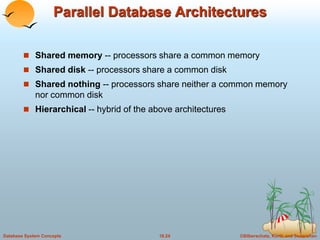
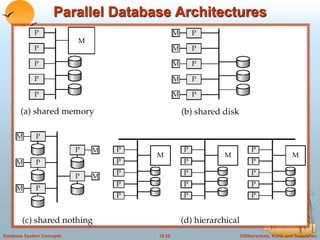
 Shared memory -- processors share a common memory 
 Shared disk -- processors share a common disk 
 Shared nothing -- processors share neither a common memory 
nor common disk 
 Hierarchical -- hybrid of the above architectures 
Database System Concepts 18.24 ©Silberschatz, Korth and Sudarshan
Parallel Database Architectures 
Database System Concepts 18.25 ©Silberschatz, Korth and Sudarshan
Shared Memory 
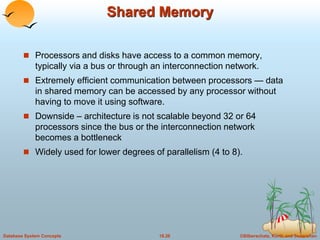
 Processors and disks have access to a common memory, 
typically via a bus or through an interconnection network. 
 Extremely efficient communication between processors — data 
in shared memory can be accessed by any processor without 
having to move it using software. 
 Downside – architecture is not scalable beyond 32 or 64 
processors since the bus or the interconnection network 
becomes a bottleneck 
 Widely used for lower degrees of parallelism (4 to 8). 
Database System Concepts 18.26 ©Silberschatz, Korth and Sudarshan
Shared Disk 
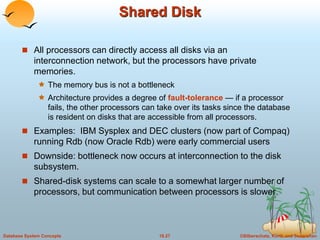
 All processors can directly access all disks via an 
interconnection network, but the processors have private 
memories. 
 The memory bus is not a bottleneck 
 Architecture provides a degree of fault-tolerance — if a processor 
fails, the other processors can take over its tasks since the database 
is resident on disks that are accessible from all processors. 
 Examples: IBM Sysplex and DEC clusters (now part of Compaq) 
running Rdb (now Oracle Rdb) were early commercial users 
 Downside: bottleneck now occurs at interconnection to the disk 
subsystem. 
 Shared-disk systems can scale to a somewhat larger number of 
processors, but communication between processors is slower. 
Database System Concepts 18.27 ©Silberschatz, Korth and Sudarshan
Shared Nothing 
 Node consists of a processor, memory, and one or more disks. 
Processors at one node communicate with another processor at 
another node using an interconnection network. A node functions 
as the server for the data on the disk or disks the node owns. 
 Examples: Teradata, Tandem, Oracle-n CUBE 
 Data accessed from local disks (and local memory accesses) do 
not pass through interconnection network, thereby minimizing the 
interference of resource sharing. 
 Shared-nothing multiprocessors can be scaled up to thousands 
of processors without interference. 
 Main drawback: cost of communication and non-local disk 
access; sending data involves software interaction at both ends. 
Database System Concepts 18.28 ©Silberschatz, Korth and Sudarshan
Hierarchical 
 Combines characteristics of shared-memory, shared-disk, and 
shared-nothing architectures. 
 Top level is a shared-nothing architecture – nodes connected by 
an interconnection network, and do not share disks or memory 
with each other. 
 Each node of the system could be a shared-memory system with 
a few processors. 
 Alternatively, each node could be a shared-disk system, and 
each of the systems sharing a set of disks could be a shared-memory 
system. 
 Reduce the complexity of programming such systems by 
distributed virtual-memory architectures 
 Also called non-uniform memory architecture (NUMA) 
Database System Concepts 18.29 ©Silberschatz, Korth and Sudarshan
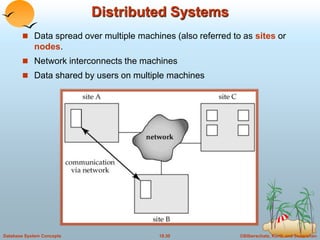
Distributed Systems 
 Data spread over multiple machines (also referred to as sites or 
nodes. 
 Network interconnects the machines 
 Data shared by users on multiple machines 
Database System Concepts 18.30 ©Silberschatz, Korth and Sudarshan
Distributed Databases 
 Homogeneous distributed databases 
 Same software/schema on all sites, data may be partitioned among 
sites 
 Goal: provide a view of a single database, hiding details of 
distribution 
 Heterogeneous distributed databases 
 Different software/schema on different sites 
 Goal: integrate existing databases to provide useful functionality 
 Differentiate between local and global transactions 
 A local transaction accesses data in the single site at which the 
transaction was initiated. 
 A global transaction either accesses data in a site different from the 
one at which the transaction was initiated or accesses data in 
several different sites. 
Database System Concepts 18.31 ©Silberschatz, Korth and Sudarshan
Trade-offs in Distributed Systems 
 Sharing data – users at one site able to access the data residing 
at some other sites. 
 Autonomy – each site is able to retain a degree of control over 
data stored locally. 
 Higher system availability through redundancy — data can be 
replicated at remote sites, and system can function even if a site 
fails. 
 Disadvantage: added complexity required to ensure proper 
coordination among sites. 
 Software development cost. 
 Greater potential for bugs. 
 Increased processing overhead. 
Database System Concepts 18.32 ©Silberschatz, Korth and Sudarshan
Implementation Issues for Distributed 
Databases 
 Atomicity needed even for transactions that update data at multiple 
site 
 Transaction cannot be committed at one site and aborted at another 
 The two-phase commit protocol (2PC) used to ensure atomicity 
 Basic idea: each site executes transaction till just before commit, and 
the leaves final decision to a coordinator 
 Each site must follow decision of coordinator: even if there is a failure 
while waiting for coordinators decision 
 To do so, updates of transaction are logged to stable storage and 
transaction is recorded as “waiting” 
 More details in Sectin 19.4.1 
 2PC is not always appropriate: other transaction models based on 
persistent messaging, and workflows, are also used 
 Distributed concurrency control (and deadlock detection) required 
 Replication of data items required for improving data availability 
 Details of above in Chapter 19 
Database System Concepts 18.33 ©Silberschatz, Korth and Sudarshan
Network Types 
 Local-area networks (LANs) – composed of processors that are 
distributed over small geographical areas, such as a single 
building or a few adjacent buildings. 
 Wide-area networks (WANs) – composed of processors 
distributed over a large geographical area. 
 Discontinuous connection – WANs, such as those based on 
periodic dial-up (using, e.g., UUCP), that are connected only for 
part of the time. 
 Continuous connection – WANs, such as the Internet, where 
hosts are connected to the network at all times. 
Database System Concepts 18.34 ©Silberschatz, Korth and Sudarshan
Networks Types (Cont.) 
 WANs with continuous connection are needed for implementing 
distributed database systems 
 Groupware applications such as Lotus notes can work on WANs 
with discontinuous connection: 
 Data is replicated. 
 Updates are propagated to replicas periodically. 
 No global locking is possible, and copies of data may be 
independently updated. 
 Non-serializable executions can thus result. Conflicting updates may 
have to be detected, and resolved in an application dependent 
manner. 
Database System Concepts 18.35 ©Silberschatz, Korth and Sudarshan
End of Chapter
Interconnection Networks 
Database System Concepts 18.37 ©Silberschatz, Korth and Sudarshan
A Distributed System 
Database System Concepts 18.38 ©Silberschatz, Korth and Sudarshan
Local-Area Network 
Database System Concepts 18.39 ©Silberschatz, Korth and Sudarshan

Database architecture

  • 1.
    Chapter 18: DatabaseSystem Architectures  Centralized Systems  Client--Server Systems  Parallel Systems  Distributed Systems  Network Types Database System Concepts 18.1 ©Silberschatz, Korth and Sudarshan
  • 2.
    Centralized Systems Run on a single computer system and do not interact with other computer systems.  General-purpose computer system: one to a few CPUs and a number of device controllers that are connected through a common bus that provides access to shared memory.  Single-user system (e.g., personal computer or workstation): desk-top unit, single user, usually has only one CPU and one or two hard disks; the OS may support only one user.  Multi-user system: more disks, more memory, multiple CPUs, and a multi-user OS. Serve a large number of users who are connected to the system vie terminals. Often called server systems. Database System Concepts 18.2 ©Silberschatz, Korth and Sudarshan
  • 3.
    A Centralized ComputerSystem Database System Concepts 18.3 ©Silberschatz, Korth and Sudarshan
  • 4.
    Client-Server Systems Server systems satisfy requests generated at m client systems, whose general structure is shown below: Database System Concepts 18.4 ©Silberschatz, Korth and Sudarshan
  • 5.
    Client-Server Systems (Cont.)  Database functionality can be divided into:  Back-end: manages access structures, query evaluation and optimization, concurrency control and recovery.  Front-end: consists of tools such as forms, report-writers, and graphical user interface facilities.  The interface between the front-end and the back-end is through SQL or through an application program interface. Database System Concepts 18.5 ©Silberschatz, Korth and Sudarshan
  • 6.
    Client-Server Systems (Cont.)  Advantages of replacing mainframes with networks of workstations or personal computers connected to back-end server machines:  better functionality for the cost  flexibility in locating resources and expanding facilities  better user interfaces  easier maintenance  Server systems can be broadly categorized into two kinds:  transaction servers which are widely used in relational database systems, and  data servers, used in object-oriented database systems Database System Concepts 18.6 ©Silberschatz, Korth and Sudarshan
  • 7.
    Transaction Servers Also called query server systems or SQL server systems; clients send requests to the server system where the transactions are executed, and results are shipped back to the client.  Requests specified in SQL, and communicated to the server through a remote procedure call (RPC) mechanism.  Transactional RPC allows many RPC calls to collectively form a transaction.  Open Database Connectivity (ODBC) is a C language application program interface standard from Microsoft for connecting to a server, sending SQL requests, and receiving results.  JDBC standard similar to ODBC, for Java Database System Concepts 18.7 ©Silberschatz, Korth and Sudarshan
  • 8.
    Transaction Server ProcessStructure  A typical transaction server consists of multiple processes accessing data in shared memory.  Server processes  These receive user queries (transactions), execute them and send results back  Processes may be multithreaded, allowing a single process to execute several user queries concurrently  Typically multiple multithreaded server processes  Lock manager process  More on this later  Database writer process  Output modified buffer blocks to disks continually Database System Concepts 18.8 ©Silberschatz, Korth and Sudarshan
  • 9.
    Transaction Server Processes(Cont.)  Log writer process  Server processes simply add log records to log record buffer  Log writer process outputs log records to stable storage.  Checkpoint process  Performs periodic checkpoints  Process monitor process  Monitors other processes, and takes recovery actions if any of the other processes fail  E.g. aborting any transactions being executed by a server process and restarting it Database System Concepts 18.9 ©Silberschatz, Korth and Sudarshan
  • 10.
    Transaction System Processes(Cont.) Database System Concepts 18.10 ©Silberschatz, Korth and Sudarshan
  • 11.
    Transaction System Processes(Cont.)  Shared memory contains shared data  Buffer pool  Lock table  Log buffer  Cached query plans (reused if same query submitted again)  All database processes can access shared memory  To ensure that no two processes are accessing the same data structure at the same time, databases systems implement mutual exclusion using either  Operating system semaphores  Atomic instructions such as test-and-set Database System Concepts 18.11 ©Silberschatz, Korth and Sudarshan
  • 12.
    Transaction System Processes(Cont.)  To avoid overhead of interprocess communication for lock request/grant, each database process operates directly on the lock table data structure (Section 16.1.4) instead of sending requests to lock manager process  Mutual exclusion ensured on the lock table using semaphores, or more commonly, atomic instructions  If a lock can be obtained, the lock table is updated directly in shared memory  If a lock cannot be immediately obtained, a lock request is noted in the lock table and the process (or thread) then waits for lock to be granted  When a lock is released, releasing process updates lock table to record release of lock, as well as grant of lock to waiting requests (if any)  Process/thread waiting for lock may either:  Continually scan lock table to check for lock grant, or  Use operating system semaphore mechanism to wait on a semaphore. – Semaphore identifier is recorded in the lock table – When a lock is granted, the releasing process signals the semaphore to tell the waiting process/thread to proceed  Lock manager process still used for deadlock detection Database System Concepts 18.12 ©Silberschatz, Korth and Sudarshan
  • 13.
    Data Servers Used in LANs, where there is a very high speed connection between the clients and the server, the client machines are comparable in processing power to the server machine, and the tasks to be executed are compute intensive.  Ship data to client machines where processing is performed, and then ship results back to the server machine.  This architecture requires full back-end functionality at the clients.  Used in many object-oriented database systems  Issues:  Page-Shipping versus Item-Shipping  Locking  Data Caching  Lock Caching Database System Concepts 18.13 ©Silberschatz, Korth and Sudarshan
  • 14.
    Data Servers (Cont.)  Page-Shipping versus Item-Shipping  Smaller unit of shipping  more messages  Worth prefetching related items along with requested item  Page shipping can be thought of as a form of prefetching  Locking  Overhead of requesting and getting locks from server is high due to message delays  Can grant locks on requested and prefetched items; with page shipping, transaction is granted lock on whole page.  Locks on a prefetched item can be P{called back} by the server, and returned by client transaction if the prefetched item has not been used.  Locks on the page can be deescalated to locks on items in the page when there are lock conflicts. Locks on unused items can then be returned to server. Database System Concepts 18.14 ©Silberschatz, Korth and Sudarshan
  • 15.
    Data Servers (Cont.)  Data Caching  Data can be cached at client even in between transactions  But check that data is up-to-date before it is used (cache coherency)  Check can be done when requesting lock on data item  Lock Caching  Locks can be retained by client system even in between transactions  Transactions can acquire cached locks locally, without contacting server  Server calls back locks from clients when it receives conflicting lock request. Client returns lock once no local transaction is using it.  Similar to deescalation, but across transactions. Database System Concepts 18.15 ©Silberschatz, Korth and Sudarshan
  • 16.
    Parallel Systems Parallel database systems consist of multiple processors and multiple disks connected by a fast interconnection network.  A coarse-grain parallel machine consists of a small number of powerful processors  A massively parallel or fine grain parallel machine utilizes thousands of smaller processors.  Two main performance measures:  throughput --- the number of tasks that can be completed in a given time interval  response time --- the amount of time it takes to complete a single task from the time it is submitted Database System Concepts 18.16 ©Silberschatz, Korth and Sudarshan
  • 17.
    Speed-Up and Scale-Up  Speedup: a fixed-sized problem executing on a small system is given to a system which is N-times larger.  Measured by: speedup = small system elapsed time large system elapsed time  Speedup is linear if equation equals N.  Scaleup: increase the size of both the problem and the system  N-times larger system used to perform N-times larger job  Measured by: scaleup = small system small problem elapsed time big system big problem elapsed time  Scale up is linear if equation equals 1. Database System Concepts 18.17 ©Silberschatz, Korth and Sudarshan
  • 18.
    Speedup Speedup DatabaseSystem Concepts 18.18 ©Silberschatz, Korth and Sudarshan
  • 19.
    Scaleup Scaleup DatabaseSystem Concepts 18.19 ©Silberschatz, Korth and Sudarshan
  • 20.
    Batch and TransactionScaleup  Batch scaleup:  A single large job; typical of most database queries and scientific simulation.  Use an N-times larger computer on N-times larger problem.  Transaction scaleup:  Numerous small queries submitted by independent users to a shared database; typical transaction processing and timesharing systems.  N-times as many users submitting requests (hence, N-times as many requests) to an N-times larger database, on an N-times larger computer.  Well-suited to parallel execution. Database System Concepts 18.20 ©Silberschatz, Korth and Sudarshan
  • 21.
    Factors Limiting Speedupand Scaleup Speedup and scaleup are often sublinear due to:  Startup costs: Cost of starting up multiple processes may dominate computation time, if the degree of parallelism is high.  Interference: Processes accessing shared resources (e.g.,system bus, disks, or locks) compete with each other, thus spending time waiting on other processes, rather than performing useful work.  Skew: Increasing the degree of parallelism increases the variance in service times of parallely executing tasks. Overall execution time determined by slowest of parallely executing tasks. Database System Concepts 18.21 ©Silberschatz, Korth and Sudarshan
  • 22.
    Interconnection Network Architectures  Bus. System components send data on and receive data from a single communication bus;  Does not scale well with increasing parallelism.  Mesh. Components are arranged as nodes in a grid, and each component is connected to all adjacent components  Communication links grow with growing number of components, and so scales better.  But may require 2n hops to send message to a node (or n with wraparound connections at edge of grid).  Hypercube. Components are numbered in binary; components are connected to one another if their binary representations differ in exactly one bit.  n components are connected to log(n) other components and can reach each other via at most log(n) links; reduces communication delays. Database System Concepts 18.22 ©Silberschatz, Korth and Sudarshan
  • 23.
    Interconnection Architectures DatabaseSystem Concepts 18.23 ©Silberschatz, Korth and Sudarshan
  • 24.
    Parallel Database Architectures  Shared memory -- processors share a common memory  Shared disk -- processors share a common disk  Shared nothing -- processors share neither a common memory nor common disk  Hierarchical -- hybrid of the above architectures Database System Concepts 18.24 ©Silberschatz, Korth and Sudarshan
  • 25.
    Parallel Database Architectures Database System Concepts 18.25 ©Silberschatz, Korth and Sudarshan
  • 26.
    Shared Memory Processors and disks have access to a common memory, typically via a bus or through an interconnection network.  Extremely efficient communication between processors — data in shared memory can be accessed by any processor without having to move it using software.  Downside – architecture is not scalable beyond 32 or 64 processors since the bus or the interconnection network becomes a bottleneck  Widely used for lower degrees of parallelism (4 to 8). Database System Concepts 18.26 ©Silberschatz, Korth and Sudarshan
  • 27.
    Shared Disk All processors can directly access all disks via an interconnection network, but the processors have private memories.  The memory bus is not a bottleneck  Architecture provides a degree of fault-tolerance — if a processor fails, the other processors can take over its tasks since the database is resident on disks that are accessible from all processors.  Examples: IBM Sysplex and DEC clusters (now part of Compaq) running Rdb (now Oracle Rdb) were early commercial users  Downside: bottleneck now occurs at interconnection to the disk subsystem.  Shared-disk systems can scale to a somewhat larger number of processors, but communication between processors is slower. Database System Concepts 18.27 ©Silberschatz, Korth and Sudarshan
  • 28.
    Shared Nothing Node consists of a processor, memory, and one or more disks. Processors at one node communicate with another processor at another node using an interconnection network. A node functions as the server for the data on the disk or disks the node owns.  Examples: Teradata, Tandem, Oracle-n CUBE  Data accessed from local disks (and local memory accesses) do not pass through interconnection network, thereby minimizing the interference of resource sharing.  Shared-nothing multiprocessors can be scaled up to thousands of processors without interference.  Main drawback: cost of communication and non-local disk access; sending data involves software interaction at both ends. Database System Concepts 18.28 ©Silberschatz, Korth and Sudarshan
  • 29.
    Hierarchical  Combinescharacteristics of shared-memory, shared-disk, and shared-nothing architectures.  Top level is a shared-nothing architecture – nodes connected by an interconnection network, and do not share disks or memory with each other.  Each node of the system could be a shared-memory system with a few processors.  Alternatively, each node could be a shared-disk system, and each of the systems sharing a set of disks could be a shared-memory system.  Reduce the complexity of programming such systems by distributed virtual-memory architectures  Also called non-uniform memory architecture (NUMA) Database System Concepts 18.29 ©Silberschatz, Korth and Sudarshan
  • 30.
    Distributed Systems Data spread over multiple machines (also referred to as sites or nodes.  Network interconnects the machines  Data shared by users on multiple machines Database System Concepts 18.30 ©Silberschatz, Korth and Sudarshan
  • 31.
    Distributed Databases Homogeneous distributed databases  Same software/schema on all sites, data may be partitioned among sites  Goal: provide a view of a single database, hiding details of distribution  Heterogeneous distributed databases  Different software/schema on different sites  Goal: integrate existing databases to provide useful functionality  Differentiate between local and global transactions  A local transaction accesses data in the single site at which the transaction was initiated.  A global transaction either accesses data in a site different from the one at which the transaction was initiated or accesses data in several different sites. Database System Concepts 18.31 ©Silberschatz, Korth and Sudarshan
  • 32.
    Trade-offs in DistributedSystems  Sharing data – users at one site able to access the data residing at some other sites.  Autonomy – each site is able to retain a degree of control over data stored locally.  Higher system availability through redundancy — data can be replicated at remote sites, and system can function even if a site fails.  Disadvantage: added complexity required to ensure proper coordination among sites.  Software development cost.  Greater potential for bugs.  Increased processing overhead. Database System Concepts 18.32 ©Silberschatz, Korth and Sudarshan
  • 33.
    Implementation Issues forDistributed Databases  Atomicity needed even for transactions that update data at multiple site  Transaction cannot be committed at one site and aborted at another  The two-phase commit protocol (2PC) used to ensure atomicity  Basic idea: each site executes transaction till just before commit, and the leaves final decision to a coordinator  Each site must follow decision of coordinator: even if there is a failure while waiting for coordinators decision  To do so, updates of transaction are logged to stable storage and transaction is recorded as “waiting”  More details in Sectin 19.4.1  2PC is not always appropriate: other transaction models based on persistent messaging, and workflows, are also used  Distributed concurrency control (and deadlock detection) required  Replication of data items required for improving data availability  Details of above in Chapter 19 Database System Concepts 18.33 ©Silberschatz, Korth and Sudarshan
  • 34.
    Network Types Local-area networks (LANs) – composed of processors that are distributed over small geographical areas, such as a single building or a few adjacent buildings.  Wide-area networks (WANs) – composed of processors distributed over a large geographical area.  Discontinuous connection – WANs, such as those based on periodic dial-up (using, e.g., UUCP), that are connected only for part of the time.  Continuous connection – WANs, such as the Internet, where hosts are connected to the network at all times. Database System Concepts 18.34 ©Silberschatz, Korth and Sudarshan
  • 35.
    Networks Types (Cont.)  WANs with continuous connection are needed for implementing distributed database systems  Groupware applications such as Lotus notes can work on WANs with discontinuous connection:  Data is replicated.  Updates are propagated to replicas periodically.  No global locking is possible, and copies of data may be independently updated.  Non-serializable executions can thus result. Conflicting updates may have to be detected, and resolved in an application dependent manner. Database System Concepts 18.35 ©Silberschatz, Korth and Sudarshan
  • 36.
  • 37.
    Interconnection Networks DatabaseSystem Concepts 18.37 ©Silberschatz, Korth and Sudarshan
  • 38.
    A Distributed System Database System Concepts 18.38 ©Silberschatz, Korth and Sudarshan
  • 39.
    Local-Area Network DatabaseSystem Concepts 18.39 ©Silberschatz, Korth and Sudarshan