DATA
FRAMES
R.Racksavi
II M.Sc IT.,
Objectives
 What is Data Frames?
 Creating Data Frames
 Other Matrix-Like Operations
 Merging Data Frames
 Applying functions to Data Frames.
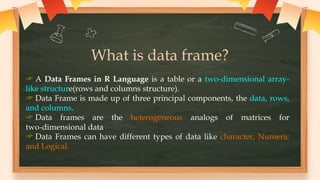
What is data frame?
 A Data Frames in R Language is a table or a two-dimensional array-
like structure(rows and columns structure).
 Data Frame is made up of three principal components, the data, rows,
and columns.
 Data frames are the heterogeneous analogs of matrices for
two-dimensional data.
 Data Frames can have different types of data like character, Numeric
and Logical.
Creating DataFrames
To create a data frame in R use data.frame() command
//creating a data frame
kids <- c("Jack","Jill")
> ages <- c(12,10)
> d <- data.frame(kids, ages, stringsAsFactors=FALSE)
> d # matrix-like viewpoint
kids ages
1 Jack 12
2 Jill 10
Output
Here Two vectors:
kids and ages
Accessing Data Frames
“d is a list”
component index value
d[[1]]
Output: [1] "Jack" "Jill”
d$kids
Output: [1] "Jack" "Jill“
view column 1
d[,1]
Output:[1] "Jack" "Jill“
using str():
str(d)
'data.frame': 2 obs. of 2 variables:
Output:
$ kids: chr "Jack" "Jill“
$ ages: num 12 10
R tells that d consists of
two observations—our
two rows—that
store data on two
variables—our two
columns.
kids ages
1 Jack 12
2 Jill 10
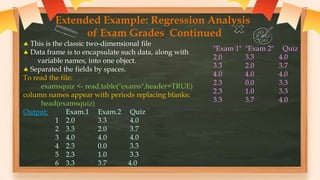
Extended Example: Regression Analysis
of Exam Grades Continued
 This is the classic two-dimensional file
 Data frame is to encapsulate such data, along with
variable names, into one object.
 Separated the fields by spaces.
To read the file:
examsquiz <- read.table("exams",header=TRUE)
column names appear with periods replacing blanks:
head(examsquiz)
Output: Exam.1 Exam.2 Quiz
1 2.0 3.3 4.0
2 3.3 2.0 3.7
3 4.0 4.0 4.0
4 2.3 0.0 3.3
5 2.3 1.0 3.3
6 3.3 3.7 4.0
"Exam 1" "Exam 2" Quiz
2.0 3.3 4.0
3.3 2.0 3.7
4.0 4.0 4.0
2.3 0.0 3.3
2.3 1.0 3.3
3.3 3.7 4.0
Other Matrix-Like Operations
(I) Extracting Subdata Frames
a data frame can be viewed in row-and-column,
extract subdata frames by rows or columns.
examsquiz[2:5,]
Output:
Exam.1 Exam.2 Quiz
2 3.3 2 3.7
3 4.0 4 4.0
4 2.3 0 3.3
5 2.3 1 3.3
examsquiz[2:5,2]
Output: [1] 2 4 0 1
"Exam 1" "Exam 2" Quiz
2.0 3.3 4.0
3.3 2.0 3.7
4.0 4.0 4.0
2.3 0.0 3.3
2.3 1.0 3.3
class(examsquiz[2:5,2])
Output: [1] "numeric“
examsquiz[2:5,2,drop=FALSE] Output:
FILTERING:
Here’s how to extract the subframe
of all Students whose first exam
score was at least 3.8:
examsquiz[examsquiz$Exam.1 >= 3.8,]
Output:
Exam.1 Exam.2 Quiz
3 4 4.0 4.0
9 4 3.3 4.0
11 4 4.0 4.0
14 4 0.0 4.0
16 4 3.7 4.0
Exam.2
2 2
3 4
4 0
5 1
(II) Treatment of NA Values
In R missing values are represented by the symbol NA .
The rm() function in R is used to delete or remove a
variable from a workspace.
2.0 NA 4.0
x <- c(2,NA,4)
> mean(x)
Output:[1] NA
> mean(x,na.rm=TRUE)
Output:[1] 3
X examsquiz[examsquiz$Exam.1 >= 3.8,]
 > subset(examsquiz,Exam.1 >= 3.8)
The complete.cases() function in R, To eliminate
missing values from a vector, matrix, or data frame.
d4
> complete.cases(d4)
[1] TRUE FALSE
TRUE FALSE
> d5 <- d4[complete.cases(d4),]
> d5
kids states
1 Jack CA
3 Jillian MA
kids states
1 Jack CA
2 <NA> MA
3 Jillian MA
4 John <NA>
apply() takes Data frame or matrix as an input and gives output in
vector, list or array.
Syntax: apply( x, margin, function )
x: determines the input array including matrix.
margin: If the margin is 1 function is applied across row, if the
margin is 2 it is applied across the column.
function: determines the function that is to be applied on input data.
apply(examsquiz,1,max)
[1] 4.0 3.7 4.0 3.3 3.3 4.0 3.7 3.3 4.0 4.0 4.0 3.3 4.0 4.0 3.7 4.0 3.3 3.7 4.0
[20] 3.7 4.0 4.0 3.3 3.3 4.0 4.0 3.3 3.3 4.0 3.7 3.3 3.3 3.7 2.7 3.3 4.0 3.7 3.7
[39] 3.7
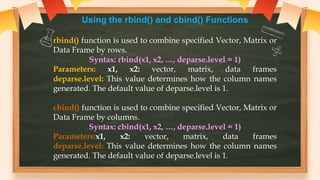
Using the rbind() and cbind() Functions
rbind() function is used to combine specified Vector, Matrix or
Data Frame by rows.
Syntax: rbind(x1, x2, …, deparse.level = 1)
Parameters: x1, x2: vector, matrix, data frames
deparse.level: This value determines how the column names
generated. The default value of deparse.level is 1.
cbind() function is used to combine specified Vector, Matrix or
Data Frame by columns.
Syntax: cbind(x1, x2, …, deparse.level = 1)
Parameters:x1, x2: vector, matrix, data frames
deparse.level: This value determines how the column names
generated. The default value of deparse.level is 1.
To add a row
>d
kids ages
1 Jack 12
2 Jill 10
> rbind(d,list("Laura",19))
kids ages
1 Jack 12
2 Jill 10
3 Laura 19
To create new columns
from old ones, to add a
variable that is the
difference between exams 1
and 2:
eq<-
cbind(examsquiz,examsqui
z$Exam.2-
examsquiz$Exam.1)
> class(eq)
[1] "data.frame"
The head() function is used to display the first n rows
present in the input data frame.
> head(eq)
Exam.1 Exam.2 Quiz examsquiz$Exam.2 - examsquiz$Exam.
1 2.0 3.3 4.0 1.3
2 3.3 2.0 3.7 -1.3
3 4.0 4.0 4.0 0.0
4 2.3 0.0 3.3 -2.3
5 2.3 1.0 3.3 -1.3
6 3.3 3.7 4.0 0.4
To add a column that is of a different length than those in the data frame:
>d
kids ages
1 Jack 12
2 Jill 10
>d
kids ages
1 Jack 12
2 Jill 10
> d$one <- 1
>d
kids ages one
1 Jack 12 1
2 Jill 10 1
Merging Data Frames
merge() function is used to merge two data frames by common columns.
Syntax: merge(arg1, arg2, by.x, by.y)
Parameters: arg1 and arg2: Data frames to be merged
by.x: Common argument of first data frame
by.y: Common argument of second data frame
> d <- merge(d1,d2)
Output:
>d
kids states ages
1 Jack CA 12
2 Jill MA 10
> d1
kids states
1 Jack CA
2 Jill MA
3 Jillian MA
4 John HI
> d2
ages kids
1 10 Jill
2 7 Lillian
3 12 Jack
> merge(d1,d3,by.x="kids",by.y="pals")
kids states ages
1 Jack CA 12
2 Jill MA 10
> d2a <- rbind(d2,list(15,"Jill"))
> d2a
ages kids
1 12 Jack
2 10 Jill
3 7 Lillian
4 15 Jill
> d3
ages pals
1 12 Jack
2 10 Jill
3 7 Lillian
> d1
kids states
1 Jack CA
2 Jill MA
3 Jillian MA
4 John HI
Applying Functions to Data Frames
Using lapply() and sapply() on DataFrames
lapply() function:
 The lapply() function helps us in applying
functions on list objects and returns a list object of
the same length.
lapply() function
 The lapply() function in the R Language takes a list, vector, or data
frame as input and gives output in the form of a list object.
 Since the lapply() function applies a certain operation to all the
elements of the list it doesn’t need a MARGIN.
Syntax: lapply( x, fun )
Parameters:
x: determines the input vector or an object.
fun: determines the function that is to be applied to input data.
Example:
The use of the lapply() function to a vector.
names <- c("priyank", "abhiraj", "pawananjani", " sudhanshu", "devraj")
print( "original data:")
names
# apply lapply() function
print("data after lapply():")
lapply(names, toupper)
O/P
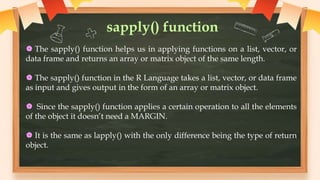
sapply() function
 The sapply() function helps us in applying functions on a list, vector, or
data frame and returns an array or matrix object of the same length.
 The sapply() function in the R Language takes a list, vector, or data frame
as input and gives output in the form of an array or matrix object.
 Since the sapply() function applies a certain operation to all the elements
of the object it doesn’t need a MARGIN.
 It is the same as lapply() with the only difference being the type of return
object.
Syntax: sapply( x, fun )
Parameters:
x: determines the input vector or an object.
fun: determines the function that is to be applied to input data.
Example:
# create sample data
sample_data<- data.frame( x=c(1,2,3,4,5,6) ,
y=c(3,2,4,2,34,5))
print( "original data:")
sample_data
# apply sapply() function
print("data after sapply():")
sapply(sample_data, max)
O/P
CRÉDITOS: Esta plantilla para
presentaciones es una creación de
Slidesgo, e incluye iconos de Flaticon,
infografías e imágenes de Freepik
¿Tienes alguna pregunta?
tuemail@freepik.com
+91 620 421 838
tupaginaweb.com
¡Gracias!
Por favor, conserva esta diapositiva
para atribuirnos
23

data frames.pptx

  • 1.
  • 2.
    Objectives  What isData Frames?  Creating Data Frames  Other Matrix-Like Operations  Merging Data Frames  Applying functions to Data Frames.
  • 3.
    What is dataframe?  A Data Frames in R Language is a table or a two-dimensional array- like structure(rows and columns structure).  Data Frame is made up of three principal components, the data, rows, and columns.  Data frames are the heterogeneous analogs of matrices for two-dimensional data.  Data Frames can have different types of data like character, Numeric and Logical.
  • 4.
    Creating DataFrames To createa data frame in R use data.frame() command //creating a data frame kids <- c("Jack","Jill") > ages <- c(12,10) > d <- data.frame(kids, ages, stringsAsFactors=FALSE) > d # matrix-like viewpoint kids ages 1 Jack 12 2 Jill 10 Output Here Two vectors: kids and ages
  • 5.
    Accessing Data Frames “dis a list” component index value d[[1]] Output: [1] "Jack" "Jill” d$kids Output: [1] "Jack" "Jill“ view column 1 d[,1] Output:[1] "Jack" "Jill“ using str(): str(d) 'data.frame': 2 obs. of 2 variables: Output: $ kids: chr "Jack" "Jill“ $ ages: num 12 10 R tells that d consists of two observations—our two rows—that store data on two variables—our two columns. kids ages 1 Jack 12 2 Jill 10
  • 6.
    Extended Example: RegressionAnalysis of Exam Grades Continued  This is the classic two-dimensional file  Data frame is to encapsulate such data, along with variable names, into one object.  Separated the fields by spaces. To read the file: examsquiz <- read.table("exams",header=TRUE) column names appear with periods replacing blanks: head(examsquiz) Output: Exam.1 Exam.2 Quiz 1 2.0 3.3 4.0 2 3.3 2.0 3.7 3 4.0 4.0 4.0 4 2.3 0.0 3.3 5 2.3 1.0 3.3 6 3.3 3.7 4.0 "Exam 1" "Exam 2" Quiz 2.0 3.3 4.0 3.3 2.0 3.7 4.0 4.0 4.0 2.3 0.0 3.3 2.3 1.0 3.3 3.3 3.7 4.0
  • 7.
    Other Matrix-Like Operations (I)Extracting Subdata Frames a data frame can be viewed in row-and-column, extract subdata frames by rows or columns. examsquiz[2:5,] Output: Exam.1 Exam.2 Quiz 2 3.3 2 3.7 3 4.0 4 4.0 4 2.3 0 3.3 5 2.3 1 3.3 examsquiz[2:5,2] Output: [1] 2 4 0 1 "Exam 1" "Exam 2" Quiz 2.0 3.3 4.0 3.3 2.0 3.7 4.0 4.0 4.0 2.3 0.0 3.3 2.3 1.0 3.3
  • 8.
    class(examsquiz[2:5,2]) Output: [1] "numeric“ examsquiz[2:5,2,drop=FALSE]Output: FILTERING: Here’s how to extract the subframe of all Students whose first exam score was at least 3.8: examsquiz[examsquiz$Exam.1 >= 3.8,] Output: Exam.1 Exam.2 Quiz 3 4 4.0 4.0 9 4 3.3 4.0 11 4 4.0 4.0 14 4 0.0 4.0 16 4 3.7 4.0 Exam.2 2 2 3 4 4 0 5 1
  • 9.
    (II) Treatment ofNA Values In R missing values are represented by the symbol NA . The rm() function in R is used to delete or remove a variable from a workspace. 2.0 NA 4.0 x <- c(2,NA,4) > mean(x) Output:[1] NA > mean(x,na.rm=TRUE) Output:[1] 3 X examsquiz[examsquiz$Exam.1 >= 3.8,]  > subset(examsquiz,Exam.1 >= 3.8)
  • 10.
    The complete.cases() functionin R, To eliminate missing values from a vector, matrix, or data frame. d4 > complete.cases(d4) [1] TRUE FALSE TRUE FALSE > d5 <- d4[complete.cases(d4),] > d5 kids states 1 Jack CA 3 Jillian MA kids states 1 Jack CA 2 <NA> MA 3 Jillian MA 4 John <NA>
  • 11.
    apply() takes Dataframe or matrix as an input and gives output in vector, list or array. Syntax: apply( x, margin, function ) x: determines the input array including matrix. margin: If the margin is 1 function is applied across row, if the margin is 2 it is applied across the column. function: determines the function that is to be applied on input data. apply(examsquiz,1,max) [1] 4.0 3.7 4.0 3.3 3.3 4.0 3.7 3.3 4.0 4.0 4.0 3.3 4.0 4.0 3.7 4.0 3.3 3.7 4.0 [20] 3.7 4.0 4.0 3.3 3.3 4.0 4.0 3.3 3.3 4.0 3.7 3.3 3.3 3.7 2.7 3.3 4.0 3.7 3.7 [39] 3.7
  • 12.
    Using the rbind()and cbind() Functions rbind() function is used to combine specified Vector, Matrix or Data Frame by rows. Syntax: rbind(x1, x2, …, deparse.level = 1) Parameters: x1, x2: vector, matrix, data frames deparse.level: This value determines how the column names generated. The default value of deparse.level is 1. cbind() function is used to combine specified Vector, Matrix or Data Frame by columns. Syntax: cbind(x1, x2, …, deparse.level = 1) Parameters:x1, x2: vector, matrix, data frames deparse.level: This value determines how the column names generated. The default value of deparse.level is 1.
  • 13.
    To add arow >d kids ages 1 Jack 12 2 Jill 10 > rbind(d,list("Laura",19)) kids ages 1 Jack 12 2 Jill 10 3 Laura 19 To create new columns from old ones, to add a variable that is the difference between exams 1 and 2: eq<- cbind(examsquiz,examsqui z$Exam.2- examsquiz$Exam.1) > class(eq) [1] "data.frame"
  • 14.
    The head() functionis used to display the first n rows present in the input data frame. > head(eq) Exam.1 Exam.2 Quiz examsquiz$Exam.2 - examsquiz$Exam. 1 2.0 3.3 4.0 1.3 2 3.3 2.0 3.7 -1.3 3 4.0 4.0 4.0 0.0 4 2.3 0.0 3.3 -2.3 5 2.3 1.0 3.3 -1.3 6 3.3 3.7 4.0 0.4 To add a column that is of a different length than those in the data frame: >d kids ages 1 Jack 12 2 Jill 10
  • 15.
    >d kids ages 1 Jack12 2 Jill 10 > d$one <- 1 >d kids ages one 1 Jack 12 1 2 Jill 10 1
  • 16.
    Merging Data Frames merge()function is used to merge two data frames by common columns. Syntax: merge(arg1, arg2, by.x, by.y) Parameters: arg1 and arg2: Data frames to be merged by.x: Common argument of first data frame by.y: Common argument of second data frame > d <- merge(d1,d2) Output: >d kids states ages 1 Jack CA 12 2 Jill MA 10 > d1 kids states 1 Jack CA 2 Jill MA 3 Jillian MA 4 John HI > d2 ages kids 1 10 Jill 2 7 Lillian 3 12 Jack
  • 17.
    > merge(d1,d3,by.x="kids",by.y="pals") kids statesages 1 Jack CA 12 2 Jill MA 10 > d2a <- rbind(d2,list(15,"Jill")) > d2a ages kids 1 12 Jack 2 10 Jill 3 7 Lillian 4 15 Jill > d3 ages pals 1 12 Jack 2 10 Jill 3 7 Lillian > d1 kids states 1 Jack CA 2 Jill MA 3 Jillian MA 4 John HI
  • 18.
    Applying Functions toData Frames Using lapply() and sapply() on DataFrames lapply() function:  The lapply() function helps us in applying functions on list objects and returns a list object of the same length.
  • 19.
    lapply() function  Thelapply() function in the R Language takes a list, vector, or data frame as input and gives output in the form of a list object.  Since the lapply() function applies a certain operation to all the elements of the list it doesn’t need a MARGIN. Syntax: lapply( x, fun ) Parameters: x: determines the input vector or an object. fun: determines the function that is to be applied to input data.
  • 20.
    Example: The use ofthe lapply() function to a vector. names <- c("priyank", "abhiraj", "pawananjani", " sudhanshu", "devraj") print( "original data:") names # apply lapply() function print("data after lapply():") lapply(names, toupper) O/P
  • 21.
    sapply() function  Thesapply() function helps us in applying functions on a list, vector, or data frame and returns an array or matrix object of the same length.  The sapply() function in the R Language takes a list, vector, or data frame as input and gives output in the form of an array or matrix object.  Since the sapply() function applies a certain operation to all the elements of the object it doesn’t need a MARGIN.  It is the same as lapply() with the only difference being the type of return object.
  • 22.
    Syntax: sapply( x,fun ) Parameters: x: determines the input vector or an object. fun: determines the function that is to be applied to input data. Example: # create sample data sample_data<- data.frame( x=c(1,2,3,4,5,6) , y=c(3,2,4,2,34,5)) print( "original data:") sample_data # apply sapply() function print("data after sapply():") sapply(sample_data, max) O/P
  • 23.
    CRÉDITOS: Esta plantillapara presentaciones es una creación de Slidesgo, e incluye iconos de Flaticon, infografías e imágenes de Freepik ¿Tienes alguna pregunta? tuemail@freepik.com +91 620 421 838 tupaginaweb.com ¡Gracias! Por favor, conserva esta diapositiva para atribuirnos 23