Introduction to R
R
• R is a language and environment for
statistical computing and graphics.
• Is open source
• http://www.r-project.org/
R
• R is an integrated suite of software facilities for data
manipulation, calculation and graphical display. It
includes
– an effective data handling and storage facility,
– a suite of operators for calculations on arrays, in particular
matrices,
– a large, coherent, integrated collection of intermediate tools for
data analysis,
– graphical facilities for data analysis and display either on-screen
or on hardcopy, and
– a well-developed, simple and effective programming language
which includes conditionals, loops, user-defined recursive
functions and input and output facilities.
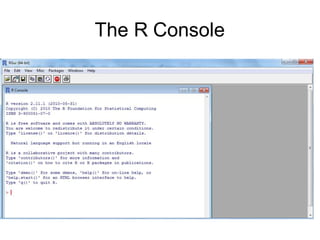
The R Console
R basics
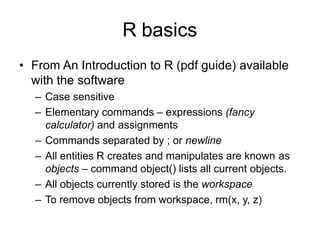
• From An Introduction to R (pdf guide) available
with the software
– Case sensitive
– Elementary commands – expressions (fancy
calculator) and assignments
– Commands separated by ; or newline
– All entities R creates and manipulates are known as
objects – command object() lists all current objects.
– All objects currently stored is the workspace
– To remove objects from workspace, rm(x, y, z)
R basics
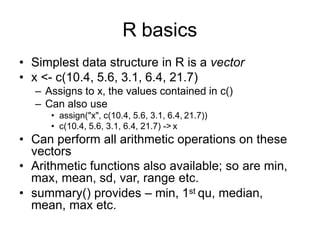
• Simplest data structure in R is a vector
• x <- c(10.4, 5.6, 3.1, 6.4, 21.7)
– Assigns to x, the values contained in c()
– Can also use
• assign("x", c(10.4, 5.6, 3.1, 6.4, 21.7))
• c(10.4, 5.6, 3.1, 6.4, 21.7) -> x
• Can perform all arithmetic operations on these
vectors
• Arithmetic functions also available; so are min,
max, mean, sd, var, range etc.
• summary() provides – min, 1st qu, median,
mean, max etc.
R basics
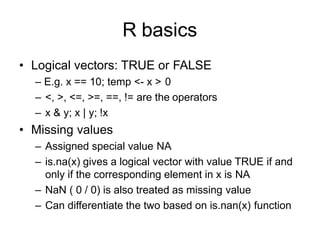
• Logical vectors: TRUE or FALSE
– E.g. x == 10; temp <- x > 0
– <, >, <=, >=, ==, != are the operators
– x & y; x | y; !x
• Missing values
– Assigned special value NA
– is.na(x) gives a logical vector with value TRUE if and
only if the corresponding element in x is NA
– NaN ( 0 / 0) is also treated as missing value
– Can differentiate the two based on is.nan(x) function
R Basics
• Other objects
– matrices or more generally arrays are multi-
dimensional generalizations of vectors.
– factors provide compact ways to handle categorical
data
– lists are a general form of vector in which the various
elements need not be of the same type
– data frames are matrix-like structures, in which the
columns can be of different types.
– functions are themselves objects in R which can be
stored in the project’s workspace.
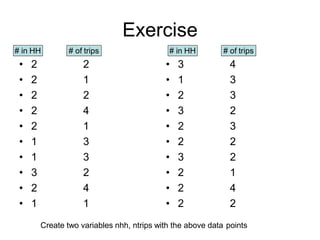
Exercise
• 2
• 2
• 2
• 2
• 2
• 1
• 1
• 3
• 2
• 1
2
1
2
4
1
3
3
2
4
1
• 3
• 1
• 2
• 3
• 2
• 2
• 3
• 2
• 2
• 2
4
3
3
2
3
2
2
1
4
2
# in HH # of trips # in HH # of trips
Create two variables nhh, ntrips with the above data points
Factor
• used to specify a discrete classification
(grouping) of the components of other vectors of
the same length
– nhhf <- factor(nhh)
– nhhf
– levels(nhhf)
– tripmeans <- tapply(ntrips, nhhf, mean)
– Create factor of ntrips;
– table(ntripsf, nhhf) gives?
Arrays
• A vector can be converted into an array
using the dim() function.
– dim(z) <- c(3,5,100)
– Index starts from 1,1,1
– Follows column major order – 1st subscript
incremented first; z[1,1,1], z[2,1,1]…
– Can also use array() function
• > x <- array(1:20, dim=c(4,5))
• > x
Matrix Operations
• Transpose: B <- t(A)
• nrow(A) and ncol(A)
• A * B – element by element multiplication
• A %*% B – matrix multiplication
• Can also use crossprod(X,y): same as t(X) %*% y
• diag()
– If argument is vector, a matrix with vector elements in diagonal is
returned
– If argument is matrix, diagonal elements returned as vector
– If argument is number k, a k by k Identity matrix is returned
• If you want to Invert matrices use, solve(A); if you want
to compute A-1x use solve(A,x)
• Matrix can be created using cbind() and rbind() too
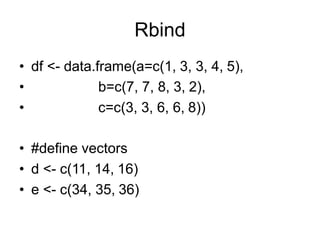
Rbind
• df <- data.frame(a=c(1, 3, 3, 4, 5),
•
•
b=c(7, 7, 8, 3, 2),
c=c(3, 3, 6, 6, 8))
• #define vectors
• d <- c(11, 14, 16)
• e <- c(34, 35, 36)
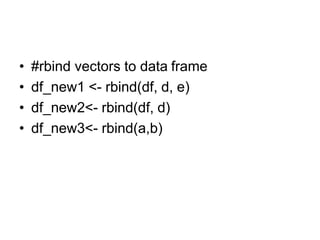
• #rbind vectors to data frame
• df_new1 <- rbind(df, d, e)
• df_new2<- rbind(df, d)
• df_new3<- rbind(a,b)
• #create two data frames
• df1 <- data.frame(a=c(1, 3, 3, 4, 5),
• b=c(7, 7, 8, 3, 2),
• c=c(3, 3, 6, 6, 8))
• df2 <- data.frame(a=c(11, 14, 16, 17, 22),
• b=c(34, 35, 36, 36, 40),
• c=c(2, 2, 5, 7, 8))
• #rbind two data frames into one data frame
• df_new <- rbind(df1, df2)
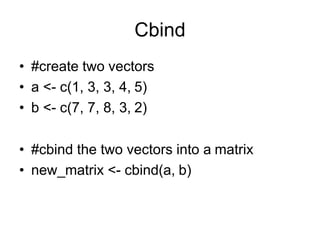
Cbind
• #create two vectors
• a <- c(1, 3, 3, 4, 5)
• b <- c(7, 7, 8, 3, 2)
• #cbind the two vectors into a matrix
• new_matrix <- cbind(a, b)
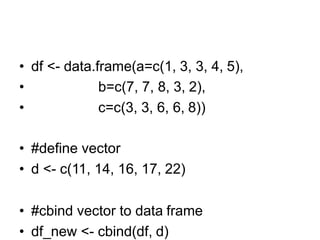
• df <- data.frame(a=c(1, 3, 3, 4, 5),
•
•
b=c(7, 7, 8, 3, 2),
c=c(3, 3, 6, 6, 8))
• #define vector
• d <- c(11, 14, 16, 17, 22)
• #cbind vector to data frame
• df_new <- cbind(df, d)
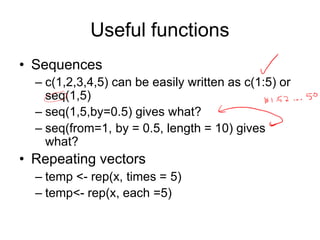
Useful functions
• Sequences
– c(1,2,3,4,5) can be easily written as c(1:5) or
seq(1,5)
– seq(1,5,by=0.5) gives what?
– seq(from=1, by = 0.5, length = 10) gives
what?
• Repeating vectors
– temp <- rep(x, times = 5)
– temp<- rep(x, each =5)
Useful functions
• Indexing Vectors
– Logical vector
• x <- c(1,2,4,NA,5)
• x[!is.na(x)] gives what?
• x[(!is.na(x)) & x > 2] gives what?
– Vector of positive integral quantities: x[1:3]
– Vector of –ve integral quantities: x[-(1:3)]
gives what?
• Replace all missing values in x with 0
Useful functions
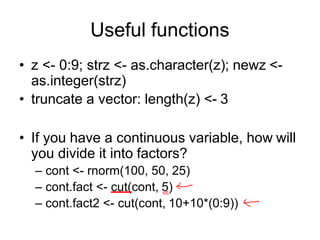
• z <- 0:9; strz <- as.character(z); newz <-
as.integer(strz)
• truncate a vector: length(z) <- 3
• If you have a continuous variable, how will
you divide it into factors?
– cont <- rnorm(100, 50, 25)
– cont.fact <- cut(cont, 5)
– cont.fact2 <- cut(cont, 10+10*(0:9))

Introduction to R.pptx

  • 1.
  • 2.
    R • R isa language and environment for statistical computing and graphics. • Is open source • http://www.r-project.org/
  • 3.
    R • R isan integrated suite of software facilities for data manipulation, calculation and graphical display. It includes – an effective data handling and storage facility, – a suite of operators for calculations on arrays, in particular matrices, – a large, coherent, integrated collection of intermediate tools for data analysis, – graphical facilities for data analysis and display either on-screen or on hardcopy, and – a well-developed, simple and effective programming language which includes conditionals, loops, user-defined recursive functions and input and output facilities.
  • 4.
  • 5.
    R basics • FromAn Introduction to R (pdf guide) available with the software – Case sensitive – Elementary commands – expressions (fancy calculator) and assignments – Commands separated by ; or newline – All entities R creates and manipulates are known as objects – command object() lists all current objects. – All objects currently stored is the workspace – To remove objects from workspace, rm(x, y, z)
  • 6.
    R basics • Simplestdata structure in R is a vector • x <- c(10.4, 5.6, 3.1, 6.4, 21.7) – Assigns to x, the values contained in c() – Can also use • assign("x", c(10.4, 5.6, 3.1, 6.4, 21.7)) • c(10.4, 5.6, 3.1, 6.4, 21.7) -> x • Can perform all arithmetic operations on these vectors • Arithmetic functions also available; so are min, max, mean, sd, var, range etc. • summary() provides – min, 1st qu, median, mean, max etc.
  • 7.
    R basics • Logicalvectors: TRUE or FALSE – E.g. x == 10; temp <- x > 0 – <, >, <=, >=, ==, != are the operators – x & y; x | y; !x • Missing values – Assigned special value NA – is.na(x) gives a logical vector with value TRUE if and only if the corresponding element in x is NA – NaN ( 0 / 0) is also treated as missing value – Can differentiate the two based on is.nan(x) function
  • 8.
    R Basics • Otherobjects – matrices or more generally arrays are multi- dimensional generalizations of vectors. – factors provide compact ways to handle categorical data – lists are a general form of vector in which the various elements need not be of the same type – data frames are matrix-like structures, in which the columns can be of different types. – functions are themselves objects in R which can be stored in the project’s workspace.
  • 9.
    Exercise • 2 • 2 •2 • 2 • 2 • 1 • 1 • 3 • 2 • 1 2 1 2 4 1 3 3 2 4 1 • 3 • 1 • 2 • 3 • 2 • 2 • 3 • 2 • 2 • 2 4 3 3 2 3 2 2 1 4 2 # in HH # of trips # in HH # of trips Create two variables nhh, ntrips with the above data points
  • 10.
    Factor • used tospecify a discrete classification (grouping) of the components of other vectors of the same length – nhhf <- factor(nhh) – nhhf – levels(nhhf) – tripmeans <- tapply(ntrips, nhhf, mean) – Create factor of ntrips; – table(ntripsf, nhhf) gives?
  • 11.
    Arrays • A vectorcan be converted into an array using the dim() function. – dim(z) <- c(3,5,100) – Index starts from 1,1,1 – Follows column major order – 1st subscript incremented first; z[1,1,1], z[2,1,1]… – Can also use array() function • > x <- array(1:20, dim=c(4,5)) • > x
  • 12.
    Matrix Operations • Transpose:B <- t(A) • nrow(A) and ncol(A) • A * B – element by element multiplication • A %*% B – matrix multiplication • Can also use crossprod(X,y): same as t(X) %*% y • diag() – If argument is vector, a matrix with vector elements in diagonal is returned – If argument is matrix, diagonal elements returned as vector – If argument is number k, a k by k Identity matrix is returned • If you want to Invert matrices use, solve(A); if you want to compute A-1x use solve(A,x) • Matrix can be created using cbind() and rbind() too
  • 13.
    Rbind • df <-data.frame(a=c(1, 3, 3, 4, 5), • • b=c(7, 7, 8, 3, 2), c=c(3, 3, 6, 6, 8)) • #define vectors • d <- c(11, 14, 16) • e <- c(34, 35, 36)
  • 14.
    • #rbind vectorsto data frame • df_new1 <- rbind(df, d, e) • df_new2<- rbind(df, d) • df_new3<- rbind(a,b)
  • 15.
    • #create twodata frames • df1 <- data.frame(a=c(1, 3, 3, 4, 5), • b=c(7, 7, 8, 3, 2), • c=c(3, 3, 6, 6, 8)) • df2 <- data.frame(a=c(11, 14, 16, 17, 22), • b=c(34, 35, 36, 36, 40), • c=c(2, 2, 5, 7, 8)) • #rbind two data frames into one data frame • df_new <- rbind(df1, df2)
  • 16.
    Cbind • #create twovectors • a <- c(1, 3, 3, 4, 5) • b <- c(7, 7, 8, 3, 2) • #cbind the two vectors into a matrix • new_matrix <- cbind(a, b)
  • 17.
    • df <-data.frame(a=c(1, 3, 3, 4, 5), • • b=c(7, 7, 8, 3, 2), c=c(3, 3, 6, 6, 8)) • #define vector • d <- c(11, 14, 16, 17, 22) • #cbind vector to data frame • df_new <- cbind(df, d)
  • 18.
    Useful functions • Sequences –c(1,2,3,4,5) can be easily written as c(1:5) or seq(1,5) – seq(1,5,by=0.5) gives what? – seq(from=1, by = 0.5, length = 10) gives what? • Repeating vectors – temp <- rep(x, times = 5) – temp<- rep(x, each =5)
  • 19.
    Useful functions • IndexingVectors – Logical vector • x <- c(1,2,4,NA,5) • x[!is.na(x)] gives what? • x[(!is.na(x)) & x > 2] gives what? – Vector of positive integral quantities: x[1:3] – Vector of –ve integral quantities: x[-(1:3)] gives what? • Replace all missing values in x with 0
  • 20.
    Useful functions • z<- 0:9; strz <- as.character(z); newz <- as.integer(strz) • truncate a vector: length(z) <- 3 • If you have a continuous variable, how will you divide it into factors? – cont <- rnorm(100, 50, 25) – cont.fact <- cut(cont, 5) – cont.fact2 <- cut(cont, 10+10*(0:9))