
Data formats
Web Technology - 2ID60
28 November 2013
Katrien Verbert
Natasha Stash
George Fletcher
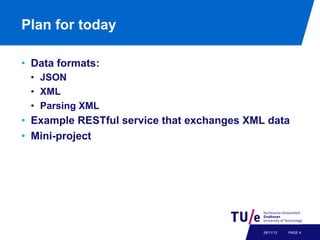
Plan for today
•  Data formats:
•  JSON
•  XML
•  Parsing XML

•  Example RESTful service that exchanges XML data
•  Mini-project

28/11/13

PAGE 4
Data formats
•  JSON
•  XML
•  Parsing XML

28/11/13

PAGE 5
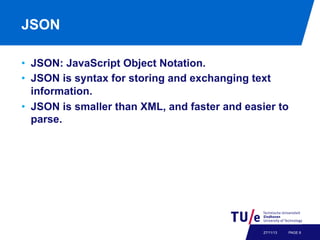
JSON
•  JSON: JavaScript Object Notation.
•  JSON is syntax for storing and exchanging text
information.
•  JSON is smaller than XML, and faster and easier to
parse.

27/11/13

PAGE 6
JSON
Maps to two universal structures
1.  An unordered collection of name value pairs:
{"firstName”:"Nicole”,"lastName": "Kidman”}
2.  An ordered list of values
["Monday”, "Tuesday”, "Wednesday”]

Source: Theresa Velden

27/11/13

PAGE 7
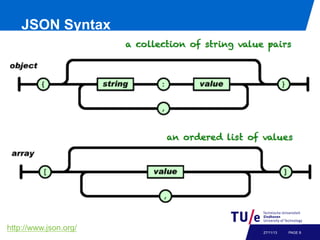
JSON Syntax

http://www.json.org/

27/11/13

PAGE 8
JSON syntax
•  An object is an unordered set of name/value pairs
• 
• 
• 
• 

The pairs are enclosed within braces, { }
There is a colon between the name and the value
Pairs are separated by commas
Example: { "firstName":"John" , "lastName":"Doe" }

•  An array is an ordered collection of values
•  The values are enclosed within brackets, [ ]
•  Values are separated by commas
•  Example: [ "html", xml", "css" ]
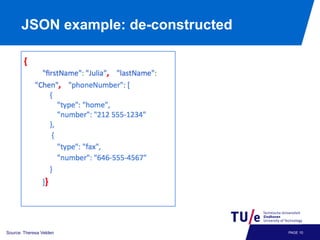
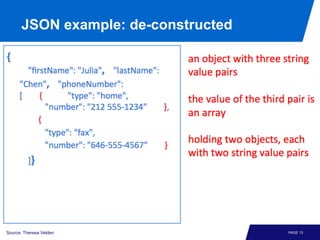
JSON example: de-constructed

27/11/13

Source: Theresa Velden

PAGE 10
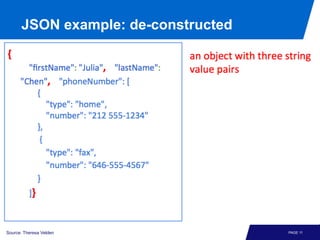
JSON example: de-constructed

27/11/13

Source: Theresa Velden

PAGE 11
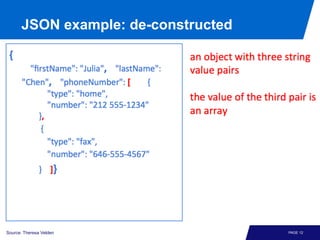
JSON example: de-constructed

27/11/13

Source: Theresa Velden

PAGE 12
JSON example: de-constructed

27/11/13

Source: Theresa Velden

PAGE 13
More information about JSON
•  http://www.w3schools.com/json/default.asp

27/11/13

PAGE 14
Overview
•  JSON
•  XML
•  parsing XML

27/11/13

PAGE 15
Introduction to XML
•  Why is XML important?
•  simple open non-proprietary widely accepted data
exchange format

•  XML is like HTML but
•  no fixed set of tags
−  X = “extensible”
•  no fixed semantics (c.q. representation) of tags
−  representation determined by separate ‘style sheet’
−  semantics determined by application
•  no fixed structure
−  user-defined schemas
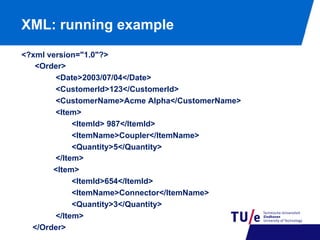
XML: running example
<?xml version="1.0"?>
<Order>
<Date>2003/07/04</Date>
<CustomerId>123</CustomerId>
<CustomerName>Acme Alpha</CustomerName>
<Item>
<ItemId> 987</ItemId>
<ItemName>Coupler</ItemName>
<Quantity>5</Quantity>
</Item>
<Item>
<ItemId>654</ItemId>
<ItemName>Connector</ItemName>
<Quantity>3</Quantity>
</Item>
</Order>
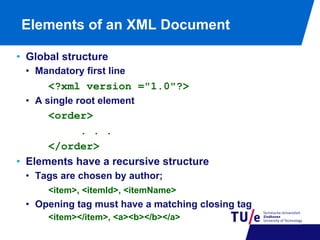
Elements of an XML Document
•  Global structure
•  Mandatory first line

<?xml version ="1.0"?>
•  A single root element

<order>
. . .
</order>
•  Elements have a recursive structure
•  Tags are chosen by author;
<item>, <itemId>, <itemName>

•  Opening tag must have a matching closing tag
<item></item>, <a><b></b></a>
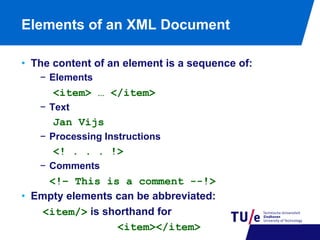
Elements of an XML Document
•  The content of an element is a sequence of:
−  Elements

<item> … </item>
−  Text

Jan Vijs
−  Processing Instructions

<! . . . !>
−  Comments

<!– This is a comment --!>
•  Empty elements can be abbreviated:
<item/> is shorthand for
<item></item>
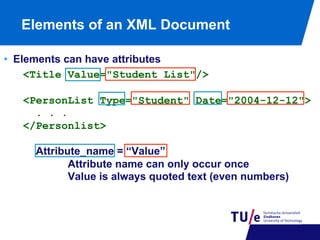
Elements of an XML Document
•  Elements can have attributes
<Title Value="Student List"/>
<PersonList Type="Student" Date="2004-12-12">
. . .
</Personlist>
Attribute_name = “Value”
Attribute name can only occur once
Value is always quoted text (even numbers)
Elements of an XML Document
•  Text and elements can be freely mixed
<Course ID=“2ID45”>
The course <fullname>Database
Technology</fullname> is lectured
by <title>dr.</title>
<fname>George</fname>
<sname>Fletcher</sname>
</Course>
•  The order between elements is considered important
•  Order between attributes is not
Well-formedness
•  We call an XML-document well-formed iff
•  it has one root element;
•  elements are properly nested;
•  any attribute can only occur once in a given opening
tag and its value must be quoted.

•  Check for instance at:
http://www.w3schools.com/xml/xml_validator.asp
Overview
•  JSON
•  XML
•  parsing XML

27/11/13

PAGE 23
Parsing XML
•  Goal
•  Read XML files into data structures in programming
languages

•  Possible strategies
•  Parse into generic tree structure (DOM)
•  Parse as sequence of events (SAX)
•  Automatically parse to language-specific objects (JAXB)
DOM
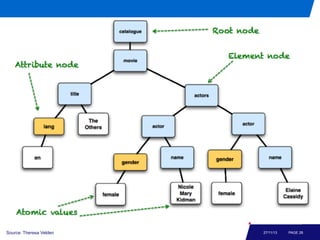
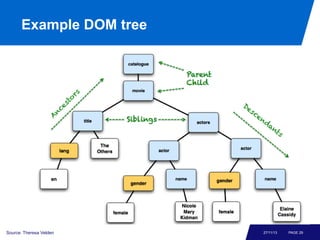
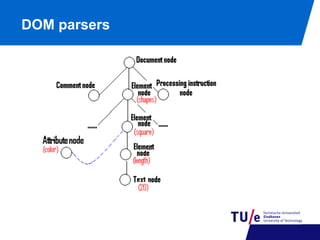
•  A DOM document is an object containing all the
information of an XML document
•  It is composed of a tree (DOM tree) of nodes

27/11/13

PAGE 25
DOM parsers
Different types of nodes
Document node
Element node
Text node
Attribute node
Processing instruction node
…….
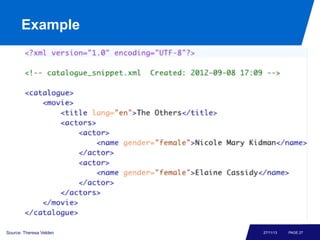
Example

Source: Theresa Velden

27/11/13

PAGE 27
Example DOM tree

Source: Theresa Velden

27/11/13

PAGE 28
Example DOM tree

Source: Theresa Velden

27/11/13

PAGE 29
DOM parsers
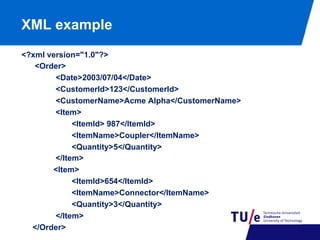
XML example
<?xml version="1.0"?>
<Order>
<Date>2003/07/04</Date>
<CustomerId>123</CustomerId>
<CustomerName>Acme Alpha</CustomerName>
<Item>
<ItemId> 987</ItemId>
<ItemName>Coupler</ItemName>
<Quantity>5</Quantity>
</Item>
<Item>
<ItemId>654</ItemId>
<ItemName>Connector</ItemName>
<Quantity>3</Quantity>
</Item>
</Order>
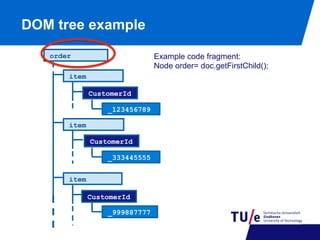
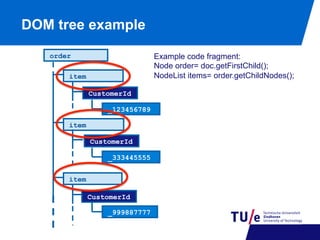
DOM tree example
Example code fragment:
Node order= doc.getFirstChild();

order
item
CustomerId
_123456789
item
CustomerId
_333445555
item
CustomerId
_999887777
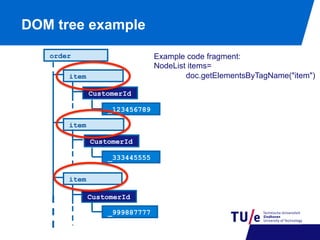
DOM tree example
Example code fragment:
Node order= doc.getFirstChild();
NodeList items= order.getChildNodes();

order
item
CustomerId
_123456789
item
CustomerId
_333445555
item
CustomerId
_999887777
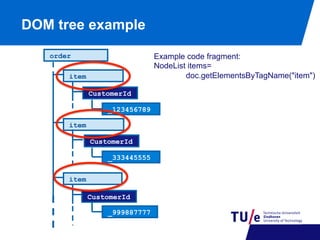
DOM tree example
Example code fragment:
NodeList items=
doc.getElementsByTagName("item")

order
item
CustomerId
_123456789
item
CustomerId
_333445555
item
CustomerId
_999887777
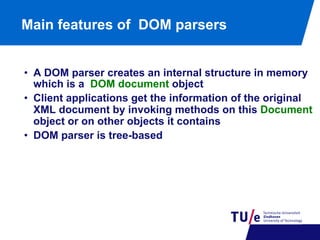
Main features of DOM parsers
•  A DOM parser creates an internal structure in memory
which is a DOM document object
•  Client applications get the information of the original
XML document by invoking methods on this Document
object or on other objects it contains
•  DOM parser is tree-based
Parsing XML in Java
•  Package javax.xml.parsers
•  Provides classes allowing the processing of XML
documents.
•  SAX (Simple API for XML)
•  DOM (Document Object Model)
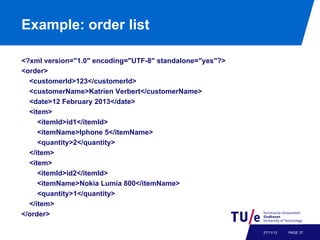
Example: order list
<?xml version="1.0" encoding="UTF-8" standalone="yes"?>
<order>
<customerId>123</customerId>
<customerName>Katrien Verbert</customerName>
<date>12 February 2013</date>
<item>
<itemId>id1</itemId>
<itemName>Iphone 5</itemName>
<quantity>2</quantity>
</item>
<item>
<itemId>id2</itemId>
<itemName>Nokia Lumia 800</itemName>
<quantity>1</quantity>
</item>
</order>
27/11/13

PAGE 37
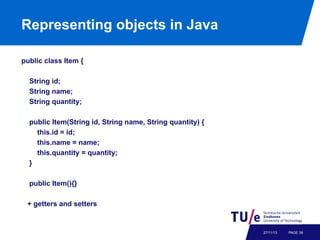
Representing objects in Java
public class Item {
String id;
String name;
String quantity;
public Item(String id, String name, String quantity) {
this.id = id;
this.name = name;
this.quantity = quantity;
}
public Item(){}
+ getters and setters

27/11/13

PAGE 38
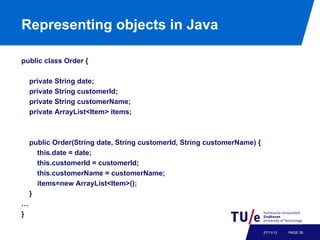
Representing objects in Java
public class Order {
private String date;
private String customerId;
private String customerName;
private ArrayList<Item> items;

public Order(String date, String customerId, String customerName) {
this.date = date;
this.customerId = customerId;
this.customerName = customerName;
items=new ArrayList<Item>();
}
…
}
27/11/13

PAGE 39
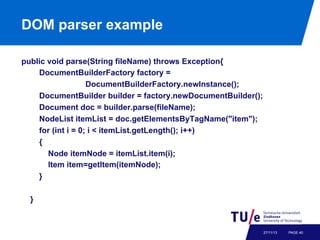
DOM parser example
public void parse(String fileName) throws Exception{
DocumentBuilderFactory factory =
DocumentBuilderFactory.newInstance();
DocumentBuilder builder = factory.newDocumentBuilder();
Document doc = builder.parse(fileName);
NodeList itemList = doc.getElementsByTagName("item");
for (int i = 0; i < itemList.getLength(); i++)
{
Node itemNode = itemList.item(i);
Item item=getItem(itemNode);
}
}

27/11/13

PAGE 40
DOM tree example
Example code fragment:
NodeList items=
doc.getElementsByTagName("item")

order
item
CustomerId
_123456789
item
CustomerId
_333445555
item
CustomerId
_999887777
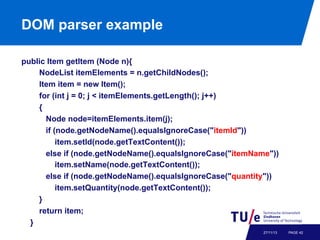
DOM parser example
public Item getItem (Node n){
NodeList itemElements = n.getChildNodes();
Item item = new Item();
for (int j = 0; j < itemElements.getLength(); j++)
{
Node node=itemElements.item(j);
if (node.getNodeName().equalsIgnoreCase("itemId"))
item.setId(node.getTextContent());
else if (node.getNodeName().equalsIgnoreCase("itemName"))
item.setName(node.getTextContent());
else if (node.getNodeName().equalsIgnoreCase("quantity"))
item.setQuantity(node.getTextContent());
}
return item;
}
27/11/13

PAGE 42
JAXB
•  JAXB: Java API for XML Bindings
•  Defines an API for automatically representing XML
schema as collections of Java classes.
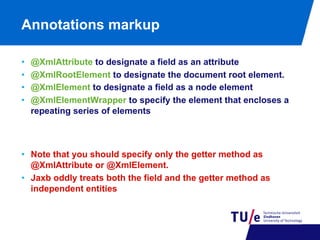
Annotations markup
• 
• 
• 
• 

@XmlAttribute to designate a field as an attribute
@XmlRootElement to designate the document root element.
@XmlElement to designate a field as a node element
@XmlElementWrapper to specify the element that encloses a
repeating series of elements

•  Note that you should specify only the getter method as
@XmlAttribute or @XmlElement.
•  Jaxb oddly treats both the field and the getter method as
independent entities
Order example
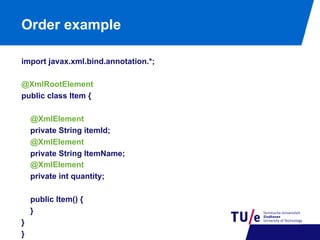
import javax.xml.bind.annotation.*;
@XmlRootElement
public class Item {
@XmlElement
private String itemId;
@XmlElement
private String ItemName;
@XmlElement
private int quantity;
public Item() {
}
}
}
Order example
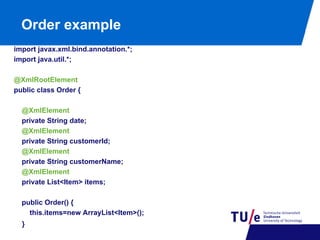
import javax.xml.bind.annotation.*;
import java.util.*;
@XmlRootElement
public class Order {
@XmlElement
private String date;
@XmlElement
private String customerId;
@XmlElement
private String customerName;
@XmlElement
private List<Item> items;
public Order() {
this.items=new ArrayList<Item>();
}
Marshalling
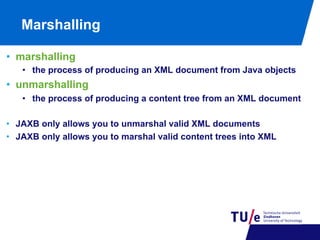
•  marshalling
•  the process of producing an XML document from Java objects

•  unmarshalling
•  the process of producing a content tree from an XML document
•  JAXB only allows you to unmarshal valid XML documents
•  JAXB only allows you to marshal valid content trees into XML
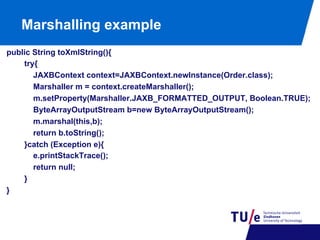
Marshalling example
public String toXmlString(){
try{
JAXBContext context=JAXBContext.newInstance(Order.class);
Marshaller m = context.createMarshaller();
m.setProperty(Marshaller.JAXB_FORMATTED_OUTPUT, Boolean.TRUE);
ByteArrayOutputStream b=new ByteArrayOutputStream();
m.marshal(this,b);
return b.toString();
}catch (Exception e){
e.printStackTrace();
return null;
}
}
Unmarshalling example
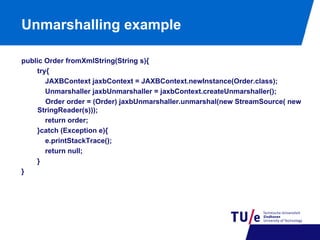
public Order fromXmlString(String s){
try{
JAXBContext jaxbContext = JAXBContext.newInstance(Order.class);
Unmarshaller jaxbUnmarshaller = jaxbContext.createUnmarshaller();
Order order = (Order) jaxbUnmarshaller.unmarshal(new StreamSource( new
StringReader(s)));
return order;
}catch (Exception e){
e.printStackTrace();
return null;
}
}
Test transformation
public static void main(String args[]){
Order o=new Order("1 March 2013", "123", "Katrien");
o.getItems().add(new Item("1", "iPhone 5", 2));
o.getItems().add(new Item("2", "Nokia Lumia 800", 2));
System.out.println(o.toXmlString());
}
Output
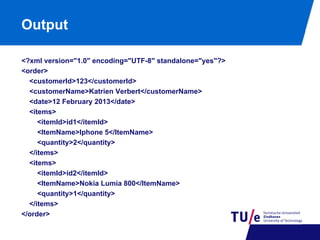
<?xml version="1.0" encoding="UTF-8" standalone="yes"?>
<order>
<customerId>123</customerId>
<customerName>Katrien Verbert</customerName>
<date>12 February 2013</date>
<items>
<itemId>id1</itemId>
<ItemName>Iphone 5</ItemName>
<quantity>2</quantity>
</items>
<items>
<itemId>id2</itemId>
<ItemName>Nokia Lumia 800</ItemName>
<quantity>1</quantity>
</items>
</order>
k.verbert@tue.nl
n.v.stash@tue.nl
g.h.l.fletcher@tue.nl

Data formats

  • 1.
    Data formats Web Technology- 2ID60 28 November 2013 Katrien Verbert Natasha Stash George Fletcher
  • 2.
    Plan for today • Data formats: •  JSON •  XML •  Parsing XML •  Example RESTful service that exchanges XML data •  Mini-project 28/11/13 PAGE 4
  • 3.
    Data formats •  JSON • XML •  Parsing XML 28/11/13 PAGE 5
  • 4.
    JSON •  JSON: JavaScriptObject Notation. •  JSON is syntax for storing and exchanging text information. •  JSON is smaller than XML, and faster and easier to parse. 27/11/13 PAGE 6
  • 5.
    JSON Maps to twouniversal structures 1.  An unordered collection of name value pairs: {"firstName”:"Nicole”,"lastName": "Kidman”} 2.  An ordered list of values ["Monday”, "Tuesday”, "Wednesday”] Source: Theresa Velden 27/11/13 PAGE 7
  • 6.
  • 7.
    JSON syntax •  Anobject is an unordered set of name/value pairs •  •  •  •  The pairs are enclosed within braces, { } There is a colon between the name and the value Pairs are separated by commas Example: { "firstName":"John" , "lastName":"Doe" } •  An array is an ordered collection of values •  The values are enclosed within brackets, [ ] •  Values are separated by commas •  Example: [ "html", xml", "css" ]
  • 8.
  • 9.
  • 10.
  • 11.
  • 12.
    More information aboutJSON •  http://www.w3schools.com/json/default.asp 27/11/13 PAGE 14
  • 13.
    Overview •  JSON •  XML • parsing XML 27/11/13 PAGE 15
  • 14.
    Introduction to XML • Why is XML important? •  simple open non-proprietary widely accepted data exchange format •  XML is like HTML but •  no fixed set of tags −  X = “extensible” •  no fixed semantics (c.q. representation) of tags −  representation determined by separate ‘style sheet’ −  semantics determined by application •  no fixed structure −  user-defined schemas
  • 15.
    XML: running example <?xmlversion="1.0"?> <Order> <Date>2003/07/04</Date> <CustomerId>123</CustomerId> <CustomerName>Acme Alpha</CustomerName> <Item> <ItemId> 987</ItemId> <ItemName>Coupler</ItemName> <Quantity>5</Quantity> </Item> <Item> <ItemId>654</ItemId> <ItemName>Connector</ItemName> <Quantity>3</Quantity> </Item> </Order>
  • 16.
    Elements of anXML Document •  Global structure •  Mandatory first line <?xml version ="1.0"?> •  A single root element <order> . . . </order> •  Elements have a recursive structure •  Tags are chosen by author; <item>, <itemId>, <itemName> •  Opening tag must have a matching closing tag <item></item>, <a><b></b></a>
  • 17.
    Elements of anXML Document •  The content of an element is a sequence of: −  Elements <item> … </item> −  Text Jan Vijs −  Processing Instructions <! . . . !> −  Comments <!– This is a comment --!> •  Empty elements can be abbreviated: <item/> is shorthand for <item></item>
  • 18.
    Elements of anXML Document •  Elements can have attributes <Title Value="Student List"/> <PersonList Type="Student" Date="2004-12-12"> . . . </Personlist> Attribute_name = “Value” Attribute name can only occur once Value is always quoted text (even numbers)
  • 19.
    Elements of anXML Document •  Text and elements can be freely mixed <Course ID=“2ID45”> The course <fullname>Database Technology</fullname> is lectured by <title>dr.</title> <fname>George</fname> <sname>Fletcher</sname> </Course> •  The order between elements is considered important •  Order between attributes is not
  • 20.
    Well-formedness •  We callan XML-document well-formed iff •  it has one root element; •  elements are properly nested; •  any attribute can only occur once in a given opening tag and its value must be quoted. •  Check for instance at: http://www.w3schools.com/xml/xml_validator.asp
  • 21.
    Overview •  JSON •  XML • parsing XML 27/11/13 PAGE 23
  • 22.
    Parsing XML •  Goal • Read XML files into data structures in programming languages •  Possible strategies •  Parse into generic tree structure (DOM) •  Parse as sequence of events (SAX) •  Automatically parse to language-specific objects (JAXB)
  • 23.
    DOM •  A DOMdocument is an object containing all the information of an XML document •  It is composed of a tree (DOM tree) of nodes 27/11/13 PAGE 25
  • 24.
    DOM parsers Different typesof nodes Document node Element node Text node Attribute node Processing instruction node …….
  • 25.
  • 26.
    Example DOM tree Source:Theresa Velden 27/11/13 PAGE 28
  • 27.
    Example DOM tree Source:Theresa Velden 27/11/13 PAGE 29
  • 28.
  • 29.
    XML example <?xml version="1.0"?> <Order> <Date>2003/07/04</Date> <CustomerId>123</CustomerId> <CustomerName>AcmeAlpha</CustomerName> <Item> <ItemId> 987</ItemId> <ItemName>Coupler</ItemName> <Quantity>5</Quantity> </Item> <Item> <ItemId>654</ItemId> <ItemName>Connector</ItemName> <Quantity>3</Quantity> </Item> </Order>
  • 30.
    DOM tree example Examplecode fragment: Node order= doc.getFirstChild(); order item CustomerId _123456789 item CustomerId _333445555 item CustomerId _999887777
  • 31.
    DOM tree example Examplecode fragment: Node order= doc.getFirstChild(); NodeList items= order.getChildNodes(); order item CustomerId _123456789 item CustomerId _333445555 item CustomerId _999887777
  • 32.
    DOM tree example Examplecode fragment: NodeList items= doc.getElementsByTagName("item") order item CustomerId _123456789 item CustomerId _333445555 item CustomerId _999887777
  • 33.
    Main features ofDOM parsers •  A DOM parser creates an internal structure in memory which is a DOM document object •  Client applications get the information of the original XML document by invoking methods on this Document object or on other objects it contains •  DOM parser is tree-based
  • 34.
    Parsing XML inJava •  Package javax.xml.parsers •  Provides classes allowing the processing of XML documents. •  SAX (Simple API for XML) •  DOM (Document Object Model)
  • 35.
    Example: order list <?xmlversion="1.0" encoding="UTF-8" standalone="yes"?> <order> <customerId>123</customerId> <customerName>Katrien Verbert</customerName> <date>12 February 2013</date> <item> <itemId>id1</itemId> <itemName>Iphone 5</itemName> <quantity>2</quantity> </item> <item> <itemId>id2</itemId> <itemName>Nokia Lumia 800</itemName> <quantity>1</quantity> </item> </order> 27/11/13 PAGE 37
  • 36.
    Representing objects inJava public class Item { String id; String name; String quantity; public Item(String id, String name, String quantity) { this.id = id; this.name = name; this.quantity = quantity; } public Item(){} + getters and setters 27/11/13 PAGE 38
  • 37.
    Representing objects inJava public class Order { private String date; private String customerId; private String customerName; private ArrayList<Item> items; public Order(String date, String customerId, String customerName) { this.date = date; this.customerId = customerId; this.customerName = customerName; items=new ArrayList<Item>(); } … } 27/11/13 PAGE 39
  • 38.
    DOM parser example publicvoid parse(String fileName) throws Exception{ DocumentBuilderFactory factory = DocumentBuilderFactory.newInstance(); DocumentBuilder builder = factory.newDocumentBuilder(); Document doc = builder.parse(fileName); NodeList itemList = doc.getElementsByTagName("item"); for (int i = 0; i < itemList.getLength(); i++) { Node itemNode = itemList.item(i); Item item=getItem(itemNode); } } 27/11/13 PAGE 40
  • 39.
    DOM tree example Examplecode fragment: NodeList items= doc.getElementsByTagName("item") order item CustomerId _123456789 item CustomerId _333445555 item CustomerId _999887777
  • 40.
    DOM parser example publicItem getItem (Node n){ NodeList itemElements = n.getChildNodes(); Item item = new Item(); for (int j = 0; j < itemElements.getLength(); j++) { Node node=itemElements.item(j); if (node.getNodeName().equalsIgnoreCase("itemId")) item.setId(node.getTextContent()); else if (node.getNodeName().equalsIgnoreCase("itemName")) item.setName(node.getTextContent()); else if (node.getNodeName().equalsIgnoreCase("quantity")) item.setQuantity(node.getTextContent()); } return item; } 27/11/13 PAGE 42
  • 41.
    JAXB •  JAXB: JavaAPI for XML Bindings •  Defines an API for automatically representing XML schema as collections of Java classes.
  • 42.
    Annotations markup •  •  •  •  @XmlAttribute todesignate a field as an attribute @XmlRootElement to designate the document root element. @XmlElement to designate a field as a node element @XmlElementWrapper to specify the element that encloses a repeating series of elements •  Note that you should specify only the getter method as @XmlAttribute or @XmlElement. •  Jaxb oddly treats both the field and the getter method as independent entities
  • 43.
    Order example import javax.xml.bind.annotation.*; @XmlRootElement publicclass Item { @XmlElement private String itemId; @XmlElement private String ItemName; @XmlElement private int quantity; public Item() { } } }
  • 44.
    Order example import javax.xml.bind.annotation.*; importjava.util.*; @XmlRootElement public class Order { @XmlElement private String date; @XmlElement private String customerId; @XmlElement private String customerName; @XmlElement private List<Item> items; public Order() { this.items=new ArrayList<Item>(); }
  • 45.
    Marshalling •  marshalling •  theprocess of producing an XML document from Java objects •  unmarshalling •  the process of producing a content tree from an XML document •  JAXB only allows you to unmarshal valid XML documents •  JAXB only allows you to marshal valid content trees into XML
  • 46.
    Marshalling example public StringtoXmlString(){ try{ JAXBContext context=JAXBContext.newInstance(Order.class); Marshaller m = context.createMarshaller(); m.setProperty(Marshaller.JAXB_FORMATTED_OUTPUT, Boolean.TRUE); ByteArrayOutputStream b=new ByteArrayOutputStream(); m.marshal(this,b); return b.toString(); }catch (Exception e){ e.printStackTrace(); return null; } }
  • 47.
    Unmarshalling example public OrderfromXmlString(String s){ try{ JAXBContext jaxbContext = JAXBContext.newInstance(Order.class); Unmarshaller jaxbUnmarshaller = jaxbContext.createUnmarshaller(); Order order = (Order) jaxbUnmarshaller.unmarshal(new StreamSource( new StringReader(s))); return order; }catch (Exception e){ e.printStackTrace(); return null; } }
  • 48.
    Test transformation public staticvoid main(String args[]){ Order o=new Order("1 March 2013", "123", "Katrien"); o.getItems().add(new Item("1", "iPhone 5", 2)); o.getItems().add(new Item("2", "Nokia Lumia 800", 2)); System.out.println(o.toXmlString()); }
  • 49.
    Output <?xml version="1.0" encoding="UTF-8"standalone="yes"?> <order> <customerId>123</customerId> <customerName>Katrien Verbert</customerName> <date>12 February 2013</date> <items> <itemId>id1</itemId> <ItemName>Iphone 5</ItemName> <quantity>2</quantity> </items> <items> <itemId>id2</itemId> <ItemName>Nokia Lumia 800</ItemName> <quantity>1</quantity> </items> </order>
  • 50.