Web Information Systems
Introduction
Katrien Verbert
katrien.verbert@cs.kuleuven.be
Many slides based on slides of Beat Signer
What is the World
Wide Web?
WWW == Internet ?
https://www.youtube.com/watch?v=J8hzJxb0rpc
Early ideas…
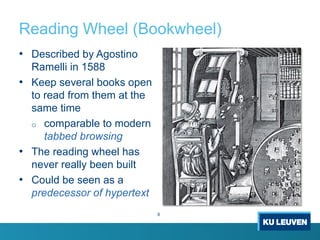
Reading Wheel (Bookwheel)
• Described by Agostino
Ramelli in 1588
• Keep several books open
to read from them at the
same time
o comparable to modern
tabbed browsing
• The reading wheel has
never really been built
• Could be seen as a
predecessor of hypertext
6
Bush & Memex
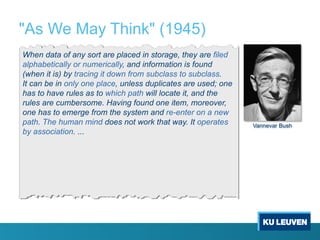
"As We May Think" (1945)
When data of any sort are placed in storage, they are filed
alphabetically or numerically, and information is found
(when it is) by tracing it down from subclass to subclass.
It can be in only one place, unless duplicates are used; one
has to have rules as to which path will locate it, and the
rules are cumbersome. Having found one item, moreover,
one has to emerge from the system and re-enter on a new
path. The human mind does not work that way. It operates
by association. ...
Vannevar Bush
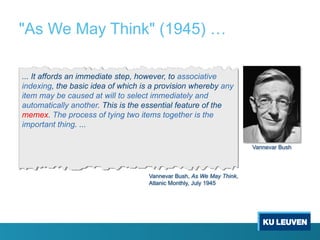
"As We May Think" (1945) …
... It affords an immediate step, however, to associative
indexing, the basic idea of which is a provision whereby any
item may be caused at will to select immediately and
automatically another. This is the essential feature of the
memex. The process of tying two items together is the
important thing. ...
Vannevar Bush, As We May Think,
Atlanic Monthly, July 1945
Vannevar Bush
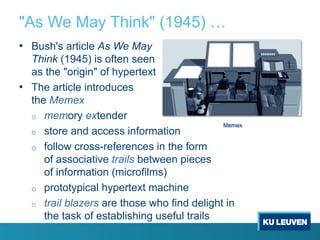
"As We May Think" (1945) …
• Bush's article As We May
Think (1945) is often seen
as the "origin" of hypertext
• The article introduces
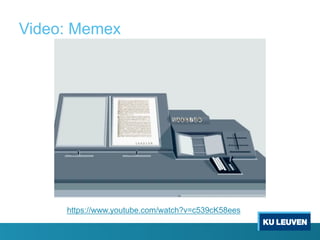
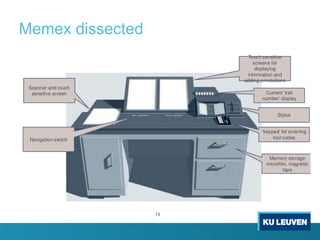
the Memex
o memory extender
o store and access information
o follow cross-references in the form
of associative trails between pieces
of information (microfilms)
o prototypical hypertext machine
o trail blazers are those who find delight in
the task of establishing useful trails
Memex
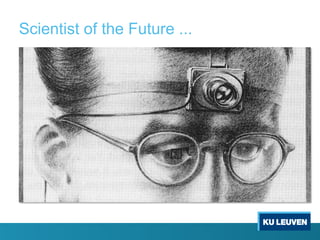
Scientist of the Future ...
Video: Memex
https://www.youtube.com/watch?v=c539cK58ees
Memex dissected
13
What happed to the Memex
14
• Bush ‘upgrades’ the memex in 1959
o Magnetic tape replaces microfilm
o Ability to speak to the machine – interaction with sound
o Color to distinguish old trails from new trails
o Phone lines in order to add documents to one’s
personal database
• Was never built
2/12/19 15
• Why wasn’t it ever built?
• What was its impact on future developments?
• Why is it important?
Why wasn’t it ever built?
16
• According to Bush:
o It would have been ‘enourmously expensive’ to build
o It was an idea before its time
o Creating associations between was not well understood
o Public didn’t understand the value of the project
• Others:
o Device was too ambiguous; no good definition
o No practical way to create associations
o Associations aren’t the best way to link information
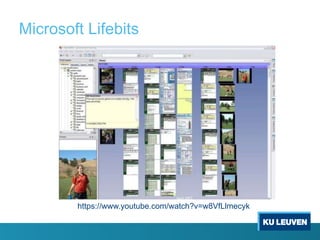
Microsoft Lifebits
https://www.youtube.com/watch?v=w8VfLlmecyk
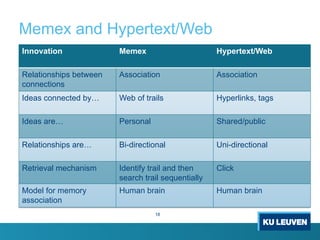
Memex and Hypertext/Web
18
Innovation Memex Hypertext/Web
Relationships between
connections
Association Association
Ideas connected by… Web of trails Hyperlinks, tags
Ideas are… Personal Shared/public
Relationships are… Bi-directional Uni-directional
Retrieval mechanism Identify trail and then
search trail sequentially
Click
Model for memory
association
Human brain Human brain
Why was the Memex important
19
• Provided a method for dealing with information overload
• Presents a novel approach to organizing personal information
• Remembered as the technical vision of hypertext
• Suggests fascinating possibilities for human-machine symbiosis
• Derivative inventions represent an opportunity to study the co-
evolution of human practices and technological tools
Xanadu & Hypertext
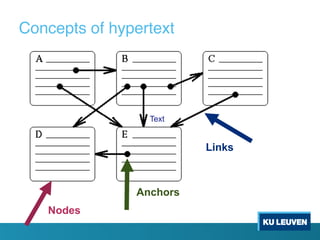
Links
Nodes
Anchors
Text
Concepts of hypertext
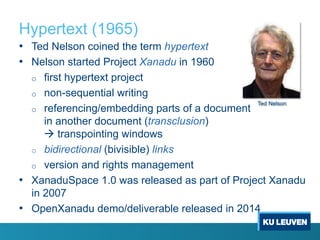
Hypertext (1965)
• Ted Nelson coined the term hypertext
• Nelson started Project Xanadu in 1960
o first hypertext project
o non-sequential writing
o referencing/embedding parts of a document
in another document (transclusion)
à transpointing windows
o bidirectional (bivisible) links
o version and rights management
• XanaduSpace 1.0 was released as part of Project Xanadu
in 2007
• OpenXanadu demo/deliverable released in 2014
Ted Nelson
Transpointing Windows Mockup (1972)
[http://www.xanadu.com.au/ted/TN/PARALUNE/paraviz.html]
OpenXanadu (2014)
[http://xanadu.com/xanademos/MoeJusteOrigins.html]
http://xanadu.com/xanademos/MoeJusteOrigins.html
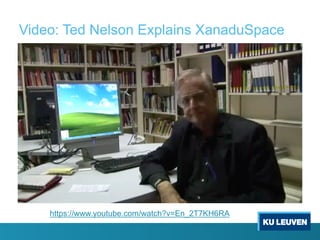
Video: Ted Nelson Explains XanaduSpace
https://www.youtube.com/watch?v=En_2T7KH6RA
Hypertext Editing System, HES (1967)
• Early hypertext system
o developed at Brown University (1967)
by Andries van Dam and his team
o Ted Nelson was a visitor at Brown
University a that time
• Limitations
o unidirectional links
o only embedded links
• File Retrieval and Editing System, FRESS (1968)
o follow-up project taking ideas from HES and NLS
o first system introducing 'undo' functionality
o bidirectional links
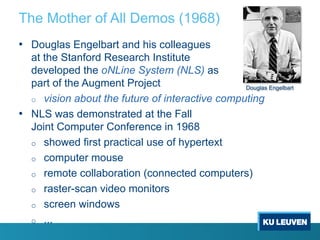
The Mother of All Demos (1968)
• Douglas Engelbart and his colleagues
at the Stanford Research Institute
developed the oNLine System (NLS) as
part of the Augment Project
o vision about the future of interactive computing
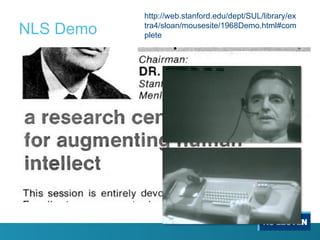
• NLS was demonstrated at the Fall
Joint Computer Conference in 1968
o showed first practical use of hypertext
o computer mouse
o remote collaboration (connected computers)
o raster-scan video monitors
o screen windows
o ...
Douglas Engelbart
NLS Demo
http://web.stanford.edu/dept/SUL/library/ex
tra4/sloan/mousesite/1968Demo.html#com
plete
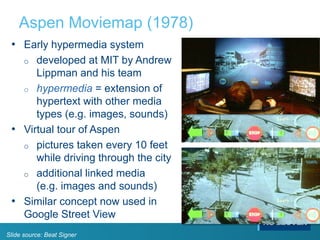
Aspen Moviemap (1978)
• Early hypermedia system
o developed at MIT by Andrew
Lippman and his team
o hypermedia = extension of
hypertext with other media
types (e.g. images, sounds)
• Virtual tour of Aspen
o pictures taken every 10 feet
while driving through the city
o additional linked media
(e.g. images and sounds)
• Similar concept now used in
Google Street View
Slide source: Beat Signer
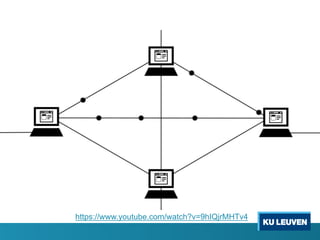
The internet
https://www.youtube.com/watch?v=9hIQjrMHTv4
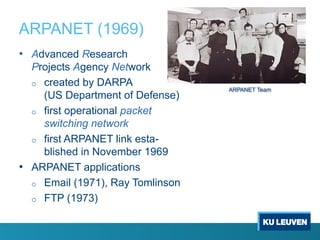
ARPANET (1969)
• Advanced Research
Projects Agency Network
o created by DARPA
(US Department of Defense)
o first operational packet
switching network
o first ARPANET link esta-
blished in November 1969
• ARPANET applications
o Email (1971), Ray Tomlinson
o FTP (1973)
ARPANET Team
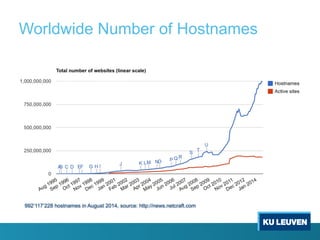
Worldwide Number of Hostnames
992‘117‘228 hostnames in August 2014, source: http://news.netcraft.com
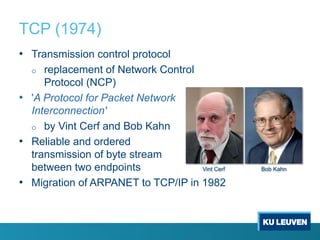
TCP (1974)
• Transmission control protocol
o replacement of Network Control
Protocol (NCP)
• 'A Protocol for Packet Network
Interconnection'
o by Vint Cerf and Bob Kahn
• Reliable and ordered
transmission of byte stream
between two endpoints
• Migration of ARPANET to TCP/IP in 1982
Vint Cerf Bob Kahn
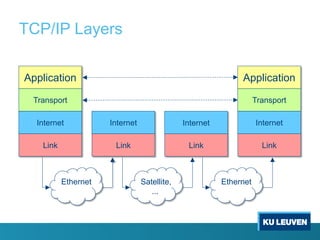
TCP/IP (1978)
• 4 abstraction layers
o each layer offers functionality to the above layer
o separation of concerns
• Application layer
o HTTP, FTP, POP, ...
• Transport layer
o TCP, UDP, ...
• Internet layer
o addressing hosts and packet routing
o IP, ...
• Link layer
TCP/IP Layers
Link
Internet
Transport
Application
Link
Internet
Link
Internet
Transport
Application
Link
Internet
Ethernet EthernetSatellite,
...
World Wide Web
2/12/19 37
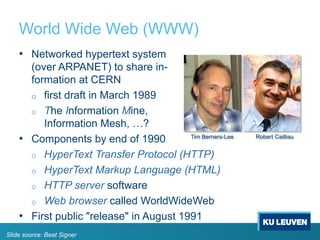
World Wide Web (WWW)
• Networked hypertext system
(over ARPANET) to share in-
formation at CERN
o first draft in March 1989
o The Information Mine,
Information Mesh, …?
• Components by end of 1990
o HyperText Transfer Protocol (HTTP)
o HyperText Markup Language (HTML)
o HTTP server software
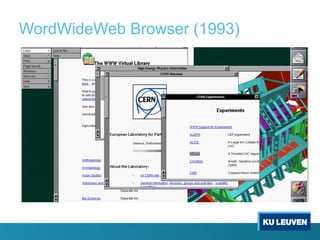
o Web browser called WorldWideWeb
• First public "release" in August 1991
Tim Berners-Lee Robert Cailliau
Slide source: Beat Signer
WordWideWeb Browser (1993)
WWW and Hypertext
• WWW is mainly a network-enabled version of the
HES hypertext model
o unidirectional links between heterogeneous resources
o is it more than just a digital version of paper documents
with links?
• What about all the richer functionality researched by the
hypertext community?
o bidirectional links
o transclusion and external (non-embedded) links
o version management
o …
Web architectures
2/12/19 41
Basic Client-Server Web Architecture
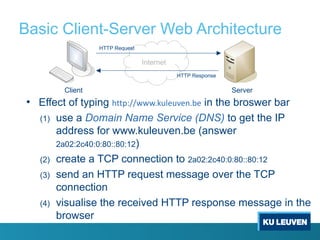
• Effect of typing http://www.kuleuven.be in the broswer bar
(1) use a Domain Name Service (DNS) to get the IP
address for www.kuleuven.be (answer
2a02:2c40:0:80::80:12)
(2) create a TCP connection to 2a02:2c40:0:80::80:12
(3) send an HTTP request message over the TCP
connection
(4) visualise the received HTTP response message in the
browser
Internet
Client Server
HTTP Request
HTTP Response
Web Server
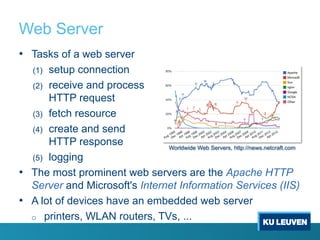
• Tasks of a web server
(1) setup connection
(2) receive and process
HTTP request
(3) fetch resource
(4) create and send
HTTP response
(5) logging
• The most prominent web servers are the Apache HTTP
Server and Microsoft's Internet Information Services (IIS)
• A lot of devices have an embedded web server
o printers, WLAN routers, TVs, ...
Worldwide Web Servers, http://news.netcraft.com
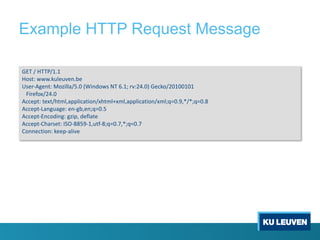
Example HTTP Request Message
GET / HTTP/1.1
Host: www.kuleuven.be
User-Agent: Mozilla/5.0 (Windows NT 6.1; rv:24.0) Gecko/20100101
Firefox/24.0
Accept: text/html,application/xhtml+xml,application/xml;q=0.9,*/*;q=0.8
Accept-Language: en-gb,en;q=0.5
Accept-Encoding: gzip, deflate
Accept-Charset: ISO-8859-1,utf-8;q=0.7,*;q=0.7
Connection: keep-alive
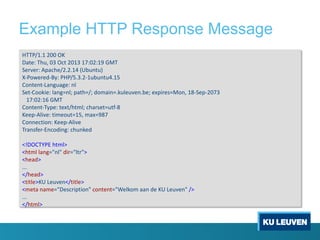
Example HTTP Response Message
HTTP/1.1 200 OK
Date: Thu, 03 Oct 2013 17:02:19 GMT
Server: Apache/2.2.14 (Ubuntu)
X-Powered-By: PHP/5.3.2-1ubuntu4.15
Content-Language: nl
Set-Cookie: lang=nl; path=/; domain=.kuleuven.be; expires=Mon, 18-Sep-2073
17:02:16 GMT
Content-Type: text/html; charset=utf-8
Keep-Alive: timeout=15, max=987
Connection: Keep-Alive
Transfer-Encoding: chunked
<!DOCTYPE html>
<html lang="nl" dir="ltr">
<head>
...
</head>
<title>KU Leuven</title>
<meta name="Description" content="Welkom aan de KU Leuven" />
...
</html>
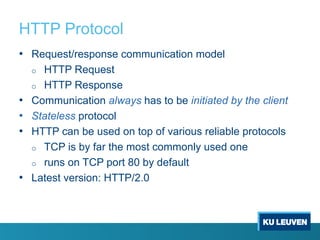
HTTP Protocol
• Request/response communication model
o HTTP Request
o HTTP Response
• Communication always has to be initiated by the client
• Stateless protocol
• HTTP can be used on top of various reliable protocols
o TCP is by far the most commonly used one
o runs on TCP port 80 by default
• Latest version: HTTP/2.0
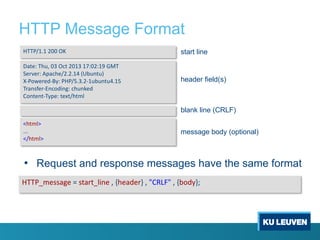
HTTP Message Format
• Request and response messages have the same format
<html>
...
</html>
HTTP/1.1 200 OK
Date: Thu, 03 Oct 2013 17:02:19 GMT
Server: Apache/2.2.14 (Ubuntu)
X-Powered-By: PHP/5.3.2-1ubuntu4.15
Transfer-Encoding: chunked
Content-Type: text/html
header field(s)
blank line (CRLF)
message body (optional)
start line
HTTP_message = start_line , {header} , "CRLF" , {body};
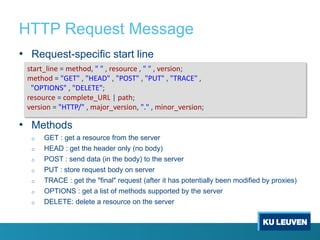
HTTP Request Message
• Request-specific start line
• Methods
o GET : get a resource from the server
o HEAD : get the header only (no body)
o POST : send data (in the body) to the server
o PUT : store request body on server
o TRACE : get the "final" request (after it has potentially been modified by proxies)
o OPTIONS : get a list of methods supported by the server
o DELETE: delete a resource on the server
start_line = method, " " , resource , " " , version;
method = "GET" , "HEAD" , "POST" , "PUT" , "TRACE" ,
"OPTIONS" , "DELETE";
resource = complete_URL | path;
version = "HTTP/" , major_version, "." , minor_version;
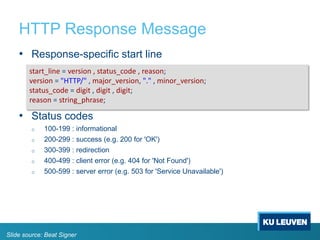
HTTP Response Message
• Response-specific start line
• Status codes
o 100-199 : informational
o 200-299 : success (e.g. 200 for 'OK')
o 300-399 : redirection
o 400-499 : client error (e.g. 404 for 'Not Found')
o 500-599 : server error (e.g. 503 for 'Service Unavailable')
start_line = version , status_code , reason;
version = "HTTP/" , major_version, "." , minor_version;
status_code = digit , digit , digit;
reason = string_phrase;
Slide source: Beat Signer
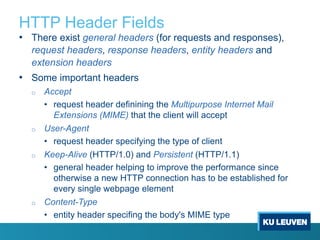
HTTP Header Fields
• There exist general headers (for requests and responses),
request headers, response headers, entity headers and
extension headers
• Some important headers
o Accept
• request header definining the Multipurpose Internet Mail
Extensions (MIME) that the client will accept
o User-Agent
• request header specifying the type of client
o Keep-Alive (HTTP/1.0) and Persistent (HTTP/1.1)
• general header helping to improve the performance since
otherwise a new HTTP connection has to be established for
every single webpage element
o Content-Type
• entity header specifing the body's MIME type
MIME Types
The MIME type defines the request or response body's
content and is used for the appropiate processing
• Standard MIME types are registered with the Internet
Assigned Numbers Authority (IANA) [RFC-2045]
mime = toplevel_type , "/" , subtype;
MIME Type Description
text/plain Human-readable text without formatting information
text/html HTML document
image/jpeg JPEG-encoded image
... ...
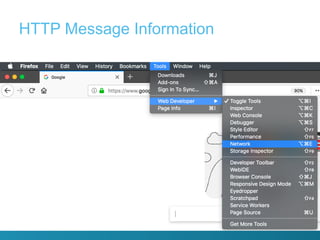
HTTP Message Information
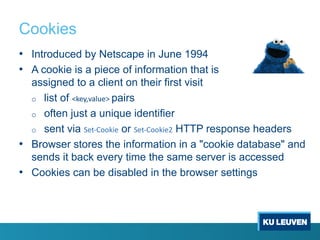
Cookies
• Introduced by Netscape in June 1994
• A cookie is a piece of information that is
assigned to a client on their first visit
o list of <key,value> pairs
o often just a unique identifier
o sent via Set-Cookie or Set-Cookie2 HTTP response headers
• Browser stores the information in a "cookie database" and
sends it back every time the same server is accessed
• Cookies can be disabled in the browser settings
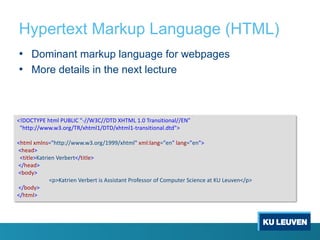
Hypertext Markup Language (HTML)
• Dominant markup language for webpages
• More details in the next lecture
<!DOCTYPE html PUBLIC "-//W3C//DTD XHTML 1.0 Transitional//EN"
"http://www.w3.org/TR/xhtml1/DTD/xhtml1-transitional.dtd">
<html xmlns="http://www.w3.org/1999/xhtml" xml:lang="en" lang="en">
<head>
<title>Katrien Verbert</title>
</head>
<body>
<p>Katrien Verbert is Assistant Professor of Computer Science at KU Leuven</p>
</body>
</html>
Dynamic Web Content
• Often it is not enough to serve static web pages but
content should be changed on the client or server side
• Server-side processing
o Common Gateway Interface (CGI)
o JavaServer Pages (JSP)
o PHP: Hypertext Preprocessor (PHP)
o Python
o ...
• Client-side processing
o JavaScript
o Adobe Flash
o ...
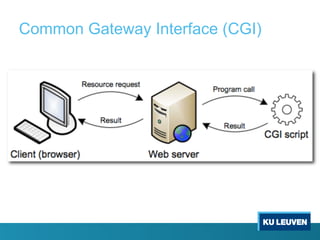
Common Gateway Interface (CGI)
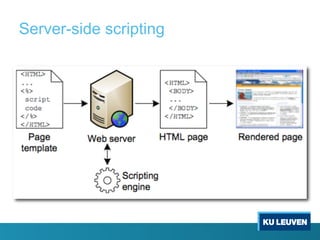
Server-side scripting
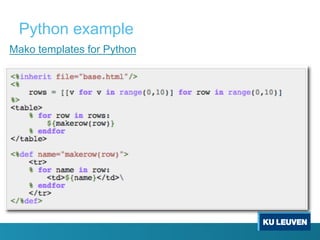
Mako templates for Python
Python example
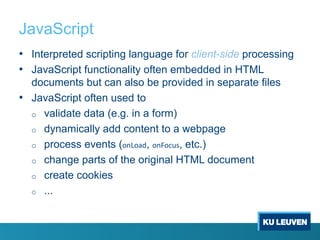
JavaScript
• Interpreted scripting language for client-side processing
• JavaScript functionality often embedded in HTML
documents but can also be provided in separate files
• JavaScript often used to
o validate data (e.g. in a form)
o dynamically add content to a webpage
o process events (onLoad, onFocus, etc.)
o change parts of the original HTML document
o create cookies
o ...
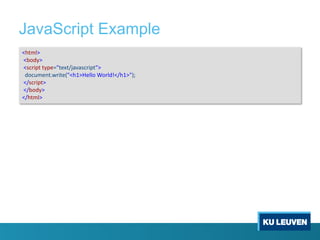
JavaScript Example
<html>
<body>
<script type="text/javascript">
document.write("<h1>Hello World!</h1>");
</script>
</body>
</html>
Semantic Web (Web 3.0)
• Add explicit semantics
to web resources
• Machine-interpretable Web
• Use of ontologies
• Potential reasoning over
Web resources
Character set: UNICODE
Cryptography
Syntax: XML and XML Namespaces
Data interchange: RDF
Taxonomies: RDFS
Ontologies:
OWLQuerying:
SPARQL
Unifying Logic
Trust
User interface and applications
Proof
Rules:
RIF/SWRL
Based on [http://en.wikipedia.org/wiki/File:Semantic-web-stack.png]
Identifiers:
URI/IRI
61
Course organisation
About me
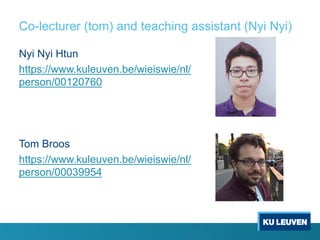
Co-lecturer (tom) and teaching assistant (Nyi Nyi)
Nyi Nyi Htun
https://www.kuleuven.be/wieiswie/nl/
person/00120760
Tom Broos
https://www.kuleuven.be/wieiswie/nl/
person/00039954
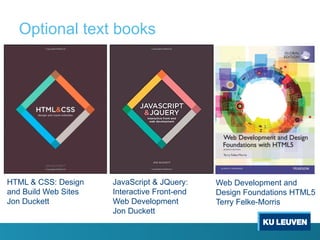
Optional text books
HTML & CSS: Design
and Build Web Sites
Jon Duckett
JavaScript & JQuery:
Interactive Front-end
Web Development
Jon Duckett
Web Development and
Design Foundations HTML5
Terry Felke-Morris
Online resources
• http://www.w3schools.com/
• https://www.codecademy.com/learn/all
o HTML & CSS
o Javascript
o JQuery
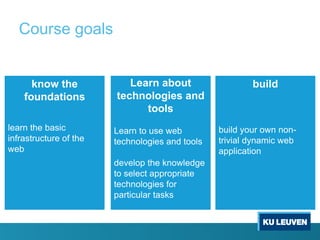
Course goals
know the
foundations
learn the basic
infrastructure of the
web
Learn about
technologies and
tools
Learn to use web
technologies and tools
develop the knowledge
to select appropriate
technologies for
particular tasks
build
build your own non-
trivial dynamic web
application
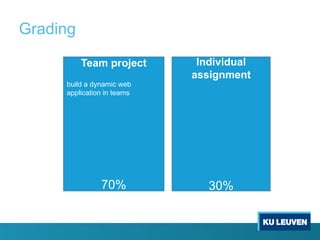
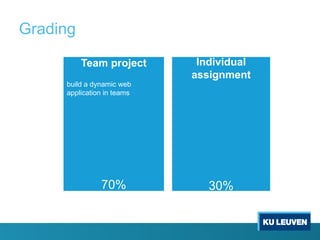
Grading
Individual
assignment
30%
Team project
build a dynamic web
application in teams
70%
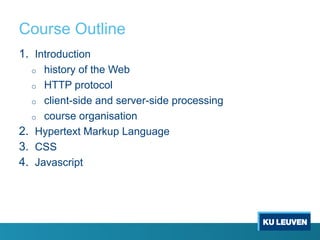
Course Outline
1. Introduction
o history of the Web
o HTTP protocol
o client-side and server-side processing
o course organisation
2. Hypertext Markup Language
3. CSS
4. Javascript
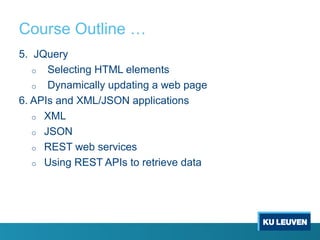
Course Outline …
5. JQuery
o Selecting HTML elements
o Dynamically updating a web page
6. APIs and XML/JSON applications
o XML
o JSON
o REST web services
o Using REST APIs to retrieve data
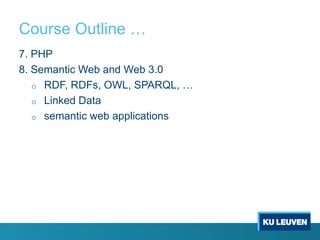
Course Outline …
7. PHP
8. Semantic Web and Web 3.0
o RDF, RDFs, OWL, SPARQL, …
o Linked Data
o semantic web applications
Grading
Individual
assignment
30%
Team project
build a dynamic web
application in teams
70%
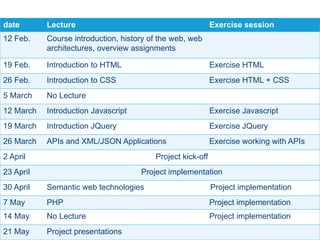
date Lecture Exercise session
12 Feb. Course introduction, history of the web, web
architectures, overview assignments
19 Feb. Introduction to HTML Exercise HTML
26 Feb. Introduction to CSS Exercise HTML + CSS
5 March No Lecture
12 March Introduction Javascript Exercise Javascript
19 March Introduction JQuery Exercise JQuery
26 March APIs and XML/JSON Applications Exercise working with APIs
2 April Project kick-off
23 April Project implementation
30 April Semantic web technologies Project implementation
7 May PHP Project implementation
14 May No Lecture Project implementation
21 May Project presentations
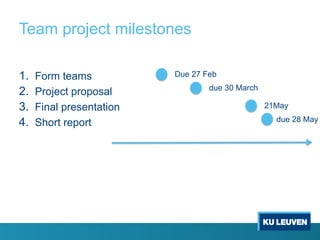
Team project milestones
1. Form teams
2. Project proposal
3. Final presentation
4. Short report
Due 27 Feb
due 30 March
21May
due 28 May
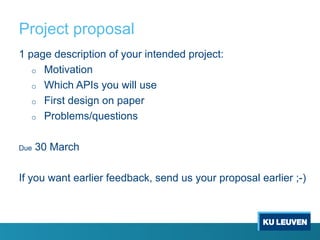
Project proposal
1 page description of your intended project:
o Motivation
o Which APIs you will use
o First design on paper
o Problems/questions
Due 30 March
If you want earlier feedback, send us your proposal earlier ;-)
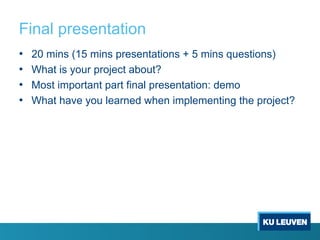
Final presentation
• 20 mins (15 mins presentations + 5 mins questions)
• What is your project about?
• Most important part final presentation: demo
• What have you learned when implementing the project?
Short report
• Motivation
• Data/API
• Web application design and implementation
• Reflection
o How is your work related to the topics taught in the course?
o If you would start over, what would you do differently?
• Effort
o How much effort did it take to implement the project?
o how did you distribute it in your group?
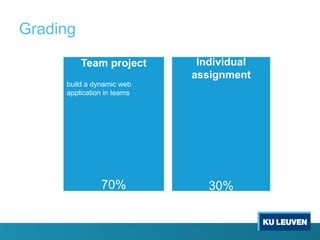
Grading
Individual
assignment
30%
Team project
build a dynamic web
application in teams
70%
Individual assignment
• Writing assignment
• Assignment will be sent April 30, 2019
2/12/19 80
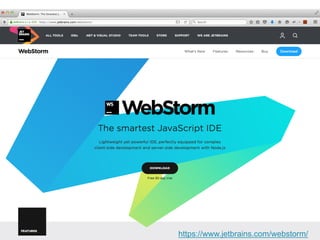
https://www.jetbrains.com/webstorm/
Contact
Office
Katrien: Dept. CW 04.49
Tom: Dept CW 03.10
Nyi Nyi: Dept. CW 04.26
Email
Katrien: katrien.verbert@cs.kuleuven.be
Tom: tom.broos@kuleuven.be
Nyi Nyi: nyinyi.htun@cs.kuleuven.be
References
• Web Technologies: A Computer Science
Perspective, Jeffrey C. Jackson, Prentice
Hall, August 2006, ISBN-13: 978-0131856035
• Vannevar Bush, As We May Think, Atlanic Monthly,
July 1945
o http://www.theatlantic.com/doc/194507/bush/
o http://sloan.stanford.edu/MouseSite/Secondary.html
o http://www.youtube.com/watch?v=c539cK58ees
• Videos of the NLS demo
o http://sloan.stanford.edu/mousesite/1968Demo.html
References …
• Ted Nelson demonstrates Xanadu Space
o http://www.youtube.com/watch?v=En_2T7KH6RA
• Aspen Moviemap
o http://www.naimark.net/projects/aspen.html
o http://www.youtube.com/watch?v=w18MyqszIYc
• Networking Technologies (TCP/IP, …)
o Andrew S. Tanenbaum, Computer Networks,
Prentice Hall 2002, ISBN-13: 978-0130661029
• Mark Weiser, The Computer for the 21st Century,
ACM Mobile Computing and Communications
Review, July 1999
TODO by next week
2/12/19 84
Request webstorm key (free)
https://www.jetbrains.com/student/
Next Lecture
HTML

Web Information Systems Lecture 1: Introduction

  • 1.
    Web Information Systems Introduction KatrienVerbert katrien.verbert@cs.kuleuven.be Many slides based on slides of Beat Signer
  • 2.
    What is theWorld Wide Web?
  • 3.
  • 4.
  • 5.
  • 6.
    Reading Wheel (Bookwheel) •Described by Agostino Ramelli in 1588 • Keep several books open to read from them at the same time o comparable to modern tabbed browsing • The reading wheel has never really been built • Could be seen as a predecessor of hypertext 6
  • 7.
  • 8.
    "As We MayThink" (1945) When data of any sort are placed in storage, they are filed alphabetically or numerically, and information is found (when it is) by tracing it down from subclass to subclass. It can be in only one place, unless duplicates are used; one has to have rules as to which path will locate it, and the rules are cumbersome. Having found one item, moreover, one has to emerge from the system and re-enter on a new path. The human mind does not work that way. It operates by association. ... Vannevar Bush
  • 9.
    "As We MayThink" (1945) … ... It affords an immediate step, however, to associative indexing, the basic idea of which is a provision whereby any item may be caused at will to select immediately and automatically another. This is the essential feature of the memex. The process of tying two items together is the important thing. ... Vannevar Bush, As We May Think, Atlanic Monthly, July 1945 Vannevar Bush
  • 10.
    "As We MayThink" (1945) … • Bush's article As We May Think (1945) is often seen as the "origin" of hypertext • The article introduces the Memex o memory extender o store and access information o follow cross-references in the form of associative trails between pieces of information (microfilms) o prototypical hypertext machine o trail blazers are those who find delight in the task of establishing useful trails Memex
  • 11.
    Scientist of theFuture ...
  • 12.
  • 13.
  • 14.
    What happed tothe Memex 14 • Bush ‘upgrades’ the memex in 1959 o Magnetic tape replaces microfilm o Ability to speak to the machine – interaction with sound o Color to distinguish old trails from new trails o Phone lines in order to add documents to one’s personal database • Was never built
  • 15.
    2/12/19 15 • Whywasn’t it ever built? • What was its impact on future developments? • Why is it important?
  • 16.
    Why wasn’t itever built? 16 • According to Bush: o It would have been ‘enourmously expensive’ to build o It was an idea before its time o Creating associations between was not well understood o Public didn’t understand the value of the project • Others: o Device was too ambiguous; no good definition o No practical way to create associations o Associations aren’t the best way to link information
  • 17.
  • 18.
    Memex and Hypertext/Web 18 InnovationMemex Hypertext/Web Relationships between connections Association Association Ideas connected by… Web of trails Hyperlinks, tags Ideas are… Personal Shared/public Relationships are… Bi-directional Uni-directional Retrieval mechanism Identify trail and then search trail sequentially Click Model for memory association Human brain Human brain
  • 19.
    Why was theMemex important 19 • Provided a method for dealing with information overload • Presents a novel approach to organizing personal information • Remembered as the technical vision of hypertext • Suggests fascinating possibilities for human-machine symbiosis • Derivative inventions represent an opportunity to study the co- evolution of human practices and technological tools
  • 20.
  • 21.
  • 22.
    Hypertext (1965) • TedNelson coined the term hypertext • Nelson started Project Xanadu in 1960 o first hypertext project o non-sequential writing o referencing/embedding parts of a document in another document (transclusion) à transpointing windows o bidirectional (bivisible) links o version and rights management • XanaduSpace 1.0 was released as part of Project Xanadu in 2007 • OpenXanadu demo/deliverable released in 2014 Ted Nelson
  • 23.
    Transpointing Windows Mockup(1972) [http://www.xanadu.com.au/ted/TN/PARALUNE/paraviz.html]
  • 24.
  • 25.
    Video: Ted NelsonExplains XanaduSpace https://www.youtube.com/watch?v=En_2T7KH6RA
  • 26.
    Hypertext Editing System,HES (1967) • Early hypertext system o developed at Brown University (1967) by Andries van Dam and his team o Ted Nelson was a visitor at Brown University a that time • Limitations o unidirectional links o only embedded links • File Retrieval and Editing System, FRESS (1968) o follow-up project taking ideas from HES and NLS o first system introducing 'undo' functionality o bidirectional links
  • 27.
    The Mother ofAll Demos (1968) • Douglas Engelbart and his colleagues at the Stanford Research Institute developed the oNLine System (NLS) as part of the Augment Project o vision about the future of interactive computing • NLS was demonstrated at the Fall Joint Computer Conference in 1968 o showed first practical use of hypertext o computer mouse o remote collaboration (connected computers) o raster-scan video monitors o screen windows o ... Douglas Engelbart
  • 28.
  • 29.
    Aspen Moviemap (1978) •Early hypermedia system o developed at MIT by Andrew Lippman and his team o hypermedia = extension of hypertext with other media types (e.g. images, sounds) • Virtual tour of Aspen o pictures taken every 10 feet while driving through the city o additional linked media (e.g. images and sounds) • Similar concept now used in Google Street View Slide source: Beat Signer
  • 30.
  • 31.
  • 32.
    ARPANET (1969) • AdvancedResearch Projects Agency Network o created by DARPA (US Department of Defense) o first operational packet switching network o first ARPANET link esta- blished in November 1969 • ARPANET applications o Email (1971), Ray Tomlinson o FTP (1973) ARPANET Team
  • 33.
    Worldwide Number ofHostnames 992‘117‘228 hostnames in August 2014, source: http://news.netcraft.com
  • 34.
    TCP (1974) • Transmissioncontrol protocol o replacement of Network Control Protocol (NCP) • 'A Protocol for Packet Network Interconnection' o by Vint Cerf and Bob Kahn • Reliable and ordered transmission of byte stream between two endpoints • Migration of ARPANET to TCP/IP in 1982 Vint Cerf Bob Kahn
  • 35.
    TCP/IP (1978) • 4abstraction layers o each layer offers functionality to the above layer o separation of concerns • Application layer o HTTP, FTP, POP, ... • Transport layer o TCP, UDP, ... • Internet layer o addressing hosts and packet routing o IP, ... • Link layer
  • 36.
  • 37.
  • 38.
    World Wide Web(WWW) • Networked hypertext system (over ARPANET) to share in- formation at CERN o first draft in March 1989 o The Information Mine, Information Mesh, …? • Components by end of 1990 o HyperText Transfer Protocol (HTTP) o HyperText Markup Language (HTML) o HTTP server software o Web browser called WorldWideWeb • First public "release" in August 1991 Tim Berners-Lee Robert Cailliau Slide source: Beat Signer
  • 39.
  • 40.
    WWW and Hypertext •WWW is mainly a network-enabled version of the HES hypertext model o unidirectional links between heterogeneous resources o is it more than just a digital version of paper documents with links? • What about all the richer functionality researched by the hypertext community? o bidirectional links o transclusion and external (non-embedded) links o version management o …
  • 41.
  • 42.
    Basic Client-Server WebArchitecture • Effect of typing http://www.kuleuven.be in the broswer bar (1) use a Domain Name Service (DNS) to get the IP address for www.kuleuven.be (answer 2a02:2c40:0:80::80:12) (2) create a TCP connection to 2a02:2c40:0:80::80:12 (3) send an HTTP request message over the TCP connection (4) visualise the received HTTP response message in the browser Internet Client Server HTTP Request HTTP Response
  • 43.
    Web Server • Tasksof a web server (1) setup connection (2) receive and process HTTP request (3) fetch resource (4) create and send HTTP response (5) logging • The most prominent web servers are the Apache HTTP Server and Microsoft's Internet Information Services (IIS) • A lot of devices have an embedded web server o printers, WLAN routers, TVs, ... Worldwide Web Servers, http://news.netcraft.com
  • 44.
    Example HTTP RequestMessage GET / HTTP/1.1 Host: www.kuleuven.be User-Agent: Mozilla/5.0 (Windows NT 6.1; rv:24.0) Gecko/20100101 Firefox/24.0 Accept: text/html,application/xhtml+xml,application/xml;q=0.9,*/*;q=0.8 Accept-Language: en-gb,en;q=0.5 Accept-Encoding: gzip, deflate Accept-Charset: ISO-8859-1,utf-8;q=0.7,*;q=0.7 Connection: keep-alive
  • 45.
    Example HTTP ResponseMessage HTTP/1.1 200 OK Date: Thu, 03 Oct 2013 17:02:19 GMT Server: Apache/2.2.14 (Ubuntu) X-Powered-By: PHP/5.3.2-1ubuntu4.15 Content-Language: nl Set-Cookie: lang=nl; path=/; domain=.kuleuven.be; expires=Mon, 18-Sep-2073 17:02:16 GMT Content-Type: text/html; charset=utf-8 Keep-Alive: timeout=15, max=987 Connection: Keep-Alive Transfer-Encoding: chunked <!DOCTYPE html> <html lang="nl" dir="ltr"> <head> ... </head> <title>KU Leuven</title> <meta name="Description" content="Welkom aan de KU Leuven" /> ... </html>
  • 46.
    HTTP Protocol • Request/responsecommunication model o HTTP Request o HTTP Response • Communication always has to be initiated by the client • Stateless protocol • HTTP can be used on top of various reliable protocols o TCP is by far the most commonly used one o runs on TCP port 80 by default • Latest version: HTTP/2.0
  • 47.
    HTTP Message Format •Request and response messages have the same format <html> ... </html> HTTP/1.1 200 OK Date: Thu, 03 Oct 2013 17:02:19 GMT Server: Apache/2.2.14 (Ubuntu) X-Powered-By: PHP/5.3.2-1ubuntu4.15 Transfer-Encoding: chunked Content-Type: text/html header field(s) blank line (CRLF) message body (optional) start line HTTP_message = start_line , {header} , "CRLF" , {body};
  • 48.
    HTTP Request Message •Request-specific start line • Methods o GET : get a resource from the server o HEAD : get the header only (no body) o POST : send data (in the body) to the server o PUT : store request body on server o TRACE : get the "final" request (after it has potentially been modified by proxies) o OPTIONS : get a list of methods supported by the server o DELETE: delete a resource on the server start_line = method, " " , resource , " " , version; method = "GET" , "HEAD" , "POST" , "PUT" , "TRACE" , "OPTIONS" , "DELETE"; resource = complete_URL | path; version = "HTTP/" , major_version, "." , minor_version;
  • 49.
    HTTP Response Message •Response-specific start line • Status codes o 100-199 : informational o 200-299 : success (e.g. 200 for 'OK') o 300-399 : redirection o 400-499 : client error (e.g. 404 for 'Not Found') o 500-599 : server error (e.g. 503 for 'Service Unavailable') start_line = version , status_code , reason; version = "HTTP/" , major_version, "." , minor_version; status_code = digit , digit , digit; reason = string_phrase; Slide source: Beat Signer
  • 50.
    HTTP Header Fields •There exist general headers (for requests and responses), request headers, response headers, entity headers and extension headers • Some important headers o Accept • request header definining the Multipurpose Internet Mail Extensions (MIME) that the client will accept o User-Agent • request header specifying the type of client o Keep-Alive (HTTP/1.0) and Persistent (HTTP/1.1) • general header helping to improve the performance since otherwise a new HTTP connection has to be established for every single webpage element o Content-Type • entity header specifing the body's MIME type
  • 51.
    MIME Types The MIMEtype defines the request or response body's content and is used for the appropiate processing • Standard MIME types are registered with the Internet Assigned Numbers Authority (IANA) [RFC-2045] mime = toplevel_type , "/" , subtype; MIME Type Description text/plain Human-readable text without formatting information text/html HTML document image/jpeg JPEG-encoded image ... ...
  • 52.
  • 53.
    Cookies • Introduced byNetscape in June 1994 • A cookie is a piece of information that is assigned to a client on their first visit o list of <key,value> pairs o often just a unique identifier o sent via Set-Cookie or Set-Cookie2 HTTP response headers • Browser stores the information in a "cookie database" and sends it back every time the same server is accessed • Cookies can be disabled in the browser settings
  • 54.
    Hypertext Markup Language(HTML) • Dominant markup language for webpages • More details in the next lecture <!DOCTYPE html PUBLIC "-//W3C//DTD XHTML 1.0 Transitional//EN" "http://www.w3.org/TR/xhtml1/DTD/xhtml1-transitional.dtd"> <html xmlns="http://www.w3.org/1999/xhtml" xml:lang="en" lang="en"> <head> <title>Katrien Verbert</title> </head> <body> <p>Katrien Verbert is Assistant Professor of Computer Science at KU Leuven</p> </body> </html>
  • 55.
    Dynamic Web Content •Often it is not enough to serve static web pages but content should be changed on the client or server side • Server-side processing o Common Gateway Interface (CGI) o JavaServer Pages (JSP) o PHP: Hypertext Preprocessor (PHP) o Python o ... • Client-side processing o JavaScript o Adobe Flash o ...
  • 56.
  • 57.
  • 58.
    Mako templates forPython Python example
  • 59.
    JavaScript • Interpreted scriptinglanguage for client-side processing • JavaScript functionality often embedded in HTML documents but can also be provided in separate files • JavaScript often used to o validate data (e.g. in a form) o dynamically add content to a webpage o process events (onLoad, onFocus, etc.) o change parts of the original HTML document o create cookies o ...
  • 60.
  • 61.
    Semantic Web (Web3.0) • Add explicit semantics to web resources • Machine-interpretable Web • Use of ontologies • Potential reasoning over Web resources Character set: UNICODE Cryptography Syntax: XML and XML Namespaces Data interchange: RDF Taxonomies: RDFS Ontologies: OWLQuerying: SPARQL Unifying Logic Trust User interface and applications Proof Rules: RIF/SWRL Based on [http://en.wikipedia.org/wiki/File:Semantic-web-stack.png] Identifiers: URI/IRI 61
  • 62.
  • 63.
  • 64.
    Co-lecturer (tom) andteaching assistant (Nyi Nyi) Nyi Nyi Htun https://www.kuleuven.be/wieiswie/nl/ person/00120760 Tom Broos https://www.kuleuven.be/wieiswie/nl/ person/00039954
  • 65.
    Optional text books HTML& CSS: Design and Build Web Sites Jon Duckett JavaScript & JQuery: Interactive Front-end Web Development Jon Duckett Web Development and Design Foundations HTML5 Terry Felke-Morris
  • 66.
    Online resources • http://www.w3schools.com/ •https://www.codecademy.com/learn/all o HTML & CSS o Javascript o JQuery
  • 67.
    Course goals know the foundations learnthe basic infrastructure of the web Learn about technologies and tools Learn to use web technologies and tools develop the knowledge to select appropriate technologies for particular tasks build build your own non- trivial dynamic web application
  • 68.
    Grading Individual assignment 30% Team project build adynamic web application in teams 70%
  • 69.
    Course Outline 1. Introduction ohistory of the Web o HTTP protocol o client-side and server-side processing o course organisation 2. Hypertext Markup Language 3. CSS 4. Javascript
  • 70.
    Course Outline … 5.JQuery o Selecting HTML elements o Dynamically updating a web page 6. APIs and XML/JSON applications o XML o JSON o REST web services o Using REST APIs to retrieve data
  • 71.
    Course Outline … 7.PHP 8. Semantic Web and Web 3.0 o RDF, RDFs, OWL, SPARQL, … o Linked Data o semantic web applications
  • 72.
    Grading Individual assignment 30% Team project build adynamic web application in teams 70%
  • 73.
    date Lecture Exercisesession 12 Feb. Course introduction, history of the web, web architectures, overview assignments 19 Feb. Introduction to HTML Exercise HTML 26 Feb. Introduction to CSS Exercise HTML + CSS 5 March No Lecture 12 March Introduction Javascript Exercise Javascript 19 March Introduction JQuery Exercise JQuery 26 March APIs and XML/JSON Applications Exercise working with APIs 2 April Project kick-off 23 April Project implementation 30 April Semantic web technologies Project implementation 7 May PHP Project implementation 14 May No Lecture Project implementation 21 May Project presentations
  • 74.
    Team project milestones 1.Form teams 2. Project proposal 3. Final presentation 4. Short report Due 27 Feb due 30 March 21May due 28 May
  • 75.
    Project proposal 1 pagedescription of your intended project: o Motivation o Which APIs you will use o First design on paper o Problems/questions Due 30 March If you want earlier feedback, send us your proposal earlier ;-)
  • 76.
    Final presentation • 20mins (15 mins presentations + 5 mins questions) • What is your project about? • Most important part final presentation: demo • What have you learned when implementing the project?
  • 77.
    Short report • Motivation •Data/API • Web application design and implementation • Reflection o How is your work related to the topics taught in the course? o If you would start over, what would you do differently? • Effort o How much effort did it take to implement the project? o how did you distribute it in your group?
  • 78.
    Grading Individual assignment 30% Team project build adynamic web application in teams 70%
  • 79.
    Individual assignment • Writingassignment • Assignment will be sent April 30, 2019
  • 80.
  • 81.
    Contact Office Katrien: Dept. CW04.49 Tom: Dept CW 03.10 Nyi Nyi: Dept. CW 04.26 Email Katrien: katrien.verbert@cs.kuleuven.be Tom: tom.broos@kuleuven.be Nyi Nyi: nyinyi.htun@cs.kuleuven.be
  • 82.
    References • Web Technologies:A Computer Science Perspective, Jeffrey C. Jackson, Prentice Hall, August 2006, ISBN-13: 978-0131856035 • Vannevar Bush, As We May Think, Atlanic Monthly, July 1945 o http://www.theatlantic.com/doc/194507/bush/ o http://sloan.stanford.edu/MouseSite/Secondary.html o http://www.youtube.com/watch?v=c539cK58ees • Videos of the NLS demo o http://sloan.stanford.edu/mousesite/1968Demo.html
  • 83.
    References … • TedNelson demonstrates Xanadu Space o http://www.youtube.com/watch?v=En_2T7KH6RA • Aspen Moviemap o http://www.naimark.net/projects/aspen.html o http://www.youtube.com/watch?v=w18MyqszIYc • Networking Technologies (TCP/IP, …) o Andrew S. Tanenbaum, Computer Networks, Prentice Hall 2002, ISBN-13: 978-0130661029 • Mark Weiser, The Computer for the 21st Century, ACM Mobile Computing and Communications Review, July 1999
  • 84.
    TODO by nextweek 2/12/19 84 Request webstorm key (free) https://www.jetbrains.com/student/
  • 85.