MongoDB, PHP & the Cloud
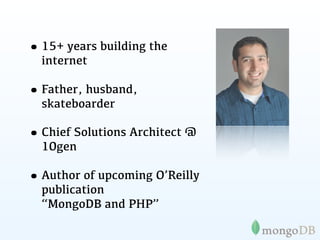
My name is
Steve Francia

     @spf13
• 15+ years building the
  internet

• Father, husband,
  skateboarder

• Chief Solutions Architect @
  10gen

• Author of upcoming O’Reilly
  publication
  “MongoDB and PHP”
Introduction to
   MongoDB
Why MongoDB?
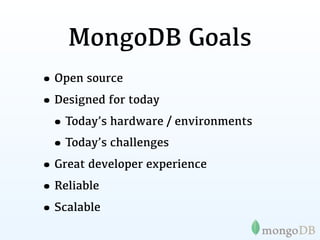
MongoDB Goals
• Open source
• Designed for today
 • Today’s hardware / environments
 • Today’s challenges
• Great developer experience
• Reliable
• Scalable
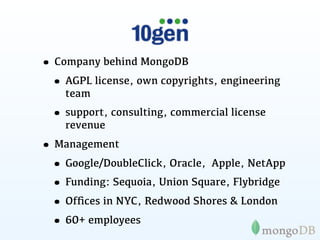
• Company behind MongoDB
 • AGPL license, own copyrights, engineering
    team
  • support, consulting, commercial license
    revenue
• Management
 • Google/DoubleClick, Oracle, Apple, NetApp
 • Funding: Sequoia, Union Square, Flybridge
 • Offices in NYC, Redwood Shores & London
 • 60+ employees
A bit of history
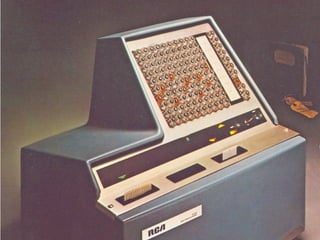
1974
The relational database is created
1979
1979   1982-1996
1979   1982-1996   1995
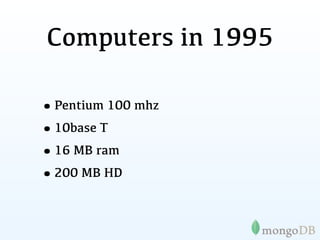
Computers in 1995

•Pentium 100 mhz
•10base T
•16 MB ram
•200 MB HD
Cloud in 1995
(Windows 95 cloud wallpaper)
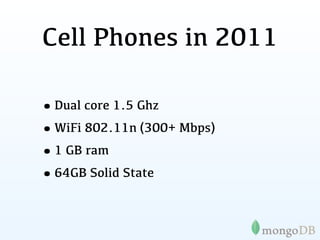
Cell Phones in 2011

•Dual core 1.5 Ghz
•WiFi 802.11n (300+ Mbps)
•1 GB ram
•64GB Solid State
How about a DB
designed for today?
MongoDB philosophy
• Keep functionality when we can (key/
  value stores are great, but we need more)
• Non-relational (no joins) makes scaling
  horizontally practical
• Document data models are good
• Database technology should run
  anywhere VMs, cloud, metal, etc
MongoDB is:
          Application      Document
                           Oriented
                           { author: “steve”,
    High                     date: new Date(),
                             text: “About MongoDB...”,
Performance                  tags: [“tech”, “database”]}


                             Fully
                           Consistent

   Horizontally Scalable
Under the hood

•Written in C++
•Runs on nearly anything
•Data serialized to BSON
•Extensive use of memory-mapped files
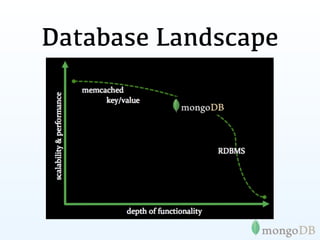
Database Landscape
This has led
    some to say

“
MongoDB has the best
features of key/ values
stores, document databases
and relational databases in
one.
               John Nunemaker
Use Cases
CMS / Blog
Needs:
• Business needed modern data store for rapid development and
  scale

Solution:
• Use PHP & MongoDB

Results:
• Real time statistics
• All data, images, etc stored together, easy access, easy
  deployment, easy high availability
• No need for complex migrations
• Enabled very rapid development and growth
Photo Meta-Data
Problem:
• Business needed more flexibility than Oracle could deliver

Solution:
• Use MongoDB instead of Oracle

Results:
• Developed application in one sprint cycle
• 500% cost reduction compared to Oracle
• 900% performance improvement compared to Oracle
Customer Analytics
Problem:
• Deal with massive data volume across all customer sites

Solution:
• Use MongoDB to replace Google Analytics / Omniture options

Results:
• Less than one week to build prototype and prove business case
• Rapid deployment of new features
Online Dictionary
Problem:
• MySQL could not scale to handle their 5B+ documents

Solution:
• Switched from MySQL to MongoDB

Results:
• Massive simplification of code base
• Eliminated need for external caching system
• 20x performance improvement over MySQL
E-commerce
Problem:
• Multi-vertical E-commerce impossible to model (efficiently) in
  RDBMS

Solution:
• Switched from MySQL to MongoDB

Results:
•   Massive simplification of code base
•   Rapidly build, halving time to market (and cost)
•   Eliminated need for external caching system
•   50x+ improvement over MySQL
Tons more
Pretty much if you can use a RDMBS or Key/Value
             MongoDB is a great fit
In Good Company
MongoDB in PHP
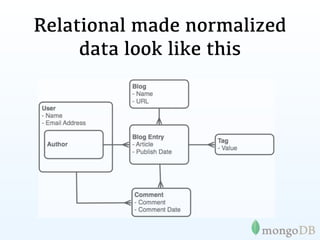
Relational made normalized
     data look like this
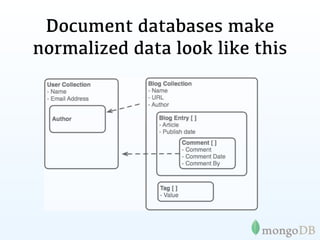
Document databases make
normalized data look like this
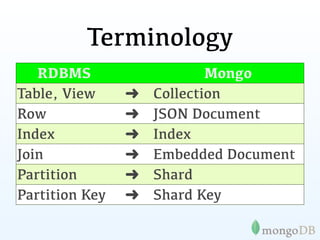
Terminology
   RDBMS                    Mongo
Table, View     ➜   Collection
Row             ➜   JSON Document
Index           ➜   Index
Join            ➜   Embedded Document
Partition       ➜   Shard
Partition Key   ➜   Shard Key
Tables to Documents
           {
               title: ‘MongoDB’,
               contributors: [
                  { name: ‘Eliot Horowitz’,
                    email: ‘eh@10gen.com’ },
                  { name: ‘Dwight Merriman’,
                    email: ‘dm@10gen.com’ }
               ],
               model: {
                   relational: false,
                   awesome: true
               }
           }
Documents to Arrays
{                                   array(
    title: ‘MongoDB’,                 "title" => 'MongoDB',
                                      "contributors" => array(
    contributors: [                      array(
       { name: ‘Eliot Horowitz’,            'name' => 'Eliot Horowitz',
         email: ‘eh@10gen.com’ },           'email' => 'eh@10gen.com'
                                         ),
       { name: ‘Dwight Merriman’,        array(
         email: ‘dm@10gen.com’ }           'name' => 'Dwight Merriman',
                                           'email' => 'dm@10gen.com'
    ],
                                         )
    model: {                          ),
        relational: false,            "model" => array(
                                           'relational' => false,
        awesome: true                      'awesome' => true
    }                                 )
}                                   )
Documents to Objects
{                                   PostObject Object(
    title: ‘MongoDB’,                   [title] => MongoDB
                                        [contributors] => Array(
    contributors: [                         [0] => PersonObject Object(
       { name: ‘Eliot Horowitz’,                [name] => Eliot Horowitz
         email: ‘eh@10gen.com’ },               [email] => eh@10gen.com
                                            )
       { name: ‘Dwight Merriman’,           [1] => PersonObject Object(
         email: ‘dm@10gen.com’ }                [name] => Dwight Merriman
                                                [email] => dm@10gen.com
    ],
                                            )
    model: {                            )
        relational: false,              [model] => ModelObject Object(
                                           [relational] =>
        awesome: true                      [awesome] => 1
    }                                   )
}                                   )
MongoDB speaks
     PHP
This has led
    Matt to say


“
The single best interface
(API) of any php
extension.  
       Matthew Weier O'Phinney
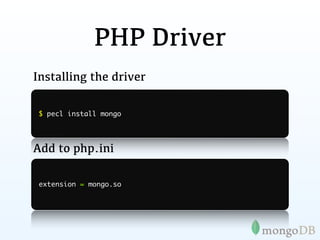
PHP Driver
Installing the driver

 $ pecl install mongo


Add to php.ini

 extension = mongo.so
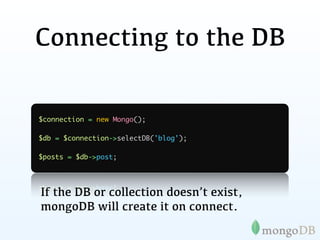
Connecting to the DB

$connection = new Mongo();

$db = $connection->selectDB('blog');

$posts = $db->post;


If the DB or collection doesn’t exist,
mongoDB will create it on connect.
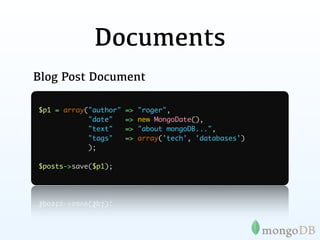
Documents
Blog Post Document

$p1 = array("author"   =>   "roger",
            "date"     =>   new MongoDate(),
            "text"     =>   "about mongoDB...",
            "tags"     =>   array('tech', 'databases')
            );

$posts->save($p1);
Querying
print_r($posts->findOne());

Array(
    [_id] => MongoId Object(
            [$id] => 4e9796764a18173a17000000
        )
    [author] => roger
    [date] => MongoDate Object(
            [sec] => 1318557302
            [usec] => 581000
        )
    [text] => about mongoDB...
    [tags] => Array(
            [0] => tech
 Note: _id is unique, but can be anything
            [1] => databases
you’d like
)
        )
Querying
> db.posts.findOne()

>   { _id : ObjectId("4c4ba5c0672c685e5e8aabf3"),
    author : "roger",
      date : "Sat Jul 24 2010 19:47:11",
      text : "About MongoDB...",
      tags : [ "tech", "databases" ] }


 Note: _id is unique, but can be anything
you’d like
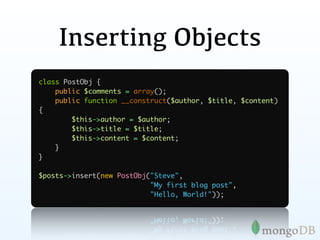
Inserting Objects
class PostObj {
    public $comments = array();
    public function __construct($author, $title, $content)
{
        $this->author = $author;
        $this->title = $title;
        $this->content = $content;
    }
}

$posts->insert(new PostObj("Steve",
                           "My first blog post",
                           "Hello, World!"));
MongoId
An autogenerated primary key

$x = array("foo" => 1, "bar" => 2);
$db->baz->save($x);
var_dump($x['_id']);

Result:

object(MongoId)#4 (1) {
  ["$id"]=> string(24) "4e9cc76a4a1817fd21000000"
}
MongoId
An autogenerated primary key


object(MongoId)#4 (1) {
  ["$id"]=> string(24) "4e9cc76a4a1817fd21000000"
}

                4e9cc76a4a1817fd21000000
                |------||----||--||----|
                   ts     mac pid inc
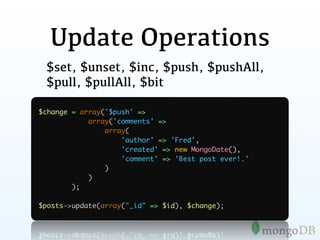
Update Operations
 $set, $unset, $inc, $push, $pushAll,
 $pull, $pullAll, $bit

$change = array('$push' =>
            array('comments' =>
                array(
                    'author' => 'Fred',
                    'created' => new MongoDate(),
                    'comment' => 'Best post ever!.'
                )
            )
        );

$posts->update(array("_id" => $id), $change);
Nested Documents
    {   _id : ObjectId("4c4ba5c0672c685e5e8aabf3"),
        author : "roger",
        date : "Sat Apr 24 2011 19:47:11",
        text : "About MongoDB...",
        tags : [ "tech", "databases" ],
        comments : [
	              {
	              	 author : "Fred",
               	
	              	 date : "Sat Apr 25 2010 20:51:03 GMT-0700",
               	
	              	 text : "Best Post Ever!"
               	
	              	
               }
         ]
}
Nested Documents
    {   _id : ObjectId("4c4ba5c0672c685e5e8aabf3"),
        author : "roger",
        date : "Sat Apr 24 2011 19:47:11",
        text : "About MongoDB...",
        tags : [ "tech", "databases" ],
        comments : [
	              {
	              	 author : "Fred",
               	
	              	 date : "Sat Apr 25 2010 20:51:03 GMT-0700",
               	
	              	 text : "Best Post Ever!"
               	
	              	
               }
         ]
}
Nested Documents
Array(
    [_id] => MongoId Object (
            [$id] => 4e9796764a18173a17000000
    )
    [author] => roger
    [comments] => Array(
        [0] => Array(
             [author] => Fred
             [created] => MongoDate Object(
                     [sec] => 1318899392
                     [usec] => 176000
                 )
             [comment] => Dumb post.
         )
    )
    [date] => MongoDate Object(
        [sec] => 1318557302
        [usec] => 581000
    )
    [tags] => Array(
        [0] => tech
        [1] => databases
    )
    [text] => about mongoDB...
)
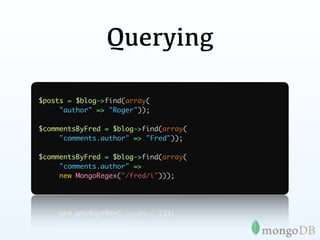
Querying

$posts = $blog->find(array(
     "author" => "Roger"));

$commentsByFred = $blog->find(array(
     "comments.author" => "Fred"));

$commentsByFred = $blog->find(array(
     "comments.author" =>
     new MongoRegex("/fred/i")));
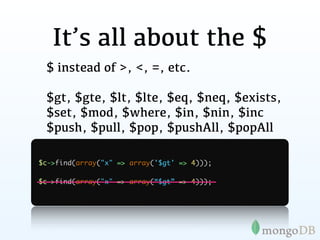
It’s all about the $
 $ instead of >, <, =, etc.

 $gt, $gte, $lt, $lte, $eq, $neq, $exists,
 $set, $mod, $where, $in, $nin, $inc
 $push, $pull, $pop, $pushAll, $popAll

$c->find(array("x" => array('$gt' => 4)));

$c->find(array("x" => array(“$gt” => 4)));
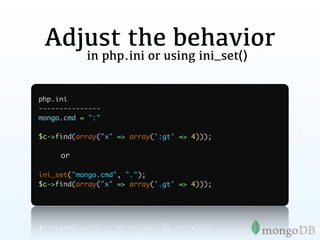
Adjust the behavior
           in php.ini or using ini_set()


php.ini
---------------
mongo.cmd = ":"

$c->find(array("x" => array(':gt' => 4)));

     or

ini_set("mongo.cmd", ".");
$c->find(array("x" => array('.gt' => 4)));
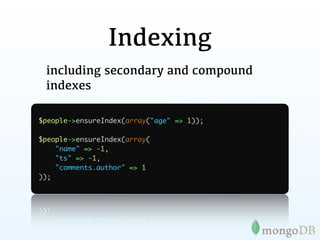
Indexing
 including secondary and compound
 indexes

$people->ensureIndex(array("age" => 1));

$people->ensureIndex(array(
    "name" => -1,
    "ts" => -1,
    "comments.author" => 1
));
Cursors

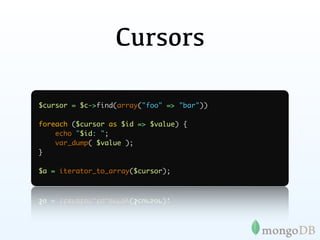
$cursor = $c->find(array("foo" => "bar"))

foreach ($cursor as $id => $value) {
    echo "$id: ";
    var_dump( $value );
}

$a = iterator_to_array($cursor);
Paging

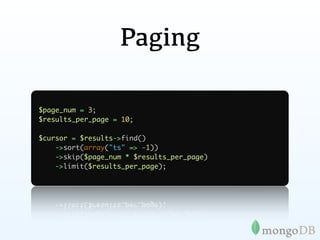
$page_num = 3;
$results_per_page = 10;

$cursor = $results->find()
    ->sort(array("ts" => -1))
    ->skip($page_num * $results_per_page)
    ->limit($results_per_page);
Grid FS
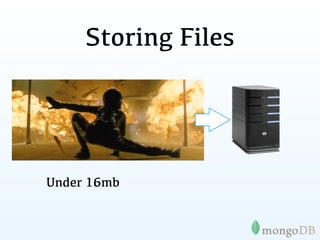
Storing Files


Under 16mb
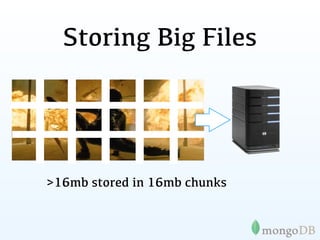
Storing Big Files


>16mb stored in 16mb chunks
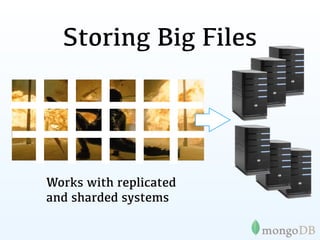
Storing Big Files


Works with replicated
and sharded systems
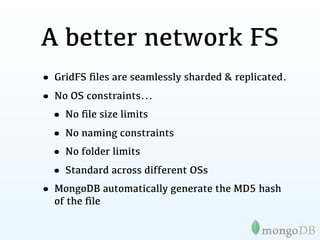
A better network FS
• GridFS files are seamlessly sharded & replicated.
• No OS constraints...
 • No file size limits
 • No naming constraints
 • No folder limits
 • Standard across different OSs
• MongoDB automatically generate the MD5 hash
  of the file
Mongo

DB for the Cloud
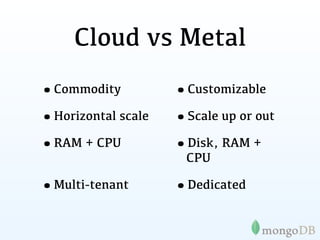
Cloud vs Metal
•Commodity          •Customizable
•Horizontal scale   •Scale up or out
•RAM + CPU          •Disk, RAM +
                     CPU

•Multi-tenant       •Dedicated
IaaS
PaaS
MongoDB
Components
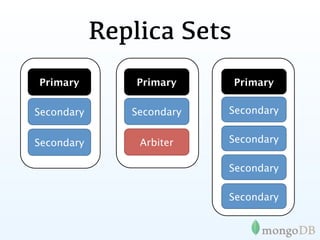
Replica Sets
Primary         Primary    Primary

Secondary      Secondary   Secondary


Secondary       Arbiter    Secondary

                           Secondary

                           Secondary
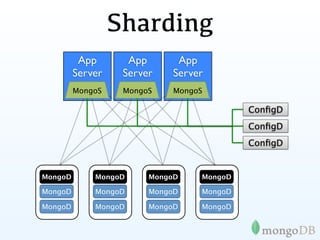
Sharding
          App       App      App
         Server    Server   Server
         MongoS    MongoS    MongoS

                                           ConfigD
                                           ConfigD
                                           ConfigD


MongoD       MongoD     MongoD    MongoD

MongoD       MongoD     MongoD    MongoD

MongoD       MongoD     MongoD    MongoD
MongoDB on EC2
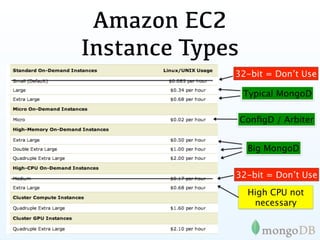
Amazon EC2
Instance Types
             32-bit = Don’t Use

                 Typical MongoD

                 ConfigD / Arbiter


                  Big MongoD


             32-bit = Don’t Use
                  High CPU not
                   necessary
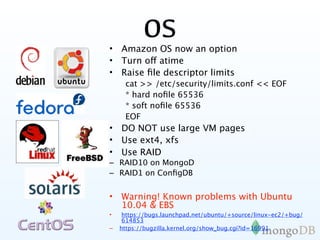
OS
• Amazon OS now an option
• Turn off atime
• Raise file descriptor limits
     cat >> /etc/security/limits.conf << EOF
     * hard nofile 65536
     * soft nofile 65536
     EOF
• DO NOT use large VM pages
• Use ext4, xfs
• Use RAID
– RAID10 on MongoD
– RAID1 on ConfigDB


• Warning! Known problems with Ubuntu
  10.04 & EBS
•    https://bugs.launchpad.net/ubuntu/+source/linux-ec2/+bug/
     614853
–   https://bugzilla.kernel.org/show_bug.cgi?id=16991
http://spf13.com
                                http://github.com/spf13
                                @spf13


          Questions?
        download at mongodb.org
PS: We’re hiring!! Contact us at jobs@10gen.com
MongoDB, PHP and the cloud - php cloud summit 2011

MongoDB, PHP and the cloud - php cloud summit 2011

  • 1.
    MongoDB, PHP &the Cloud
  • 2.
    My name is SteveFrancia @spf13
  • 3.
    • 15+ yearsbuilding the internet • Father, husband, skateboarder • Chief Solutions Architect @ 10gen • Author of upcoming O’Reilly publication “MongoDB and PHP”
  • 4.
  • 5.
  • 6.
    MongoDB Goals • Opensource • Designed for today • Today’s hardware / environments • Today’s challenges • Great developer experience • Reliable • Scalable
  • 7.
    • Company behindMongoDB • AGPL license, own copyrights, engineering team • support, consulting, commercial license revenue • Management • Google/DoubleClick, Oracle, Apple, NetApp • Funding: Sequoia, Union Square, Flybridge • Offices in NYC, Redwood Shores & London • 60+ employees
  • 8.
    A bit ofhistory
  • 9.
  • 12.
  • 13.
    1979 1982-1996
  • 14.
    1979 1982-1996 1995
  • 15.
    Computers in 1995 •Pentium100 mhz •10base T •16 MB ram •200 MB HD
  • 16.
    Cloud in 1995 (Windows95 cloud wallpaper)
  • 17.
    Cell Phones in2011 •Dual core 1.5 Ghz •WiFi 802.11n (300+ Mbps) •1 GB ram •64GB Solid State
  • 18.
    How about aDB designed for today?
  • 19.
    MongoDB philosophy • Keepfunctionality when we can (key/ value stores are great, but we need more) • Non-relational (no joins) makes scaling horizontally practical • Document data models are good • Database technology should run anywhere VMs, cloud, metal, etc
  • 20.
    MongoDB is: Application Document Oriented { author: “steve”, High date: new Date(), text: “About MongoDB...”, Performance tags: [“tech”, “database”]} Fully Consistent Horizontally Scalable
  • 21.
    Under the hood •Writtenin C++ •Runs on nearly anything •Data serialized to BSON •Extensive use of memory-mapped files
  • 22.
  • 23.
    This has led some to say “ MongoDB has the best features of key/ values stores, document databases and relational databases in one. John Nunemaker
  • 24.
  • 25.
    CMS / Blog Needs: •Business needed modern data store for rapid development and scale Solution: • Use PHP & MongoDB Results: • Real time statistics • All data, images, etc stored together, easy access, easy deployment, easy high availability • No need for complex migrations • Enabled very rapid development and growth
  • 26.
    Photo Meta-Data Problem: • Businessneeded more flexibility than Oracle could deliver Solution: • Use MongoDB instead of Oracle Results: • Developed application in one sprint cycle • 500% cost reduction compared to Oracle • 900% performance improvement compared to Oracle
  • 27.
    Customer Analytics Problem: • Dealwith massive data volume across all customer sites Solution: • Use MongoDB to replace Google Analytics / Omniture options Results: • Less than one week to build prototype and prove business case • Rapid deployment of new features
  • 28.
    Online Dictionary Problem: • MySQLcould not scale to handle their 5B+ documents Solution: • Switched from MySQL to MongoDB Results: • Massive simplification of code base • Eliminated need for external caching system • 20x performance improvement over MySQL
  • 29.
    E-commerce Problem: • Multi-vertical E-commerceimpossible to model (efficiently) in RDBMS Solution: • Switched from MySQL to MongoDB Results: • Massive simplification of code base • Rapidly build, halving time to market (and cost) • Eliminated need for external caching system • 50x+ improvement over MySQL
  • 30.
    Tons more Pretty muchif you can use a RDMBS or Key/Value MongoDB is a great fit
  • 31.
  • 32.
  • 33.
    Relational made normalized data look like this
  • 34.
  • 35.
    Terminology RDBMS Mongo Table, View ➜ Collection Row ➜ JSON Document Index ➜ Index Join ➜ Embedded Document Partition ➜ Shard Partition Key ➜ Shard Key
  • 36.
    Tables to Documents { title: ‘MongoDB’, contributors: [ { name: ‘Eliot Horowitz’, email: ‘eh@10gen.com’ }, { name: ‘Dwight Merriman’, email: ‘dm@10gen.com’ } ], model: { relational: false, awesome: true } }
  • 37.
    Documents to Arrays { array( title: ‘MongoDB’, "title" => 'MongoDB', "contributors" => array( contributors: [ array( { name: ‘Eliot Horowitz’, 'name' => 'Eliot Horowitz', email: ‘eh@10gen.com’ }, 'email' => 'eh@10gen.com' ), { name: ‘Dwight Merriman’, array( email: ‘dm@10gen.com’ } 'name' => 'Dwight Merriman', 'email' => 'dm@10gen.com' ], ) model: { ), relational: false, "model" => array( 'relational' => false, awesome: true 'awesome' => true } ) } )
  • 38.
    Documents to Objects { PostObject Object( title: ‘MongoDB’, [title] => MongoDB [contributors] => Array( contributors: [ [0] => PersonObject Object( { name: ‘Eliot Horowitz’, [name] => Eliot Horowitz email: ‘eh@10gen.com’ }, [email] => eh@10gen.com ) { name: ‘Dwight Merriman’, [1] => PersonObject Object( email: ‘dm@10gen.com’ } [name] => Dwight Merriman [email] => dm@10gen.com ], ) model: { ) relational: false, [model] => ModelObject Object( [relational] => awesome: true [awesome] => 1 } ) } )
  • 39.
  • 40.
    This has led Matt to say “ The single best interface (API) of any php extension.   Matthew Weier O'Phinney
  • 41.
    PHP Driver Installing thedriver $ pecl install mongo Add to php.ini extension = mongo.so
  • 42.
    Connecting to theDB $connection = new Mongo(); $db = $connection->selectDB('blog'); $posts = $db->post; If the DB or collection doesn’t exist, mongoDB will create it on connect.
  • 43.
    Documents Blog Post Document $p1= array("author" => "roger", "date" => new MongoDate(), "text" => "about mongoDB...", "tags" => array('tech', 'databases') ); $posts->save($p1);
  • 44.
    Querying print_r($posts->findOne()); Array( [_id] => MongoId Object( [$id] => 4e9796764a18173a17000000 ) [author] => roger [date] => MongoDate Object( [sec] => 1318557302 [usec] => 581000 ) [text] => about mongoDB... [tags] => Array( [0] => tech Note: _id is unique, but can be anything [1] => databases you’d like ) )
  • 45.
    Querying > db.posts.findOne() > { _id : ObjectId("4c4ba5c0672c685e5e8aabf3"), author : "roger", date : "Sat Jul 24 2010 19:47:11", text : "About MongoDB...", tags : [ "tech", "databases" ] } Note: _id is unique, but can be anything you’d like
  • 46.
    Inserting Objects class PostObj{ public $comments = array(); public function __construct($author, $title, $content) { $this->author = $author; $this->title = $title; $this->content = $content; } } $posts->insert(new PostObj("Steve", "My first blog post", "Hello, World!"));
  • 47.
    MongoId An autogenerated primarykey $x = array("foo" => 1, "bar" => 2); $db->baz->save($x); var_dump($x['_id']); Result: object(MongoId)#4 (1) { ["$id"]=> string(24) "4e9cc76a4a1817fd21000000" }
  • 48.
    MongoId An autogenerated primarykey object(MongoId)#4 (1) { ["$id"]=> string(24) "4e9cc76a4a1817fd21000000" } 4e9cc76a4a1817fd21000000 |------||----||--||----| ts mac pid inc
  • 49.
    Update Operations $set,$unset, $inc, $push, $pushAll, $pull, $pullAll, $bit $change = array('$push' => array('comments' => array( 'author' => 'Fred', 'created' => new MongoDate(), 'comment' => 'Best post ever!.' ) ) ); $posts->update(array("_id" => $id), $change);
  • 50.
    Nested Documents { _id : ObjectId("4c4ba5c0672c685e5e8aabf3"), author : "roger", date : "Sat Apr 24 2011 19:47:11", text : "About MongoDB...", tags : [ "tech", "databases" ], comments : [ { author : "Fred", date : "Sat Apr 25 2010 20:51:03 GMT-0700", text : "Best Post Ever!" } ] }
  • 51.
    Nested Documents { _id : ObjectId("4c4ba5c0672c685e5e8aabf3"), author : "roger", date : "Sat Apr 24 2011 19:47:11", text : "About MongoDB...", tags : [ "tech", "databases" ], comments : [ { author : "Fred", date : "Sat Apr 25 2010 20:51:03 GMT-0700", text : "Best Post Ever!" } ] }
  • 52.
    Nested Documents Array( [_id] => MongoId Object ( [$id] => 4e9796764a18173a17000000 ) [author] => roger [comments] => Array( [0] => Array( [author] => Fred [created] => MongoDate Object( [sec] => 1318899392 [usec] => 176000 ) [comment] => Dumb post. ) ) [date] => MongoDate Object( [sec] => 1318557302 [usec] => 581000 ) [tags] => Array( [0] => tech [1] => databases ) [text] => about mongoDB... )
  • 53.
    Querying $posts = $blog->find(array( "author" => "Roger")); $commentsByFred = $blog->find(array( "comments.author" => "Fred")); $commentsByFred = $blog->find(array( "comments.author" => new MongoRegex("/fred/i")));
  • 54.
    It’s all aboutthe $ $ instead of >, <, =, etc. $gt, $gte, $lt, $lte, $eq, $neq, $exists, $set, $mod, $where, $in, $nin, $inc $push, $pull, $pop, $pushAll, $popAll $c->find(array("x" => array('$gt' => 4))); $c->find(array("x" => array(“$gt” => 4)));
  • 55.
    Adjust the behavior in php.ini or using ini_set() php.ini --------------- mongo.cmd = ":" $c->find(array("x" => array(':gt' => 4))); or ini_set("mongo.cmd", "."); $c->find(array("x" => array('.gt' => 4)));
  • 56.
    Indexing including secondaryand compound indexes $people->ensureIndex(array("age" => 1)); $people->ensureIndex(array( "name" => -1, "ts" => -1, "comments.author" => 1 ));
  • 57.
    Cursors $cursor = $c->find(array("foo"=> "bar")) foreach ($cursor as $id => $value) { echo "$id: "; var_dump( $value ); } $a = iterator_to_array($cursor);
  • 58.
    Paging $page_num = 3; $results_per_page= 10; $cursor = $results->find() ->sort(array("ts" => -1)) ->skip($page_num * $results_per_page) ->limit($results_per_page);
  • 59.
  • 60.
  • 61.
    Storing Big Files >16mbstored in 16mb chunks
  • 62.
    Storing Big Files Workswith replicated and sharded systems
  • 63.
    A better networkFS • GridFS files are seamlessly sharded & replicated. • No OS constraints... • No file size limits • No naming constraints • No folder limits • Standard across different OSs • MongoDB automatically generate the MD5 hash of the file
  • 64.
  • 65.
    Cloud vs Metal •Commodity •Customizable •Horizontal scale •Scale up or out •RAM + CPU •Disk, RAM + CPU •Multi-tenant •Dedicated
  • 66.
  • 67.
  • 68.
  • 69.
    Replica Sets Primary Primary Primary Secondary Secondary Secondary Secondary Arbiter Secondary Secondary Secondary
  • 70.
    Sharding App App App Server Server Server MongoS MongoS MongoS ConfigD ConfigD ConfigD MongoD MongoD MongoD MongoD MongoD MongoD MongoD MongoD MongoD MongoD MongoD MongoD
  • 71.
  • 72.
    Amazon EC2 Instance Types 32-bit = Don’t Use Typical MongoD ConfigD / Arbiter Big MongoD 32-bit = Don’t Use High CPU not necessary
  • 73.
    OS • Amazon OSnow an option • Turn off atime • Raise file descriptor limits cat >> /etc/security/limits.conf << EOF * hard nofile 65536 * soft nofile 65536 EOF • DO NOT use large VM pages • Use ext4, xfs • Use RAID – RAID10 on MongoD – RAID1 on ConfigDB • Warning! Known problems with Ubuntu 10.04 & EBS • https://bugs.launchpad.net/ubuntu/+source/linux-ec2/+bug/ 614853 – https://bugzilla.kernel.org/show_bug.cgi?id=16991
  • 74.
    http://spf13.com http://github.com/spf13 @spf13 Questions? download at mongodb.org PS: We’re hiring!! Contact us at jobs@10gen.com

Editor's Notes