

How to write Custom
Modules for PHP-based E-
Commerce Systems
Dr. Roman Zenner
Roman Zenner
•  Working as freelance trainer, author and
developer since 2004
•  Has written two books on Magento
•  Is in the process of writing a book on
OXID eShop
•  Publishes in various magazines
Initial thoughts
•  Modularity a no-brainer in today’s
ecommerce software
•  There must be a way of extending
classes or an event-listener system in
order to integrate custom functionalities
Types of modules
•  Encapsulate graphical (template)
changes
•  Provide additional information (e.g. for
an article
•  Special calculations
•  Payment and shipping
•  Other interfaces (ImpEx, etc.
Today‘s candidates
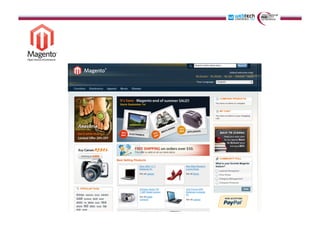
•  Magento
•  OXID eShop
•  Shopware
http://www.flickr.com/photos/exey/3815327201
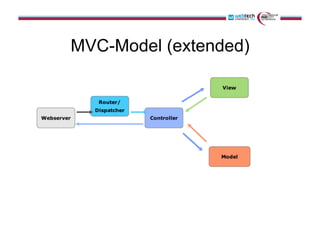
MVC-Model (extended)
Brief History
•  First stable version released in spring 2008
•  Community Edition under OSL
•  Professional and Enterprise Editions
•  Based on Zend Framework and MySQL
•  Relies heavily on EAV structure
•  XML definitions
•  Bought by eBay in 2011 (X.commerce)
•  Current stable version: 1.6.1
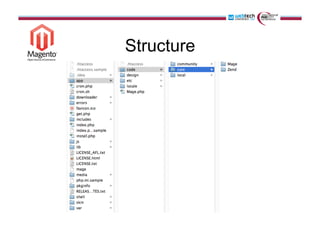
Structure
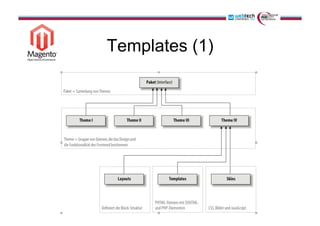
Templates (1)
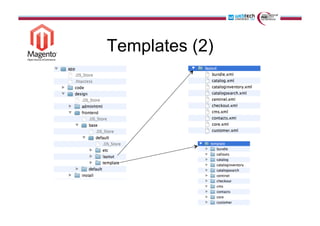
Templates (2)
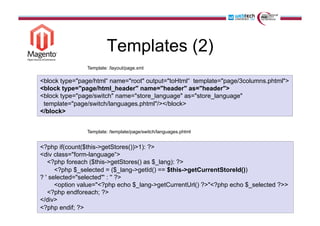
Templates (2)
<block type="page/html“ name="root" output="toHtml“ template="page/3columns.phtml">
<block type="page/html_header" name="header" as="header">
<block type="page/switch" name="store_language" as="store_language"
template="page/switch/languages.phtml"/></block>
</block>
Template: /layout/page.xml
<?php if(count($this->getStores())>1): ?>
<div class="form-language“>
<?php foreach ($this->getStores() as $_lang): ?>
<?php $_selected = ($_lang->getId() == $this->getCurrentStoreId())
? ' selected="selected"' : '' ?>
<option value="<?php echo $_lang->getCurrentUrl() ?>"<?php echo $_selected ?>>
<?php endforeach; ?>
</div>
<?php endif; ?>
Template: /template/page/switch/languages.phtml
Drilling down (1)
Example:
How to get from the article name in
the template to the database field?
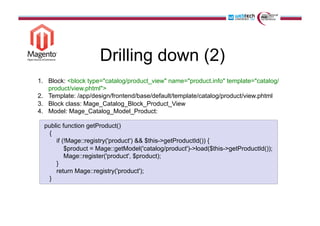
Drilling down (2)
1.  Block: <block type="catalog/product_view" name="product.info" template="catalog/
product/view.phtml">
2.  Template: /app/design/frontend/base/default/template/catalog/product/view.phtml
3.  Block class: Mage_Catalog_Block_Product_View
4.  Model: Mage_Catalog_Model_Product:
public function getProduct()
{
if (!Mage::registry('product') && $this->getProductId()) {
$product = Mage::getModel('catalog/product')->load($this->getProductId());
Mage::register('product', $product);
}
return Mage::registry('product');
}
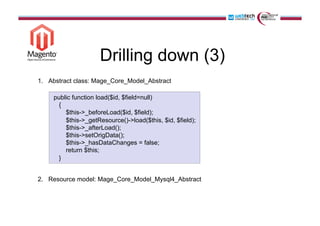
Drilling down (3)
1.  Abstract class: Mage_Core_Model_Abstract
2.  Resource model: Mage_Core_Model_Mysql4_Abstract
public function load($id, $field=null)
{
$this->_beforeLoad($id, $field);
$this->_getResource()->load($this, $id, $field);
$this->_afterLoad();
$this->setOrigData();
$this->_hasDataChanges = false;
return $this;
}
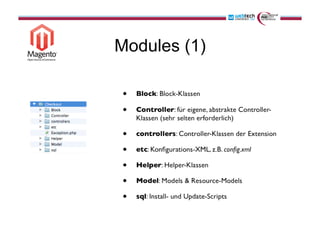
Modules (1)
Modules (2)
IDE, please!
Brief History
•  OS-Edition since late 2008.
•  Based on own PHP-Framework & MySQL
•  Recent version: 4.5.3
Features
•  ADODB database abstraction layer
•  Uses Smarty 2 (but Template Inheritance by
Smarty 3)
•  Block Inheritance
•  Autoloader
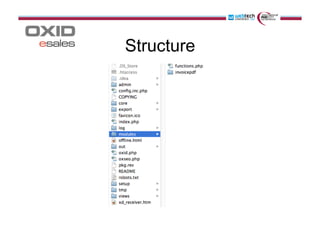
Structure
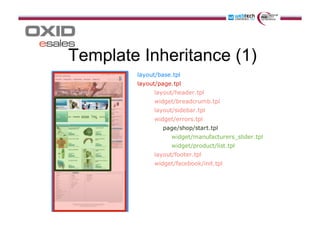
Template Inheritance (1)
Template Inheritance (2)
[{capture append="oxidBlock_content"}]
[{assign var="oFirstArticle" value=$oView->getFirstArticle()}]
[{/capture}]
[{include file="layout/page.tpl" sidebar="Right"}]
/out/azure/tpl/page/shop/start.tpl
Template Inheritance (3)
<div id="content">
[{include file="message/errors.tpl"}]
[{foreach from=$oxidBlock_content item="_block"}]
[{$_block}]
[{/foreach}]
</div>
[{include file="layout/footer.tpl"}]
/out/azure/tpl/layout/page.tpl
Drilling down (1)
Example:
How to get from the article name in
the Smarty-Template to the database field?
Drilling down (1)
Example:
How to get from the article name in
the Smarty-Template to the database field?
Drilling down (2)
•  Article detail page: /out/azure/tpl/page/details/inc/productmain.tpl
[{block name="details_productmain_title"}]
<h1 id="productTitle"><span itemprop="name">
[{$oDetailsProduct->oxarticles__oxtitle->value}]
[{$oDetailsProduct->oxarticles__oxvarselect->value}]</span></h1>
[{/block}]
Scheme: [Object name]->[Table name]__[Field name]->value
•  View controller: /views/details.php
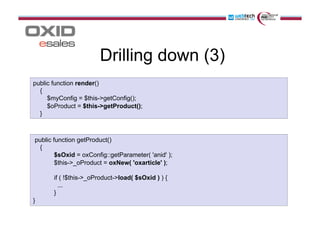
Drilling down (3)
public function render()
{
$myConfig = $this->getConfig();
$oProduct = $this->getProduct();
}
public function getProduct()
{
$sOxid = oxConfig::getParameter( 'anid' );
$this->_oProduct = oxNew( 'oxarticle' );
if ( !$this->_oProduct->load( $sOxid ) ) {
...
}
}
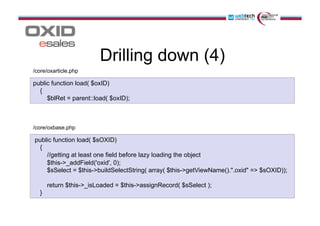
Drilling down (4)
public function load( $oxID)
{
$blRet = parent::load( $oxID);
public function load( $sOXID)
{
//getting at least one field before lazy loading the object
$this->_addField('oxid', 0);
$sSelect = $this->buildSelectString( array( $this->getViewName().".oxid" => $sOXID));
return $this->_isLoaded = $this->assignRecord( $sSelect );
}
/core/oxarticle.php
/core/oxbase.php
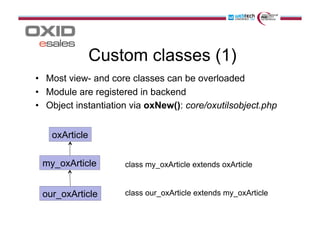
Custom classes (1)
•  Most view- and core classes can be overloaded
•  Module are registered in backend
•  Object instantiation via oxNew(): core/oxutilsobject.php
oxArticle
my_oxArticle
our_oxArticle
class my_oxArticle extends oxArticle
class our_oxArticle extends my_oxArticle
Custom classes (2)
•  This procedure becomes problematic when there is more
than one new module wanting to extend a specific class.
•  Solution: oxNew() dynamically creates transparent
classes in the form of: [class-name]_parent
•  This means that by means of the following structure,
module classes can be chained:
–  oxArticle => my_oxArticle&our_oxArticle
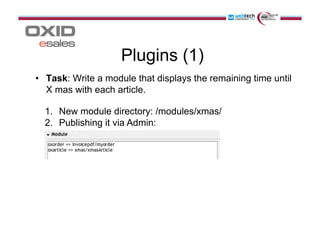
Plugins (1)
•  Task: Write a module that displays the remaining time until
X mas with each article.
1.  New module directory: /modules/xmas/
2.  Publishing it via Admin:
Plugins (2)
class xmasArticle extends xmasArticle_parent
{
public function getDaysLeft()
{
$time = mktime(0, 0, 0, 12, 25, 2011, 1) - time();
$days = floor($time/86400);
return $days;
}
}
<div>Only [{$oDetailsProduct->getDaysLeft()}] days left until Xmas!</div>
/modules/xmas/xmasArticle.php
/out/azure/tpl/page/details/inc/productmain.tpl
Brief History
•  First stable version released in 2007.
•  OS-Edition since October 2010.
•  Since v.3.5 based on Enlight Framework
(based on ZF) & MySQL
•  MVC-Model
•  Backend based on ExtJS 4
•  Templates based on Smarty 3
•  Recent version: 3.5.5
Enlight-Framework
•  Basis functionalities are inherited from Zend
Framework:
•  Syntax and Workflow
•  Request- and Response-Objects
•  Action-Controller Design
•  Rewritten Router / Dispatcher and View-
Object optimised for performance and
expandability
•  Own plugin system based on events and
hooks
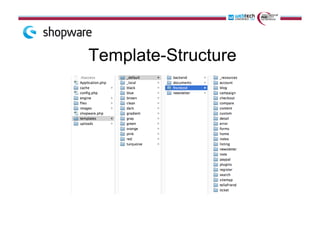
Template-Structure
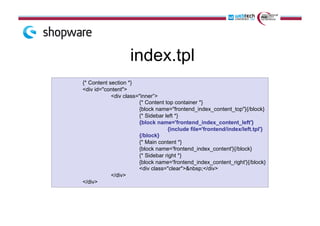
index.tpl
{* Content section *}
<div id="content">
<div class="inner”>
{* Content top container *}
{block name="frontend_index_content_top"}{/block}
{* Sidebar left *}
{block name='frontend_index_content_left'}
{include file='frontend/index/left.tpl'}
{/block}
{* Main content *}
{block name='frontend_index_content'}{/block}
{* Sidebar right *}
{block name='frontend_index_content_right'}{/block}
<div class="clear">&nbsp;</div>
</div>
</div>
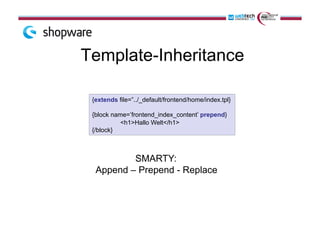
Template-Inheritance
{extends file=”../_default/frontend/home/index.tpl}
{block name=’frontend_index_content’ prepend}
<h1>Hallo Welt</h1>
{/block}
SMARTY:
Append – Prepend - Replace
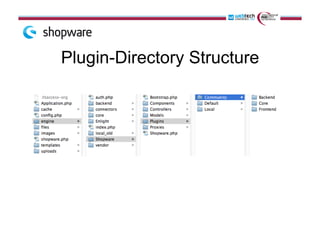
Plugin-Directory Structure
Drilling down
Example:
How to get from the article name in
the Smarty-Template to the database field?
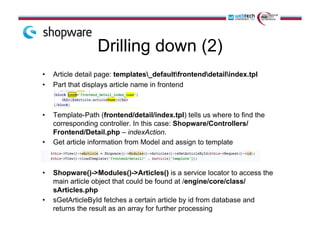
Drilling down (2)
•  Article detail page: templates_defaultfrontenddetailindex.tpl
•  Part that displays article name in frontend
•  Template-Path (frontend/detail/index.tpl) tells us where to find the
corresponding controller. In this case: Shopware/Controllers/
Frontend/Detail.php – indexAction.
•  Get article information from Model and assign to template
•  Shopware()->Modules()->Articles() is a service locator to access the
main article object that could be found at /engine/core/class/
sArticles.php
•  sGetArticleById fetches a certain article by id from database and
returns the result as an array for further processing
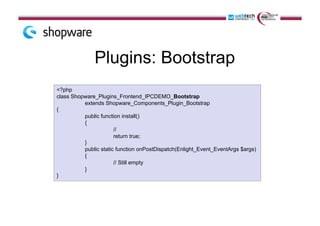
Plugins: Bootstrap
<?php
class Shopware_Plugins_Frontend_IPCDEMO_Bootstrap
extends Shopware_Components_Plugin_Bootstrap
{
public function install()
{
//
return true;
}
public static function onPostDispatch(Enlight_Event_EventArgs $args)
{
// Still empty
}
}
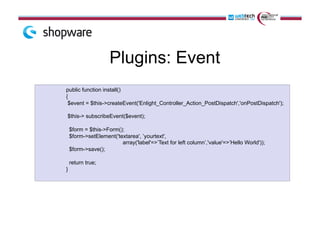
Plugins: Event
public function install()
{
$event = $this->createEvent('Enlight_Controller_Action_PostDispatch','onPostDispatch');
$this-> subscribeEvent($event);
$form = $this->Form();
$form->setElement('textarea', ’yourtext',
array('label'=>’Text for left column’,'value'=>’Hello World'));
$form->save();
return true;
}
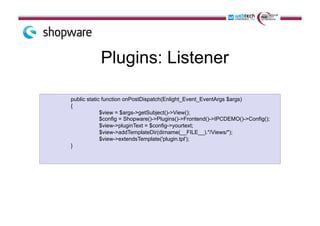
Plugins: Listener
!public static function onPostDispatch(Enlight_Event_EventArgs $args)
{
$view = $args->getSubject()->View();
$config = Shopware()->Plugins()->Frontend()->IPCDEMO()->Config();
$view->pluginText = $config->yourtext;
$view->addTemplateDir(dirname(__FILE__)."/Views/");
$view->extendsTemplate('plugin.tpl');
}
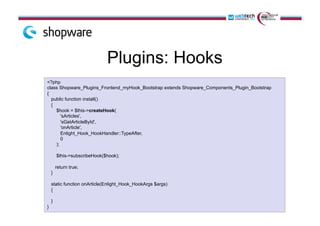
Plugins: Hooks
<?php
class Shopware_Plugins_Frontend_myHook_Bootstrap extends Shopware_Components_Plugin_Bootstrap
{
public function install()
{
$hook = $this->createHook(
'sArticles',
'sGetArticleById',
'onArticle',
Enlight_Hook_HookHandler::TypeAfter,
0
);
$this->subscribeHook($hook);
return true;
}
static function onArticle(Enlight_Hook_HookArgs $args)
{
}
}
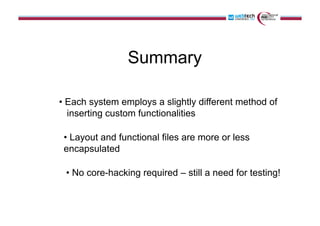
Summary
• Each system employs a slightly different method of
inserting custom functionalities
• Layout and functional files are more or less
encapsulated
• No core-hacking required – still a need for testing!
?
Thank you!
Blog: romanzenner.com
Skype: roman_zenner
XING: xing.com/profile/Roman_Zenner
Twitter: twitter.com/rzenner

How to Write Custom Modules for PHP-based E-Commerce Systems (2011)

  • 1.
    How to writeCustom Modules for PHP-based E- Commerce Systems Dr. Roman Zenner
  • 2.
    Roman Zenner •  Workingas freelance trainer, author and developer since 2004 •  Has written two books on Magento •  Is in the process of writing a book on OXID eShop •  Publishes in various magazines
  • 3.
    Initial thoughts •  Modularitya no-brainer in today’s ecommerce software •  There must be a way of extending classes or an event-listener system in order to integrate custom functionalities
  • 4.
    Types of modules • Encapsulate graphical (template) changes •  Provide additional information (e.g. for an article •  Special calculations •  Payment and shipping •  Other interfaces (ImpEx, etc.
  • 5.
  • 6.
  • 7.
  • 9.
    Brief History •  Firststable version released in spring 2008 •  Community Edition under OSL •  Professional and Enterprise Editions •  Based on Zend Framework and MySQL •  Relies heavily on EAV structure •  XML definitions •  Bought by eBay in 2011 (X.commerce) •  Current stable version: 1.6.1
  • 10.
  • 11.
  • 12.
  • 13.
    Templates (2) <block type="page/html“name="root" output="toHtml“ template="page/3columns.phtml"> <block type="page/html_header" name="header" as="header"> <block type="page/switch" name="store_language" as="store_language" template="page/switch/languages.phtml"/></block> </block> Template: /layout/page.xml <?php if(count($this->getStores())>1): ?> <div class="form-language“> <?php foreach ($this->getStores() as $_lang): ?> <?php $_selected = ($_lang->getId() == $this->getCurrentStoreId()) ? ' selected="selected"' : '' ?> <option value="<?php echo $_lang->getCurrentUrl() ?>"<?php echo $_selected ?>> <?php endforeach; ?> </div> <?php endif; ?> Template: /template/page/switch/languages.phtml
  • 14.
    Drilling down (1) Example: Howto get from the article name in the template to the database field?
  • 15.
    Drilling down (2) 1. Block: <block type="catalog/product_view" name="product.info" template="catalog/ product/view.phtml"> 2.  Template: /app/design/frontend/base/default/template/catalog/product/view.phtml 3.  Block class: Mage_Catalog_Block_Product_View 4.  Model: Mage_Catalog_Model_Product: public function getProduct() { if (!Mage::registry('product') && $this->getProductId()) { $product = Mage::getModel('catalog/product')->load($this->getProductId()); Mage::register('product', $product); } return Mage::registry('product'); }
  • 16.
    Drilling down (3) 1. Abstract class: Mage_Core_Model_Abstract 2.  Resource model: Mage_Core_Model_Mysql4_Abstract public function load($id, $field=null) { $this->_beforeLoad($id, $field); $this->_getResource()->load($this, $id, $field); $this->_afterLoad(); $this->setOrigData(); $this->_hasDataChanges = false; return $this; }
  • 17.
  • 18.
  • 20.
    Brief History •  OS-Editionsince late 2008. •  Based on own PHP-Framework & MySQL •  Recent version: 4.5.3
  • 21.
    Features •  ADODB databaseabstraction layer •  Uses Smarty 2 (but Template Inheritance by Smarty 3) •  Block Inheritance •  Autoloader
  • 22.
  • 23.
  • 24.
    Template Inheritance (2) [{captureappend="oxidBlock_content"}] [{assign var="oFirstArticle" value=$oView->getFirstArticle()}] [{/capture}] [{include file="layout/page.tpl" sidebar="Right"}] /out/azure/tpl/page/shop/start.tpl
  • 25.
    Template Inheritance (3) <divid="content"> [{include file="message/errors.tpl"}] [{foreach from=$oxidBlock_content item="_block"}] [{$_block}] [{/foreach}] </div> [{include file="layout/footer.tpl"}] /out/azure/tpl/layout/page.tpl
  • 26.
    Drilling down (1) Example: Howto get from the article name in the Smarty-Template to the database field?
  • 27.
    Drilling down (1) Example: Howto get from the article name in the Smarty-Template to the database field?
  • 28.
    Drilling down (2) • Article detail page: /out/azure/tpl/page/details/inc/productmain.tpl [{block name="details_productmain_title"}] <h1 id="productTitle"><span itemprop="name"> [{$oDetailsProduct->oxarticles__oxtitle->value}] [{$oDetailsProduct->oxarticles__oxvarselect->value}]</span></h1> [{/block}] Scheme: [Object name]->[Table name]__[Field name]->value •  View controller: /views/details.php
  • 29.
    Drilling down (3) publicfunction render() { $myConfig = $this->getConfig(); $oProduct = $this->getProduct(); } public function getProduct() { $sOxid = oxConfig::getParameter( 'anid' ); $this->_oProduct = oxNew( 'oxarticle' ); if ( !$this->_oProduct->load( $sOxid ) ) { ... } }
  • 30.
    Drilling down (4) publicfunction load( $oxID) { $blRet = parent::load( $oxID); public function load( $sOXID) { //getting at least one field before lazy loading the object $this->_addField('oxid', 0); $sSelect = $this->buildSelectString( array( $this->getViewName().".oxid" => $sOXID)); return $this->_isLoaded = $this->assignRecord( $sSelect ); } /core/oxarticle.php /core/oxbase.php
  • 31.
    Custom classes (1) • Most view- and core classes can be overloaded •  Module are registered in backend •  Object instantiation via oxNew(): core/oxutilsobject.php oxArticle my_oxArticle our_oxArticle class my_oxArticle extends oxArticle class our_oxArticle extends my_oxArticle
  • 32.
    Custom classes (2) • This procedure becomes problematic when there is more than one new module wanting to extend a specific class. •  Solution: oxNew() dynamically creates transparent classes in the form of: [class-name]_parent •  This means that by means of the following structure, module classes can be chained: –  oxArticle => my_oxArticle&our_oxArticle
  • 33.
    Plugins (1) •  Task:Write a module that displays the remaining time until X mas with each article. 1.  New module directory: /modules/xmas/ 2.  Publishing it via Admin:
  • 34.
    Plugins (2) class xmasArticleextends xmasArticle_parent { public function getDaysLeft() { $time = mktime(0, 0, 0, 12, 25, 2011, 1) - time(); $days = floor($time/86400); return $days; } } <div>Only [{$oDetailsProduct->getDaysLeft()}] days left until Xmas!</div> /modules/xmas/xmasArticle.php /out/azure/tpl/page/details/inc/productmain.tpl
  • 36.
    Brief History •  Firststable version released in 2007. •  OS-Edition since October 2010. •  Since v.3.5 based on Enlight Framework (based on ZF) & MySQL •  MVC-Model •  Backend based on ExtJS 4 •  Templates based on Smarty 3 •  Recent version: 3.5.5
  • 37.
    Enlight-Framework •  Basis functionalitiesare inherited from Zend Framework: •  Syntax and Workflow •  Request- and Response-Objects •  Action-Controller Design •  Rewritten Router / Dispatcher and View- Object optimised for performance and expandability •  Own plugin system based on events and hooks
  • 38.
  • 39.
    index.tpl {* Content section*} <div id="content"> <div class="inner”> {* Content top container *} {block name="frontend_index_content_top"}{/block} {* Sidebar left *} {block name='frontend_index_content_left'} {include file='frontend/index/left.tpl'} {/block} {* Main content *} {block name='frontend_index_content'}{/block} {* Sidebar right *} {block name='frontend_index_content_right'}{/block} <div class="clear">&nbsp;</div> </div> </div>
  • 40.
  • 41.
  • 42.
    Drilling down Example: How toget from the article name in the Smarty-Template to the database field?
  • 43.
    Drilling down (2) • Article detail page: templates_defaultfrontenddetailindex.tpl •  Part that displays article name in frontend •  Template-Path (frontend/detail/index.tpl) tells us where to find the corresponding controller. In this case: Shopware/Controllers/ Frontend/Detail.php – indexAction. •  Get article information from Model and assign to template •  Shopware()->Modules()->Articles() is a service locator to access the main article object that could be found at /engine/core/class/ sArticles.php •  sGetArticleById fetches a certain article by id from database and returns the result as an array for further processing
  • 44.
    Plugins: Bootstrap <?php class Shopware_Plugins_Frontend_IPCDEMO_Bootstrap extendsShopware_Components_Plugin_Bootstrap { public function install() { // return true; } public static function onPostDispatch(Enlight_Event_EventArgs $args) { // Still empty } }
  • 45.
    Plugins: Event public functioninstall() { $event = $this->createEvent('Enlight_Controller_Action_PostDispatch','onPostDispatch'); $this-> subscribeEvent($event); $form = $this->Form(); $form->setElement('textarea', ’yourtext', array('label'=>’Text for left column’,'value'=>’Hello World')); $form->save(); return true; }
  • 46.
    Plugins: Listener !public staticfunction onPostDispatch(Enlight_Event_EventArgs $args) { $view = $args->getSubject()->View(); $config = Shopware()->Plugins()->Frontend()->IPCDEMO()->Config(); $view->pluginText = $config->yourtext; $view->addTemplateDir(dirname(__FILE__)."/Views/"); $view->extendsTemplate('plugin.tpl'); }
  • 47.
    Plugins: Hooks <?php class Shopware_Plugins_Frontend_myHook_Bootstrapextends Shopware_Components_Plugin_Bootstrap { public function install() { $hook = $this->createHook( 'sArticles', 'sGetArticleById', 'onArticle', Enlight_Hook_HookHandler::TypeAfter, 0 ); $this->subscribeHook($hook); return true; } static function onArticle(Enlight_Hook_HookArgs $args) { } }
  • 48.
    Summary • Each system employsa slightly different method of inserting custom functionalities • Layout and functional files are more or less encapsulated • No core-hacking required – still a need for testing!
  • 49.
  • 50.
    Thank you! Blog: romanzenner.com Skype:roman_zenner XING: xing.com/profile/Roman_Zenner Twitter: twitter.com/rzenner