INTRODUCTION
TO
COMPUTER
TLE_IACSS9-12ICCS-Ia-e-28
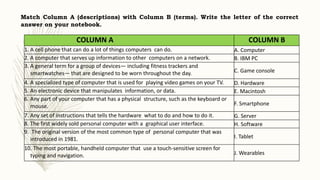
Match Column A (descriptions) with Column B (terms). Write the letter of the correct
answer on your notebook.
COLUMN A COLUMN B
1. A cell phone that can do a lot of things computers can do. A. Computer
2. A computer that serves up information to other computers on a network. B. IBM PC
3. A general term for a group of devices— including fitness trackers and
smartwatches— that are designed to be worn throughout the day. C. Game console
4. A specialized type of computer that is used for playing video games on your TV. D. Hardware
5. An electronic device that manipulates information, or data. E. Macintosh
6. Any part of your computer that has a physical structure, such as the keyboard or
mouse. F. Smartphone
7. Any set of instructions that tells the hardware what to do and how to do it. G. Server
8. The first widely sold personal computer with a graphical user interface. H. Software
9. The original version of the most common type of personal computer that was
introduced in 1981. I. Tablet
10. The most portable, handheld computer that use a touch-sensitive screen for
typing and navigation. J. Wearables
What is the difference between
hardware and software? What are
the types of computers?
What is a computer?
WHAT IS A COMPUTER?
A computer is an electronic device that
manipulates information, or data. It has the ability to
store, retrieve, and process data. Among the many
uses of computer are: to type documents, send email,
play games, and browse the Web. It can also be used
to edit or create spreadsheets, presentations, and
even videos.
HARDWARE VS SOFTWARE
The two important terms relating to computers are
hardware and software.
Hardware is any part of your computer that has a
physical structure, such as the keyboard or mouse. It
also includes all of the computer's internal parts.
Software is any set of instructions that tells the
hardware what to do and how to do it. Examples of
software include web browsers, games, and word
processors.
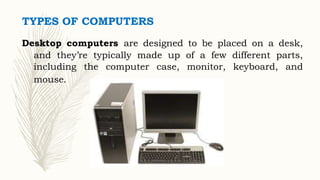
TYPES OF COMPUTERS
Desktop computers are designed to be placed on a desk,
and they’re typically made up of a few different parts,
including the computer case, monitor, keyboard, and
mouse.
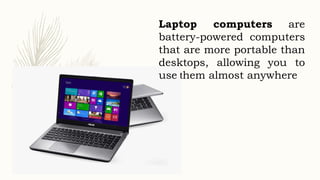
Laptop computers are
battery-powered computers
that are more portable than
desktops, allowing you to
use them almost anywhere
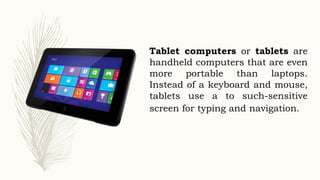
Tablet computers or tablets are
handheld computers that are even
more portable than laptops.
Instead of a keyboard and mouse,
tablets use a to such-sensitive
screen for typing and navigation.
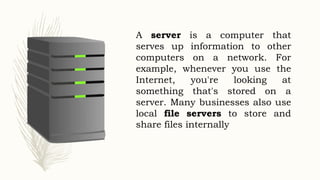
A server is a computer that
serves up information to other
computers on a network. For
example, whenever you use the
Internet, you're looking at
something that's stored on a
server. Many businesses also use
local file servers to store and
share files internally
OTHER TYPES OF COMPUTERS
Many of today's electronics are basically specialized
computers, though we don't always think of them that way.
Ex:
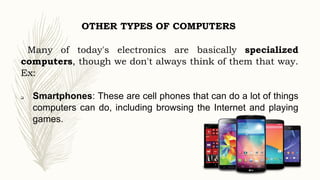
 Smartphones: These are cell phones that can do a lot of things
computers can do, including browsing the Internet and playing
games.
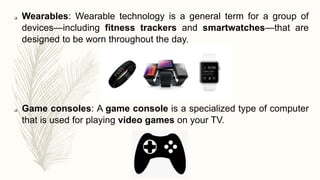
 Wearables: Wearable technology is a general term for a group of
devices—including fitness trackers and smartwatches—that are
designed to be worn throughout the day.
 Game consoles: A game console is a specialized type of computer
that is used for playing video games on your TV.
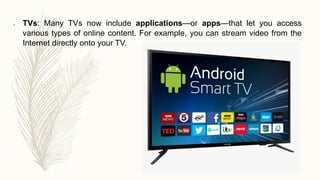
• TVs: Many TVs now include applications—or apps—that let you access
various types of online content. For example, you can stream video from the
Internet directly onto your TV.
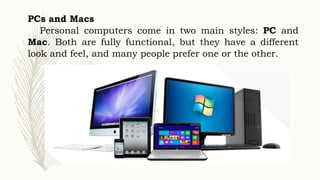
PCs and Macs
Personal computers come in two main styles: PC and
Mac. Both are fully functional, but they have a different
look and feel, and many people prefer one or the other.
PCs
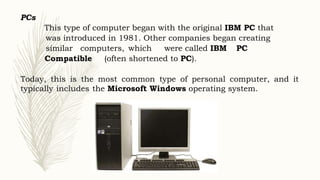
This type of computer began with the original IBM PC that
was introduced in 1981. Other companies began creating
similar computers, which were called IBM PC
Compatible (often shortened to PC).
Today, this is the most common type of personal computer, and it
typically includes the Microsoft Windows operating system.
Macs
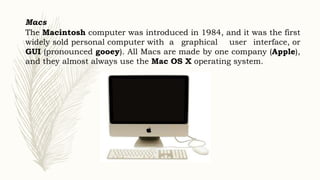
The Macintosh computer was introduced in 1984, and it was the first
widely sold personal computer with a graphical user interface, or
GUI (pronounced gooey). All Macs are made by one company (Apple),
and they almost always use the Mac OS X operating system.
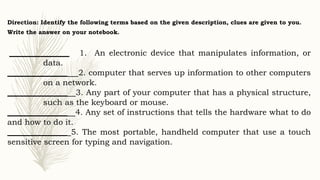
Direction: Identify the following terms based on the given description, clues are given to you.
Write the answer on your notebook.
_______________ 1. An electronic device that manipulates information, or
data.
_______________ 2. computer that serves up information to other computers
on a network.
_______________ 3. Any part of your computer that has a physical structure,
such as the keyboard or mouse.
_______________ 4. Any set of instructions that tells the hardware what to do
and how to do it.
_______________ 5. The most portable, handheld computer that use a touch
sensitive screen for typing and navigation.
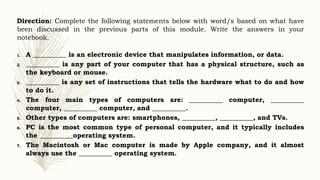
Direction: Complete the following statements below with word/s based on what have
been discussed in the previous parts of this module. Write the answers in your
notebook.
1. A __________ is an electronic device that manipulates information, or data.
2. __________ is any part of your computer that has a physical structure, such as
the keyboard or mouse.
3. __________ is any set of instructions that tells the hardware what to do and how
to do it.
4. The four main types of computers are: __________ computer, __________
computer, __________ computer, and __________.
5. Other types of computers are: smartphones, __________, __________, and TVs.
6. PC is the most common type of personal computer, and it typically includes
the __________operating system.
7. The Macintosh or Mac computer is made by Apple company, and it almost
always use the __________ operating system.
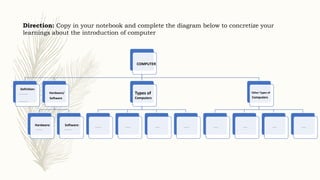
Direction: Copy in your notebook and complete the diagram below to concretize your
learnings about the introduction of computer
COMPUTER
Definition:
___________
___________
Hardware/
Software
Hardware:
________
Software:
_________
Types of
Computers
_______ ______ _____ ______
Other Types of
Computers
_____ _____ _____ _____
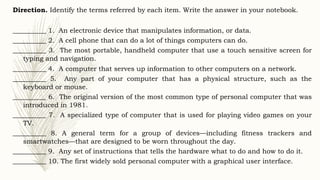
Direction. Identify the terms referred by each item. Write the answer in your notebook.
__________ 1. An electronic device that manipulates information, or data.
__________ 2. A cell phone that can do a lot of things computers can do.
__________ 3. The most portable, handheld computer that use a touch sensitive screen for
typing and navigation.
__________ 4. A computer that serves up information to other computers on a network.
__________ 5. Any part of your computer that has a physical structure, such as the
keyboard or mouse.
__________ 6. The original version of the most common type of personal computer that was
introduced in 1981.
__________ 7. A specialized type of computer that is used for playing video games on your
TV.
__________ 8. A general term for a group of devices—including fitness trackers and
smartwatches—that are designed to be worn throughout the day.
__________ 9. Any set of instructions that tells the hardware what to do and how to do it.
__________ 10. The first widely sold personal computer with a graphical user interface.
ASSIGNMENT:
Direction: Answer the riddles below about computer.
Write the answer in your notebook.
1. What is an aliens’ favorite place on a computer?
1. What does a computer do when it’s tired?

Css - INTRODUCTION-TO-COMPUTER- Lesson 1pptx

  • 1.
  • 2.
    Match Column A(descriptions) with Column B (terms). Write the letter of the correct answer on your notebook. COLUMN A COLUMN B 1. A cell phone that can do a lot of things computers can do. A. Computer 2. A computer that serves up information to other computers on a network. B. IBM PC 3. A general term for a group of devices— including fitness trackers and smartwatches— that are designed to be worn throughout the day. C. Game console 4. A specialized type of computer that is used for playing video games on your TV. D. Hardware 5. An electronic device that manipulates information, or data. E. Macintosh 6. Any part of your computer that has a physical structure, such as the keyboard or mouse. F. Smartphone 7. Any set of instructions that tells the hardware what to do and how to do it. G. Server 8. The first widely sold personal computer with a graphical user interface. H. Software 9. The original version of the most common type of personal computer that was introduced in 1981. I. Tablet 10. The most portable, handheld computer that use a touch-sensitive screen for typing and navigation. J. Wearables
  • 3.
    What is thedifference between hardware and software? What are the types of computers? What is a computer?
  • 4.
    WHAT IS ACOMPUTER? A computer is an electronic device that manipulates information, or data. It has the ability to store, retrieve, and process data. Among the many uses of computer are: to type documents, send email, play games, and browse the Web. It can also be used to edit or create spreadsheets, presentations, and even videos.
  • 5.
    HARDWARE VS SOFTWARE Thetwo important terms relating to computers are hardware and software. Hardware is any part of your computer that has a physical structure, such as the keyboard or mouse. It also includes all of the computer's internal parts. Software is any set of instructions that tells the hardware what to do and how to do it. Examples of software include web browsers, games, and word processors.
  • 6.
    TYPES OF COMPUTERS Desktopcomputers are designed to be placed on a desk, and they’re typically made up of a few different parts, including the computer case, monitor, keyboard, and mouse.
  • 7.
    Laptop computers are battery-poweredcomputers that are more portable than desktops, allowing you to use them almost anywhere
  • 8.
    Tablet computers ortablets are handheld computers that are even more portable than laptops. Instead of a keyboard and mouse, tablets use a to such-sensitive screen for typing and navigation.
  • 9.
    A server isa computer that serves up information to other computers on a network. For example, whenever you use the Internet, you're looking at something that's stored on a server. Many businesses also use local file servers to store and share files internally
  • 10.
    OTHER TYPES OFCOMPUTERS Many of today's electronics are basically specialized computers, though we don't always think of them that way. Ex:  Smartphones: These are cell phones that can do a lot of things computers can do, including browsing the Internet and playing games.
  • 11.
     Wearables: Wearabletechnology is a general term for a group of devices—including fitness trackers and smartwatches—that are designed to be worn throughout the day.  Game consoles: A game console is a specialized type of computer that is used for playing video games on your TV.
  • 12.
    • TVs: ManyTVs now include applications—or apps—that let you access various types of online content. For example, you can stream video from the Internet directly onto your TV.
  • 13.
    PCs and Macs Personalcomputers come in two main styles: PC and Mac. Both are fully functional, but they have a different look and feel, and many people prefer one or the other.
  • 14.
    PCs This type ofcomputer began with the original IBM PC that was introduced in 1981. Other companies began creating similar computers, which were called IBM PC Compatible (often shortened to PC). Today, this is the most common type of personal computer, and it typically includes the Microsoft Windows operating system.
  • 15.
    Macs The Macintosh computerwas introduced in 1984, and it was the first widely sold personal computer with a graphical user interface, or GUI (pronounced gooey). All Macs are made by one company (Apple), and they almost always use the Mac OS X operating system.
  • 16.
    Direction: Identify thefollowing terms based on the given description, clues are given to you. Write the answer on your notebook. _______________ 1. An electronic device that manipulates information, or data. _______________ 2. computer that serves up information to other computers on a network. _______________ 3. Any part of your computer that has a physical structure, such as the keyboard or mouse. _______________ 4. Any set of instructions that tells the hardware what to do and how to do it. _______________ 5. The most portable, handheld computer that use a touch sensitive screen for typing and navigation.
  • 17.
    Direction: Complete thefollowing statements below with word/s based on what have been discussed in the previous parts of this module. Write the answers in your notebook. 1. A __________ is an electronic device that manipulates information, or data. 2. __________ is any part of your computer that has a physical structure, such as the keyboard or mouse. 3. __________ is any set of instructions that tells the hardware what to do and how to do it. 4. The four main types of computers are: __________ computer, __________ computer, __________ computer, and __________. 5. Other types of computers are: smartphones, __________, __________, and TVs. 6. PC is the most common type of personal computer, and it typically includes the __________operating system. 7. The Macintosh or Mac computer is made by Apple company, and it almost always use the __________ operating system.
  • 18.
    Direction: Copy inyour notebook and complete the diagram below to concretize your learnings about the introduction of computer COMPUTER Definition: ___________ ___________ Hardware/ Software Hardware: ________ Software: _________ Types of Computers _______ ______ _____ ______ Other Types of Computers _____ _____ _____ _____
  • 19.
    Direction. Identify theterms referred by each item. Write the answer in your notebook. __________ 1. An electronic device that manipulates information, or data. __________ 2. A cell phone that can do a lot of things computers can do. __________ 3. The most portable, handheld computer that use a touch sensitive screen for typing and navigation. __________ 4. A computer that serves up information to other computers on a network. __________ 5. Any part of your computer that has a physical structure, such as the keyboard or mouse. __________ 6. The original version of the most common type of personal computer that was introduced in 1981. __________ 7. A specialized type of computer that is used for playing video games on your TV. __________ 8. A general term for a group of devices—including fitness trackers and smartwatches—that are designed to be worn throughout the day. __________ 9. Any set of instructions that tells the hardware what to do and how to do it. __________ 10. The first widely sold personal computer with a graphical user interface.
  • 20.
    ASSIGNMENT: Direction: Answer theriddles below about computer. Write the answer in your notebook. 1. What is an aliens’ favorite place on a computer? 1. What does a computer do when it’s tired?