Click to edit Master title style
1 1
Click to edit Master title style
2 2
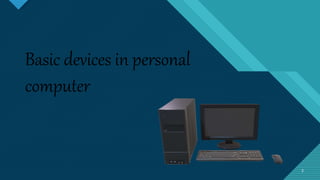
Basic devices in personal
computer
Click to edit Master title style
3 3
Click to edit Master title style
4
Examples of Basic Devices in
most Personal camp
1. System unit
2. Mother board/ main board/ system board
3. Central Processing Unit (CPU)
4. Primary storage
5. Expansion buds
6. Adapters
7. Power Supply Unit (PSU)
8. Hard Drive Disk (HDD)
9. Optical Drive
10.Digital Versatile Disc (DVD)
4
Click to edit Master title style
5
SYSTEMUNIT
5
THE SYSTEM UNIT
 A part of a computer that houses the
primary devices that perform operations and
produce result for complex calculations.
 The main part of Micro-Computer
 It contains important parts
Click to edit Master title style
6 6
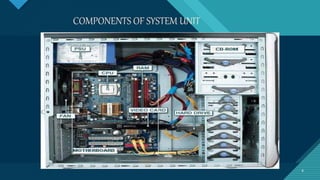
COMPONENTS OF SYSTEM UNIT
Click to edit Master title style
7
MOTHERBOARD
7
A mother board is the main
circuit board in a computer
system. It connects all of the
internal components, like the
memory, processor, graphics,
card and other hardware.
Click to edit Master title style
8
CENTRALPROCESSINGUNIT(CPU)
8
The central processing unit (CPU) is the
brain of computer, responsible for
executing instructions, performing
calculations, and managing data within a
computer system. It’s essentially the
primary component that carries out the
instructions is a computer program by
performing basic arithmetic, logic, control,
and input/output operations specified by
the instructions.
Click to edit Master title style
9
9
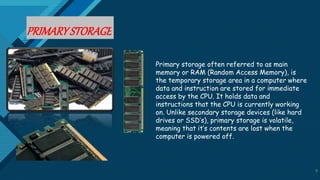
PRIMARYSTORAGE
Primary storage often referred to as main
memory or RAM (Random Access Memory), is
the temporary storage area in a computer where
data and instruction are stored for immediate
access by the CPU. It holds data and
instructions that the CPU is currently working
on. Unlike secondary storage devices (like hard
drives or SSD’s), primary storage is volatile,
meaning that it’s contents are lost when the
computer is powered off.
Click to edit Master title style
10
10
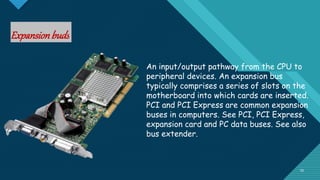
Expansionbuds
An input/output pathway from the CPU to
peripheral devices. An expansion bus
typically comprises a series of slots on the
motherboard into which cards are inserted.
PCI and PCI Express are common expansion
buses in computers. See PCI, PCI Express,
expansion card and PC data buses. See also
bus extender.
Click to edit Master title style
11
11
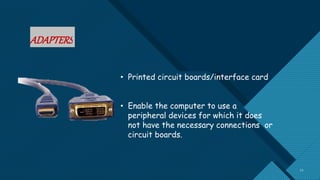
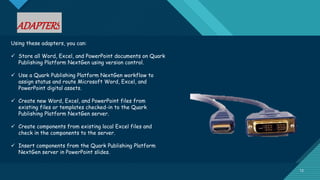
ADAPTERS
• Printed circuit boards/interface card
• Enable the computer to use a
peripheral devices for which it does
not have the necessary connections or
circuit boards.
Click to edit Master title style
12
12
ADAPTERS
Using these adapters, you can:
 Store all Word, Excel, and PowerPoint documents on Quark
Publishing Platform NextGen using version control.
 Use a Quark Publishing Platform NextGen workflow to
assign status and route Microsoft Word, Excel, and
PowerPoint digital assets.
 Create new Word, Excel, and PowerPoint files from
existing files or templates checked-in to the Quark
Publishing Platform NextGen server.
 Create components from existing local Excel files and
check in the components to the server.
 Insert components from the Quark Publishing Platform
NextGen server in PowerPoint slides.
Click to edit Master title style
13
13
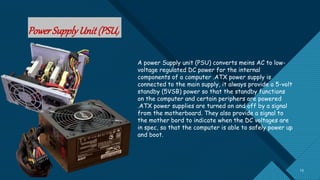
PowerSupplyUnit(PSU)
A power Supply unit (PSU) converts meins AC to low-
voltage regulated DC power for the internal
components of a computer .ATX power supply is
connected to the main supply, it always provide a 5-volt
standby (5VSB) power so that the standby functions
on the computer and certain periphers are powered
.ATX power supplies are turned on and off by a signal
from the motherboard. They also provide a signal to
the mother bord to indicate when the DC voltages are
in spec, so that the computer is able to safely power up
and boot.
Click to edit Master title style
14
14
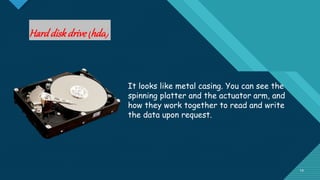
Harddiskdrive(hdd)
It looks like metal casing. You can see the
spinning platter and the actuator arm, and
how they work together to read and write
the data upon request.
Click to edit Master title style
15
15
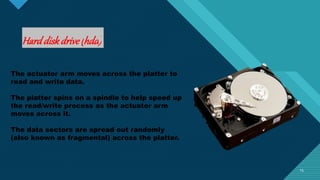
Harddiskdrive(hdd)
The actuator arm moves across the platter to
read and write data.
The platter spins on a spindle to help speed up
the read/write process as the actuator arm
moves across it.
The data sectors are spread out randomly
(also known as fragmental) across the platter.
Click to edit Master title style
16
16
OpticalDrive
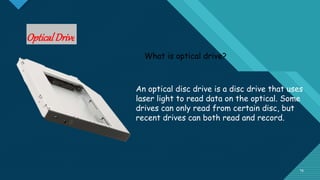
What is optical drive?
An optical disc drive is a disc drive that uses
laser light to read data on the optical. Some
drives can only read from certain disc, but
recent drives can both read and record.
Click to edit Master title style
17
Digital Versatile disc
17
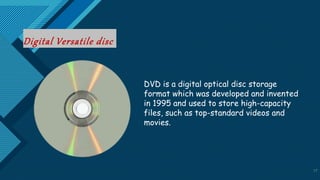
DVD is a digital optical disc storage
format which was developed and invented
in 1995 and used to store high-capacity
files, such as top-standard videos and
movies.
Click to edit Master title style
18
18
Click to edit Master title style
19
But What is the importance of
knowing their function?
Click to edit Master title style
20
By knowing the importance of it, we will be able to use it properly. Youmight not be ableto connect
things properlyand get the computer functioning if youdon’t knowhow to usethe various
computer components. Knowledge of themanytypesof computer hardware and software also
makes it easier to use.
Click to edit Master title style
21
P R E PA R E D B Y: G R O U P 4
21
Click to edit Master title style
22
22

Basic Components of a System Unit- Computer Science.pptx

  • 1.
    Click to editMaster title style 1 1
  • 2.
    Click to editMaster title style 2 2 Basic devices in personal computer
  • 3.
    Click to editMaster title style 3 3
  • 4.
    Click to editMaster title style 4 Examples of Basic Devices in most Personal camp 1. System unit 2. Mother board/ main board/ system board 3. Central Processing Unit (CPU) 4. Primary storage 5. Expansion buds 6. Adapters 7. Power Supply Unit (PSU) 8. Hard Drive Disk (HDD) 9. Optical Drive 10.Digital Versatile Disc (DVD) 4
  • 5.
    Click to editMaster title style 5 SYSTEMUNIT 5 THE SYSTEM UNIT  A part of a computer that houses the primary devices that perform operations and produce result for complex calculations.  The main part of Micro-Computer  It contains important parts
  • 6.
    Click to editMaster title style 6 6 COMPONENTS OF SYSTEM UNIT
  • 7.
    Click to editMaster title style 7 MOTHERBOARD 7 A mother board is the main circuit board in a computer system. It connects all of the internal components, like the memory, processor, graphics, card and other hardware.
  • 8.
    Click to editMaster title style 8 CENTRALPROCESSINGUNIT(CPU) 8 The central processing unit (CPU) is the brain of computer, responsible for executing instructions, performing calculations, and managing data within a computer system. It’s essentially the primary component that carries out the instructions is a computer program by performing basic arithmetic, logic, control, and input/output operations specified by the instructions.
  • 9.
    Click to editMaster title style 9 9 PRIMARYSTORAGE Primary storage often referred to as main memory or RAM (Random Access Memory), is the temporary storage area in a computer where data and instruction are stored for immediate access by the CPU. It holds data and instructions that the CPU is currently working on. Unlike secondary storage devices (like hard drives or SSD’s), primary storage is volatile, meaning that it’s contents are lost when the computer is powered off.
  • 10.
    Click to editMaster title style 10 10 Expansionbuds An input/output pathway from the CPU to peripheral devices. An expansion bus typically comprises a series of slots on the motherboard into which cards are inserted. PCI and PCI Express are common expansion buses in computers. See PCI, PCI Express, expansion card and PC data buses. See also bus extender.
  • 11.
    Click to editMaster title style 11 11 ADAPTERS • Printed circuit boards/interface card • Enable the computer to use a peripheral devices for which it does not have the necessary connections or circuit boards.
  • 12.
    Click to editMaster title style 12 12 ADAPTERS Using these adapters, you can:  Store all Word, Excel, and PowerPoint documents on Quark Publishing Platform NextGen using version control.  Use a Quark Publishing Platform NextGen workflow to assign status and route Microsoft Word, Excel, and PowerPoint digital assets.  Create new Word, Excel, and PowerPoint files from existing files or templates checked-in to the Quark Publishing Platform NextGen server.  Create components from existing local Excel files and check in the components to the server.  Insert components from the Quark Publishing Platform NextGen server in PowerPoint slides.
  • 13.
    Click to editMaster title style 13 13 PowerSupplyUnit(PSU) A power Supply unit (PSU) converts meins AC to low- voltage regulated DC power for the internal components of a computer .ATX power supply is connected to the main supply, it always provide a 5-volt standby (5VSB) power so that the standby functions on the computer and certain periphers are powered .ATX power supplies are turned on and off by a signal from the motherboard. They also provide a signal to the mother bord to indicate when the DC voltages are in spec, so that the computer is able to safely power up and boot.
  • 14.
    Click to editMaster title style 14 14 Harddiskdrive(hdd) It looks like metal casing. You can see the spinning platter and the actuator arm, and how they work together to read and write the data upon request.
  • 15.
    Click to editMaster title style 15 15 Harddiskdrive(hdd) The actuator arm moves across the platter to read and write data. The platter spins on a spindle to help speed up the read/write process as the actuator arm moves across it. The data sectors are spread out randomly (also known as fragmental) across the platter.
  • 16.
    Click to editMaster title style 16 16 OpticalDrive What is optical drive? An optical disc drive is a disc drive that uses laser light to read data on the optical. Some drives can only read from certain disc, but recent drives can both read and record.
  • 17.
    Click to editMaster title style 17 Digital Versatile disc 17 DVD is a digital optical disc storage format which was developed and invented in 1995 and used to store high-capacity files, such as top-standard videos and movies.
  • 18.
    Click to editMaster title style 18 18
  • 19.
    Click to editMaster title style 19 But What is the importance of knowing their function?
  • 20.
    Click to editMaster title style 20 By knowing the importance of it, we will be able to use it properly. Youmight not be ableto connect things properlyand get the computer functioning if youdon’t knowhow to usethe various computer components. Knowledge of themanytypesof computer hardware and software also makes it easier to use.
  • 21.
    Click to editMaster title style 21 P R E PA R E D B Y: G R O U P 4 21
  • 22.
    Click to editMaster title style 22 22