TVL - ICT
COMPUTER SYSTEMS
SERVICING (CSS NC-II)
QUARTER 1
Lessons under Quarter 1:
1. Computer Hardware and Assembly Tools
2. Parts of A Computer and Peripherals
3. Communication Ports, Bios, UEFI
4. Types of Software
5. Creating Portable Bootable Device
6. Installing Operating System
GRADE 11 TVL - ICT COMPUTER SYSTEMS SERVICING (CSS NC-II) QUARTER 1
ARCHDIOCESE OF LINGAYEN-DAGUPAN CATHOLIC SCHOOLS
SAINT CHARLES ACADEMY
OBJECTIVES:
Plan unit assembly to ensure OHS policies and
procedures are followed in accordance with systems
requirements
GRADE 11 TVL - ICT COMPUTER SYSTEMS SERVICING (CSS NC-II) QUARTER 1
ARCHDIOCESE OF LINGAYEN-DAGUPAN CATHOLIC SCHOOLS
SAINT CHARLES ACADEMY
LESSON 1
COMPUTER HARDWARE
GRADE 11 TVL - ICT COMPUTER SYSTEMS SERVICING (CSS NC-II) QUARTER 1
ARCHDIOCESE OF LINGAYEN-DAGUPAN CATHOLIC SCHOOLS
SAINT CHARLES ACADEMY
GRADE 11 TVL - ICT COMPUTER SYSTEMS SERVICING (CSS NC-II) QUARTER 1
ARCHDIOCESE OF LINGAYEN-DAGUPAN CATHOLIC SCHOOLS
SAINT CHARLES ACADEMY LESSON 1
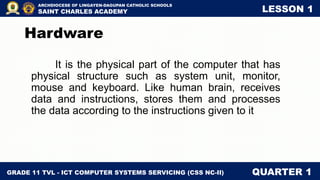
It is the physical part of the computer that has
physical structure such as system unit, monitor,
mouse and keyboard. Like human brain, receives
data and instructions, stores them and processes
the data according to the instructions given to it
Hardware
GRADE 11 TVL - ICT COMPUTER SYSTEMS SERVICING (CSS NC-II) QUARTER 1
ARCHDIOCESE OF LINGAYEN-DAGUPAN CATHOLIC SCHOOLS
SAINT CHARLES ACADEMY LESSON 1
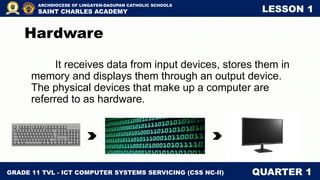
It receives data from input devices, stores them in
memory and displays them through an output device.
The physical devices that make up a computer are
referred to as hardware.
Hardware
GRADE 11 TVL - ICT COMPUTER SYSTEMS SERVICING (CSS NC-II) QUARTER 1
ARCHDIOCESE OF LINGAYEN-DAGUPAN CATHOLIC SCHOOLS
SAINT CHARLES ACADEMY LESSON 1
Computer hardware can be broadly classified into
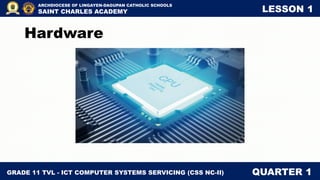
two: CPU and peripherals. The CPU is perhaps the
most important part of a computer. The other hardware
pieces like input devices, output devices, etc. are
called peripherals.
Hardware
GRADE 11 TVL - ICT COMPUTER SYSTEMS SERVICING (CSS NC-II) QUARTER 1
ARCHDIOCESE OF LINGAYEN-DAGUPAN CATHOLIC SCHOOLS
SAINT CHARLES ACADEMY LESSON 1
The CPU. It is a hardware within a computer that carries
out the instructions of a computer program by
performing the basic arithmetical, logical, and
input/output operations of the system. These is
known as the brain of the computer and one of the most
important chips in the computer.
Hardware
GRADE 11 TVL - ICT COMPUTER SYSTEMS SERVICING (CSS NC-II) QUARTER 1
ARCHDIOCESE OF LINGAYEN-DAGUPAN CATHOLIC SCHOOLS
SAINT CHARLES ACADEMY LESSON 1
Hardware
GRADE 11 TVL - ICT COMPUTER SYSTEMS SERVICING (CSS NC-II) QUARTER 1
ARCHDIOCESE OF LINGAYEN-DAGUPAN CATHOLIC SCHOOLS
SAINT CHARLES ACADEMY LESSON 1
Computers can be generally classified by size and
power, and group into categories in numerous ways. It
classifies the types of computers according to their physical
size, processing speed, cost, and number of users.
Types of Computer
GRADE 11 TVL - ICT COMPUTER SYSTEMS SERVICING (CSS NC-II) QUARTER 1
ARCHDIOCESE OF LINGAYEN-DAGUPAN CATHOLIC SCHOOLS
SAINT CHARLES ACADEMY LESSON 1
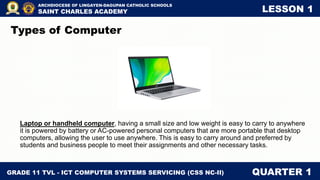
Laptop or handheld computer, having a small size and low weight is easy to carry to anywhere
it is powered by battery or AC-powered personal computers that are more portable that desktop
computers, allowing the user to use anywhere. This is easy to carry around and preferred by
students and business people to meet their assignments and other necessary tasks.
Types of Computer
GRADE 11 TVL - ICT COMPUTER SYSTEMS SERVICING (CSS NC-II) QUARTER 1
ARCHDIOCESE OF LINGAYEN-DAGUPAN CATHOLIC SCHOOLS
SAINT CHARLES ACADEMY LESSON 1
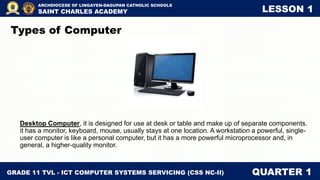
Desktop Computer, it is designed for use at desk or table and make up of separate components.
it has a monitor, keyboard, mouse, usually stays at one location. A workstation a powerful, single-
user computer is like a personal computer, but it has a more powerful microprocessor and, in
general, a higher-quality monitor.
Types of Computer
GRADE 11 TVL - ICT COMPUTER SYSTEMS SERVICING (CSS NC-II) QUARTER 1
ARCHDIOCESE OF LINGAYEN-DAGUPAN CATHOLIC SCHOOLS
SAINT CHARLES ACADEMY LESSON 1
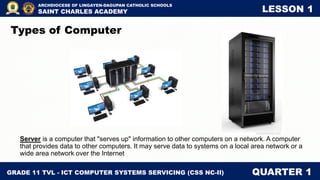
Server is a computer that "serves up" information to other computers on a network. A computer
that provides data to other computers. It may serve data to systems on a local area network or a
wide area network over the Internet
Types of Computer
GRADE 11 TVL - ICT COMPUTER SYSTEMS SERVICING (CSS NC-II) QUARTER 1
ARCHDIOCESE OF LINGAYEN-DAGUPAN CATHOLIC SCHOOLS
SAINT CHARLES ACADEMY LESSON 1
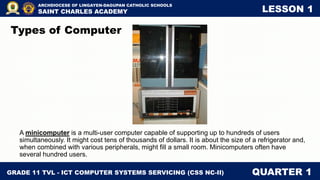
A minicomputer is a multi-user computer capable of supporting up to hundreds of users
simultaneously. It might cost tens of thousands of dollars. It is about the size of a refrigerator and,
when combined with various peripherals, might fill a small room. Minicomputers often have
several hundred users.
Types of Computer
GRADE 11 TVL - ICT COMPUTER SYSTEMS SERVICING (CSS NC-II) QUARTER 1
ARCHDIOCESE OF LINGAYEN-DAGUPAN CATHOLIC SCHOOLS
SAINT CHARLES ACADEMY LESSON 1
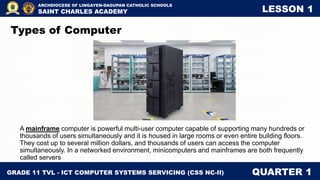
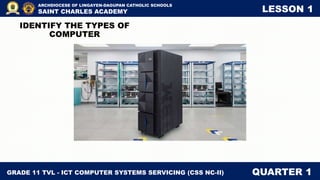
A mainframe computer is powerful multi-user computer capable of supporting many hundreds or
thousands of users simultaneously and it is housed in large rooms or even entire building floors.
They cost up to several million dollars, and thousands of users can access the computer
simultaneously. In a networked environment, minicomputers and mainframes are both frequently
called servers
Types of Computer
GRADE 11 TVL - ICT COMPUTER SYSTEMS SERVICING (CSS NC-II) QUARTER 1
ARCHDIOCESE OF LINGAYEN-DAGUPAN CATHOLIC SCHOOLS
SAINT CHARLES ACADEMY LESSON 1
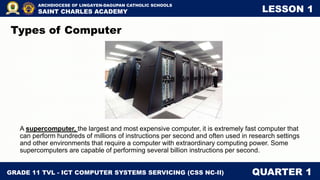
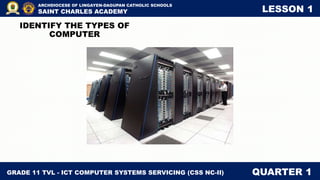
A supercomputer, the largest and most expensive computer, it is extremely fast computer that
can perform hundreds of millions of instructions per second and often used in research settings
and other environments that require a computer with extraordinary computing power. Some
supercomputers are capable of performing several billion instructions per second.
Types of Computer
GRADE 11 TVL - ICT COMPUTER SYSTEMS SERVICING (CSS NC-II) QUARTER 1
ARCHDIOCESE OF LINGAYEN-DAGUPAN CATHOLIC SCHOOLS
SAINT CHARLES ACADEMY LESSON 1
How are data
stored?
GRADE 11 TVL - ICT COMPUTER SYSTEMS SERVICING (CSS NC-II) QUARTER 1
ARCHDIOCESE OF LINGAYEN-DAGUPAN CATHOLIC SCHOOLS
SAINT CHARLES ACADEMY LESSON 1
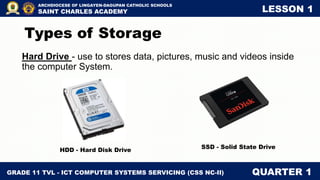
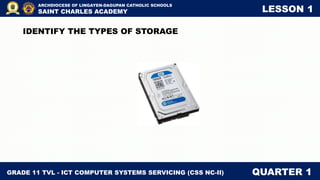
Hard Drive - use to stores data, pictures, music and videos inside
the computer System.
Types of Storage
HDD - Hard Disk Drive
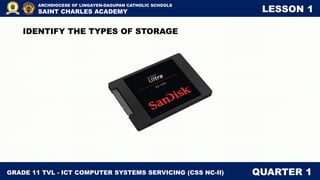
SSD - Solid State Drive
GRADE 11 TVL - ICT COMPUTER SYSTEMS SERVICING (CSS NC-II) QUARTER 1
ARCHDIOCESE OF LINGAYEN-DAGUPAN CATHOLIC SCHOOLS
SAINT CHARLES ACADEMY LESSON 1
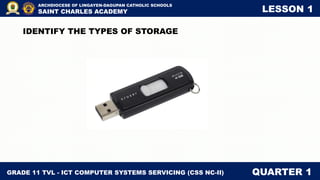
Flashdrive- known as a USB stick, USB thumb
drive or pen drive is a plug-and-play portable
storage device that uses flash memory and is
lightweight enough to attach to a keychain.
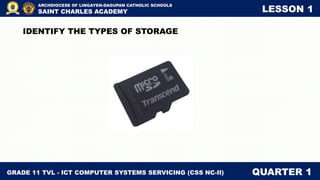
Memory Card- is an electronic data storage device
used for storing digital information, typically using
flash memory.
Types of Storage
GRADE 11 TVL - ICT COMPUTER SYSTEMS SERVICING (CSS NC-II) QUARTER 1
ARCHDIOCESE OF LINGAYEN-DAGUPAN CATHOLIC SCHOOLS
SAINT CHARLES ACADEMY LESSON 1
DVD Disc - of optical disc technology that can stored
files ranging from 4.7 to 8 gigabyte. A Writable DVD
can hold more 1 GB of information
Diskette- Magnetic medium house in a rigid plastic
cartridge measuring 3.5 inches square that is a
random access, removable data storage medium
that can be used with personal computers.
Types of Storage
GRADE 11 TVL - ICT COMPUTER SYSTEMS SERVICING (CSS NC-II) QUARTER 1
ARCHDIOCESE OF LINGAYEN-DAGUPAN CATHOLIC SCHOOLS
SAINT CHARLES ACADEMY LESSON 1
COMPUTER ASSEMBLY AND REPAIR TOOLS
For every job there is the right tool. Make sure that you are familiar
with the correct use of each tool and that the correct tool is used for the
current task. Skilled use of tools and software makes the job less difficult
and ensures that tasks are performed properly and safely.
GRADE 11 TVL - ICT COMPUTER SYSTEMS SERVICING (CSS NC-II) QUARTER 1
ARCHDIOCESE OF LINGAYEN-DAGUPAN CATHOLIC SCHOOLS
SAINT CHARLES ACADEMY LESSON 1
COMPUTER ASSEMBLY AND REPAIR TOOLS
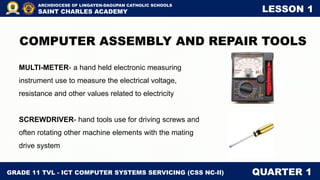
MULTI-METER- a hand held electronic measuring
instrument use to measure the electrical voltage,
resistance and other values related to electricity
SCREWDRIVER- hand tools use for driving screws and
often rotating other machine elements with the mating
drive system
GRADE 11 TVL - ICT COMPUTER SYSTEMS SERVICING (CSS NC-II) QUARTER 1
ARCHDIOCESE OF LINGAYEN-DAGUPAN CATHOLIC SCHOOLS
SAINT CHARLES ACADEMY LESSON 1
COMPUTER ASSEMBLY AND REPAIR TOOLS
FLAT SCREW DRIVER – hand tool is used to drive
or fasten negative slotted screws.
TORX DRIVER- hand tool used to loosen or tighten
screws that have a star-like depression on the top, a
feature that is mainly found on laptop.
GRADE 11 TVL - ICT COMPUTER SYSTEMS SERVICING (CSS NC-II) QUARTER 1
ARCHDIOCESE OF LINGAYEN-DAGUPAN CATHOLIC SCHOOLS
SAINT CHARLES ACADEMY LESSON 1
COMPUTER ASSEMBLY AND REPAIR TOOLS
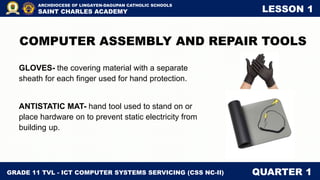
GLOVES- the covering material with a separate
sheath for each finger used for hand protection.
ANTISTATIC MAT- hand tool used to stand on or
place hardware on to prevent static electricity from
building up.
GRADE 11 TVL - ICT COMPUTER SYSTEMS SERVICING (CSS NC-II) QUARTER 1
ARCHDIOCESE OF LINGAYEN-DAGUPAN CATHOLIC SCHOOLS
SAINT CHARLES ACADEMY LESSON 1
COMPUTER ASSEMBLY AND REPAIR TOOLS
CRIMPING TOOL- Device used to conjoin two
pieces of metal by deforming one or both of them in
a way that causes them to hold each other
LAN TESTER- is a device designed to measure
and test existing LAN connection.
GRADE 11 TVL - ICT COMPUTER SYSTEMS SERVICING (CSS NC-II) QUARTER 1
ARCHDIOCESE OF LINGAYEN-DAGUPAN CATHOLIC SCHOOLS
SAINT CHARLES ACADEMY LESSON 1
COMPUTER ASSEMBLY AND REPAIR TOOLS
TWEEZERS- A tool use to hold small sensitive part of a
computer.
ANTISTATIC WRIST STRAP- antistatic device used to
safely ground a person working on very sensitive
electronic equipment, to prevent the buildup of static
electricity on their body, which can result in electrostatic
discharge.
GRADE 11 TVL - ICT COMPUTER SYSTEMS SERVICING (CSS NC-II) QUARTER 1
ARCHDIOCESE OF LINGAYEN-DAGUPAN CATHOLIC SCHOOLS
SAINT CHARLES ACADEMY LESSON 1
COMPUTER ASSEMBLY AND REPAIR TOOLS
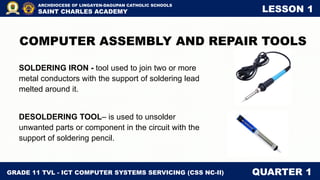
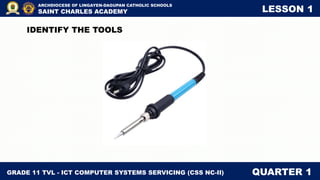
SOLDERING IRON - tool used to join two or more
metal conductors with the support of soldering lead
melted around it.
DESOLDERING TOOL– is used to unsolder
unwanted parts or component in the circuit with the
support of soldering pencil.
GRADE 11 TVL - ICT COMPUTER SYSTEMS SERVICING (CSS NC-II) QUARTER 1
ARCHDIOCESE OF LINGAYEN-DAGUPAN CATHOLIC SCHOOLS
SAINT CHARLES ACADEMY LESSON 1
COMPUTER ASSEMBLY AND REPAIR TOOLS
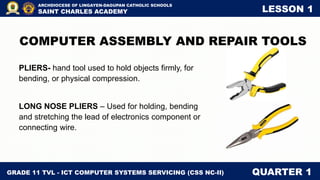
PLIERS- hand tool used to hold objects firmly, for
bending, or physical compression.
LONG NOSE PLIERS – Used for holding, bending
and stretching the lead of electronics component or
connecting wire.
GRADE 11 TVL - ICT COMPUTER SYSTEMS SERVICING (CSS NC-II) QUARTER 1
ARCHDIOCESE OF LINGAYEN-DAGUPAN CATHOLIC SCHOOLS
SAINT CHARLES ACADEMY LESSON 1
COMPUTER ASSEMBLY AND REPAIR TOOLS
SIDE CUTTER PLIER- A tool used for cutting or
trimming of connecting wires or terminal leads in the
circuit board.
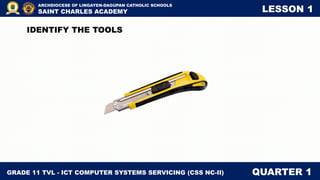
CUTTER- A tool used in stripping wires.
GRADE 11 TVL - ICT COMPUTER SYSTEMS SERVICING (CSS NC-II) QUARTER 1
ARCHDIOCESE OF LINGAYEN-DAGUPAN CATHOLIC SCHOOLS
SAINT CHARLES ACADEMY LESSON 1
COMPUTER ASSEMBLY AND REPAIR TOOLS
WIRE STRIPPER- is a portable handheld tool used
by workers, especially electricians, for removing the
protective coating of an electric wire in order to
replace or repair the wire.
GRADE 11 TVL - ICT COMPUTER SYSTEMS SERVICING (CSS NC-II) QUARTER 1
ARCHDIOCESE OF LINGAYEN-DAGUPAN CATHOLIC SCHOOLS
SAINT CHARLES ACADEMY LESSON 1
IDENTIFY THE TOOLS
GRADE 11 TVL - ICT COMPUTER SYSTEMS SERVICING (CSS NC-II) QUARTER 1
ARCHDIOCESE OF LINGAYEN-DAGUPAN CATHOLIC SCHOOLS
SAINT CHARLES ACADEMY LESSON 1
IDENTIFY THE TOOLS
GRADE 11 TVL - ICT COMPUTER SYSTEMS SERVICING (CSS NC-II) QUARTER 1
ARCHDIOCESE OF LINGAYEN-DAGUPAN CATHOLIC SCHOOLS
SAINT CHARLES ACADEMY LESSON 1
IDENTIFY THE TOOLS
GRADE 11 TVL - ICT COMPUTER SYSTEMS SERVICING (CSS NC-II) QUARTER 1
ARCHDIOCESE OF LINGAYEN-DAGUPAN CATHOLIC SCHOOLS
SAINT CHARLES ACADEMY LESSON 1
IDENTIFY THE TOOLS
GRADE 11 TVL - ICT COMPUTER SYSTEMS SERVICING (CSS NC-II) QUARTER 1
ARCHDIOCESE OF LINGAYEN-DAGUPAN CATHOLIC SCHOOLS
SAINT CHARLES ACADEMY LESSON 1
IDENTIFY THE TOOLS
GRADE 11 TVL - ICT COMPUTER SYSTEMS SERVICING (CSS NC-II) QUARTER 1
ARCHDIOCESE OF LINGAYEN-DAGUPAN CATHOLIC SCHOOLS
SAINT CHARLES ACADEMY LESSON 1
IDENTIFY THE TYPES OF
COMPUTER
GRADE 11 TVL - ICT COMPUTER SYSTEMS SERVICING (CSS NC-II) QUARTER 1
ARCHDIOCESE OF LINGAYEN-DAGUPAN CATHOLIC SCHOOLS
SAINT CHARLES ACADEMY LESSON 1
IDENTIFY THE TYPES OF
COMPUTER
GRADE 11 TVL - ICT COMPUTER SYSTEMS SERVICING (CSS NC-II) QUARTER 1
ARCHDIOCESE OF LINGAYEN-DAGUPAN CATHOLIC SCHOOLS
SAINT CHARLES ACADEMY LESSON 1
IDENTIFY THE TYPES OF
COMPUTER
GRADE 11 TVL - ICT COMPUTER SYSTEMS SERVICING (CSS NC-II) QUARTER 1
ARCHDIOCESE OF LINGAYEN-DAGUPAN CATHOLIC SCHOOLS
SAINT CHARLES ACADEMY LESSON 1
IDENTIFY THE TYPES OF
COMPUTER
GRADE 11 TVL - ICT COMPUTER SYSTEMS SERVICING (CSS NC-II) QUARTER 1
ARCHDIOCESE OF LINGAYEN-DAGUPAN CATHOLIC SCHOOLS
SAINT CHARLES ACADEMY LESSON 1
IDENTIFY THE TYPES OF
COMPUTER
GRADE 11 TVL - ICT COMPUTER SYSTEMS SERVICING (CSS NC-II) QUARTER 1
ARCHDIOCESE OF LINGAYEN-DAGUPAN CATHOLIC SCHOOLS
SAINT CHARLES ACADEMY LESSON 1
IDENTIFY THE TYPES OF STORAGE
GRADE 11 TVL - ICT COMPUTER SYSTEMS SERVICING (CSS NC-II) QUARTER 1
ARCHDIOCESE OF LINGAYEN-DAGUPAN CATHOLIC SCHOOLS
SAINT CHARLES ACADEMY LESSON 1
IDENTIFY THE TYPES OF STORAGE
GRADE 11 TVL - ICT COMPUTER SYSTEMS SERVICING (CSS NC-II) QUARTER 1
ARCHDIOCESE OF LINGAYEN-DAGUPAN CATHOLIC SCHOOLS
SAINT CHARLES ACADEMY LESSON 1
IDENTIFY THE TYPES OF STORAGE
GRADE 11 TVL - ICT COMPUTER SYSTEMS SERVICING (CSS NC-II) QUARTER 1
ARCHDIOCESE OF LINGAYEN-DAGUPAN CATHOLIC SCHOOLS
SAINT CHARLES ACADEMY LESSON 1
IDENTIFY THE TYPES OF STORAGE
GRADE 11 TVL - ICT COMPUTER SYSTEMS SERVICING (CSS NC-II) QUARTER 1
ARCHDIOCESE OF LINGAYEN-DAGUPAN CATHOLIC SCHOOLS
SAINT CHARLES ACADEMY LESSON 1
IDENTIFY THE TYPES OF STORAGE
GRADE 11 TVL - ICT COMPUTER SYSTEMS SERVICING (CSS NC-II) QUARTER 1
ARCHDIOCESE OF LINGAYEN-DAGUPAN CATHOLIC SCHOOLS
SAINT CHARLES ACADEMY LESSON 1
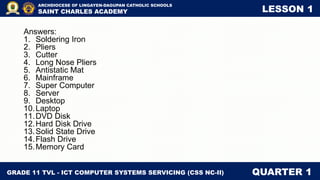
Answers:
1. Soldering Iron
2. Pliers
3. Cutter
4. Long Nose Pliers
5. Antistatic Mat
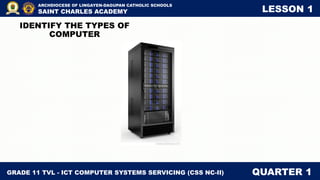
6. Mainframe
7. Super Computer
8. Server
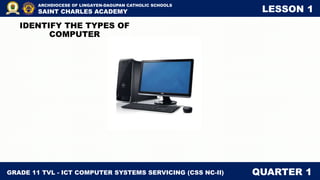
9. Desktop
10.Laptop
11.DVD Disk
12.Hard Disk Drive
13.Solid State Drive
14.Flash Drive
15.Memory Card

Grade 11 - TVL - Computer system servicing

  • 1.
    TVL - ICT COMPUTERSYSTEMS SERVICING (CSS NC-II) QUARTER 1
  • 2.
    Lessons under Quarter1: 1. Computer Hardware and Assembly Tools 2. Parts of A Computer and Peripherals 3. Communication Ports, Bios, UEFI 4. Types of Software 5. Creating Portable Bootable Device 6. Installing Operating System GRADE 11 TVL - ICT COMPUTER SYSTEMS SERVICING (CSS NC-II) QUARTER 1 ARCHDIOCESE OF LINGAYEN-DAGUPAN CATHOLIC SCHOOLS SAINT CHARLES ACADEMY
  • 3.
    OBJECTIVES: Plan unit assemblyto ensure OHS policies and procedures are followed in accordance with systems requirements GRADE 11 TVL - ICT COMPUTER SYSTEMS SERVICING (CSS NC-II) QUARTER 1 ARCHDIOCESE OF LINGAYEN-DAGUPAN CATHOLIC SCHOOLS SAINT CHARLES ACADEMY
  • 4.
    LESSON 1 COMPUTER HARDWARE GRADE11 TVL - ICT COMPUTER SYSTEMS SERVICING (CSS NC-II) QUARTER 1 ARCHDIOCESE OF LINGAYEN-DAGUPAN CATHOLIC SCHOOLS SAINT CHARLES ACADEMY
  • 5.
    GRADE 11 TVL- ICT COMPUTER SYSTEMS SERVICING (CSS NC-II) QUARTER 1 ARCHDIOCESE OF LINGAYEN-DAGUPAN CATHOLIC SCHOOLS SAINT CHARLES ACADEMY LESSON 1 It is the physical part of the computer that has physical structure such as system unit, monitor, mouse and keyboard. Like human brain, receives data and instructions, stores them and processes the data according to the instructions given to it Hardware
  • 6.
    GRADE 11 TVL- ICT COMPUTER SYSTEMS SERVICING (CSS NC-II) QUARTER 1 ARCHDIOCESE OF LINGAYEN-DAGUPAN CATHOLIC SCHOOLS SAINT CHARLES ACADEMY LESSON 1 It receives data from input devices, stores them in memory and displays them through an output device. The physical devices that make up a computer are referred to as hardware. Hardware
  • 7.
    GRADE 11 TVL- ICT COMPUTER SYSTEMS SERVICING (CSS NC-II) QUARTER 1 ARCHDIOCESE OF LINGAYEN-DAGUPAN CATHOLIC SCHOOLS SAINT CHARLES ACADEMY LESSON 1 Computer hardware can be broadly classified into two: CPU and peripherals. The CPU is perhaps the most important part of a computer. The other hardware pieces like input devices, output devices, etc. are called peripherals. Hardware
  • 8.
    GRADE 11 TVL- ICT COMPUTER SYSTEMS SERVICING (CSS NC-II) QUARTER 1 ARCHDIOCESE OF LINGAYEN-DAGUPAN CATHOLIC SCHOOLS SAINT CHARLES ACADEMY LESSON 1 The CPU. It is a hardware within a computer that carries out the instructions of a computer program by performing the basic arithmetical, logical, and input/output operations of the system. These is known as the brain of the computer and one of the most important chips in the computer. Hardware
  • 9.
    GRADE 11 TVL- ICT COMPUTER SYSTEMS SERVICING (CSS NC-II) QUARTER 1 ARCHDIOCESE OF LINGAYEN-DAGUPAN CATHOLIC SCHOOLS SAINT CHARLES ACADEMY LESSON 1 Hardware
  • 10.
    GRADE 11 TVL- ICT COMPUTER SYSTEMS SERVICING (CSS NC-II) QUARTER 1 ARCHDIOCESE OF LINGAYEN-DAGUPAN CATHOLIC SCHOOLS SAINT CHARLES ACADEMY LESSON 1 Computers can be generally classified by size and power, and group into categories in numerous ways. It classifies the types of computers according to their physical size, processing speed, cost, and number of users. Types of Computer
  • 11.
    GRADE 11 TVL- ICT COMPUTER SYSTEMS SERVICING (CSS NC-II) QUARTER 1 ARCHDIOCESE OF LINGAYEN-DAGUPAN CATHOLIC SCHOOLS SAINT CHARLES ACADEMY LESSON 1 Laptop or handheld computer, having a small size and low weight is easy to carry to anywhere it is powered by battery or AC-powered personal computers that are more portable that desktop computers, allowing the user to use anywhere. This is easy to carry around and preferred by students and business people to meet their assignments and other necessary tasks. Types of Computer
  • 12.
    GRADE 11 TVL- ICT COMPUTER SYSTEMS SERVICING (CSS NC-II) QUARTER 1 ARCHDIOCESE OF LINGAYEN-DAGUPAN CATHOLIC SCHOOLS SAINT CHARLES ACADEMY LESSON 1 Desktop Computer, it is designed for use at desk or table and make up of separate components. it has a monitor, keyboard, mouse, usually stays at one location. A workstation a powerful, single- user computer is like a personal computer, but it has a more powerful microprocessor and, in general, a higher-quality monitor. Types of Computer
  • 13.
    GRADE 11 TVL- ICT COMPUTER SYSTEMS SERVICING (CSS NC-II) QUARTER 1 ARCHDIOCESE OF LINGAYEN-DAGUPAN CATHOLIC SCHOOLS SAINT CHARLES ACADEMY LESSON 1 Server is a computer that "serves up" information to other computers on a network. A computer that provides data to other computers. It may serve data to systems on a local area network or a wide area network over the Internet Types of Computer
  • 14.
    GRADE 11 TVL- ICT COMPUTER SYSTEMS SERVICING (CSS NC-II) QUARTER 1 ARCHDIOCESE OF LINGAYEN-DAGUPAN CATHOLIC SCHOOLS SAINT CHARLES ACADEMY LESSON 1 A minicomputer is a multi-user computer capable of supporting up to hundreds of users simultaneously. It might cost tens of thousands of dollars. It is about the size of a refrigerator and, when combined with various peripherals, might fill a small room. Minicomputers often have several hundred users. Types of Computer
  • 15.
    GRADE 11 TVL- ICT COMPUTER SYSTEMS SERVICING (CSS NC-II) QUARTER 1 ARCHDIOCESE OF LINGAYEN-DAGUPAN CATHOLIC SCHOOLS SAINT CHARLES ACADEMY LESSON 1 A mainframe computer is powerful multi-user computer capable of supporting many hundreds or thousands of users simultaneously and it is housed in large rooms or even entire building floors. They cost up to several million dollars, and thousands of users can access the computer simultaneously. In a networked environment, minicomputers and mainframes are both frequently called servers Types of Computer
  • 16.
    GRADE 11 TVL- ICT COMPUTER SYSTEMS SERVICING (CSS NC-II) QUARTER 1 ARCHDIOCESE OF LINGAYEN-DAGUPAN CATHOLIC SCHOOLS SAINT CHARLES ACADEMY LESSON 1 A supercomputer, the largest and most expensive computer, it is extremely fast computer that can perform hundreds of millions of instructions per second and often used in research settings and other environments that require a computer with extraordinary computing power. Some supercomputers are capable of performing several billion instructions per second. Types of Computer
  • 17.
    GRADE 11 TVL- ICT COMPUTER SYSTEMS SERVICING (CSS NC-II) QUARTER 1 ARCHDIOCESE OF LINGAYEN-DAGUPAN CATHOLIC SCHOOLS SAINT CHARLES ACADEMY LESSON 1 How are data stored?
  • 18.
    GRADE 11 TVL- ICT COMPUTER SYSTEMS SERVICING (CSS NC-II) QUARTER 1 ARCHDIOCESE OF LINGAYEN-DAGUPAN CATHOLIC SCHOOLS SAINT CHARLES ACADEMY LESSON 1 Hard Drive - use to stores data, pictures, music and videos inside the computer System. Types of Storage HDD - Hard Disk Drive SSD - Solid State Drive
  • 19.
    GRADE 11 TVL- ICT COMPUTER SYSTEMS SERVICING (CSS NC-II) QUARTER 1 ARCHDIOCESE OF LINGAYEN-DAGUPAN CATHOLIC SCHOOLS SAINT CHARLES ACADEMY LESSON 1 Flashdrive- known as a USB stick, USB thumb drive or pen drive is a plug-and-play portable storage device that uses flash memory and is lightweight enough to attach to a keychain. Memory Card- is an electronic data storage device used for storing digital information, typically using flash memory. Types of Storage
  • 20.
    GRADE 11 TVL- ICT COMPUTER SYSTEMS SERVICING (CSS NC-II) QUARTER 1 ARCHDIOCESE OF LINGAYEN-DAGUPAN CATHOLIC SCHOOLS SAINT CHARLES ACADEMY LESSON 1 DVD Disc - of optical disc technology that can stored files ranging from 4.7 to 8 gigabyte. A Writable DVD can hold more 1 GB of information Diskette- Magnetic medium house in a rigid plastic cartridge measuring 3.5 inches square that is a random access, removable data storage medium that can be used with personal computers. Types of Storage
  • 21.
    GRADE 11 TVL- ICT COMPUTER SYSTEMS SERVICING (CSS NC-II) QUARTER 1 ARCHDIOCESE OF LINGAYEN-DAGUPAN CATHOLIC SCHOOLS SAINT CHARLES ACADEMY LESSON 1 COMPUTER ASSEMBLY AND REPAIR TOOLS For every job there is the right tool. Make sure that you are familiar with the correct use of each tool and that the correct tool is used for the current task. Skilled use of tools and software makes the job less difficult and ensures that tasks are performed properly and safely.
  • 22.
    GRADE 11 TVL- ICT COMPUTER SYSTEMS SERVICING (CSS NC-II) QUARTER 1 ARCHDIOCESE OF LINGAYEN-DAGUPAN CATHOLIC SCHOOLS SAINT CHARLES ACADEMY LESSON 1 COMPUTER ASSEMBLY AND REPAIR TOOLS MULTI-METER- a hand held electronic measuring instrument use to measure the electrical voltage, resistance and other values related to electricity SCREWDRIVER- hand tools use for driving screws and often rotating other machine elements with the mating drive system
  • 23.
    GRADE 11 TVL- ICT COMPUTER SYSTEMS SERVICING (CSS NC-II) QUARTER 1 ARCHDIOCESE OF LINGAYEN-DAGUPAN CATHOLIC SCHOOLS SAINT CHARLES ACADEMY LESSON 1 COMPUTER ASSEMBLY AND REPAIR TOOLS FLAT SCREW DRIVER – hand tool is used to drive or fasten negative slotted screws. TORX DRIVER- hand tool used to loosen or tighten screws that have a star-like depression on the top, a feature that is mainly found on laptop.
  • 24.
    GRADE 11 TVL- ICT COMPUTER SYSTEMS SERVICING (CSS NC-II) QUARTER 1 ARCHDIOCESE OF LINGAYEN-DAGUPAN CATHOLIC SCHOOLS SAINT CHARLES ACADEMY LESSON 1 COMPUTER ASSEMBLY AND REPAIR TOOLS GLOVES- the covering material with a separate sheath for each finger used for hand protection. ANTISTATIC MAT- hand tool used to stand on or place hardware on to prevent static electricity from building up.
  • 25.
    GRADE 11 TVL- ICT COMPUTER SYSTEMS SERVICING (CSS NC-II) QUARTER 1 ARCHDIOCESE OF LINGAYEN-DAGUPAN CATHOLIC SCHOOLS SAINT CHARLES ACADEMY LESSON 1 COMPUTER ASSEMBLY AND REPAIR TOOLS CRIMPING TOOL- Device used to conjoin two pieces of metal by deforming one or both of them in a way that causes them to hold each other LAN TESTER- is a device designed to measure and test existing LAN connection.
  • 26.
    GRADE 11 TVL- ICT COMPUTER SYSTEMS SERVICING (CSS NC-II) QUARTER 1 ARCHDIOCESE OF LINGAYEN-DAGUPAN CATHOLIC SCHOOLS SAINT CHARLES ACADEMY LESSON 1 COMPUTER ASSEMBLY AND REPAIR TOOLS TWEEZERS- A tool use to hold small sensitive part of a computer. ANTISTATIC WRIST STRAP- antistatic device used to safely ground a person working on very sensitive electronic equipment, to prevent the buildup of static electricity on their body, which can result in electrostatic discharge.
  • 27.
    GRADE 11 TVL- ICT COMPUTER SYSTEMS SERVICING (CSS NC-II) QUARTER 1 ARCHDIOCESE OF LINGAYEN-DAGUPAN CATHOLIC SCHOOLS SAINT CHARLES ACADEMY LESSON 1 COMPUTER ASSEMBLY AND REPAIR TOOLS SOLDERING IRON - tool used to join two or more metal conductors with the support of soldering lead melted around it. DESOLDERING TOOL– is used to unsolder unwanted parts or component in the circuit with the support of soldering pencil.
  • 28.
    GRADE 11 TVL- ICT COMPUTER SYSTEMS SERVICING (CSS NC-II) QUARTER 1 ARCHDIOCESE OF LINGAYEN-DAGUPAN CATHOLIC SCHOOLS SAINT CHARLES ACADEMY LESSON 1 COMPUTER ASSEMBLY AND REPAIR TOOLS PLIERS- hand tool used to hold objects firmly, for bending, or physical compression. LONG NOSE PLIERS – Used for holding, bending and stretching the lead of electronics component or connecting wire.
  • 29.
    GRADE 11 TVL- ICT COMPUTER SYSTEMS SERVICING (CSS NC-II) QUARTER 1 ARCHDIOCESE OF LINGAYEN-DAGUPAN CATHOLIC SCHOOLS SAINT CHARLES ACADEMY LESSON 1 COMPUTER ASSEMBLY AND REPAIR TOOLS SIDE CUTTER PLIER- A tool used for cutting or trimming of connecting wires or terminal leads in the circuit board. CUTTER- A tool used in stripping wires.
  • 30.
    GRADE 11 TVL- ICT COMPUTER SYSTEMS SERVICING (CSS NC-II) QUARTER 1 ARCHDIOCESE OF LINGAYEN-DAGUPAN CATHOLIC SCHOOLS SAINT CHARLES ACADEMY LESSON 1 COMPUTER ASSEMBLY AND REPAIR TOOLS WIRE STRIPPER- is a portable handheld tool used by workers, especially electricians, for removing the protective coating of an electric wire in order to replace or repair the wire.
  • 31.
    GRADE 11 TVL- ICT COMPUTER SYSTEMS SERVICING (CSS NC-II) QUARTER 1 ARCHDIOCESE OF LINGAYEN-DAGUPAN CATHOLIC SCHOOLS SAINT CHARLES ACADEMY LESSON 1 IDENTIFY THE TOOLS
  • 32.
    GRADE 11 TVL- ICT COMPUTER SYSTEMS SERVICING (CSS NC-II) QUARTER 1 ARCHDIOCESE OF LINGAYEN-DAGUPAN CATHOLIC SCHOOLS SAINT CHARLES ACADEMY LESSON 1 IDENTIFY THE TOOLS
  • 33.
    GRADE 11 TVL- ICT COMPUTER SYSTEMS SERVICING (CSS NC-II) QUARTER 1 ARCHDIOCESE OF LINGAYEN-DAGUPAN CATHOLIC SCHOOLS SAINT CHARLES ACADEMY LESSON 1 IDENTIFY THE TOOLS
  • 34.
    GRADE 11 TVL- ICT COMPUTER SYSTEMS SERVICING (CSS NC-II) QUARTER 1 ARCHDIOCESE OF LINGAYEN-DAGUPAN CATHOLIC SCHOOLS SAINT CHARLES ACADEMY LESSON 1 IDENTIFY THE TOOLS
  • 35.
    GRADE 11 TVL- ICT COMPUTER SYSTEMS SERVICING (CSS NC-II) QUARTER 1 ARCHDIOCESE OF LINGAYEN-DAGUPAN CATHOLIC SCHOOLS SAINT CHARLES ACADEMY LESSON 1 IDENTIFY THE TOOLS
  • 36.
    GRADE 11 TVL- ICT COMPUTER SYSTEMS SERVICING (CSS NC-II) QUARTER 1 ARCHDIOCESE OF LINGAYEN-DAGUPAN CATHOLIC SCHOOLS SAINT CHARLES ACADEMY LESSON 1 IDENTIFY THE TYPES OF COMPUTER
  • 37.
    GRADE 11 TVL- ICT COMPUTER SYSTEMS SERVICING (CSS NC-II) QUARTER 1 ARCHDIOCESE OF LINGAYEN-DAGUPAN CATHOLIC SCHOOLS SAINT CHARLES ACADEMY LESSON 1 IDENTIFY THE TYPES OF COMPUTER
  • 38.
    GRADE 11 TVL- ICT COMPUTER SYSTEMS SERVICING (CSS NC-II) QUARTER 1 ARCHDIOCESE OF LINGAYEN-DAGUPAN CATHOLIC SCHOOLS SAINT CHARLES ACADEMY LESSON 1 IDENTIFY THE TYPES OF COMPUTER
  • 39.
    GRADE 11 TVL- ICT COMPUTER SYSTEMS SERVICING (CSS NC-II) QUARTER 1 ARCHDIOCESE OF LINGAYEN-DAGUPAN CATHOLIC SCHOOLS SAINT CHARLES ACADEMY LESSON 1 IDENTIFY THE TYPES OF COMPUTER
  • 40.
    GRADE 11 TVL- ICT COMPUTER SYSTEMS SERVICING (CSS NC-II) QUARTER 1 ARCHDIOCESE OF LINGAYEN-DAGUPAN CATHOLIC SCHOOLS SAINT CHARLES ACADEMY LESSON 1 IDENTIFY THE TYPES OF COMPUTER
  • 41.
    GRADE 11 TVL- ICT COMPUTER SYSTEMS SERVICING (CSS NC-II) QUARTER 1 ARCHDIOCESE OF LINGAYEN-DAGUPAN CATHOLIC SCHOOLS SAINT CHARLES ACADEMY LESSON 1 IDENTIFY THE TYPES OF STORAGE
  • 42.
    GRADE 11 TVL- ICT COMPUTER SYSTEMS SERVICING (CSS NC-II) QUARTER 1 ARCHDIOCESE OF LINGAYEN-DAGUPAN CATHOLIC SCHOOLS SAINT CHARLES ACADEMY LESSON 1 IDENTIFY THE TYPES OF STORAGE
  • 43.
    GRADE 11 TVL- ICT COMPUTER SYSTEMS SERVICING (CSS NC-II) QUARTER 1 ARCHDIOCESE OF LINGAYEN-DAGUPAN CATHOLIC SCHOOLS SAINT CHARLES ACADEMY LESSON 1 IDENTIFY THE TYPES OF STORAGE
  • 44.
    GRADE 11 TVL- ICT COMPUTER SYSTEMS SERVICING (CSS NC-II) QUARTER 1 ARCHDIOCESE OF LINGAYEN-DAGUPAN CATHOLIC SCHOOLS SAINT CHARLES ACADEMY LESSON 1 IDENTIFY THE TYPES OF STORAGE
  • 45.
    GRADE 11 TVL- ICT COMPUTER SYSTEMS SERVICING (CSS NC-II) QUARTER 1 ARCHDIOCESE OF LINGAYEN-DAGUPAN CATHOLIC SCHOOLS SAINT CHARLES ACADEMY LESSON 1 IDENTIFY THE TYPES OF STORAGE
  • 46.
    GRADE 11 TVL- ICT COMPUTER SYSTEMS SERVICING (CSS NC-II) QUARTER 1 ARCHDIOCESE OF LINGAYEN-DAGUPAN CATHOLIC SCHOOLS SAINT CHARLES ACADEMY LESSON 1 Answers: 1. Soldering Iron 2. Pliers 3. Cutter 4. Long Nose Pliers 5. Antistatic Mat 6. Mainframe 7. Super Computer 8. Server 9. Desktop 10.Laptop 11.DVD Disk 12.Hard Disk Drive 13.Solid State Drive 14.Flash Drive 15.Memory Card