Databases
CSC 103 Intro to Computing
What is a Database?
 a collection of information that is organized
so that it can easily be accessed, managed,
and updated.
 databases typically contain collections of data
records or files, such as sales transactions,
products, supplies, inventory, customer/client
profiles, employees, patients, students, etc.
What databases do you
personally manage?
 Emails
 Files on a computer, music, pictures, movies
 Online shopping (Amazon)
 Web searching (Google)
 Research (Library – research papers)
 Any collection of info that you need to sort
through and locate items
How is information
organized in a database?
 By fields (also called columns)
 Fields are the categories or criteria, by which
all information is organized and categorized
 Fields for students may include:
student ID, SSN, lastname, firstname, middle name,
birthdate, address (street, city, state, county),
email, phone, major, grades, credits, financial info,
etc.
What Databases
are you a part of?
 Facebook – you supply information
 Google – your information is captured
 Any website where you register and log-in
to with an email or password (Devices)
 Student database at WCCC, MyWarren
 Government, State, Utilities, Healthcare
Banking, Credit – any correspondence you get
(emails, junk mail, ads)
How are you identified
in a database?
 Email, username, password (logins),
+ security verifications
 Name, DOB or Age, Social Security Number, ID
Numbers, Account Numbers, Phone
Number(s), Address, Vehicle Vin #, etc.
Where are
databases stored?
 Business store their data on Database servers
 Databases and database managers are prevalent in
large mainframe systems, but are also present in
smaller distributed workstation and mid-range systems
such as the AS/400 and on personal computers
(Access).
 SQL (Structured Query Language) is a standard
language for making interactive queries from and
updating a database such as IBM's DB2,
Microsoft's SQL Server, and database products
from Oracle, Sybase, and Computer Associates.
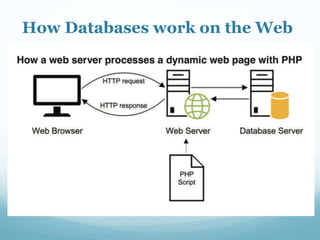
How Databases work on the Web
What operations can be
performed on a DB?
 CRUD - Create, Read, Update, Delete
 Collect and store data, View data
Find data, Update data
Organize data, Sort & Filter data,
Distribute data, Move or remove data
Databases are
constructed of tables:
 A table is simply tabular information organized
in a grid of rows and columns.
 Employees db for WCCC
may have these tables:
• Faculty
• Adjunct Faculty
• Administration
• Staff
 Each group (above) in its own table.
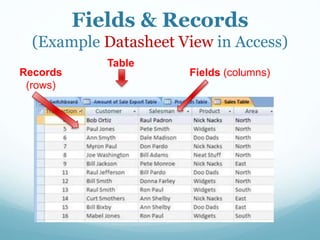
Fields & Records
(Example Datasheet View in Access)
Fields (columns)Records
(rows)
Table
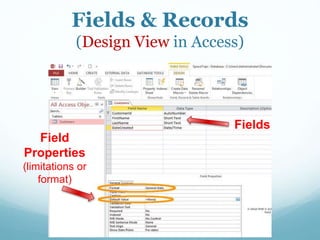
Fields & Records
(Design View in Access)
Fields
Field
Properties
(limitations or
format)
What software on a PC
can manage databases?
 Access – (part of Microsoft Office Suite) is
designed to create and manage databases
 We can begin by exploring some basic
operations of Access (sorting, filtering,
advanced filters) using Microsoft Access
and database files presidents.accdb
and countries.accdb
How is information
retrieved?
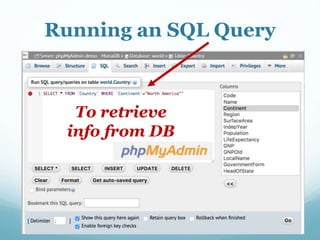
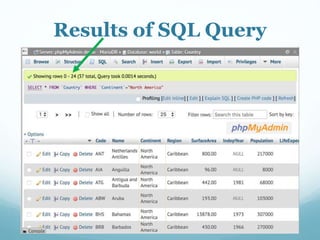
 Display all – SELECT * FROM (tablename)
 Sort – displays information in ascending,
descending order (based on a field)
 Filter – limits the display of information
through specific criteria
 Query – retrieve and store information
based on specific criteria
phpMyAdmin
 phpMyAdmin – (web-based tool) is used to
create, edit and manage databases stored on a
web server.
 Web pages use php (server side code) to store
or retrieve data from the database
 Uses SQL language to retrieve, filter, display
information from the database
 SQL stands for structured query language
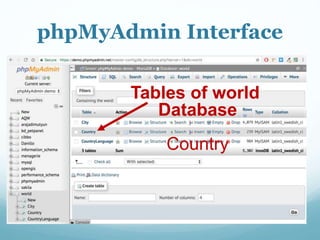
phpMyAdmin Interface
Tables of world
Database
Country
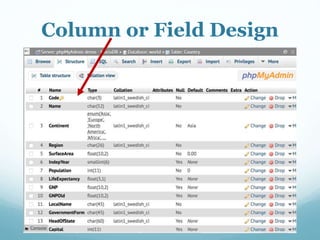
Column or Field Design
Running an SQL Query
To retrieve
info from DB
Results of SQL Query

CSC 103 Databases Overview

  • 1.
  • 2.
    What is aDatabase?  a collection of information that is organized so that it can easily be accessed, managed, and updated.  databases typically contain collections of data records or files, such as sales transactions, products, supplies, inventory, customer/client profiles, employees, patients, students, etc.
  • 3.
    What databases doyou personally manage?  Emails  Files on a computer, music, pictures, movies  Online shopping (Amazon)  Web searching (Google)  Research (Library – research papers)  Any collection of info that you need to sort through and locate items
  • 4.
    How is information organizedin a database?  By fields (also called columns)  Fields are the categories or criteria, by which all information is organized and categorized  Fields for students may include: student ID, SSN, lastname, firstname, middle name, birthdate, address (street, city, state, county), email, phone, major, grades, credits, financial info, etc.
  • 5.
    What Databases are youa part of?  Facebook – you supply information  Google – your information is captured  Any website where you register and log-in to with an email or password (Devices)  Student database at WCCC, MyWarren  Government, State, Utilities, Healthcare Banking, Credit – any correspondence you get (emails, junk mail, ads)
  • 6.
    How are youidentified in a database?  Email, username, password (logins), + security verifications  Name, DOB or Age, Social Security Number, ID Numbers, Account Numbers, Phone Number(s), Address, Vehicle Vin #, etc.
  • 7.
    Where are databases stored? Business store their data on Database servers  Databases and database managers are prevalent in large mainframe systems, but are also present in smaller distributed workstation and mid-range systems such as the AS/400 and on personal computers (Access).  SQL (Structured Query Language) is a standard language for making interactive queries from and updating a database such as IBM's DB2, Microsoft's SQL Server, and database products from Oracle, Sybase, and Computer Associates.
  • 8.
  • 9.
    What operations canbe performed on a DB?  CRUD - Create, Read, Update, Delete  Collect and store data, View data Find data, Update data Organize data, Sort & Filter data, Distribute data, Move or remove data
  • 10.
    Databases are constructed oftables:  A table is simply tabular information organized in a grid of rows and columns.  Employees db for WCCC may have these tables: • Faculty • Adjunct Faculty • Administration • Staff  Each group (above) in its own table.
  • 11.
    Fields & Records (ExampleDatasheet View in Access) Fields (columns)Records (rows) Table
  • 12.
    Fields & Records (DesignView in Access) Fields Field Properties (limitations or format)
  • 13.
    What software ona PC can manage databases?  Access – (part of Microsoft Office Suite) is designed to create and manage databases  We can begin by exploring some basic operations of Access (sorting, filtering, advanced filters) using Microsoft Access and database files presidents.accdb and countries.accdb
  • 14.
    How is information retrieved? Display all – SELECT * FROM (tablename)  Sort – displays information in ascending, descending order (based on a field)  Filter – limits the display of information through specific criteria  Query – retrieve and store information based on specific criteria
  • 15.
    phpMyAdmin  phpMyAdmin –(web-based tool) is used to create, edit and manage databases stored on a web server.  Web pages use php (server side code) to store or retrieve data from the database  Uses SQL language to retrieve, filter, display information from the database  SQL stands for structured query language
  • 16.
    phpMyAdmin Interface Tables ofworld Database Country
  • 17.
  • 18.
    Running an SQLQuery To retrieve info from DB
  • 19.