S
Module 2: Digital Devices
Section C – Processing & Memory
CSC 103 Intro to Computing
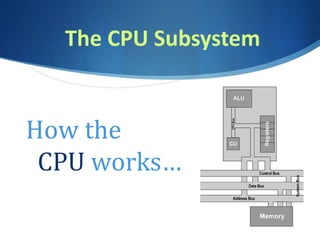
The CPU Subsystem
How the
CPU works…
The CPU Subsystem
 Composed of control unit and
arithmetic logic unit (ALU)
 Control unit coordinates activities of all
computer components – “brain” or “boss”
 ALU is responsible for a math operations
and logic comparison operations
 Registers – memory on the CPU used by
control unit & ALU for storing instructions
and data
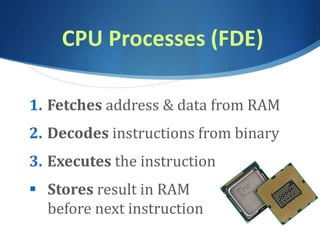
CPU Processes (FDE)
1. Fetches address & data from RAM
2. Decodes instructions from binary
3. Executes the instruction
 Stores result in RAM
before next instruction
CPU Factors
 Clock Speed measured in GHz
– billions of steps per second
 Number of cores
- Single, Dual Core, Quad Core
 Cache Memory – Like RAM for the CPU –
temporary storage that speeds up
processing (Level 1, 2 & 3)
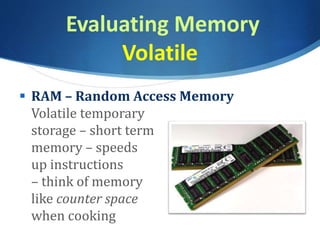
Evaluating Memory
Volatile
 RAM – Random Access Memory
Volatile temporary
storage – short term
memory – speeds
up instructions
– think of memory
like counter space
when cooking
Evaluating Memory
non-volatile
 ROM – Read Only Memory
–non-volatile
- Handles boot instructions, etc.
 Hard Drives – are non-volatile
storage spaces – larger, but slower
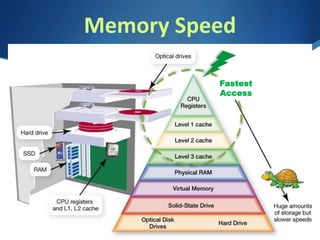
Memory Speed
Fastest
Access
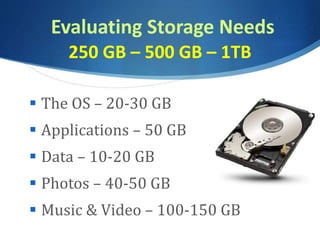
Evaluating Storage Needs
250 GB – 500 GB – 1TB
 The OS – 20-30 GB
 Applications – 50 GB
 Data – 10-20 GB
 Photos – 40-50 GB
 Music & Video – 100-150 GB
Larger Storage Considerations
 Cloud Storage
- Can offset some photo, music, video storage
 Flash Storage – SSD Cards & Drives
 Multiple Internal Hard Drives (RAIDS)
- Redundant Array of Independent Disks
 External Hard Drives
better for back-up purposes
Hard Drives vs SSD
 Magnetic Hard Drives – Spinning platters
that are magnetized to write data
- Spin at 7200 RPMS, 4TB capacity
- Lots of moving parts, slower
 Solid State Drives – Charged electronic
transistors that store data
- faster, less chance of crashing,
- run cooler, 1 TB capacity
Audio & Video
Considerations
 Graphics/Video Cards - hardware that is
responsible of producing output to monitor.
It has a connector(s) for monitor(s) and
another connector to computer motherboard.
 GPU (Graphics Processor Unit) is part of
graphics card and more essential for gaming,
3D software, video editing software (Nvidia
GeForce, AMD Radeon)
Purchase Consideration
 Buy what you think you will need
3-5 years from now
 You will only gather more photos, music,
video, software, games
 Operating Systems will require more
space and more RAM with each upgrade

CSC103 Processing, Memory & Storage

  • 1.
    S Module 2: DigitalDevices Section C – Processing & Memory CSC 103 Intro to Computing
  • 2.
    The CPU Subsystem Howthe CPU works…
  • 3.
    The CPU Subsystem Composed of control unit and arithmetic logic unit (ALU)  Control unit coordinates activities of all computer components – “brain” or “boss”  ALU is responsible for a math operations and logic comparison operations  Registers – memory on the CPU used by control unit & ALU for storing instructions and data
  • 4.
    CPU Processes (FDE) 1.Fetches address & data from RAM 2. Decodes instructions from binary 3. Executes the instruction  Stores result in RAM before next instruction
  • 5.
    CPU Factors  ClockSpeed measured in GHz – billions of steps per second  Number of cores - Single, Dual Core, Quad Core  Cache Memory – Like RAM for the CPU – temporary storage that speeds up processing (Level 1, 2 & 3)
  • 6.
    Evaluating Memory Volatile  RAM– Random Access Memory Volatile temporary storage – short term memory – speeds up instructions – think of memory like counter space when cooking
  • 7.
    Evaluating Memory non-volatile  ROM– Read Only Memory –non-volatile - Handles boot instructions, etc.  Hard Drives – are non-volatile storage spaces – larger, but slower
  • 8.
  • 9.
    Evaluating Storage Needs 250GB – 500 GB – 1TB  The OS – 20-30 GB  Applications – 50 GB  Data – 10-20 GB  Photos – 40-50 GB  Music & Video – 100-150 GB
  • 10.
    Larger Storage Considerations Cloud Storage - Can offset some photo, music, video storage  Flash Storage – SSD Cards & Drives  Multiple Internal Hard Drives (RAIDS) - Redundant Array of Independent Disks  External Hard Drives better for back-up purposes
  • 11.
    Hard Drives vsSSD  Magnetic Hard Drives – Spinning platters that are magnetized to write data - Spin at 7200 RPMS, 4TB capacity - Lots of moving parts, slower  Solid State Drives – Charged electronic transistors that store data - faster, less chance of crashing, - run cooler, 1 TB capacity
  • 12.
    Audio & Video Considerations Graphics/Video Cards - hardware that is responsible of producing output to monitor. It has a connector(s) for monitor(s) and another connector to computer motherboard.  GPU (Graphics Processor Unit) is part of graphics card and more essential for gaming, 3D software, video editing software (Nvidia GeForce, AMD Radeon)
  • 13.
    Purchase Consideration  Buywhat you think you will need 3-5 years from now  You will only gather more photos, music, video, software, games  Operating Systems will require more space and more RAM with each upgrade