Database Management System(DBMS)
• A database management system (DBMS) is a
collection of interrelated data and a set of
programs to access those data.
• The collection of data, usually referred to as the
database, contains information relevant to an
enterprise.
• The primary goal of a DBMS is to provide a way
to store and retrieve database information that
is both convenient and efficient.
Characteristics
1. Real Entity: An entity can be a real world object, that can be easily identifiable. For
example in a school database , students, teachers , classes and offered courses
offered can be considered as entities .
2. Relation based structure: DBMS allows entities and relations between them to form
tables . A user can understand the architecture of a database just by seeing at the
table names.
3. Inaccessibility of data and application:
4. Lowest redundancy
5. Consistency
6. Query languages
7. ACID Properties used in transactions .A-Atomicity,
C-consistency, I-Issolation , D-Durability
1. Concurrent and multiuser access
2. Multiple views
3. Security
Advantages of DBMS
• Data Independence
• Efficient Data Access
• Data Security and integrity
• Reduced Development time
Disadvantages of DBMS
• Complexity
• Skilled Personnel
• Cost
• Lower Efficiency
Schema and Instance
• The overall design of the database is called the
database schema.
• The collection of the information stored in the
database at a certain moment is called an instance of
the database.
Data models
• The structure of a database is the data model: a
collection of conceptual tools for describing data, data
relationships, data semantics, and consistency
constraints.
• To illustrate the concept of a data model, we outline
two data models in this section: the entity-relationship
model and the relational model. Both provide a way to
describe the design of a database at the logical level
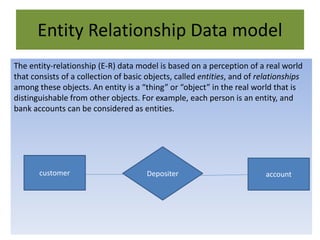
Entity Relationship Data model
The entity-relationship (E-R) data model is based on a perception of a real world
that consists of a collection of basic objects, called entities, and of relationships
among these objects. An entity is a “thing” or “object” in the real world that is
distinguishable from other objects. For example, each person is an entity, and
bank accounts can be considered as entities.
customer accountDepositer
Relational Data models
• The relational model uses a collection of tables to represent both data and the
relationships among those data. Each table has multiple columns, and each column
has a unique name. It uses the unique key called primary key to identify record
uniquely.
Microsoft access
• Microsoft Access is a Relational Database
Management System (RDBMS), designed
primarily for home or small business usage.
• Access is known as a desktop database system
because it's functions are intended to be run
from a single computer. This is in contrast to
a server database application (such as SQL
Server), where it is intended to be installed on
a server, then accessed remotely from
multiple client machines.
BASICS
• A Table is an arrangement of data in a row
and column.
• A field is a column in a table that contains
particular information about a record.
• A Primary Key is a field uniquely identifies
every record in a table.
• A Record is a set of information stored about a
particular entry.
• Forms are used to customize formats for
adding, editing, deleting or displaying data.
• Queries display information from one or more
tables based on a selection criteria.
• Reports contain data from one or more tables
and databases that can be printed. Selective
fields and records can be displayed in a report.
• Macros perform a fixed set of tasks every
time they are run.
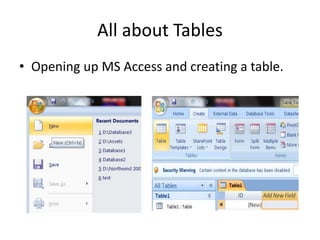
All about Tables
• Opening up MS Access and creating a table.
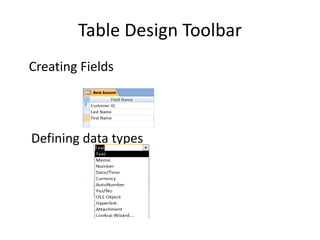
Table Design Toolbar
Creating Fields
Defining data types
• Text data type is used to store all valid printable
characters. Default size is 255.
• Memo data type is used to create a text field in which
size of the values can vary widely . Like to store
paragraph its size is 6500 characters.
• Number data type enables you to enter numeric data.
• Currency data type enables you to enter monetary
data.
• Date/Time data type can store date and time values.
• Yes/No data type, also known as a logical type, stores
data that can have only two values.
• Auto number data type stores an integer that
is incremented or decremented automatically
as you add or delete records.
• OLE object type can store any type of object
such as video clip, a picture or a word
document.
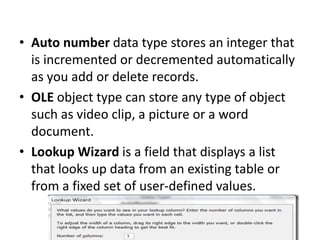
• Lookup Wizard is a field that displays a list
that looks up data from an existing table or
from a fixed set of user-defined values.

Access

  • 1.
    Database Management System(DBMS) •A database management system (DBMS) is a collection of interrelated data and a set of programs to access those data. • The collection of data, usually referred to as the database, contains information relevant to an enterprise. • The primary goal of a DBMS is to provide a way to store and retrieve database information that is both convenient and efficient.
  • 2.
    Characteristics 1. Real Entity:An entity can be a real world object, that can be easily identifiable. For example in a school database , students, teachers , classes and offered courses offered can be considered as entities . 2. Relation based structure: DBMS allows entities and relations between them to form tables . A user can understand the architecture of a database just by seeing at the table names. 3. Inaccessibility of data and application: 4. Lowest redundancy 5. Consistency 6. Query languages 7. ACID Properties used in transactions .A-Atomicity, C-consistency, I-Issolation , D-Durability 1. Concurrent and multiuser access 2. Multiple views 3. Security
  • 3.
    Advantages of DBMS •Data Independence • Efficient Data Access • Data Security and integrity • Reduced Development time
  • 4.
    Disadvantages of DBMS •Complexity • Skilled Personnel • Cost • Lower Efficiency
  • 5.
    Schema and Instance •The overall design of the database is called the database schema. • The collection of the information stored in the database at a certain moment is called an instance of the database.
  • 6.
    Data models • Thestructure of a database is the data model: a collection of conceptual tools for describing data, data relationships, data semantics, and consistency constraints. • To illustrate the concept of a data model, we outline two data models in this section: the entity-relationship model and the relational model. Both provide a way to describe the design of a database at the logical level
  • 7.
    Entity Relationship Datamodel The entity-relationship (E-R) data model is based on a perception of a real world that consists of a collection of basic objects, called entities, and of relationships among these objects. An entity is a “thing” or “object” in the real world that is distinguishable from other objects. For example, each person is an entity, and bank accounts can be considered as entities. customer accountDepositer
  • 8.
    Relational Data models •The relational model uses a collection of tables to represent both data and the relationships among those data. Each table has multiple columns, and each column has a unique name. It uses the unique key called primary key to identify record uniquely.
  • 9.
    Microsoft access • MicrosoftAccess is a Relational Database Management System (RDBMS), designed primarily for home or small business usage. • Access is known as a desktop database system because it's functions are intended to be run from a single computer. This is in contrast to a server database application (such as SQL Server), where it is intended to be installed on a server, then accessed remotely from multiple client machines.
  • 10.
    BASICS • A Tableis an arrangement of data in a row and column. • A field is a column in a table that contains particular information about a record. • A Primary Key is a field uniquely identifies every record in a table. • A Record is a set of information stored about a particular entry.
  • 11.
    • Forms areused to customize formats for adding, editing, deleting or displaying data. • Queries display information from one or more tables based on a selection criteria. • Reports contain data from one or more tables and databases that can be printed. Selective fields and records can be displayed in a report. • Macros perform a fixed set of tasks every time they are run.
  • 12.
    All about Tables •Opening up MS Access and creating a table.
  • 13.
    Table Design Toolbar CreatingFields Defining data types
  • 14.
    • Text datatype is used to store all valid printable characters. Default size is 255. • Memo data type is used to create a text field in which size of the values can vary widely . Like to store paragraph its size is 6500 characters. • Number data type enables you to enter numeric data. • Currency data type enables you to enter monetary data. • Date/Time data type can store date and time values. • Yes/No data type, also known as a logical type, stores data that can have only two values.
  • 15.
    • Auto numberdata type stores an integer that is incremented or decremented automatically as you add or delete records. • OLE object type can store any type of object such as video clip, a picture or a word document. • Lookup Wizard is a field that displays a list that looks up data from an existing table or from a fixed set of user-defined values.