S
CSC 103
Using the Internet
Definition
 The Internet
The interconnected network
of computer networks.
History
 ARPA (1969)
Advanced Research Projects Agency.
4 computers connected: UCLA,
Stanford Research Institute,
Cal - Santa Barbara, University of Utah
History
 ARPAnet
Originally limited to Government,
Research, Education – until the ban on
commercial use lifted 1991.
Innovator…
 Tim Berners-Lee
Research Scientist at CERN (Switzerland)
utilized hyperlinks to view research
papers. Used HTML (Hypertext Markup
Language) to create World Wide Web in
@1989–1991. Current Director of W3C.
First Browser
Mosaic (1993)
 Created by students at NCSA (National
Center for Supercomputer Applications).
 First browser to display text and images
inline.
 Later became Netscape (Mozilla group)
which became modern-day Firefox.
Early Internet
Mid-Late 90’s Growth
 AOL (America Online), CompuServe and
Prodigy were early low-cost Internet
Providers.
 Primarily Dial-up Modem Connection, then
DSL and later Broadband: Cable, FiOS.
Growth - Mid-90’s
 1995
Less than 1% of world population had
internet connections.
44 million users
Source: InternetLiveStats.com
Growth - Today
 2019
57% of world population (40% in 2016)
now has internet connection.
4.3 billion users
Source: www.internetworldstats.com/
Client/Server Model
 Web Server (host)
S Receives requests from a client using
HTTP (Hypertext Transfer Protocol)
to serve up a web page
S Commercial Hosting Providers include:
GoDaddy, HostGator, BlueHost, eHost, etc.
Client/Server Model
 Web Client (user)
S Client/User connected to Internet using a
browser (Chrome, Firefox, Edge, IE, Safari)
S Requests web pages from a server using
HTTP (Hypertext Transfer Protocol)
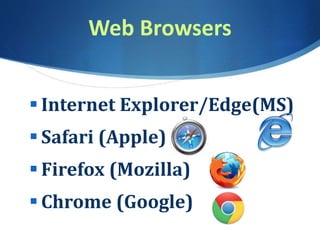
Web Browsers
 Internet Explorer/Edge(MS)
 Safari (Apple)
 Firefox (Mozilla)
 Chrome (Google)
What do Web Browsers do?
 Web Browsers…
S Interpret HTML Markup Code
into formatted web pages
S Web pages use HTML, CSS
and JavaScript
IP Addresses/DNS
 IP Addresses
S 255.255.255.255
S 173.194.116.72
 DNS – Domain Name System
S Translates 173.194.116.72
S to Google.com
Internet Protocols
 Email
S Incoming (POP, IMAP)
S Outgoing (SMTP)
 HTTP - Hypertext Transfer
 FTP - File Transfer (upload files to server)
 TCP/IP - Transfer Control, Internet
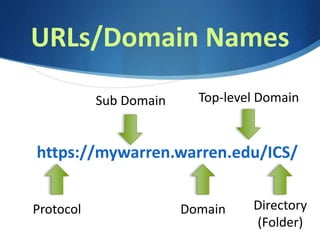
URLs/Domain Names
https://mywarren.warren.edu/ICS/
Protocol Domain
Top-level DomainSub Domain
Directory
(Folder)
Email
 Email Client
S MS Outlook – Saves to local Computer
 Webmail – Web-based
S Gmail, Yahoo, Hotmail, etc.
S Available from any computer/device
S Most common delivery today
Web 2.0
 Actively creating, sharing and
collaborating on web content
 Social Media, Wiki’s, Blogs,
Podcasts & Webcasts
HTML
 Stands for:
Hypertext Markup Language
 Combines text, hyperlinks, images
and media
 Basic text surrounded by “markup” tags.
 Elements have <opening> and </closing>
tags to indicate beginning and end.
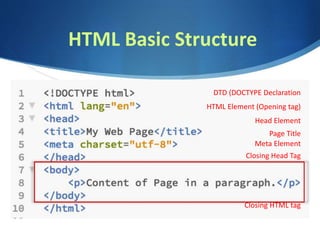
HTML Basic Structure
DTD (DOCTYPE Declaration
HTML Element (Opening tag)
Closing HTML tag
Head Element
Closing Head Tag
Page Title
Meta Element
HTML - CSS – JavaScript
.html .css .js
 HTML – Provides Content, Structure and
Hierarchy (importance/organization) of
information
 CSS – Cascading Style Sheets provides
layout, design & formatting
 JavaScript – Adds Behavior capabilities:
Show/hide content, control windows,
validate forms, create slideshows, etc.
Creating HTML Pages
 HTML can be written in a basic text editor
like NotePad or TextEdit (Mac).
 or a dedicated code editor like VS Code,
Atom, Brackets, NotePad++,
TextWrangler, Komodo Edit,
or Sublime Text.
 or Adobe Dreamweaver* or a template-
based editor that does the coding for you.
*Part of Adobe Creative Suite or Creative Cloud – not free.
Web CMS’s
 Content Management Systems…
are hosted in the cloud, utilize databases,
themes and an online administrative
dashboard. Systems vary in their power,
extensibility and flexibility.
 WordPress, Joomla, Drupal and
beginner based systems, like Wix,
Squarespace & Weebly.
*Part of Adobe Creative Suite or Creative Cloud – not free.
Creating HTML Pages
 We will create a basic HTML page with
CSS and some JavaScript.
 We will use an online
HTML/CSS/JavaScript Editor
to write and preview code called
CodePen (similar to Trinket)

CSC103 Internet

  • 1.
  • 2.
    Definition  The Internet Theinterconnected network of computer networks.
  • 3.
    History  ARPA (1969) AdvancedResearch Projects Agency. 4 computers connected: UCLA, Stanford Research Institute, Cal - Santa Barbara, University of Utah
  • 4.
    History  ARPAnet Originally limitedto Government, Research, Education – until the ban on commercial use lifted 1991.
  • 5.
    Innovator…  Tim Berners-Lee ResearchScientist at CERN (Switzerland) utilized hyperlinks to view research papers. Used HTML (Hypertext Markup Language) to create World Wide Web in @1989–1991. Current Director of W3C.
  • 6.
    First Browser Mosaic (1993) Created by students at NCSA (National Center for Supercomputer Applications).  First browser to display text and images inline.  Later became Netscape (Mozilla group) which became modern-day Firefox.
  • 7.
    Early Internet Mid-Late 90’sGrowth  AOL (America Online), CompuServe and Prodigy were early low-cost Internet Providers.  Primarily Dial-up Modem Connection, then DSL and later Broadband: Cable, FiOS.
  • 8.
    Growth - Mid-90’s 1995 Less than 1% of world population had internet connections. 44 million users Source: InternetLiveStats.com
  • 9.
    Growth - Today 2019 57% of world population (40% in 2016) now has internet connection. 4.3 billion users Source: www.internetworldstats.com/
  • 10.
    Client/Server Model  WebServer (host) S Receives requests from a client using HTTP (Hypertext Transfer Protocol) to serve up a web page S Commercial Hosting Providers include: GoDaddy, HostGator, BlueHost, eHost, etc.
  • 11.
    Client/Server Model  WebClient (user) S Client/User connected to Internet using a browser (Chrome, Firefox, Edge, IE, Safari) S Requests web pages from a server using HTTP (Hypertext Transfer Protocol)
  • 12.
    Web Browsers  InternetExplorer/Edge(MS)  Safari (Apple)  Firefox (Mozilla)  Chrome (Google)
  • 13.
    What do WebBrowsers do?  Web Browsers… S Interpret HTML Markup Code into formatted web pages S Web pages use HTML, CSS and JavaScript
  • 14.
    IP Addresses/DNS  IPAddresses S 255.255.255.255 S 173.194.116.72  DNS – Domain Name System S Translates 173.194.116.72 S to Google.com
  • 15.
    Internet Protocols  Email SIncoming (POP, IMAP) S Outgoing (SMTP)  HTTP - Hypertext Transfer  FTP - File Transfer (upload files to server)  TCP/IP - Transfer Control, Internet
  • 16.
  • 17.
    Email  Email Client SMS Outlook – Saves to local Computer  Webmail – Web-based S Gmail, Yahoo, Hotmail, etc. S Available from any computer/device S Most common delivery today
  • 18.
    Web 2.0  Activelycreating, sharing and collaborating on web content  Social Media, Wiki’s, Blogs, Podcasts & Webcasts
  • 19.
    HTML  Stands for: HypertextMarkup Language  Combines text, hyperlinks, images and media  Basic text surrounded by “markup” tags.  Elements have <opening> and </closing> tags to indicate beginning and end.
  • 20.
    HTML Basic Structure DTD(DOCTYPE Declaration HTML Element (Opening tag) Closing HTML tag Head Element Closing Head Tag Page Title Meta Element
  • 21.
    HTML - CSS– JavaScript .html .css .js  HTML – Provides Content, Structure and Hierarchy (importance/organization) of information  CSS – Cascading Style Sheets provides layout, design & formatting  JavaScript – Adds Behavior capabilities: Show/hide content, control windows, validate forms, create slideshows, etc.
  • 22.
    Creating HTML Pages HTML can be written in a basic text editor like NotePad or TextEdit (Mac).  or a dedicated code editor like VS Code, Atom, Brackets, NotePad++, TextWrangler, Komodo Edit, or Sublime Text.  or Adobe Dreamweaver* or a template- based editor that does the coding for you. *Part of Adobe Creative Suite or Creative Cloud – not free.
  • 23.
    Web CMS’s  ContentManagement Systems… are hosted in the cloud, utilize databases, themes and an online administrative dashboard. Systems vary in their power, extensibility and flexibility.  WordPress, Joomla, Drupal and beginner based systems, like Wix, Squarespace & Weebly. *Part of Adobe Creative Suite or Creative Cloud – not free.
  • 24.
    Creating HTML Pages We will create a basic HTML page with CSS and some JavaScript.  We will use an online HTML/CSS/JavaScript Editor to write and preview code called CodePen (similar to Trinket)