INT104 – Database Management Systems
S.Palanivel
CSE / SOC
Slide 1- 2
Readings
 TEXTBOOK
1. Henry F.Korth, Abraham Silberschatz, Sudarshan.
Database System Concepts, McGraw Hill, 6th Edition,
2010.
2. R.Elmasri, S.B.Navathe. Fundamentals of Database
Systems, Addison Wesley, 7th Edition, 2016.
Slide 1- 3
Outline
 Database Definition
 Types of Databases and Database Applications
 Basic Definitions
 Typical DBMS Functionality
 Example of a Database (UNIVERSITY)
Slide 1- 4
Introduction
 What is a database?
 Collection of related data.
 What is data?
 Known facts that can be
recorded and have an
implicit meaning.
Slide 1- 5
Database Definition
 “A database has some source from which data are
derived, some degree of interaction with events in the real
world, and an audience that is actively interested in the
contents of the database”
 Implicit Properties of a Database:
 Represents some aspect of the real world (Mini-world).
 A logically coherent collection of words with some inherent
meaning.
 Designed, built & populated with data for a specific purpose.
Slide 1- 6
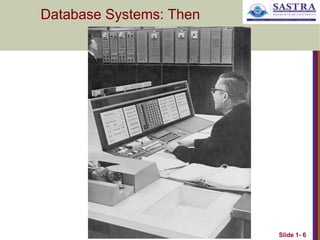
Database Systems: Then
Slide 1- 7
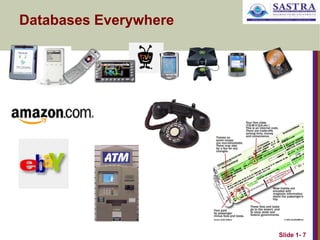
Databases Everywhere
Slide 1- 8
Databases and database systems
 Databases and database systems are an essential component of
life in modern society
 Most of us encounter several activities every day that involve
some interaction with a database.
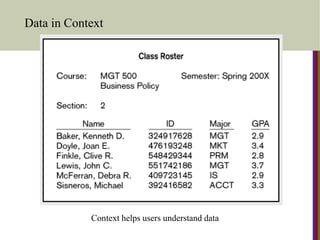
Data in Context
Context helps users understand data
Graphical displays turn data into useful information
that managers can use for decision making and
interpretation
Slide 1- 11
Types of Databases and
Database Applications
 Traditional Applications:
 Numeric and Textual Databases
 More Recent Applications:
 Multimedia Databases
 Geographic Information Systems (GIS)
 Data Warehouses
 Real-time and Active Databases
 Many other applications
Slide 1- 12
Database Implementation
 Defining a database
 Data types
 Structures
 Constraints
 Constructing a database
 Storing the data itself on a storage medium
 Manipulating a database
 Querying
 Updating
 Generating reports
Slide 1- 13
Database Management System (DBMS)
 General-purpose software system that facilitates the
processes of defining, constructing and manipulating
databases.
 Can also write your own set of programs to create and
maintain the database, i.e. your own Special-purpose
DBMS software.
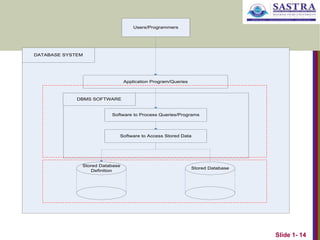
Database + Software == Database System
Slide 1- 14
DATABASE SYSTEM
Application Program/Queries
DBMS SOFTWARE
Software to Process Queries/Programs
Software to Access Stored Data
Stored Database
Definition
Stored Database
Users/Programmers
Slide 1- 15
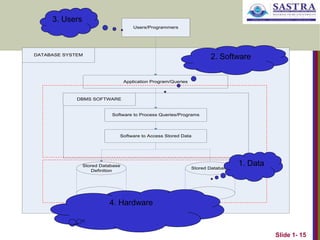
DATABASE SYSTEM
Application Program/Queries
DBMS SOFTWARE
Software to Process Queries/Programs
Software to Access Stored Data
Stored Database
Definition
Stored Database
Users/Programmers
1. Data
2. Software
3. Users
4. Hardware
Slide 1- 16
Summary of Basic Definitions
 Database:
 A collection of related data.
 Data:
 Known facts that can be recorded and have an implicit meaning.
 Mini-world:
 Some part of the real world about which data is stored in a
database. For example, student grades and transcripts at a
university.
 Database Management System (DBMS):
 A software package/ system to facilitate the creation and
maintenance of a computerized database.
 Database System:
 The DBMS software together with the data itself. Sometimes, the
applications are also included.
Slide 1- 17
Typical DBMS Functionality
 Define a particular database in terms of its data types,
structures, and constraints
 Construct or Load the initial database contents on a
secondary storage medium
 Manipulating the database:
 Retrieval: Querying, generating reports
 Modification: Insertions, deletions and updates to its content
 Accessing the database through Web applications
 Processing and Sharing by a set of concurrent users and
application programs – yet, keeping all data valid and
consistent
Slide 1- 18
Typical DBMS Functionality
 Other features:
 Protection or Security measures to prevent
unauthorized access
 “Active” processing to take internal actions on data
 Presentation and Visualization of data
 Maintaining the database and associated
programs over the lifetime of the database
application
 Called database, software, and system
maintenance
Slide 1- 19
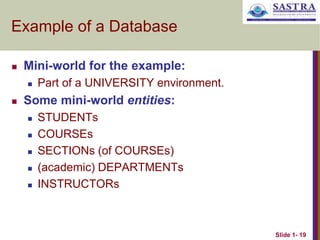
Example of a Database
 Mini-world for the example:
 Part of a UNIVERSITY environment.
 Some mini-world entities:
 STUDENTs
 COURSEs
 SECTIONs (of COURSEs)
 (academic) DEPARTMENTs
 INSTRUCTORs
Slide 1- 20
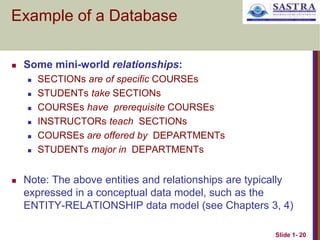
Example of a Database
 Some mini-world relationships:
 SECTIONs are of specific COURSEs
 STUDENTs take SECTIONs
 COURSEs have prerequisite COURSEs
 INSTRUCTORs teach SECTIONs
 COURSEs are offered by DEPARTMENTs
 STUDENTs major in DEPARTMENTs
 Note: The above entities and relationships are typically
expressed in a conceptual data model, such as the
ENTITY-RELATIONSHIP data model (see Chapters 3, 4)
Slide 1- 21
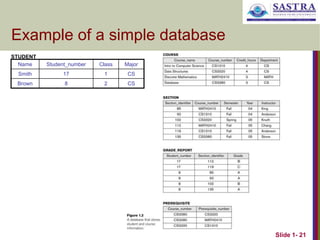
Example of a simple database
Name Student_number Class Major
Smith 17 1 CS
Brown 8 2 CS
STUDENT
Slide 1- 22
The Database Approach Vs File
Processing Approach
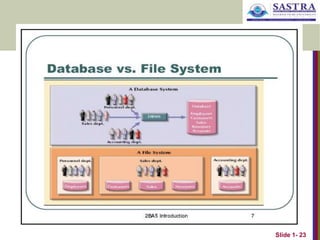
 In traditional file processing, each user defines and
implements the files needed for a specific application.
 redundancy in defining and storing data.
 wastes storage space and effort used to maintain the
common data up-to-date.
 In the database approach, a single repository of data is
maintained that is defined once and then is accessed by
various users.
Slide 1- 23
Slide 1- 24
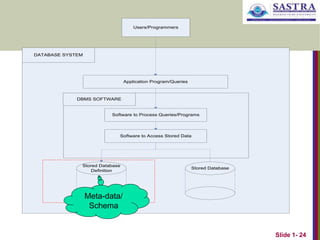
DATABASE SYSTEM
Application Program/Queries
DBMS SOFTWARE
Software to Process Queries/Programs
Software to Access Stored Data
Stored Database
Definition
Stored Database
Users/Programmers
Meta-data/
Schema
Slide 1- 25
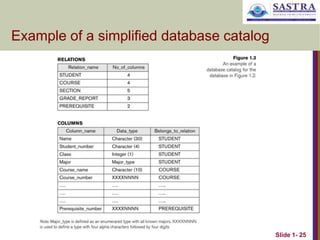
Example of a simplified database catalog
Thank U

INT104 DBMS - Introduction_Atomicity.ppt

  • 1.
    INT104 – DatabaseManagement Systems S.Palanivel CSE / SOC
  • 2.
    Slide 1- 2 Readings TEXTBOOK 1. Henry F.Korth, Abraham Silberschatz, Sudarshan. Database System Concepts, McGraw Hill, 6th Edition, 2010. 2. R.Elmasri, S.B.Navathe. Fundamentals of Database Systems, Addison Wesley, 7th Edition, 2016.
  • 3.
    Slide 1- 3 Outline Database Definition  Types of Databases and Database Applications  Basic Definitions  Typical DBMS Functionality  Example of a Database (UNIVERSITY)
  • 4.
    Slide 1- 4 Introduction What is a database?  Collection of related data.  What is data?  Known facts that can be recorded and have an implicit meaning.
  • 5.
    Slide 1- 5 DatabaseDefinition  “A database has some source from which data are derived, some degree of interaction with events in the real world, and an audience that is actively interested in the contents of the database”  Implicit Properties of a Database:  Represents some aspect of the real world (Mini-world).  A logically coherent collection of words with some inherent meaning.  Designed, built & populated with data for a specific purpose.
  • 6.
    Slide 1- 6 DatabaseSystems: Then
  • 7.
  • 8.
    Slide 1- 8 Databasesand database systems  Databases and database systems are an essential component of life in modern society  Most of us encounter several activities every day that involve some interaction with a database.
  • 9.
    Data in Context Contexthelps users understand data
  • 10.
    Graphical displays turndata into useful information that managers can use for decision making and interpretation
  • 11.
    Slide 1- 11 Typesof Databases and Database Applications  Traditional Applications:  Numeric and Textual Databases  More Recent Applications:  Multimedia Databases  Geographic Information Systems (GIS)  Data Warehouses  Real-time and Active Databases  Many other applications
  • 12.
    Slide 1- 12 DatabaseImplementation  Defining a database  Data types  Structures  Constraints  Constructing a database  Storing the data itself on a storage medium  Manipulating a database  Querying  Updating  Generating reports
  • 13.
    Slide 1- 13 DatabaseManagement System (DBMS)  General-purpose software system that facilitates the processes of defining, constructing and manipulating databases.  Can also write your own set of programs to create and maintain the database, i.e. your own Special-purpose DBMS software. Database + Software == Database System
  • 14.
    Slide 1- 14 DATABASESYSTEM Application Program/Queries DBMS SOFTWARE Software to Process Queries/Programs Software to Access Stored Data Stored Database Definition Stored Database Users/Programmers
  • 15.
    Slide 1- 15 DATABASESYSTEM Application Program/Queries DBMS SOFTWARE Software to Process Queries/Programs Software to Access Stored Data Stored Database Definition Stored Database Users/Programmers 1. Data 2. Software 3. Users 4. Hardware
  • 16.
    Slide 1- 16 Summaryof Basic Definitions  Database:  A collection of related data.  Data:  Known facts that can be recorded and have an implicit meaning.  Mini-world:  Some part of the real world about which data is stored in a database. For example, student grades and transcripts at a university.  Database Management System (DBMS):  A software package/ system to facilitate the creation and maintenance of a computerized database.  Database System:  The DBMS software together with the data itself. Sometimes, the applications are also included.
  • 17.
    Slide 1- 17 TypicalDBMS Functionality  Define a particular database in terms of its data types, structures, and constraints  Construct or Load the initial database contents on a secondary storage medium  Manipulating the database:  Retrieval: Querying, generating reports  Modification: Insertions, deletions and updates to its content  Accessing the database through Web applications  Processing and Sharing by a set of concurrent users and application programs – yet, keeping all data valid and consistent
  • 18.
    Slide 1- 18 TypicalDBMS Functionality  Other features:  Protection or Security measures to prevent unauthorized access  “Active” processing to take internal actions on data  Presentation and Visualization of data  Maintaining the database and associated programs over the lifetime of the database application  Called database, software, and system maintenance
  • 19.
    Slide 1- 19 Exampleof a Database  Mini-world for the example:  Part of a UNIVERSITY environment.  Some mini-world entities:  STUDENTs  COURSEs  SECTIONs (of COURSEs)  (academic) DEPARTMENTs  INSTRUCTORs
  • 20.
    Slide 1- 20 Exampleof a Database  Some mini-world relationships:  SECTIONs are of specific COURSEs  STUDENTs take SECTIONs  COURSEs have prerequisite COURSEs  INSTRUCTORs teach SECTIONs  COURSEs are offered by DEPARTMENTs  STUDENTs major in DEPARTMENTs  Note: The above entities and relationships are typically expressed in a conceptual data model, such as the ENTITY-RELATIONSHIP data model (see Chapters 3, 4)
  • 21.
    Slide 1- 21 Exampleof a simple database Name Student_number Class Major Smith 17 1 CS Brown 8 2 CS STUDENT
  • 22.
    Slide 1- 22 TheDatabase Approach Vs File Processing Approach  In traditional file processing, each user defines and implements the files needed for a specific application.  redundancy in defining and storing data.  wastes storage space and effort used to maintain the common data up-to-date.  In the database approach, a single repository of data is maintained that is defined once and then is accessed by various users.
  • 23.
  • 24.
    Slide 1- 24 DATABASESYSTEM Application Program/Queries DBMS SOFTWARE Software to Process Queries/Programs Software to Access Stored Data Stored Database Definition Stored Database Users/Programmers Meta-data/ Schema
  • 25.
    Slide 1- 25 Exampleof a simplified database catalog
  • 26.