Crisis Communications:
A Microsoft Power Platform
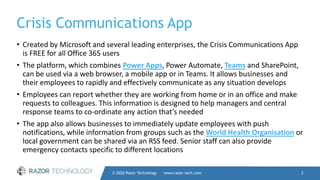
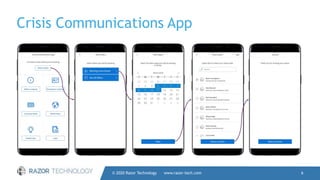
Crisis Communications App
• Created by Microsoft and several leading enterprises, the Crisis Communications App
is FREE for all Office 365 users
• The platform, which combines Power Apps, Power Automate, Teams and SharePoint,
can be used via a web browser, a mobile app or in Teams. It allows businesses and
their employees to rapidly and effectively communicate as any situation develops
• Employees can report whether they are working from home or in an office and make
requests to colleagues. This information is designed to help managers and central
response teams to co-ordinate any action that’s needed
• The app also allows businesses to immediately update employees with push
notifications, while information from groups such as the World Health Organisation or
local government can be shared via an RSS feed. Senior staff can also provide
emergency contacts specific to different locations
© 2020 Razor Technology www.razor-tech.com 2
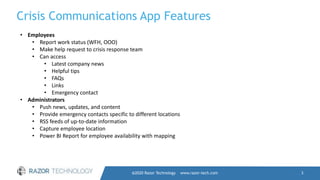
Crisis Communications App Features
@2020 Razor Technology www.razor-tech.com 3
• Employees
• Report work status (WFH, OOO)
• Make help request to crisis response team
• Can access
• Latest company news
• Helpful tips
• FAQs
• Links
• Emergency contact
• Administrators
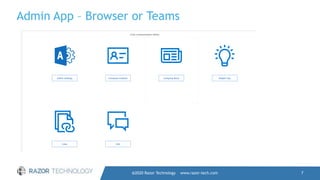
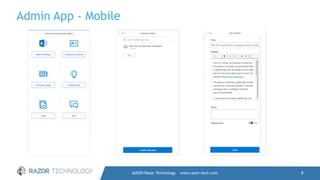
• Push news, updates, and content
• Provide emergency contacts specific to different locations
• RSS feeds of up-to-date information
• Capture employee location
• Power BI Report for employee availability with mapping
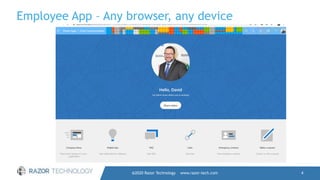
Employee App – Any browser, any device
@2020 Razor Technology www.razor-tech.com 4
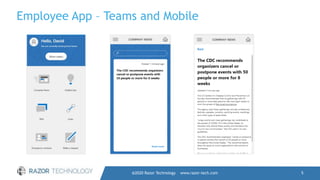
Employee App – Teams and Mobile
@2020 Razor Technology www.razor-tech.com 5
Crisis Communications App
© 2020 Razor Technology www.razor-tech.com 6
Admin App – Browser or Teams
@2020 Razor Technology www.razor-tech.com 7
Admin App - Mobile
@2020 Razor Technology www.razor-tech.com 8
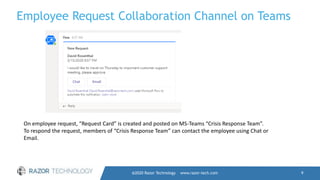
Employee Request Collaboration Channel on Teams
@2020 Razor Technology www.razor-tech.com 9
On employee request, “Request Card” is created and posted on MS-Teams “Crisis Response Team”.
To respond the request, members of “Crisis Response Team” can contact the employee using Chat or
Email.
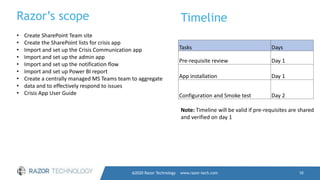
Razor’s scope
@2020 Razor Technology www.razor-tech.com 10
• Create SharePoint Team site
• Create the SharePoint lists for crisis app
• Import and set up the Crisis Communication app
• Import and set up the admin app
• Import and set up the notification flow
• Import and set up Power BI report
• Create a centrally managed MS Teams team to aggregate
• data and to effectively respond to issues
• Crisis App User Guide
Timeline
Tasks Days
Pre-requisite review Day 1
App installation Day 1
Configuration and Smoke test Day 2
Note: Timeline will be valid if pre-requisites are shared
and verified on day 1
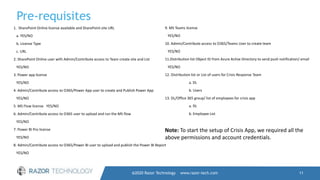
Pre-requisites
@2020 Razor Technology www.razor-tech.com 11
1. SharePoint Online license available and SharePoint site URL
a. YES/NO
b. License Type
c. URL
2. SharePoint Online user with Admin/Contribute access to Team create site and List
YES/NO
3. Power app license
YES/NO
4. Admin/Contribute access to O365/Power App user to create and Publish Power App
YES/NO
5. MS Flow license YES/NO
6. Admin/Contribute access to O365 user to upload and run the MS flow
YES/NO
7. Power BI Pro license
YES/NO
8. Admin/Contribute access to O365/Power BI user to upload and publish the Power BI Report
YES/NO
9. MS Teams license
YES/NO
10. Admin/Contribute access to O365/Teams User to create team
YES/NO
11.Distribution list Object ID from Azure Active Directory to send push notification/ email
YES/NO
12. Distribution list or List of users for Crisis Response Team
a. DL
b. Users
13. DL/Office 365 group/ list of employees for crisis app
a. DL
b. Employee List
Note: To start the setup of Crisis App, we required all the
above permissions and account credentials.
@2020 Razor Technology www.razor-tech.com 12
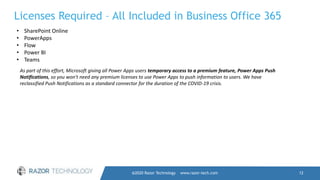
Licenses Required – All Included in Business Office 365
• SharePoint Online
• PowerApps
• Flow
• Power BI
• Teams
As part of this effort, Microsoft giving all Power Apps users temporary access to a premium feature, Power Apps Push
Notifications, so you won't need any premium licenses to use Power Apps to push information to users. We have
reclassified Push Notifications as a standard connector for the duration of the COVID-19 crisis.
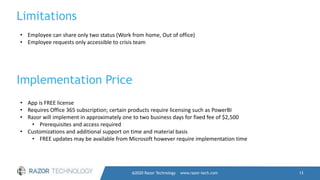
Limitations
@2020 Razor Technology www.razor-tech.com 13
• Employee can share only two status (Work from home, Out of office)
• Employee requests only accessible to crisis team
Implementation Price
• App is FREE license
• Requires Office 365 subscription; certain products require licensing such as PowerBI
• Razor will implement in approximately one to two business days for fixed fee of $2,500
• Prerequisites and access required
• Customizations and additional support on time and material basis
• FREE updates may be available from Microsoft however require implementation time

Crisis communication App - A Power Platform App from Microsoft

  • 1.
  • 2.
    Crisis Communications App •Created by Microsoft and several leading enterprises, the Crisis Communications App is FREE for all Office 365 users • The platform, which combines Power Apps, Power Automate, Teams and SharePoint, can be used via a web browser, a mobile app or in Teams. It allows businesses and their employees to rapidly and effectively communicate as any situation develops • Employees can report whether they are working from home or in an office and make requests to colleagues. This information is designed to help managers and central response teams to co-ordinate any action that’s needed • The app also allows businesses to immediately update employees with push notifications, while information from groups such as the World Health Organisation or local government can be shared via an RSS feed. Senior staff can also provide emergency contacts specific to different locations © 2020 Razor Technology www.razor-tech.com 2
  • 3.
    Crisis Communications AppFeatures @2020 Razor Technology www.razor-tech.com 3 • Employees • Report work status (WFH, OOO) • Make help request to crisis response team • Can access • Latest company news • Helpful tips • FAQs • Links • Emergency contact • Administrators • Push news, updates, and content • Provide emergency contacts specific to different locations • RSS feeds of up-to-date information • Capture employee location • Power BI Report for employee availability with mapping
  • 4.
    Employee App –Any browser, any device @2020 Razor Technology www.razor-tech.com 4
  • 5.
    Employee App –Teams and Mobile @2020 Razor Technology www.razor-tech.com 5
  • 6.
    Crisis Communications App ©2020 Razor Technology www.razor-tech.com 6
  • 7.
    Admin App –Browser or Teams @2020 Razor Technology www.razor-tech.com 7
  • 8.
    Admin App -Mobile @2020 Razor Technology www.razor-tech.com 8
  • 9.
    Employee Request CollaborationChannel on Teams @2020 Razor Technology www.razor-tech.com 9 On employee request, “Request Card” is created and posted on MS-Teams “Crisis Response Team”. To respond the request, members of “Crisis Response Team” can contact the employee using Chat or Email.
  • 10.
    Razor’s scope @2020 RazorTechnology www.razor-tech.com 10 • Create SharePoint Team site • Create the SharePoint lists for crisis app • Import and set up the Crisis Communication app • Import and set up the admin app • Import and set up the notification flow • Import and set up Power BI report • Create a centrally managed MS Teams team to aggregate • data and to effectively respond to issues • Crisis App User Guide Timeline Tasks Days Pre-requisite review Day 1 App installation Day 1 Configuration and Smoke test Day 2 Note: Timeline will be valid if pre-requisites are shared and verified on day 1
  • 11.
    Pre-requisites @2020 Razor Technologywww.razor-tech.com 11 1. SharePoint Online license available and SharePoint site URL a. YES/NO b. License Type c. URL 2. SharePoint Online user with Admin/Contribute access to Team create site and List YES/NO 3. Power app license YES/NO 4. Admin/Contribute access to O365/Power App user to create and Publish Power App YES/NO 5. MS Flow license YES/NO 6. Admin/Contribute access to O365 user to upload and run the MS flow YES/NO 7. Power BI Pro license YES/NO 8. Admin/Contribute access to O365/Power BI user to upload and publish the Power BI Report YES/NO 9. MS Teams license YES/NO 10. Admin/Contribute access to O365/Teams User to create team YES/NO 11.Distribution list Object ID from Azure Active Directory to send push notification/ email YES/NO 12. Distribution list or List of users for Crisis Response Team a. DL b. Users 13. DL/Office 365 group/ list of employees for crisis app a. DL b. Employee List Note: To start the setup of Crisis App, we required all the above permissions and account credentials.
  • 12.
    @2020 Razor Technologywww.razor-tech.com 12 Licenses Required – All Included in Business Office 365 • SharePoint Online • PowerApps • Flow • Power BI • Teams As part of this effort, Microsoft giving all Power Apps users temporary access to a premium feature, Power Apps Push Notifications, so you won't need any premium licenses to use Power Apps to push information to users. We have reclassified Push Notifications as a standard connector for the duration of the COVID-19 crisis.
  • 13.
    Limitations @2020 Razor Technologywww.razor-tech.com 13 • Employee can share only two status (Work from home, Out of office) • Employee requests only accessible to crisis team Implementation Price • App is FREE license • Requires Office 365 subscription; certain products require licensing such as PowerBI • Razor will implement in approximately one to two business days for fixed fee of $2,500 • Prerequisites and access required • Customizations and additional support on time and material basis • FREE updates may be available from Microsoft however require implementation time