Creating your first Web page
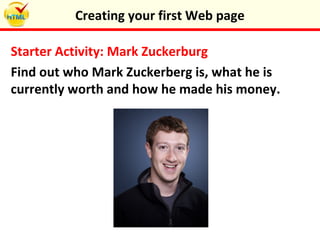
Starter Activity: Mark Zuckerburg
Find out who Mark Zuckerberg is, what he is
currently worth and how he made his money.
Creating your first Web page
Lesson
Objectives
Creating your first Web page
In this lesson you will learn about the essentials of html
and how to view the html code of websites. You will
create and preview your own first web page and start to
develop a homepage for the zoo.
 Understand what html is and what is does
 Understand how HTML documents are structured
 Understand the difference between tags and
elements
 Be able to create a simple HTML document
What is HTML?
•HTML stands for HyperText Markup Language.
The code uses “tags” that tell the web browser how
to display text and images on a web page.
•For example, to display ‘Cardinal Allen’ as a
heading on a web page you would need to write
the code: <h1>Cardinal Allen </h1>
•The red parts are known as HTML tags. In case
they tell the web browser to display the text as a
heading
Creating your first Web page
Task 1: Viewing the Code!
Even though HTML code is hidden you can still view
it.
1.Open Internet Explorer, Chrome or Firefox
2.Enter the address for a website
3.Click ‘View’ in the top toolbar and then click on
source. In a matter of seconds, you will see the
hidden code of that page.
How many lines of code has your webpage been
created from?
Creating your first Web page
HTML Essentials
1.HTML can be written in Notepad
2.HTML is not case sensitive
3.HTML tags are always surrounded by < and >
4.Words between < and > are called elements
5.Tags typically occur in 'begin-end' pairs. <tag> ……
</tag>
6.HTML documents are divided into two main
parts: the head and the body
Creating your first Web page
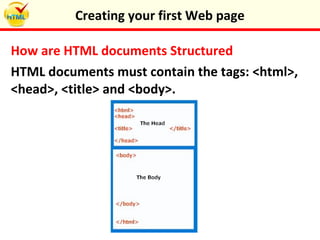
How are HTML documents Structured
HTML documents must contain the tags: <html>,
<head>, <title> and <body>.
Creating your first Web page
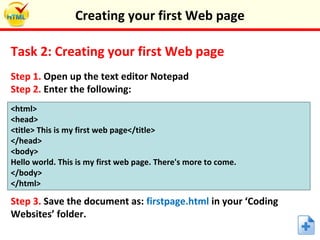
Task 2: Creating your first Web page
Step 1. Open up the text editor Notepad
Step 2. Enter the following:
<html>
<head>
<title> This is my first web page</title>
</head>
<body>
Hello world. This is my first web page. There's more to come.
</body>
</html>
Step 3. Save the document as: firstpage.html in your ‘Coding
Websites’ folder.
Creating your first Web page
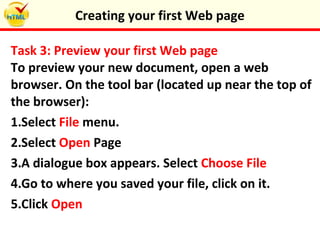
Task 3: Preview your first Web page
To preview your new document, open a web
browser. On the tool bar (located up near the top of
the browser):
1.Select File menu.
2.Select Open Page
3.A dialogue box appears. Select Choose File
4.Go to where you saved your file, click on it.
5.Click Open
Creating your first Web page
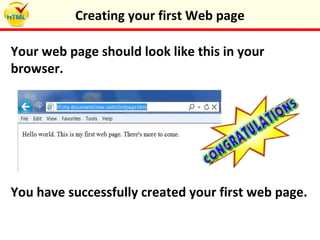
Your web page should look like this in your
browser.
You have successfully created your first web page.
Creating your first Web page
Task 4: Zoo Homepage
1.Using your skills and knowledge create a
homepage for the zoo website. You need to include
a title and some introductory text.
2.Save the document as: zoohomepage.html in
your ‘Coding Websites’ folder and then preview
your work.
Creating your first Web page
Plenary: Key Points
Write down five key points which summarise
today’s learning.
Creating your first Web page
Keywords
Objectives
 Title
 HTML
 Tag
 Source
 Elements
 Head
 Body
 Web browser




Creating your first Web page
 Understand what html is and what is does
 Understand how HTML documents are structured
 Understand the difference between tags and elements
 Be able to create a simple HTML document

Creating your first web page

  • 1.
  • 2.
    Starter Activity: MarkZuckerburg Find out who Mark Zuckerberg is, what he is currently worth and how he made his money. Creating your first Web page
  • 3.
    Lesson Objectives Creating your firstWeb page In this lesson you will learn about the essentials of html and how to view the html code of websites. You will create and preview your own first web page and start to develop a homepage for the zoo.  Understand what html is and what is does  Understand how HTML documents are structured  Understand the difference between tags and elements  Be able to create a simple HTML document
  • 4.
    What is HTML? •HTMLstands for HyperText Markup Language. The code uses “tags” that tell the web browser how to display text and images on a web page. •For example, to display ‘Cardinal Allen’ as a heading on a web page you would need to write the code: <h1>Cardinal Allen </h1> •The red parts are known as HTML tags. In case they tell the web browser to display the text as a heading Creating your first Web page
  • 5.
    Task 1: Viewingthe Code! Even though HTML code is hidden you can still view it. 1.Open Internet Explorer, Chrome or Firefox 2.Enter the address for a website 3.Click ‘View’ in the top toolbar and then click on source. In a matter of seconds, you will see the hidden code of that page. How many lines of code has your webpage been created from? Creating your first Web page
  • 6.
    HTML Essentials 1.HTML canbe written in Notepad 2.HTML is not case sensitive 3.HTML tags are always surrounded by < and > 4.Words between < and > are called elements 5.Tags typically occur in 'begin-end' pairs. <tag> …… </tag> 6.HTML documents are divided into two main parts: the head and the body Creating your first Web page
  • 7.
    How are HTMLdocuments Structured HTML documents must contain the tags: <html>, <head>, <title> and <body>. Creating your first Web page
  • 8.
    Task 2: Creatingyour first Web page Step 1. Open up the text editor Notepad Step 2. Enter the following: <html> <head> <title> This is my first web page</title> </head> <body> Hello world. This is my first web page. There's more to come. </body> </html> Step 3. Save the document as: firstpage.html in your ‘Coding Websites’ folder. Creating your first Web page
  • 9.
    Task 3: Previewyour first Web page To preview your new document, open a web browser. On the tool bar (located up near the top of the browser): 1.Select File menu. 2.Select Open Page 3.A dialogue box appears. Select Choose File 4.Go to where you saved your file, click on it. 5.Click Open Creating your first Web page
  • 10.
    Your web pageshould look like this in your browser. You have successfully created your first web page. Creating your first Web page
  • 11.
    Task 4: ZooHomepage 1.Using your skills and knowledge create a homepage for the zoo website. You need to include a title and some introductory text. 2.Save the document as: zoohomepage.html in your ‘Coding Websites’ folder and then preview your work. Creating your first Web page
  • 12.
    Plenary: Key Points Writedown five key points which summarise today’s learning. Creating your first Web page
  • 13.
    Keywords Objectives  Title  HTML Tag  Source  Elements  Head  Body  Web browser     Creating your first Web page  Understand what html is and what is does  Understand how HTML documents are structured  Understand the difference between tags and elements  Be able to create a simple HTML document