IT and Computing
Start of Each Lesson
•Line up quietly outside the room until you are
told to enter by your teacher
•Go quietly to your seat without running or
pushing and place your coat and other outdoor
clothes over the back of your chair
•Put your bag under the desk
•Log onto the computer
IT and Computing
Whole Class Learning Time
•Listen quietly when the teacher is talking or
someone is asking or answering a question
•Make sure you ask questions if you do not
understand what you are being asked to do
•When asked to turn off your monitors do so on
three – ‘one, two, three’; monitors should be off
now
IT and Computing
Independent Learning Time
•Complete all your work to the best of your ability
•Save your work into your ICT and Computing folder
and give it a sensible file name
•Stay in your seat, do not wander around the room
•If you don’t know how to do something:
– Ask an elbow partner or use the help function
for the application
– Put your hand up but do something else on the
task while you are waiting for the teacher
IT and Computing
End of the Lesson
•Write any extended work into your diary
•Save your work, log off and stand quietly by your
desk with your chair pushed in
IT and Computing
Units of Study
•Getting Started - 5 weeks
•IT/Computing Literacy Assessment - 1 week
•Functional Skills - 5 weeks
•Staying Safe Online - 4 weeks
•Computer Basics - 6 weeks
•Starting from Scratch - 9 weeks
•Sound Editing - 4 weeks
IT and Computing
Feedback
•For each unit along with teacher feedback you
will receive a working at level and an effort grade.
You may also receive merit points.
•Levels will be determined by matching your work
against a set of criteria, this will be explained at
the start of each unit.
•Effort grades will be determined using a ‘best fit’
approach.
•All feedback will be provided electronically.
IT and Computing
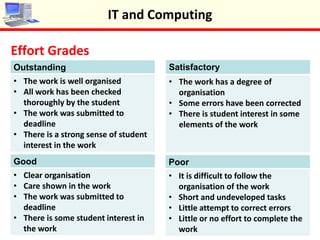
Effort Grades
IT and Computing
Outstanding
• The work is well organised
• All work has been checked
thoroughly by the student
• The work was submitted to
deadline
• There is a strong sense of student
interest in the work
Good
• Clear organisation
• Care shown in the work
• The work was submitted to
deadline
• There is some student interest in
the work
Satisfactory
• The work has a degree of
organisation
• Some errors have been corrected
• There is student interest in some
elements of the work
Poor
• It is difficult to follow the
organisation of the work
• Short and undeveloped tasks
• Little attempt to correct errors
• Little or no effort to complete the
work
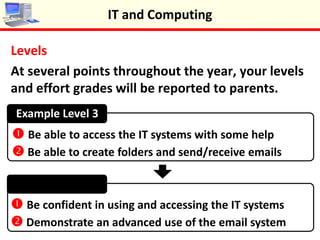
Levels
At several points throughout the year, your levels
and effort grades will be reported to parents.
IT and Computing
Example Level 3
Example Level 4
 Be able to access the IT systems with some help
 Be able to create folders and send/receive emails
 Be confident in using and accessing the IT systems
 Demonstrate an advanced use of the email system
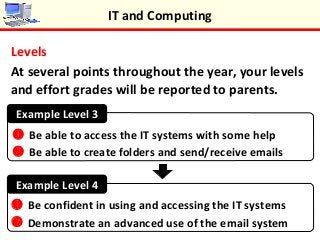
Levels
At several points throughout the year, your levels
and effort grades will be reported to parents.
IT and Computing
Example Level 3
Example Level 4
 Be able to access the IT systems with some help
 Be able to create folders and send/receive emails
 Be confident in using and accessing the IT systems
 Demonstrate an advanced use of the email system

Introduction

  • 1.
  • 2.
    Start of EachLesson •Line up quietly outside the room until you are told to enter by your teacher •Go quietly to your seat without running or pushing and place your coat and other outdoor clothes over the back of your chair •Put your bag under the desk •Log onto the computer IT and Computing
  • 3.
    Whole Class LearningTime •Listen quietly when the teacher is talking or someone is asking or answering a question •Make sure you ask questions if you do not understand what you are being asked to do •When asked to turn off your monitors do so on three – ‘one, two, three’; monitors should be off now IT and Computing
  • 4.
    Independent Learning Time •Completeall your work to the best of your ability •Save your work into your ICT and Computing folder and give it a sensible file name •Stay in your seat, do not wander around the room •If you don’t know how to do something: – Ask an elbow partner or use the help function for the application – Put your hand up but do something else on the task while you are waiting for the teacher IT and Computing
  • 5.
    End of theLesson •Write any extended work into your diary •Save your work, log off and stand quietly by your desk with your chair pushed in IT and Computing
  • 6.
    Units of Study •GettingStarted - 5 weeks •IT/Computing Literacy Assessment - 1 week •Functional Skills - 5 weeks •Staying Safe Online - 4 weeks •Computer Basics - 6 weeks •Starting from Scratch - 9 weeks •Sound Editing - 4 weeks IT and Computing
  • 7.
    Feedback •For each unitalong with teacher feedback you will receive a working at level and an effort grade. You may also receive merit points. •Levels will be determined by matching your work against a set of criteria, this will be explained at the start of each unit. •Effort grades will be determined using a ‘best fit’ approach. •All feedback will be provided electronically. IT and Computing
  • 8.
    Effort Grades IT andComputing Outstanding • The work is well organised • All work has been checked thoroughly by the student • The work was submitted to deadline • There is a strong sense of student interest in the work Good • Clear organisation • Care shown in the work • The work was submitted to deadline • There is some student interest in the work Satisfactory • The work has a degree of organisation • Some errors have been corrected • There is student interest in some elements of the work Poor • It is difficult to follow the organisation of the work • Short and undeveloped tasks • Little attempt to correct errors • Little or no effort to complete the work
  • 9.
    Levels At several pointsthroughout the year, your levels and effort grades will be reported to parents. IT and Computing Example Level 3 Example Level 4  Be able to access the IT systems with some help  Be able to create folders and send/receive emails  Be confident in using and accessing the IT systems  Demonstrate an advanced use of the email system
  • 10.
    Levels At several pointsthroughout the year, your levels and effort grades will be reported to parents. IT and Computing Example Level 3 Example Level 4  Be able to access the IT systems with some help  Be able to create folders and send/receive emails  Be confident in using and accessing the IT systems  Demonstrate an advanced use of the email system