
How to create 
a Google group 
by Fiona Beal
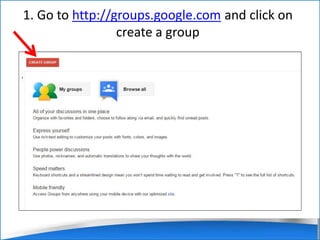
1. Go to http://groups.google.com and click on 
create a group
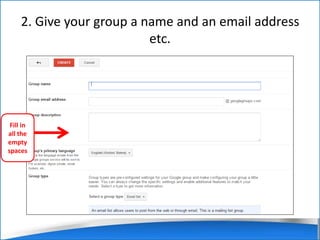
2. Give your group a name and an email address 
etc. 
Fill in 
all the 
empty 
spaces
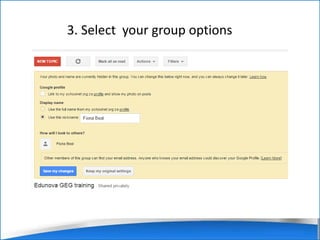
3. Select your group options
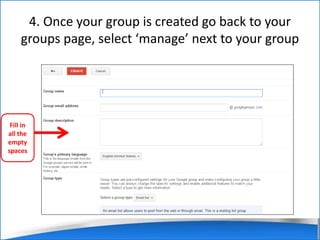
4. Once your group is created go back to your 
groups page, select ‘manage’ next to your group 
Fill in 
all the 
empty 
spaces
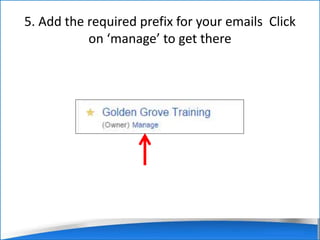
5. Add the required prefix for your emails Click 
on ‘manage’ to get there
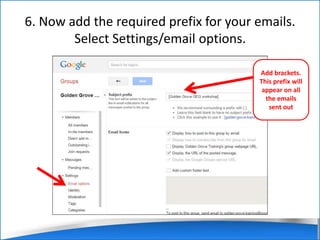
6. Now add the required prefix for your emails. 
Select Settings/email options. 
Add brackets. 
This prefix will 
appear on all 
the emails 
sent out
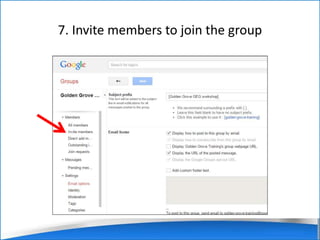
7. Invite members to join the group
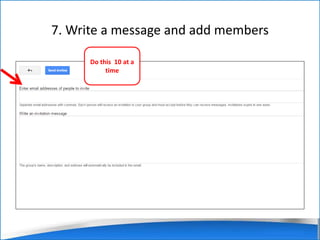
7. Write a message and add members 
Do this 10 at a 
time
That is it! 
Your group is now ready to be used for great 
communication. 
Further reading and viewing: 
• http://www.wikihow.com/Create-a-Google- 
Group 
• https://www.youtube.com/watch?v=AP4180c 
4tE4

Create a Google Group

  • 1.
    How to create a Google group by Fiona Beal
  • 2.
    1. Go tohttp://groups.google.com and click on create a group
  • 3.
    2. Give yourgroup a name and an email address etc. Fill in all the empty spaces
  • 4.
    3. Select yourgroup options
  • 5.
    4. Once yourgroup is created go back to your groups page, select ‘manage’ next to your group Fill in all the empty spaces
  • 6.
    5. Add therequired prefix for your emails Click on ‘manage’ to get there
  • 7.
    6. Now addthe required prefix for your emails. Select Settings/email options. Add brackets. This prefix will appear on all the emails sent out
  • 8.
    7. Invite membersto join the group
  • 9.
    7. Write amessage and add members Do this 10 at a time
  • 10.
    That is it! Your group is now ready to be used for great communication. Further reading and viewing: • http://www.wikihow.com/Create-a-Google- Group • https://www.youtube.com/watch?v=AP4180c 4tE4