Please sit near your group members
CPD 150 GROUP PROJECT RESEARCHDanielle Carlock480 425 6765d.carlock@sccmail.maricopa.edu
TODAY’S OBJECTIVESLearn about library services & materialsFor your topic find:One bookOne newspaper/magazine articleOne website
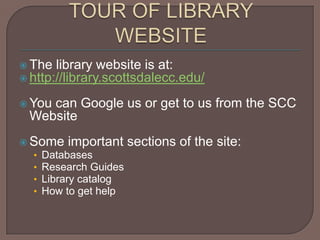
TOUR OF LIBRARY WEBSITEThe library website is at:http://library.scottsdalecc.edu/You can Google us or get to us from the SCC WebsiteSome important sections of the site:		DatabasesResearch GuidesLibrary catalogHow to get help
GROUP PROJECT REQUIRES:One newspaper/magazine articleOne websiteOne book (textbook can count)Let’s look at how to find these materials
FINDING BOOKSUse the library catalog, a search engine on the library’s website to find booksPrint vs. electronic booksFind a book on your topic
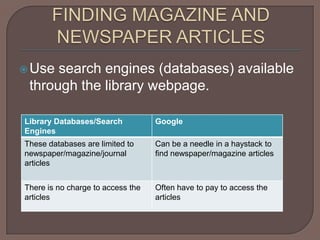
FINDING MAGAZINE AND NEWSPAPER ARTICLESUse search engines (databases) available through the library webpage.
LIBRARY DATABASES-SOME INFOCan only be accessed from library websiteMust know your MEID to get access off campusThere are several dozen databasesRecommended databases: Academic One File or National Newspapers
GETTING TO THE DATABASES1. Go to the library website: http://library.scottsdalecc.edu/2. Click on the Databases tab3. Click on Academic One File 4. If off campus, enter your MEID or SCC login when prompted5. Begin your search!
HOW TO USE ACADEMIC ONE FILE1. Type your search words into the box2. Click on “limit to documents with full text”3. Look at the results in the “Magazines” and “News” tabs4. Click “Full text” or “PDF” to open, save, email, or print articles
WORK WITH YOUR GROUP TO FIND AT LEAST ONE USEFUL MAGAZINE/NEWSPAPER ARTICLE FOR YOUR PROJECT
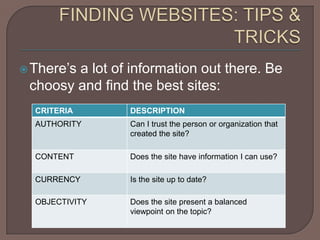
FINDING WEBSITES: TIPS & TRICKSThere’s a lot of information out there. Be choosy and find the best sites:
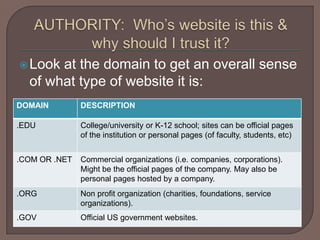
AUTHORITY:  Who’s website is this & why should I trust it?Look at the domain to get an overall sense of what type of website it is:
AUTHORITY: Who’s website is this anyway?Look on the page to see who created the page:About us Bottom of pageSee if there is any information about the group or person’s credentials.
Can these websites be trusted?“College students” and “stress management”Analyze two of the hits for authority:Stress management techniques for college students http://www.essortment.com/stress-management-techniques-college-students-40346.htmlUniversity Health Center | A Wellness Lifestyle Approachwww.uhs.uga.edu/stress/wellnesslifestyle.html
USE ADVANCE GOOGLE SEARCHING TO LIMIT DOMAINShttp://www.google.com/advanced_searchExample: your topic is stress management in college students. Sites in the .edu domain might be best. Limit to that domain.
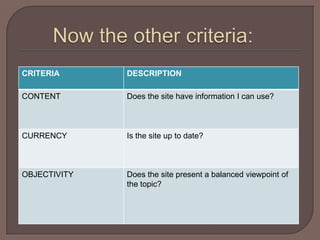
Now the other criteria:
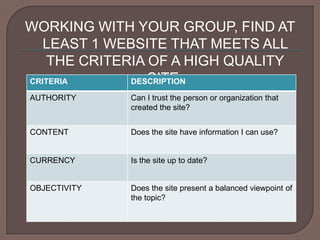
WORKING WITH YOUR GROUP, FIND AT LEAST 1 WEBSITE THAT MEETS ALL THE CRITERIA OF A HIGH QUALITY SITE:

CPD 150: Finding Sources

  • 1.
    Please sit nearyour group members
  • 2.
    CPD 150 GROUPPROJECT RESEARCHDanielle Carlock480 425 6765d.carlock@sccmail.maricopa.edu
  • 3.
    TODAY’S OBJECTIVESLearn aboutlibrary services & materialsFor your topic find:One bookOne newspaper/magazine articleOne website
  • 4.
    TOUR OF LIBRARYWEBSITEThe library website is at:http://library.scottsdalecc.edu/You can Google us or get to us from the SCC WebsiteSome important sections of the site: DatabasesResearch GuidesLibrary catalogHow to get help
  • 5.
    GROUP PROJECT REQUIRES:Onenewspaper/magazine articleOne websiteOne book (textbook can count)Let’s look at how to find these materials
  • 6.
    FINDING BOOKSUse thelibrary catalog, a search engine on the library’s website to find booksPrint vs. electronic booksFind a book on your topic
  • 7.
    FINDING MAGAZINE ANDNEWSPAPER ARTICLESUse search engines (databases) available through the library webpage.
  • 8.
    LIBRARY DATABASES-SOME INFOCanonly be accessed from library websiteMust know your MEID to get access off campusThere are several dozen databasesRecommended databases: Academic One File or National Newspapers
  • 9.
    GETTING TO THEDATABASES1. Go to the library website: http://library.scottsdalecc.edu/2. Click on the Databases tab3. Click on Academic One File 4. If off campus, enter your MEID or SCC login when prompted5. Begin your search!
  • 10.
    HOW TO USEACADEMIC ONE FILE1. Type your search words into the box2. Click on “limit to documents with full text”3. Look at the results in the “Magazines” and “News” tabs4. Click “Full text” or “PDF” to open, save, email, or print articles
  • 11.
    WORK WITH YOURGROUP TO FIND AT LEAST ONE USEFUL MAGAZINE/NEWSPAPER ARTICLE FOR YOUR PROJECT
  • 12.
    FINDING WEBSITES: TIPS& TRICKSThere’s a lot of information out there. Be choosy and find the best sites:
  • 13.
    AUTHORITY: Who’swebsite is this & why should I trust it?Look at the domain to get an overall sense of what type of website it is:
  • 14.
    AUTHORITY: Who’s websiteis this anyway?Look on the page to see who created the page:About us Bottom of pageSee if there is any information about the group or person’s credentials.
  • 15.
    Can these websitesbe trusted?“College students” and “stress management”Analyze two of the hits for authority:Stress management techniques for college students http://www.essortment.com/stress-management-techniques-college-students-40346.htmlUniversity Health Center | A Wellness Lifestyle Approachwww.uhs.uga.edu/stress/wellnesslifestyle.html
  • 16.
    USE ADVANCE GOOGLESEARCHING TO LIMIT DOMAINShttp://www.google.com/advanced_searchExample: your topic is stress management in college students. Sites in the .edu domain might be best. Limit to that domain.
  • 17.
    Now the othercriteria:
  • 18.
    WORKING WITH YOURGROUP, FIND AT LEAST 1 WEBSITE THAT MEETS ALL THE CRITERIA OF A HIGH QUALITY SITE: