How to Develop and
Write a Research Paper
Developed by
             Judy Harding
      Coordinator of User Services
            Wadsworth Library
                 and
           Christine McLaughlin
Director of the Academic Success Center
       and the Writing Center
Research Paper Assignment
 Identify what the assignment requires:
  topic possibilities
  number of sources
  type of sources (journal, book, Internet)
  citation requirements (MLA, APA, Chicago)
  presentation requirements (oral or written)
  length of paper
  due date
Getting Started
• Choose a topic based on requirements.
• Ask yourself questions:
   •   What do I know about the topic?
   •   What would I like to learn?
   •   What will others learn from reading my
       paper?
Formulate a Research Question
 Startby finding background information on
  your topic:
   – Resource Links to Background Information:
      How to Find Journal Articles in Electronic
       Databases
      How to find Books in the Online Catalog
Personal Exploration of
            Topic
Once you have familiarized yourself with the
topic, reflect on your initial impressions:
 Free Writing – just write down your thoughts
 List Key Words – list words that describe your topic
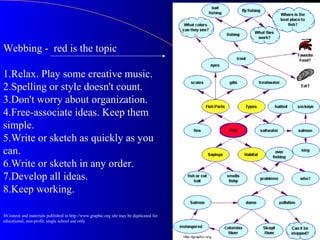
 Clustering/Webbing - create a web that links terms
  together (an example of webbing is on the next
  slide)
Webbing - red is the topic

1.Relax. Play some creative music.
2.Spelling or style doesn't count.
3.Don't worry about organization.
4.Free-associate ideas. Keep them
simple.
5.Write or sketch as quickly as you
can.
6.Write or sketch in any order.
7.Develop all ideas.
8.Keep working.

®Content and materials published in http://www.graphic.org site may be duplicated for
educational, non-profit, single school use only.
Formulate a Question
 Decide what question you want to answer
  with your research.
 Formulate a Question – the answer to the
  question becomes your thesis question.
 For example:
  – How does exercise improve someone’s mental health?
  – What are the effects of violent video games on elementary
    school children?
  – What was the impact of Cubism on early twentieth century
    culture?
  – Should elementary schools provide more programming in the
    arts?
Starting Your Research
 Decide  what kind of information that you
  need based on your research assignment.
 The information will be determined by your
  topic and assignment requirements:
  –   Current or historical or both
  –   Biographical information
  –   Criticism and analysis
  –   Statistics
  –   And More
Finding Information in Books
1.   Find Books – Check the library on-line catalog:
       Minuteman Library Network Catalog

1.   Search just Mount Ida College or all MLN libraries:
     For help with searching or stop by and see a librarian
     in the Wadsworth Library.
2.   Locate if the book is in the Wadsworth Library.
3.   If the book is not available at Mount Ida, you may
     directly request that the book be delivered to the
     Wadsworth Library or ask the Librarian to request
     the book for you.
Decide on the
           Usefulness of a Book
1.   How to Evaluate a Book for the
     Assignment:
      a.   Read title as clue to content
      b.   Scan table of contents
      c.   Search for key terms in book index
Finding Information in
                   Journals
1.   Find Journal Articles in electronic databases:
     Electronic Databases
2. Ask the Librarian about the best databases to
   search on your topic:
          i.e., InfoTrac Expanded Academic – Journal
           Articles - full text or citation (find actual journal
           through the library)
Decide on the Usefulness of
       Journal Articles
 Evaluate
         usefulness of journal articles for
 assignment:
  – Read title and subtitle as clue to content.
  – Read abstract if available.
  – Check key terms at end of article for related
    links to further explore topic.
Finding Information
     Using Internet Resources
1.   Click on Internet Resources part of the
     MLN homepage.

2.   Or select a search engine or website.
Decide on the Usefulness of
       Internet Site Information
1.    Evaluate Internet site:
       a.   find source of the site and information
             Who is responsible for the website?
             Who provided the information?
              • a person who is known in the field of study.
              • an organization that is reputable, i.e.
                American Cancer Society.
       a.   note currency of site – when was it last
            updated?
       b.   assess relevance of information to the
            assignment.
Ask a Librarian for Support
A  librarian can assist you with the process
 of finding information sources for your
 assignment.

 Stop
     by the library. Click for Library
 Hours.

 Contact   the librarian via e-mail or in person.
How to Avoid Plagiarism
 Howto Avoid Plagiarism – Review the
 PowerPoint presentation. It covers:
  – Citing sources of information.
  – How to paraphrase, summarize, quote.
  – How to cite your sources for your works cited
   page.
Taking Notes
 Organizing Your Research Using Note Cards
  – Read source actively by highlighting important
     information.
   – Record quotes that you may want to use later and
     include source and page number on card.
   – Create paraphrases and summaries on note cards
     directly from your research.
   – Record on each note card the author’s name and page
     number for later reference.
 Organizing  Your Research Using a Computer
  http://www.studygs.net/plagiarism.htm
Organize Your Research
 Construct   an Outline
Drafting
 Follow  your outline.
 Begin to incorporate research material into each
  paragraph.
 Cite your source for each quote, paraphrase and
  summary.
 Check with your instructor about which
  documentation and format style to use.
 Be sure to include your opinion and comments on
  the research.
 Write your conclusion based on your answer to
  your research question (your thesis).
Need Help with
         Writing Your Draft?
A   writing tutor can help you with how to
  outline and develop your paper.
 Make an appointment with a writing tutor at
  the Writing Center.
  http://www.mountida.edu/filelibrary/TutorS
  chedSpring2007.doc
Preparing the Final Version of
      Your Research Paper
 Revise  draft based on comments from your
  instructor and/or tutor
 Check cited sources for accuracy and MLA Style
  or another style format.
 Proof read your work – don’t forget the Spell and
  Grammar check in Microsoft Word.
 Add works cited page.
 Add title page.
Acknowledgements
 Theoriginal module was supported by the
 Massachusetts Board of Library Commissioners
 through a LSTA Grant.

 Marge  Lippincott, Dean of Information
 Technology and Learning Resources, coordinated
 the effort and created the PowerPoint with Judy
 Harding and Christine McLaughlin.

Library develop researchpaper_082107

  • 1.
    How to Developand Write a Research Paper
  • 2.
    Developed by Judy Harding Coordinator of User Services Wadsworth Library and Christine McLaughlin Director of the Academic Success Center and the Writing Center
  • 3.
    Research Paper Assignment Identify what the assignment requires:  topic possibilities  number of sources  type of sources (journal, book, Internet)  citation requirements (MLA, APA, Chicago)  presentation requirements (oral or written)  length of paper  due date
  • 4.
    Getting Started • Choosea topic based on requirements. • Ask yourself questions: • What do I know about the topic? • What would I like to learn? • What will others learn from reading my paper?
  • 5.
    Formulate a ResearchQuestion  Startby finding background information on your topic: – Resource Links to Background Information:  How to Find Journal Articles in Electronic Databases  How to find Books in the Online Catalog
  • 6.
    Personal Exploration of Topic Once you have familiarized yourself with the topic, reflect on your initial impressions:  Free Writing – just write down your thoughts  List Key Words – list words that describe your topic  Clustering/Webbing - create a web that links terms together (an example of webbing is on the next slide)
  • 7.
    Webbing - redis the topic 1.Relax. Play some creative music. 2.Spelling or style doesn't count. 3.Don't worry about organization. 4.Free-associate ideas. Keep them simple. 5.Write or sketch as quickly as you can. 6.Write or sketch in any order. 7.Develop all ideas. 8.Keep working. ®Content and materials published in http://www.graphic.org site may be duplicated for educational, non-profit, single school use only.
  • 8.
    Formulate a Question Decide what question you want to answer with your research.  Formulate a Question – the answer to the question becomes your thesis question.  For example: – How does exercise improve someone’s mental health? – What are the effects of violent video games on elementary school children? – What was the impact of Cubism on early twentieth century culture? – Should elementary schools provide more programming in the arts?
  • 9.
    Starting Your Research Decide what kind of information that you need based on your research assignment.  The information will be determined by your topic and assignment requirements: – Current or historical or both – Biographical information – Criticism and analysis – Statistics – And More
  • 10.
    Finding Information inBooks 1. Find Books – Check the library on-line catalog: Minuteman Library Network Catalog 1. Search just Mount Ida College or all MLN libraries: For help with searching or stop by and see a librarian in the Wadsworth Library. 2. Locate if the book is in the Wadsworth Library. 3. If the book is not available at Mount Ida, you may directly request that the book be delivered to the Wadsworth Library or ask the Librarian to request the book for you.
  • 11.
    Decide on the Usefulness of a Book 1. How to Evaluate a Book for the Assignment: a. Read title as clue to content b. Scan table of contents c. Search for key terms in book index
  • 12.
    Finding Information in Journals 1. Find Journal Articles in electronic databases: Electronic Databases 2. Ask the Librarian about the best databases to search on your topic:  i.e., InfoTrac Expanded Academic – Journal Articles - full text or citation (find actual journal through the library)
  • 13.
    Decide on theUsefulness of Journal Articles  Evaluate usefulness of journal articles for assignment: – Read title and subtitle as clue to content. – Read abstract if available. – Check key terms at end of article for related links to further explore topic.
  • 14.
    Finding Information Using Internet Resources 1. Click on Internet Resources part of the MLN homepage. 2. Or select a search engine or website.
  • 15.
    Decide on theUsefulness of Internet Site Information 1. Evaluate Internet site: a. find source of the site and information  Who is responsible for the website?  Who provided the information? • a person who is known in the field of study. • an organization that is reputable, i.e. American Cancer Society. a. note currency of site – when was it last updated? b. assess relevance of information to the assignment.
  • 16.
    Ask a Librarianfor Support A librarian can assist you with the process of finding information sources for your assignment.  Stop by the library. Click for Library Hours.  Contact the librarian via e-mail or in person.
  • 17.
    How to AvoidPlagiarism  Howto Avoid Plagiarism – Review the PowerPoint presentation. It covers: – Citing sources of information. – How to paraphrase, summarize, quote. – How to cite your sources for your works cited page.
  • 18.
    Taking Notes  OrganizingYour Research Using Note Cards – Read source actively by highlighting important information. – Record quotes that you may want to use later and include source and page number on card. – Create paraphrases and summaries on note cards directly from your research. – Record on each note card the author’s name and page number for later reference.  Organizing Your Research Using a Computer http://www.studygs.net/plagiarism.htm
  • 19.
    Organize Your Research Construct an Outline
  • 20.
    Drafting  Follow your outline.  Begin to incorporate research material into each paragraph.  Cite your source for each quote, paraphrase and summary.  Check with your instructor about which documentation and format style to use.  Be sure to include your opinion and comments on the research.  Write your conclusion based on your answer to your research question (your thesis).
  • 21.
    Need Help with Writing Your Draft? A writing tutor can help you with how to outline and develop your paper.  Make an appointment with a writing tutor at the Writing Center. http://www.mountida.edu/filelibrary/TutorS chedSpring2007.doc
  • 22.
    Preparing the FinalVersion of Your Research Paper  Revise draft based on comments from your instructor and/or tutor  Check cited sources for accuracy and MLA Style or another style format.  Proof read your work – don’t forget the Spell and Grammar check in Microsoft Word.  Add works cited page.  Add title page.
  • 23.
    Acknowledgements  Theoriginal modulewas supported by the Massachusetts Board of Library Commissioners through a LSTA Grant.  Marge Lippincott, Dean of Information Technology and Learning Resources, coordinated the effort and created the PowerPoint with Judy Harding and Christine McLaughlin.