CORPORATE
ESPIONAGE
James McFadyen and Jacolon Walker
(jtm) (disable)
Outline
• Part I: Intro
• Corporate Espionage, Corporate Attitude
• Part II: Enterprise Security Technology
• The different technology
• Part II: Evasion techniques
• Can’t stop me!
PART I
Introduction
“Corporate Espionage”
• Not really, but…
• Focuses on technology found in real business
environments.
• Considers the human element - the security analyst.
• Discusses techniques used by attackers to evade
detection and compromise protected networks.
• This is NOT comprehensive – the purpose is to introduce
the concepts.
Corporate Attitude
• Motivating factor for security is not security itself!
• Business Continuity - $$$
• Compliance – PCI / HIPAA etc…
• Management and executives do care about security, but
things are often ignored if it does not directly affect their
revenue stream or cause some compliance violation.
• This fact is useful for attackers – comprehensive security
is VERY difficult.
S.O.C
• Security Operations Center
• Comprised of analysts who monitor for attacks in real time
for scans, attacks, compromises, policy violations and
infections.
• 24/7
• Research and create signatures and policies for client
networks
• MSSP (Managed Security Service Provider)
• Have many clients who outsource their security needs to the S.O.C
PART II
Enterprise Security Technology
Firewall
• Software or hardware based
• Controls incoming / outgoing network traffic
• Firewalls today can handle routing / NAT
• Hardware firewalls generally sit at network perimeter
• Stateful packet inspection:
• Maintain information and context in a session
• Stateless packet inspection:
• Simpler filtering, does not keep track of active session
• Rules define which traffic gets accepted and rejected.
• Usually the first line of defense.
Firewall
• Hardware examples:
• Cisco ASA
• SonicWALL
• Watchguard
• Software examples:
• pf
• iptables
• Windows Firewall
Firewall
IDS / HIDS
• IDS: Intrusion Detection System
• HIDS: Host based Intrusion Detection System
• Appliance (software or hardware) that detects malicious
traffic, or any traffic violating the defined policies.
• Use keyword matching or content matching
• Searching for something specific within a packet or session
• Can also use regular expression matching in payload
• Ex: content:”sEleCt”; pcre:”/^INSERT INTO”
• Analyst would see the alerts based on priority
• False positives
IDS / HIDS
• IDS
• Snort
• Suricata
• HIDS
• OSSEC
IDS / HIDS
IPS
• Intrusion Prevention System
• Similar to IDS, but also attempts to prevent the traffic
from passing through the device.
• Rule / Signature based
• Like a firewall, the packets will be dropped.
• Rules and signatures are more complex than that of a
firewall.
IPS
• Sourcefire
• TippingPoint
• McAfee IPS
• Fortinet
• Secureworks
Web Application Firewall
• Software or hardware
• Plugins or filters
• Applies to HTTP sessions
• Some vendors can handle HTTPS
• Checks for web attacks such as XSS and SQL Injection
• Content matching, regular expressions
Web Application Firewall
• Blue Coat
• Barracuda
• Trustwave
• Imperva
Log Analysis
• Dynamic or static
• Great forensics tools, but can be difficult to find security
events in real time.
• Regular expression searches
• Keyword searches
• Solution such as Splunk can allow analyst to search for
events easily.
• Pulls from logs, not network traffic
• Splunk
S.I.E.M
• Security Information & Events Management
• Normalizes and correlates network traffic to identify
security events and reduce false positive
• Pulls in log data from multiple types of devices
• Identifies common attributes and associates different
events where applicable
• Alerts on actionable security events
• Helpful in compliance reporting
• Set complex rules to define expected behavior of a
network.
S.I.E.M
• HAWK eyeCon
• Nitro Security
• ArcSight
• RSA enVision
• Q1 Labs
PART III
Evasion Techniques
Tools
• Useful tools:
• hping3, firewalk, nmap, custom tools (scapy is great!), netcat,
tcpdump, wireshark, fragroute
• … so you discovered a firewall, now what?
Evasion: Basics
• Firewalls will drop packets that do not adhere to protocol
specification
• Ex: Sending a SYN ACK without first sending SYN is not how TCP
works!
• Tools like “xprobe” can be used to detect operating
systems behind a firewall by using the TCP / UDP / ICMP
protocols. This is ‘fingerprinting’.
• Firewalls behave differently!
• Firewalking:
• Send TCP / UDP / ICMP packets and examine response
• Window size, sequence numbers, type encode, etc…
TCP Header
struct tcpheader {
unsigned short int th_sport;
unsigned short int th_dport;
unsigned int th_seq;
unsigned int th_ack;
unsigned char th_x2:4, th_off:4;
unsigned char th_flags;
unsigned short int th_win;
unsigned short int th_sum;
unsigned short int th_urp;
}; /* total tcp header length: 20 bytes (=160 bits) */
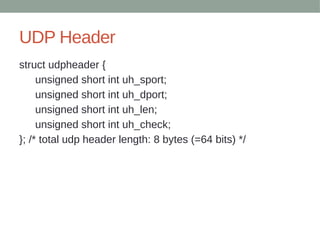
UDP Header
struct udpheader {
unsigned short int uh_sport;
unsigned short int uh_dport;
unsigned short int uh_len;
unsigned short int uh_check;
}; /* total udp header length: 8 bytes (=64 bits) */
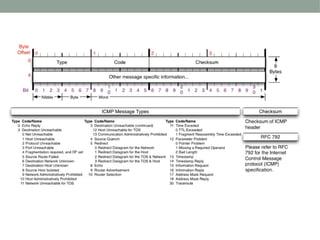
ICMP Header
struct icmpheader {
unsigned char icmp_type;
unsigned char icmp_code;
unsigned short int icmp_cksum;
/* The following data structures are ICMP type specific
*/
unsigned short int icmp_id;
unsigned short int icmp_seq;
}; /* total icmp header length: 8 bytes (=64 bits) */
Evasion: Scan Techniques
• Different Types of scans will produce different results
• XMAS scan: FIN PSH URG flags set on TCP segment.
• NULL scan: TCP flags are set to all 0
• FIN scan: FIN flag set on TCP segment
• ACK scan: ACK flag set on TCP segment
• SYN scan: SYN flag set
• SYN ACK: SYN ACK flag set
• FTP Bounce: uses another host to act as proxy
• Zombie Scan: Use idle host on a network to hide real
source address
Evasion: Scan Techniques
• Specify different source port
• Some poorly configured systems may block packets from a certain
source port
• Default UNIX based firewalls can be bypassed with an
XMAS or a NULL scan.
• Inverted Technique – crafting malformed TCP packets
• Closed ports will respond with RA (Reset Acknowledge) – RFC793
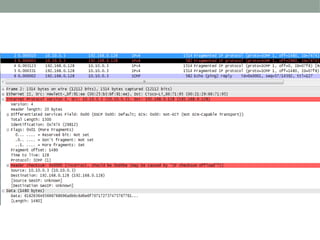
Evasion: Fragmentation
• Can be used to bypass Firewalls, IDS
• Can also cause Denial of Service by exhausting
resources
• IP packet has a MTU (maximum transmission unit) that is
smaller than the MTU of the current network it is
traversing.
• Can occur on ANY router the packet travels through
• Destination host will reassemble the packet
Evasion: Fragmentation
• Fragments of packets must include:
• Fragment ID # (IP ID)
• Offset (multiple of 8 bytes)
• Length of the data
• MF flag – more fragments
Evasion: Fragmentation
• Fragment Offset
• Fragment offset field maximum = 8191 (13 bits)
• Max IP packet = 65535 bytes
• Fragment offset * 8 = real offset
Evasion: Fragmentation
• Sample tcpdump output
ping.com > myhost.com: icmp: echo request (frag
21223:1480@0+)
ping.com > myhost.com: (frag 21223:1480@1480+)
ping.com > myhost.com: (frag 21223:1480@2960)
Evasion: Fragmentation
• Protocol header found in first fragment
• Stateful packet filtering sees all fragments as one packet
• Stateless sees each individually
• Packet can have DF (don’t fragment) flag set, which tells
routers that it cannot be fragmented.
• Routers will respond with “unreachable – need to frag”
message if DF flag is set and it needs to be fragmented.
• ICMP error message returns MTU of the network which is
useful in Path MTU discovery.
• Can leverage this to discover MTU of a network
• router.ru > mail.mysite.ru: icmp: host.ru unreachable – need to frag
(mtu 308) (DF)
Evasion: Fragmentation
• Fragment packets with nmap:
• nmap -f host
• Specify MTU with nmap
• nmap --mtu host
Evasion: Source Routing
• Loose Source Routing:
• Use any intermediate gateway
• This will cause different source IP which could potentially be
whitelisted (trusted device).
• Strict Source Routing:
• Defining your own route for a network
• Need to be on directly connected network
Evading Snort Rules
• Simple case:
• A rule exists to pick up certain user agent
• Simply change user agent.
Snort Example Signatures
•# jwalker
•alert tcp $EXTERNAL_NET $HTTP_PORTS -> $HOME_NET any (msg:"ET WORM AirOS admin.cgi/css Exploit Attempt";
flow:established,to_server; content:"POST"; http_method; content:"/admin.cgi/"; http_uri; fast_pattern:only; content:".css HTTP/1.";
http_raw_header; content:"Content-Type|3A| multipart/form-data"; http_header; reference:url,seclists.org/fulldisclosure/2011/Dec/419;
classtype:trojan-activity; sid:2014041; rev:2;)
•# jwalker
•alert udp $HOME_NET any -> $EXTERNAL_NET 53 (msg:"DNS Query to msnsolution.nicaze.net"; content:"msnsolution|06|nicaze|03|net";
offset:12; fast_pattern; reference:md5,89332c92d0360095e2dda8385d400258; sid:10000500; rev:1;)
•# jwalker
•alert tcp $EXTERNAL_NET any -> $HOME_NET $HTTP_PORTS (msg:"ET LOIC Javascript DDoS Inbound"; flow:established,to_server;
content:"GET /?id="; nocase; pcre:"/[0-9]{13}/"; content:"&msg="; nocase; detection_filter:track by_src, count 100, seconds 60;
reference:url,isc.sans.org/diary/Javascript+DDoS+Tool+Analysis/12442; reference:url,www.wired.com/threatlevel/2012/01/anons-rickroll-botnet;
classtype:attempted-dos; sid:10000101; rev:1;)
•# jwalker
•alert tcp $HOME_NET any -> $EXTERNAL_NET $HTTP_PORTS (msg:"ET LOIC Javascript DDoS Outbound"; flow:established,from_client;
content:"GET /?id="; nocase; pcre:"/[0-9]{13}/"; content:"&msg="; nocase; detection_filter:track by_src, count 100, seconds 60;
reference:url,isc.sans.org/diary/Javascript+DDoS+Tool+Analysis/12442; reference:url,www.wired.com/threatlevel/2012/01/anons-rickroll-botnet;
classtype:attempted-dos; sid:10000102; rev:1;)
•# jwalker
•alert udp $EXTERNAL_NET any -> $HOME_NET any (msg:"Combat Arms UDP DDoS"; detection_filter:track by_src, count 10, seconds 30;
dsize:1024<>2048; sid:10000103; rev:1;)
•# jwalker
•alert tcp $EXTERNAL_NET any -> $HOME_NET $HTTP_PORTS (msg:"ET SCAN FHScan core User-Agent Detect"; flow:to_server,established;
content:"FHScan Core 1."; http_header; reference:url,www.tarasco.org/security/FHScan_Fast_HTTP_Vulnerability_Scanner/index.html;
classtype:attempted-recon; sid:2014541; rev:4;)
•# jwalker
•alert tcp $HOME_NET any -> $EXTERNAL_NET 443 (msg:"ET TROJAN Possible Variant.Kazy.53640 Malformed Client Hello SSL 3.0
(Session_Id length greater than Client_Hello Length)"; flow:to_server,established; content:"|16 03 00|"; depth:3; content:"|01 00 00 33 03 00|";
distance:2; within:6; byte_test:1,>,51,32,relative; reference:md5,a01d75158cf4618677f494f9626b1c4c; classtype:trojan-activity; sid:2014634;
rev:3;)
Snort Rule Example
• Sample w3af signature:
(envelope) – (alert, log, passive) (protocol) (usually defined as any) (anything coming inbound) (to
our servers that are defined) (ports)
alert tcp $EXTERNAL_NET any -> $HTTP_SERVERS $HTTP_PORTS (msg:"ET SCAN w3af User
Agent"; flow: established,to_server; content:"User-Agent|3a| w3af.sourceforge.net"; http_header;
fast_pattern:only; reference:url,w3af.sourceforge.net; reference:url,doc.emergingthreats.net/2007757;
classtype:attempted-recon; sid:2007757; rev:12;)
(message tag) defines what the signature name is (alert that pops up)
alert tcp $EXTERNAL_NET any -> $HTTP_SERVERS $HTTP_PORTS (msg:"ET SCAN w3af User
Agent"; flow: established,to_server; content:"User-Agent|3a| w3af.sourceforge.net"; http_header;
fast_pattern:only; reference:url,w3af.sourceforge.net; reference:url,doc.emergingthreats.net/2007757;
classtype:attempted-recon; sid:2007757; rev:12;)
(rule) what to look for
alert tcp $EXTERNAL_NET any -> $HTTP_SERVERS $HTTP_PORTS (msg:"ET SCAN w3af User
Agent"; flow: established,to_server; content:"User-Agent|3a| w3af.sourceforge.net";
http_header; fast_pattern:only; reference:url,w3af.sourceforge.net;
reference:url,doc.emergingthreats.net/2007757; classtype:attempted-recon; sid:2007757; rev:12;)
Snort Rule Example
• Other tags – flow, content, reference, classtype, sid, rev
• Classtype – different classes lump together alerts of similar
priorities
• sid: (signature ID) – can track signature through their life cycle on
Emerging Threats or through Sourcefire. “rev” is the revision
number for the signature ID.
• Need to understand the HTTP headers!!
Snort Rule Example
• Attacker settings:
• Snort Alerts:
Snort Rules Example
• User agent can be changed..
• Since it looks for that User Agent, this won’t be detected
by that specific rule.
MS08-067
• Extremely popular.
• First attempt uses a meterpreter reverse TCP payload…
• Success!
MS08-067
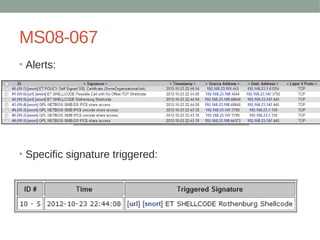
• But Snort looked
at the payload…
MS08-067
• Alerts:
• Specific signature triggered:
MS08-067
• Changing the payload will bypass this specific signature.
• Payload was changed to a reverse https handler
About the payload
• Switching the payload evaded the signature.
• The IDS / IPS could be detecting other payloads, or even
characteristics of a payload.
• Using different encodings for the payload can be effective.
Tunnels
• Scenario:
• Attacker is blocked by firewall (System A).
• Attacker finds another host (System B), perhaps a partner website
or a portal with open services.
• Attacker breaches that host (System B), and tunnels through to the
original target (System A).
• System B’s IP address may be whitelisted, or maybe even on a
VPN.
• Tunneling allows us to attack from different computers.
• Good for “anonymous pentesting”.
Tunnels
• Ex: Attacker can sniff traffic from System B and steal valid
MAC addresses, spoof their MAC, and gain access to
networks that use MAC address authentication
• With the new MAC address, the attacker may have less
restrictions.
• May have access to new subnets.
• Firewalls, IDS, etc.. may not detect attacks or malicious
behavior because it is originating from a trusted host.
• Better rules can fix this, though.
Tunnels
• “SSH Gymnastics and Tunneling with ProxyChains” – magikh0e
• Tunneling through hosts using proxychains
• Explanation of how to reach protected hosts by tunneling through a
different host
• Tunnel all UDP/TCP traffic from a specific process over a proxy.
• From magikh0e’s SSH Gymnastics and Tunneling with ProxyChains
• http://magikh0e.ihtb.org/pubPapers/ssh_gymnastics_tunneling.html
Tunnels and Logging
• Can hop through Tor.
• Bounce through different countries.
• Many systems can be easily compromised by attackers
and used to hide their identity.
• General attack set up:
• Attacker -> Cracked wifi -> Compromised Host -> Compromised
Host -> Compromised Host -> ……. -> Target Host
Tunnels and Logging
• How do attackers find machines to tunnel through?
• Leverage vulnerabilities to gain remote access.
• Backdoor, rootkits.
• How do attackers use these machines to stay
anonymous?
• Forward all of their traffic through compromised machine.
• Bouncing through a single machine is not a good idea.
• Multiple hosts on multiple devices in multiple countries.
Tunnels and Logging
• Automation example (not tested. The grep –b4 would probably need to be
more dynamic):
• max_ms=250
• hosts=( $(nmap -PN -sV -p$port $host | grep -b4 $service | egrep -o '[[:digit:]]{1,3}.[[:digit:]]
{1,3}.[[:digit:]]{1,3}.[[:digit:]]{1,3}') )
• for ip in "${hosts[@]}"
• do
• # want to make sure ping response time is within our specified $max_ms
• time=$(ping -c1 $ip | egrep -o 'time=[0-9]{1,5}' | sed -e 's/time=//g' | tr -d 'n')
• if [[ "${time:-1000}" -ge $max_ms ]]
• then
• echo "$ip $time too slow, ignoring"
• else
• echo "$ip $time OK.. attempting to connect"
• # do stuff here with discovered device...
• fi
• done
Tunnels and Logging
• Useful for finding target by known vulnerable “service”.
• Once service is discovered, attacker can try to exploit the
vulnerable service, or brute force.
• Once access is gained, target can be used as a tunnel or
a proxy for web traffic.
• When analysts see attacks, they do not see the real
hosts.
• Tracking down the attackers becomes difficult, the log
data does not provide much useful information.
• Blacklisting IP addresses is futile.
Proprietary Protocols
• It can be difficult to write signatures for proprietary
protocols.
• A lot of traffic can appear to be legitimate, but actually
malicious.
• The protocol specification and the source code for the
service may not be readily available.
• The analyst will have hard time detecting these.
• Attacks can target the application to gain access to the
network or trigger an application layer DoS.
• Example: game servers
References
• http://www.linuxjunkies.org/network/tcpip/intro8.html
• http://
en.wikipedia.org/wiki/Intrusion_detection_system_evasio
n_techniques
• http://
www.sans.org/security-resources/idfaq/fragroute.php
• http://
csis.bits-pilani.ac.in/faculty/dk_tyagi/Study_stuffs/raw.html
• http://pentestlab.wordpress.com/2012/04/02/nmap-techniqu
es-for-avoiding-firewalls
/
• http://darkcodecracker.blogspot.com/2009/03/hping-tutoria
l.html
References
• “TCP/IP Illustrated, Vol. 1: The Protocols (Addison-Wesley
Professional Computing Series)” – W. Richard Stevens

Coporate Espionage

  • 1.
    CORPORATE ESPIONAGE James McFadyen andJacolon Walker (jtm) (disable)
  • 2.
    Outline • Part I:Intro • Corporate Espionage, Corporate Attitude • Part II: Enterprise Security Technology • The different technology • Part II: Evasion techniques • Can’t stop me!
  • 3.
  • 4.
    “Corporate Espionage” • Notreally, but… • Focuses on technology found in real business environments. • Considers the human element - the security analyst. • Discusses techniques used by attackers to evade detection and compromise protected networks. • This is NOT comprehensive – the purpose is to introduce the concepts.
  • 5.
    Corporate Attitude • Motivatingfactor for security is not security itself! • Business Continuity - $$$ • Compliance – PCI / HIPAA etc… • Management and executives do care about security, but things are often ignored if it does not directly affect their revenue stream or cause some compliance violation. • This fact is useful for attackers – comprehensive security is VERY difficult.
  • 6.
    S.O.C • Security OperationsCenter • Comprised of analysts who monitor for attacks in real time for scans, attacks, compromises, policy violations and infections. • 24/7 • Research and create signatures and policies for client networks • MSSP (Managed Security Service Provider) • Have many clients who outsource their security needs to the S.O.C
  • 7.
  • 8.
    Firewall • Software orhardware based • Controls incoming / outgoing network traffic • Firewalls today can handle routing / NAT • Hardware firewalls generally sit at network perimeter • Stateful packet inspection: • Maintain information and context in a session • Stateless packet inspection: • Simpler filtering, does not keep track of active session • Rules define which traffic gets accepted and rejected. • Usually the first line of defense.
  • 9.
    Firewall • Hardware examples: •Cisco ASA • SonicWALL • Watchguard • Software examples: • pf • iptables • Windows Firewall
  • 10.
  • 11.
    IDS / HIDS •IDS: Intrusion Detection System • HIDS: Host based Intrusion Detection System • Appliance (software or hardware) that detects malicious traffic, or any traffic violating the defined policies. • Use keyword matching or content matching • Searching for something specific within a packet or session • Can also use regular expression matching in payload • Ex: content:”sEleCt”; pcre:”/^INSERT INTO” • Analyst would see the alerts based on priority • False positives
  • 12.
    IDS / HIDS •IDS • Snort • Suricata • HIDS • OSSEC
  • 13.
  • 14.
    IPS • Intrusion PreventionSystem • Similar to IDS, but also attempts to prevent the traffic from passing through the device. • Rule / Signature based • Like a firewall, the packets will be dropped. • Rules and signatures are more complex than that of a firewall.
  • 15.
    IPS • Sourcefire • TippingPoint •McAfee IPS • Fortinet • Secureworks
  • 16.
    Web Application Firewall •Software or hardware • Plugins or filters • Applies to HTTP sessions • Some vendors can handle HTTPS • Checks for web attacks such as XSS and SQL Injection • Content matching, regular expressions
  • 17.
    Web Application Firewall •Blue Coat • Barracuda • Trustwave • Imperva
  • 18.
    Log Analysis • Dynamicor static • Great forensics tools, but can be difficult to find security events in real time. • Regular expression searches • Keyword searches • Solution such as Splunk can allow analyst to search for events easily. • Pulls from logs, not network traffic • Splunk
  • 19.
    S.I.E.M • Security Information& Events Management • Normalizes and correlates network traffic to identify security events and reduce false positive • Pulls in log data from multiple types of devices • Identifies common attributes and associates different events where applicable • Alerts on actionable security events • Helpful in compliance reporting • Set complex rules to define expected behavior of a network.
  • 20.
    S.I.E.M • HAWK eyeCon •Nitro Security • ArcSight • RSA enVision • Q1 Labs
  • 21.
  • 22.
    Tools • Useful tools: •hping3, firewalk, nmap, custom tools (scapy is great!), netcat, tcpdump, wireshark, fragroute • … so you discovered a firewall, now what?
  • 23.
    Evasion: Basics • Firewallswill drop packets that do not adhere to protocol specification • Ex: Sending a SYN ACK without first sending SYN is not how TCP works! • Tools like “xprobe” can be used to detect operating systems behind a firewall by using the TCP / UDP / ICMP protocols. This is ‘fingerprinting’. • Firewalls behave differently! • Firewalking: • Send TCP / UDP / ICMP packets and examine response • Window size, sequence numbers, type encode, etc…
  • 24.
    TCP Header struct tcpheader{ unsigned short int th_sport; unsigned short int th_dport; unsigned int th_seq; unsigned int th_ack; unsigned char th_x2:4, th_off:4; unsigned char th_flags; unsigned short int th_win; unsigned short int th_sum; unsigned short int th_urp; }; /* total tcp header length: 20 bytes (=160 bits) */
  • 26.
    UDP Header struct udpheader{ unsigned short int uh_sport; unsigned short int uh_dport; unsigned short int uh_len; unsigned short int uh_check; }; /* total udp header length: 8 bytes (=64 bits) */
  • 28.
    ICMP Header struct icmpheader{ unsigned char icmp_type; unsigned char icmp_code; unsigned short int icmp_cksum; /* The following data structures are ICMP type specific */ unsigned short int icmp_id; unsigned short int icmp_seq; }; /* total icmp header length: 8 bytes (=64 bits) */
  • 30.
    Evasion: Scan Techniques •Different Types of scans will produce different results • XMAS scan: FIN PSH URG flags set on TCP segment. • NULL scan: TCP flags are set to all 0 • FIN scan: FIN flag set on TCP segment • ACK scan: ACK flag set on TCP segment • SYN scan: SYN flag set • SYN ACK: SYN ACK flag set • FTP Bounce: uses another host to act as proxy • Zombie Scan: Use idle host on a network to hide real source address
  • 31.
    Evasion: Scan Techniques •Specify different source port • Some poorly configured systems may block packets from a certain source port • Default UNIX based firewalls can be bypassed with an XMAS or a NULL scan. • Inverted Technique – crafting malformed TCP packets • Closed ports will respond with RA (Reset Acknowledge) – RFC793
  • 32.
    Evasion: Fragmentation • Canbe used to bypass Firewalls, IDS • Can also cause Denial of Service by exhausting resources • IP packet has a MTU (maximum transmission unit) that is smaller than the MTU of the current network it is traversing. • Can occur on ANY router the packet travels through • Destination host will reassemble the packet
  • 33.
    Evasion: Fragmentation • Fragmentsof packets must include: • Fragment ID # (IP ID) • Offset (multiple of 8 bytes) • Length of the data • MF flag – more fragments
  • 35.
    Evasion: Fragmentation • FragmentOffset • Fragment offset field maximum = 8191 (13 bits) • Max IP packet = 65535 bytes • Fragment offset * 8 = real offset
  • 36.
  • 37.
    Evasion: Fragmentation • Sampletcpdump output ping.com > myhost.com: icmp: echo request (frag 21223:1480@0+) ping.com > myhost.com: (frag 21223:1480@1480+) ping.com > myhost.com: (frag 21223:1480@2960)
  • 38.
    Evasion: Fragmentation • Protocolheader found in first fragment • Stateful packet filtering sees all fragments as one packet • Stateless sees each individually • Packet can have DF (don’t fragment) flag set, which tells routers that it cannot be fragmented. • Routers will respond with “unreachable – need to frag” message if DF flag is set and it needs to be fragmented. • ICMP error message returns MTU of the network which is useful in Path MTU discovery. • Can leverage this to discover MTU of a network • router.ru > mail.mysite.ru: icmp: host.ru unreachable – need to frag (mtu 308) (DF)
  • 39.
    Evasion: Fragmentation • Fragmentpackets with nmap: • nmap -f host • Specify MTU with nmap • nmap --mtu host
  • 42.
    Evasion: Source Routing •Loose Source Routing: • Use any intermediate gateway • This will cause different source IP which could potentially be whitelisted (trusted device). • Strict Source Routing: • Defining your own route for a network • Need to be on directly connected network
  • 43.
    Evading Snort Rules •Simple case: • A rule exists to pick up certain user agent • Simply change user agent.
  • 44.
    Snort Example Signatures •#jwalker •alert tcp $EXTERNAL_NET $HTTP_PORTS -> $HOME_NET any (msg:"ET WORM AirOS admin.cgi/css Exploit Attempt"; flow:established,to_server; content:"POST"; http_method; content:"/admin.cgi/"; http_uri; fast_pattern:only; content:".css HTTP/1."; http_raw_header; content:"Content-Type|3A| multipart/form-data"; http_header; reference:url,seclists.org/fulldisclosure/2011/Dec/419; classtype:trojan-activity; sid:2014041; rev:2;) •# jwalker •alert udp $HOME_NET any -> $EXTERNAL_NET 53 (msg:"DNS Query to msnsolution.nicaze.net"; content:"msnsolution|06|nicaze|03|net"; offset:12; fast_pattern; reference:md5,89332c92d0360095e2dda8385d400258; sid:10000500; rev:1;) •# jwalker •alert tcp $EXTERNAL_NET any -> $HOME_NET $HTTP_PORTS (msg:"ET LOIC Javascript DDoS Inbound"; flow:established,to_server; content:"GET /?id="; nocase; pcre:"/[0-9]{13}/"; content:"&msg="; nocase; detection_filter:track by_src, count 100, seconds 60; reference:url,isc.sans.org/diary/Javascript+DDoS+Tool+Analysis/12442; reference:url,www.wired.com/threatlevel/2012/01/anons-rickroll-botnet; classtype:attempted-dos; sid:10000101; rev:1;) •# jwalker •alert tcp $HOME_NET any -> $EXTERNAL_NET $HTTP_PORTS (msg:"ET LOIC Javascript DDoS Outbound"; flow:established,from_client; content:"GET /?id="; nocase; pcre:"/[0-9]{13}/"; content:"&msg="; nocase; detection_filter:track by_src, count 100, seconds 60; reference:url,isc.sans.org/diary/Javascript+DDoS+Tool+Analysis/12442; reference:url,www.wired.com/threatlevel/2012/01/anons-rickroll-botnet; classtype:attempted-dos; sid:10000102; rev:1;) •# jwalker •alert udp $EXTERNAL_NET any -> $HOME_NET any (msg:"Combat Arms UDP DDoS"; detection_filter:track by_src, count 10, seconds 30; dsize:1024<>2048; sid:10000103; rev:1;) •# jwalker •alert tcp $EXTERNAL_NET any -> $HOME_NET $HTTP_PORTS (msg:"ET SCAN FHScan core User-Agent Detect"; flow:to_server,established; content:"FHScan Core 1."; http_header; reference:url,www.tarasco.org/security/FHScan_Fast_HTTP_Vulnerability_Scanner/index.html; classtype:attempted-recon; sid:2014541; rev:4;) •# jwalker •alert tcp $HOME_NET any -> $EXTERNAL_NET 443 (msg:"ET TROJAN Possible Variant.Kazy.53640 Malformed Client Hello SSL 3.0 (Session_Id length greater than Client_Hello Length)"; flow:to_server,established; content:"|16 03 00|"; depth:3; content:"|01 00 00 33 03 00|"; distance:2; within:6; byte_test:1,>,51,32,relative; reference:md5,a01d75158cf4618677f494f9626b1c4c; classtype:trojan-activity; sid:2014634; rev:3;)
  • 45.
    Snort Rule Example •Sample w3af signature: (envelope) – (alert, log, passive) (protocol) (usually defined as any) (anything coming inbound) (to our servers that are defined) (ports) alert tcp $EXTERNAL_NET any -> $HTTP_SERVERS $HTTP_PORTS (msg:"ET SCAN w3af User Agent"; flow: established,to_server; content:"User-Agent|3a| w3af.sourceforge.net"; http_header; fast_pattern:only; reference:url,w3af.sourceforge.net; reference:url,doc.emergingthreats.net/2007757; classtype:attempted-recon; sid:2007757; rev:12;) (message tag) defines what the signature name is (alert that pops up) alert tcp $EXTERNAL_NET any -> $HTTP_SERVERS $HTTP_PORTS (msg:"ET SCAN w3af User Agent"; flow: established,to_server; content:"User-Agent|3a| w3af.sourceforge.net"; http_header; fast_pattern:only; reference:url,w3af.sourceforge.net; reference:url,doc.emergingthreats.net/2007757; classtype:attempted-recon; sid:2007757; rev:12;) (rule) what to look for alert tcp $EXTERNAL_NET any -> $HTTP_SERVERS $HTTP_PORTS (msg:"ET SCAN w3af User Agent"; flow: established,to_server; content:"User-Agent|3a| w3af.sourceforge.net"; http_header; fast_pattern:only; reference:url,w3af.sourceforge.net; reference:url,doc.emergingthreats.net/2007757; classtype:attempted-recon; sid:2007757; rev:12;)
  • 46.
    Snort Rule Example •Other tags – flow, content, reference, classtype, sid, rev • Classtype – different classes lump together alerts of similar priorities • sid: (signature ID) – can track signature through their life cycle on Emerging Threats or through Sourcefire. “rev” is the revision number for the signature ID. • Need to understand the HTTP headers!!
  • 47.
    Snort Rule Example •Attacker settings: • Snort Alerts:
  • 49.
    Snort Rules Example •User agent can be changed.. • Since it looks for that User Agent, this won’t be detected by that specific rule.
  • 50.
    MS08-067 • Extremely popular. •First attempt uses a meterpreter reverse TCP payload… • Success!
  • 51.
    MS08-067 • But Snortlooked at the payload…
  • 52.
  • 53.
    MS08-067 • Changing thepayload will bypass this specific signature. • Payload was changed to a reverse https handler
  • 54.
    About the payload •Switching the payload evaded the signature. • The IDS / IPS could be detecting other payloads, or even characteristics of a payload. • Using different encodings for the payload can be effective.
  • 55.
    Tunnels • Scenario: • Attackeris blocked by firewall (System A). • Attacker finds another host (System B), perhaps a partner website or a portal with open services. • Attacker breaches that host (System B), and tunnels through to the original target (System A). • System B’s IP address may be whitelisted, or maybe even on a VPN. • Tunneling allows us to attack from different computers. • Good for “anonymous pentesting”.
  • 56.
    Tunnels • Ex: Attackercan sniff traffic from System B and steal valid MAC addresses, spoof their MAC, and gain access to networks that use MAC address authentication • With the new MAC address, the attacker may have less restrictions. • May have access to new subnets. • Firewalls, IDS, etc.. may not detect attacks or malicious behavior because it is originating from a trusted host. • Better rules can fix this, though.
  • 57.
    Tunnels • “SSH Gymnasticsand Tunneling with ProxyChains” – magikh0e • Tunneling through hosts using proxychains • Explanation of how to reach protected hosts by tunneling through a different host • Tunnel all UDP/TCP traffic from a specific process over a proxy.
  • 58.
    • From magikh0e’sSSH Gymnastics and Tunneling with ProxyChains • http://magikh0e.ihtb.org/pubPapers/ssh_gymnastics_tunneling.html
  • 59.
    Tunnels and Logging •Can hop through Tor. • Bounce through different countries. • Many systems can be easily compromised by attackers and used to hide their identity. • General attack set up: • Attacker -> Cracked wifi -> Compromised Host -> Compromised Host -> Compromised Host -> ……. -> Target Host
  • 60.
    Tunnels and Logging •How do attackers find machines to tunnel through? • Leverage vulnerabilities to gain remote access. • Backdoor, rootkits. • How do attackers use these machines to stay anonymous? • Forward all of their traffic through compromised machine. • Bouncing through a single machine is not a good idea. • Multiple hosts on multiple devices in multiple countries.
  • 61.
    Tunnels and Logging •Automation example (not tested. The grep –b4 would probably need to be more dynamic): • max_ms=250 • hosts=( $(nmap -PN -sV -p$port $host | grep -b4 $service | egrep -o '[[:digit:]]{1,3}.[[:digit:]] {1,3}.[[:digit:]]{1,3}.[[:digit:]]{1,3}') ) • for ip in "${hosts[@]}" • do • # want to make sure ping response time is within our specified $max_ms • time=$(ping -c1 $ip | egrep -o 'time=[0-9]{1,5}' | sed -e 's/time=//g' | tr -d 'n') • if [[ "${time:-1000}" -ge $max_ms ]] • then • echo "$ip $time too slow, ignoring" • else • echo "$ip $time OK.. attempting to connect" • # do stuff here with discovered device... • fi • done
  • 62.
    Tunnels and Logging •Useful for finding target by known vulnerable “service”. • Once service is discovered, attacker can try to exploit the vulnerable service, or brute force. • Once access is gained, target can be used as a tunnel or a proxy for web traffic. • When analysts see attacks, they do not see the real hosts. • Tracking down the attackers becomes difficult, the log data does not provide much useful information. • Blacklisting IP addresses is futile.
  • 63.
    Proprietary Protocols • Itcan be difficult to write signatures for proprietary protocols. • A lot of traffic can appear to be legitimate, but actually malicious. • The protocol specification and the source code for the service may not be readily available. • The analyst will have hard time detecting these. • Attacks can target the application to gain access to the network or trigger an application layer DoS. • Example: game servers
  • 64.
    References • http://www.linuxjunkies.org/network/tcpip/intro8.html • http:// en.wikipedia.org/wiki/Intrusion_detection_system_evasio n_techniques •http:// www.sans.org/security-resources/idfaq/fragroute.php • http:// csis.bits-pilani.ac.in/faculty/dk_tyagi/Study_stuffs/raw.html • http://pentestlab.wordpress.com/2012/04/02/nmap-techniqu es-for-avoiding-firewalls / • http://darkcodecracker.blogspot.com/2009/03/hping-tutoria l.html
  • 65.
    References • “TCP/IP Illustrated,Vol. 1: The Protocols (Addison-Wesley Professional Computing Series)” – W. Richard Stevens