Android Content Providers
Kurt Mbanje : DStv Digital Media
+KurtMbanje
@ckurtm
What's a Content Provider?
• They provide content to applications.
• They encapsulate data and provide it to applications through the single
ContentResolver interface
Why?
• Share data between applications.
• Predictive search within your app
• Leverage power of loaders with cursors.
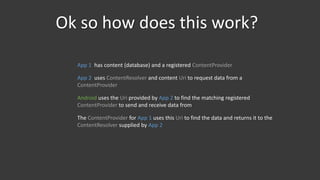
Ok so how does this work?
App 1 has content (database) and a registered ContentProvider
App 2 uses ContentResolver and content Uri to request data from a
ContentProvider
Android uses the Uri provided by App 2 to find the matching registered
ContentProvider to send and receive data from
The ContentProvider for App 1 uses this Uri to find the data and returns it to the
ContentResolver supplied by App 2
Components
• android.content.ContentResolver getContext().getContentResolver()
• android.net.Uri
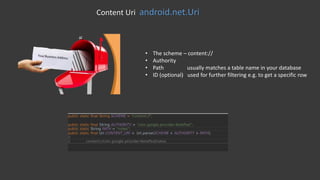
Content Uri android.net.Uri
• The scheme – content://
• Authority
• Path usually matches a table name in your database
• ID (optional) used for further filtering e.g. to get a specific row
android.content.ContentResolver
public final Cursor query (Uri uri, String[] projection, String selection, String[] selectionArgs, String sortOrder)
Query
insert(Uri url, ContentValues values)
INSERT
update(Uri uri, ContentValues values, String where, String[] selectionArgs)
Update
delete(Uri url, String where, String[] selectionArgs)
Delete
android.content.ContentResolver
Query
Example: Query Calendar
android.content.ContentResolver
public final Cursor query (Uri uri, String[] projection, String selection, String[] selectionArgs, String sortOrder)
Query
insert(Uri url, ContentValues values)
INSERT
update(Uri uri, ContentValues values, String where, String[] selectionArgs)
Update
delete(Uri url, String where, String[] selectionArgs)
Delete
android.content.ContentResolver
public final Cursor query (Uri uri, String[] projection, String selection, String[] selectionArgs, String sortOrder)
Query
insert(Uri url, ContentValues values)
INSERT
update(Uri uri, ContentValues values, String where, String[] selectionArgs)
Update
delete(Uri url, String where, String[] selectionArgs)
Delete
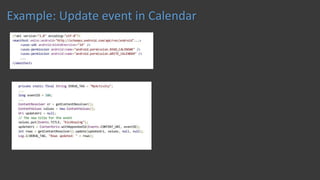
Example: Update event in Calendar
android.content.ContentResolver
public final Cursor query (Uri uri, String[] projection, String selection, String[] selectionArgs, String sortOrder)
Query
insert(Uri url, ContentValues values)
INSERT
update(Uri uri, ContentValues values, String where, String[] selectionArgs)
Update
delete(Uri url, String where, String[] selectionArgs)
Delete
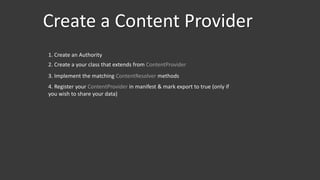
Create a Content Provider
1. Create an Authority
2. Create a your class that extends from ContentProvider
3. Implement the matching ContentResolver methods
4. Register your ContentProvider in manifest & mark export to true (only if
you wish to share your data)
1: Create an Authority
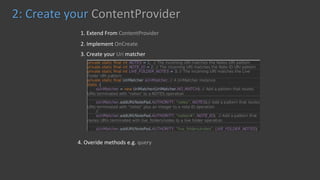
2: Create your ContentProvider
1. Extend From ContentProvider
2. Implement OnCreate
3. Create your Uri matcher
4. Overide methods e.g. query
3: Create your ContentProvider : Query Method
Type - public String getType(Uri uri)
Delete - public abstract int delete (Uri uri, String selection, String[] selectionArgs)
Update - public abstract int update (Uri uri, ContentValues values, String selection, String[] selectionArgs)
Insert - public abstract Uri insert (Uri uri, ContentValues values)
3: Create your ContentProvider : Other Methods
4: Register your ContentProvider
DroidProvider
https://github.com/ckurtm/DroidProvider
Thanks
+KurtMbanje

Android content providers

  • 1.
    Android Content Providers KurtMbanje : DStv Digital Media +KurtMbanje @ckurtm
  • 2.
    What's a ContentProvider? • They provide content to applications. • They encapsulate data and provide it to applications through the single ContentResolver interface
  • 3.
    Why? • Share databetween applications. • Predictive search within your app • Leverage power of loaders with cursors.
  • 4.
    Ok so howdoes this work? App 1 has content (database) and a registered ContentProvider App 2 uses ContentResolver and content Uri to request data from a ContentProvider Android uses the Uri provided by App 2 to find the matching registered ContentProvider to send and receive data from The ContentProvider for App 1 uses this Uri to find the data and returns it to the ContentResolver supplied by App 2
  • 5.
  • 6.
    Content Uri android.net.Uri •The scheme – content:// • Authority • Path usually matches a table name in your database • ID (optional) used for further filtering e.g. to get a specific row
  • 7.
    android.content.ContentResolver public final Cursorquery (Uri uri, String[] projection, String selection, String[] selectionArgs, String sortOrder) Query insert(Uri url, ContentValues values) INSERT update(Uri uri, ContentValues values, String where, String[] selectionArgs) Update delete(Uri url, String where, String[] selectionArgs) Delete
  • 8.
  • 9.
  • 10.
    android.content.ContentResolver public final Cursorquery (Uri uri, String[] projection, String selection, String[] selectionArgs, String sortOrder) Query insert(Uri url, ContentValues values) INSERT update(Uri uri, ContentValues values, String where, String[] selectionArgs) Update delete(Uri url, String where, String[] selectionArgs) Delete
  • 11.
    android.content.ContentResolver public final Cursorquery (Uri uri, String[] projection, String selection, String[] selectionArgs, String sortOrder) Query insert(Uri url, ContentValues values) INSERT update(Uri uri, ContentValues values, String where, String[] selectionArgs) Update delete(Uri url, String where, String[] selectionArgs) Delete
  • 12.
  • 13.
    android.content.ContentResolver public final Cursorquery (Uri uri, String[] projection, String selection, String[] selectionArgs, String sortOrder) Query insert(Uri url, ContentValues values) INSERT update(Uri uri, ContentValues values, String where, String[] selectionArgs) Update delete(Uri url, String where, String[] selectionArgs) Delete
  • 14.
    Create a ContentProvider 1. Create an Authority 2. Create a your class that extends from ContentProvider 3. Implement the matching ContentResolver methods 4. Register your ContentProvider in manifest & mark export to true (only if you wish to share your data)
  • 15.
    1: Create anAuthority
  • 16.
    2: Create yourContentProvider 1. Extend From ContentProvider 2. Implement OnCreate 3. Create your Uri matcher 4. Overide methods e.g. query
  • 17.
    3: Create yourContentProvider : Query Method
  • 18.
    Type - publicString getType(Uri uri) Delete - public abstract int delete (Uri uri, String selection, String[] selectionArgs) Update - public abstract int update (Uri uri, ContentValues values, String selection, String[] selectionArgs) Insert - public abstract Uri insert (Uri uri, ContentValues values) 3: Create your ContentProvider : Other Methods
  • 19.
    4: Register yourContentProvider
  • 21.
  • 22.