Android Insights - 3


  Content Providers
Topics to be Covered
• Content Provider Basics
• Accessing a Content Provider
• Developing a Custom Content Provider


2/11/2012          Android Insights - 3   2/18
Content Provider
• A content provider manages access to a central
  repository of data..
• The provider is part of an Android application, which
  often provides its own UI for working with the data.
• However, content providers are primarily intended to
  be used by other applications, which access the
  provider using a provider client object.
• Together, providers and provider clients offer a
  consistent, standard interface to data that also handles
  inter-process communication and secure data access.


2/11/2012               Android Insights - 3            3/18
Accessing a Content Provider
• A content provider offers methods which
  correspond to the basic CRUD functions of
  persistent storage.
• An application accesses the data from a content
  provider with a ContentResolver client object.
  This object has methods that call identically-
  named methods in the provider object.
• A content provider is identified by a content URI.


2/11/2012             Android Insights - 3         4/18
Accessing a Content Provider...
• Example of getting a list of words from the User
  Dictionary provider:


• The content URI of the words table is:
    content://user_dictionary/words
• Read permission for accessing the content
  provider is also needed in the manifest file:

2/11/2012              Android Insights - 3          5/18
Developing a Custom Content Provider
1. Extend the
    ContentProvider
   class.
2. In the
    onCreate()
    method, create
    a new instance
    of the database
    helper class.

2/11/2012             Android Insights - 3   6/18
Developing a Custom Content Provider...

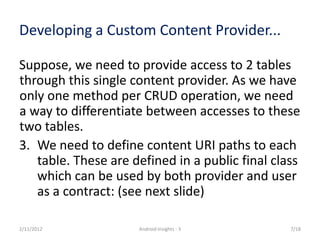
Suppose, we need to provide access to 2 tables
through this single content provider. As we have
only one method per CRUD operation, we need
a way to differentiate between accesses to these
two tables.
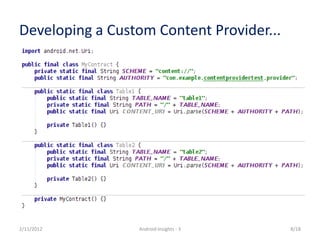
3. We need to define content URI paths to each
   table. These are defined in a public final class
   which can be used by both provider and user
   as a contract: (see next slide)

2/11/2012            Android Insights - 3        7/18
Developing a Custom Content Provider...


2/11/2012        Android Insights - 3     8/18
Developing a Custom Content Provider...

Now comes the issue of differentiating between
paths. The idea is to match a URI and then
taking appropriate actions for the corresponding
table path.
4. Add a UriMatcher to the provider and add
   expected URI patterns to it.
5. In the query() method, get the appropriate
   table name from the URI.

2/11/2012           Android Insights - 3      9/18
Developing a Custom Content Provider...


2/11/2012        Android Insights - 3     10/18
Developing a Custom Content Provider...
6. Now write the actual query method:


•      You should add this URI to notification observables by
       calling setNotificationUri() so that if this
       cursor is directly used in a ListView, updating or
       inserting or deleting data in the table represented by
       this URI would notify the ListView of this data change.

2/11/2012                   Android Insights - 3           11/18
Developing a Custom Content Provider...

7. insert, update and delete methods are similar.
     – insert() returns the Uri with the newly
       inserted ID appended.
     – update() and delete() returns the number
       of rows affected.
     – You should call
            notifyChangeToContentObservers(uri);
            before returning from these methods.


2/11/2012                   Android Insights - 3   12/18
Developing a Custom Content Provider...
We need to provide MIME type of the data returned by a URI.

8.     The overridden method getType(Uri uri) needs to be filled-in.
     –          For common types of data such as as text, HTML, or JPEG, getType()
                should return the standard MIME type for that data.
     –          For content URIs that point to a row or rows of table data, getType()
                should return a MIME type in Android's vendor-specific MIME format:
            •      Type part: vnd
            •      Subtype part:
                   –    If the URI pattern is for a single row: android.cursor.item/
                   –    If the URI pattern is for more than one row: android.cursor.dir/
            •      Provider-specific part: vnd.<name>.<type>
                   –    You supply the <name> and <type>.
                   –    The <name> value should be globally unique, and the <type> value should be unique to
                        the corresponding URI pattern.
                   –    A good choice for <name> is your company's name or some part of your application's
                        Android package name.
                   –    A good choice for the <type> is a string that identifies the table associated with the URI.


2/11/2012                                      Android Insights - 3                                         13/18
Developing a Custom Content Provider...
• Content type defined in the contract class:


2/11/2012            Android Insights - 3       14/18
Developing a Custom Content Provider...
• getType() method in the provider class:


2/11/2012          Android Insights - 3     15/18
Developing a Custom Content Provider...
9. We need to declare the provider in the
   manifest.xml file:


2/11/2012           Android Insights - 3    16/18
Developing a Custom Content Provider...
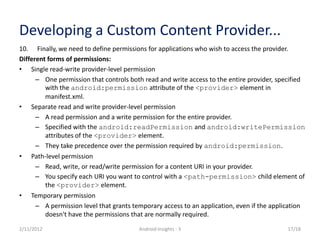
10. Finally, we need to define permissions for applications who wish to access the provider.
Different forms of permissions:
• Single read-write provider-level permission
      – One permission that controls both read and write access to the entire provider, specified
         with the android:permission attribute of the <provider> element in
         manifest.xml.
• Separate read and write provider-level permission
      – A read permission and a write permission for the entire provider.
      – Specified with the android:readPermission and android:writePermission
         attributes of the <provider> element.
      – They take precedence over the permission required by android:permission.
• Path-level permission
      – Read, write, or read/write permission for a content URI in your provider.
      – You specify each URI you want to control with a <path-permission> child element of
         the <provider> element.
• Temporary permission
      – A permission level that grants temporary access to an application, even if the application
         doesn't have the permissions that are normally required.
2/11/2012                                Android Insights - 3                               17/18
Developing a Custom Content Provider...
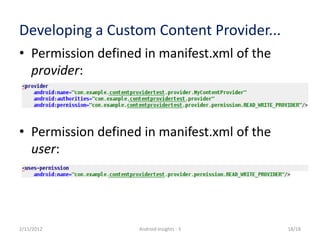
• Permission defined in manifest.xml of the
  provider:


• Permission defined in manifest.xml of the
  user:


2/11/2012           Android Insights - 3      18/18

Android Insights - 3 [Content Providers]

  • 1.
    Android Insights -3 Content Providers
  • 2.
    Topics to beCovered • Content Provider Basics • Accessing a Content Provider • Developing a Custom Content Provider 2/11/2012 Android Insights - 3 2/18
  • 3.
    Content Provider • Acontent provider manages access to a central repository of data.. • The provider is part of an Android application, which often provides its own UI for working with the data. • However, content providers are primarily intended to be used by other applications, which access the provider using a provider client object. • Together, providers and provider clients offer a consistent, standard interface to data that also handles inter-process communication and secure data access. 2/11/2012 Android Insights - 3 3/18
  • 4.
    Accessing a ContentProvider • A content provider offers methods which correspond to the basic CRUD functions of persistent storage. • An application accesses the data from a content provider with a ContentResolver client object. This object has methods that call identically- named methods in the provider object. • A content provider is identified by a content URI. 2/11/2012 Android Insights - 3 4/18
  • 5.
    Accessing a ContentProvider... • Example of getting a list of words from the User Dictionary provider: • The content URI of the words table is: content://user_dictionary/words • Read permission for accessing the content provider is also needed in the manifest file: 2/11/2012 Android Insights - 3 5/18
  • 6.
    Developing a CustomContent Provider 1. Extend the ContentProvider class. 2. In the onCreate() method, create a new instance of the database helper class. 2/11/2012 Android Insights - 3 6/18
  • 7.
    Developing a CustomContent Provider... Suppose, we need to provide access to 2 tables through this single content provider. As we have only one method per CRUD operation, we need a way to differentiate between accesses to these two tables. 3. We need to define content URI paths to each table. These are defined in a public final class which can be used by both provider and user as a contract: (see next slide) 2/11/2012 Android Insights - 3 7/18
  • 8.
    Developing a CustomContent Provider... 2/11/2012 Android Insights - 3 8/18
  • 9.
    Developing a CustomContent Provider... Now comes the issue of differentiating between paths. The idea is to match a URI and then taking appropriate actions for the corresponding table path. 4. Add a UriMatcher to the provider and add expected URI patterns to it. 5. In the query() method, get the appropriate table name from the URI. 2/11/2012 Android Insights - 3 9/18
  • 10.
    Developing a CustomContent Provider... 2/11/2012 Android Insights - 3 10/18
  • 11.
    Developing a CustomContent Provider... 6. Now write the actual query method: • You should add this URI to notification observables by calling setNotificationUri() so that if this cursor is directly used in a ListView, updating or inserting or deleting data in the table represented by this URI would notify the ListView of this data change. 2/11/2012 Android Insights - 3 11/18
  • 12.
    Developing a CustomContent Provider... 7. insert, update and delete methods are similar. – insert() returns the Uri with the newly inserted ID appended. – update() and delete() returns the number of rows affected. – You should call notifyChangeToContentObservers(uri); before returning from these methods. 2/11/2012 Android Insights - 3 12/18
  • 13.
    Developing a CustomContent Provider... We need to provide MIME type of the data returned by a URI. 8. The overridden method getType(Uri uri) needs to be filled-in. – For common types of data such as as text, HTML, or JPEG, getType() should return the standard MIME type for that data. – For content URIs that point to a row or rows of table data, getType() should return a MIME type in Android's vendor-specific MIME format: • Type part: vnd • Subtype part: – If the URI pattern is for a single row: android.cursor.item/ – If the URI pattern is for more than one row: android.cursor.dir/ • Provider-specific part: vnd.<name>.<type> – You supply the <name> and <type>. – The <name> value should be globally unique, and the <type> value should be unique to the corresponding URI pattern. – A good choice for <name> is your company's name or some part of your application's Android package name. – A good choice for the <type> is a string that identifies the table associated with the URI. 2/11/2012 Android Insights - 3 13/18
  • 14.
    Developing a CustomContent Provider... • Content type defined in the contract class: 2/11/2012 Android Insights - 3 14/18
  • 15.
    Developing a CustomContent Provider... • getType() method in the provider class: 2/11/2012 Android Insights - 3 15/18
  • 16.
    Developing a CustomContent Provider... 9. We need to declare the provider in the manifest.xml file: 2/11/2012 Android Insights - 3 16/18
  • 17.
    Developing a CustomContent Provider... 10. Finally, we need to define permissions for applications who wish to access the provider. Different forms of permissions: • Single read-write provider-level permission – One permission that controls both read and write access to the entire provider, specified with the android:permission attribute of the <provider> element in manifest.xml. • Separate read and write provider-level permission – A read permission and a write permission for the entire provider. – Specified with the android:readPermission and android:writePermission attributes of the <provider> element. – They take precedence over the permission required by android:permission. • Path-level permission – Read, write, or read/write permission for a content URI in your provider. – You specify each URI you want to control with a <path-permission> child element of the <provider> element. • Temporary permission – A permission level that grants temporary access to an application, even if the application doesn't have the permissions that are normally required. 2/11/2012 Android Insights - 3 17/18
  • 18.
    Developing a CustomContent Provider... • Permission defined in manifest.xml of the provider: • Permission defined in manifest.xml of the user: 2/11/2012 Android Insights - 3 18/18