Improved Text Layout for
Localisation
Charles Harley & Robert Hewitt   25/10/12
Who is Kotikan?
Who is Kotikan?

• Mobile development consultancy based in
  Edinburgh
Who is Kotikan?

• Mobile development consultancy based in
  Edinburgh
• Apps
Who is Kotikan?

• Mobile development consultancy based in
  Edinburgh
• Apps
  • Skyscanner Android and iOS
Who is Kotikan?

• Mobile development consultancy based in
  Edinburgh
• Apps
  • Skyscanner Android and iOS
  • Edinburgh Festival Fringe
Who is Kotikan?

• Mobile development consultancy based in
  Edinburgh
• Apps
  • Skyscanner Android and iOS
  • Edinburgh Festival Fringe
  • Study Planner for the Scottish Qualifications
    Authority
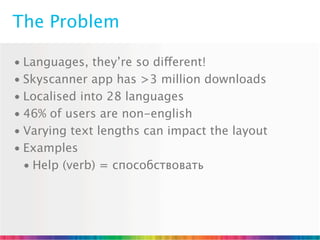
The Problem
The Problem

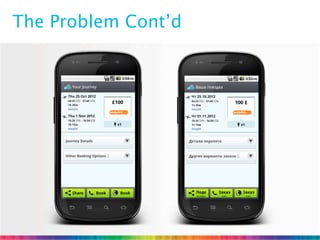
• Languages, they’re so different!
The Problem

• Languages, they’re so different!
• Skyscanner app has >3 million downloads
The Problem

• Languages, they’re so different!
• Skyscanner app has >3 million downloads
• Localised into 28 languages
The Problem

• Languages, they’re so different!
• Skyscanner app has >3 million downloads
• Localised into 28 languages
• 46% of users are non-english
The Problem

• Languages, they’re so different!
• Skyscanner app has >3 million downloads
• Localised into 28 languages
• 46% of users are non-english
• Varying text lengths can impact the layout
The Problem

• Languages, they’re so different!
• Skyscanner app has >3 million downloads
• Localised into 28 languages
• 46% of users are non-english
• Varying text lengths can impact the layout
• Examples
The Problem

• Languages, they’re so different!
• Skyscanner app has >3 million downloads
• Localised into 28 languages
• 46% of users are non-english
• Varying text lengths can impact the layout
• Examples
  • Help (verb) = способствовать
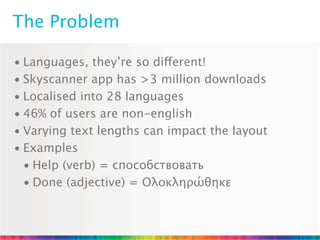
The Problem

• Languages, they’re so different!
• Skyscanner app has >3 million downloads
• Localised into 28 languages
• 46% of users are non-english
• Varying text lengths can impact the layout
• Examples
  • Help (verb) = способствовать
  • Done (adjective) = Ολοκληρώθηκε
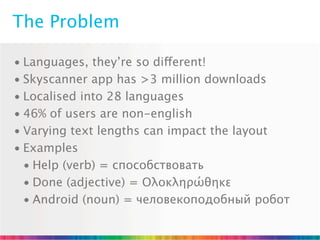
The Problem

• Languages, they’re so different!
• Skyscanner app has >3 million downloads
• Localised into 28 languages
• 46% of users are non-english
• Varying text lengths can impact the layout
• Examples
  • Help (verb) = способствовать
  • Done (adjective) = Ολοκληρώθηκε
  • Android (noun) = человекоподобный робот
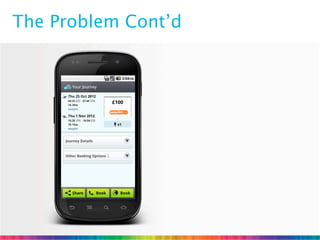
The Problem Cont’d
The Problem Cont’d
Existing Solutions?
Existing Solutions?

• Use shorter text (best)
Existing Solutions?

• Use shorter text (best)
• Use built in truncation
Existing Solutions?

• Use shorter text (best)
• Use built in truncation
  • Not very flexible
Existing Solutions?

• Use shorter text (best)
• Use built in truncation
  • Not very flexible
  • Has potential to hide valuable information
Existing Solutions?

• Use shorter text (best)
• Use built in truncation
  • Not very flexible
  • Has potential to hide valuable information
• Resizable views
Existing Solutions?

• Use shorter text (best)
• Use built in truncation
  • Not very flexible
  • Has potential to hide valuable information
• Resizable views
  • Can have negative impact on screen design
Our Solution
Our Solution

• Custom TextView
Our Solution

• Custom TextView
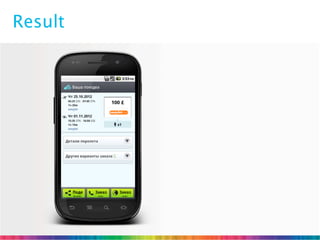
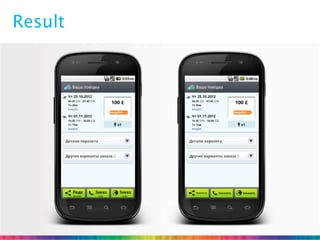
  • Resizes text to fit available width
Our Solution

• Custom TextView
  • Resizes text to fit available width
  • Flexible truncation using markup
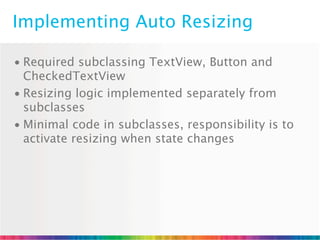
Implementing Auto Resizing

• Required subclassing TextView, Button and
  CheckedTextView
Implementing Auto Resizing

• Required subclassing TextView, Button and
  CheckedTextView
• Resizing logic implemented separately from
  subclasses
Implementing Auto Resizing

• Required subclassing TextView, Button and
  CheckedTextView
• Resizing logic implemented separately from
  subclasses
• Minimal code in subclasses, responsibility is to
  activate resizing when state changes
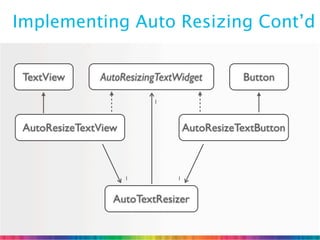
Implementing Auto Resizing Cont’d


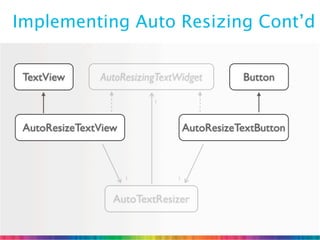
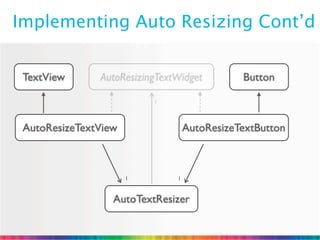
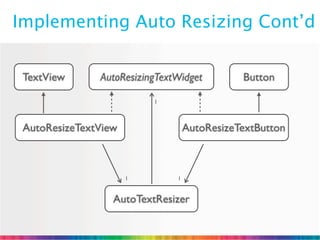
 TextView      AutoResizingTextWidget         Button

                          1


 AutoResizeTextView                AutoResizeTextButton


                      1        1


                  AutoTextResizer
Implementing Auto Resizing Cont’d


 TextView      AutoResizingTextWidget         Button

                          1


 AutoResizeTextView                AutoResizeTextButton


                      1        1


                  AutoTextResizer
Implementing Auto Resizing Cont’d


 TextView      AutoResizingTextWidget         Button

                          1


 AutoResizeTextView                AutoResizeTextButton


                      1        1


                  AutoTextResizer
Implementing Auto Resizing Cont’d


 TextView      AutoResizingTextWidget         Button

                          1


 AutoResizeTextView                AutoResizeTextButton


                      1        1


                  AutoTextResizer
Implementing Auto Resizing Cont’d


 TextView      AutoResizingTextWidget         Button

                          1


 AutoResizeTextView                AutoResizeTextButton


                      1        1


                  AutoTextResizer
Implementing Auto Resizing Cont’d


 TextView      AutoResizingTextWidget         Button

                          1


 AutoResizeTextView                AutoResizeTextButton


                      1        1


                  AutoTextResizer
AutoTextResizer Logic

• Resizing starts with the desired text size, i.e. the
  text size set in the XML layout or through calls to
  setTextSize()
AutoTextResizer Logic

• Resizing starts with the desired text size, i.e. the
  text size set in the XML layout or through calls to
  setTextSize()
• Decreasing text sizes are measured until the text
  fits the available width
AutoTextResizer Logic

• Resizing starts with the desired text size, i.e. the
  text size set in the XML layout or through calls to
  setTextSize()
• Decreasing text sizes are measured until the text
  fits the available width
• There is a minimum text size
AutoTextResizer Logic

• Resizing starts with the desired text size, i.e. the
  text size set in the XML layout or through calls to
  setTextSize()
• Decreasing text sizes are measured until the text
  fits the available width
• There is a minimum text size
• Various optimisations
Result
Result
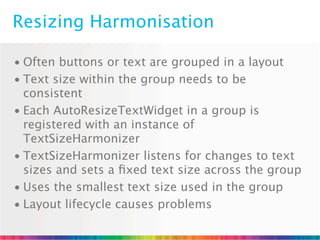
Resizing Harmonisation

• Often buttons or text are grouped in a layout
Resizing Harmonisation

• Often buttons or text are grouped in a layout
• Text size within the group needs to be
  consistent
Resizing Harmonisation

• Often buttons or text are grouped in a layout
• Text size within the group needs to be
  consistent
• Each AutoResizeTextWidget in a group is
  registered with an instance of
  TextSizeHarmonizer
Resizing Harmonisation

• Often buttons or text are grouped in a layout
• Text size within the group needs to be
  consistent
• Each AutoResizeTextWidget in a group is
  registered with an instance of
  TextSizeHarmonizer
• TextSizeHarmonizer listens for changes to text
  sizes and sets a fixed text size across the group
Resizing Harmonisation

• Often buttons or text are grouped in a layout
• Text size within the group needs to be
  consistent
• Each AutoResizeTextWidget in a group is
  registered with an instance of
  TextSizeHarmonizer
• TextSizeHarmonizer listens for changes to text
  sizes and sets a fixed text size across the group
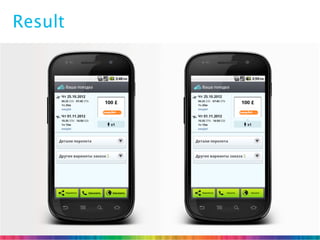
• Uses the smallest text size used in the group
Resizing Harmonisation

• Often buttons or text are grouped in a layout
• Text size within the group needs to be
  consistent
• Each AutoResizeTextWidget in a group is
  registered with an instance of
  TextSizeHarmonizer
• TextSizeHarmonizer listens for changes to text
  sizes and sets a fixed text size across the group
• Uses the smallest text size used in the group
• Layout lifecycle causes problems
Resizing Harmonisation Cont’d

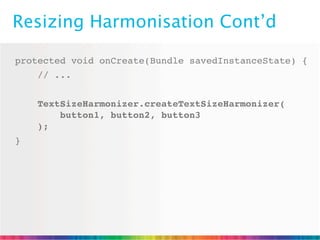
protected void onCreate(Bundle savedInstanceState) {
    // ...


    TextSizeHarmonizer.createTextSizeHarmonizer(
        button1, button2, button3
    );
}
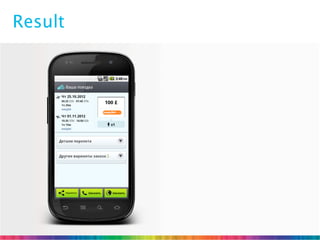
Result
Result
XML Harmonisation
XML Harmonisation

• We can make it better
XML Harmonisation

• We can make it better
  • Using XML attributes to define a group ID
XML Harmonisation

• We can make it better
  • Using XML attributes to define a group ID
  • Simplifies Activity code
XML Harmonisation

• We can make it better
  • Using XML attributes to define a group ID
  • Simplifies Activity code
  • Separation of layout logic from business logic
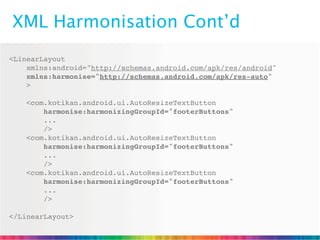
XML Harmonisation Cont’d
<LinearLayout
    xmlns:android="http://schemas.android.com/apk/res/android"
    xmlns:harmonise="http://schemas.android.com/apk/res-auto"
    >

    <com.kotikan.android.ui.AutoResizeTextButton
        harmonise:harmonizingGroupId="footerButtons"
        ...
        />
    <com.kotikan.android.ui.AutoResizeTextButton
        harmonise:harmonizingGroupId="footerButtons"
        ...
        />
    <com.kotikan.android.ui.AutoResizeTextButton
        harmonise:harmonizingGroupId="footerButtons"
        ...
        />

</LinearLayout>
XML Harmonisation Gotchas

• Group IDs may be reused across activities
XML Harmonisation Gotchas

• Group IDs may be reused across activities
  • Both ID and Context identify the group
XML Harmonisation Gotchas

• Group IDs may be reused across activities
  • Both ID and Context identify the group
• Memory management!
XML Harmonisation Gotchas

• Group IDs may be reused across activities
  • Both ID and Context identify the group
• Memory management!
  • Groups are stored statically
XML Harmonisation Gotchas

• Group IDs may be reused across activities
  • Both ID and Context identify the group
• Memory management!
  • Groups are stored statically
  • Weak references used to avoid memory leaks
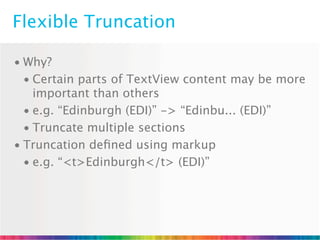
Flexible Truncation
Flexible Truncation

• Why?
Flexible Truncation

• Why?
  • Certain parts of TextView content may be more
    important than others
Flexible Truncation

• Why?
  • Certain parts of TextView content may be more
    important than others
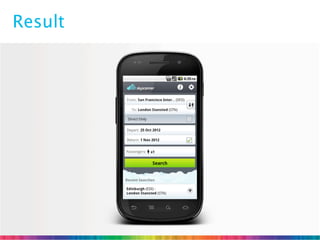
  • e.g. “Edinburgh (EDI)” -> “Edinbu... (EDI)”
Flexible Truncation

• Why?
  • Certain parts of TextView content may be more
    important than others
  • e.g. “Edinburgh (EDI)” -> “Edinbu... (EDI)”
  • Truncate multiple sections
Flexible Truncation

• Why?
  • Certain parts of TextView content may be more
    important than others
  • e.g. “Edinburgh (EDI)” -> “Edinbu... (EDI)”
  • Truncate multiple sections
• Truncation defined using markup
Flexible Truncation

• Why?
  • Certain parts of TextView content may be more
    important than others
  • e.g. “Edinburgh (EDI)” -> “Edinbu... (EDI)”
  • Truncate multiple sections
• Truncation defined using markup
  • e.g. “<t>Edinburgh</t> (EDI)”
Truncation Logic
Truncation Logic

• Quick exit if no truncation required
Truncation Logic

• Quick exit if no truncation required
• Parsing phase
Truncation Logic

• Quick exit if no truncation required
• Parsing phase
• Measuring phase
Truncation Logic

• Quick exit if no truncation required
• Parsing phase
• Measuring phase
• Truncation phase
Result
Summary
Summary

• Variable text lengths across languages required
  an auto resizing solution
Summary

• Variable text lengths across languages required
  an auto resizing solution
• Use harmonizing to keep text sizes consistent
  within logical view groups
Summary

• Variable text lengths across languages required
  an auto resizing solution
• Use harmonizing to keep text sizes consistent
  within logical view groups
• Harmonizer groups can be defined using XML
  attributes
Summary

• Variable text lengths across languages required
  an auto resizing solution
• Use harmonizing to keep text sizes consistent
  within logical view groups
• Harmonizer groups can be defined using XML
  attributes
• Flexible truncation
Q&A / Feedback


                      ?


charles@kotikan.com       robert@kotikan.com
@charlesharley

Improving Android Text Layout in Localisation

  • 1.
    Improved Text Layoutfor Localisation Charles Harley & Robert Hewitt 25/10/12
  • 2.
  • 3.
    Who is Kotikan? •Mobile development consultancy based in Edinburgh
  • 4.
    Who is Kotikan? •Mobile development consultancy based in Edinburgh • Apps
  • 5.
    Who is Kotikan? •Mobile development consultancy based in Edinburgh • Apps • Skyscanner Android and iOS
  • 6.
    Who is Kotikan? •Mobile development consultancy based in Edinburgh • Apps • Skyscanner Android and iOS • Edinburgh Festival Fringe
  • 7.
    Who is Kotikan? •Mobile development consultancy based in Edinburgh • Apps • Skyscanner Android and iOS • Edinburgh Festival Fringe • Study Planner for the Scottish Qualifications Authority
  • 8.
  • 9.
    The Problem • Languages,they’re so different!
  • 10.
    The Problem • Languages,they’re so different! • Skyscanner app has >3 million downloads
  • 11.
    The Problem • Languages,they’re so different! • Skyscanner app has >3 million downloads • Localised into 28 languages
  • 12.
    The Problem • Languages,they’re so different! • Skyscanner app has >3 million downloads • Localised into 28 languages • 46% of users are non-english
  • 13.
    The Problem • Languages,they’re so different! • Skyscanner app has >3 million downloads • Localised into 28 languages • 46% of users are non-english • Varying text lengths can impact the layout
  • 14.
    The Problem • Languages,they’re so different! • Skyscanner app has >3 million downloads • Localised into 28 languages • 46% of users are non-english • Varying text lengths can impact the layout • Examples
  • 15.
    The Problem • Languages,they’re so different! • Skyscanner app has >3 million downloads • Localised into 28 languages • 46% of users are non-english • Varying text lengths can impact the layout • Examples • Help (verb) = способствовать
  • 16.
    The Problem • Languages,they’re so different! • Skyscanner app has >3 million downloads • Localised into 28 languages • 46% of users are non-english • Varying text lengths can impact the layout • Examples • Help (verb) = способствовать • Done (adjective) = Ολοκληρώθηκε
  • 17.
    The Problem • Languages,they’re so different! • Skyscanner app has >3 million downloads • Localised into 28 languages • 46% of users are non-english • Varying text lengths can impact the layout • Examples • Help (verb) = способствовать • Done (adjective) = Ολοκληρώθηκε • Android (noun) = человекоподобный робот
  • 18.
  • 19.
  • 20.
  • 21.
    Existing Solutions? • Useshorter text (best)
  • 22.
    Existing Solutions? • Useshorter text (best) • Use built in truncation
  • 23.
    Existing Solutions? • Useshorter text (best) • Use built in truncation • Not very flexible
  • 24.
    Existing Solutions? • Useshorter text (best) • Use built in truncation • Not very flexible • Has potential to hide valuable information
  • 25.
    Existing Solutions? • Useshorter text (best) • Use built in truncation • Not very flexible • Has potential to hide valuable information • Resizable views
  • 26.
    Existing Solutions? • Useshorter text (best) • Use built in truncation • Not very flexible • Has potential to hide valuable information • Resizable views • Can have negative impact on screen design
  • 27.
  • 28.
  • 29.
    Our Solution • CustomTextView • Resizes text to fit available width
  • 30.
    Our Solution • CustomTextView • Resizes text to fit available width • Flexible truncation using markup
  • 31.
  • 32.
    Implementing Auto Resizing •Required subclassing TextView, Button and CheckedTextView
  • 33.
    Implementing Auto Resizing •Required subclassing TextView, Button and CheckedTextView • Resizing logic implemented separately from subclasses
  • 34.
    Implementing Auto Resizing •Required subclassing TextView, Button and CheckedTextView • Resizing logic implemented separately from subclasses • Minimal code in subclasses, responsibility is to activate resizing when state changes
  • 35.
    Implementing Auto ResizingCont’d TextView AutoResizingTextWidget Button 1 AutoResizeTextView AutoResizeTextButton 1 1 AutoTextResizer
  • 36.
    Implementing Auto ResizingCont’d TextView AutoResizingTextWidget Button 1 AutoResizeTextView AutoResizeTextButton 1 1 AutoTextResizer
  • 37.
    Implementing Auto ResizingCont’d TextView AutoResizingTextWidget Button 1 AutoResizeTextView AutoResizeTextButton 1 1 AutoTextResizer
  • 38.
    Implementing Auto ResizingCont’d TextView AutoResizingTextWidget Button 1 AutoResizeTextView AutoResizeTextButton 1 1 AutoTextResizer
  • 39.
    Implementing Auto ResizingCont’d TextView AutoResizingTextWidget Button 1 AutoResizeTextView AutoResizeTextButton 1 1 AutoTextResizer
  • 40.
    Implementing Auto ResizingCont’d TextView AutoResizingTextWidget Button 1 AutoResizeTextView AutoResizeTextButton 1 1 AutoTextResizer
  • 41.
  • 42.
    AutoTextResizer Logic • Resizingstarts with the desired text size, i.e. the text size set in the XML layout or through calls to setTextSize()
  • 43.
    AutoTextResizer Logic • Resizingstarts with the desired text size, i.e. the text size set in the XML layout or through calls to setTextSize() • Decreasing text sizes are measured until the text fits the available width
  • 44.
    AutoTextResizer Logic • Resizingstarts with the desired text size, i.e. the text size set in the XML layout or through calls to setTextSize() • Decreasing text sizes are measured until the text fits the available width • There is a minimum text size
  • 45.
    AutoTextResizer Logic • Resizingstarts with the desired text size, i.e. the text size set in the XML layout or through calls to setTextSize() • Decreasing text sizes are measured until the text fits the available width • There is a minimum text size • Various optimisations
  • 46.
  • 47.
  • 48.
  • 49.
    Resizing Harmonisation • Oftenbuttons or text are grouped in a layout
  • 50.
    Resizing Harmonisation • Oftenbuttons or text are grouped in a layout • Text size within the group needs to be consistent
  • 51.
    Resizing Harmonisation • Oftenbuttons or text are grouped in a layout • Text size within the group needs to be consistent • Each AutoResizeTextWidget in a group is registered with an instance of TextSizeHarmonizer
  • 52.
    Resizing Harmonisation • Oftenbuttons or text are grouped in a layout • Text size within the group needs to be consistent • Each AutoResizeTextWidget in a group is registered with an instance of TextSizeHarmonizer • TextSizeHarmonizer listens for changes to text sizes and sets a fixed text size across the group
  • 53.
    Resizing Harmonisation • Oftenbuttons or text are grouped in a layout • Text size within the group needs to be consistent • Each AutoResizeTextWidget in a group is registered with an instance of TextSizeHarmonizer • TextSizeHarmonizer listens for changes to text sizes and sets a fixed text size across the group • Uses the smallest text size used in the group
  • 54.
    Resizing Harmonisation • Oftenbuttons or text are grouped in a layout • Text size within the group needs to be consistent • Each AutoResizeTextWidget in a group is registered with an instance of TextSizeHarmonizer • TextSizeHarmonizer listens for changes to text sizes and sets a fixed text size across the group • Uses the smallest text size used in the group • Layout lifecycle causes problems
  • 55.
    Resizing Harmonisation Cont’d protectedvoid onCreate(Bundle savedInstanceState) { // ... TextSizeHarmonizer.createTextSizeHarmonizer( button1, button2, button3 ); }
  • 56.
  • 57.
  • 58.
  • 59.
    XML Harmonisation • Wecan make it better
  • 60.
    XML Harmonisation • Wecan make it better • Using XML attributes to define a group ID
  • 61.
    XML Harmonisation • Wecan make it better • Using XML attributes to define a group ID • Simplifies Activity code
  • 62.
    XML Harmonisation • Wecan make it better • Using XML attributes to define a group ID • Simplifies Activity code • Separation of layout logic from business logic
  • 63.
    XML Harmonisation Cont’d <LinearLayout xmlns:android="http://schemas.android.com/apk/res/android" xmlns:harmonise="http://schemas.android.com/apk/res-auto" > <com.kotikan.android.ui.AutoResizeTextButton harmonise:harmonizingGroupId="footerButtons" ... /> <com.kotikan.android.ui.AutoResizeTextButton harmonise:harmonizingGroupId="footerButtons" ... /> <com.kotikan.android.ui.AutoResizeTextButton harmonise:harmonizingGroupId="footerButtons" ... /> </LinearLayout>
  • 64.
  • 65.
    XML Harmonisation Gotchas •Group IDs may be reused across activities
  • 66.
    XML Harmonisation Gotchas •Group IDs may be reused across activities • Both ID and Context identify the group
  • 67.
    XML Harmonisation Gotchas •Group IDs may be reused across activities • Both ID and Context identify the group • Memory management!
  • 68.
    XML Harmonisation Gotchas •Group IDs may be reused across activities • Both ID and Context identify the group • Memory management! • Groups are stored statically
  • 69.
    XML Harmonisation Gotchas •Group IDs may be reused across activities • Both ID and Context identify the group • Memory management! • Groups are stored statically • Weak references used to avoid memory leaks
  • 70.
  • 71.
  • 72.
    Flexible Truncation • Why? • Certain parts of TextView content may be more important than others
  • 73.
    Flexible Truncation • Why? • Certain parts of TextView content may be more important than others • e.g. “Edinburgh (EDI)” -> “Edinbu... (EDI)”
  • 74.
    Flexible Truncation • Why? • Certain parts of TextView content may be more important than others • e.g. “Edinburgh (EDI)” -> “Edinbu... (EDI)” • Truncate multiple sections
  • 75.
    Flexible Truncation • Why? • Certain parts of TextView content may be more important than others • e.g. “Edinburgh (EDI)” -> “Edinbu... (EDI)” • Truncate multiple sections • Truncation defined using markup
  • 76.
    Flexible Truncation • Why? • Certain parts of TextView content may be more important than others • e.g. “Edinburgh (EDI)” -> “Edinbu... (EDI)” • Truncate multiple sections • Truncation defined using markup • e.g. “<t>Edinburgh</t> (EDI)”
  • 77.
  • 78.
    Truncation Logic • Quickexit if no truncation required
  • 79.
    Truncation Logic • Quickexit if no truncation required • Parsing phase
  • 80.
    Truncation Logic • Quickexit if no truncation required • Parsing phase • Measuring phase
  • 81.
    Truncation Logic • Quickexit if no truncation required • Parsing phase • Measuring phase • Truncation phase
  • 82.
  • 83.
  • 84.
    Summary • Variable textlengths across languages required an auto resizing solution
  • 85.
    Summary • Variable textlengths across languages required an auto resizing solution • Use harmonizing to keep text sizes consistent within logical view groups
  • 86.
    Summary • Variable textlengths across languages required an auto resizing solution • Use harmonizing to keep text sizes consistent within logical view groups • Harmonizer groups can be defined using XML attributes
  • 87.
    Summary • Variable textlengths across languages required an auto resizing solution • Use harmonizing to keep text sizes consistent within logical view groups • Harmonizer groups can be defined using XML attributes • Flexible truncation
  • 88.
    Q&A / Feedback ? charles@kotikan.com robert@kotikan.com @charlesharley