
Android Lollipop
For Enterprise
DroidCon Italy
Torino 2015
Android Lollipop for Enterprise
● Senior Security Researcher - Mobile Security Lab
● Senior Security Analyst - Consulthink S.p.A.
DroidCon IT 2015 - Android Lollipop For Enterprise 2
Who are we
● r.piccirillo@mseclab.com
● @robpicone
● r.gassira@mseclab.com
● @robgas
@droidconit #droidconit
Android Lollipop For Enterprise
Enterprise Mobile Management
3
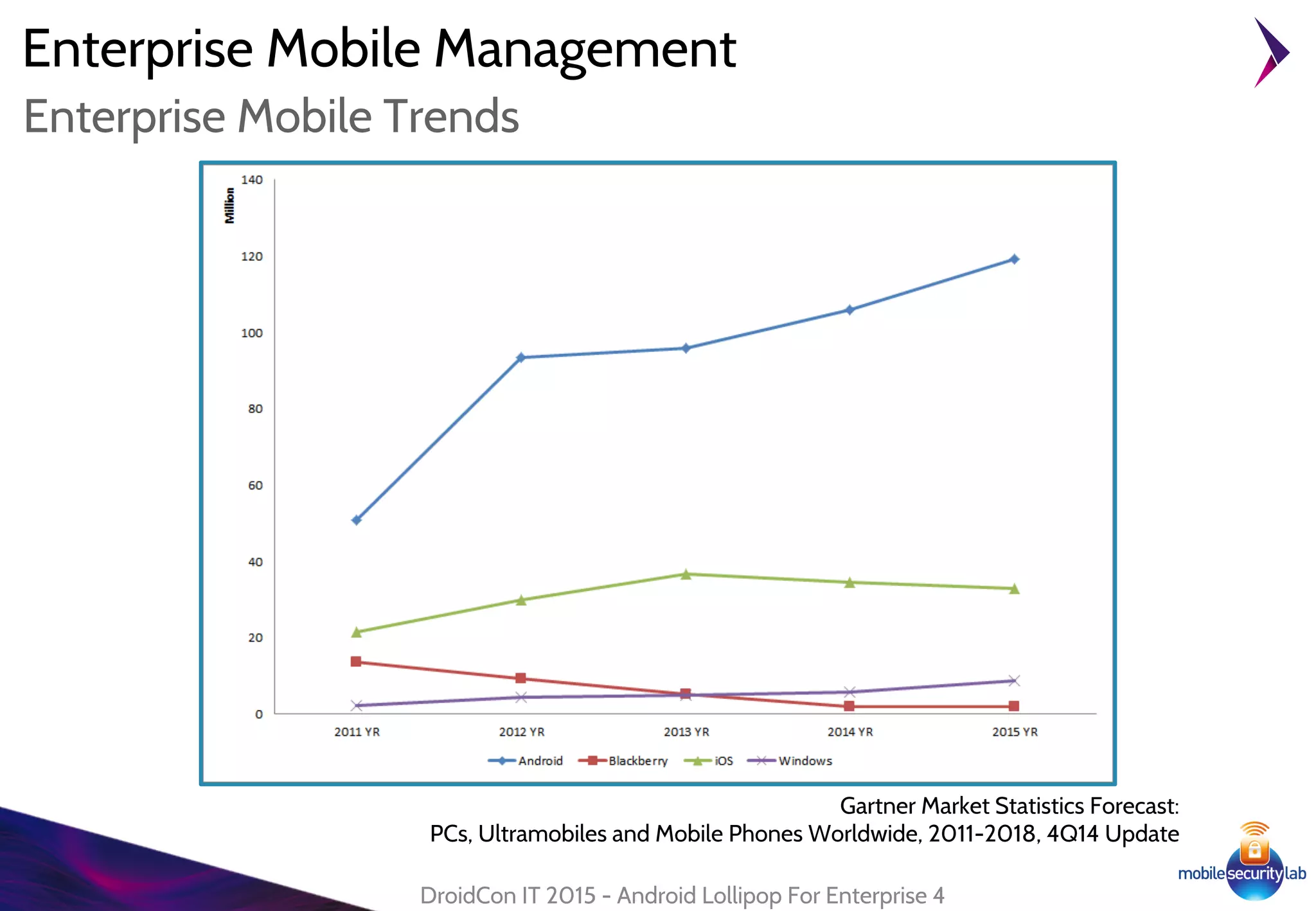
Enterprise Mobile Management
DroidCon IT 2015 - Android Lollipop For Enterprise 4
Enterprise Mobile Trends
Gartner Market Statistics Forecast:
PCs, Ultramobiles and Mobile Phones Worldwide, 2011-2018, 4Q14 Update
Enterprise Mobile Management
● Secure Environment
○ SELinux
● Device Protection
○ Smart Lock
○ "Kill Switch"
● Device Management
○ Device Administration API
○ Device Owner
● Security Container
○ Managed Profile
○ App Restrictions
● Data Encryption
DroidCon IT 2015 - Android Lollipop For Enterprise 5
Lollipop for Enteprise
Android Lollipop For Enterprise
SELinux
6
● Introduced in Android 4.3 to enforce the existing Discretionary
Access Control (DAC) for application sandboxing (UID,GID)
● Provides Mandatory Access Control (MAC) over all processes at kernel
level
● Allows to define fine-grained security policies
● Main security features:
○ Better system service restriction and protection
○ Improved access control to application data and system logs
○ Reduce effects of malicious software
○ User protection from potential flaws in mobile application
SELinux
DroidCon IT 2015 - Android Lollipop For Enterprise 7
Security-Enhanced Linux in Android
"This new layer provides additional protection against potential security vulnerabilities
by reducing exposure of system functionality to applications"
Google Report Android Security 2014 Year in Review
SELinux
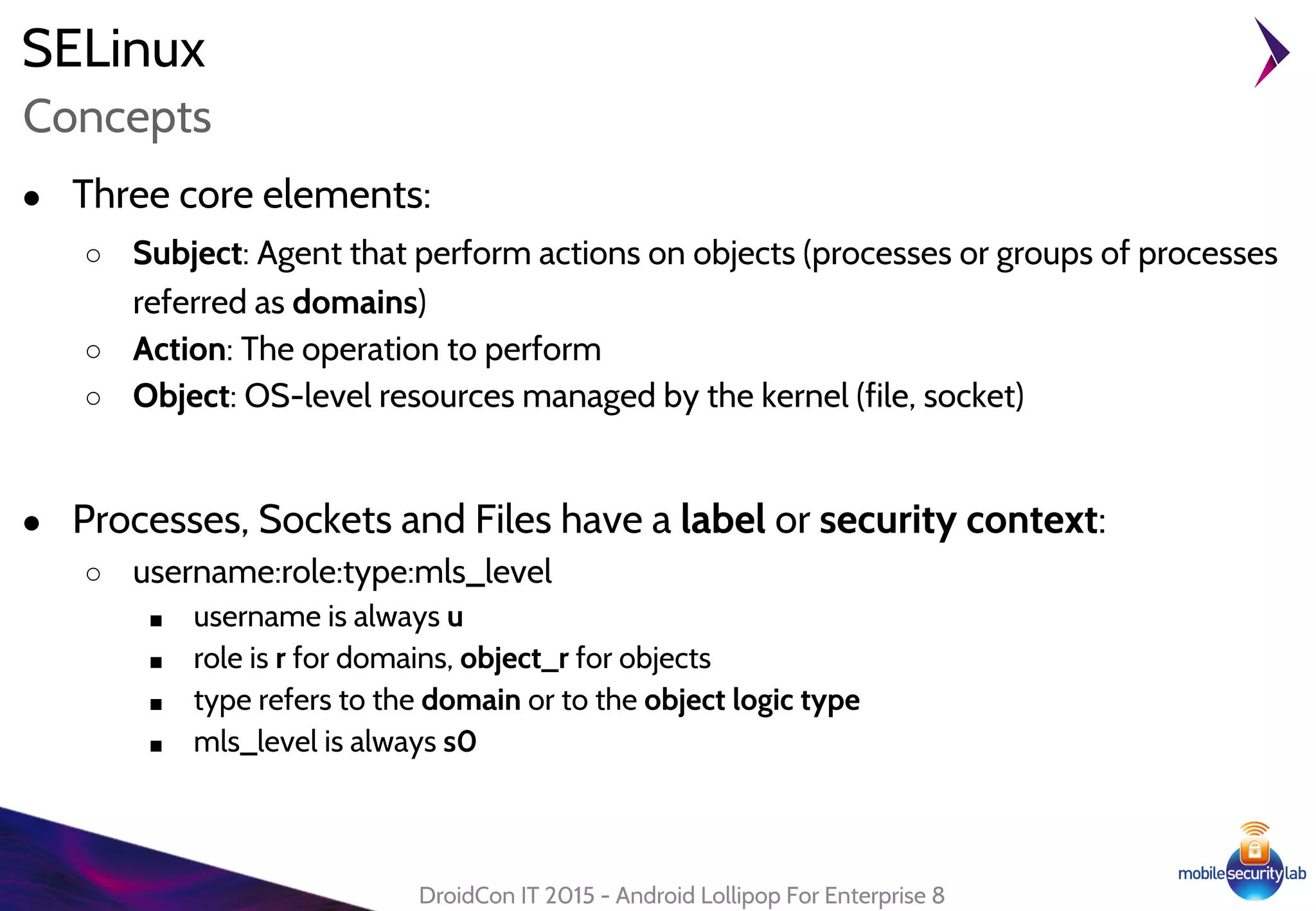
● Three core elements:
○ Subject: Agent that perform actions on objects (processes or groups of processes
referred as domains)
○ Action: The operation to perform
○ Object: OS-level resources managed by the kernel (file, socket)
● Processes, Sockets and Files have a label or security context:
○ username:role:type:mls_level
■ username is always u
■ role is r for domains, object_r for objects
■ type refers to the domain or to the object logic type
■ mls_level is always s0
DroidCon IT 2015 - Android Lollipop For Enterprise 8
Concepts
SELinux
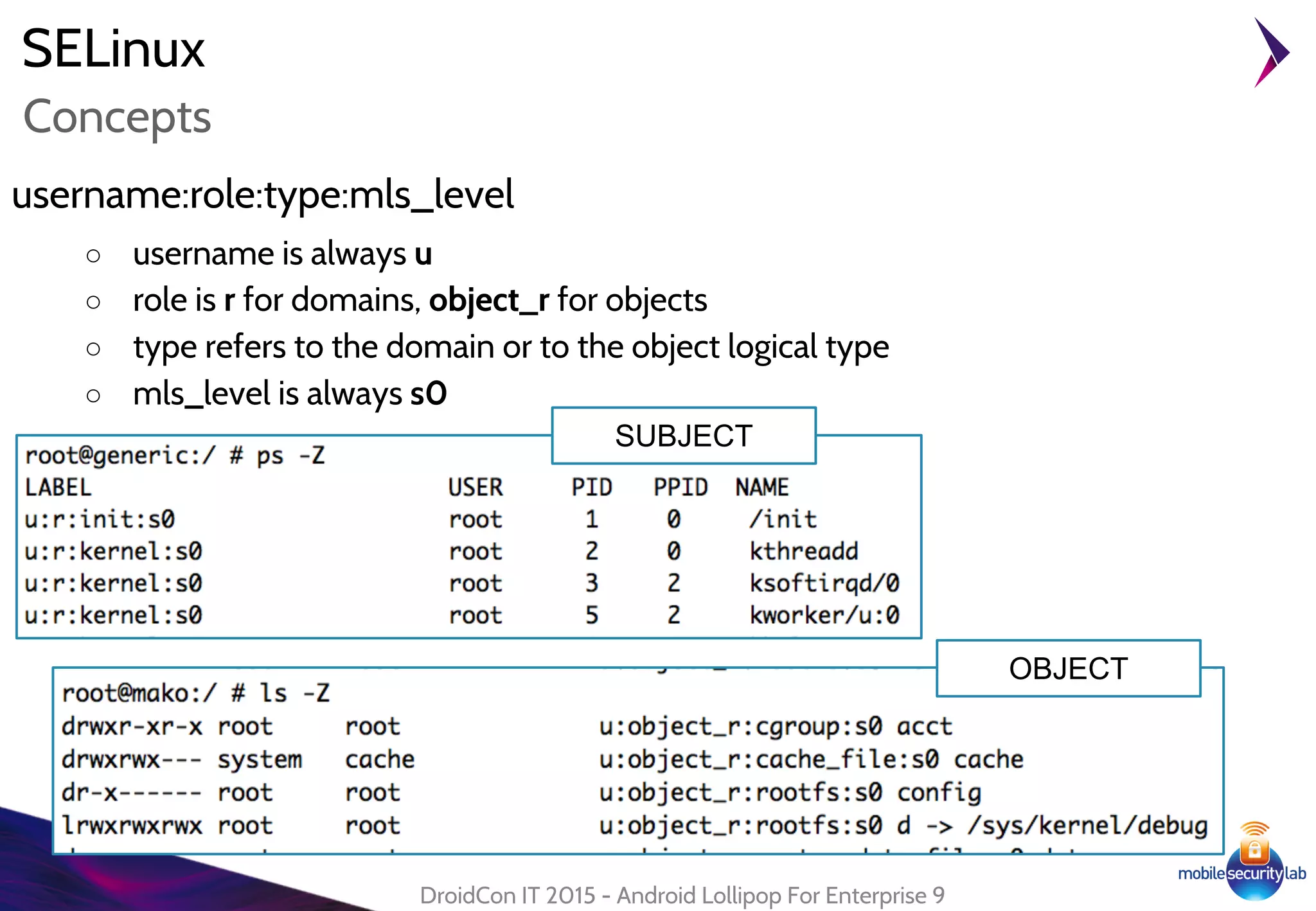
username:role:type:mls_level
○ username is always u
○ role is r for domains, object_r for objects
○ type refers to the domain or to the object logical type
○ mls_level is always s0
DroidCon IT 2015 - Android Lollipop For Enterprise 9
Concepts
SUBJECT
OBJECT
Lollipop Enhancements
SELinux
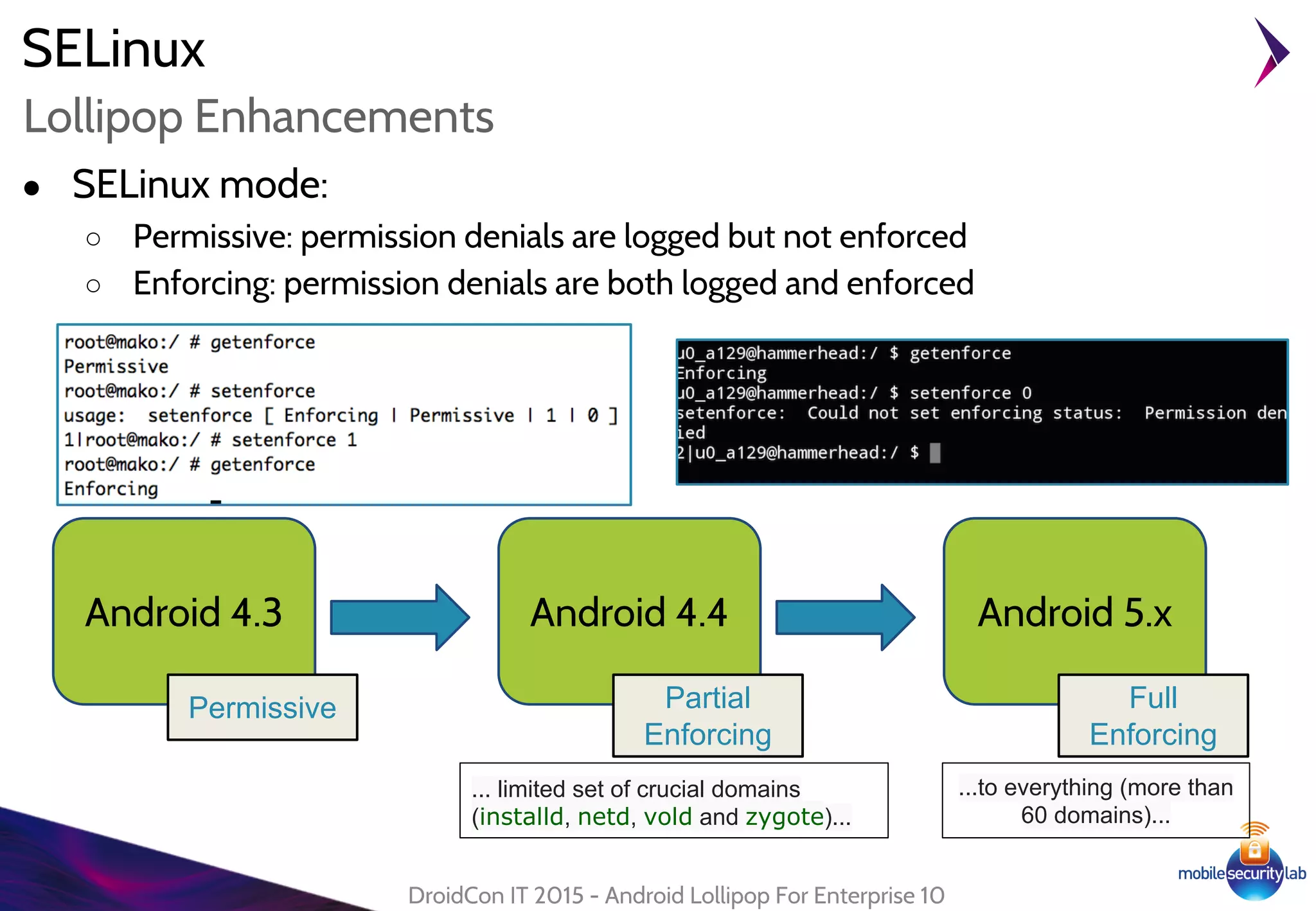
● SELinux mode:
○ Permissive: permission denials are logged but not enforced
○ Enforcing: permission denials are both logged and enforced
DroidCon IT 2015 - Android Lollipop For Enterprise 10
Android 4.3
Permissive
Android 4.4
Partial
Enforcing
Android 5.x
Full
Enforcing
... limited set of crucial domains
(installd, netd, vold and zygote)...
...to everything (more than
60 domains)...
Android Lollipop For Enterprise
Smart Lock
11
Smart Lock
● Disable device lockscreen in "trusted condition"
● Based on Trust Agent:
○ "A service that notifies the system about whether it
believes the environment of the device to be trusted"
○ Requires signatureOrSystem permission
○ Can be disabled by Device Administrator
[KEYGUARD_DISABLE_TRUST_AGENTS]
DroidCon IT 2015 - Android Lollipop For Enterprise 12
Trust Agent
http://nelenkov.
blogspot.
it/2014/12/dissecting
-lollipops-smart-
lock.html
lollipop/frameworks/base/core/res/AndroidManifest.xml
Smart Lock
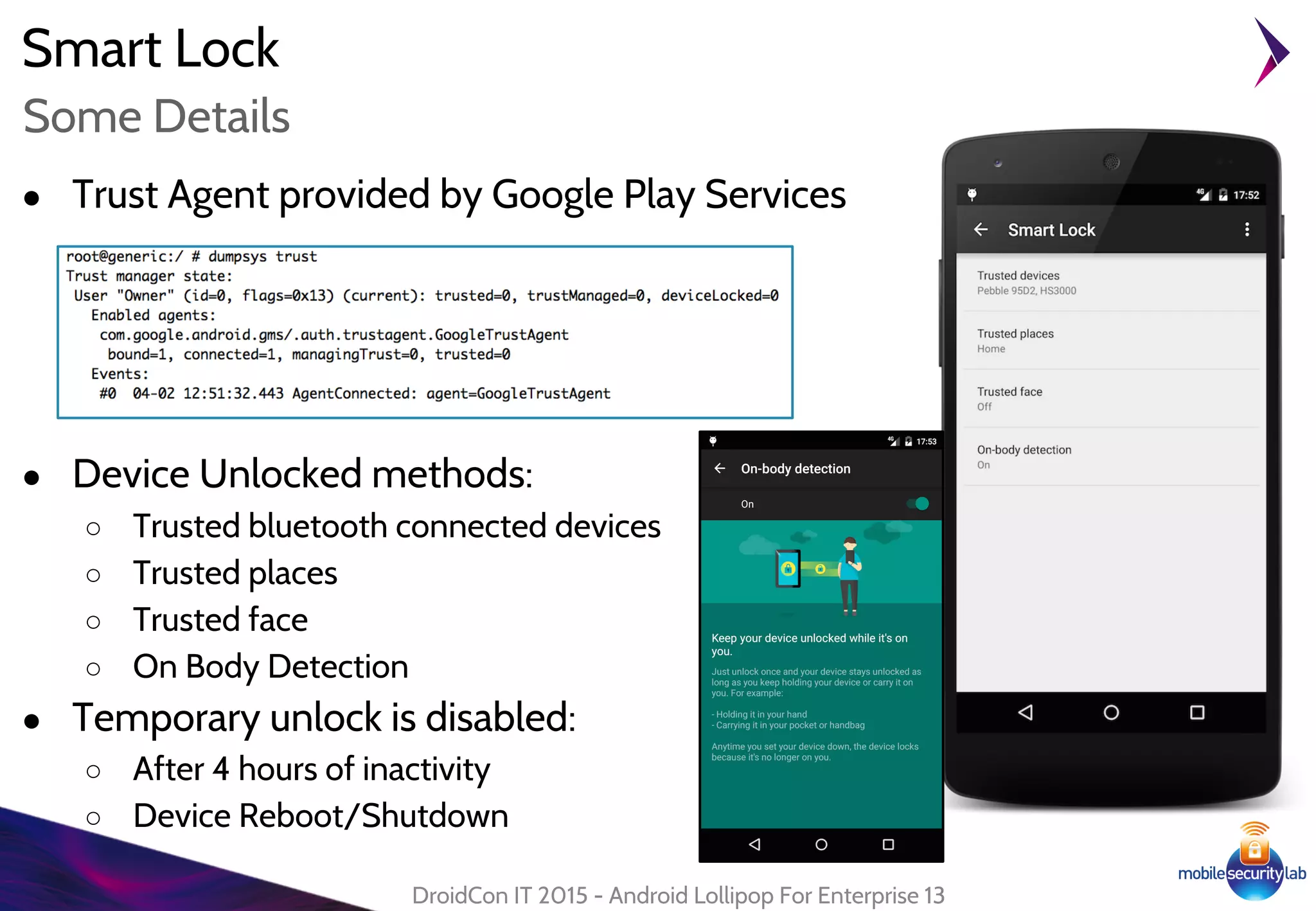
● Trust Agent provided by Google Play Services
● Device Unlocked methods:
○ Trusted bluetooth connected devices
○ Trusted places
○ Trusted face
○ On Body Detection
● Temporary unlock is disabled:
○ After 4 hours of inactivity
○ Device Reboot/Shutdown
DroidCon IT 2015 - Android Lollipop For Enterprise 13
Some Details
Android Lollipop for Enterprise
Device Protection
Corso Poste
Sicurezza Android 14
Device Protection
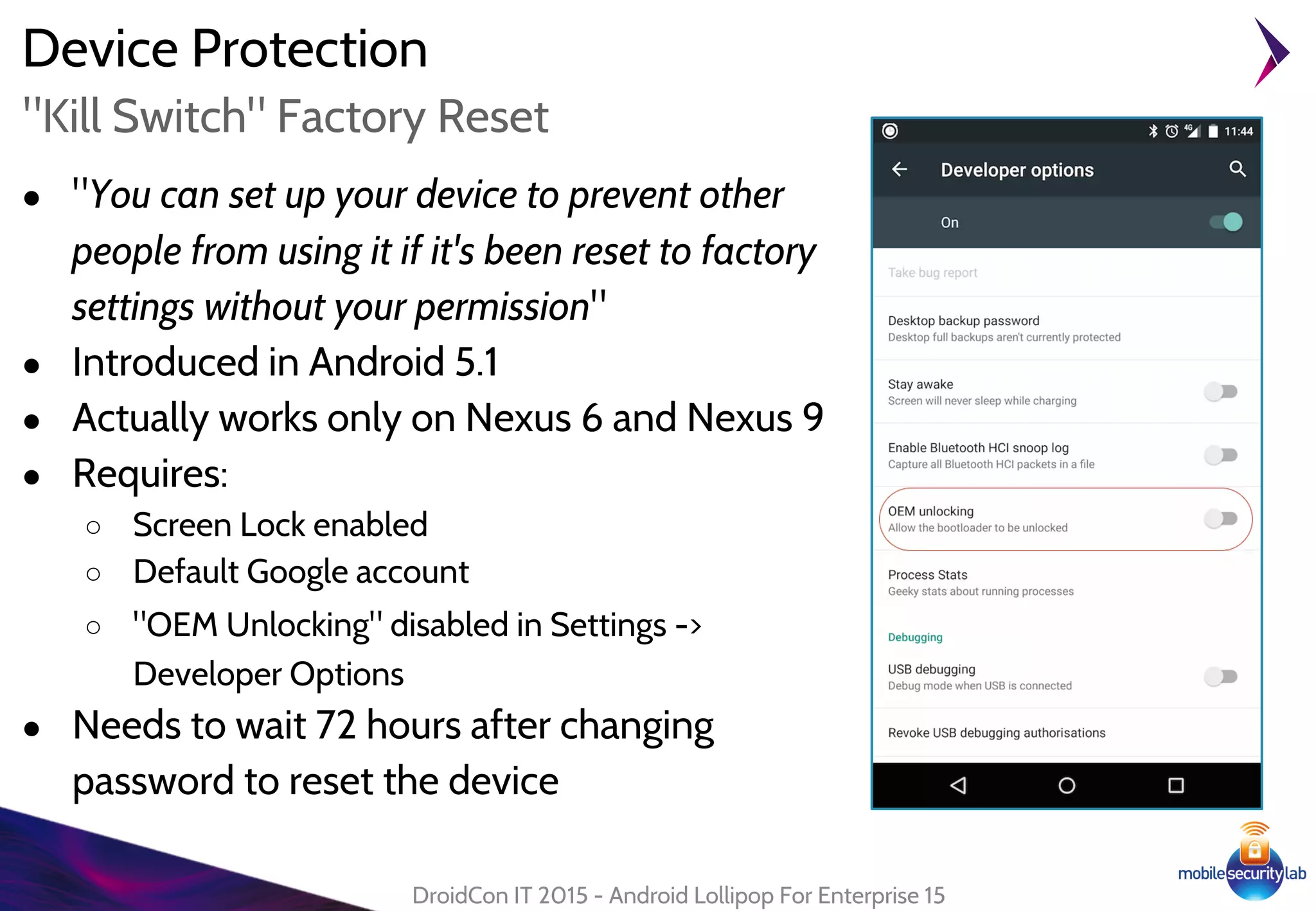
● "You can set up your device to prevent other
people from using it if it's been reset to factory
settings without your permission"
● Introduced in Android 5.1
● Actually works only on Nexus 6 and Nexus 9
● Requires:
○ Screen Lock enabled
○ Default Google account
○ "OEM Unlocking" disabled in Settings ->
Developer Options
● Needs to wait 72 hours after changing
password to reset the device
DroidCon IT 2015 - Android Lollipop For Enterprise 15
"Kill Switch" Factory Reset
Device Protection
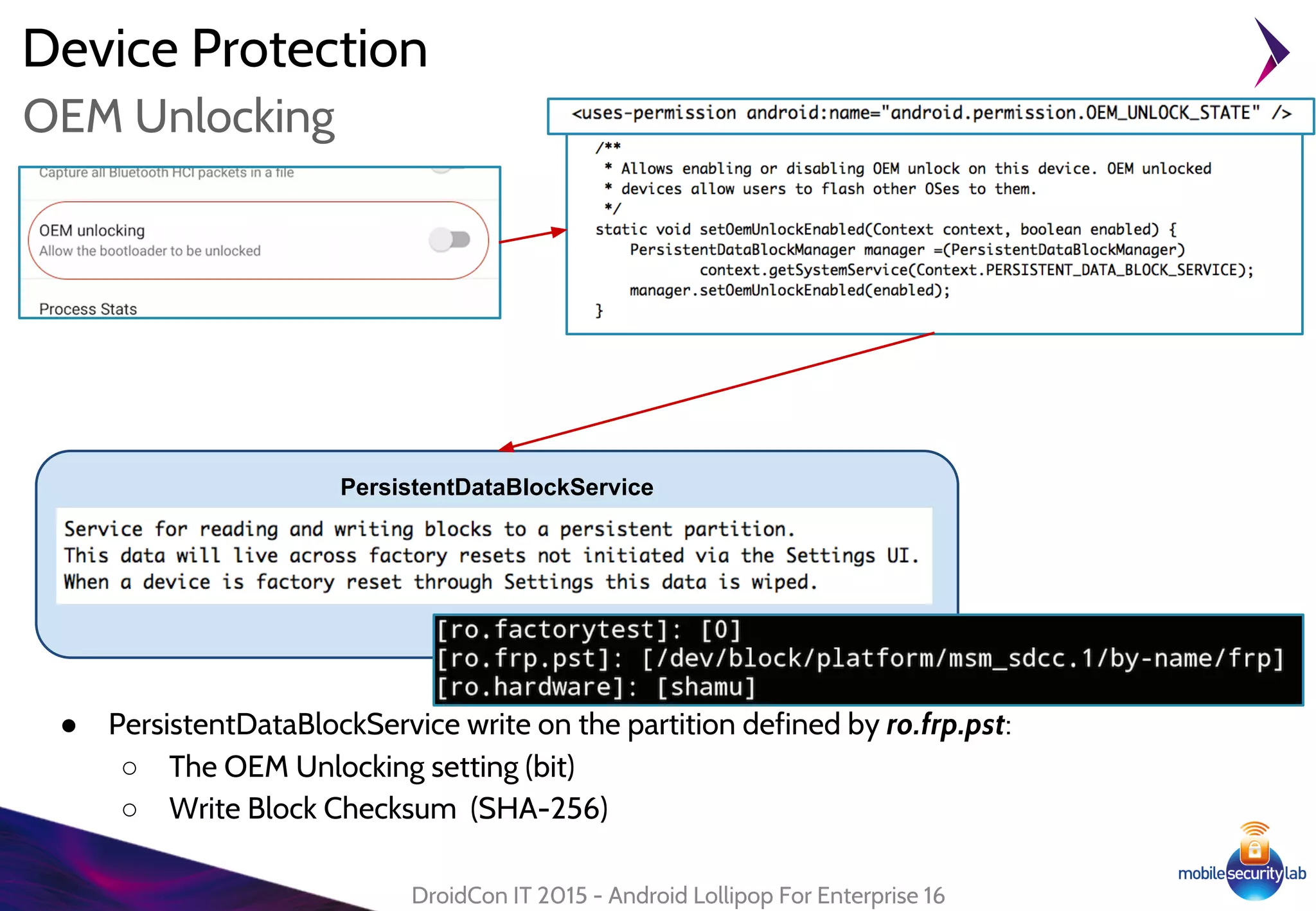
● PersistentDataBlockService write on the partition defined by ro.frp.pst:
○ The OEM Unlocking setting (bit)
○ Write Block Checksum (SHA-256)
DroidCon IT 2015 - Android Lollipop For Enterprise 16
OEM Unlocking
PersistentDataBlockService
Android Lollipop For Enterprise
Device Administration API
17
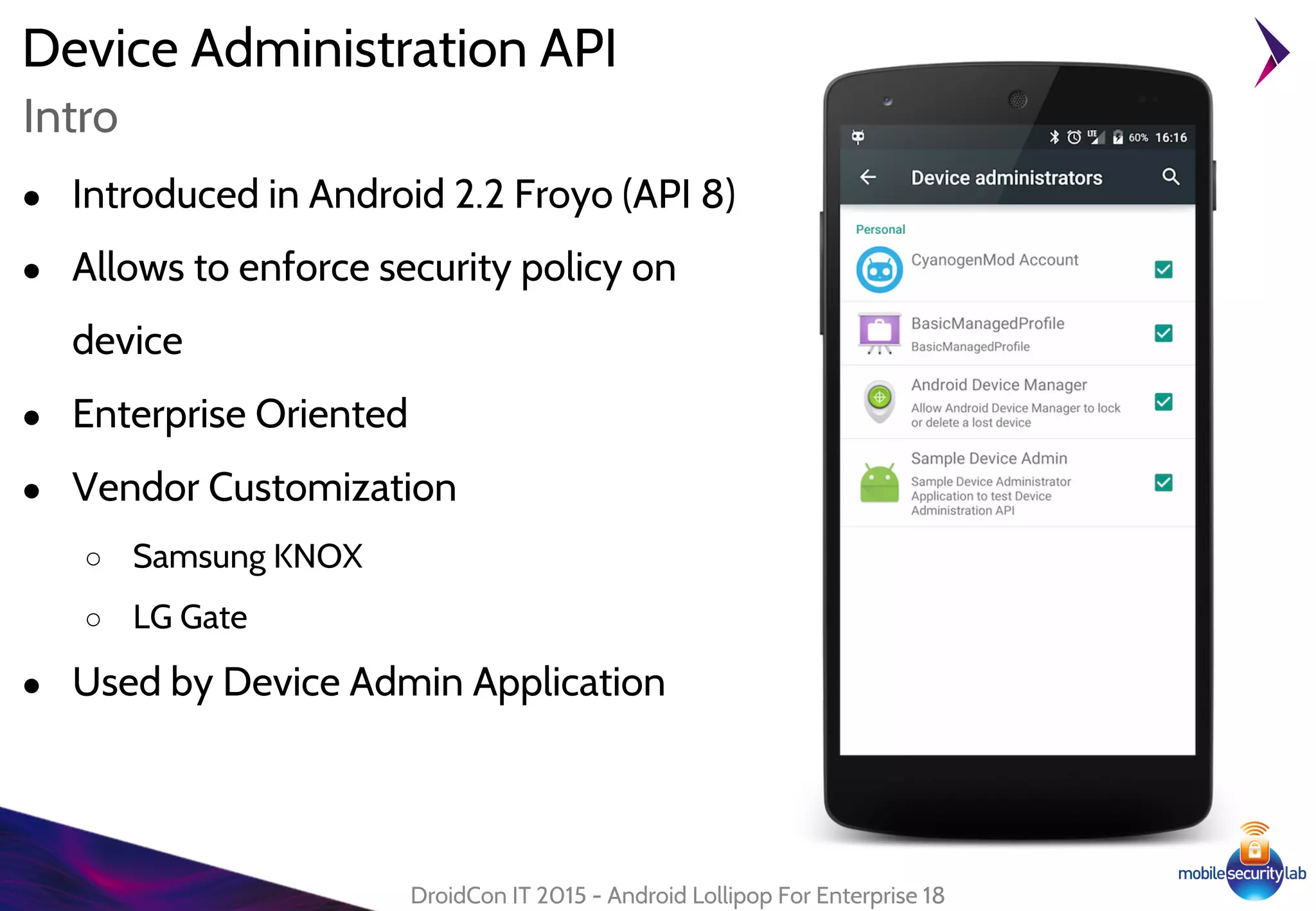
Device Administration API
● Introduced in Android 2.2 Froyo (API 8)
● Allows to enforce security policy on
device
● Enterprise Oriented
● Vendor Customization
○ Samsung KNOX
○ LG Gate
● Used by Device Admin Application
DroidCon IT 2015 - Android Lollipop For Enterprise 18
Intro
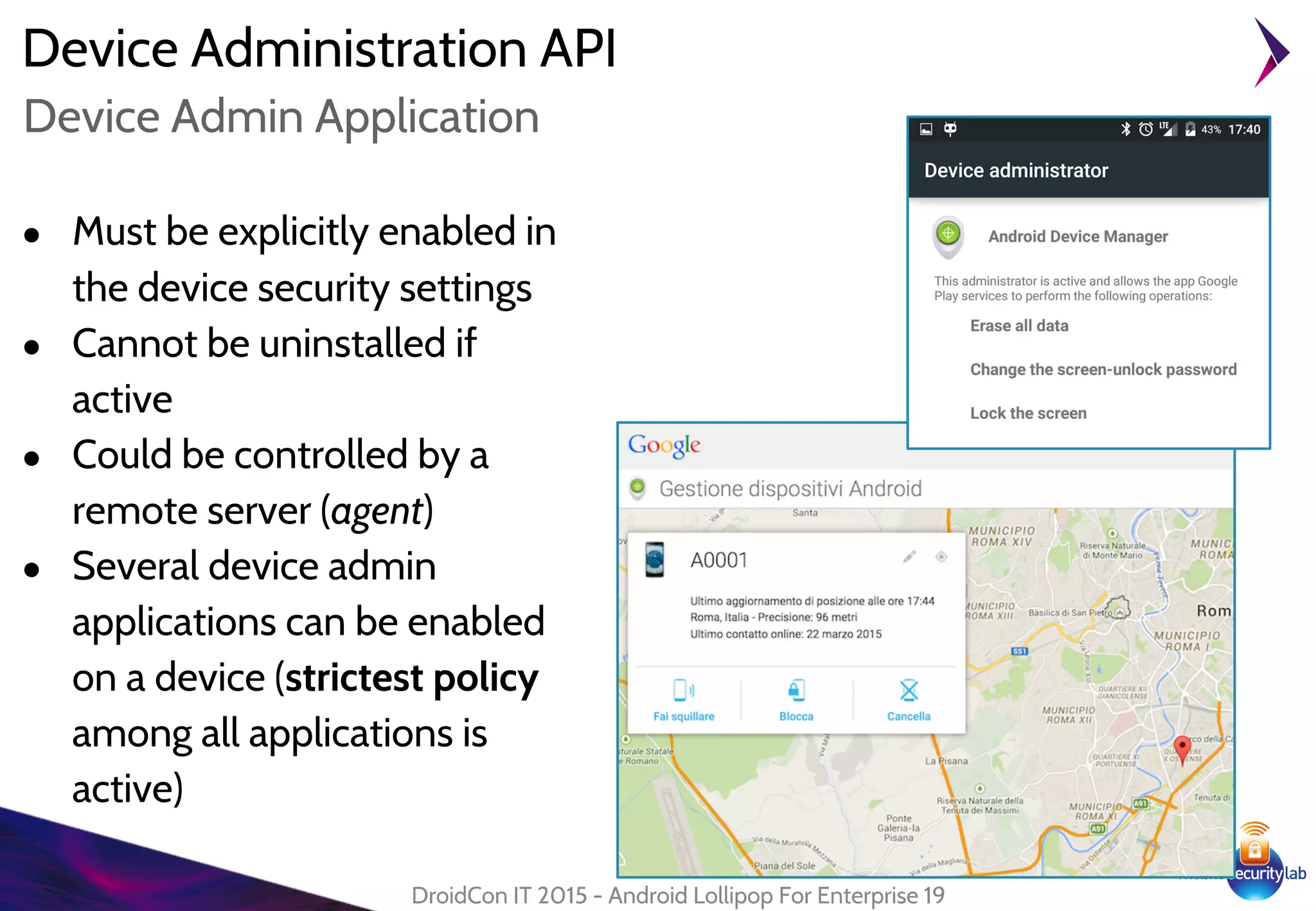
Device Administration API
● Must be explicitly enabled in
the device security settings
● Cannot be uninstalled if
active
● Could be controlled by a
remote server (agent)
● Several device admin
applications can be enabled
on a device (strictest policy
among all applications is
active)
DroidCon IT 2015 - Android Lollipop For Enterprise 19
Device Admin Application
Device Administration API
DroidCon IT 2015 - Android Lollipop For Enterprise 20
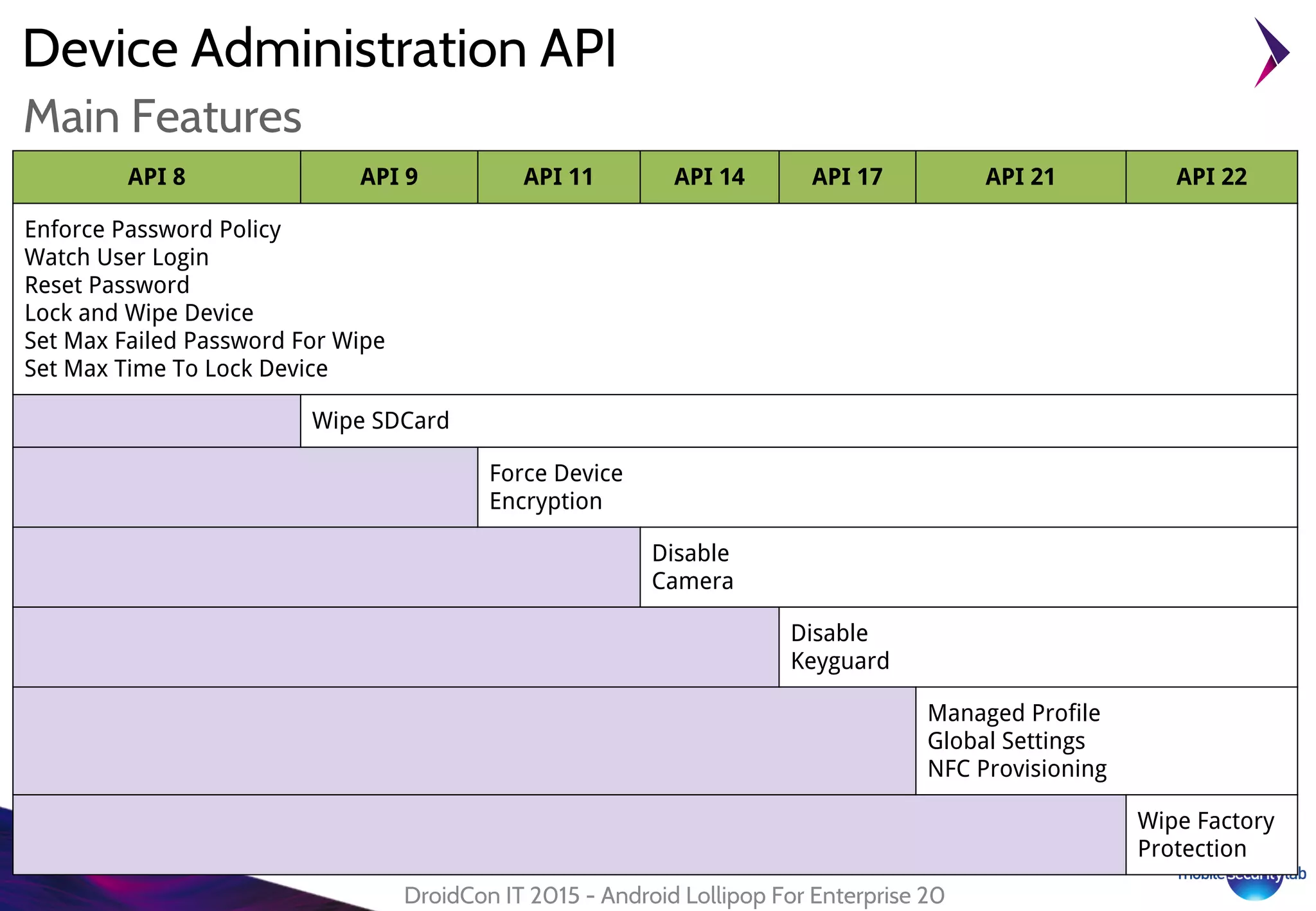
Main Features
API 8 API 9 API 11 API 14 API 17 API 21 API 22
Enforce Password Policy
Watch User Login
Reset Password
Lock and Wipe Device
Set Max Failed Password For Wipe
Set Max Time To Lock Device
Wipe SDCard
Force Device
Encryption
Disable
Camera
Disable
Keyguard
Managed Profile
Global Settings
NFC Provisioning
Wipe Factory
Protection
Device Administration API
DroidCon IT 2015 - Android Lollipop For Enterprise 21
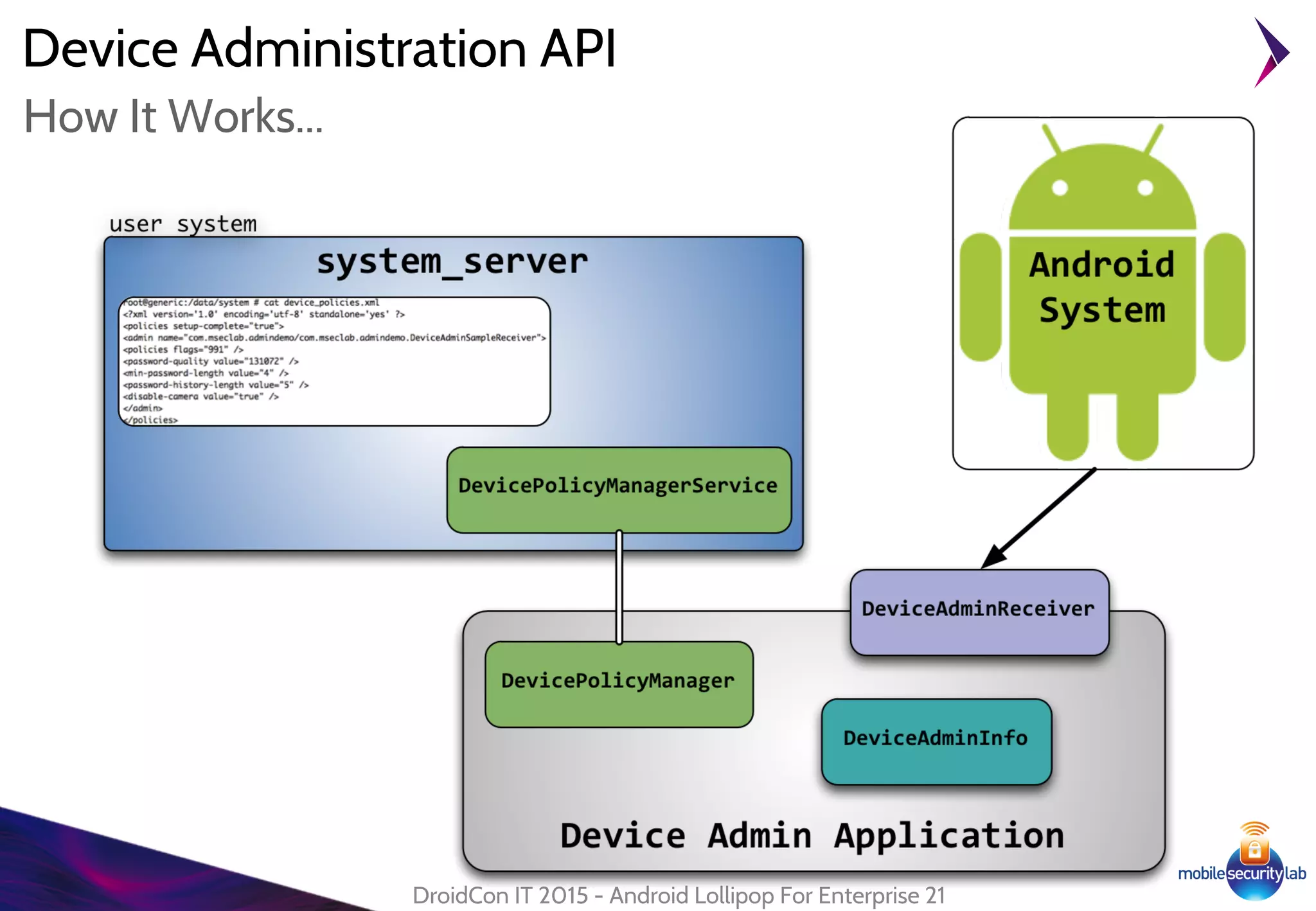
How It Works...
Device Administration API
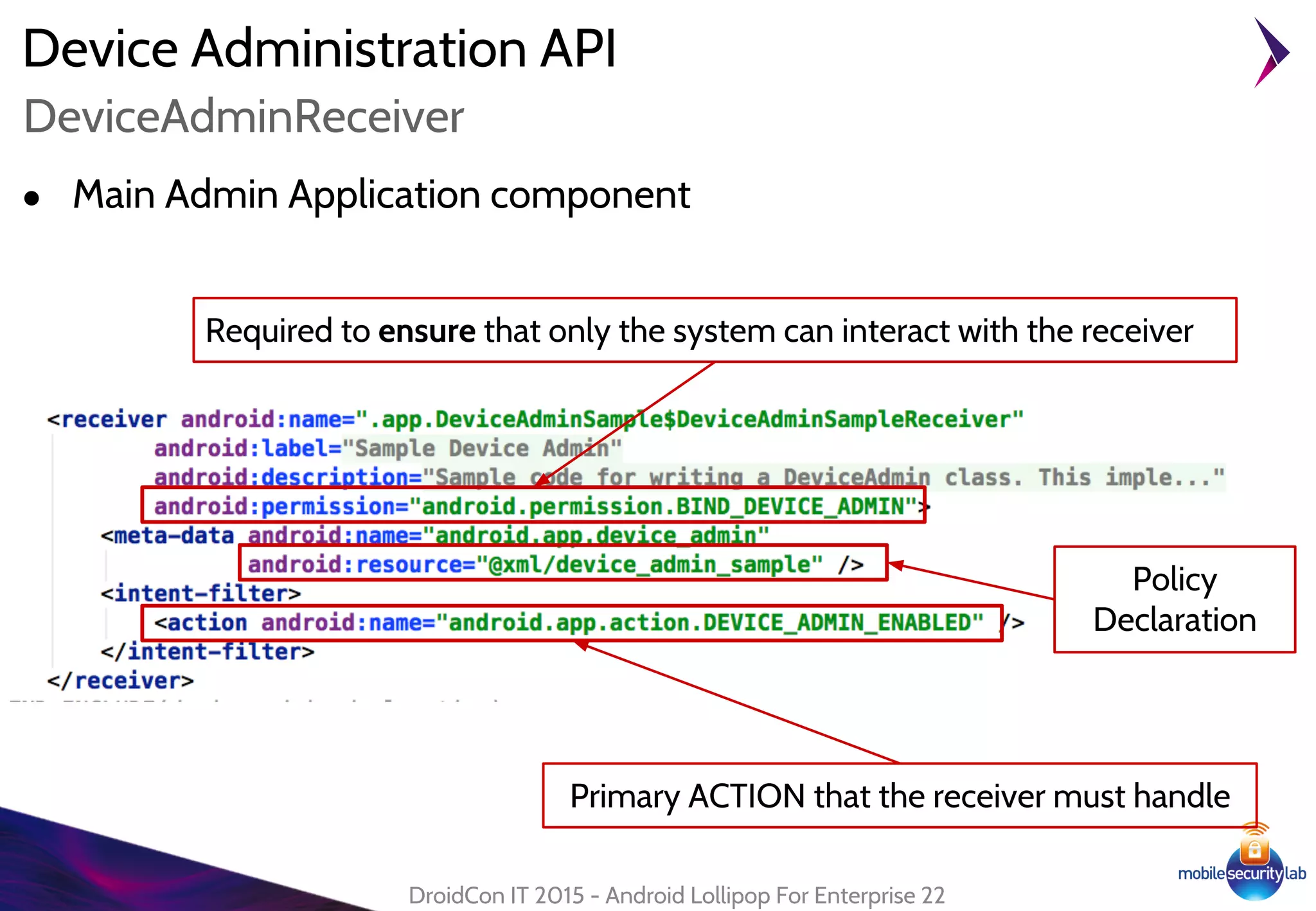
● Main Admin Application component
DroidCon IT 2015 - Android Lollipop For Enterprise 22
DeviceAdminReceiver
Required to ensure that only the system can interact with the receiver
Primary ACTION that the receiver must handle
Policy
Declaration
Device Administration API
DroidCon IT 2015 - Android Lollipop For Enterprise 23
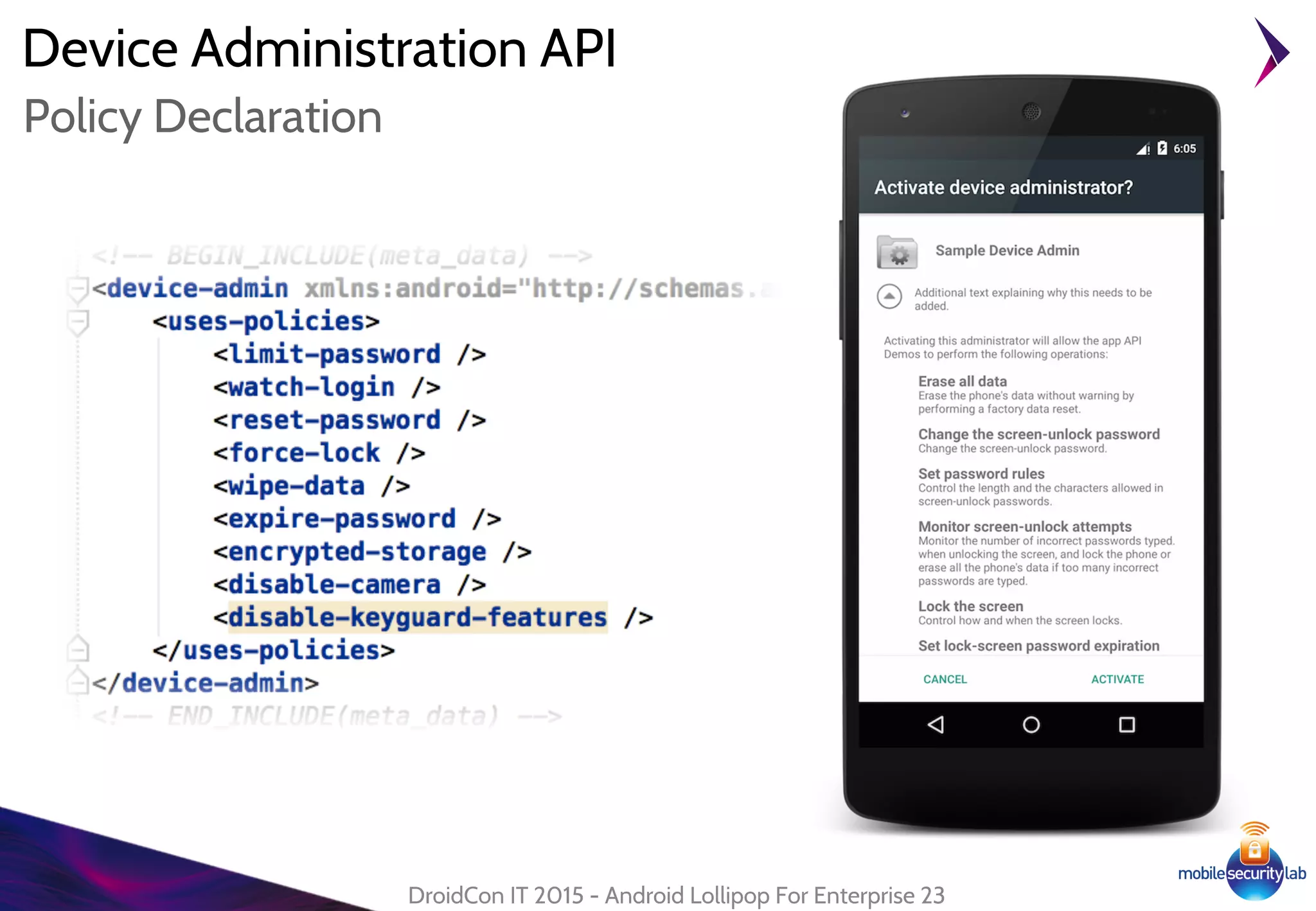
Policy Declaration
Device Administration API
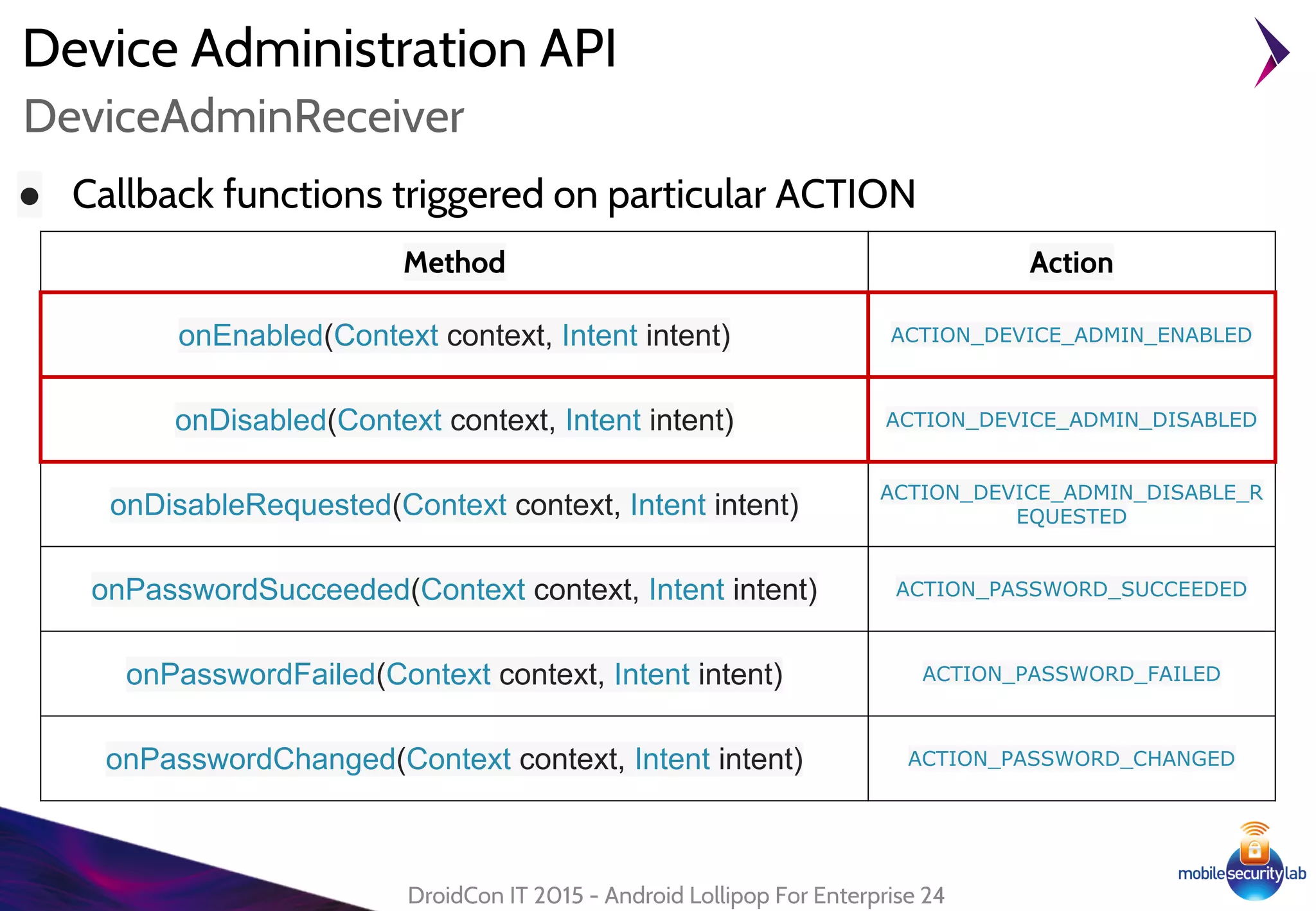
● Callback functions triggered on particular ACTION
DroidCon IT 2015 - Android Lollipop For Enterprise 24
DeviceAdminReceiver
Method Action
onEnabled(Context context, Intent intent) ACTION_DEVICE_ADMIN_ENABLED
onDisabled(Context context, Intent intent) ACTION_DEVICE_ADMIN_DISABLED
onDisableRequested(Context context, Intent intent)
ACTION_DEVICE_ADMIN_DISABLE_R
EQUESTED
onPasswordSucceeded(Context context, Intent intent) ACTION_PASSWORD_SUCCEEDED
onPasswordFailed(Context context, Intent intent) ACTION_PASSWORD_FAILED
onPasswordChanged(Context context, Intent intent) ACTION_PASSWORD_CHANGED
Device Administration API
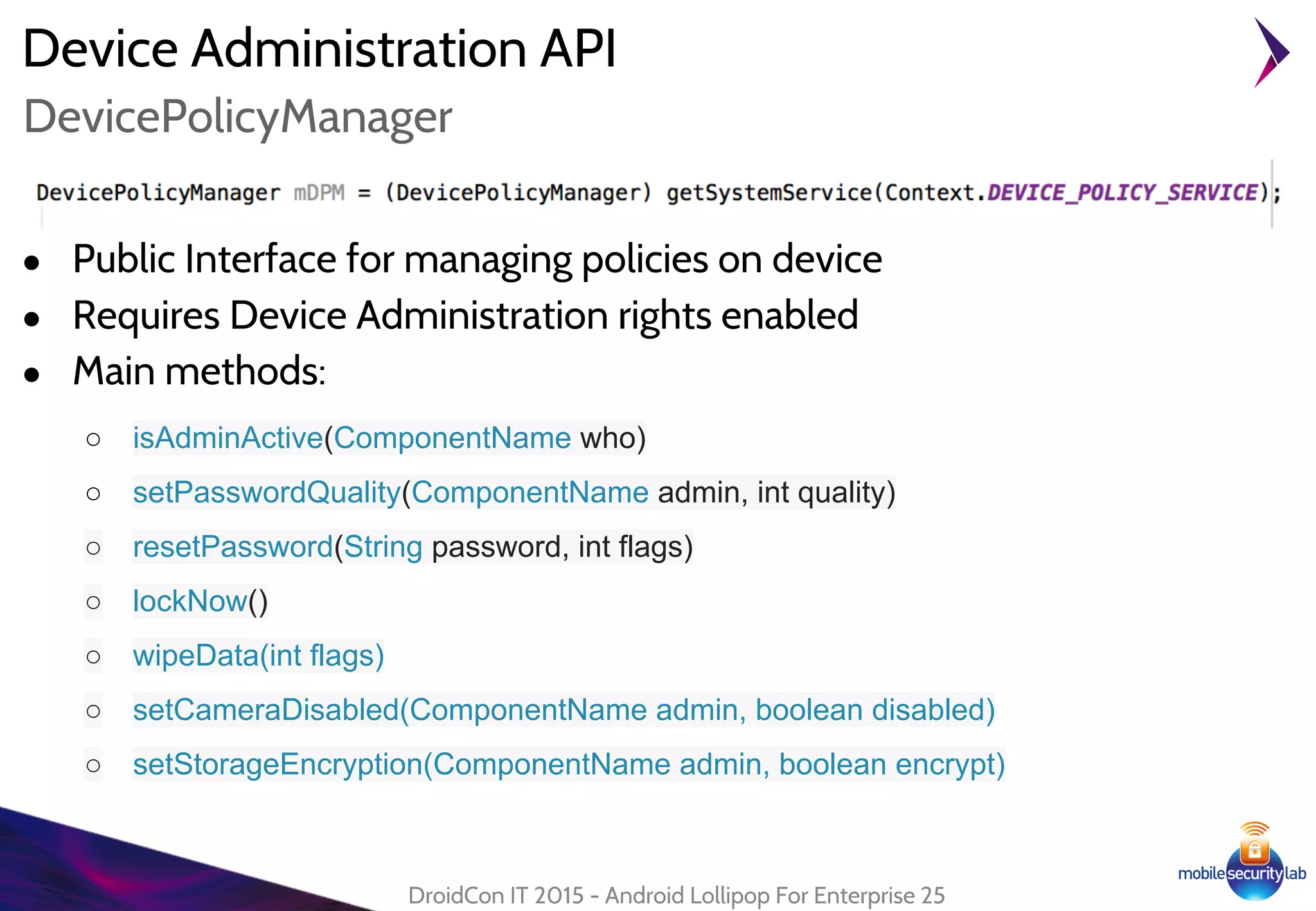
● Public Interface for managing policies on device
● Requires Device Administration rights enabled
● Main methods:
○ isAdminActive(ComponentName who)
○ setPasswordQuality(ComponentName admin, int quality)
○ resetPassword(String password, int flags)
○ lockNow()
○ wipeData(int flags)
○ setCameraDisabled(ComponentName admin, boolean disabled)
○ setStorageEncryption(ComponentName admin, boolean encrypt)
DroidCon IT 2015 - Android Lollipop For Enterprise 25
DevicePolicyManager
Device Administration API
DroidCon IT 2015 - Android Lollipop For Enterprise 26
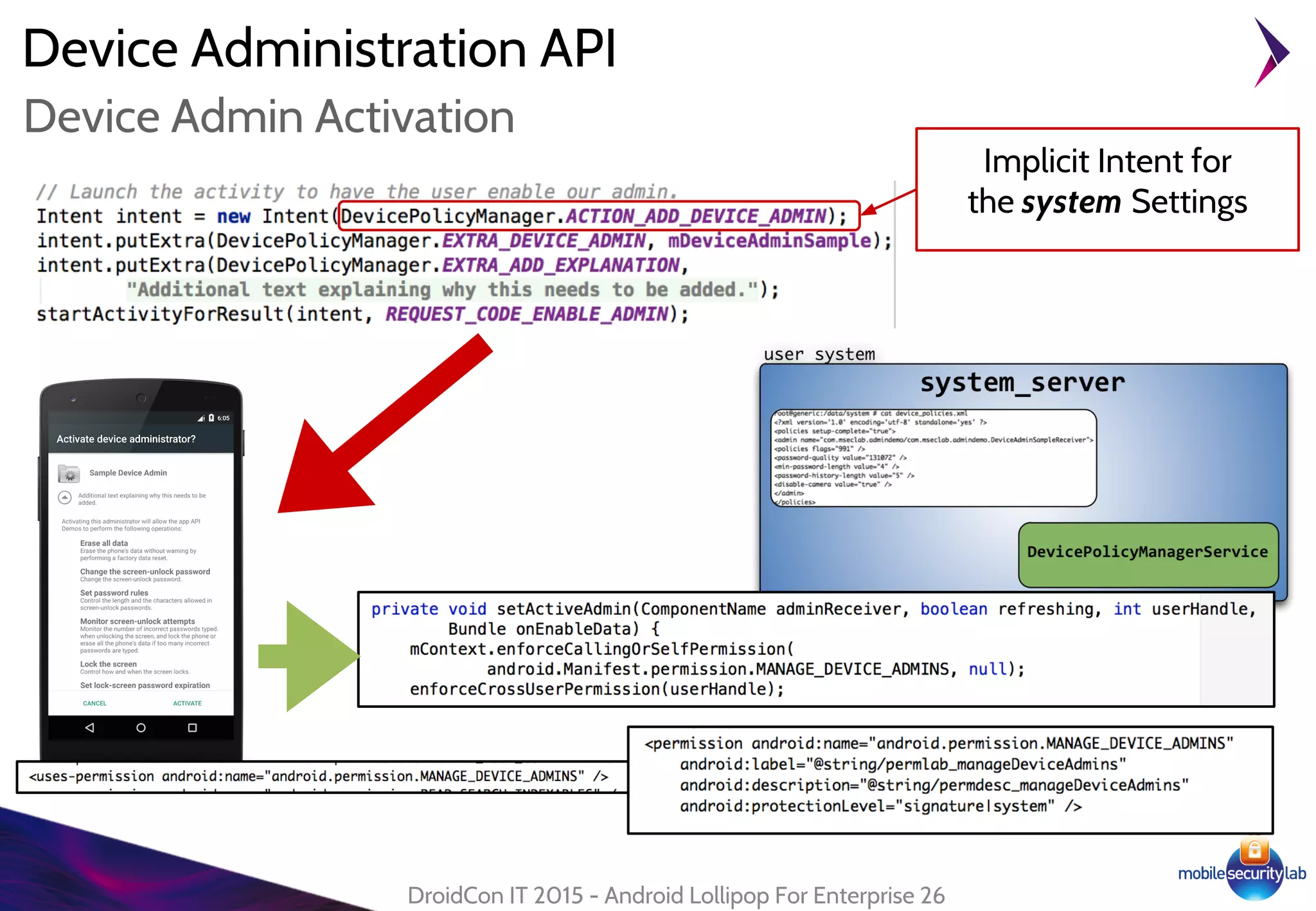
Device Admin Activation
Implicit Intent for
the system Settings
Device Administration API
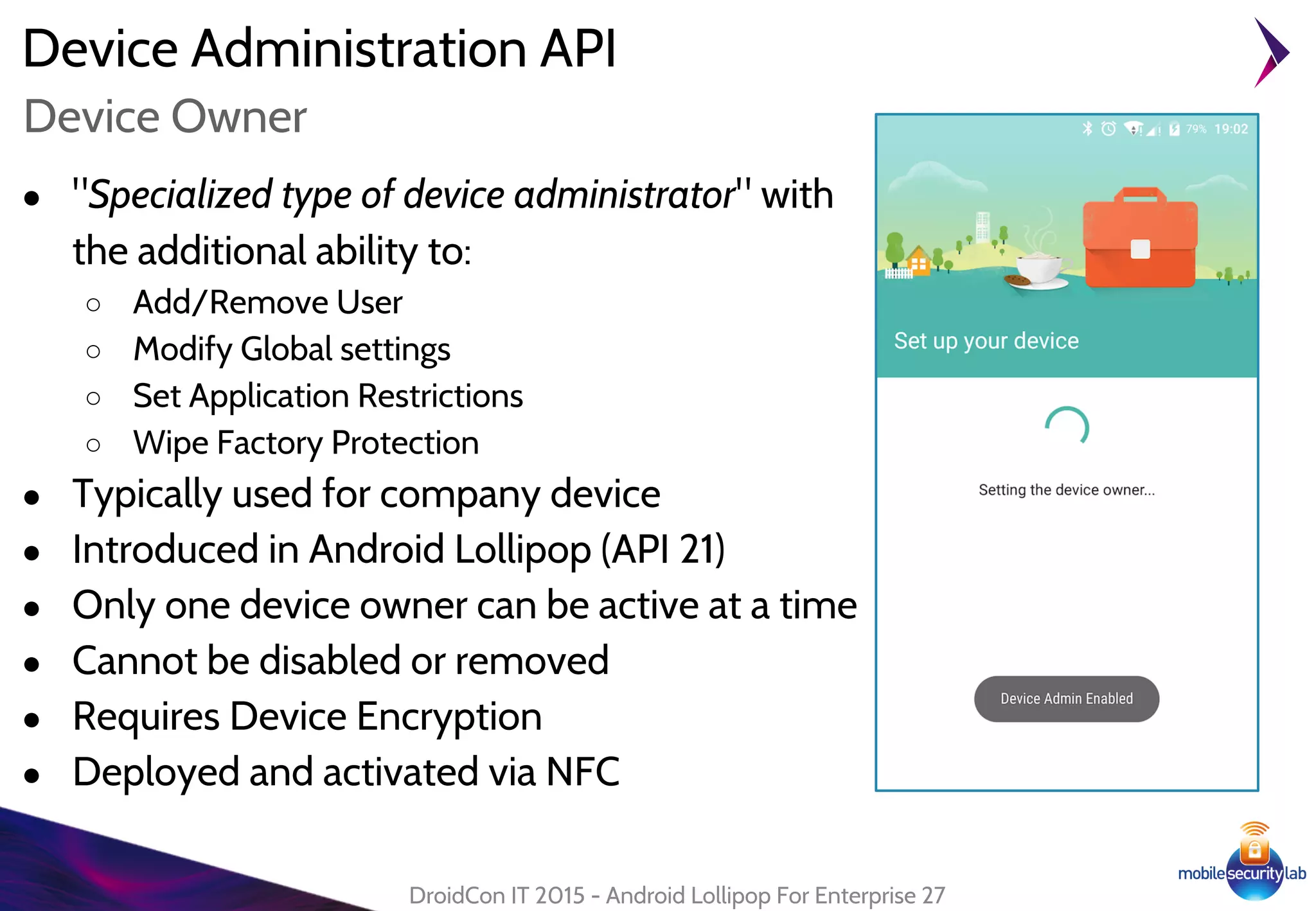
● "Specialized type of device administrator" with
the additional ability to:
○ Add/Remove User
○ Modify Global settings
○ Set Application Restrictions
○ Wipe Factory Protection
● Typically used for company device
● Introduced in Android Lollipop (API 21)
● Only one device owner can be active at a time
● Cannot be disabled or removed
● Requires Device Encryption
● Deployed and activated via NFC
DroidCon IT 2015 - Android Lollipop For Enterprise 27
Device Owner
Device Administration API
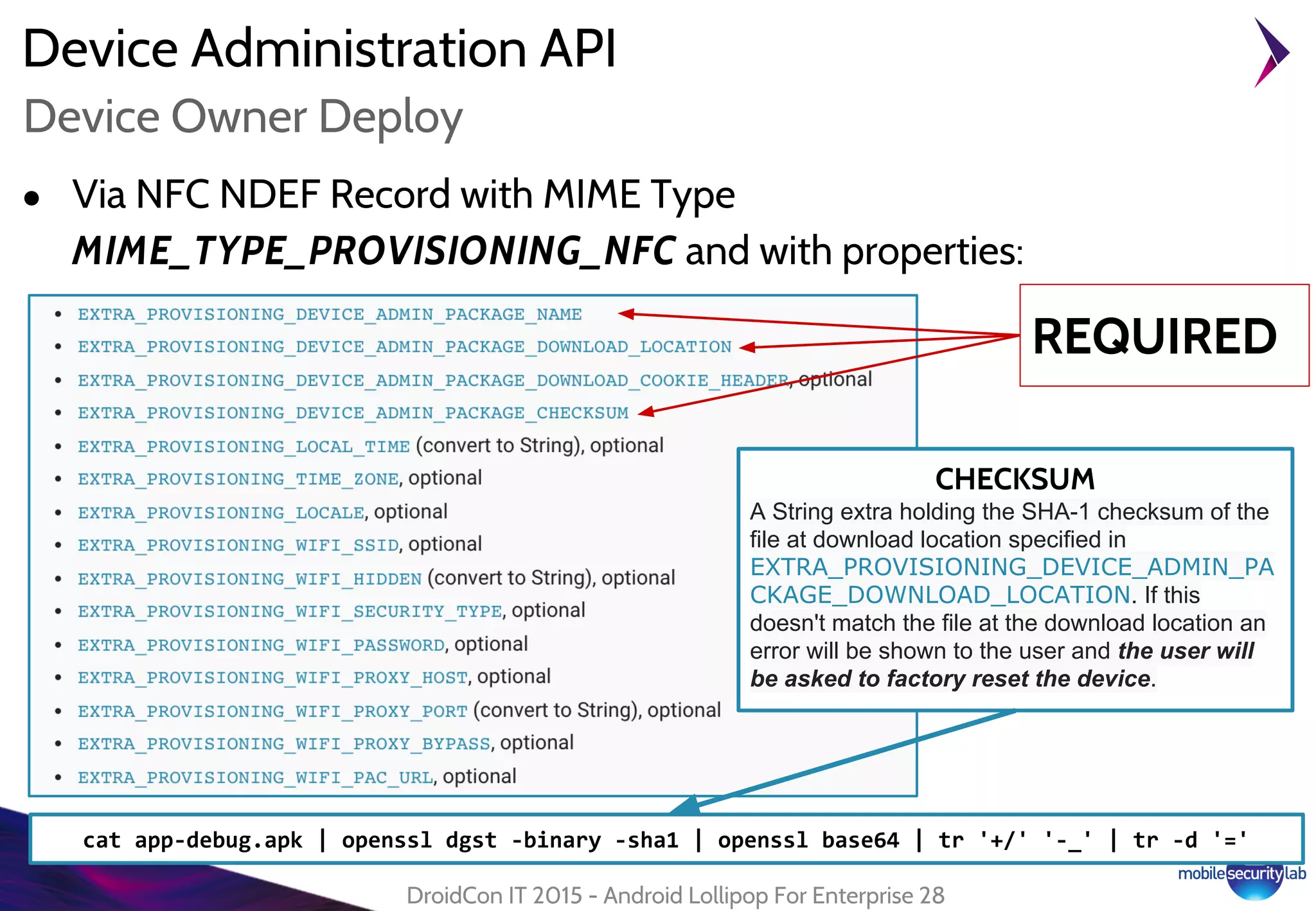
● Via NFC NDEF Record with MIME Type
MIME_TYPE_PROVISIONING_NFC and with properties:
DroidCon IT 2015 - Android Lollipop For Enterprise 28
Device Owner Deploy
REQUIRED
CHECKSUM
A String extra holding the SHA-1 checksum of the
file at download location specified in
EXTRA_PROVISIONING_DEVICE_ADMIN_PA
CKAGE_DOWNLOAD_LOCATION. If this
doesn't match the file at the download location an
error will be shown to the user and the user will
be asked to factory reset the device.
cat app-debug.apk | openssl dgst -binary -sha1 | openssl base64 | tr '+/' '-_' | tr -d '='
Device Administration API
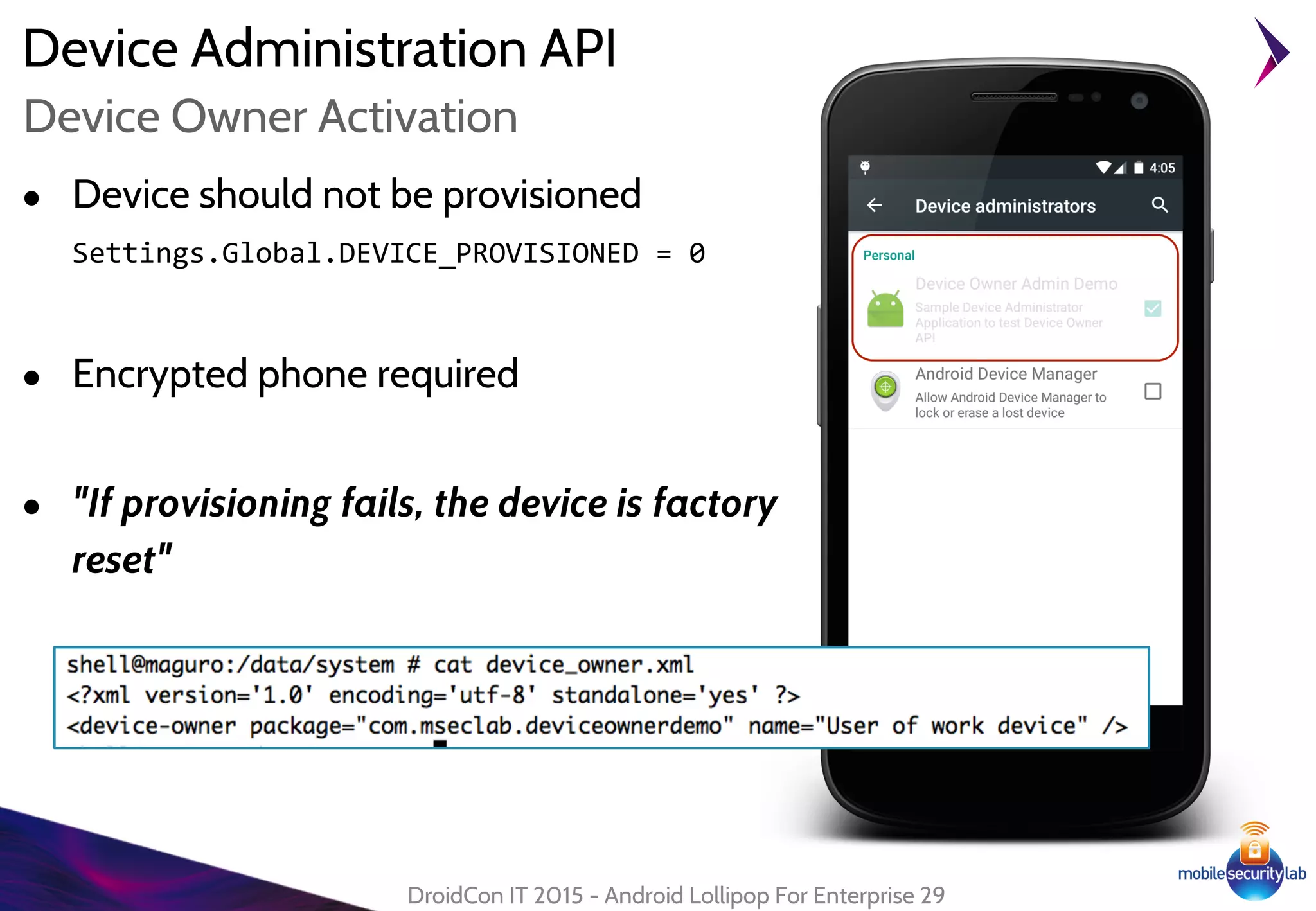
● Device should not be provisioned
Settings.Global.DEVICE_PROVISIONED = 0
● Encrypted phone required
● "If provisioning fails, the device is factory
reset"
DroidCon IT 2015 - Android Lollipop For Enterprise 29
Device Owner Activation
Android Lollipop For Enterprise
Managed Profile
30
Managed Profile
● New security feature for enterprise “managed profile”
● Available since Android Lollipop (API 21)
● Using managed profile the enterprise could define a controlled domain
on the user's device to run controlled application
● The application inside the new managed profile can be configured with
policy to interact or not with other apps on device
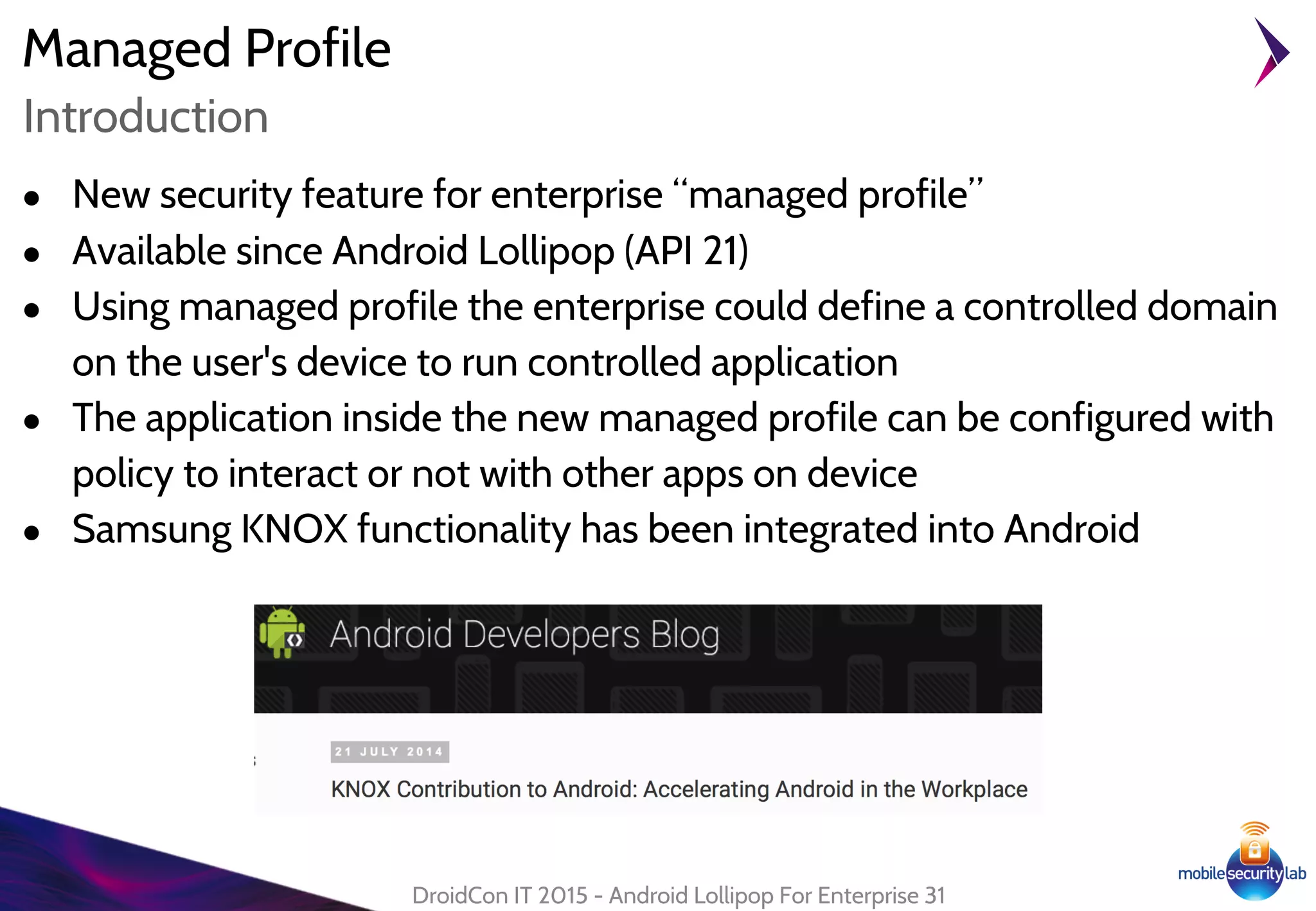
● Samsung KNOX functionality has been integrated into Android
DroidCon IT 2015 - Android Lollipop For Enterprise 31
Introduction
Managed Profile
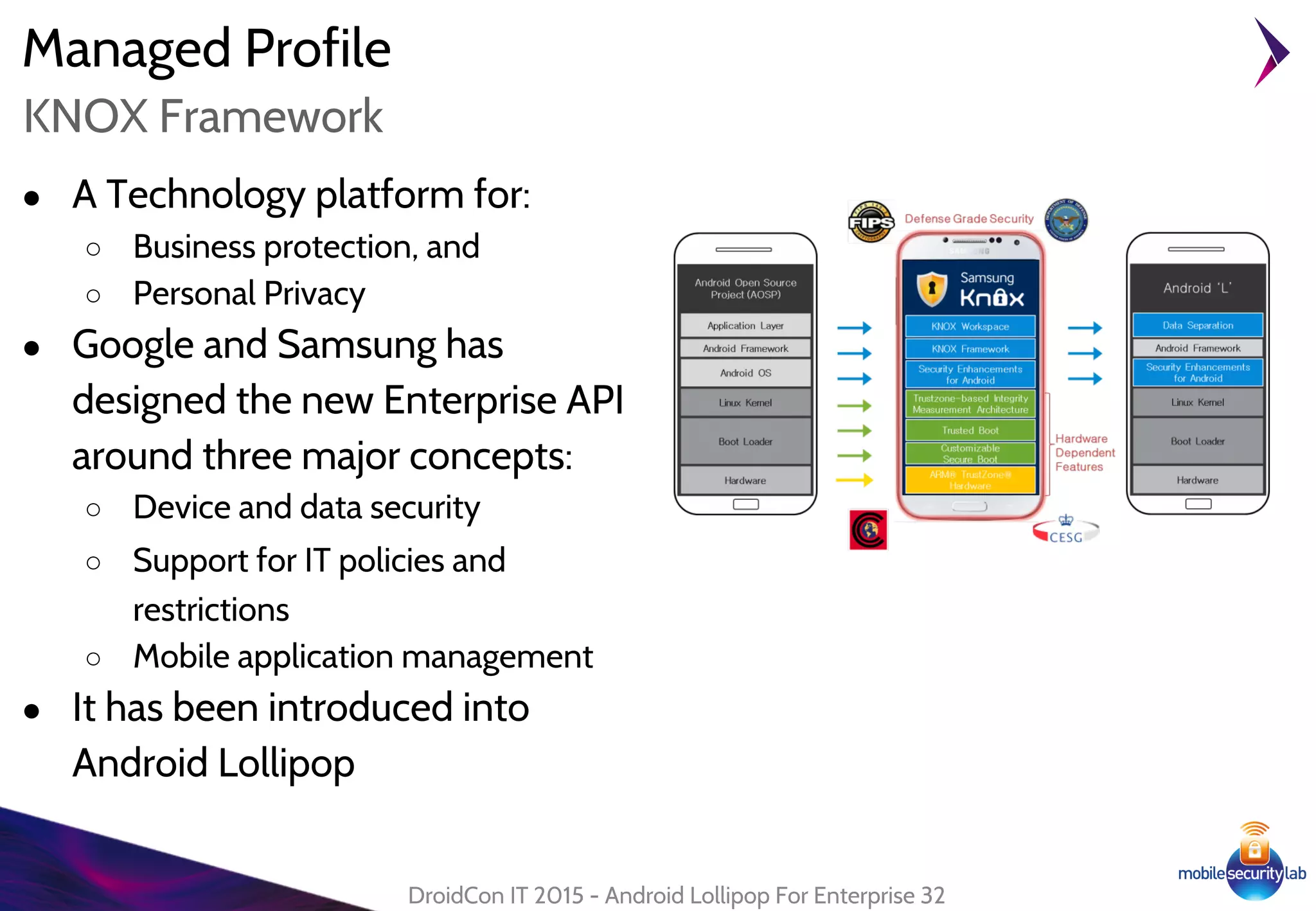
● A Technology platform for:
○ Business protection, and
○ Personal Privacy
● Google and Samsung has
designed the new Enterprise API
around three major concepts:
○ Device and data security
○ Support for IT policies and
restrictions
○ Mobile application management
● It has been introduced into
Android Lollipop
DroidCon IT 2015 - Android Lollipop For Enterprise 32
KNOX Framework
Managed Profile
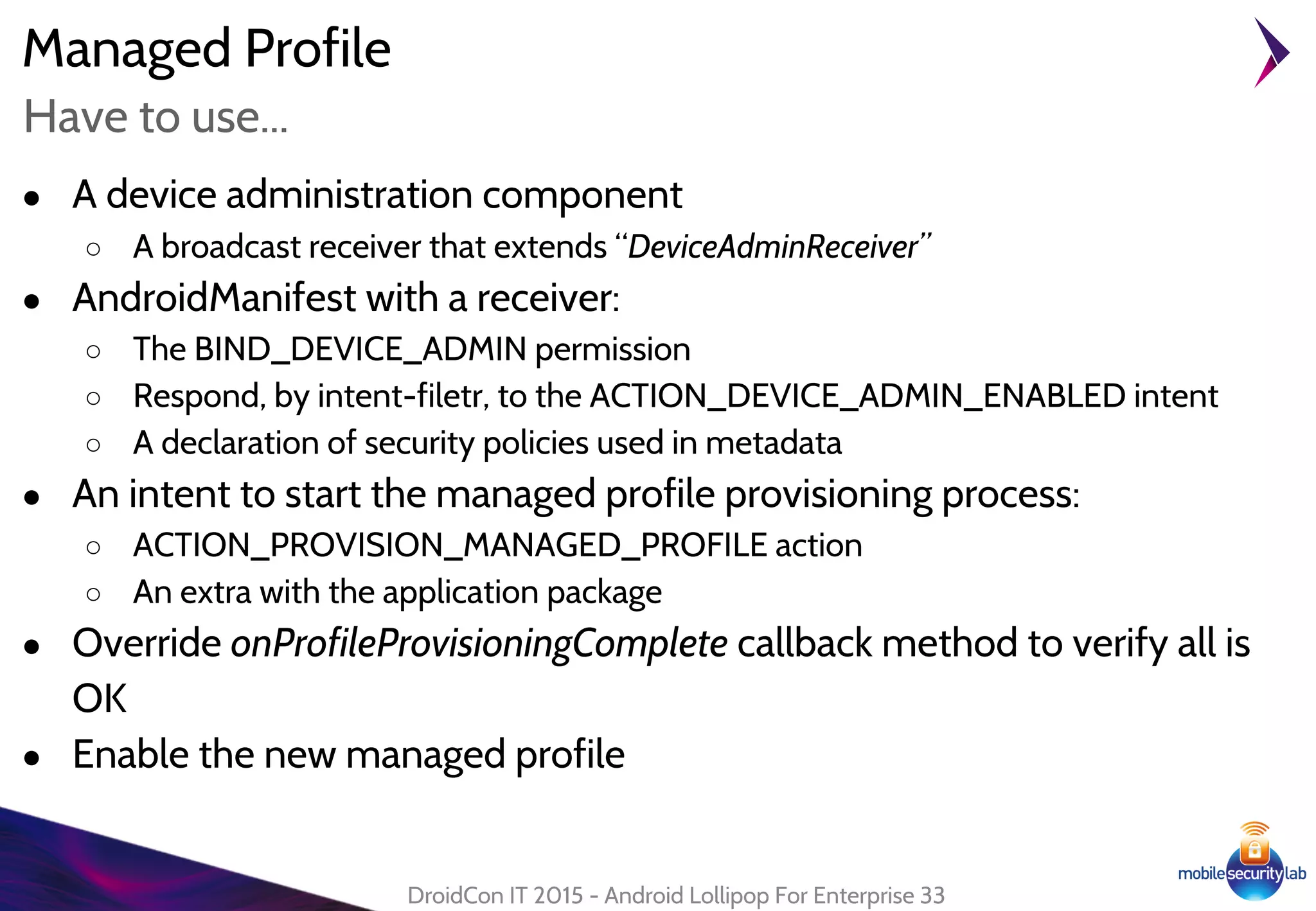
● A device administration component
○ A broadcast receiver that extends “DeviceAdminReceiver”
● AndroidManifest with a receiver:
○ The BIND_DEVICE_ADMIN permission
○ Respond, by intent-filetr, to the ACTION_DEVICE_ADMIN_ENABLED intent
○ A declaration of security policies used in metadata
● An intent to start the managed profile provisioning process:
○ ACTION_PROVISION_MANAGED_PROFILE action
○ An extra with the application package
● Override onProfileProvisioningComplete callback method to verify all is
OK
● Enable the new managed profile
DroidCon IT 2015 - Android Lollipop For Enterprise 33
Have to use...
Managed Profile
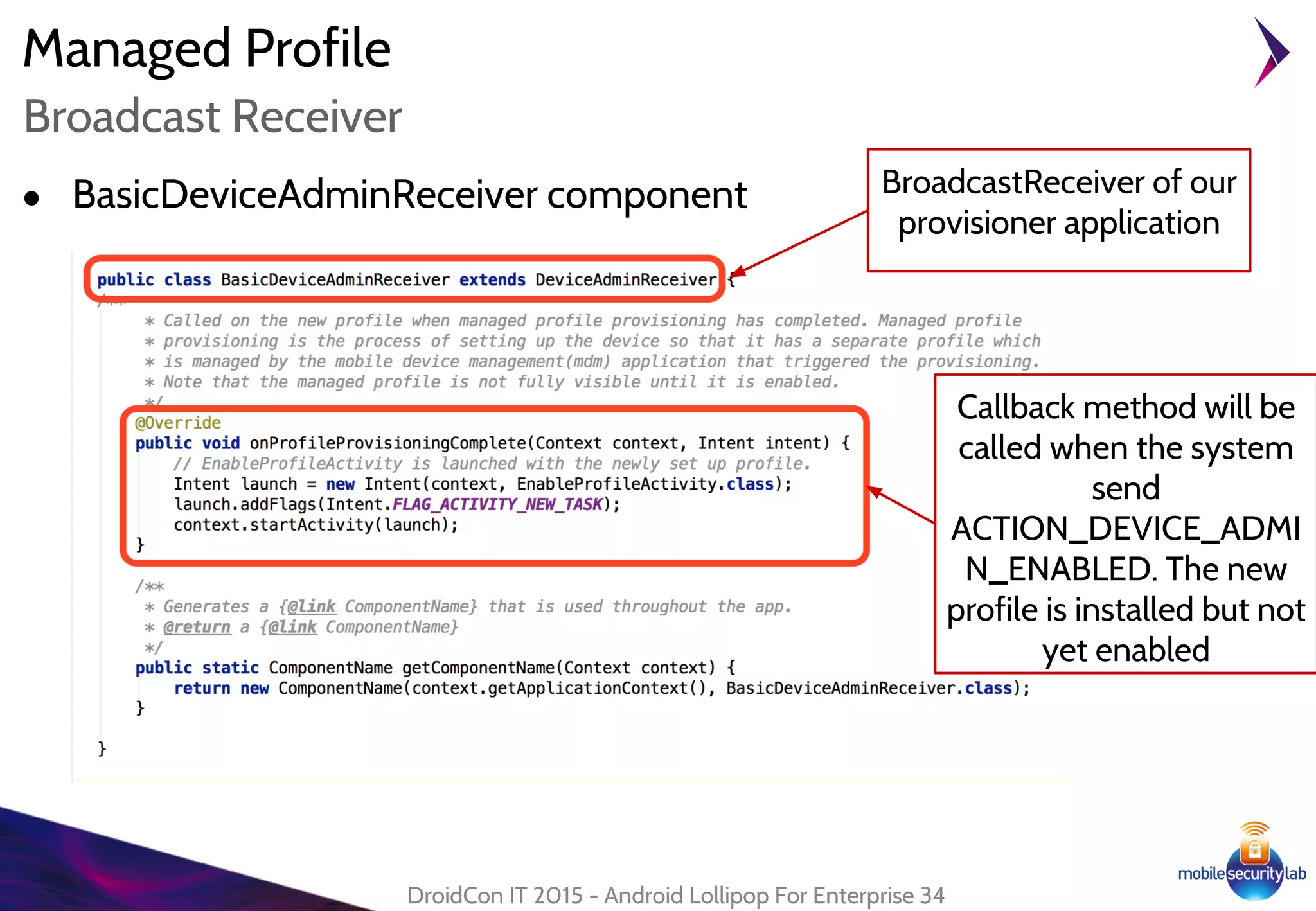
● BasicDeviceAdminReceiver component
DroidCon IT 2015 - Android Lollipop For Enterprise 34
Broadcast Receiver
BroadcastReceiver of our
provisioner application
Callback method will be
called when the system
send
ACTION_DEVICE_ADMI
N_ENABLED. The new
profile is installed but not
yet enabled
Managed Profile
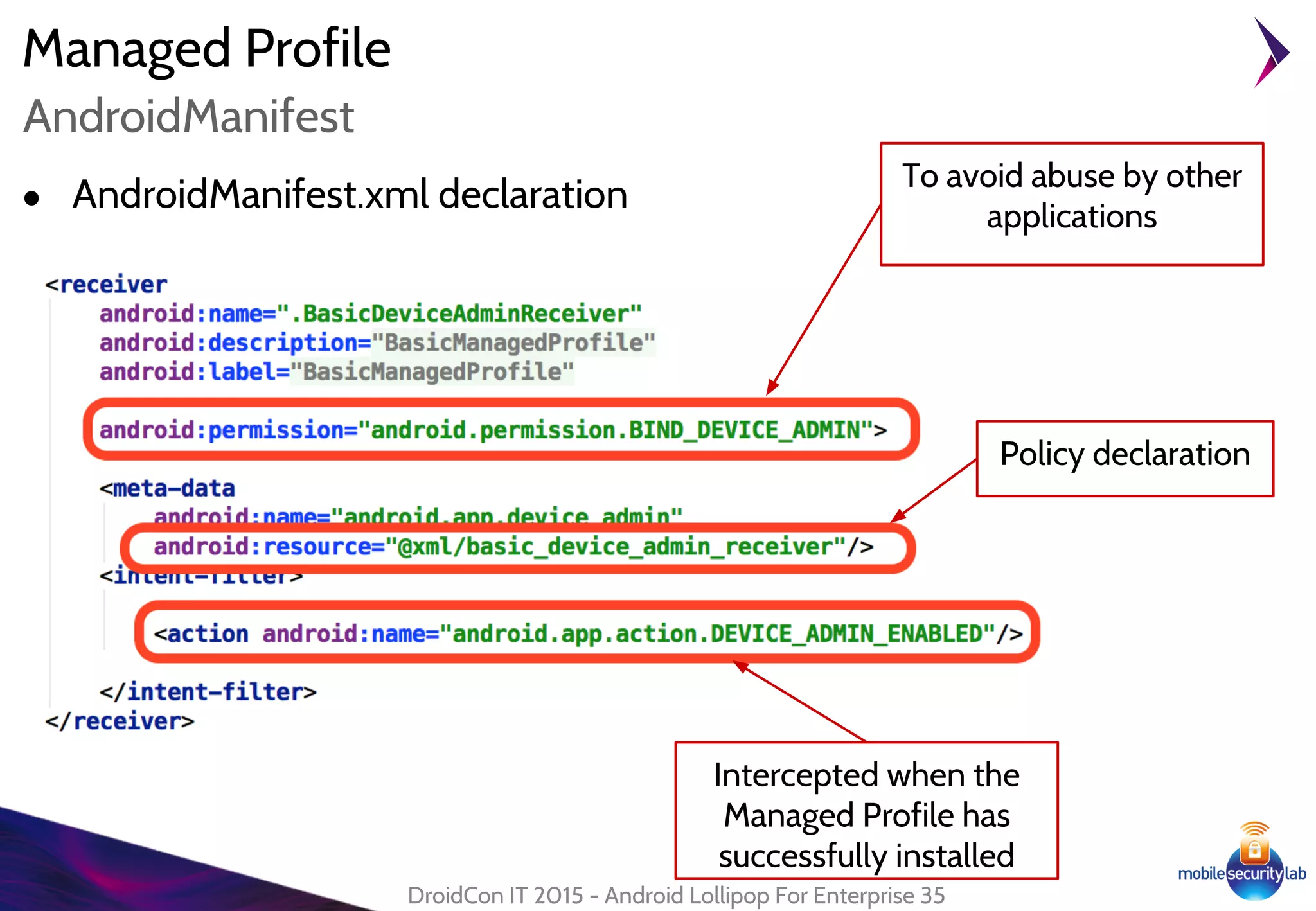
● AndroidManifest.xml declaration
DroidCon IT 2015 - Android Lollipop For Enterprise 35
AndroidManifest
To avoid abuse by other
applications
Intercepted when the
Managed Profile has
successfully installed
Policy declaration
Managed Profile
DroidCon IT 2015 - Android Lollipop For Enterprise 36
Activation
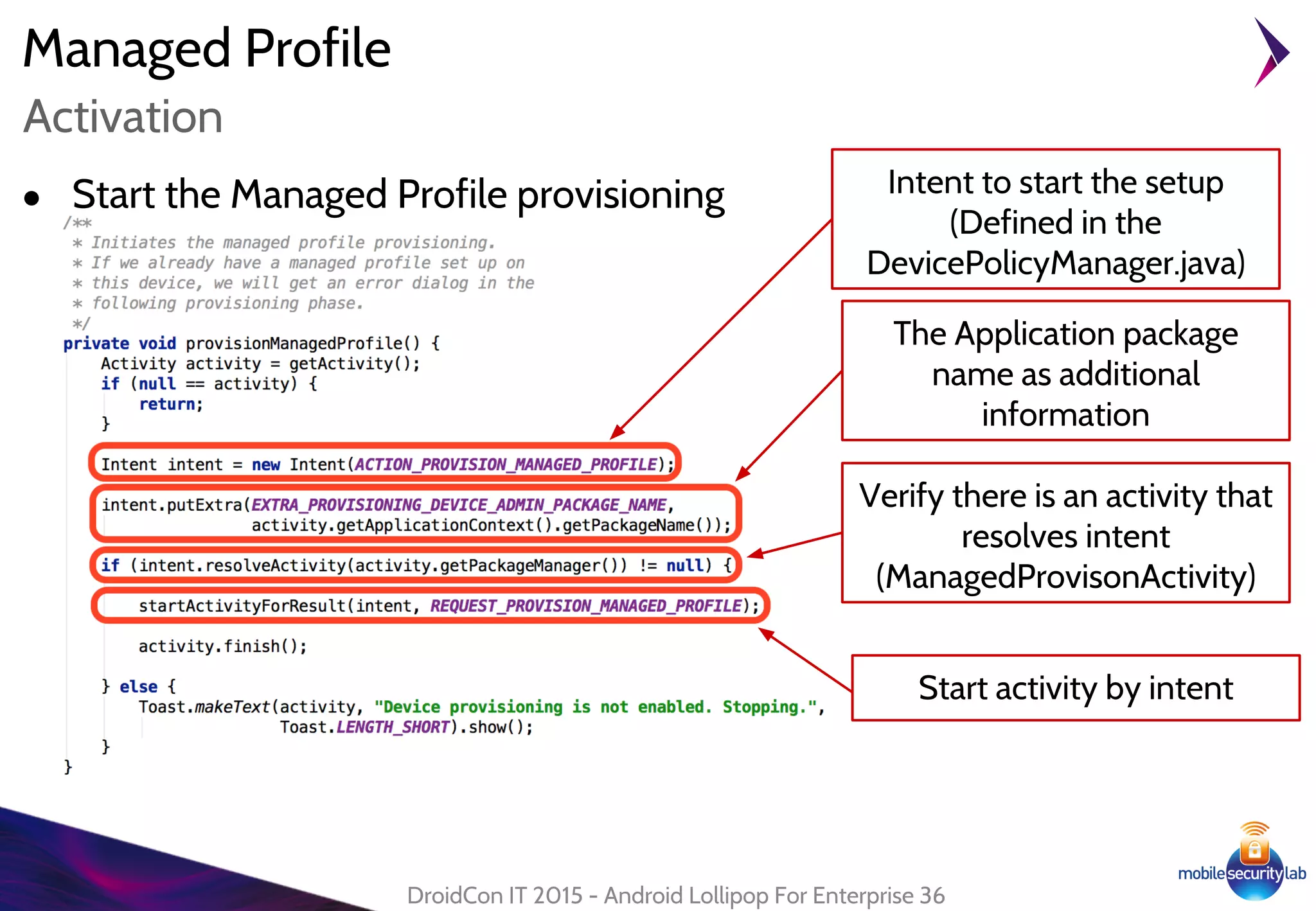
Intent to start the setup
(Defined in the
DevicePolicyManager.java)
● Start the Managed Profile provisioning
The Application package
name as additional
information
Verify there is an activity that
resolves intent
(ManagedProvisonActivity)
Start activity by intent
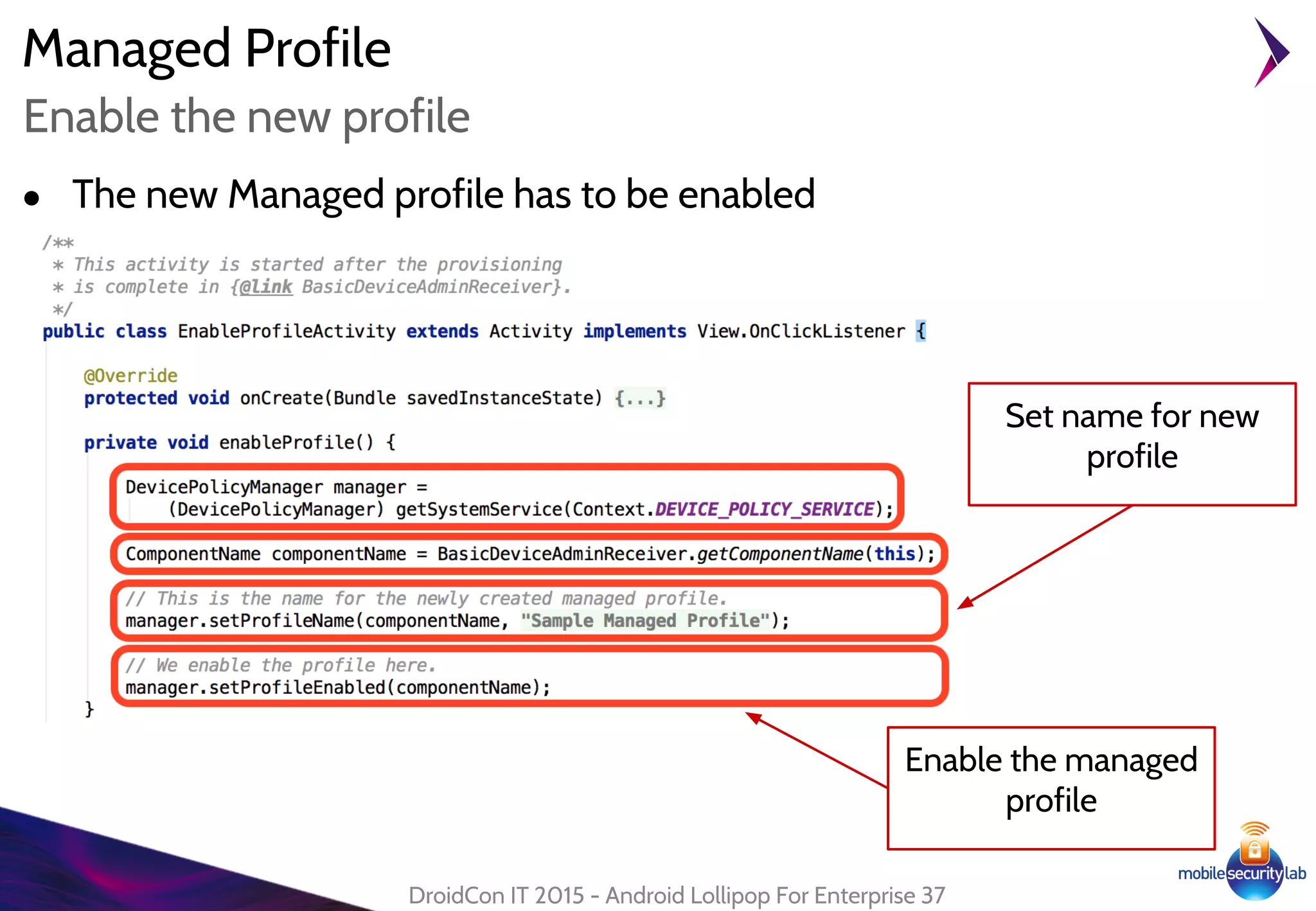
● The new Managed profile has to be enabled
Managed Profile
DroidCon IT 2015 - Android Lollipop For Enterprise 37
Enable the new profile
Enable the managed
profile
Set name for new
profile
Managed Profile
DroidCon IT 2015 - Android Lollipop For Enterprise 38
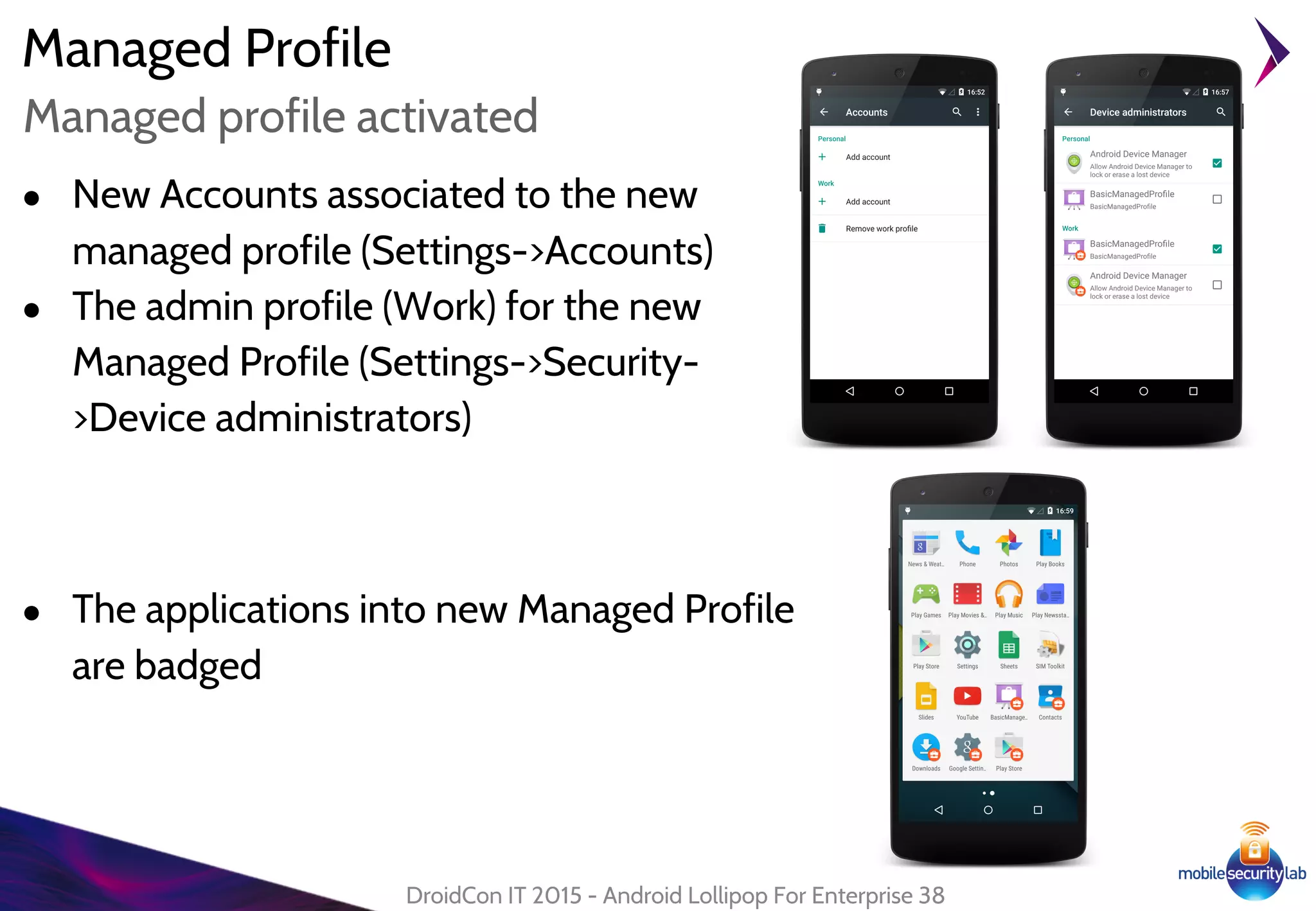
Managed profile activated
● New Accounts associated to the new
managed profile (Settings->Accounts)
● The admin profile (Work) for the new
Managed Profile (Settings->Security-
>Device administrators)
● The applications into new Managed Profile
are badged
Managed Profile
DroidCon IT 2015 - Android Lollipop For Enterprise 39
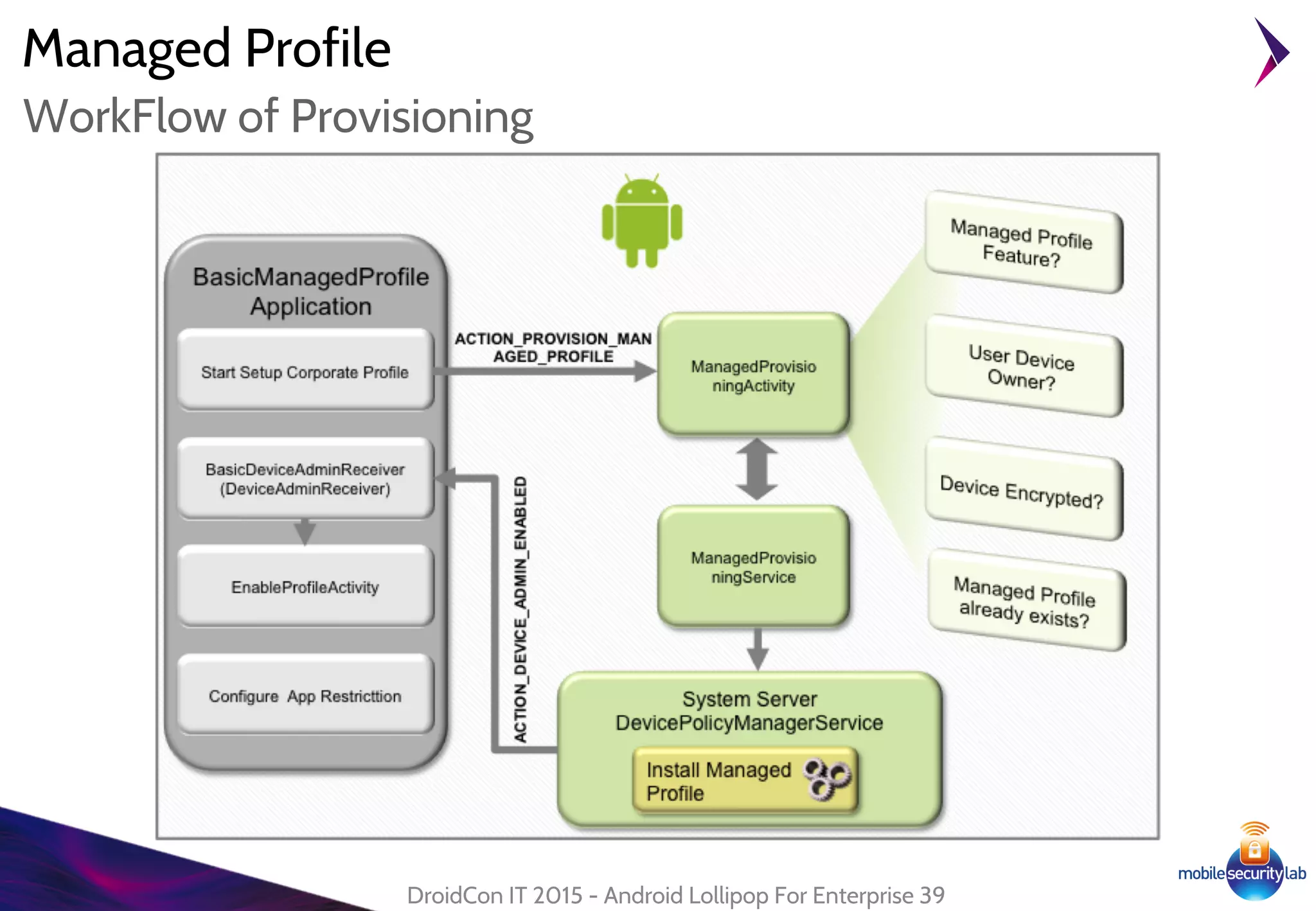
WorkFlow of Provisioning
Managed Profile
DroidCon IT 2015 - Android Lollipop For Enterprise 40
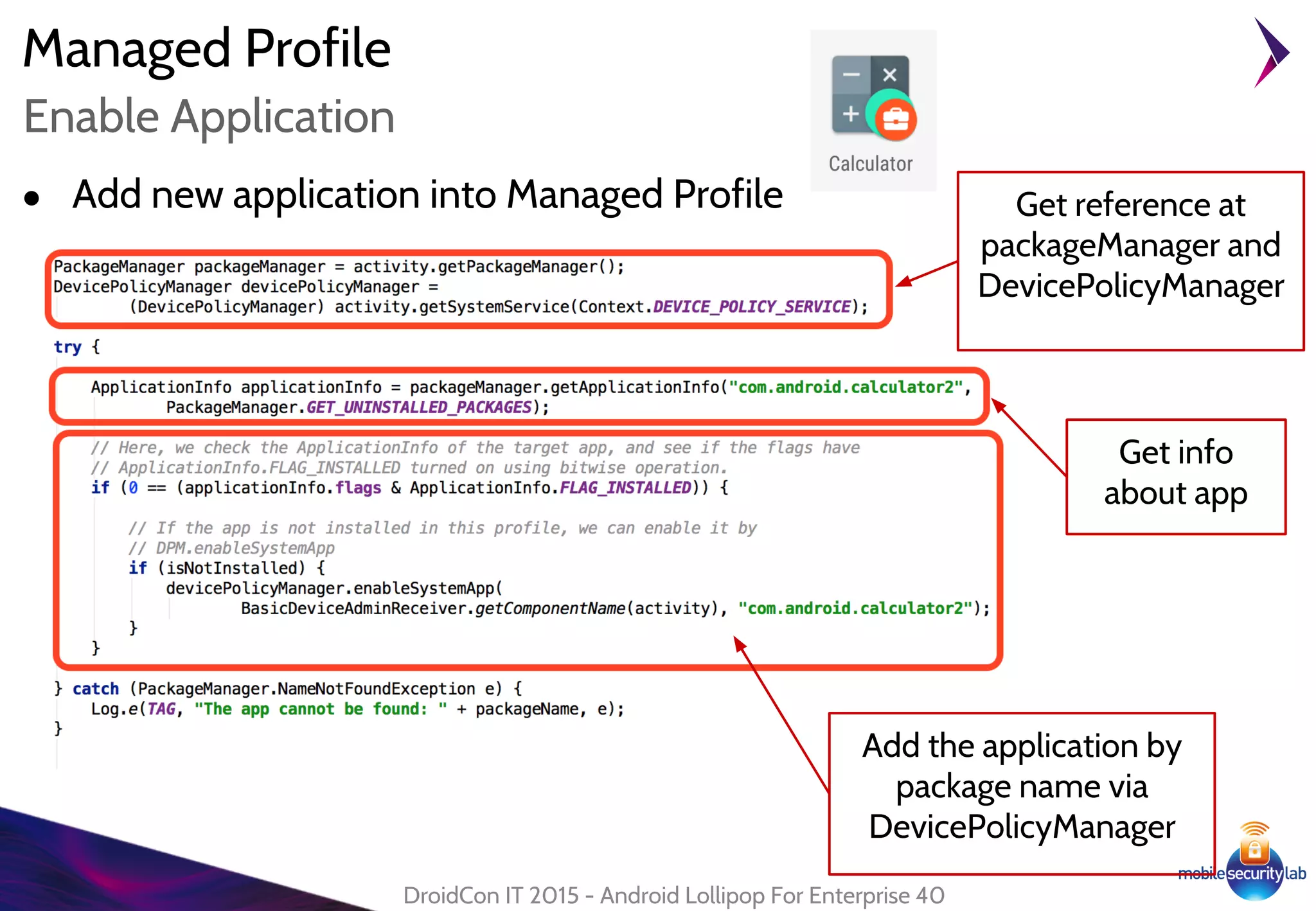
Enable Application
● Add new application into Managed Profile
Add the application by
package name via
DevicePolicyManager
Get info
about app
Get reference at
packageManager and
DevicePolicyManager
Managed Profile
DroidCon IT 2015 - Android Lollipop For Enterprise 41
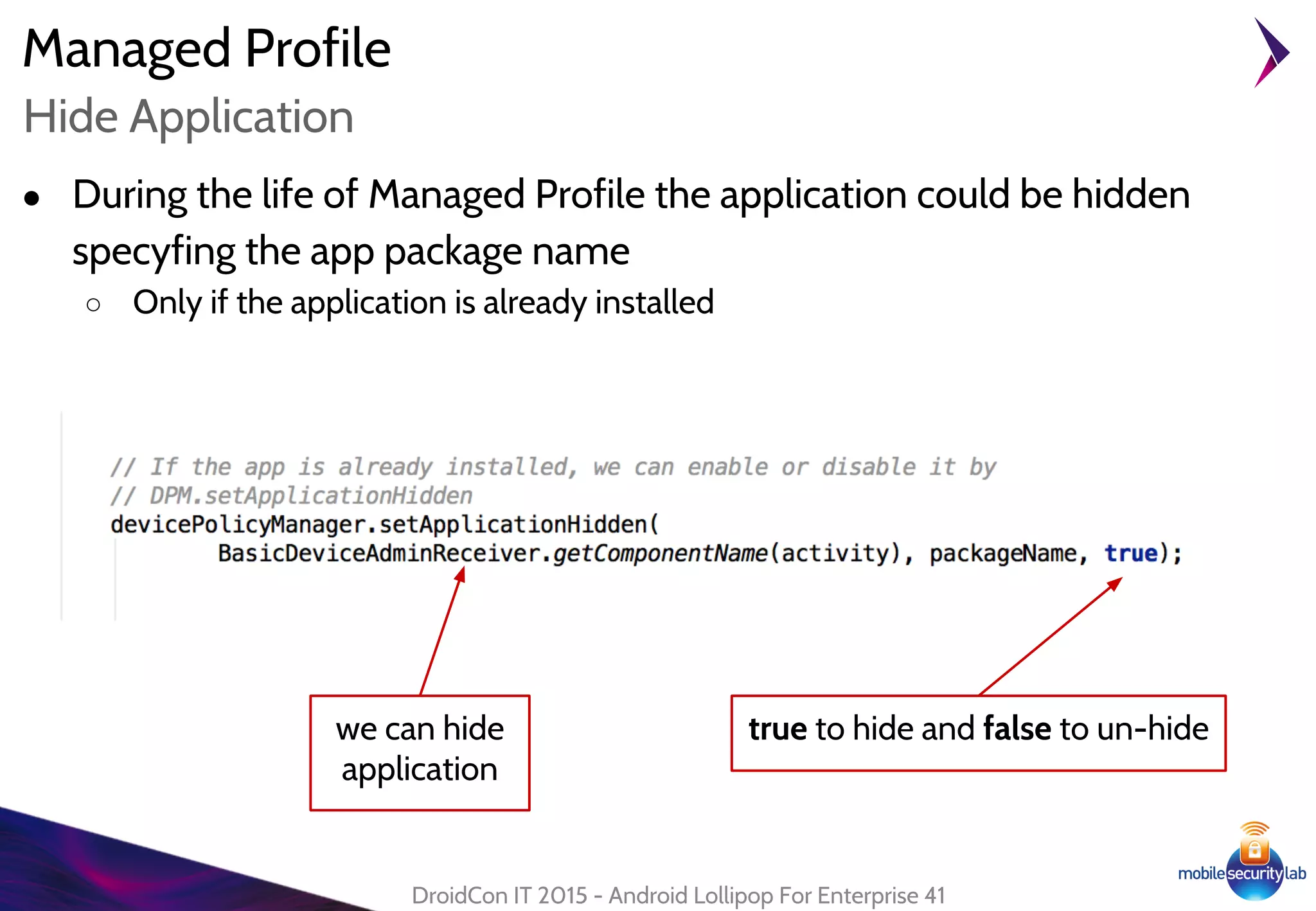
Hide Application
● During the life of Managed Profile the application could be hidden
specyfing the app package name
○ Only if the application is already installed
we can hide
application
true to hide and false to un-hide
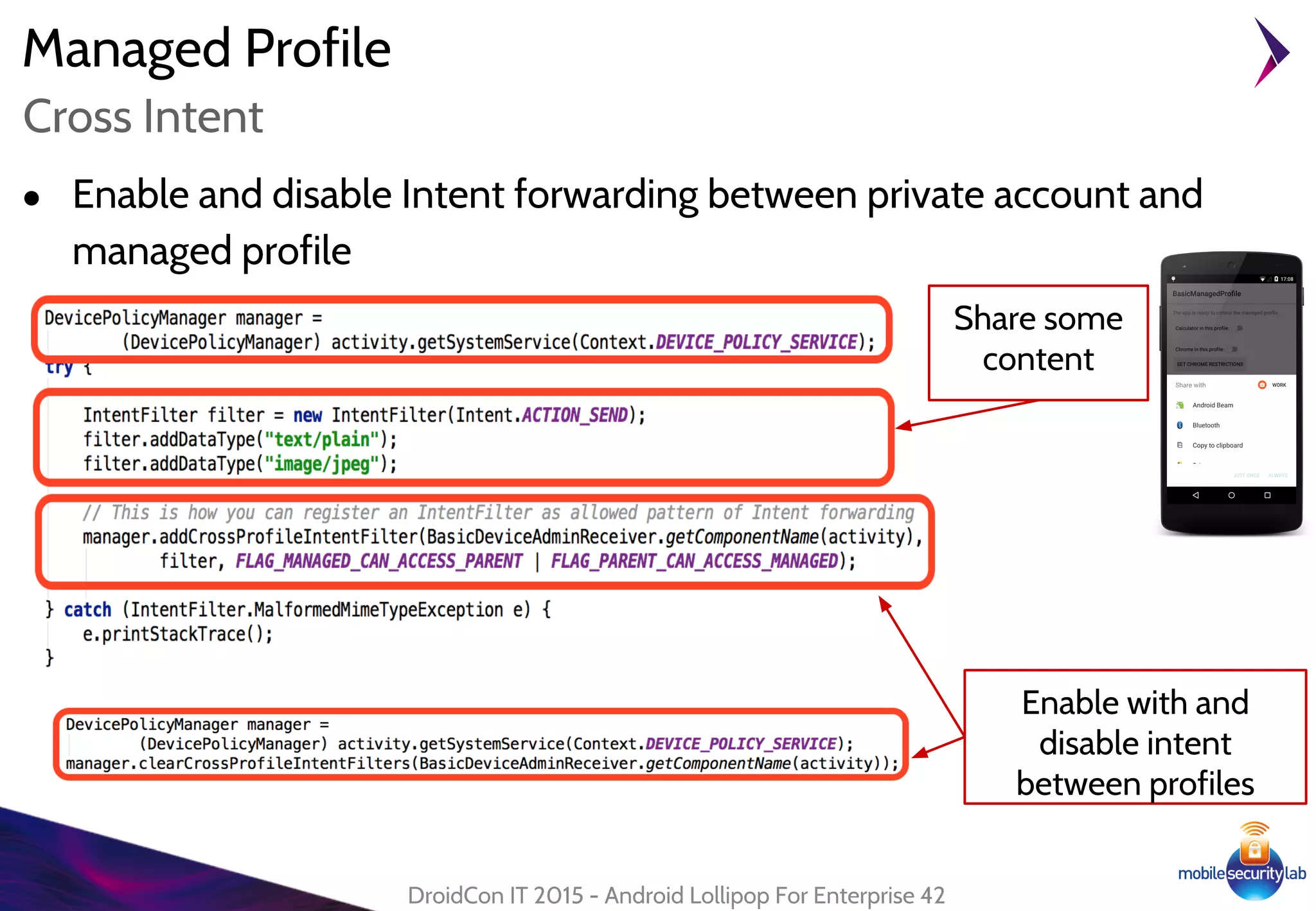
Managed Profile
● Enable and disable Intent forwarding between private account and
managed profile
DroidCon IT 2015 - Android Lollipop For Enterprise 42
Cross Intent
Enable with and
disable intent
between profiles
Share some
content
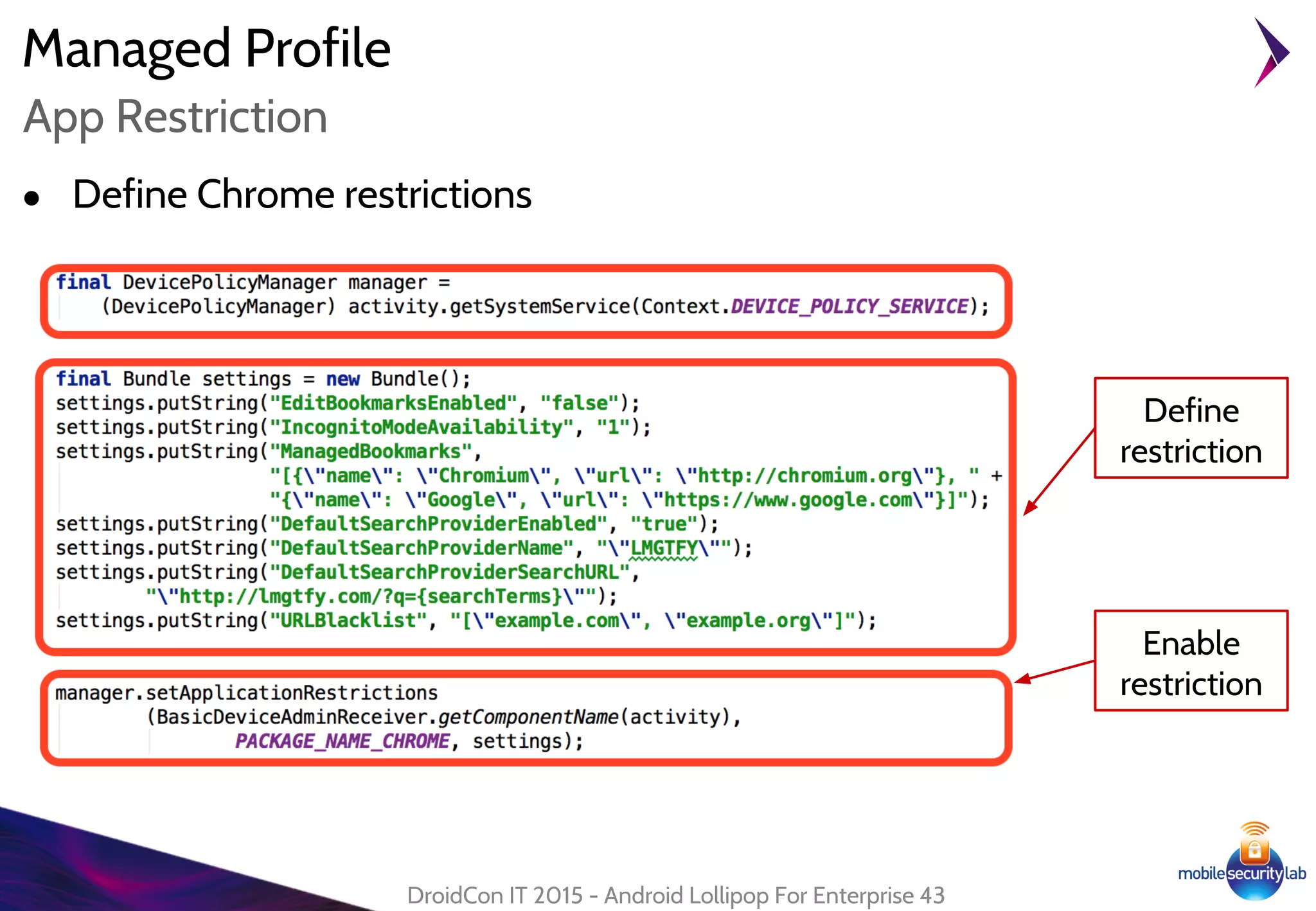
Managed Profile
● Define Chrome restrictions
DroidCon IT 2015 - Android Lollipop For Enterprise 43
App Restriction
Define
restriction
Enable
restriction
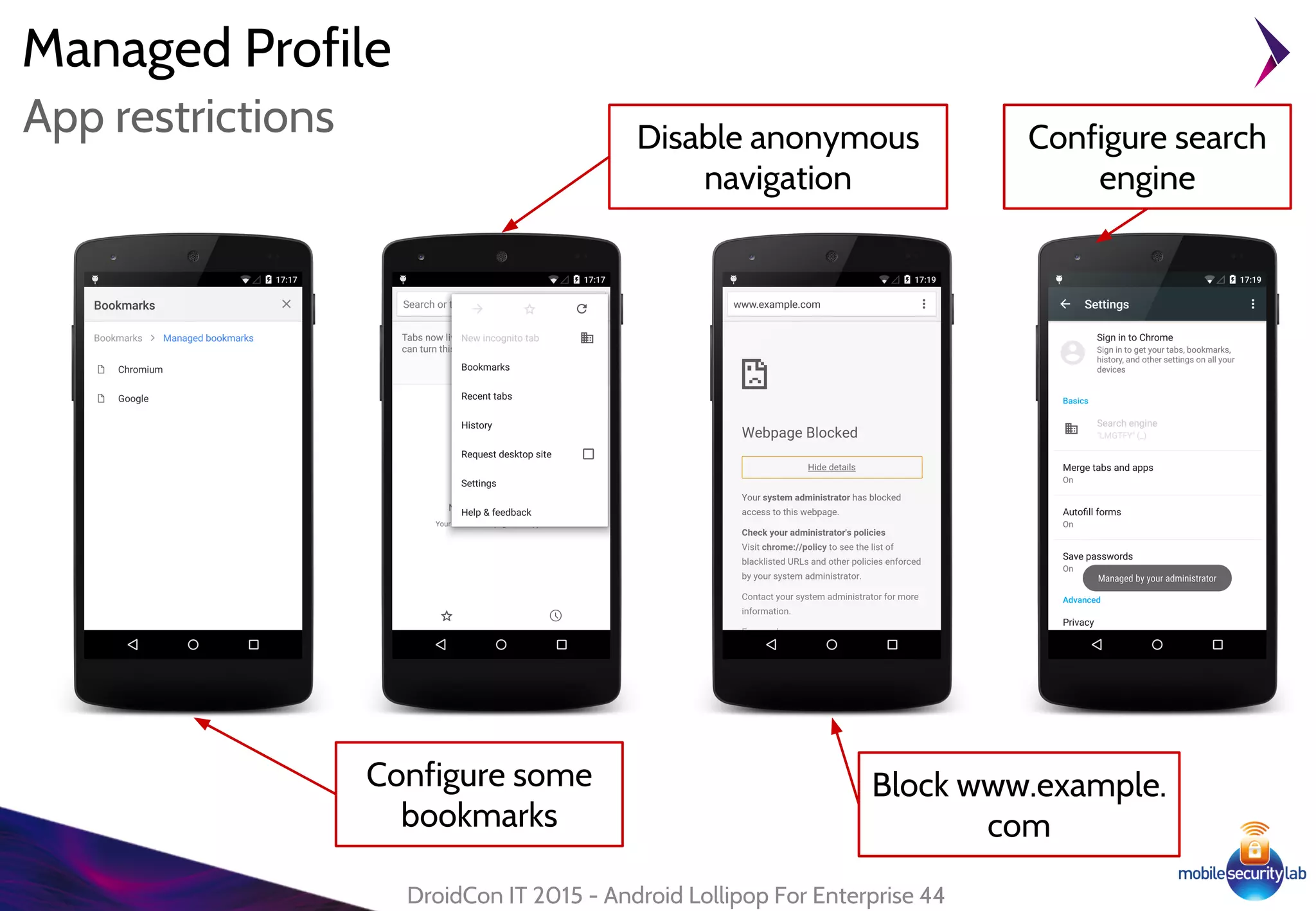
Managed Profile
DroidCon IT 2015 - Android Lollipop For Enterprise 44
App restrictions
Configure some
bookmarks
Disable anonymous
navigation
Block www.example.
com
Configure search
engine
Managed Profile
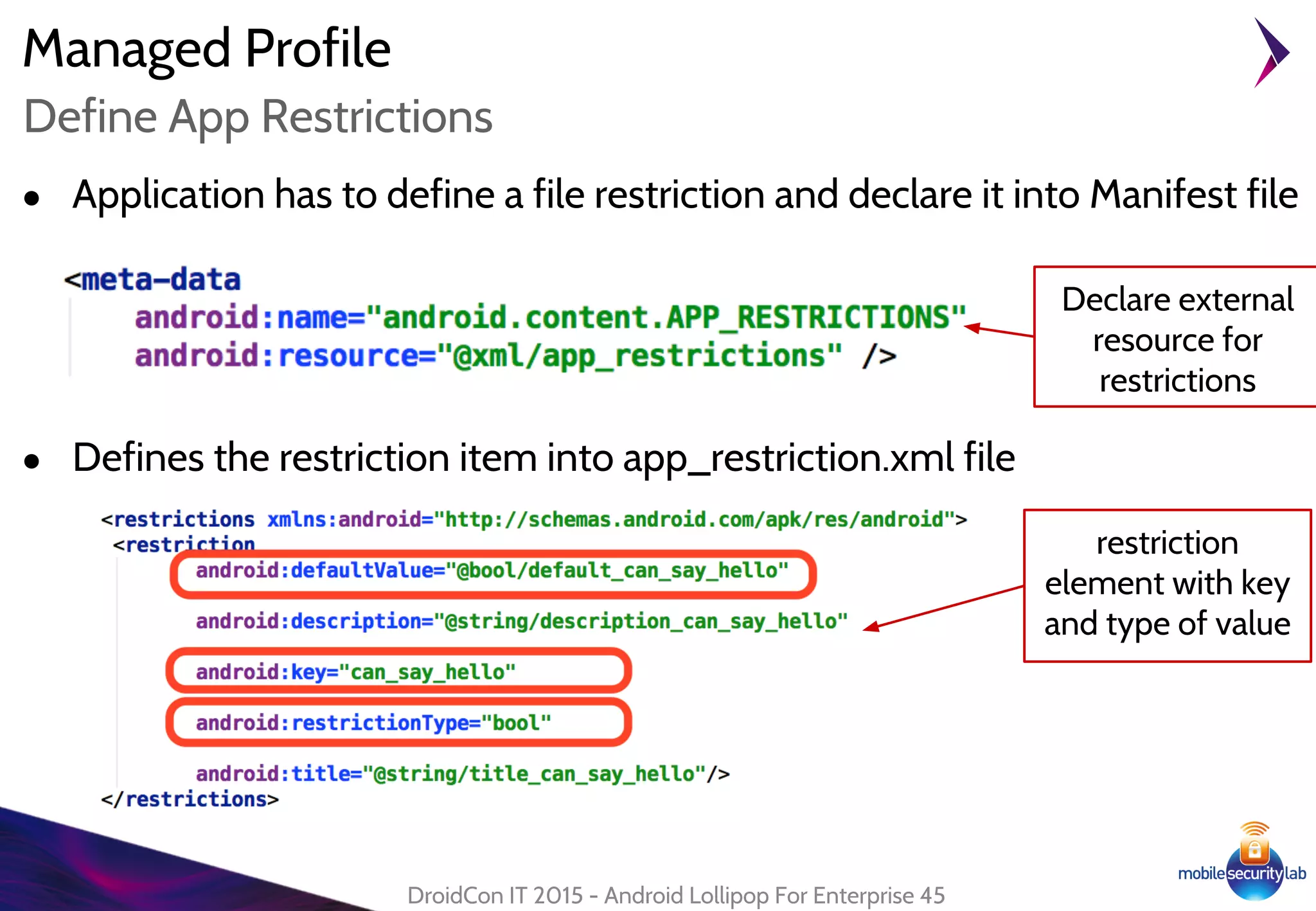
● Application has to define a file restriction and declare it into Manifest file
DroidCon IT 2015 - Android Lollipop For Enterprise 45
Define App Restrictions
● Defines the restriction item into app_restriction.xml file
Declare external
resource for
restrictions
restriction
element with key
and type of value
Managed Profile
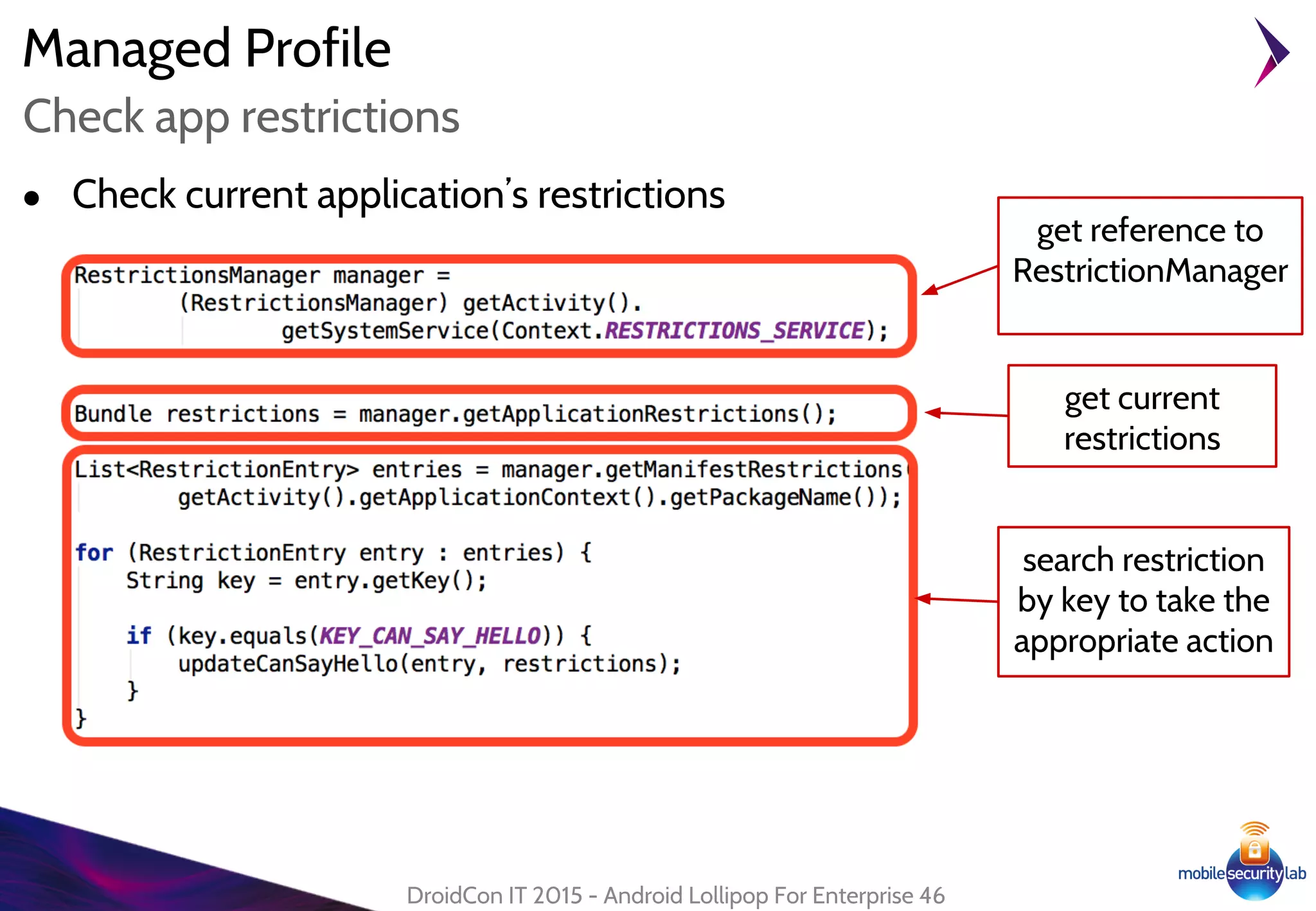
● Check current application’s restrictions
DroidCon IT 2015 - Android Lollipop For Enterprise 46
Check app restrictions
get current
restrictions
get reference to
RestrictionManager
search restriction
by key to take the
appropriate action
Managed Profile
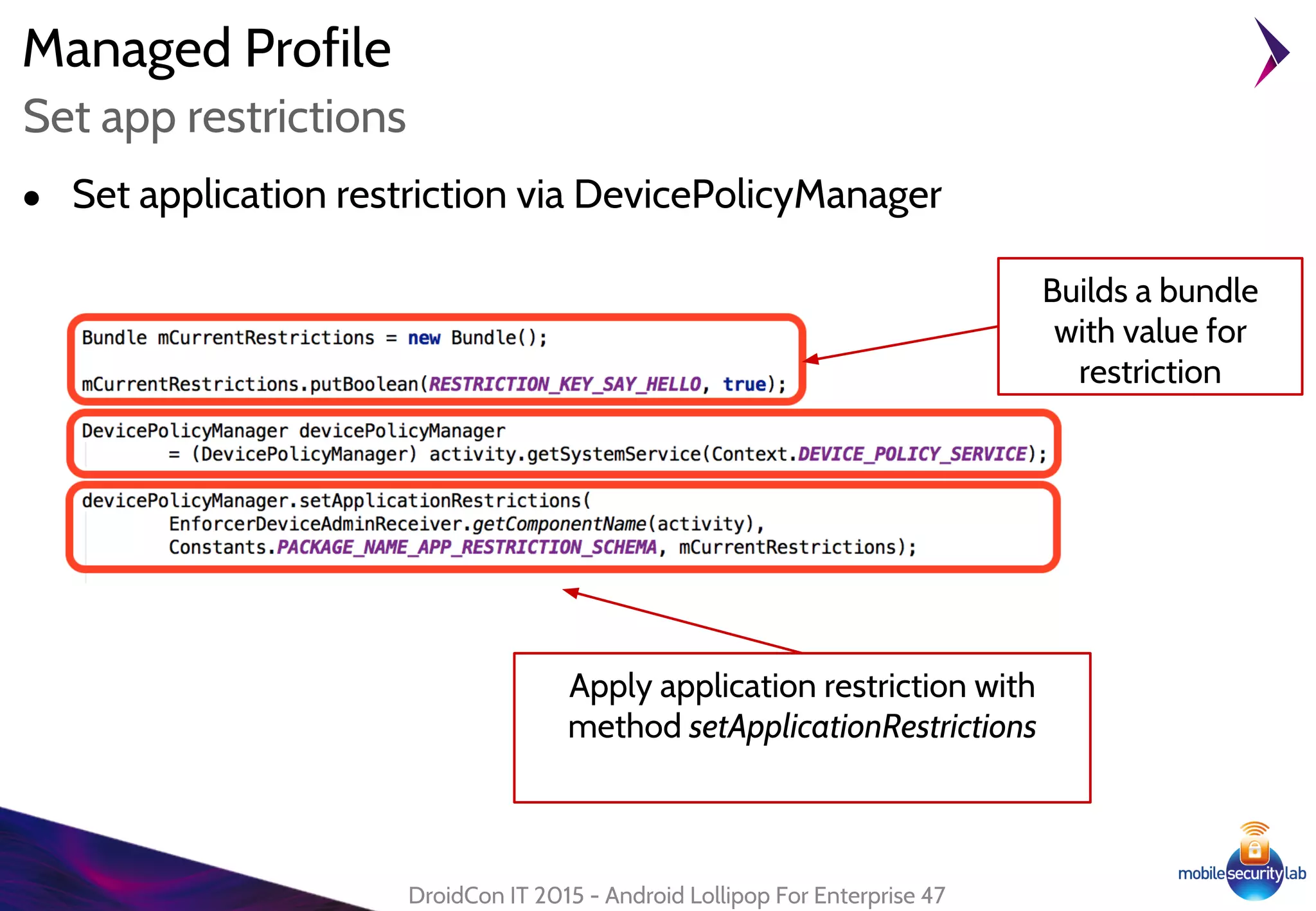
● Set application restriction via DevicePolicyManager
DroidCon IT 2015 - Android Lollipop For Enterprise 47
Set app restrictions
Builds a bundle
with value for
restriction
Apply application restriction with
method setApplicationRestrictions
Android Lollipop For Enterprise
Data Encryption
48
Data Encryption
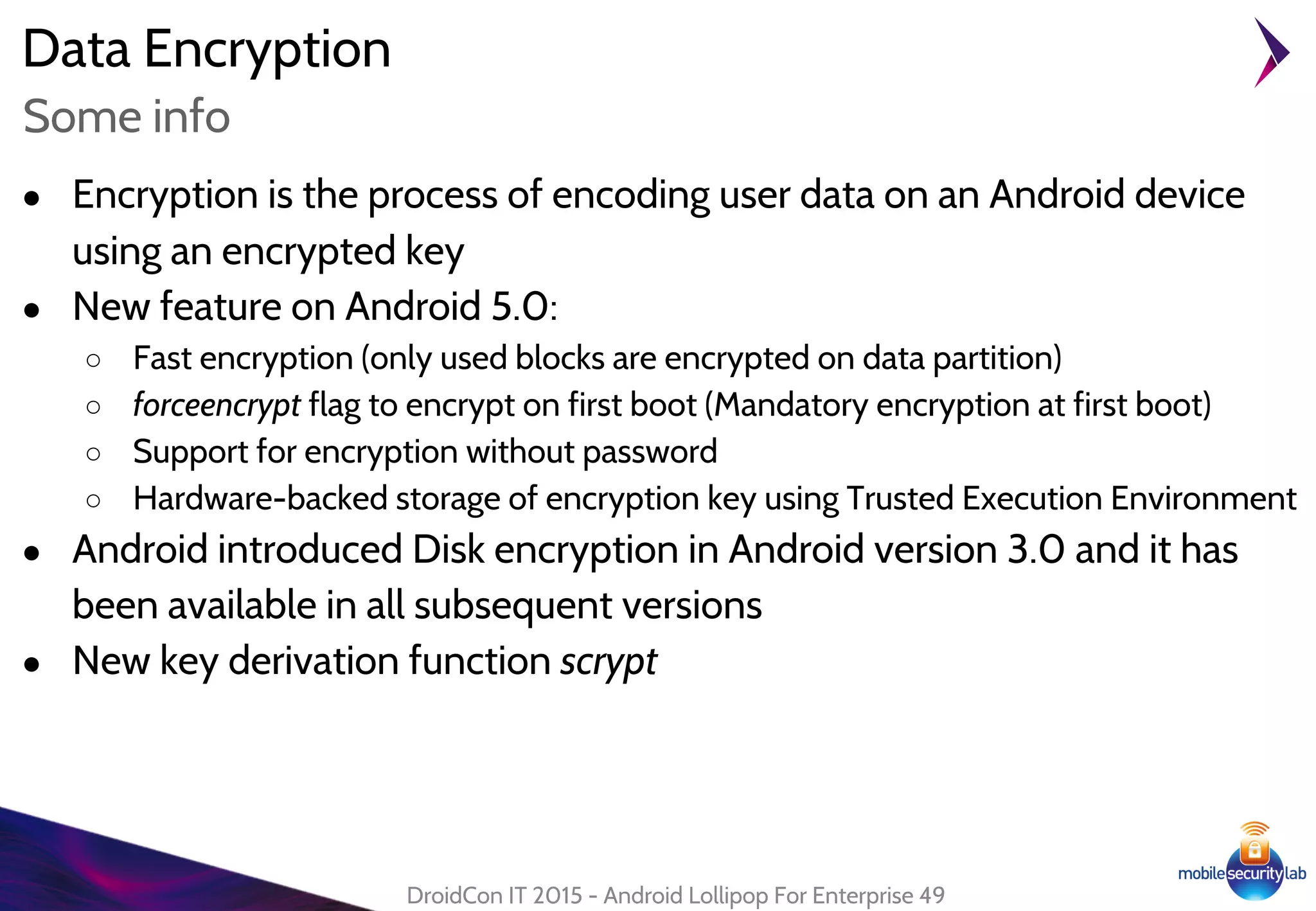
● Encryption is the process of encoding user data on an Android device
using an encrypted key
● New feature on Android 5.0:
○ Fast encryption (only used blocks are encrypted on data partition)
○ forceencrypt flag to encrypt on first boot (Mandatory encryption at first boot)
○ Support for encryption without password
○ Hardware-backed storage of encryption key using Trusted Execution Environment
● Android introduced Disk encryption in Android version 3.0 and it has
been available in all subsequent versions
● New key derivation function scrypt
DroidCon IT 2015 - Android Lollipop For Enterprise 49
Some info
Data Encryption
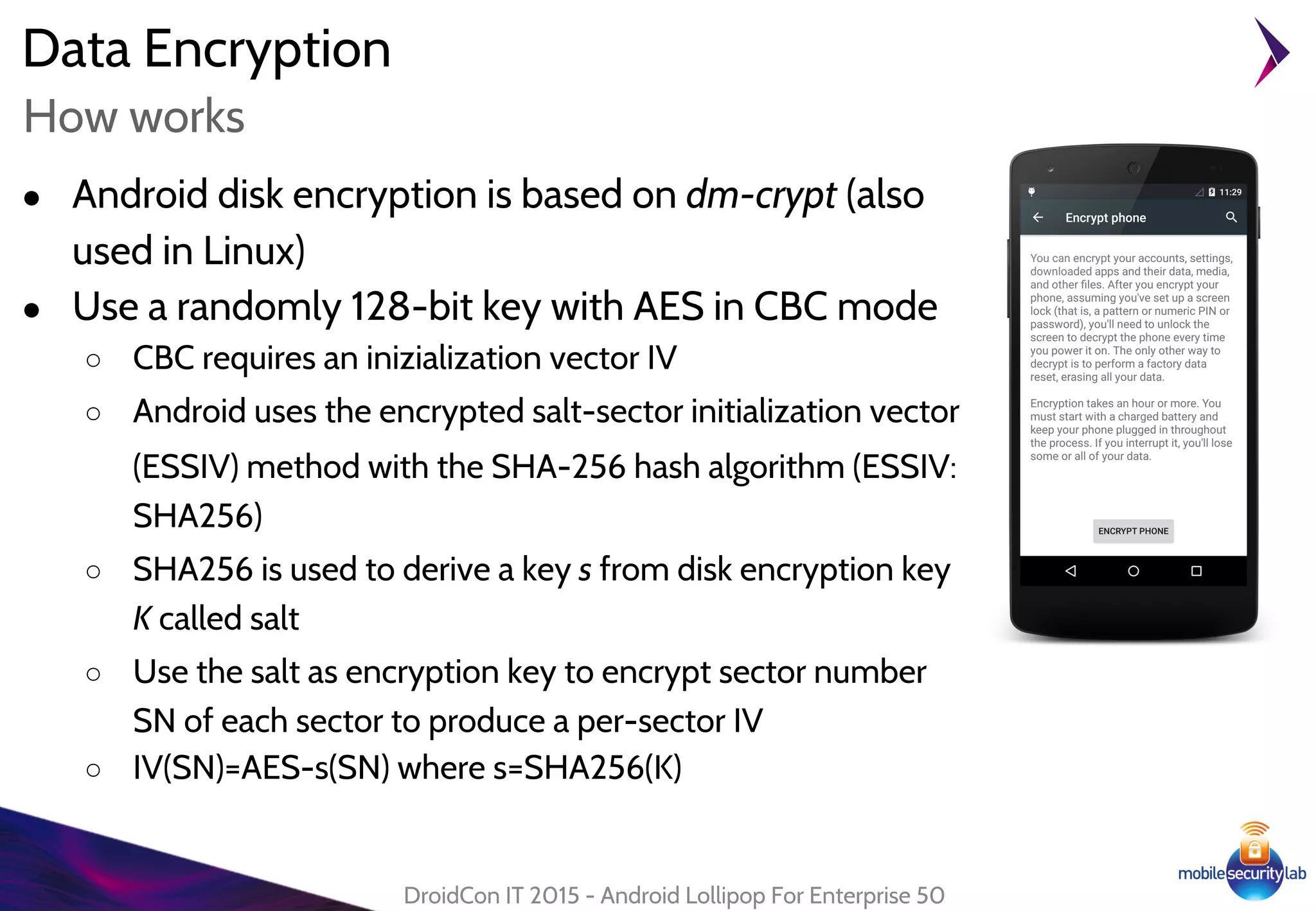
● Android disk encryption is based on dm-crypt (also
used in Linux)
● Use a randomly 128-bit key with AES in CBC mode
○ CBC requires an inizialization vector IV
○ Android uses the encrypted salt-sector initialization vector
(ESSIV) method with the SHA-256 hash algorithm (ESSIV:
SHA256)
○ SHA256 is used to derive a key s from disk encryption key
K called salt
○ Use the salt as encryption key to encrypt sector number
SN of each sector to produce a per-sector IV
○ IV(SN)=AES-s(SN) where s=SHA256(K)
DroidCon IT 2015 - Android Lollipop For Enterprise 50
How works
Data Encryption
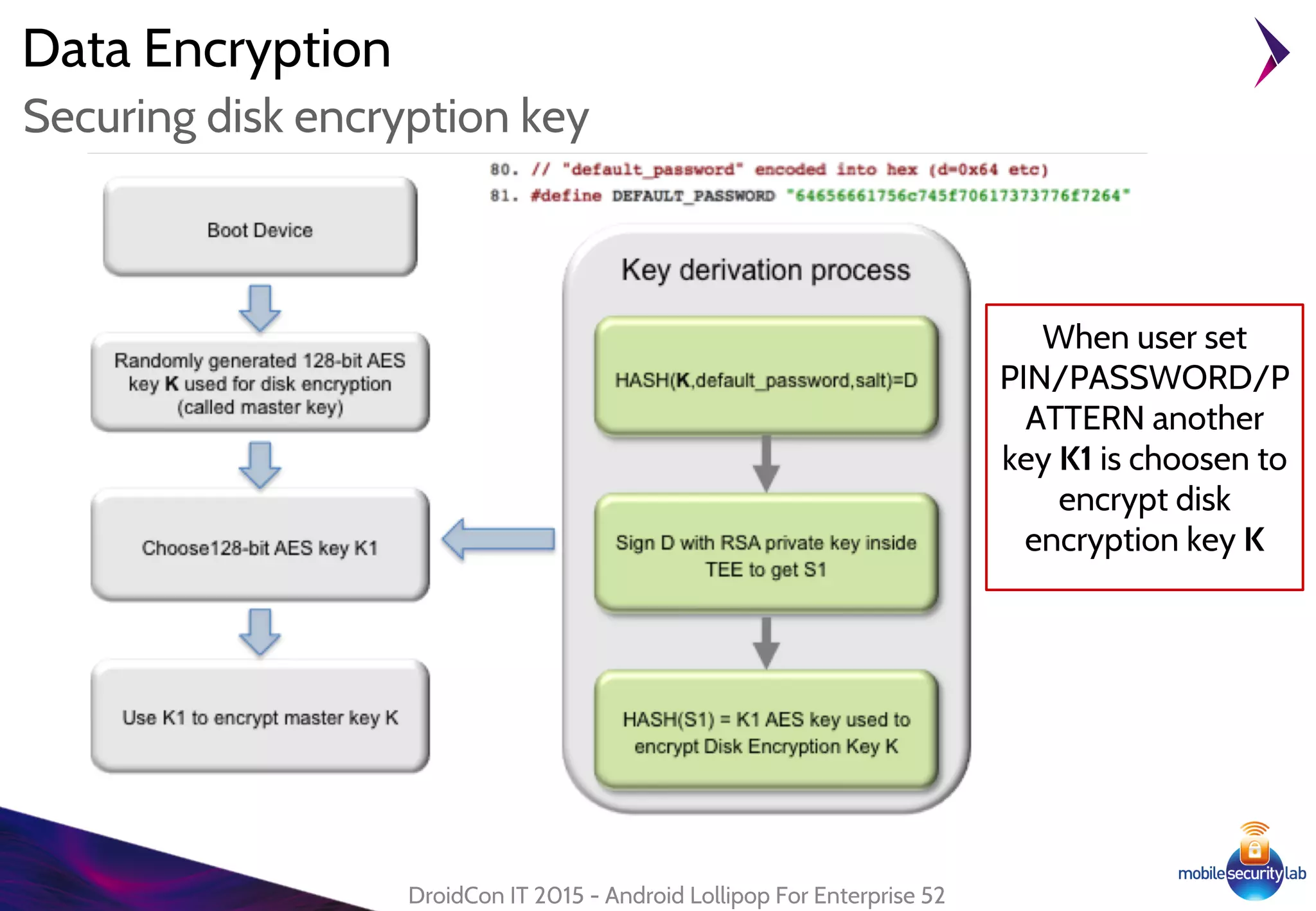
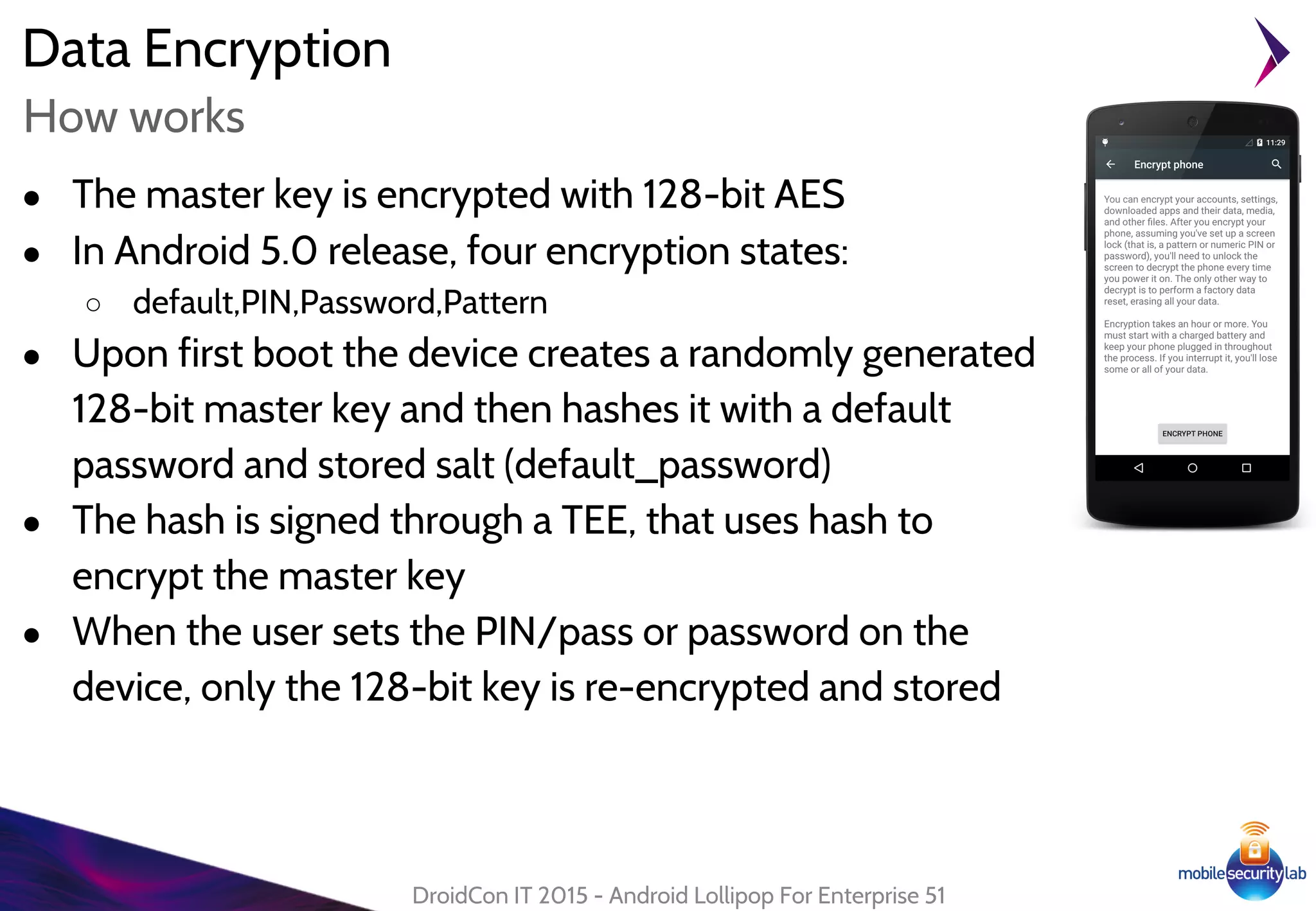
● The master key is encrypted with 128-bit AES
● In Android 5.0 release, four encryption states:
○ default,PIN,Password,Pattern
● Upon first boot the device creates a randomly generated
128-bit master key and then hashes it with a default
password and stored salt (default_password)
● The hash is signed through a TEE, that uses hash to
encrypt the master key
● When the user sets the PIN/pass or password on the
device, only the 128-bit key is re-encrypted and stored
DroidCon IT 2015 - Android Lollipop For Enterprise 51
How works
Data Encryption
DroidCon IT 2015 - Android Lollipop For Enterprise 52
Securing disk encryption key
When user set
PIN/PASSWORD/P
ATTERN another
key K1 is choosen to
encrypt disk
encryption key K
Thanks! DroidCon Italy
Torino 2015www.mseclab.com
www.consulthink.it
research@mseclab.com

Droidcon it 2015: Android Lollipop for Enterprise

  • 1.
  • 2.
    Android Lollipop forEnterprise ● Senior Security Researcher - Mobile Security Lab ● Senior Security Analyst - Consulthink S.p.A. DroidCon IT 2015 - Android Lollipop For Enterprise 2 Who are we ● r.piccirillo@mseclab.com ● @robpicone ● r.gassira@mseclab.com ● @robgas @droidconit #droidconit
  • 3.
    Android Lollipop ForEnterprise Enterprise Mobile Management 3
  • 4.
    Enterprise Mobile Management DroidConIT 2015 - Android Lollipop For Enterprise 4 Enterprise Mobile Trends Gartner Market Statistics Forecast: PCs, Ultramobiles and Mobile Phones Worldwide, 2011-2018, 4Q14 Update
  • 5.
    Enterprise Mobile Management ●Secure Environment ○ SELinux ● Device Protection ○ Smart Lock ○ "Kill Switch" ● Device Management ○ Device Administration API ○ Device Owner ● Security Container ○ Managed Profile ○ App Restrictions ● Data Encryption DroidCon IT 2015 - Android Lollipop For Enterprise 5 Lollipop for Enteprise
  • 6.
    Android Lollipop ForEnterprise SELinux 6
  • 7.
    ● Introduced inAndroid 4.3 to enforce the existing Discretionary Access Control (DAC) for application sandboxing (UID,GID) ● Provides Mandatory Access Control (MAC) over all processes at kernel level ● Allows to define fine-grained security policies ● Main security features: ○ Better system service restriction and protection ○ Improved access control to application data and system logs ○ Reduce effects of malicious software ○ User protection from potential flaws in mobile application SELinux DroidCon IT 2015 - Android Lollipop For Enterprise 7 Security-Enhanced Linux in Android "This new layer provides additional protection against potential security vulnerabilities by reducing exposure of system functionality to applications" Google Report Android Security 2014 Year in Review
  • 8.
    SELinux ● Three coreelements: ○ Subject: Agent that perform actions on objects (processes or groups of processes referred as domains) ○ Action: The operation to perform ○ Object: OS-level resources managed by the kernel (file, socket) ● Processes, Sockets and Files have a label or security context: ○ username:role:type:mls_level ■ username is always u ■ role is r for domains, object_r for objects ■ type refers to the domain or to the object logic type ■ mls_level is always s0 DroidCon IT 2015 - Android Lollipop For Enterprise 8 Concepts
  • 9.
    SELinux username:role:type:mls_level ○ username isalways u ○ role is r for domains, object_r for objects ○ type refers to the domain or to the object logical type ○ mls_level is always s0 DroidCon IT 2015 - Android Lollipop For Enterprise 9 Concepts SUBJECT OBJECT
  • 10.
    Lollipop Enhancements SELinux ● SELinuxmode: ○ Permissive: permission denials are logged but not enforced ○ Enforcing: permission denials are both logged and enforced DroidCon IT 2015 - Android Lollipop For Enterprise 10 Android 4.3 Permissive Android 4.4 Partial Enforcing Android 5.x Full Enforcing ... limited set of crucial domains (installd, netd, vold and zygote)... ...to everything (more than 60 domains)...
  • 11.
    Android Lollipop ForEnterprise Smart Lock 11
  • 12.
    Smart Lock ● Disabledevice lockscreen in "trusted condition" ● Based on Trust Agent: ○ "A service that notifies the system about whether it believes the environment of the device to be trusted" ○ Requires signatureOrSystem permission ○ Can be disabled by Device Administrator [KEYGUARD_DISABLE_TRUST_AGENTS] DroidCon IT 2015 - Android Lollipop For Enterprise 12 Trust Agent http://nelenkov. blogspot. it/2014/12/dissecting -lollipops-smart- lock.html lollipop/frameworks/base/core/res/AndroidManifest.xml
  • 13.
    Smart Lock ● TrustAgent provided by Google Play Services ● Device Unlocked methods: ○ Trusted bluetooth connected devices ○ Trusted places ○ Trusted face ○ On Body Detection ● Temporary unlock is disabled: ○ After 4 hours of inactivity ○ Device Reboot/Shutdown DroidCon IT 2015 - Android Lollipop For Enterprise 13 Some Details
  • 14.
    Android Lollipop forEnterprise Device Protection Corso Poste Sicurezza Android 14
  • 15.
    Device Protection ● "Youcan set up your device to prevent other people from using it if it's been reset to factory settings without your permission" ● Introduced in Android 5.1 ● Actually works only on Nexus 6 and Nexus 9 ● Requires: ○ Screen Lock enabled ○ Default Google account ○ "OEM Unlocking" disabled in Settings -> Developer Options ● Needs to wait 72 hours after changing password to reset the device DroidCon IT 2015 - Android Lollipop For Enterprise 15 "Kill Switch" Factory Reset
  • 16.
    Device Protection ● PersistentDataBlockServicewrite on the partition defined by ro.frp.pst: ○ The OEM Unlocking setting (bit) ○ Write Block Checksum (SHA-256) DroidCon IT 2015 - Android Lollipop For Enterprise 16 OEM Unlocking PersistentDataBlockService
  • 17.
    Android Lollipop ForEnterprise Device Administration API 17
  • 18.
    Device Administration API ●Introduced in Android 2.2 Froyo (API 8) ● Allows to enforce security policy on device ● Enterprise Oriented ● Vendor Customization ○ Samsung KNOX ○ LG Gate ● Used by Device Admin Application DroidCon IT 2015 - Android Lollipop For Enterprise 18 Intro
  • 19.
    Device Administration API ●Must be explicitly enabled in the device security settings ● Cannot be uninstalled if active ● Could be controlled by a remote server (agent) ● Several device admin applications can be enabled on a device (strictest policy among all applications is active) DroidCon IT 2015 - Android Lollipop For Enterprise 19 Device Admin Application
  • 20.
    Device Administration API DroidConIT 2015 - Android Lollipop For Enterprise 20 Main Features API 8 API 9 API 11 API 14 API 17 API 21 API 22 Enforce Password Policy Watch User Login Reset Password Lock and Wipe Device Set Max Failed Password For Wipe Set Max Time To Lock Device Wipe SDCard Force Device Encryption Disable Camera Disable Keyguard Managed Profile Global Settings NFC Provisioning Wipe Factory Protection
  • 21.
    Device Administration API DroidConIT 2015 - Android Lollipop For Enterprise 21 How It Works...
  • 22.
    Device Administration API ●Main Admin Application component DroidCon IT 2015 - Android Lollipop For Enterprise 22 DeviceAdminReceiver Required to ensure that only the system can interact with the receiver Primary ACTION that the receiver must handle Policy Declaration
  • 23.
    Device Administration API DroidConIT 2015 - Android Lollipop For Enterprise 23 Policy Declaration
  • 24.
    Device Administration API ●Callback functions triggered on particular ACTION DroidCon IT 2015 - Android Lollipop For Enterprise 24 DeviceAdminReceiver Method Action onEnabled(Context context, Intent intent) ACTION_DEVICE_ADMIN_ENABLED onDisabled(Context context, Intent intent) ACTION_DEVICE_ADMIN_DISABLED onDisableRequested(Context context, Intent intent) ACTION_DEVICE_ADMIN_DISABLE_R EQUESTED onPasswordSucceeded(Context context, Intent intent) ACTION_PASSWORD_SUCCEEDED onPasswordFailed(Context context, Intent intent) ACTION_PASSWORD_FAILED onPasswordChanged(Context context, Intent intent) ACTION_PASSWORD_CHANGED
  • 25.
    Device Administration API ●Public Interface for managing policies on device ● Requires Device Administration rights enabled ● Main methods: ○ isAdminActive(ComponentName who) ○ setPasswordQuality(ComponentName admin, int quality) ○ resetPassword(String password, int flags) ○ lockNow() ○ wipeData(int flags) ○ setCameraDisabled(ComponentName admin, boolean disabled) ○ setStorageEncryption(ComponentName admin, boolean encrypt) DroidCon IT 2015 - Android Lollipop For Enterprise 25 DevicePolicyManager
  • 26.
    Device Administration API DroidConIT 2015 - Android Lollipop For Enterprise 26 Device Admin Activation Implicit Intent for the system Settings
  • 27.
    Device Administration API ●"Specialized type of device administrator" with the additional ability to: ○ Add/Remove User ○ Modify Global settings ○ Set Application Restrictions ○ Wipe Factory Protection ● Typically used for company device ● Introduced in Android Lollipop (API 21) ● Only one device owner can be active at a time ● Cannot be disabled or removed ● Requires Device Encryption ● Deployed and activated via NFC DroidCon IT 2015 - Android Lollipop For Enterprise 27 Device Owner
  • 28.
    Device Administration API ●Via NFC NDEF Record with MIME Type MIME_TYPE_PROVISIONING_NFC and with properties: DroidCon IT 2015 - Android Lollipop For Enterprise 28 Device Owner Deploy REQUIRED CHECKSUM A String extra holding the SHA-1 checksum of the file at download location specified in EXTRA_PROVISIONING_DEVICE_ADMIN_PA CKAGE_DOWNLOAD_LOCATION. If this doesn't match the file at the download location an error will be shown to the user and the user will be asked to factory reset the device. cat app-debug.apk | openssl dgst -binary -sha1 | openssl base64 | tr '+/' '-_' | tr -d '='
  • 29.
    Device Administration API ●Device should not be provisioned Settings.Global.DEVICE_PROVISIONED = 0 ● Encrypted phone required ● "If provisioning fails, the device is factory reset" DroidCon IT 2015 - Android Lollipop For Enterprise 29 Device Owner Activation
  • 30.
    Android Lollipop ForEnterprise Managed Profile 30
  • 31.
    Managed Profile ● Newsecurity feature for enterprise “managed profile” ● Available since Android Lollipop (API 21) ● Using managed profile the enterprise could define a controlled domain on the user's device to run controlled application ● The application inside the new managed profile can be configured with policy to interact or not with other apps on device ● Samsung KNOX functionality has been integrated into Android DroidCon IT 2015 - Android Lollipop For Enterprise 31 Introduction
  • 32.
    Managed Profile ● ATechnology platform for: ○ Business protection, and ○ Personal Privacy ● Google and Samsung has designed the new Enterprise API around three major concepts: ○ Device and data security ○ Support for IT policies and restrictions ○ Mobile application management ● It has been introduced into Android Lollipop DroidCon IT 2015 - Android Lollipop For Enterprise 32 KNOX Framework
  • 33.
    Managed Profile ● Adevice administration component ○ A broadcast receiver that extends “DeviceAdminReceiver” ● AndroidManifest with a receiver: ○ The BIND_DEVICE_ADMIN permission ○ Respond, by intent-filetr, to the ACTION_DEVICE_ADMIN_ENABLED intent ○ A declaration of security policies used in metadata ● An intent to start the managed profile provisioning process: ○ ACTION_PROVISION_MANAGED_PROFILE action ○ An extra with the application package ● Override onProfileProvisioningComplete callback method to verify all is OK ● Enable the new managed profile DroidCon IT 2015 - Android Lollipop For Enterprise 33 Have to use...
  • 34.
    Managed Profile ● BasicDeviceAdminReceivercomponent DroidCon IT 2015 - Android Lollipop For Enterprise 34 Broadcast Receiver BroadcastReceiver of our provisioner application Callback method will be called when the system send ACTION_DEVICE_ADMI N_ENABLED. The new profile is installed but not yet enabled
  • 35.
    Managed Profile ● AndroidManifest.xmldeclaration DroidCon IT 2015 - Android Lollipop For Enterprise 35 AndroidManifest To avoid abuse by other applications Intercepted when the Managed Profile has successfully installed Policy declaration
  • 36.
    Managed Profile DroidCon IT2015 - Android Lollipop For Enterprise 36 Activation Intent to start the setup (Defined in the DevicePolicyManager.java) ● Start the Managed Profile provisioning The Application package name as additional information Verify there is an activity that resolves intent (ManagedProvisonActivity) Start activity by intent
  • 37.
    ● The newManaged profile has to be enabled Managed Profile DroidCon IT 2015 - Android Lollipop For Enterprise 37 Enable the new profile Enable the managed profile Set name for new profile
  • 38.
    Managed Profile DroidCon IT2015 - Android Lollipop For Enterprise 38 Managed profile activated ● New Accounts associated to the new managed profile (Settings->Accounts) ● The admin profile (Work) for the new Managed Profile (Settings->Security- >Device administrators) ● The applications into new Managed Profile are badged
  • 39.
    Managed Profile DroidCon IT2015 - Android Lollipop For Enterprise 39 WorkFlow of Provisioning
  • 40.
    Managed Profile DroidCon IT2015 - Android Lollipop For Enterprise 40 Enable Application ● Add new application into Managed Profile Add the application by package name via DevicePolicyManager Get info about app Get reference at packageManager and DevicePolicyManager
  • 41.
    Managed Profile DroidCon IT2015 - Android Lollipop For Enterprise 41 Hide Application ● During the life of Managed Profile the application could be hidden specyfing the app package name ○ Only if the application is already installed we can hide application true to hide and false to un-hide
  • 42.
    Managed Profile ● Enableand disable Intent forwarding between private account and managed profile DroidCon IT 2015 - Android Lollipop For Enterprise 42 Cross Intent Enable with and disable intent between profiles Share some content
  • 43.
    Managed Profile ● DefineChrome restrictions DroidCon IT 2015 - Android Lollipop For Enterprise 43 App Restriction Define restriction Enable restriction
  • 44.
    Managed Profile DroidCon IT2015 - Android Lollipop For Enterprise 44 App restrictions Configure some bookmarks Disable anonymous navigation Block www.example. com Configure search engine
  • 45.
    Managed Profile ● Applicationhas to define a file restriction and declare it into Manifest file DroidCon IT 2015 - Android Lollipop For Enterprise 45 Define App Restrictions ● Defines the restriction item into app_restriction.xml file Declare external resource for restrictions restriction element with key and type of value
  • 46.
    Managed Profile ● Checkcurrent application’s restrictions DroidCon IT 2015 - Android Lollipop For Enterprise 46 Check app restrictions get current restrictions get reference to RestrictionManager search restriction by key to take the appropriate action
  • 47.
    Managed Profile ● Setapplication restriction via DevicePolicyManager DroidCon IT 2015 - Android Lollipop For Enterprise 47 Set app restrictions Builds a bundle with value for restriction Apply application restriction with method setApplicationRestrictions
  • 48.
    Android Lollipop ForEnterprise Data Encryption 48
  • 49.
    Data Encryption ● Encryptionis the process of encoding user data on an Android device using an encrypted key ● New feature on Android 5.0: ○ Fast encryption (only used blocks are encrypted on data partition) ○ forceencrypt flag to encrypt on first boot (Mandatory encryption at first boot) ○ Support for encryption without password ○ Hardware-backed storage of encryption key using Trusted Execution Environment ● Android introduced Disk encryption in Android version 3.0 and it has been available in all subsequent versions ● New key derivation function scrypt DroidCon IT 2015 - Android Lollipop For Enterprise 49 Some info
  • 50.
    Data Encryption ● Androiddisk encryption is based on dm-crypt (also used in Linux) ● Use a randomly 128-bit key with AES in CBC mode ○ CBC requires an inizialization vector IV ○ Android uses the encrypted salt-sector initialization vector (ESSIV) method with the SHA-256 hash algorithm (ESSIV: SHA256) ○ SHA256 is used to derive a key s from disk encryption key K called salt ○ Use the salt as encryption key to encrypt sector number SN of each sector to produce a per-sector IV ○ IV(SN)=AES-s(SN) where s=SHA256(K) DroidCon IT 2015 - Android Lollipop For Enterprise 50 How works
  • 51.
    Data Encryption ● Themaster key is encrypted with 128-bit AES ● In Android 5.0 release, four encryption states: ○ default,PIN,Password,Pattern ● Upon first boot the device creates a randomly generated 128-bit master key and then hashes it with a default password and stored salt (default_password) ● The hash is signed through a TEE, that uses hash to encrypt the master key ● When the user sets the PIN/pass or password on the device, only the 128-bit key is re-encrypted and stored DroidCon IT 2015 - Android Lollipop For Enterprise 51 How works
  • 52.
    Data Encryption DroidCon IT2015 - Android Lollipop For Enterprise 52 Securing disk encryption key When user set PIN/PASSWORD/P ATTERN another key K1 is choosen to encrypt disk encryption key K
  • 53.
    Thanks! DroidCon Italy Torino2015www.mseclab.com www.consulthink.it research@mseclab.com