Computer Networking
Internetworking devices2NICHubsBridgesSwitchesRouters
Network Interface Card (NIC)Every computer and most devices (e.g. a network printer) is connected to network through an NIC. In most desktop computers, this is an Ethernet card (10 or 100 Mbps) that is plugged into a slot on the computer motherboard.
4HubsAs seen earlier, a hub interconnects two or more workstations into a local area network. A simple interconnecting device that requires no overhead to operate.When a workstation transmits to a hub, the hub immediately resends the data frame out all connecting links.A hub can be managed or unmanaged.  A managed hub possesses enough processing power that it can be managed from a remote location.Hubs continue to become smarter. Some call any interconnection device in a LAN a hub!
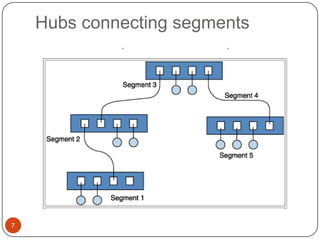
Hubs5Hubs, also called concentrators, expand one Ethernet connection into many. For example, a four-port hub connects up to four machines (or other network devices) via UTP cables. The hub provides a star connection for the four ports. Many hubs contain a single BNC connector as well to connect the hub to existing 10Base-2 network wiring. The hub also can be connected via one of its ports. One port is designed to operate in either Straight-Through or Crossover mode, selected by a switch on the hub. A hub is similar to a repeater, except it broadcasts data received by any port to all other ports on the hub. Most hubs contain a small amount of intelligence as well, examining received packets and checking them for integrity. If a bad packet arrives or the hub determines that a port is unreliable, it will shut down the line until the error condition disappears. Because of its slight delay when processing a packet, the number of hubs that may be connected in series is also limited. Several hubs can be used to connect five Ethernet segments within the accepted limits. Because each UTP cable may be as long as 100 m, the maximum distance between nodes is 500 m (the network diameter).
HubsA hub is the place where data converges from one or more directions and is forwarded out in one or more directions.Seen in local area networks
Hubs connecting segments7
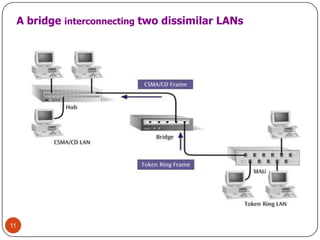
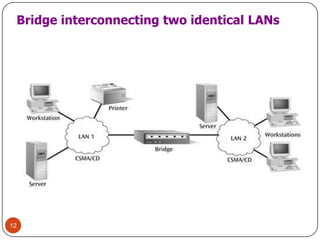
8BridgesA bridge can be used to connect two similar LANs, such as two CSMA/CD LANs.A bridge can also be used to connect two closely similar LANs, such as a CSMA/CD LAN and a token ring LAN.The bridge examines the destination address in a frame and either forwards this frame onto the next LAN or does not.The bridge examines the source address in a frame and places this address in a routing table, to be used for future routing decisions.
BridgeA bridge is a product that connects a local area network (LAN) to another local area network that uses the same protocol (for example, Ethernet or token ring).A bridge examines each message on a LAN, "passing" those known to be within the same LAN, and forwarding those known to be on the other interconnected LAN (or LANs).
RoutersA router is a device or a software in a computer that determines the next network point to which a packet should be forwarded toward its destination.Allow different networks to communicate with each otherA router creates and maintain a table of the available routes and their conditions and uses this information along with distance and cost algorithms to determine the best route for  a given packet.A packet will travel through a number of network points with routers before arriving at its destination.
11A bridge interconnecting two dissimilar LANs
12Bridge interconnecting two identical LANs
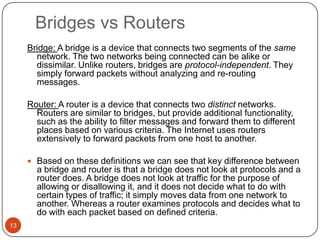
Bridges vs Routers13Bridge: A bridge is a device that connects two segments of the same network. The two networks being connected can be alike or dissimilar. Unlike routers, bridges are protocol-independent. They simply forward packets without analyzing and re-routing messages.  Router: A router is a device that connects two distinct networks. Routers are similar to bridges, but provide additional functionality, such as the ability to filter messages and forward them to different places based on various criteria. The Internet uses routers extensively to forward packets from one host to another.  Based on these definitions we can see that key difference between a bridge and router is that a bridge does not look at protocols and a router does. A bridge does not look at traffic for the purpose of allowing or disallowing it, and it does not decide what to do with certain types of traffic; it simply moves data from one network to another. Whereas a router examines protocols and decides what to do with each packet based on defined criteria.
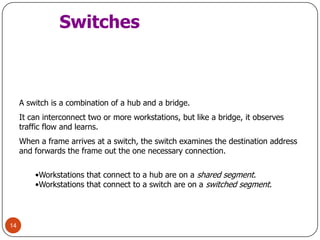
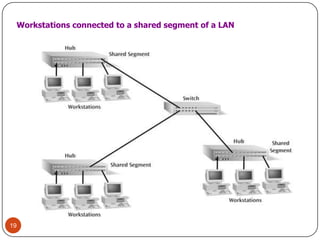
14SwitchesA switch is a combination of a hub and a bridge. It can interconnect two or more workstations, but like a bridge, it observes traffic flow and learns.When a frame arrives at a switch, the switch examines the destination address and forwards the frame out the one necessary connection.Workstations that connect to a hub are on a shared segment.
Workstations that connect to a switch are on a switched segment.SwitchesAllow different nodes of a network to communicate directly with each other.Allow several users to send information over a network at the same time without slowing each other down.
GatewaysA gateway is a network point that acts as an entrance to another network. On the internet, in terms of routing, the network consists of gateway nodes and host nodes. Host nodes are computer of network users and the computers that serve contents (such as Web pages).Gateway nodes are computers that control traffic within your company’s network or at your local internet service provider (ISP)
What is the difference between?Bridge: device to interconnect two LANs that use the SAME logical link control protocol but may use different medium access control protocols.Router: device to interconnect SIMILAR networks, e.g. similar protocols and workstations and serversGateway: device to interconnect DISSIMILAR protocols and servers, and Macintosh and IBM LANs and equipment
18
19Workstations connected to a shared segment of a LAN
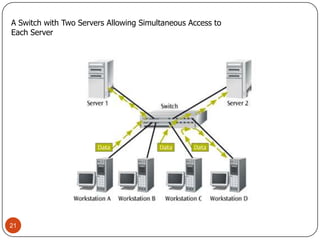
20SwitchesMajor role: isolating traffic patterns and providing multiple access. This design is usually done by the network manager.Switches are easy to install and have components that are hot-swappable.
21A Switch with Two Servers Allowing Simultaneous Access to Each Server
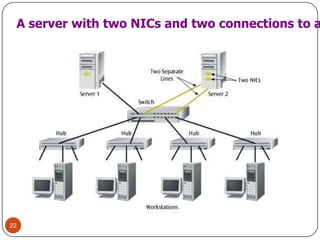
22A server with two NICs and two connections to a switch
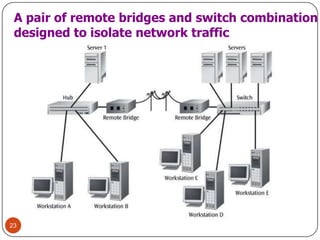
23A pair of remote bridges and switch combinationdesigned to isolate network traffic
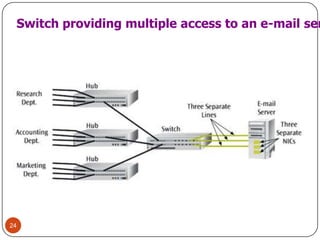
24Switch providing multiple access to an e-mail server
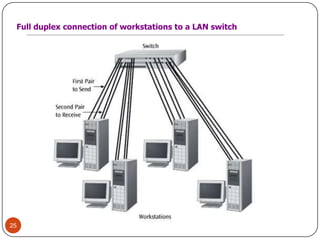
25Full duplex connection of workstations to a LAN switch
26Computer Networks
A computer network is a system for communicating between two or more computers and associated devices. It is an interconnection of computers for the purposes of sharing information and resources.
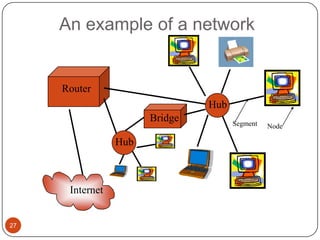
A popular example of a computer network is the internet, which allows millions of users to share informationAn example of a network27RouterHubBridgeSegmentNodeHubInternet
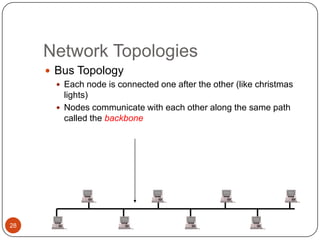
28Network TopologiesBus TopologyEach node is connected one after the other (like christmas lights)Nodes communicate with each other along the same path called the backbone
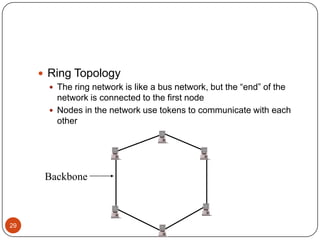
29Ring TopologyThe ring network is like a bus network, but the “end” of the network is connected to the first nodeNodes in the network use tokens to communicate with each otherBackbone
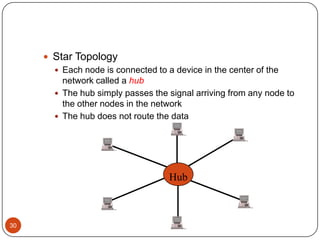
30HubStar TopologyEach node is connected to a device in the center of the network called a hubThe hub simply passes the signal arriving from any node to the other nodes in the networkThe hub does not route the data
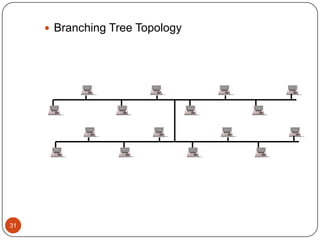
31Branching Tree Topology
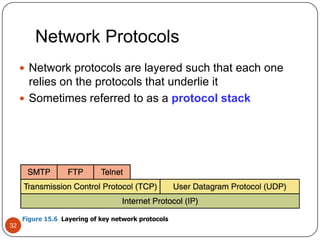
Network Protocols32Network protocols are layered such that each one relies on the protocols that underlie itSometimes referred to as a protocol stackFigure 15.6  Layering of key network protocols
TCP/IP33Transmission Control Protocol (TCP)Software that breaks messages into packets, hands them off to the IP software for delivery, and then orders and reassembles the packets at their destinationInternet Protocol (IP)Software that deals with the routing of packets through the maze of interconnected networks to their final destination
TCP/IP34User Datagram Protocol (DP)An alternative to TCP that is faster but less reliablePingA program used to test whether a particular network computer is active and reachableTracerouteA program that shows the route a packet takes across the Internet
High-Level Protocols35Other protocols build on TCP/IP protocol suiteSimple Mail Transfer Protocol (SMTP) used to specify transfer of electronic mailFile Transfer Protocol (FTP) allows a user to transfer files to and from another computerTelnet used to log onto one computer from anotherHyper Text Transfer Protocol (http) allows exchange of Web documentsWhich of these have you used?
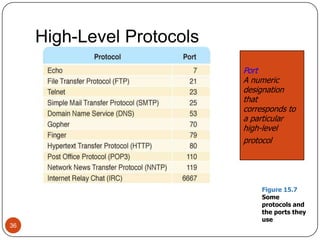
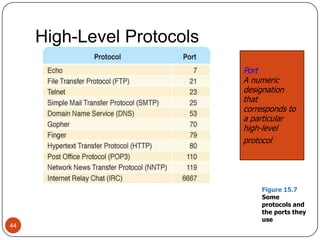
High-Level Protocols36PortA numericdesignationthat corresponds to a particularhigh-levelprotocolFigure 15.7  Some protocols and the ports they use
MIME Types37MIME typeA standard for defining the format of files that are included as email attachments or on websitesWhat does MIME stand for?
Protocols
TCP/IP41User Datagram Protocol (DP)An alternative to TCP that is faster but less reliablePingA program used to test whether a particular network computer is active and reachableTracerouteA program that shows the route a packet takes across the Internet
High-Level Protocols42Other protocols build on TCP/IP protocol suiteSimple Mail Transfer Protocol (SMTP) used to specify transfer of electronic mailFile Transfer Protocol (FTP) allows a user to transfer files to and from another computerTelnet used to log onto one computer from anotherHyper Text Transfer Protocol (http) allows exchange of Web documentsWhich of these have you used?
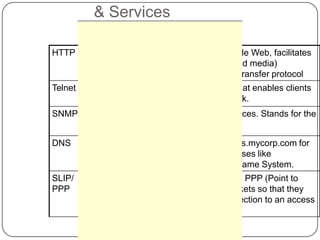
Associated TCP/IP Protocols & Services
High-Level Protocols44PortA numericdesignationthat corresponds to a particularhigh-levelprotocolFigure 15.7  Some protocols and the ports they use
MIME Types45MIME typeA standard for defining the format of files that are included as email attachments or on websitesWhat does MIME stand for?
TYPES OF NETWORKSLAN – LOCAL AREA NETWORK  IS A SMALL GEOGRAPHICAL AREA SUCH AS OUR SCHOOL BOARD.MAN – METROPOLITAN AREA NETWORK  IS A NETWORK OVER A LARGER GEOGRAPHICAL AREA SUCH AS THE PROVINCIAL GOVERNMENT.WAN – WIDE AREA NETWORK  IS A NETWORK USED OVER AN EXTREMELY LARGE GEOGRAPHICAL AREA SUCH AS THE FEDERAL GOVERNMENT.Basics of Networking
47ersonal area network (PAN) is a computer network designed for communication between computer devices (including telephones and personal digital assistants close to one person). The devices may or may not belong to the person in question. The reach of a PAN is typically a few meters. PANs can be used for communication among the personal devices themselves or for connecting to a higher level network and the Internet.Personal area networks may be wired with computer buses such as USB and FireWire. A wireless personal area network (WPAN) can also be made possible with network technologies such as IrDA and Bluetooth.ersonal area network (PAN) is a computer network designed for communication between computer devices (including telephones and personal digital assistants close to one person). The devices may or may not belong to the person in question. The reach of a PAN is typically a few meters. PANs can be used for communication among the personal devices themselves or for connecting to a higher level network and the Internet.Personal area networks may be wired with computer buses such as USB and FireWire. A wireless personal area network (WPAN) can also be made possible with network technologies such as IrDA and Bluetooth.PAN – PERSONAL AREA NETWORK Personal area network (PAN) is a computer network designed for communication between computer devices (including telephones and personal digital assistants close to one person). The devices may or may not belong to the person in question. The reach of a PAN is typically a few meters. PANs can be used for communication among the personal devices themselves or for connecting to a higher level network and the Internet. Personal area networks may be wired with computer buses such as USB and FireWire.
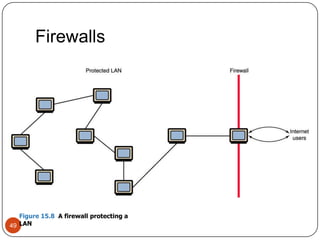
Firewalls48FirewallA gateway machine and its software that protects a network by filtering the traffic it allowsAccess control policyA set of rules established by an organization that specify what types of network communication are permitted and deniedHave your messages ever beenreturned undelivered, blocked by a firewall?
Firewalls49Figure 15.8  A firewall protecting a LAN
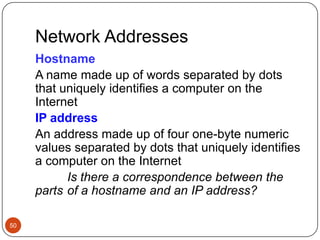
Network Addresses50HostnameA name made up of words separated by dots that uniquely identifies a computer on the InternetIP addressAn address made up of four one-byte numeric values separated by dots that uniquely identifies a computer on the InternetIs there a correspondence between the parts 	of a hostname and an IP address?
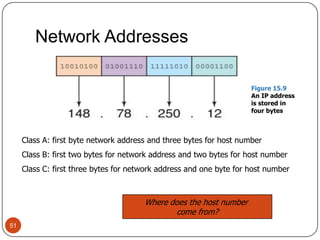
Network Addresses51Figure 15.9  An IP address is stored in four bytesClass A: first byte network address and three bytes for host numberClass B: first two bytes for network address and two bytes for host numberClass C: first three bytes for network address and one byte for host numberWhere does the host number come from?
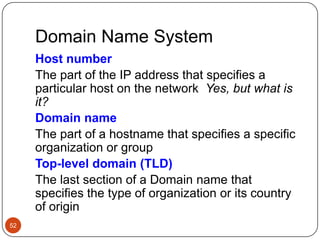
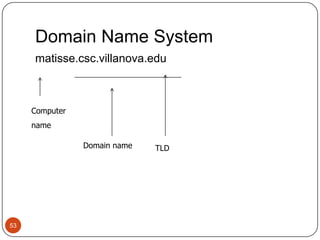
Domain Name System52Host numberThe part of the IP address that specifies a particular host on the network  Yes, but what is it?Domain nameThe part of a hostname that specifies a specific organization or groupTop-level domain (TLD)The last section of a Domain name that specifies the type of organization or its country of origin
Domain Name System53matisse.csc.villanova.eduComputernameDomain nameTLD
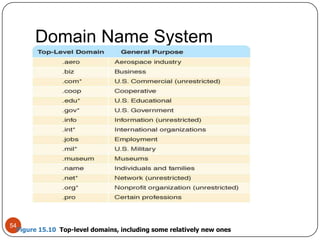
Domain Name System54Figure 15.10  Top-level domains, including some relatively new ones
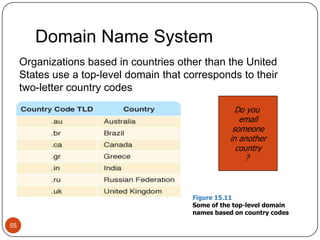
Domain Name System55Organizations based in countries other than the United States use a top-level domain that corresponds to their two-letter country codesDo you emailsomeonein anothercountry? Figure 15.11Some of the top-level domain names based on country codes

Computer networking

  • 1.
  • 2.
  • 3.
    Network Interface Card(NIC)Every computer and most devices (e.g. a network printer) is connected to network through an NIC. In most desktop computers, this is an Ethernet card (10 or 100 Mbps) that is plugged into a slot on the computer motherboard.
  • 4.
    4HubsAs seen earlier,a hub interconnects two or more workstations into a local area network. A simple interconnecting device that requires no overhead to operate.When a workstation transmits to a hub, the hub immediately resends the data frame out all connecting links.A hub can be managed or unmanaged. A managed hub possesses enough processing power that it can be managed from a remote location.Hubs continue to become smarter. Some call any interconnection device in a LAN a hub!
  • 5.
    Hubs5Hubs, also calledconcentrators, expand one Ethernet connection into many. For example, a four-port hub connects up to four machines (or other network devices) via UTP cables. The hub provides a star connection for the four ports. Many hubs contain a single BNC connector as well to connect the hub to existing 10Base-2 network wiring. The hub also can be connected via one of its ports. One port is designed to operate in either Straight-Through or Crossover mode, selected by a switch on the hub. A hub is similar to a repeater, except it broadcasts data received by any port to all other ports on the hub. Most hubs contain a small amount of intelligence as well, examining received packets and checking them for integrity. If a bad packet arrives or the hub determines that a port is unreliable, it will shut down the line until the error condition disappears. Because of its slight delay when processing a packet, the number of hubs that may be connected in series is also limited. Several hubs can be used to connect five Ethernet segments within the accepted limits. Because each UTP cable may be as long as 100 m, the maximum distance between nodes is 500 m (the network diameter).
  • 6.
    HubsA hub isthe place where data converges from one or more directions and is forwarded out in one or more directions.Seen in local area networks
  • 7.
  • 8.
    8BridgesA bridge canbe used to connect two similar LANs, such as two CSMA/CD LANs.A bridge can also be used to connect two closely similar LANs, such as a CSMA/CD LAN and a token ring LAN.The bridge examines the destination address in a frame and either forwards this frame onto the next LAN or does not.The bridge examines the source address in a frame and places this address in a routing table, to be used for future routing decisions.
  • 9.
    BridgeA bridge isa product that connects a local area network (LAN) to another local area network that uses the same protocol (for example, Ethernet or token ring).A bridge examines each message on a LAN, "passing" those known to be within the same LAN, and forwarding those known to be on the other interconnected LAN (or LANs).
  • 10.
    RoutersA router isa device or a software in a computer that determines the next network point to which a packet should be forwarded toward its destination.Allow different networks to communicate with each otherA router creates and maintain a table of the available routes and their conditions and uses this information along with distance and cost algorithms to determine the best route for a given packet.A packet will travel through a number of network points with routers before arriving at its destination.
  • 11.
    11A bridge interconnectingtwo dissimilar LANs
  • 12.
  • 13.
    Bridges vs Routers13Bridge:A bridge is a device that connects two segments of the same network. The two networks being connected can be alike or dissimilar. Unlike routers, bridges are protocol-independent. They simply forward packets without analyzing and re-routing messages.  Router: A router is a device that connects two distinct networks. Routers are similar to bridges, but provide additional functionality, such as the ability to filter messages and forward them to different places based on various criteria. The Internet uses routers extensively to forward packets from one host to another.  Based on these definitions we can see that key difference between a bridge and router is that a bridge does not look at protocols and a router does. A bridge does not look at traffic for the purpose of allowing or disallowing it, and it does not decide what to do with certain types of traffic; it simply moves data from one network to another. Whereas a router examines protocols and decides what to do with each packet based on defined criteria.
  • 14.
    14SwitchesA switch isa combination of a hub and a bridge. It can interconnect two or more workstations, but like a bridge, it observes traffic flow and learns.When a frame arrives at a switch, the switch examines the destination address and forwards the frame out the one necessary connection.Workstations that connect to a hub are on a shared segment.
  • 15.
    Workstations that connectto a switch are on a switched segment.SwitchesAllow different nodes of a network to communicate directly with each other.Allow several users to send information over a network at the same time without slowing each other down.
  • 16.
    GatewaysA gateway isa network point that acts as an entrance to another network. On the internet, in terms of routing, the network consists of gateway nodes and host nodes. Host nodes are computer of network users and the computers that serve contents (such as Web pages).Gateway nodes are computers that control traffic within your company’s network or at your local internet service provider (ISP)
  • 17.
    What is thedifference between?Bridge: device to interconnect two LANs that use the SAME logical link control protocol but may use different medium access control protocols.Router: device to interconnect SIMILAR networks, e.g. similar protocols and workstations and serversGateway: device to interconnect DISSIMILAR protocols and servers, and Macintosh and IBM LANs and equipment
  • 18.
  • 19.
    19Workstations connected toa shared segment of a LAN
  • 20.
    20SwitchesMajor role: isolatingtraffic patterns and providing multiple access. This design is usually done by the network manager.Switches are easy to install and have components that are hot-swappable.
  • 21.
    21A Switch withTwo Servers Allowing Simultaneous Access to Each Server
  • 22.
    22A server withtwo NICs and two connections to a switch
  • 23.
    23A pair ofremote bridges and switch combinationdesigned to isolate network traffic
  • 24.
    24Switch providing multipleaccess to an e-mail server
  • 25.
    25Full duplex connectionof workstations to a LAN switch
  • 26.
  • 27.
    A computer networkis a system for communicating between two or more computers and associated devices. It is an interconnection of computers for the purposes of sharing information and resources.
  • 28.
    A popular exampleof a computer network is the internet, which allows millions of users to share informationAn example of a network27RouterHubBridgeSegmentNodeHubInternet
  • 29.
    28Network TopologiesBus TopologyEachnode is connected one after the other (like christmas lights)Nodes communicate with each other along the same path called the backbone
  • 30.
    29Ring TopologyThe ringnetwork is like a bus network, but the “end” of the network is connected to the first nodeNodes in the network use tokens to communicate with each otherBackbone
  • 31.
    30HubStar TopologyEach nodeis connected to a device in the center of the network called a hubThe hub simply passes the signal arriving from any node to the other nodes in the networkThe hub does not route the data
  • 32.
  • 33.
    Network Protocols32Network protocolsare layered such that each one relies on the protocols that underlie itSometimes referred to as a protocol stackFigure 15.6 Layering of key network protocols
  • 34.
    TCP/IP33Transmission Control Protocol(TCP)Software that breaks messages into packets, hands them off to the IP software for delivery, and then orders and reassembles the packets at their destinationInternet Protocol (IP)Software that deals with the routing of packets through the maze of interconnected networks to their final destination
  • 35.
    TCP/IP34User Datagram Protocol(DP)An alternative to TCP that is faster but less reliablePingA program used to test whether a particular network computer is active and reachableTracerouteA program that shows the route a packet takes across the Internet
  • 36.
    High-Level Protocols35Other protocolsbuild on TCP/IP protocol suiteSimple Mail Transfer Protocol (SMTP) used to specify transfer of electronic mailFile Transfer Protocol (FTP) allows a user to transfer files to and from another computerTelnet used to log onto one computer from anotherHyper Text Transfer Protocol (http) allows exchange of Web documentsWhich of these have you used?
  • 37.
    High-Level Protocols36PortA numericdesignationthatcorresponds to a particularhigh-levelprotocolFigure 15.7 Some protocols and the ports they use
  • 38.
    MIME Types37MIME typeAstandard for defining the format of files that are included as email attachments or on websitesWhat does MIME stand for?
  • 39.
  • 42.
    TCP/IP41User Datagram Protocol(DP)An alternative to TCP that is faster but less reliablePingA program used to test whether a particular network computer is active and reachableTracerouteA program that shows the route a packet takes across the Internet
  • 43.
    High-Level Protocols42Other protocolsbuild on TCP/IP protocol suiteSimple Mail Transfer Protocol (SMTP) used to specify transfer of electronic mailFile Transfer Protocol (FTP) allows a user to transfer files to and from another computerTelnet used to log onto one computer from anotherHyper Text Transfer Protocol (http) allows exchange of Web documentsWhich of these have you used?
  • 44.
  • 45.
    High-Level Protocols44PortA numericdesignationthatcorresponds to a particularhigh-levelprotocolFigure 15.7 Some protocols and the ports they use
  • 46.
    MIME Types45MIME typeAstandard for defining the format of files that are included as email attachments or on websitesWhat does MIME stand for?
  • 47.
    TYPES OF NETWORKSLAN– LOCAL AREA NETWORK IS A SMALL GEOGRAPHICAL AREA SUCH AS OUR SCHOOL BOARD.MAN – METROPOLITAN AREA NETWORK IS A NETWORK OVER A LARGER GEOGRAPHICAL AREA SUCH AS THE PROVINCIAL GOVERNMENT.WAN – WIDE AREA NETWORK IS A NETWORK USED OVER AN EXTREMELY LARGE GEOGRAPHICAL AREA SUCH AS THE FEDERAL GOVERNMENT.Basics of Networking
  • 48.
    47ersonal area network(PAN) is a computer network designed for communication between computer devices (including telephones and personal digital assistants close to one person). The devices may or may not belong to the person in question. The reach of a PAN is typically a few meters. PANs can be used for communication among the personal devices themselves or for connecting to a higher level network and the Internet.Personal area networks may be wired with computer buses such as USB and FireWire. A wireless personal area network (WPAN) can also be made possible with network technologies such as IrDA and Bluetooth.ersonal area network (PAN) is a computer network designed for communication between computer devices (including telephones and personal digital assistants close to one person). The devices may or may not belong to the person in question. The reach of a PAN is typically a few meters. PANs can be used for communication among the personal devices themselves or for connecting to a higher level network and the Internet.Personal area networks may be wired with computer buses such as USB and FireWire. A wireless personal area network (WPAN) can also be made possible with network technologies such as IrDA and Bluetooth.PAN – PERSONAL AREA NETWORK Personal area network (PAN) is a computer network designed for communication between computer devices (including telephones and personal digital assistants close to one person). The devices may or may not belong to the person in question. The reach of a PAN is typically a few meters. PANs can be used for communication among the personal devices themselves or for connecting to a higher level network and the Internet. Personal area networks may be wired with computer buses such as USB and FireWire.
  • 49.
    Firewalls48FirewallA gateway machineand its software that protects a network by filtering the traffic it allowsAccess control policyA set of rules established by an organization that specify what types of network communication are permitted and deniedHave your messages ever beenreturned undelivered, blocked by a firewall?
  • 50.
    Firewalls49Figure 15.8 A firewall protecting a LAN
  • 51.
    Network Addresses50HostnameA namemade up of words separated by dots that uniquely identifies a computer on the InternetIP addressAn address made up of four one-byte numeric values separated by dots that uniquely identifies a computer on the InternetIs there a correspondence between the parts of a hostname and an IP address?
  • 52.
    Network Addresses51Figure 15.9 An IP address is stored in four bytesClass A: first byte network address and three bytes for host numberClass B: first two bytes for network address and two bytes for host numberClass C: first three bytes for network address and one byte for host numberWhere does the host number come from?
  • 53.
    Domain Name System52HostnumberThe part of the IP address that specifies a particular host on the network Yes, but what is it?Domain nameThe part of a hostname that specifies a specific organization or groupTop-level domain (TLD)The last section of a Domain name that specifies the type of organization or its country of origin
  • 54.
  • 55.
    Domain Name System54Figure15.10 Top-level domains, including some relatively new ones
  • 56.
    Domain Name System55Organizationsbased in countries other than the United States use a top-level domain that corresponds to their two-letter country codesDo you emailsomeonein anothercountry? Figure 15.11Some of the top-level domain names based on country codes