CONNECTING DEVICES
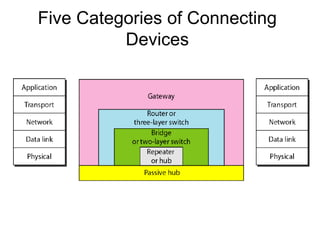
Five Categories of Connecting
Devices
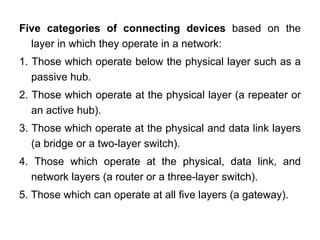
Five categories of connecting devices based on the
layer in which they operate in a network:
1. Those which operate below the physical layer such as a
passive hub.
2. Those which operate at the physical layer (a repeater or
an active hub).
3. Those which operate at the physical and data link layers
(a bridge or a two-layer switch).
4. Those which operate at the physical, data link, and
network layers (a router or a three-layer switch).
5. Those which can operate at all five layers (a gateway).
PASSIVE HUB
• A passive hub is just a connector.
• It connects the wires coming from different
branches.
• In star-topology Ethernet LAN, a passive
hub is a point where the signals coming
from different stations collide (Hub is the
Collision point)
• Its location in the Internet model is below
the physical layer
Repeater
• Operates only in the physical layer
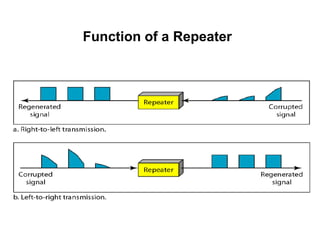
• A repeater receives a signal and, before it
becomes too weak or corrupted, regenerates the
original bit pattern. It then sends the refreshed
signal.
• A repeater can extend the physical length of a
LAN
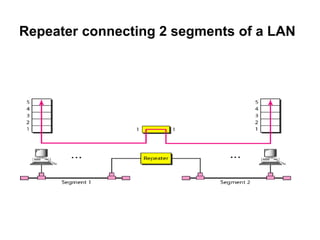
• A repeater connects segments of a LAN.
• A repeater forwards every frame; it has no
filtering capability.
• A repeater is a regenerator, not an amplifier.
Repeater connecting 2 segments of a LAN
Function of a Repeater
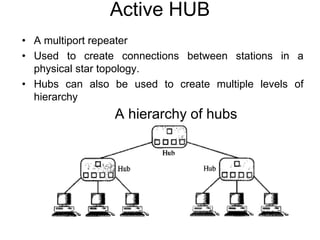
Active HUB
• A multiport repeater
• Used to create connections between stations in a
physical star topology.
• Hubs can also be used to create multiple levels of
hierarchy
A hierarchy of hubs
Bridges
• Operate in both the physical and the data link layer
• As a physical layer device, it regenerates the signal it
receives.
• As a data link layer device, the bridge can check the
physical (MAC) addresses (source and destination)
contained in the frame.
• A bridge has filtering capability. It can check the
destination address of a frame and decide if the frame
should be forwarded or dropped
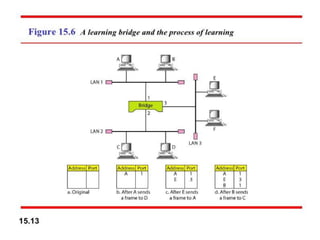
• Bridge has a table that maps addresses to ports.
A Bridge connecting two LANs
Transparent Bridges
• A bridge in which the stations are completely
unaware of the bridge's existence.
• If a bridge is added or deleted from the system,
reconfiguration of the stations is unnecessary.
I. Frames must be forwarded from one station to another.
2. The forwarding table is automatically made by learning
frame movements in the network.(Dynamic table)
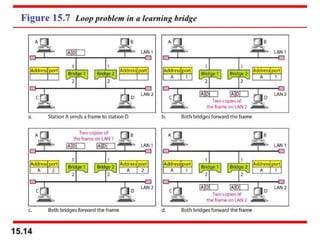
3. Loops in the system must be prevented.(Redundancy in
Bridges can create loops in the system, which is very
undesirable.)
A system equipped with transparent bridges must meet three criteria:
To Prevent Looping
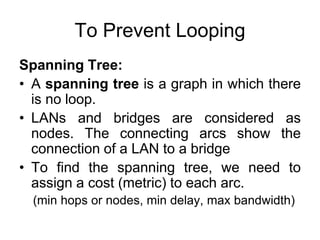
Spanning Tree:
• A spanning tree is a graph in which there
is no loop.
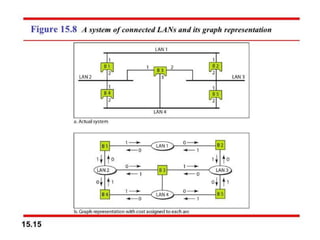
• LANs and bridges are considered as
nodes. The connecting arcs show the
connection of a LAN to a bridge
• To find the spanning tree, we need to
assign a cost (metric) to each arc.
(min hops or nodes, min delay, max bandwidth)
Process to find the spanning tree involves the foll. steps:
1. Every bridge has a built-in ID (normally the serial number, which is
unique). The bridge with the smallest ID is selected as the root
bridge (root of the tree). We assume that bridge B1 has the
smallest ID.
2. The algorithm tries to find the shortest path (a path with the
shortest cost) from the root bridge to every other bridge or LAN.
3. The combination of the shortest paths creates the shortest tree
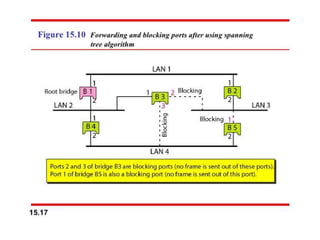
4. Based on the spanning tree, mark the ports that are part of the
spanning tree, the forwarding ports, which forward a frame that
the bridge receives. Also mark those ports that are not part of the
spanning tree, the blocking ports, which block the frames
received by the bridge.
Source Routing Bridges
• To prevent looping
• The frame contains not only the source
and destination addresses, but also the
addresses of all bridges to be visited.
• Done by exchanging special frames with
the destination prior sending data frame
• Designed by IEEE to be used with Token
Ring LANs
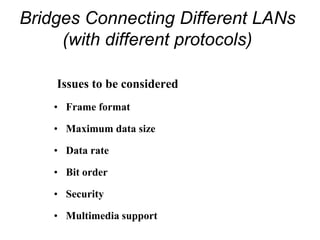
Bridges Connecting Different LANs
(with different protocols)
Issues to be considered
• Frame format
• Maximum data size
• Data rate
• Bit order
• Security
• Multimedia support
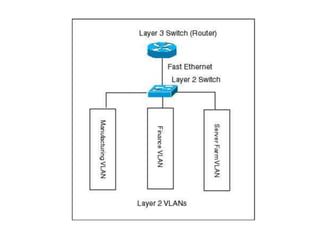
Two-Layer Switches
• Performs at Physical and Data link layers
• A two-layer switch is a bridge, a bridge with many ports
and a design that allows better (faster) performance.
• A two-layer switch makes filtering decision
• It can have a buffer to hold the frames for processing.
• It can have a switching factor that forwards the frames
faster.
• Some new two-layer switches, called cut-through
switches, have been designed to forward the frame as
soon as they check the MAC addresses in the header of
the frame.
• A three-layer switch is used at the network layer; it is a
kind of router. It is faster and more sophisticated.
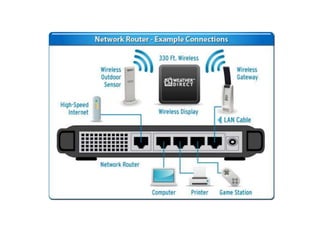
Routers
• A router is a three-layer device that routes
packets based on their logical addresses.
• A router normally connects LANs and
WANs.
• It has a routing table that is used for
making decisions about the route.
• The routing tables are dynamic and are
updated using routing protocols.
Gateway
• A gateway is normally a computer that
operates in all five layers of the Internet or
seven layers of OSI model.
• It can be used as a connecting device
between two internetworks that use
different models (Eg : OSI and Internet
Models).
• Gateways can provide security.
• It filters unwanted application-layer
messages.

Connecting devices

  • 1.
  • 2.
    Five Categories ofConnecting Devices
  • 3.
    Five categories ofconnecting devices based on the layer in which they operate in a network: 1. Those which operate below the physical layer such as a passive hub. 2. Those which operate at the physical layer (a repeater or an active hub). 3. Those which operate at the physical and data link layers (a bridge or a two-layer switch). 4. Those which operate at the physical, data link, and network layers (a router or a three-layer switch). 5. Those which can operate at all five layers (a gateway).
  • 4.
    PASSIVE HUB • Apassive hub is just a connector. • It connects the wires coming from different branches. • In star-topology Ethernet LAN, a passive hub is a point where the signals coming from different stations collide (Hub is the Collision point) • Its location in the Internet model is below the physical layer
  • 5.
    Repeater • Operates onlyin the physical layer • A repeater receives a signal and, before it becomes too weak or corrupted, regenerates the original bit pattern. It then sends the refreshed signal. • A repeater can extend the physical length of a LAN • A repeater connects segments of a LAN. • A repeater forwards every frame; it has no filtering capability. • A repeater is a regenerator, not an amplifier.
  • 6.
    Repeater connecting 2segments of a LAN
  • 7.
    Function of aRepeater
  • 8.
    Active HUB • Amultiport repeater • Used to create connections between stations in a physical star topology. • Hubs can also be used to create multiple levels of hierarchy A hierarchy of hubs
  • 9.
    Bridges • Operate inboth the physical and the data link layer • As a physical layer device, it regenerates the signal it receives. • As a data link layer device, the bridge can check the physical (MAC) addresses (source and destination) contained in the frame. • A bridge has filtering capability. It can check the destination address of a frame and decide if the frame should be forwarded or dropped • Bridge has a table that maps addresses to ports.
  • 10.
  • 11.
    Transparent Bridges • Abridge in which the stations are completely unaware of the bridge's existence. • If a bridge is added or deleted from the system, reconfiguration of the stations is unnecessary. I. Frames must be forwarded from one station to another. 2. The forwarding table is automatically made by learning frame movements in the network.(Dynamic table) 3. Loops in the system must be prevented.(Redundancy in Bridges can create loops in the system, which is very undesirable.) A system equipped with transparent bridges must meet three criteria:
  • 14.
    To Prevent Looping SpanningTree: • A spanning tree is a graph in which there is no loop. • LANs and bridges are considered as nodes. The connecting arcs show the connection of a LAN to a bridge • To find the spanning tree, we need to assign a cost (metric) to each arc. (min hops or nodes, min delay, max bandwidth)
  • 16.
    Process to findthe spanning tree involves the foll. steps: 1. Every bridge has a built-in ID (normally the serial number, which is unique). The bridge with the smallest ID is selected as the root bridge (root of the tree). We assume that bridge B1 has the smallest ID. 2. The algorithm tries to find the shortest path (a path with the shortest cost) from the root bridge to every other bridge or LAN. 3. The combination of the shortest paths creates the shortest tree 4. Based on the spanning tree, mark the ports that are part of the spanning tree, the forwarding ports, which forward a frame that the bridge receives. Also mark those ports that are not part of the spanning tree, the blocking ports, which block the frames received by the bridge.
  • 19.
    Source Routing Bridges •To prevent looping • The frame contains not only the source and destination addresses, but also the addresses of all bridges to be visited. • Done by exchanging special frames with the destination prior sending data frame • Designed by IEEE to be used with Token Ring LANs
  • 20.
    Bridges Connecting DifferentLANs (with different protocols) Issues to be considered • Frame format • Maximum data size • Data rate • Bit order • Security • Multimedia support
  • 21.
    Two-Layer Switches • Performsat Physical and Data link layers • A two-layer switch is a bridge, a bridge with many ports and a design that allows better (faster) performance. • A two-layer switch makes filtering decision • It can have a buffer to hold the frames for processing. • It can have a switching factor that forwards the frames faster. • Some new two-layer switches, called cut-through switches, have been designed to forward the frame as soon as they check the MAC addresses in the header of the frame. • A three-layer switch is used at the network layer; it is a kind of router. It is faster and more sophisticated.
  • 22.
    Routers • A routeris a three-layer device that routes packets based on their logical addresses. • A router normally connects LANs and WANs. • It has a routing table that is used for making decisions about the route. • The routing tables are dynamic and are updated using routing protocols.
  • 25.
    Gateway • A gatewayis normally a computer that operates in all five layers of the Internet or seven layers of OSI model. • It can be used as a connecting device between two internetworks that use different models (Eg : OSI and Internet Models). • Gateways can provide security. • It filters unwanted application-layer messages.