Basics of Networking &
Communication Protocols
Welcome to this comprehensive overview of computer networking fundamentals
and essential communication protocols. In today's interconnected world,
understanding how devices communicate is crucial for anyone working with
technology.
This presentation will guide you through the core concepts of networking, from basic
definitions to advanced protocols that power our digital landscape.
by Chandru Ramaswamy
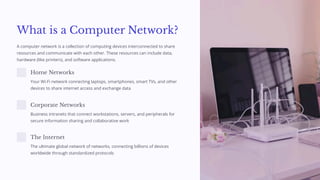
What is a Computer Network?
A computer network is a collection of computing devices interconnected to share
resources and communicate with each other. These resources can include data,
hardware (like printers), and software applications.
Home Networks
Your Wi-Fi network connecting laptops, smartphones, smart TVs, and other
devices to share internet access and exchange data
Corporate Networks
Business intranets that connect workstations, servers, and peripherals for
secure information sharing and collaborative work
The Internet
The ultimate global network of networks, connecting billions of devices
worldwide through standardized protocols
Core Networking Terms
Node
Any device connected to a network, including computers, printers,
servers, smartphones, IoT devices, or any equipment with network
capability
NIC (Network Interface Card)
Hardware component that enables devices to connect to a network,
either built-in or added as an expansion card
MAC Address
Media Access Control address: a unique 48-bit identifier assigned to
each NIC by the manufacturer, formatted as six pairs of hexadecimal
digits (e.g., 00:1A:2B:3C:4D:5E)
Packet
Small unit of data transmitted across networks, containing both the
actual data and control information like source/destination addresses
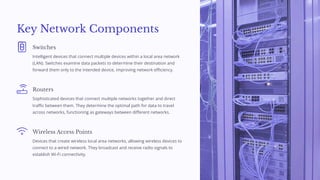
Key Network Components
Switches
Intelligent devices that connect multiple devices within a local area network
(LAN). Switches examine data packets to determine their destination and
forward them only to the intended device, improving network efficiency.
Routers
Sophisticated devices that connect multiple networks together and direct
traffic between them. They determine the optimal path for data to travel
across networks, functioning as gateways between different networks.
Wireless Access Points
Devices that create wireless local area networks, allowing wireless devices to
connect to a wired network. They broadcast and receive radio signals to
establish Wi-Fi connectivity.
Wired vs Wireless Networking
Ethernet (Wired)
Higher reliability and consistent speeds
Lower latency ideal for gaming and streaming
Physical security - requires direct access
Speeds from 100 Mbps to 10 Gbps or higher
Less susceptible to interference
Wi-Fi (Wireless)
Greater mobility and flexibility
Easier to deploy across spaces
No cable management required
Susceptible to interference
Signal strength varies with distance
Security requires proper encryption
Most modern networks employ a hybrid approach, using both wired connections for critical infrastructure and wireless for convenience and
mobility.
Understanding IP Addressing
IP (Internet Protocol) addresses function as unique identifiers for devices on a network, similar to postal addresses for houses. They allow data
packets to find their way to the correct destination across complex networks.
IPv4
32-bit addresses (e.g., 192.168.1.1)
Limited to approximately 4.3 billion addresses
Address exhaustion is a significant issue
Uses NAT to extend usable addresses
IPv6
128-bit addresses (e.g.,
2001:0db8:85a3:0000:0000:8a2e:0370:7334)
Provides 340 undecillion unique addresses
Improved security and routing efficiency
Gradually replacing IPv4 globally
MAC Address: Device Identity
MAC (Media Access Control) addresses serve as permanent physical identifiers
burned into network interface hardware during manufacturing. Unlike IP addresses
which can change, MAC addresses remain constant for the life of the device.
Structure
Six pairs of hexadecimal digits (e.g., 00:1A:2B:3C:4D:5E) where the first three
pairs identify the manufacturer and the last three uniquely identify the device
Function
Enables direct device-to-device communication within the same network
segment at the Data Link Layer (Layer 2) of the OSI model
Applications
Used for MAC filtering in network security, device tracking, and
troubleshooting network connectivity issues
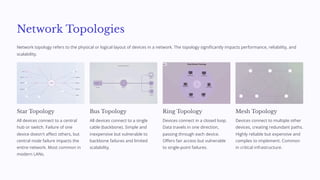
Network Topologies
Network topology refers to the physical or logical layout of devices in a network. The topology significantly impacts performance, reliability, and
scalability.
Star Topology
All devices connect to a central
hub or switch. Failure of one
device doesn't affect others, but
central node failure impacts the
entire network. Most common in
modern LANs.
Bus Topology
All devices connect to a single
cable (backbone). Simple and
inexpensive but vulnerable to
backbone failures and limited
scalability.
Ring Topology
Devices connect in a closed loop.
Data travels in one direction,
passing through each device.
Offers fair access but vulnerable
to single-point failures.
Mesh Topology
Devices connect to multiple other
devices, creating redundant paths.
Highly reliable but expensive and
complex to implement. Common
in critical infrastructure.
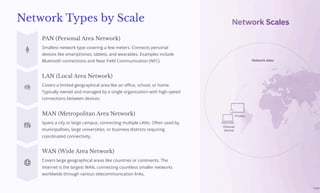
Network Types by Scale
PAN (Personal Area Network)
Smallest network type covering a few meters. Connects personal
devices like smartphones, tablets, and wearables. Examples include
Bluetooth connections and Near Field Communication (NFC).
LAN (Local Area Network)
Covers a limited geographical area like an office, school, or home.
Typically owned and managed by a single organization with high-speed
connections between devices.
MAN (Metropolitan Area Network)
Spans a city or large campus, connecting multiple LANs. Often used by
municipalities, large universities, or business districts requiring
coordinated connectivity.
WAN (Wide Area Network)
Covers large geographical areas like countries or continents. The
Internet is the largest WAN, connecting countless smaller networks
worldwide through various telecommunication links.
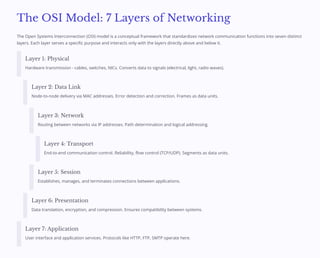
The OSI Model: 7 Layers of Networking
The Open Systems Interconnection (OSI) model is a conceptual framework that standardizes network communication functions into seven distinct
layers. Each layer serves a specific purpose and interacts only with the layers directly above and below it.
Layer 1: Physical
Hardware transmission - cables, switches, NICs. Converts data to signals (electrical, light, radio waves).
Layer 2: Data Link
Node-to-node delivery via MAC addresses. Error detection and correction. Frames as data units.
Layer 3: Network
Routing between networks via IP addresses. Path determination and logical addressing.
Layer 4: Transport
End-to-end communication control. Reliability, flow control (TCP/UDP). Segments as data units.
Layer 5: Session
Establishes, manages, and terminates connections between applications.
Layer 6: Presentation
Data translation, encryption, and compression. Ensures compatibility between systems.
Layer 7: Application
User interface and application services. Protocols like HTTP, FTP, SMTP operate here.
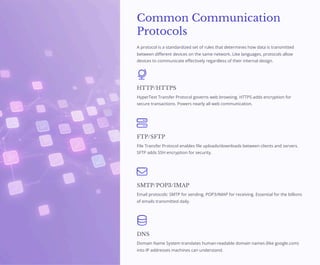
Common Communication
Protocols
A protocol is a standardized set of rules that determines how data is transmitted
between different devices on the same network. Like languages, protocols allow
devices to communicate effectively regardless of their internal design.
HTTP/HTTPS
HyperText Transfer Protocol governs web browsing. HTTPS adds encryption for
secure transactions. Powers nearly all web communication.
FTP/SFTP
File Transfer Protocol enables file uploads/downloads between clients and servers.
SFTP adds SSH encryption for security.
SMTP/POP3/IMAP
Email protocols: SMTP for sending, POP3/IMAP for receiving. Essential for the billions
of emails transmitted daily.
DNS
Domain Name System translates human-readable domain names (like google.com)
into IP addresses machines can understand.
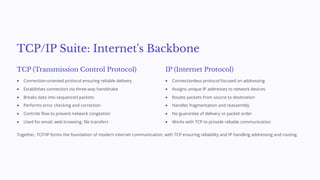
TCP/IP Suite: Internet's Backbone
TCP (Transmission Control Protocol)
Connection-oriented protocol ensuring reliable delivery
Establishes connection via three-way handshake
Breaks data into sequenced packets
Performs error checking and correction
Controls flow to prevent network congestion
Used for email, web browsing, file transfers
IP (Internet Protocol)
Connectionless protocol focused on addressing
Assigns unique IP addresses to network devices
Routes packets from source to destination
Handles fragmentation and reassembly
No guarantee of delivery or packet order
Works with TCP to provide reliable communication
Together, TCP/IP forms the foundation of modern internet communication, with TCP ensuring reliability and IP handling addressing and routing.
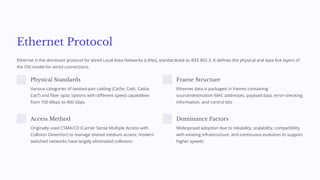
Ethernet Protocol
Ethernet is the dominant protocol for wired Local Area Networks (LANs), standardized as IEEE 802.3. It defines the physical and data link layers of
the OSI model for wired connections.
Physical Standards
Various categories of twisted-pair cabling (Cat5e, Cat6, Cat6a,
Cat7) and fiber optic options with different speed capabilities
from 100 Mbps to 400 Gbps
Frame Structure
Ethernet data is packaged in frames containing
source/destination MAC addresses, payload data, error-checking
information, and control bits
Access Method
Originally used CSMA/CD (Carrier Sense Multiple Access with
Collision Detection) to manage shared medium access; modern
switched networks have largely eliminated collisions
Dominance Factors
Widespread adoption due to reliability, scalability, compatibility
with existing infrastructure, and continuous evolution to support
higher speeds
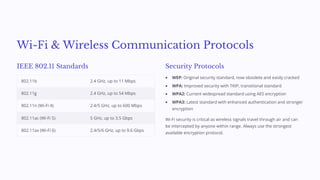
Wi-Fi & Wireless Communication Protocols
IEEE 802.11 Standards
802.11b 2.4 GHz, up to 11 Mbps
802.11g 2.4 GHz, up to 54 Mbps
802.11n (Wi-Fi 4) 2.4/5 GHz, up to 600 Mbps
802.11ac (Wi-Fi 5) 5 GHz, up to 3.5 Gbps
802.11ax (Wi-Fi 6) 2.4/5/6 GHz, up to 9.6 Gbps
Security Protocols
WEP: Original security standard, now obsolete and easily cracked
WPA: Improved security with TKIP, transitional standard
WPA2: Current widespread standard using AES encryption
WPA3: Latest standard with enhanced authentication and stronger
encryption
Wi-Fi security is critical as wireless signals travel through air and can
be intercepted by anyone within range. Always use the strongest
available encryption protocol.
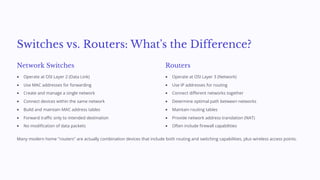
Switches vs. Routers: What's the Difference?
Network Switches
Operate at OSI Layer 2 (Data Link)
Use MAC addresses for forwarding
Create and manage a single network
Connect devices within the same network
Build and maintain MAC address tables
Forward traffic only to intended destination
No modification of data packets
Routers
Operate at OSI Layer 3 (Network)
Use IP addresses for routing
Connect different networks together
Determine optimal path between networks
Maintain routing tables
Provide network address translation (NAT)
Often include firewall capabilities
Many modern home "routers" are actually combination devices that include both routing and switching capabilities, plus wireless access points.
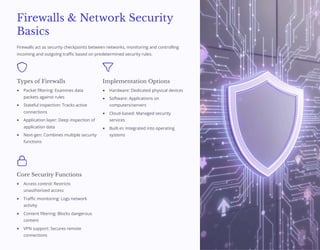
Firewalls & Network Security
Basics
Firewalls act as security checkpoints between networks, monitoring and controlling
incoming and outgoing traffic based on predetermined security rules.
Types of Firewalls
Packet filtering: Examines data
packets against rules
Stateful inspection: Tracks active
connections
Application layer: Deep inspection of
application data
Next-gen: Combines multiple security
functions
Implementation Options
Hardware: Dedicated physical devices
Software: Applications on
computers/servers
Cloud-based: Managed security
services
Built-in: Integrated into operating
systems
Core Security Functions
Access control: Restricts
unauthorized access
Traffic monitoring: Logs network
activity
Content filtering: Blocks dangerous
content
VPN support: Secures remote
connections
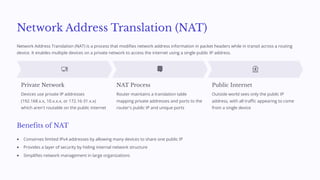
Network Address Translation (NAT)
Network Address Translation (NAT) is a process that modifies network address information in packet headers while in transit across a routing
device. It enables multiple devices on a private network to access the internet using a single public IP address.
Private Network
Devices use private IP addresses
(192.168.x.x, 10.x.x.x, or 172.16-31.x.x)
which aren't routable on the public internet
NAT Process
Router maintains a translation table
mapping private addresses and ports to the
router's public IP and unique ports
Public Internet
Outside world sees only the public IP
address, with all traffic appearing to come
from a single device
Benefits of NAT
Conserves limited IPv4 addresses by allowing many devices to share one public IP
Provides a layer of security by hiding internal network structure
Simplifies network management in large organizations
Emerging Trends in Networking
Cloud-Managed Networking
Cloud-managed networking centralizes network management in the
cloud, allowing administration from anywhere with internet access.
Zero-touch provisioning of devices
Centralized management interface
Automatic firmware updates
Scalable from small business to enterprise
Reduced on-site IT infrastructure
Real-time monitoring and analytics
Software-Defined Networking (SDN)
SDN separates the network control plane from the data forwarding
plane, making networks programmable and adaptable.
Programmable network behavior
Dynamic traffic management
Automated network configuration
Reduced hardware dependency
More flexible resource allocation
Better support for cloud environments
Other emerging trends include Intent-Based Networking (IBN), Network Function Virtualization (NFV), and 5G integration with enterprise networks.
Best Practices for Network Design
Design for Redundancy
Implement redundant paths, equipment, and power supplies to eliminate single points of failure. Consider technologies like HSRP, VRRP, or
CARP for gateway redundancy and link aggregation for path redundancy.
Segment Your Network
Use VLANs and subnets to isolate traffic, improve security, and enhance performance. Create logical boundaries between different
departments or functions while maintaining appropriate access controls.
Document Everything
Maintain detailed network diagrams, IP address schemes, configuration details, and change logs. Good documentation is essential for
troubleshooting and knowledge transfer.
Implement Monitoring
Deploy network monitoring tools to track performance, detect anomalies, and alert administrators to potential issues before they cause
outages. Collect and analyze metrics like bandwidth usage, latency, and error rates.
Plan for Scalability
Design networks with future growth in mind. Choose equipment, addressing schemes, and architectures that can accommodate expansion
without major redesigns.
Summary & Key Takeaways
Core Concepts
Networks connect devices to share resources and information
IP addresses identify devices on networks (IPv4, IPv6)
MAC addresses provide hardware-level identification
The OSI model divides networking functions into 7 layers
Network topologies determine how devices connect
Key Components & Protocols
Switches connect devices within a network (Layer 2)
Routers connect different networks (Layer 3)
TCP/IP forms the foundation of internet communication
Security measures like firewalls and encryption are essential
Emerging technologies focus on automation and flexibility
Understanding networking fundamentals is crucial in today's interconnected world. These concepts apply across all scales, from home networks to
global enterprise infrastructure. As technologies evolve, the core principles of addressing, routing, and protocols remain essential knowledge for IT
professionals.
For further learning, explore certification paths like CompTIA Network+, Cisco CCNA, or practical hands-on labs with network simulation tools.

Basics-of-Networking-and-Communication-Protocols.pdf

  • 1.
    Basics of Networking& Communication Protocols Welcome to this comprehensive overview of computer networking fundamentals and essential communication protocols. In today's interconnected world, understanding how devices communicate is crucial for anyone working with technology. This presentation will guide you through the core concepts of networking, from basic definitions to advanced protocols that power our digital landscape. by Chandru Ramaswamy
  • 2.
    What is aComputer Network? A computer network is a collection of computing devices interconnected to share resources and communicate with each other. These resources can include data, hardware (like printers), and software applications. Home Networks Your Wi-Fi network connecting laptops, smartphones, smart TVs, and other devices to share internet access and exchange data Corporate Networks Business intranets that connect workstations, servers, and peripherals for secure information sharing and collaborative work The Internet The ultimate global network of networks, connecting billions of devices worldwide through standardized protocols
  • 3.
    Core Networking Terms Node Anydevice connected to a network, including computers, printers, servers, smartphones, IoT devices, or any equipment with network capability NIC (Network Interface Card) Hardware component that enables devices to connect to a network, either built-in or added as an expansion card MAC Address Media Access Control address: a unique 48-bit identifier assigned to each NIC by the manufacturer, formatted as six pairs of hexadecimal digits (e.g., 00:1A:2B:3C:4D:5E) Packet Small unit of data transmitted across networks, containing both the actual data and control information like source/destination addresses
  • 4.
    Key Network Components Switches Intelligentdevices that connect multiple devices within a local area network (LAN). Switches examine data packets to determine their destination and forward them only to the intended device, improving network efficiency. Routers Sophisticated devices that connect multiple networks together and direct traffic between them. They determine the optimal path for data to travel across networks, functioning as gateways between different networks. Wireless Access Points Devices that create wireless local area networks, allowing wireless devices to connect to a wired network. They broadcast and receive radio signals to establish Wi-Fi connectivity.
  • 5.
    Wired vs WirelessNetworking Ethernet (Wired) Higher reliability and consistent speeds Lower latency ideal for gaming and streaming Physical security - requires direct access Speeds from 100 Mbps to 10 Gbps or higher Less susceptible to interference Wi-Fi (Wireless) Greater mobility and flexibility Easier to deploy across spaces No cable management required Susceptible to interference Signal strength varies with distance Security requires proper encryption Most modern networks employ a hybrid approach, using both wired connections for critical infrastructure and wireless for convenience and mobility.
  • 6.
    Understanding IP Addressing IP(Internet Protocol) addresses function as unique identifiers for devices on a network, similar to postal addresses for houses. They allow data packets to find their way to the correct destination across complex networks. IPv4 32-bit addresses (e.g., 192.168.1.1) Limited to approximately 4.3 billion addresses Address exhaustion is a significant issue Uses NAT to extend usable addresses IPv6 128-bit addresses (e.g., 2001:0db8:85a3:0000:0000:8a2e:0370:7334) Provides 340 undecillion unique addresses Improved security and routing efficiency Gradually replacing IPv4 globally
  • 7.
    MAC Address: DeviceIdentity MAC (Media Access Control) addresses serve as permanent physical identifiers burned into network interface hardware during manufacturing. Unlike IP addresses which can change, MAC addresses remain constant for the life of the device. Structure Six pairs of hexadecimal digits (e.g., 00:1A:2B:3C:4D:5E) where the first three pairs identify the manufacturer and the last three uniquely identify the device Function Enables direct device-to-device communication within the same network segment at the Data Link Layer (Layer 2) of the OSI model Applications Used for MAC filtering in network security, device tracking, and troubleshooting network connectivity issues
  • 8.
    Network Topologies Network topologyrefers to the physical or logical layout of devices in a network. The topology significantly impacts performance, reliability, and scalability. Star Topology All devices connect to a central hub or switch. Failure of one device doesn't affect others, but central node failure impacts the entire network. Most common in modern LANs. Bus Topology All devices connect to a single cable (backbone). Simple and inexpensive but vulnerable to backbone failures and limited scalability. Ring Topology Devices connect in a closed loop. Data travels in one direction, passing through each device. Offers fair access but vulnerable to single-point failures. Mesh Topology Devices connect to multiple other devices, creating redundant paths. Highly reliable but expensive and complex to implement. Common in critical infrastructure.
  • 9.
    Network Types byScale PAN (Personal Area Network) Smallest network type covering a few meters. Connects personal devices like smartphones, tablets, and wearables. Examples include Bluetooth connections and Near Field Communication (NFC). LAN (Local Area Network) Covers a limited geographical area like an office, school, or home. Typically owned and managed by a single organization with high-speed connections between devices. MAN (Metropolitan Area Network) Spans a city or large campus, connecting multiple LANs. Often used by municipalities, large universities, or business districts requiring coordinated connectivity. WAN (Wide Area Network) Covers large geographical areas like countries or continents. The Internet is the largest WAN, connecting countless smaller networks worldwide through various telecommunication links.
  • 10.
    The OSI Model:7 Layers of Networking The Open Systems Interconnection (OSI) model is a conceptual framework that standardizes network communication functions into seven distinct layers. Each layer serves a specific purpose and interacts only with the layers directly above and below it. Layer 1: Physical Hardware transmission - cables, switches, NICs. Converts data to signals (electrical, light, radio waves). Layer 2: Data Link Node-to-node delivery via MAC addresses. Error detection and correction. Frames as data units. Layer 3: Network Routing between networks via IP addresses. Path determination and logical addressing. Layer 4: Transport End-to-end communication control. Reliability, flow control (TCP/UDP). Segments as data units. Layer 5: Session Establishes, manages, and terminates connections between applications. Layer 6: Presentation Data translation, encryption, and compression. Ensures compatibility between systems. Layer 7: Application User interface and application services. Protocols like HTTP, FTP, SMTP operate here.
  • 11.
    Common Communication Protocols A protocolis a standardized set of rules that determines how data is transmitted between different devices on the same network. Like languages, protocols allow devices to communicate effectively regardless of their internal design. HTTP/HTTPS HyperText Transfer Protocol governs web browsing. HTTPS adds encryption for secure transactions. Powers nearly all web communication. FTP/SFTP File Transfer Protocol enables file uploads/downloads between clients and servers. SFTP adds SSH encryption for security. SMTP/POP3/IMAP Email protocols: SMTP for sending, POP3/IMAP for receiving. Essential for the billions of emails transmitted daily. DNS Domain Name System translates human-readable domain names (like google.com) into IP addresses machines can understand.
  • 12.
    TCP/IP Suite: Internet'sBackbone TCP (Transmission Control Protocol) Connection-oriented protocol ensuring reliable delivery Establishes connection via three-way handshake Breaks data into sequenced packets Performs error checking and correction Controls flow to prevent network congestion Used for email, web browsing, file transfers IP (Internet Protocol) Connectionless protocol focused on addressing Assigns unique IP addresses to network devices Routes packets from source to destination Handles fragmentation and reassembly No guarantee of delivery or packet order Works with TCP to provide reliable communication Together, TCP/IP forms the foundation of modern internet communication, with TCP ensuring reliability and IP handling addressing and routing.
  • 13.
    Ethernet Protocol Ethernet isthe dominant protocol for wired Local Area Networks (LANs), standardized as IEEE 802.3. It defines the physical and data link layers of the OSI model for wired connections. Physical Standards Various categories of twisted-pair cabling (Cat5e, Cat6, Cat6a, Cat7) and fiber optic options with different speed capabilities from 100 Mbps to 400 Gbps Frame Structure Ethernet data is packaged in frames containing source/destination MAC addresses, payload data, error-checking information, and control bits Access Method Originally used CSMA/CD (Carrier Sense Multiple Access with Collision Detection) to manage shared medium access; modern switched networks have largely eliminated collisions Dominance Factors Widespread adoption due to reliability, scalability, compatibility with existing infrastructure, and continuous evolution to support higher speeds
  • 14.
    Wi-Fi & WirelessCommunication Protocols IEEE 802.11 Standards 802.11b 2.4 GHz, up to 11 Mbps 802.11g 2.4 GHz, up to 54 Mbps 802.11n (Wi-Fi 4) 2.4/5 GHz, up to 600 Mbps 802.11ac (Wi-Fi 5) 5 GHz, up to 3.5 Gbps 802.11ax (Wi-Fi 6) 2.4/5/6 GHz, up to 9.6 Gbps Security Protocols WEP: Original security standard, now obsolete and easily cracked WPA: Improved security with TKIP, transitional standard WPA2: Current widespread standard using AES encryption WPA3: Latest standard with enhanced authentication and stronger encryption Wi-Fi security is critical as wireless signals travel through air and can be intercepted by anyone within range. Always use the strongest available encryption protocol.
  • 15.
    Switches vs. Routers:What's the Difference? Network Switches Operate at OSI Layer 2 (Data Link) Use MAC addresses for forwarding Create and manage a single network Connect devices within the same network Build and maintain MAC address tables Forward traffic only to intended destination No modification of data packets Routers Operate at OSI Layer 3 (Network) Use IP addresses for routing Connect different networks together Determine optimal path between networks Maintain routing tables Provide network address translation (NAT) Often include firewall capabilities Many modern home "routers" are actually combination devices that include both routing and switching capabilities, plus wireless access points.
  • 16.
    Firewalls & NetworkSecurity Basics Firewalls act as security checkpoints between networks, monitoring and controlling incoming and outgoing traffic based on predetermined security rules. Types of Firewalls Packet filtering: Examines data packets against rules Stateful inspection: Tracks active connections Application layer: Deep inspection of application data Next-gen: Combines multiple security functions Implementation Options Hardware: Dedicated physical devices Software: Applications on computers/servers Cloud-based: Managed security services Built-in: Integrated into operating systems Core Security Functions Access control: Restricts unauthorized access Traffic monitoring: Logs network activity Content filtering: Blocks dangerous content VPN support: Secures remote connections
  • 17.
    Network Address Translation(NAT) Network Address Translation (NAT) is a process that modifies network address information in packet headers while in transit across a routing device. It enables multiple devices on a private network to access the internet using a single public IP address. Private Network Devices use private IP addresses (192.168.x.x, 10.x.x.x, or 172.16-31.x.x) which aren't routable on the public internet NAT Process Router maintains a translation table mapping private addresses and ports to the router's public IP and unique ports Public Internet Outside world sees only the public IP address, with all traffic appearing to come from a single device Benefits of NAT Conserves limited IPv4 addresses by allowing many devices to share one public IP Provides a layer of security by hiding internal network structure Simplifies network management in large organizations
  • 18.
    Emerging Trends inNetworking Cloud-Managed Networking Cloud-managed networking centralizes network management in the cloud, allowing administration from anywhere with internet access. Zero-touch provisioning of devices Centralized management interface Automatic firmware updates Scalable from small business to enterprise Reduced on-site IT infrastructure Real-time monitoring and analytics Software-Defined Networking (SDN) SDN separates the network control plane from the data forwarding plane, making networks programmable and adaptable. Programmable network behavior Dynamic traffic management Automated network configuration Reduced hardware dependency More flexible resource allocation Better support for cloud environments Other emerging trends include Intent-Based Networking (IBN), Network Function Virtualization (NFV), and 5G integration with enterprise networks.
  • 19.
    Best Practices forNetwork Design Design for Redundancy Implement redundant paths, equipment, and power supplies to eliminate single points of failure. Consider technologies like HSRP, VRRP, or CARP for gateway redundancy and link aggregation for path redundancy. Segment Your Network Use VLANs and subnets to isolate traffic, improve security, and enhance performance. Create logical boundaries between different departments or functions while maintaining appropriate access controls. Document Everything Maintain detailed network diagrams, IP address schemes, configuration details, and change logs. Good documentation is essential for troubleshooting and knowledge transfer. Implement Monitoring Deploy network monitoring tools to track performance, detect anomalies, and alert administrators to potential issues before they cause outages. Collect and analyze metrics like bandwidth usage, latency, and error rates. Plan for Scalability Design networks with future growth in mind. Choose equipment, addressing schemes, and architectures that can accommodate expansion without major redesigns.
  • 20.
    Summary & KeyTakeaways Core Concepts Networks connect devices to share resources and information IP addresses identify devices on networks (IPv4, IPv6) MAC addresses provide hardware-level identification The OSI model divides networking functions into 7 layers Network topologies determine how devices connect Key Components & Protocols Switches connect devices within a network (Layer 2) Routers connect different networks (Layer 3) TCP/IP forms the foundation of internet communication Security measures like firewalls and encryption are essential Emerging technologies focus on automation and flexibility Understanding networking fundamentals is crucial in today's interconnected world. These concepts apply across all scales, from home networks to global enterprise infrastructure. As technologies evolve, the core principles of addressing, routing, and protocols remain essential knowledge for IT professionals. For further learning, explore certification paths like CompTIA Network+, Cisco CCNA, or practical hands-on labs with network simulation tools.