1
Computer security Against
threats
A presentation by Vishwaraj Yadav
and Saurav Mohapatra of class 11th
Cannas
2
Contents
• Security of computer
• Threats to computer security
• Solutions to computer threats
Security of system
• Nowadays, Computers are used
everywhere. Various data is shared
from one computer to another. But
sometimes the data is not trustworthy,
or it behaves in an undesired manner. If
this happens then our computer is
insecure.
3
Continued….
• So to make our computer secured we
need Computer security.
• It is the ability of computer to protect
information & system resources with
respect to confidentiality & integrity.
4
• A threat is a potential violation to
security. When it is executed it becomes
attack.
5
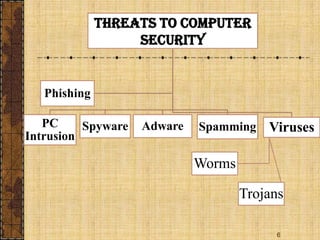
Threats to computer
security
6
Threats to computer
security
PC
Intrusion
Spyware Adware Spamming Viruses
Worms
Trojans
Phishing
7
Computer Virus
• Viruses are malicious codes that cause
damage to data, they can attack to any
part of computer’s software such as boot
block, files & application programs etc.
• Worms & Trojan horses are similar
programs having virus-like effects.
Computer Virus
• Worms- A self-replicating program
which eats up the entire disk space or
memory.
• Trojan Horses- It is a program which
appears harmless but performs
malicious functions such as deleting or
damaging files.
8
Computer Virus
• How do viruses damage computer?
1. They damage or delete files.
2. Slow down the computer.
3. Invade your email program.
9
10
Computer
Viruses
Boot sector
viruses
File
viruses
Macro
viruses
Multipartite
viruses
Polymorph
ic viruses
11
Computer Virus
Types of Computer Virus
• Boot Sector Virus
Boot sector viruses infect the boot sectors on floppy
disks and hard disks, and can also infect the master
boot record on a user's hard drive.
• File Virus
Operate in memory and usually infect executable files.
• Polymorphic virus
They mutate their own code to make it difficult for
antivirus to detect and remove.
Computer Virus
• Multi-partite Virus
Multi-partite viruses have characteristics
of both boot sector viruses and file
infector viruses.
• Macro Virus
They infect macro utilities that accompany
such applications as Microsoft Word,
Excel and outlook.
12
13
Example of computer virus
I LOVE YOU
• VBS/LoveLetter is a VBScript worm. It
spreads through e-mail as a chain letter.
• This worm sends itself to email addresses in
the Microsoft Outlook address book and also
spreads to Internet chatrooms.
• This worm overwrites files on local and
remote drives, including files with the
extensions .html, .c,.bat,.mp3 etc.
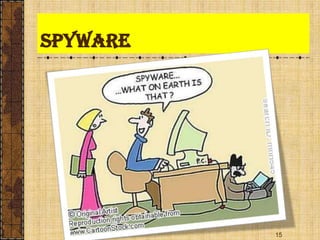
spyware
• Spyware is a software which is installed
in the computer to spy on the activities
done on the computer.
• It tracks what all user does and reports
it to the central source. They are used
to spy either for legal purpose or illegal
purpose.
14
Spyware
15
spyware
• How do spyware cause damage?
1. They monitor information such as what
sites you visit or record keystrokes
which can lead to identity thefts.
2. Some spywares alter PC settings like
position of your desktop icons etc.
3. It can rob the PC of system speed and
internet access efficiency.
16
Adware
• These are programs that deliver
unwanted ads to computer(in the form
of pop-ups).
17
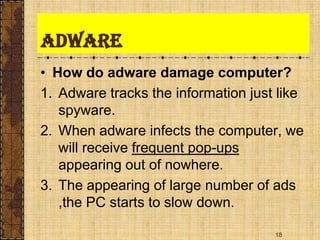
Adware
• How do adware damage computer?
1. Adware tracks the information just like
spyware.
2. When adware infects the computer, we
will receive frequent pop-ups
appearing out of nowhere.
3. The appearing of large number of ads
,the PC starts to slow down.
18
Spamming
• Spamming refers to sending of bulk-
mail by an identified or unidentified
source. The attacker keeps on sending
bulk mail to various accounts until mail
server runs out of disk space.
19
Spamming
• How do spams damage computer?
1. Spam messages circulating across
internet disrupt email delivery & system
performance.
2. Spams eats up time.
3. Spam messages contain fraud material
and can even spread viruses.
20
PC Intrusion
• Every PC connected to Internet are
target of hackers. Hackers constantly
attack computers.
21
PC Intrusion
• How can it damage the system?
1. Sweeper attack- Hackers use it to
delete all the data in the system.
2. Denial of service- Thais attack eats up
all the resources of system and system
or application doesn’t work.
3. Password guessing- Hackers crack or
guess passwords of account to gain
entry into remote computer systems.
22
Solutions to computer
threats
• The computer security protects the
computer through threats by taking
actions or taking prevention. There are
two solutions to these threats-
1. Active Protection
2. Preventive Maesures
23
Continued…
• Active Protection- Installing and using
antivirus that includes Internet security-
which includes protection against
viruses, spyware & PC intrusion.
• Preventive measures- Even though
security programs detect & eliminate
threats but we should help prevent
these issues from ever arising.
24
Continued…
• Solutions to viruses, adware,spyware
1. Active protection
• Use Anti-virus and Anti-spyware
software.
• Download updates regularly.
• Run frequent full-system scans.
25
2. Preventive measures
• Keep your system up-to-date.
• Use caution when downloading files on
the internet.
• Be careful with email.
• Disable Cookies, if possible.
26
Continued…
• Solutions to Spam
1. Active Protection:-Methods used by
anti-spam software-
(a)Sender Filtering
Digital Certificates
Digital Signatures
(b)Keyword Filtering
27
Continued…
Solutions to PC intrusion:-
Authorization
Authentication
Firewall
28
Continued…
29

Computer virus-and-antivirus

  • 1.
    1 Computer security Against threats Apresentation by Vishwaraj Yadav and Saurav Mohapatra of class 11th Cannas
  • 2.
    2 Contents • Security ofcomputer • Threats to computer security • Solutions to computer threats
  • 3.
    Security of system •Nowadays, Computers are used everywhere. Various data is shared from one computer to another. But sometimes the data is not trustworthy, or it behaves in an undesired manner. If this happens then our computer is insecure. 3
  • 4.
    Continued…. • So tomake our computer secured we need Computer security. • It is the ability of computer to protect information & system resources with respect to confidentiality & integrity. 4
  • 5.
    • A threatis a potential violation to security. When it is executed it becomes attack. 5 Threats to computer security
  • 6.
    6 Threats to computer security PC Intrusion SpywareAdware Spamming Viruses Worms Trojans Phishing
  • 7.
    7 Computer Virus • Virusesare malicious codes that cause damage to data, they can attack to any part of computer’s software such as boot block, files & application programs etc. • Worms & Trojan horses are similar programs having virus-like effects.
  • 8.
    Computer Virus • Worms-A self-replicating program which eats up the entire disk space or memory. • Trojan Horses- It is a program which appears harmless but performs malicious functions such as deleting or damaging files. 8
  • 9.
    Computer Virus • Howdo viruses damage computer? 1. They damage or delete files. 2. Slow down the computer. 3. Invade your email program. 9
  • 10.
  • 11.
    11 Computer Virus Types ofComputer Virus • Boot Sector Virus Boot sector viruses infect the boot sectors on floppy disks and hard disks, and can also infect the master boot record on a user's hard drive. • File Virus Operate in memory and usually infect executable files. • Polymorphic virus They mutate their own code to make it difficult for antivirus to detect and remove.
  • 12.
    Computer Virus • Multi-partiteVirus Multi-partite viruses have characteristics of both boot sector viruses and file infector viruses. • Macro Virus They infect macro utilities that accompany such applications as Microsoft Word, Excel and outlook. 12
  • 13.
    13 Example of computervirus I LOVE YOU • VBS/LoveLetter is a VBScript worm. It spreads through e-mail as a chain letter. • This worm sends itself to email addresses in the Microsoft Outlook address book and also spreads to Internet chatrooms. • This worm overwrites files on local and remote drives, including files with the extensions .html, .c,.bat,.mp3 etc.
  • 14.
    spyware • Spyware isa software which is installed in the computer to spy on the activities done on the computer. • It tracks what all user does and reports it to the central source. They are used to spy either for legal purpose or illegal purpose. 14
  • 15.
  • 16.
    spyware • How dospyware cause damage? 1. They monitor information such as what sites you visit or record keystrokes which can lead to identity thefts. 2. Some spywares alter PC settings like position of your desktop icons etc. 3. It can rob the PC of system speed and internet access efficiency. 16
  • 17.
    Adware • These areprograms that deliver unwanted ads to computer(in the form of pop-ups). 17
  • 18.
    Adware • How doadware damage computer? 1. Adware tracks the information just like spyware. 2. When adware infects the computer, we will receive frequent pop-ups appearing out of nowhere. 3. The appearing of large number of ads ,the PC starts to slow down. 18
  • 19.
    Spamming • Spamming refersto sending of bulk- mail by an identified or unidentified source. The attacker keeps on sending bulk mail to various accounts until mail server runs out of disk space. 19
  • 20.
    Spamming • How dospams damage computer? 1. Spam messages circulating across internet disrupt email delivery & system performance. 2. Spams eats up time. 3. Spam messages contain fraud material and can even spread viruses. 20
  • 21.
    PC Intrusion • EveryPC connected to Internet are target of hackers. Hackers constantly attack computers. 21
  • 22.
    PC Intrusion • Howcan it damage the system? 1. Sweeper attack- Hackers use it to delete all the data in the system. 2. Denial of service- Thais attack eats up all the resources of system and system or application doesn’t work. 3. Password guessing- Hackers crack or guess passwords of account to gain entry into remote computer systems. 22
  • 23.
    Solutions to computer threats •The computer security protects the computer through threats by taking actions or taking prevention. There are two solutions to these threats- 1. Active Protection 2. Preventive Maesures 23
  • 24.
    Continued… • Active Protection-Installing and using antivirus that includes Internet security- which includes protection against viruses, spyware & PC intrusion. • Preventive measures- Even though security programs detect & eliminate threats but we should help prevent these issues from ever arising. 24
  • 25.
    Continued… • Solutions toviruses, adware,spyware 1. Active protection • Use Anti-virus and Anti-spyware software. • Download updates regularly. • Run frequent full-system scans. 25
  • 26.
    2. Preventive measures •Keep your system up-to-date. • Use caution when downloading files on the internet. • Be careful with email. • Disable Cookies, if possible. 26 Continued…
  • 27.
    • Solutions toSpam 1. Active Protection:-Methods used by anti-spam software- (a)Sender Filtering Digital Certificates Digital Signatures (b)Keyword Filtering 27 Continued…
  • 28.
    Solutions to PCintrusion:- Authorization Authentication Firewall 28 Continued…
  • 29.