Viruses
What is a Virus?
a virus is software that spreads from program to
program, or from disk to disk, and uses each
infected program or disk to make copies of itself.
basically computer sabotage.
The History of the Virus
 the term comes from biology. a computer
virus reproduces by making, possibly
modified, copies of itself in the computer’s
memory, storage, or over a network.
similar to the way a biological virus would
work.
 the very first virus to be created outside the
single computer or lab was the program
called "Elk Cloner.” it was written by Rich
Skrenta in 1982. the virus attached itself to
the Apple DOS 3.3 operating system and
spread through floppy disk.
How does a Virus Spread?
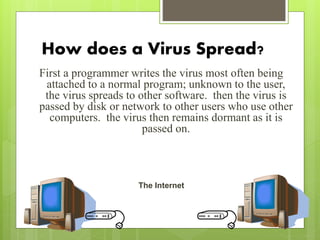
First a programmer writes the virus most often being
attached to a normal program; unknown to the user,
the virus spreads to other software. then the virus is
passed by disk or network to other users who use other
computers. the virus then remains dormant as it is
passed on.
The Internet
The types of Viruses
 the boot virus which infects the boot sector of disk storage
 the program virus which infects the executable programs
 the multipartite virus which is a combination of the boot and program
virus
 the stealth virus which is able avoid detection by a variety of means such
as removing itself from the system registry, or masquerading as a system
file
 the parasitic virus which embeds itself into another file or program such
that the original file is still viable
 the polymorphic virus which changes its code structure to avoid
detection and removal
 the macro virus which exploits the macro language of a program like
Microsoft Word or Excel.
Specific virus attacks
The Macro Virus
 One of the most common viruses is a macro virus,
which is usually contracted through emails.
 macro viruses attach themselves to a document usually
created in one of the applications in Microsoft Office.
 when one of these infected documents is sent through
an email.
 it infects the computer by getting into an email account
and reproducing itself by sending it to all the people in
that person’s email address list.
The Polymorphic Virus
 polymorphic viruses are also very hard to detect.
 this virus can actually use an encrypted code so it
looks like a different virus every time.
 different examples of this type of virus would be
Stimulate or Phoenix.
The Stealth Virus
 Stealth viruses are very tricky viruses.
 they usually are very hard to detect because they
take up exactly the amount of space as the program
should so it is very hard to discover the virus
because it is so well hidden.
 an example of this kind of virus would be the
Whale virus.
The Boot Virus
 boot viruses are viruses that infect either the floppy
disk boot records or the master boot records in hard
disks.
 most of the time what happens is the virus overwrites
the boot record program and this is a problem because
the boot record program is what loads the operating
system.
 boot viruses often load into the memory of the
computer while the disk is in use because the virus is
there instead of the operating systems program.
 some examples of these types of viruses would be Disk
Killer or Stone virus.
The Program Virus
 program viruses are viruses that attack the
executable program files.
 the files it infects are .bin, .com, .exe, .ovl,
.drv, or .sys.
 these kinds of viruses are loaded onto the
computer when the file is being downloaded.
 once the infected program is loaded then the
virus starts making copies of itself.
 examples of these would be Sunday or
Cascade.
Antivirus
Software
What is Antivirus Software?
computer programs intended to identify and
eliminate computer viruses.
The Best Defense
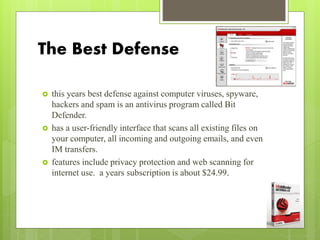
 this years best defense against computer viruses, spyware,
hackers and spam is an antivirus program called Bit
Defender.
 has a user-friendly interface that scans all existing files on
your computer, all incoming and outgoing emails, and even
IM transfers.
 features include privacy protection and web scanning for
internet use. a years subscription is about $24.99.
NAV
 the most widely used software is the Norton Antivirus.
(NAV)
 since its release in 1990, over 100 million people around the
world have used it.
 it’s a free program but in order to receive live updates, a
valid subscription is needed.
 a yearly subscription is only $29.99.
McAfee
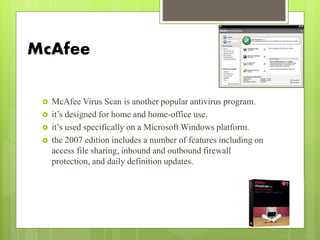
 McAfee Virus Scan is another popular antivirus program.
 it’s designed for home and home-office use.
 it’s used specifically on a Microsoft Windows platform.
 the 2007 edition includes a number of features including on
access file sharing, inbound and outbound firewall
protection, and daily definition updates.
Sophos
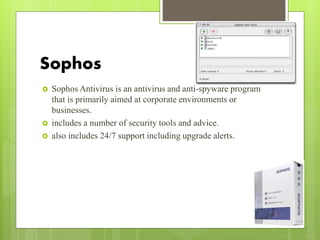
 Sophos Antivirus is an antivirus and anti-spyware program
that is primarily aimed at corporate environments or
businesses.
 includes a number of security tools and advice.
 also includes 24/7 support including upgrade alerts.
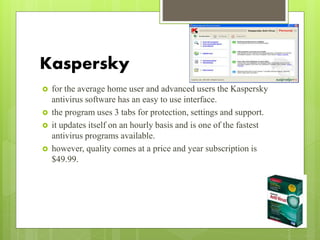
Kaspersky
 for the average home user and advanced users the Kaspersky
antivirus software has an easy to use interface.
 the program uses 3 tabs for protection, settings and support.
 it updates itself on an hourly basis and is one of the fastest
antivirus programs available.
 however, quality comes at a price and year subscription is
$49.99.
Antivirus
software:
How it works
“Antivirus software is the equivalent to
penicillin of the computer world.”
 like penicillin, antivirus applications act as a guard
over your system, scanning incoming files and
applications, “quarantining” or cleaning up
unwanted viruses looking to cause harm to your
system
 antivirus software is considered to be an aid that
detects, fixes and even prevents viruses and worms
from spreading to your computer as well as
connecting computers.
Why is software an issue?
 some antivirus software can considerably reduce
performance
 there should not be more than one antivirus software
installed on a single computer at any given time
 it’s sometimes necessary to temporarily disable virus
protection when installing major updates
 some argue that antivirus software often delivers more
“pain than value to end users
Two main types
 there are different types of antivirus software for
different computers
 some are designed for personal computers
 some are for servers and others for enterprises
 there are mainly two types of antivirus software:
specific and generic
Specific Scanning
 specific scanning or signature detection
 the application scans files to look for known
viruses matching definitions in a “virus
dictionary”
 when the antivirus looks at a file it refers to a
dictionary of known viruses and matches a
piece of code (specific patterns of bytes) from
the new file to the dictionary.
Specific scanning cont..
 after recognizing the malicious software the
antivirus software can take one of the following
actions:
 (1): attempt to repair the file by removing the virus
itself from the file
 (2): quarantine the file
 (3): or delete the file completely
Generic Scanning
 generic scanning is also referred to as the
suspicious behavior approach.
 generic Scanning is used when new viruses appear.
 in this method the software does not look for a
specific signature but instead monitors the
behavior of all applications.
Generic Scanning cont…
 if anything questionable is found by the software
the application is quarantined and a warning is
broadcasted to the user about what the program
may be trying to do.
 if the software is found to be a virus the user can
send it to a virus vendor.
Generic Scanning cont…
 there, researchers examine it, determine its
signature, name and catalogue it and release
antivirus software to stop its spread.
 if the virus never reappears the vendors categorize
the virus as dormant.
Two other approaches
 heuristic analysis
(another form of generic scanning).
 the sandbox method.
heuristic analysis :
 in the heuristic method the software, for example, “could try to emulate
the beginning of the code of each new executable that the system
invokes before transferring control to that executable.” if the program
attempts to use “self-modifying code” or appears to be a virus, it’s
assumed that the virus has infected the executable.
 in this method there are a lot of false positives.
sandbox method :
 when an antivirus program will take suspicious code and run it in a
“virtual machine” to see the purpose of the code and exactly how the
code works. after the program has terminated, the software analyzes
the sandbox for any changes, which could indicate a virus.
Conclusion
 Computer viruses can so easily be placed into
your work station so you must be careful when
going on the internet, opening emails from
unknown users, make sure you have some kind
of anti-virus software and always get updates
so that you aren’t helping to spread viruses to
other people as well as harming yourself and
your pocket.
FIREWALL
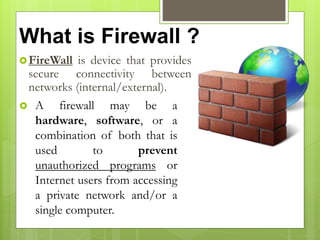
What is Firewall ?
FireWall is device that provides
secure connectivity between
networks (internal/external).
 A firewall may be a
hardware, software, or a
combination of both that is
used to prevent
unauthorized programs or
Internet users from accessing
a private network and/or a
single computer.
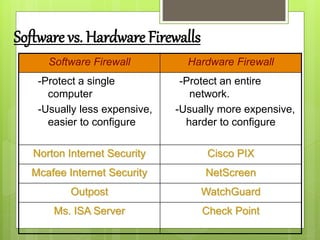
Software Firewall Hardware Firewall
-Protect a single
computer
-Usually less expensive,
easier to configure
-Protect an entire
network.
-Usually more expensive,
harder to configure
Norton Internet Security Cisco PIX
Mcafee Internet Security NetScreen
Outpost WatchGuard
Ms. ISA Server Check Point
Software vs. Hardware Firewalls
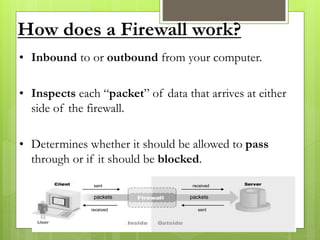
How does a Firewall work?
• Inbound to or outbound from your computer.
• Inspects each “packet” of data that arrives at either
side of the firewall.
• Determines whether it should be allowed to pass
through or if it should be blocked.
sent
sentreceived
received
packets packets
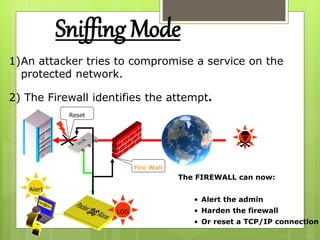
Sniffing Mode
1)An attacker tries to compromise a service on the
protected network.
2) The Firewall identifies the attempt.
The FIREWALL can now:
• Alert the admin
• Harden the firewall
• Or reset a TCP/IP connection
LOG
Alert
Reset
Fire Wall

Types of Firewall Techniques
1. Packet filter
2. Application gateway (a.k.a. Proxy
server)
3. Circuit-level gateway
4. Bastion Host
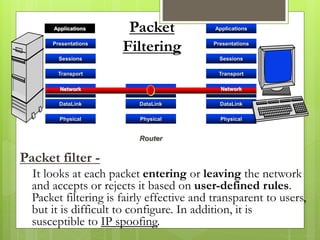
Packet filter -
It looks at each packet entering or leaving the network
and accepts or rejects it based on user-defined rules.
Packet filtering is fairly effective and transparent to users,
but it is difficult to configure. In addition, it is
susceptible to IP spoofing.
Applications
Presentations
Sessions
Transport
DataLink
Physical
DataLink
Physical
Router
Applications
Presentations
Sessions
Transport
DataLink
Physical
Network Network
Packet
Filtering
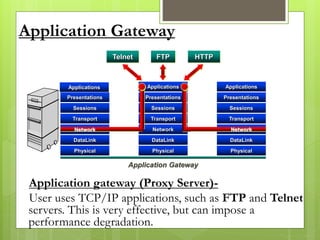
Application Gateway
Applications
Presentations
Sessions
Transport
DataLink
Physical
Network
DataLink
Physical
Applications
Presentations
Sessions
Transport
DataLink
Physical
Application Gateway
Applications
Presentations
Sessions
Transport
Network Network
Telnet HTTPFTP
Application gateway (Proxy Server)-
User uses TCP/IP applications, such as FTP and Telnet
servers. This is very effective, but can impose a
performance degradation.
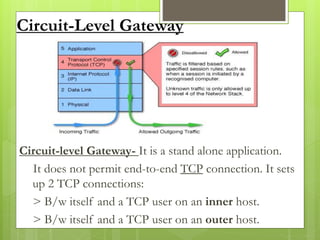
Circuit-Level Gateway
Circuit-level Gateway- It is a stand alone application.
It does not permit end-to-end TCP connection. It sets
up 2 TCP connections:
> B/w itself and a TCP user on an inner host.
> B/w itself and a TCP user on an outer host.
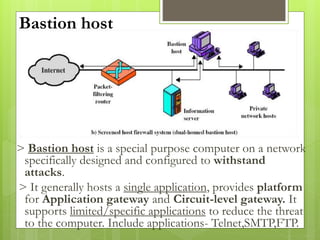
Bastion host
> Bastion host is a special purpose computer on a network
specifically designed and configured to withstand
attacks.
> It generally hosts a single application, provides platform
for Application gateway and Circuit-level gateway. It
supports limited/specific applications to reduce the threat
to the computer. Include applications- Telnet,SMTP,FTP.
Conclusion
What a personal firewall can do ?
What a personal firewall cannot do ?
What a personal firewall can do ?
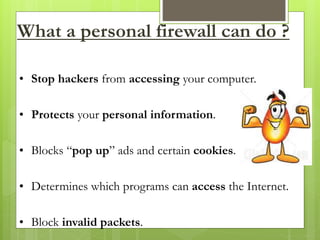
• Stop hackers from accessing your computer.
• Protects your personal information.
• Blocks “pop up” ads and certain cookies.
• Determines which programs can access the Internet.
• Block invalid packets.
What a personal firewall cannot do ?
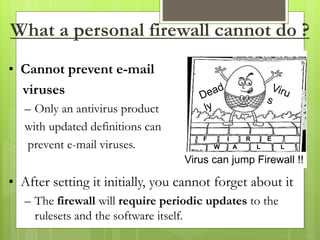
• Cannot prevent e-mail
viruses
– Only an antivirus product
with updated definitions can
prevent e-mail viruses.
• After setting it initially, you cannot forget about it
– The firewall will require periodic updates to the
rulesets and the software itself.
Virus can jump Firewall !!
F I R E
W A L L
THE
END
Presentation by :
Vikas Chandwani

Firewall , Viruses and Antiviruses

  • 1.
  • 2.
    What is aVirus? a virus is software that spreads from program to program, or from disk to disk, and uses each infected program or disk to make copies of itself. basically computer sabotage.
  • 3.
    The History ofthe Virus  the term comes from biology. a computer virus reproduces by making, possibly modified, copies of itself in the computer’s memory, storage, or over a network. similar to the way a biological virus would work.  the very first virus to be created outside the single computer or lab was the program called "Elk Cloner.” it was written by Rich Skrenta in 1982. the virus attached itself to the Apple DOS 3.3 operating system and spread through floppy disk.
  • 4.
    How does aVirus Spread? First a programmer writes the virus most often being attached to a normal program; unknown to the user, the virus spreads to other software. then the virus is passed by disk or network to other users who use other computers. the virus then remains dormant as it is passed on. The Internet
  • 5.
    The types ofViruses  the boot virus which infects the boot sector of disk storage  the program virus which infects the executable programs  the multipartite virus which is a combination of the boot and program virus  the stealth virus which is able avoid detection by a variety of means such as removing itself from the system registry, or masquerading as a system file  the parasitic virus which embeds itself into another file or program such that the original file is still viable  the polymorphic virus which changes its code structure to avoid detection and removal  the macro virus which exploits the macro language of a program like Microsoft Word or Excel.
  • 6.
  • 7.
    The Macro Virus One of the most common viruses is a macro virus, which is usually contracted through emails.  macro viruses attach themselves to a document usually created in one of the applications in Microsoft Office.  when one of these infected documents is sent through an email.  it infects the computer by getting into an email account and reproducing itself by sending it to all the people in that person’s email address list.
  • 8.
    The Polymorphic Virus polymorphic viruses are also very hard to detect.  this virus can actually use an encrypted code so it looks like a different virus every time.  different examples of this type of virus would be Stimulate or Phoenix.
  • 9.
    The Stealth Virus Stealth viruses are very tricky viruses.  they usually are very hard to detect because they take up exactly the amount of space as the program should so it is very hard to discover the virus because it is so well hidden.  an example of this kind of virus would be the Whale virus.
  • 10.
    The Boot Virus boot viruses are viruses that infect either the floppy disk boot records or the master boot records in hard disks.  most of the time what happens is the virus overwrites the boot record program and this is a problem because the boot record program is what loads the operating system.  boot viruses often load into the memory of the computer while the disk is in use because the virus is there instead of the operating systems program.  some examples of these types of viruses would be Disk Killer or Stone virus.
  • 11.
    The Program Virus program viruses are viruses that attack the executable program files.  the files it infects are .bin, .com, .exe, .ovl, .drv, or .sys.  these kinds of viruses are loaded onto the computer when the file is being downloaded.  once the infected program is loaded then the virus starts making copies of itself.  examples of these would be Sunday or Cascade.
  • 12.
  • 13.
    What is AntivirusSoftware? computer programs intended to identify and eliminate computer viruses.
  • 14.
    The Best Defense this years best defense against computer viruses, spyware, hackers and spam is an antivirus program called Bit Defender.  has a user-friendly interface that scans all existing files on your computer, all incoming and outgoing emails, and even IM transfers.  features include privacy protection and web scanning for internet use. a years subscription is about $24.99.
  • 15.
    NAV  the mostwidely used software is the Norton Antivirus. (NAV)  since its release in 1990, over 100 million people around the world have used it.  it’s a free program but in order to receive live updates, a valid subscription is needed.  a yearly subscription is only $29.99.
  • 16.
    McAfee  McAfee VirusScan is another popular antivirus program.  it’s designed for home and home-office use.  it’s used specifically on a Microsoft Windows platform.  the 2007 edition includes a number of features including on access file sharing, inbound and outbound firewall protection, and daily definition updates.
  • 17.
    Sophos  Sophos Antivirusis an antivirus and anti-spyware program that is primarily aimed at corporate environments or businesses.  includes a number of security tools and advice.  also includes 24/7 support including upgrade alerts.
  • 18.
    Kaspersky  for theaverage home user and advanced users the Kaspersky antivirus software has an easy to use interface.  the program uses 3 tabs for protection, settings and support.  it updates itself on an hourly basis and is one of the fastest antivirus programs available.  however, quality comes at a price and year subscription is $49.99.
  • 19.
  • 20.
    “Antivirus software isthe equivalent to penicillin of the computer world.”  like penicillin, antivirus applications act as a guard over your system, scanning incoming files and applications, “quarantining” or cleaning up unwanted viruses looking to cause harm to your system  antivirus software is considered to be an aid that detects, fixes and even prevents viruses and worms from spreading to your computer as well as connecting computers.
  • 21.
    Why is softwarean issue?  some antivirus software can considerably reduce performance  there should not be more than one antivirus software installed on a single computer at any given time  it’s sometimes necessary to temporarily disable virus protection when installing major updates  some argue that antivirus software often delivers more “pain than value to end users
  • 22.
    Two main types there are different types of antivirus software for different computers  some are designed for personal computers  some are for servers and others for enterprises  there are mainly two types of antivirus software: specific and generic
  • 23.
    Specific Scanning  specificscanning or signature detection  the application scans files to look for known viruses matching definitions in a “virus dictionary”  when the antivirus looks at a file it refers to a dictionary of known viruses and matches a piece of code (specific patterns of bytes) from the new file to the dictionary.
  • 24.
    Specific scanning cont.. after recognizing the malicious software the antivirus software can take one of the following actions:  (1): attempt to repair the file by removing the virus itself from the file  (2): quarantine the file  (3): or delete the file completely
  • 25.
    Generic Scanning  genericscanning is also referred to as the suspicious behavior approach.  generic Scanning is used when new viruses appear.  in this method the software does not look for a specific signature but instead monitors the behavior of all applications.
  • 26.
    Generic Scanning cont… if anything questionable is found by the software the application is quarantined and a warning is broadcasted to the user about what the program may be trying to do.  if the software is found to be a virus the user can send it to a virus vendor.
  • 27.
    Generic Scanning cont… there, researchers examine it, determine its signature, name and catalogue it and release antivirus software to stop its spread.  if the virus never reappears the vendors categorize the virus as dormant.
  • 28.
    Two other approaches heuristic analysis (another form of generic scanning).  the sandbox method.
  • 29.
    heuristic analysis : in the heuristic method the software, for example, “could try to emulate the beginning of the code of each new executable that the system invokes before transferring control to that executable.” if the program attempts to use “self-modifying code” or appears to be a virus, it’s assumed that the virus has infected the executable.  in this method there are a lot of false positives. sandbox method :  when an antivirus program will take suspicious code and run it in a “virtual machine” to see the purpose of the code and exactly how the code works. after the program has terminated, the software analyzes the sandbox for any changes, which could indicate a virus.
  • 30.
    Conclusion  Computer virusescan so easily be placed into your work station so you must be careful when going on the internet, opening emails from unknown users, make sure you have some kind of anti-virus software and always get updates so that you aren’t helping to spread viruses to other people as well as harming yourself and your pocket.
  • 31.
  • 32.
    What is Firewall? FireWall is device that provides secure connectivity between networks (internal/external).  A firewall may be a hardware, software, or a combination of both that is used to prevent unauthorized programs or Internet users from accessing a private network and/or a single computer.
  • 33.
    Software Firewall HardwareFirewall -Protect a single computer -Usually less expensive, easier to configure -Protect an entire network. -Usually more expensive, harder to configure Norton Internet Security Cisco PIX Mcafee Internet Security NetScreen Outpost WatchGuard Ms. ISA Server Check Point Software vs. Hardware Firewalls
  • 34.
    How does aFirewall work? • Inbound to or outbound from your computer. • Inspects each “packet” of data that arrives at either side of the firewall. • Determines whether it should be allowed to pass through or if it should be blocked. sent sentreceived received packets packets
  • 35.
    Sniffing Mode 1)An attackertries to compromise a service on the protected network. 2) The Firewall identifies the attempt. The FIREWALL can now: • Alert the admin • Harden the firewall • Or reset a TCP/IP connection LOG Alert Reset Fire Wall 
  • 36.
    Types of FirewallTechniques 1. Packet filter 2. Application gateway (a.k.a. Proxy server) 3. Circuit-level gateway 4. Bastion Host
  • 37.
    Packet filter - Itlooks at each packet entering or leaving the network and accepts or rejects it based on user-defined rules. Packet filtering is fairly effective and transparent to users, but it is difficult to configure. In addition, it is susceptible to IP spoofing. Applications Presentations Sessions Transport DataLink Physical DataLink Physical Router Applications Presentations Sessions Transport DataLink Physical Network Network Packet Filtering
  • 38.
    Application Gateway Applications Presentations Sessions Transport DataLink Physical Network DataLink Physical Applications Presentations Sessions Transport DataLink Physical Application Gateway Applications Presentations Sessions Transport NetworkNetwork Telnet HTTPFTP Application gateway (Proxy Server)- User uses TCP/IP applications, such as FTP and Telnet servers. This is very effective, but can impose a performance degradation.
  • 39.
    Circuit-Level Gateway Circuit-level Gateway-It is a stand alone application. It does not permit end-to-end TCP connection. It sets up 2 TCP connections: > B/w itself and a TCP user on an inner host. > B/w itself and a TCP user on an outer host.
  • 40.
    Bastion host > Bastionhost is a special purpose computer on a network specifically designed and configured to withstand attacks. > It generally hosts a single application, provides platform for Application gateway and Circuit-level gateway. It supports limited/specific applications to reduce the threat to the computer. Include applications- Telnet,SMTP,FTP.
  • 41.
    Conclusion What a personalfirewall can do ? What a personal firewall cannot do ?
  • 42.
    What a personalfirewall can do ? • Stop hackers from accessing your computer. • Protects your personal information. • Blocks “pop up” ads and certain cookies. • Determines which programs can access the Internet. • Block invalid packets.
  • 43.
    What a personalfirewall cannot do ? • Cannot prevent e-mail viruses – Only an antivirus product with updated definitions can prevent e-mail viruses. • After setting it initially, you cannot forget about it – The firewall will require periodic updates to the rulesets and the software itself. Virus can jump Firewall !! F I R E W A L L
  • 44.