 A complete computer system consists of four parts (see Figure IB.1): »
1. Hardware
2. Software
3. Data
4. User
Hardware
 The mechanical devices that make up the computer
are called hardware.
 Hard* ware is any part of the computer you can touch
(see Figure 1B.2).
 A computer’s hardware consists of interconnected
electronic devices that you can use to control the
computer’s operation, input, and output. (The generic
term device refers to any piece of hardware.)
Software
 Software is a set of instructions that makes the computer
perform tasks.
 In other words, software tells the computer what to do.
(The term program refers to any piece of software.
Data
 Data consist of individual facts or pieces of information that by themselves
may not make much sense to a person.
 A computer’s primary job is to process these tiny pieces of data in various
ways, converting them into useful information.
USER
 People are the computer operators, also known as users.
The Information Processing Cycle
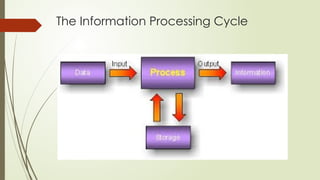
 Using all its parts together, a computer converts data into information by
performing various actions on the data.
 For example, a computer might perform a mathematical operation on two
numbers, then display the result. Or the computer might perform a logical
operation such as comparing two numbers, then display that result. These
operations are part of a process called the information process ing cycle,
which is a set of steps the computer follows to receive data, process the
data according to instructions from a program, display the resulting
information to the user, and store the results (see Figure IB-5).
The Information Processing Cycle
The information processing cycle
 The information processing cycle has four parts,
1. » Input. the computer accepts data from some source, such as the user or a program,
for processing.
2. » Processing. the computer’s processing components perform actions on the data,
based on instructions from the user or a program.
3. » Output. Here, the computer may be required to display the results of its processing.
For example, the results may appear as text, numbers, or a graphic on the
computer’s screen or as sounds from its speaker. The computer also can send output
to a printer or transfer the output to another computer through a network or the
Internet. Output is an optional step in the information processing cycle but may be
ordered by the user or program.
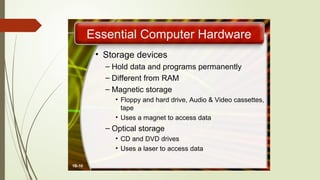
4. » Storage. In this step, the computer permanently stores the results of its processing on
a disk, tape, or some other kind of storage medium. As with output, storage
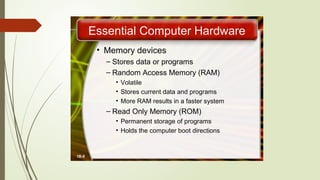
Essential Computer Hardware
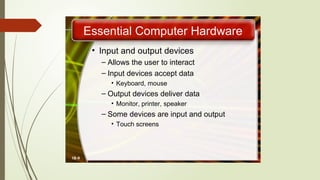
 A computer’s hardware deviccs fall into one of four categories
1. Processor
2. Memory
3. Input and output
4. Storage
Processing Devices
 The procedure that transforms raw data into useful information is called
processing.
I. To perform this transform ation, the computer uses two components: the
processor and memory.
processor
 The processor is like the brain of the computer;
 it organizes and carries out instructions that come from either the user or the
software. In a personal computet;
 the processor usually consists of one or more specialized chips, called
microprocessors, which are slivers of silicon or other material etched with
many tiny electronic circuits.
 To process data or complete an instruction from a user or a program, the
computer passes electricity through the circuits
• the microprocessor is plugged into the computer’s motherboard. The mother
board is a rigid rectangular card containing the circuitry that connects the
processor to the other hardware. The motherboard is an example of a circuit
board.
CENTRAL PROCESSING UNIT
 called the brain of computer.
 consists of Arithmetic Logic Unit (ALU) and Control Unit (CU)
CONTROL UNIT
 CU is responsible for organizing the processing of data and instructions.
 CU controls and coordinates the activity of the other units of computer. CPU uses the registers to
store the data, instructions during processing.
 The control unit of a computer does not do any actual processing of data. It organizes the
processing of data and instructions. It acts as a supervisor and, controls and coordinates the activity
of the other units of computer.
 CU coordinates the input and output devices of a computer. It directs the computer to carry out
stored program instructions by communicating with the ALU and the registers. CU uses the
instructions in the Instruction Register (IR) to decide which circuit needs to be activated. It also
instructs the ALU to perform the arithmetic or logic operations. When a program is run, the Program
Counter (PC) register keeps track of the program instruction to be executed next.
 CU tells when to fetch the data and instructions, what to do, where to store the results, the
sequencing of events during processing etc.
 CU also holds the CPU’s Instruction Set, which is a list of all operations that the CPU can perform.
Arithmetic Logic Unit
 ALU consists of two units—arithmetic unit and logic unit. 
 The arithmetic unit performs arithmetic operations on the data that is
made available to it. Some of the arithmetic operations supported by
the arithmetic unit are—addition, subtraction, multiplication and division.
 The logic unit of ALU is responsible for performing logic operations. Logic
unit performs comparisons of numbers, letters and special characters.
Logic operations include testing for greater than, less than or equal to
condition.
 ALU performs arithmetic and logic operations, and uses registers to hold
the data that is being processed
Primary Memory
 Primary memory is the main memory of computer. It is used to store data
and instructions during the processing of data. Primary memory is
semiconductor memory. 
 Primary memory is of two kinds—Random Access Memory (RAM) and Read
Only Memory (ROM)
RAM
 RAM is volatile. It stores data when the computer is on. The information stored in RAM
gets erased when the computer is turned off. RAM provides temporary storage for
data and instructions
 RAM stores data and instructions during the execution of instructions. The data and
instructions that require processing are brought into the RAM from the storage devices
like hard disk. CPU accesses the data and the instructions from RAM, as it can access
it at a fast speed than the storage devices connected to the input and output unit (
 The input data that is entered using the input unit is stored in RAM, to be made
available during the processing of data. Similarly, the output data generated after
processing is stored in RAM before being sent to the output device. Any intermediate
results generated during the processing of program are stored in RAM. 
 RAM provides a limited storage capacity, due to its high cost.
ROM
 ROM is non-volatile memory, but is a read only memory. The storage in ROM
is permanent in nature, and is used for storing standard processing
programs that permanently reside in the computer. ROM comes
programmed by the manufacturer
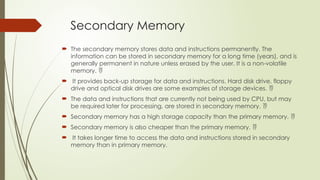
Secondary Memory
 The secondary memory stores data and instructions permanently. The
information can be stored in secondary memory for a long time (years), and is
generally permanent in nature unless erased by the user. It is a non-volatile
memory. 
 It provides back-up storage for data and instructions. Hard disk drive, floppy
drive and optical disk drives are some examples of storage devices. 
 The data and instructions that are currently not being used by CPU, but may
be required later for processing, are stored in secondary memory. 
 Secondary memory has a high storage capacity than the primary memory. 
 Secondary memory is also cheaper than the primary memory. 
 It takes longer time to access the data and instructions stored in secondary
memory than in primary memory.
Registers
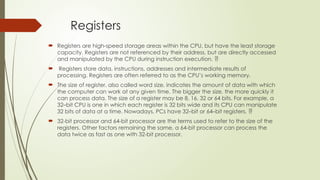
 Registers are high-speed storage areas within the CPU, but have the least storage
capacity. Registers are not referenced by their address, but are directly accessed
and manipulated by the CPU during instruction execution. 
 Registers store data, instructions, addresses and intermediate results of
processing. Registers are often referred to as the CPU’s working memory.
 The size of register, also called word size, indicates the amount of data with which
the computer can work at any given time. The bigger the size, the more quickly it
can process data. The size of a register may be 8, 16, 32 or 64 bits. For example, a
32–bit CPU is one in which each register is 32 bits wide and its CPU can manipulate
32 bits of data at a time. Nowadays, PCs have 32–bit or 64–bit registers. 
 32-bit processor and 64-bit processor are the terms used to refer to the size of the
registers. Other factors remaining the same, a 64-bit processor can process the
data twice as fast as one with 32-bit processor.
Cache Memory
 The data and instructions that are required during the processing of data are
brought from the secondary storage devices and stored in the RAM. For
processing, it is required that the data and instructions are accessed from the
RAM and stored in the registers. The time taken to move the data between
RAM and CPU registers is large. This affects the speed of processing of
computer, and results in decreasing the performance of CPU.
 Cache memory is a very high speed memory placed in between RAM and
CPU. Cache memory increases the speed of processing. 
 Cache memory is a storage buffer that stores the data that is used more often,
temporarily, and makes them available to CPU at a fast rate. During
processing, CPU first checks cache for the required data. If data is not found in
cache, then it looks in the RAM for data.
 Cache memory is very expensive, so it is smaller in size. Generally, computers
have
 cache memory of sizes 256 KB to 2 MB.
BUS
Bus is a set of electronic signal pathways that allows
information and signals to travel between components inside or outside of a computer.
The
different components of computer, i.e., CPU, I/O unit, and memory unit are connected
with each
other by a bus. The data, instructions and the signals are carried between the different
components via a bus. The features and functionality of a bus are as follows—
• A bus is a set of wires used for interconnection, where each wire can carry one bit of
data. 
• A bus width is defined by the number of wires in the bus.
•  A computer bus can be divided into two types—Internal Bus and External Bus.
•  The Internal Bus connects components inside the motherboard like, CPU and system
memory. It is also called the System Bus. Figure 2.10 shows interaction between
processor and memory.
 Data bus is used for transfering data between CPU and memory. The data
bus width affects the speed of computer. In a 16–bit processor, 16–bit wire
bus can carry 16 bits of data. The bus speed is measured in MHz. Higher the
bus speed the better it is. Address bus connects CPU and RAM with a set of
wires similar to data bus. The address bus width determines the maximum
number of memory locations the computer can address. Pentium Pro, II, III,
IV have 36–bit address bus that can address 236 bytes or 64 GB of memory.
PCs nowadays have a bus speed varying from 100 MHz to 400 MHz.
System Clock
 The clock speed of a CPU is defined as the frequency with which a
processor executes instructions or the data is processed. Higher clock
frequencies mean more clock ticks per second. The computer’s operating
speed is linked to the speed of the system clock. The clock frequency is
measured in millions of cycles per second or megahertz (MHz) or gigahertz
(GHz) which is billions of cycles per second. A CPU’s performance is
measured by the number of instructions it executes in a second, i.e., MIPS or
BIPS. PCs nowadays come with a clock speed of more than 1 GHz. In
Windows OS, you can select the System Properties dialog box to see the
processor name and clock frequency.
Computer Data
 data is any piece of information or fact that, taken by itself, may not make
sense to a person. For example, you might think of the letters of the
alphabet as data. Taken individually, they do not mean a lot. But when
grouped into words and sentences, they make sense; that is, they become
information (see Figure IB . 19).
 Similarly, basic geometric shapes may not have much meaning by
themselves, but when they arc grouped into a blueprint or a chart, they
become useful information.
Computer Users
 Personal computers, which are the focus of this book, arc designed to work
with a human user. In fact, the user is a critical part of a complete
computer system, especially when a personal computer is involved. This
may seem surprising, since we tend to think of computers as intelligent
devices, capable of performing amazing tasks. People also sometimes
believe that computers can think and make decisions, just like humans do.
But this is not the case. Even the most powerful supercomputers require
human interaction—if for no other reason than to get them started and tell
them which problems to solve
The User's Role
 Setting up the System.
 Installing Software
 Running Programs.
 Managing Files
 Maintaining the System.

chapter2.pptxttttttttttttttttttttttttttt

  • 2.
     A completecomputer system consists of four parts (see Figure IB.1): » 1. Hardware 2. Software 3. Data 4. User
  • 3.
    Hardware  The mechanicaldevices that make up the computer are called hardware.  Hard* ware is any part of the computer you can touch (see Figure 1B.2).  A computer’s hardware consists of interconnected electronic devices that you can use to control the computer’s operation, input, and output. (The generic term device refers to any piece of hardware.)
  • 4.
    Software  Software isa set of instructions that makes the computer perform tasks.  In other words, software tells the computer what to do. (The term program refers to any piece of software.
  • 5.
    Data  Data consistof individual facts or pieces of information that by themselves may not make much sense to a person.  A computer’s primary job is to process these tiny pieces of data in various ways, converting them into useful information.
  • 6.
    USER  People arethe computer operators, also known as users.
  • 7.
    The Information ProcessingCycle  Using all its parts together, a computer converts data into information by performing various actions on the data.  For example, a computer might perform a mathematical operation on two numbers, then display the result. Or the computer might perform a logical operation such as comparing two numbers, then display that result. These operations are part of a process called the information process ing cycle, which is a set of steps the computer follows to receive data, process the data according to instructions from a program, display the resulting information to the user, and store the results (see Figure IB-5).
  • 8.
  • 9.
    The information processingcycle  The information processing cycle has four parts, 1. » Input. the computer accepts data from some source, such as the user or a program, for processing. 2. » Processing. the computer’s processing components perform actions on the data, based on instructions from the user or a program. 3. » Output. Here, the computer may be required to display the results of its processing. For example, the results may appear as text, numbers, or a graphic on the computer’s screen or as sounds from its speaker. The computer also can send output to a printer or transfer the output to another computer through a network or the Internet. Output is an optional step in the information processing cycle but may be ordered by the user or program. 4. » Storage. In this step, the computer permanently stores the results of its processing on a disk, tape, or some other kind of storage medium. As with output, storage
  • 10.
    Essential Computer Hardware A computer’s hardware deviccs fall into one of four categories 1. Processor 2. Memory 3. Input and output 4. Storage
  • 11.
    Processing Devices  Theprocedure that transforms raw data into useful information is called processing. I. To perform this transform ation, the computer uses two components: the processor and memory.
  • 12.
    processor  The processoris like the brain of the computer;  it organizes and carries out instructions that come from either the user or the software. In a personal computet;  the processor usually consists of one or more specialized chips, called microprocessors, which are slivers of silicon or other material etched with many tiny electronic circuits.  To process data or complete an instruction from a user or a program, the computer passes electricity through the circuits
  • 14.
    • the microprocessoris plugged into the computer’s motherboard. The mother board is a rigid rectangular card containing the circuitry that connects the processor to the other hardware. The motherboard is an example of a circuit board.
  • 15.
    CENTRAL PROCESSING UNIT called the brain of computer.  consists of Arithmetic Logic Unit (ALU) and Control Unit (CU)
  • 16.
    CONTROL UNIT  CUis responsible for organizing the processing of data and instructions.  CU controls and coordinates the activity of the other units of computer. CPU uses the registers to store the data, instructions during processing.  The control unit of a computer does not do any actual processing of data. It organizes the processing of data and instructions. It acts as a supervisor and, controls and coordinates the activity of the other units of computer.  CU coordinates the input and output devices of a computer. It directs the computer to carry out stored program instructions by communicating with the ALU and the registers. CU uses the instructions in the Instruction Register (IR) to decide which circuit needs to be activated. It also instructs the ALU to perform the arithmetic or logic operations. When a program is run, the Program Counter (PC) register keeps track of the program instruction to be executed next.  CU tells when to fetch the data and instructions, what to do, where to store the results, the sequencing of events during processing etc.  CU also holds the CPU’s Instruction Set, which is a list of all operations that the CPU can perform.
  • 17.
    Arithmetic Logic Unit ALU consists of two units—arithmetic unit and logic unit.   The arithmetic unit performs arithmetic operations on the data that is made available to it. Some of the arithmetic operations supported by the arithmetic unit are—addition, subtraction, multiplication and division.  The logic unit of ALU is responsible for performing logic operations. Logic unit performs comparisons of numbers, letters and special characters. Logic operations include testing for greater than, less than or equal to condition.  ALU performs arithmetic and logic operations, and uses registers to hold the data that is being processed
  • 20.
    Primary Memory  Primarymemory is the main memory of computer. It is used to store data and instructions during the processing of data. Primary memory is semiconductor memory.   Primary memory is of two kinds—Random Access Memory (RAM) and Read Only Memory (ROM)
  • 21.
    RAM  RAM isvolatile. It stores data when the computer is on. The information stored in RAM gets erased when the computer is turned off. RAM provides temporary storage for data and instructions  RAM stores data and instructions during the execution of instructions. The data and instructions that require processing are brought into the RAM from the storage devices like hard disk. CPU accesses the data and the instructions from RAM, as it can access it at a fast speed than the storage devices connected to the input and output unit (  The input data that is entered using the input unit is stored in RAM, to be made available during the processing of data. Similarly, the output data generated after processing is stored in RAM before being sent to the output device. Any intermediate results generated during the processing of program are stored in RAM.   RAM provides a limited storage capacity, due to its high cost.
  • 22.
    ROM  ROM isnon-volatile memory, but is a read only memory. The storage in ROM is permanent in nature, and is used for storing standard processing programs that permanently reside in the computer. ROM comes programmed by the manufacturer
  • 23.
    Secondary Memory  Thesecondary memory stores data and instructions permanently. The information can be stored in secondary memory for a long time (years), and is generally permanent in nature unless erased by the user. It is a non-volatile memory.   It provides back-up storage for data and instructions. Hard disk drive, floppy drive and optical disk drives are some examples of storage devices.   The data and instructions that are currently not being used by CPU, but may be required later for processing, are stored in secondary memory.   Secondary memory has a high storage capacity than the primary memory.   Secondary memory is also cheaper than the primary memory.   It takes longer time to access the data and instructions stored in secondary memory than in primary memory.
  • 26.
    Registers  Registers arehigh-speed storage areas within the CPU, but have the least storage capacity. Registers are not referenced by their address, but are directly accessed and manipulated by the CPU during instruction execution.   Registers store data, instructions, addresses and intermediate results of processing. Registers are often referred to as the CPU’s working memory.  The size of register, also called word size, indicates the amount of data with which the computer can work at any given time. The bigger the size, the more quickly it can process data. The size of a register may be 8, 16, 32 or 64 bits. For example, a 32–bit CPU is one in which each register is 32 bits wide and its CPU can manipulate 32 bits of data at a time. Nowadays, PCs have 32–bit or 64–bit registers.   32-bit processor and 64-bit processor are the terms used to refer to the size of the registers. Other factors remaining the same, a 64-bit processor can process the data twice as fast as one with 32-bit processor.
  • 27.
    Cache Memory  Thedata and instructions that are required during the processing of data are brought from the secondary storage devices and stored in the RAM. For processing, it is required that the data and instructions are accessed from the RAM and stored in the registers. The time taken to move the data between RAM and CPU registers is large. This affects the speed of processing of computer, and results in decreasing the performance of CPU.  Cache memory is a very high speed memory placed in between RAM and CPU. Cache memory increases the speed of processing.   Cache memory is a storage buffer that stores the data that is used more often, temporarily, and makes them available to CPU at a fast rate. During processing, CPU first checks cache for the required data. If data is not found in cache, then it looks in the RAM for data.  Cache memory is very expensive, so it is smaller in size. Generally, computers have  cache memory of sizes 256 KB to 2 MB.
  • 28.
    BUS Bus is aset of electronic signal pathways that allows information and signals to travel between components inside or outside of a computer. The different components of computer, i.e., CPU, I/O unit, and memory unit are connected with each other by a bus. The data, instructions and the signals are carried between the different components via a bus. The features and functionality of a bus are as follows— • A bus is a set of wires used for interconnection, where each wire can carry one bit of data.  • A bus width is defined by the number of wires in the bus. •  A computer bus can be divided into two types—Internal Bus and External Bus. •  The Internal Bus connects components inside the motherboard like, CPU and system memory. It is also called the System Bus. Figure 2.10 shows interaction between processor and memory.
  • 29.
     Data busis used for transfering data between CPU and memory. The data bus width affects the speed of computer. In a 16–bit processor, 16–bit wire bus can carry 16 bits of data. The bus speed is measured in MHz. Higher the bus speed the better it is. Address bus connects CPU and RAM with a set of wires similar to data bus. The address bus width determines the maximum number of memory locations the computer can address. Pentium Pro, II, III, IV have 36–bit address bus that can address 236 bytes or 64 GB of memory. PCs nowadays have a bus speed varying from 100 MHz to 400 MHz.
  • 30.
    System Clock  Theclock speed of a CPU is defined as the frequency with which a processor executes instructions or the data is processed. Higher clock frequencies mean more clock ticks per second. The computer’s operating speed is linked to the speed of the system clock. The clock frequency is measured in millions of cycles per second or megahertz (MHz) or gigahertz (GHz) which is billions of cycles per second. A CPU’s performance is measured by the number of instructions it executes in a second, i.e., MIPS or BIPS. PCs nowadays come with a clock speed of more than 1 GHz. In Windows OS, you can select the System Properties dialog box to see the processor name and clock frequency.
  • 31.
    Computer Data  datais any piece of information or fact that, taken by itself, may not make sense to a person. For example, you might think of the letters of the alphabet as data. Taken individually, they do not mean a lot. But when grouped into words and sentences, they make sense; that is, they become information (see Figure IB . 19).  Similarly, basic geometric shapes may not have much meaning by themselves, but when they arc grouped into a blueprint or a chart, they become useful information.
  • 32.
    Computer Users  Personalcomputers, which are the focus of this book, arc designed to work with a human user. In fact, the user is a critical part of a complete computer system, especially when a personal computer is involved. This may seem surprising, since we tend to think of computers as intelligent devices, capable of performing amazing tasks. People also sometimes believe that computers can think and make decisions, just like humans do. But this is not the case. Even the most powerful supercomputers require human interaction—if for no other reason than to get them started and tell them which problems to solve
  • 33.
    The User's Role Setting up the System.  Installing Software  Running Programs.  Managing Files  Maintaining the System.