Introduction of Computer
What is Computer ?
It is an electronic device which is used to take input from the
user and process it, and produces result as output.
It is a fast and accurate electronic data processing machine
capable of performing arithmetic and logical operations.
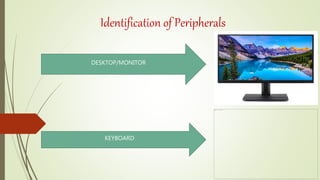
Identification of Peripherals
DESKTOP/MONITOR
KEYBOARD
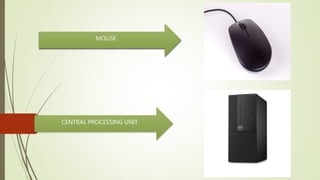
MOUSE
CENTRAL PROCESSING UNIT
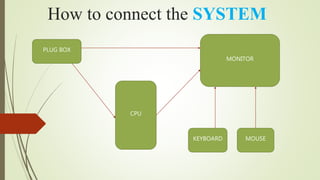
How to connect the SYSTEM
PLUG BOX
MONITOR
CPU
KEYBOARD MOUSE
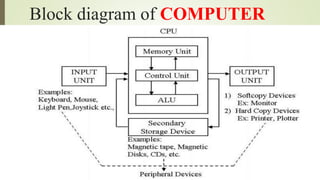
Block diagram of COMPUTER
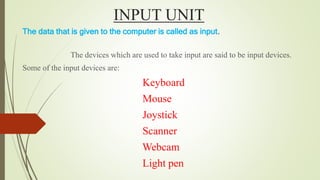
INPUT UNIT
The data that is given to the computer is called as input.
The devices which are used to take input are said to be input devices.
Some of the input devices are:
Keyboard
Mouse
Joystick
Scanner
Webcam
Light pen
CPU stands for Central Processing Unit
It carries the task of processing.
It can also be called as “Heart” or “Brain” of the computer.
It has three sub-units.
• ALU
ALU stands for Arithmetic and logical unit. It performs all arithmetic operations
+, - , * , /), comparison operations (< , >, <=, >=, =) and logical operations (and, or, not)
• Control Unit
Control Unit controls the processing. It has the data bus to carry the data
from one unit to another unit. Control unit also controls all the hardware devices.
• Memory Unit
Memory unit is used to store the data. It has two units.
• Primary Memory
• Secondary Memory
CPU
Primary Memory
It is used to store the data or program during execution.
It has two sub-units:
• RAM
• ROM
RAM (Random Access Memory) :
• It is read and write memory
• It is a volatile memory i.e., erasable memory (if power goes off or system is
switched off the contents of memory will be lost)
• It does not have necessary commands to start the computer.
ROM (Read Only Memory)
• We can just read the data present in this memory but we can not store the data.
• It is a non-volatile memory i.e., non-erasable memory (if power goes off or
system is switched off the contents of memory will not be lost)
• It has necessary commands to start the computer and configuration particulars
of all the peripherals.
Secondary
Memory
It is a supporting memory for
any computer. The information
can
be stored permanently in this
memory. It includes :
• Floppy Disk
• Hard Disk
• CDs
• DVDs
• Magnetic Disk
• Optical Devices
• Punched Cards
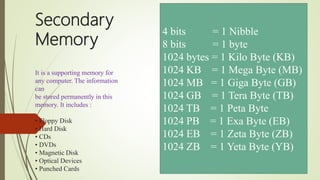
4 bits = 1 Nibble
8 bits = 1 byte
1024 bytes = 1 Kilo Byte (KB)
1024 KB = 1 Mega Byte (MB)
1024 MB = 1 Giga Byte (GB)
1024 GB = 1 Tera Byte (TB)
1024 TB = 1 Peta Byte
1024 PB = 1 Exa Byte (EB)
1024 EB = 1 Zeta Byte (ZB)
1024 ZB = 1 Yeta Byte (YB)
Output Devices
The information that is received from the computer is an output.
The devices which are used to receive output are said to be output devices.
Some of the output devices
Monitor
Printer
Speaker
Plotter.

Computer Introduction

  • 1.
  • 2.
    What is Computer? It is an electronic device which is used to take input from the user and process it, and produces result as output. It is a fast and accurate electronic data processing machine capable of performing arithmetic and logical operations.
  • 3.
  • 4.
  • 5.
    How to connectthe SYSTEM PLUG BOX MONITOR CPU KEYBOARD MOUSE
  • 6.
  • 7.
    INPUT UNIT The datathat is given to the computer is called as input. The devices which are used to take input are said to be input devices. Some of the input devices are: Keyboard Mouse Joystick Scanner Webcam Light pen
  • 8.
    CPU stands forCentral Processing Unit It carries the task of processing. It can also be called as “Heart” or “Brain” of the computer. It has three sub-units. • ALU ALU stands for Arithmetic and logical unit. It performs all arithmetic operations +, - , * , /), comparison operations (< , >, <=, >=, =) and logical operations (and, or, not) • Control Unit Control Unit controls the processing. It has the data bus to carry the data from one unit to another unit. Control unit also controls all the hardware devices. • Memory Unit Memory unit is used to store the data. It has two units. • Primary Memory • Secondary Memory CPU
  • 9.
    Primary Memory It isused to store the data or program during execution. It has two sub-units: • RAM • ROM RAM (Random Access Memory) : • It is read and write memory • It is a volatile memory i.e., erasable memory (if power goes off or system is switched off the contents of memory will be lost) • It does not have necessary commands to start the computer. ROM (Read Only Memory) • We can just read the data present in this memory but we can not store the data. • It is a non-volatile memory i.e., non-erasable memory (if power goes off or system is switched off the contents of memory will not be lost) • It has necessary commands to start the computer and configuration particulars of all the peripherals.
  • 10.
    Secondary Memory It is asupporting memory for any computer. The information can be stored permanently in this memory. It includes : • Floppy Disk • Hard Disk • CDs • DVDs • Magnetic Disk • Optical Devices • Punched Cards 4 bits = 1 Nibble 8 bits = 1 byte 1024 bytes = 1 Kilo Byte (KB) 1024 KB = 1 Mega Byte (MB) 1024 MB = 1 Giga Byte (GB) 1024 GB = 1 Tera Byte (TB) 1024 TB = 1 Peta Byte 1024 PB = 1 Exa Byte (EB) 1024 EB = 1 Zeta Byte (ZB) 1024 ZB = 1 Yeta Byte (YB)
  • 11.
    Output Devices The informationthat is received from the computer is an output. The devices which are used to receive output are said to be output devices. Some of the output devices Monitor Printer Speaker Plotter.