Computer System
What is a Computer System?
A computer system is an interconnected
combination of hardware and software
components that work together to perform tasks.
It consists of input devices, processing units,
memory, output devices, and storage devices.
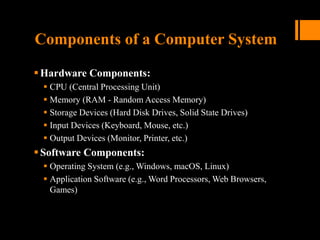
Components of a Computer System
Hardware Components:
 CPU (Central Processing Unit)
 Memory (RAM - Random Access Memory)
 Storage Devices (Hard Disk Drives, Solid State Drives)
 Input Devices (Keyboard, Mouse, etc.)
 Output Devices (Monitor, Printer, etc.)
Software Components:
 Operating System (e.g., Windows, macOS, Linux)
 Application Software (e.g., Word Processors, Web Browsers,
Games)
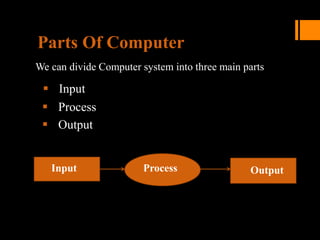
Input Output
Process
Parts Of Computer
We can divide Computer system into three main parts
 Input
 Process
 Output
Functions of a Computer System
 Input:
 Gathering data or instructions.
 Processing:
 Manipulating, calculating, or organizing data.
 Output:
 Presenting processed data or results.
 Storage:
 Saving data or instructions for later use.
Types of Computer Systems
Personal Computers (PCs):
 Designed for individual use, such as desktops, laptops, and
tablets.
Servers:
 Designed to provide services or resources to other computers on
a network.
Mainframes:
 Powerful computers used by large organizations for critical
applications and massive data processing.
Embedded Systems:
 Specialized computers built into other devices, like smartphones,
cars, and appliances.
Information Process Cycle
The Information Processing Cycle is a series of
steps that computers use to process data and
produce meaningful information.
Steps
Input:
Data is entered into the computer system through
input devices such as keyboards, mice, scanners,
or sensors.
Examples: typing on a keyboard, scanning a
barcode, or clicking a mouse.
Process
The computer processes the input data using
algorithms and instructions stored in its
memory.
Processing involves manipulating, analyzing, or
organizing the data to produce meaningful
results.
This step is performed by the CPU (Central
Processing Unit).
Examples: performing calculations, sorting
data, or executing software applications.
Storage:
Processed data and program instructions are
stored in the computer's memory or storage
devices for later use.
Memory (RAM - Random Access Memory) is
used for temporary storage during processing.
Storage devices (Hard Disk Drives, Solid State
Drives) are used for long-term storage.
Examples: saving a document to a hard drive,
storing a photo in memory.
Output
The processed information is presented to the
user in a human-readable form through output
devices.
Output devices include monitors, printers,
speakers, or any device that conveys
information to the user.
Examples: displaying text on a monitor, printing
a report, playing audio through speakers.
Importance of the Information
Processing Cycle
The Information Processing Cycle is
fundamental to the operation of computers and
computing systems.
It enables computers to receive, process, store,
and output data, allowing users to interact with
digital information effectively.
Information Process cycle
Computer Architecture
Computer architecture is defined as the
end-to-end structure of a computer system
that determines how its components
interact with each other in helping execute
the machine’s purpose (i.e., processing
data).
How does computer architecture work?
Computer architecture allows a computer to compute, retain,
and retrieve information.
 Purpose of computer architecture
 Data in numbers
 Manipulating data
 Multifaceted functions
 Support for temporary storage
 Support for permanent storage
Components of Computer
Architecture
 Depending on the method of categorization, the parts of a
computer architecture can be subdivided in several ways.
 All these elements are linked by the system bus, which
comprises an address bus, a data bus, and a control bus.
Within this framework, the computer architecture has eight
key components, as described below.
Basic Components
 CPU (Central Processing Unit)
 ALU (Arithmetic Logic Unit)
 Control Unit
 Memory (RAM, ROM)
 Input/Output Devices
Input unit and output unit
 The input unit provides external data sources to the computer
system. Therefore, it connects the external environment to
the computer. It receives information from input devices,
translates it to machine language, and then inserts it within
the computer system.
 The output unit delivers the computer process’s results to the
user. A majority of the output data comprises music, graphics,
or video. A computer architecture’s output devices
encompass the display, printing unit, speakers, headphones,
etc.
Storage Unit
The storage unit contains numerous computer
parts that are employed to store data. It is typically
separated into primary storage and secondary
storage.
Primary storage unit
 This component of the computer architecture is also
referred to as the main memory, as the CPU has direct
access to it. Primary memory is utilized for storing
information and instructions during program execution.
 RAM supplies the necessary information straight to the CPU. It
is a temporary memory that stores data and instructions
intermittently.
 ROM is a memory type that contains pre-installed instructions,
including firmware. This memory’s content is persistent and
cannot be modified.
Secondary storage unit
 Secondary or external storage is inaccessible directly to the
CPU. Before the CPU uses secondary storage data, it must
be transferred to the main storage. Secondary storage
permanently retains vast amounts of data.
 Examples include hard disk drives (HDDs), solid-state drives
(SSDs), compact disks (CDs), etc.
Central processing unit (CPU)
 The central processing unit includes registers, an arithmetic
logic unit (ALU), and control circuits, which interpret and
execute assembly language instructions. The CPU interacts
with all the other parts of the computer architecture to make
sense of the data and deliver the necessary output.
 Registers
 Arithmetic logic unit (ALU)
 Control unit
 Bootloader
 Operating system (OS)
 Buses
 Interrupts
Register
 These are high-speed and purpose-built temporary memory
devices. Rather than being referred to by their address, they
are accessed and modified directly by the CPU throughout
execution.Essentially, they contain data that the CPU is
presently processing. Registers contain information,
commands, addresses, and intermediate processing results.
Arithmetic logic unit (ALU)
 The arithmetic logic unit includes the electrical circuitry that
performs any arithmetic and logical processes on the
supplied data. It is used to execute all arithmetic (additions,
subtractions, multiplication, division) and logical (<, >, AND,
OR, etc.) computations. Registers are used by the ALU to
retain the data being processed.
Control unit
 The control unit collaborates with the computer’s input and
output devices. It instructs the computer to execute stored
program instructions via communication with the ALU and
registers. The control unit aims to arrange data and
instruction processing.
Bootloader
 The firmware contains the bootloader, a specific program
executed by the processor that retrieves the operating
system from the disc (or non-volatile memory or network
interface, as deemed applicable) and loads it into the
memory so that the processor can execute it.
 The bootloader is found on desktop and workstation
computers and embedded devices. It is essential for all
computer architectures.
Operating system (OS)
 The operating system governs the computer’s functionality
just above firmware. It manages memory usage and
regulates devices such as the keyboard, mouse, display, and
disc drives. The OS also provides the user with an interface,
allowing them to launch apps and access data on the drive.
 Typically, the operating system offers a set of tools for
programs, allowing them to access the screen, disc drives,
and other elements of the computer’s architecture.
Buses
 A bus is a tangible collection of signal lines with a linked
purpose; a good example is the universal serial bus (USB).
Buses enable the flow of electrical impulses between various
components of a computer’s design, transferring information
from one system to another.
 The size of a bus is the count of information-transferring
signal lines. A bus with a size of 8 bits, for instance,
transports 8 data bits in a parallel formation.
Interrupts
 Interrupts, also known as traps or exceptions in certain
processors, are a method for redirecting the processor from
the running of the current program so that it can handle an
occurrence. Such an event might be a malfunction from a
peripheral or just the fact that an I/O device has completed its
previous duty and is presently ready for another one.
 Every time you press a key and click a mouse button, your
system will generate an interrupt.
Types of Computer Architecture
It is possible to set up and configure the above architectural
components in numerous ways. This gives rise to the different
types of computer architecture.
Instruction set architecture (ISA)
 Instruction set architecture (ISA) is a bridge between the
software and hardware of a computer. It functions as a
programmer’s viewpoint on a machine.
 Computers can only comprehend binary language (0 and 1),
but humans can comprehend high-level language (if-else,
while, conditions, and the like).
Arithmetic/logic instructions: These instructions
execute various mathematical or logical processing
elements solely on a single or maybe more
operands (data inputs).
Data transfer instructions: These instructions
move commands from the memory or into the
processor registers, or vice versa.
Branch and jump instructions: These
instructions are essential to interrupt the logical
sequence of instructions and jump to other
destinations.
Microarchitecture
 Microarchitecture, unlike ISA, focuses on the implementation
of how instructions will be executed at a lower level. This is
influenced by the microprocessor’s structural design.
 Microarchitecture is a technique in which the instruction set
architecture incorporates a processor.
Client-server architecture
Multiple clients (remote processors) may request and get services
from a single, centralized server in a client-server system (host
computer). Client computers allow users to request services from the
server and receive the server’s reply. Servers receive and react to
client inquiries.
Single instruction, multiple data (SIMD)
architecture
 Single instruction, multiple data (SIMD) computer systems
can process multiple data points concurrently. This cleared
the path for supercomputers and other devices with
incredible performance capabilities. In this form of design, all
processors receive an identical command from the control
unit yet operate on distinct data packets. The shared memory
unit requires numerous modules to interact with all CPUs
concurrently.
Multicore architecture
 Multicore is a framework wherein a single physical processor
has the logic of multiple processors. A multicore architecture
integrates numerous processing cores onto only one
integrated circuit. The goal is to develop a system capable of
doing more tasks concurrently, improving overall system
performance.
Examples of Computer Architecture
 Two notable examples of computer architecture have paved
the way for recent advancements in computing. These are
‘Von Neumann architecture’ and ‘Harvard architecture.’ Most
other architectural designs are proprietary and are therefore
not revealed in the public domain beyond a basic abstraction.
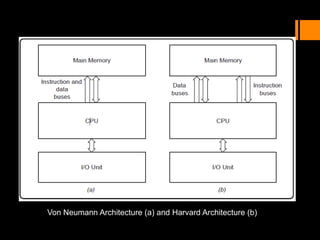
 Von Neumann architecture
 Harvard architecture
Von Neumann architecture
 The von Neumann architecture, often referred to as the
Princeton architecture, is a computer architecture that was
established in a 1945 presentation by John von Neumann
and his collaborators in the First Draft of a Report on the
EDVAC (electronic discrete variable automatic computer).
 five components:
 A processor with connected registers
 A control unit capable of storing instructions
 Memory capable of storing information as well as
instructions and communicating via buses
 Additional or external storage
 Device input as well as output mechanisms
Harvard architecture
 The Harvard architecture refers to a computer architecture
with distinct data and instruction storage and signal
pathways. In contrast to the von Neumann architecture, in
which program instructions and data use the very same
memory and pathways, this design separates the two. In
practice, a customized Harvard architecture with two
distinct caches is employed (for data and instruction); X86
and Advanced RISC Machine (ARM) systems frequently
employ this instruction.
Von Neumann Architecture (a) and Harvard Architecture (b)

cental processing unit and all its components

  • 1.
  • 2.
    What is aComputer System? A computer system is an interconnected combination of hardware and software components that work together to perform tasks. It consists of input devices, processing units, memory, output devices, and storage devices.
  • 3.
    Components of aComputer System Hardware Components:  CPU (Central Processing Unit)  Memory (RAM - Random Access Memory)  Storage Devices (Hard Disk Drives, Solid State Drives)  Input Devices (Keyboard, Mouse, etc.)  Output Devices (Monitor, Printer, etc.) Software Components:  Operating System (e.g., Windows, macOS, Linux)  Application Software (e.g., Word Processors, Web Browsers, Games)
  • 4.
    Input Output Process Parts OfComputer We can divide Computer system into three main parts  Input  Process  Output
  • 5.
    Functions of aComputer System  Input:  Gathering data or instructions.  Processing:  Manipulating, calculating, or organizing data.  Output:  Presenting processed data or results.  Storage:  Saving data or instructions for later use.
  • 6.
    Types of ComputerSystems Personal Computers (PCs):  Designed for individual use, such as desktops, laptops, and tablets. Servers:  Designed to provide services or resources to other computers on a network. Mainframes:  Powerful computers used by large organizations for critical applications and massive data processing. Embedded Systems:  Specialized computers built into other devices, like smartphones, cars, and appliances.
  • 7.
    Information Process Cycle TheInformation Processing Cycle is a series of steps that computers use to process data and produce meaningful information.
  • 8.
    Steps Input: Data is enteredinto the computer system through input devices such as keyboards, mice, scanners, or sensors. Examples: typing on a keyboard, scanning a barcode, or clicking a mouse.
  • 9.
    Process The computer processesthe input data using algorithms and instructions stored in its memory. Processing involves manipulating, analyzing, or organizing the data to produce meaningful results. This step is performed by the CPU (Central Processing Unit). Examples: performing calculations, sorting data, or executing software applications.
  • 10.
    Storage: Processed data andprogram instructions are stored in the computer's memory or storage devices for later use. Memory (RAM - Random Access Memory) is used for temporary storage during processing. Storage devices (Hard Disk Drives, Solid State Drives) are used for long-term storage. Examples: saving a document to a hard drive, storing a photo in memory.
  • 11.
    Output The processed informationis presented to the user in a human-readable form through output devices. Output devices include monitors, printers, speakers, or any device that conveys information to the user. Examples: displaying text on a monitor, printing a report, playing audio through speakers.
  • 12.
    Importance of theInformation Processing Cycle The Information Processing Cycle is fundamental to the operation of computers and computing systems. It enables computers to receive, process, store, and output data, allowing users to interact with digital information effectively.
  • 13.
  • 14.
    Computer Architecture Computer architectureis defined as the end-to-end structure of a computer system that determines how its components interact with each other in helping execute the machine’s purpose (i.e., processing data).
  • 15.
    How does computerarchitecture work? Computer architecture allows a computer to compute, retain, and retrieve information.  Purpose of computer architecture  Data in numbers  Manipulating data  Multifaceted functions  Support for temporary storage  Support for permanent storage
  • 16.
    Components of Computer Architecture Depending on the method of categorization, the parts of a computer architecture can be subdivided in several ways.  All these elements are linked by the system bus, which comprises an address bus, a data bus, and a control bus. Within this framework, the computer architecture has eight key components, as described below.
  • 17.
    Basic Components  CPU(Central Processing Unit)  ALU (Arithmetic Logic Unit)  Control Unit  Memory (RAM, ROM)  Input/Output Devices
  • 18.
    Input unit andoutput unit  The input unit provides external data sources to the computer system. Therefore, it connects the external environment to the computer. It receives information from input devices, translates it to machine language, and then inserts it within the computer system.  The output unit delivers the computer process’s results to the user. A majority of the output data comprises music, graphics, or video. A computer architecture’s output devices encompass the display, printing unit, speakers, headphones, etc.
  • 19.
    Storage Unit The storageunit contains numerous computer parts that are employed to store data. It is typically separated into primary storage and secondary storage. Primary storage unit  This component of the computer architecture is also referred to as the main memory, as the CPU has direct access to it. Primary memory is utilized for storing information and instructions during program execution.  RAM supplies the necessary information straight to the CPU. It is a temporary memory that stores data and instructions intermittently.  ROM is a memory type that contains pre-installed instructions, including firmware. This memory’s content is persistent and cannot be modified.
  • 20.
    Secondary storage unit Secondary or external storage is inaccessible directly to the CPU. Before the CPU uses secondary storage data, it must be transferred to the main storage. Secondary storage permanently retains vast amounts of data.  Examples include hard disk drives (HDDs), solid-state drives (SSDs), compact disks (CDs), etc.
  • 21.
    Central processing unit(CPU)  The central processing unit includes registers, an arithmetic logic unit (ALU), and control circuits, which interpret and execute assembly language instructions. The CPU interacts with all the other parts of the computer architecture to make sense of the data and deliver the necessary output.  Registers  Arithmetic logic unit (ALU)  Control unit  Bootloader  Operating system (OS)  Buses  Interrupts
  • 22.
    Register  These arehigh-speed and purpose-built temporary memory devices. Rather than being referred to by their address, they are accessed and modified directly by the CPU throughout execution.Essentially, they contain data that the CPU is presently processing. Registers contain information, commands, addresses, and intermediate processing results.
  • 23.
    Arithmetic logic unit(ALU)  The arithmetic logic unit includes the electrical circuitry that performs any arithmetic and logical processes on the supplied data. It is used to execute all arithmetic (additions, subtractions, multiplication, division) and logical (<, >, AND, OR, etc.) computations. Registers are used by the ALU to retain the data being processed.
  • 24.
    Control unit  Thecontrol unit collaborates with the computer’s input and output devices. It instructs the computer to execute stored program instructions via communication with the ALU and registers. The control unit aims to arrange data and instruction processing.
  • 25.
    Bootloader  The firmwarecontains the bootloader, a specific program executed by the processor that retrieves the operating system from the disc (or non-volatile memory or network interface, as deemed applicable) and loads it into the memory so that the processor can execute it.  The bootloader is found on desktop and workstation computers and embedded devices. It is essential for all computer architectures.
  • 26.
    Operating system (OS) The operating system governs the computer’s functionality just above firmware. It manages memory usage and regulates devices such as the keyboard, mouse, display, and disc drives. The OS also provides the user with an interface, allowing them to launch apps and access data on the drive.  Typically, the operating system offers a set of tools for programs, allowing them to access the screen, disc drives, and other elements of the computer’s architecture.
  • 27.
    Buses  A busis a tangible collection of signal lines with a linked purpose; a good example is the universal serial bus (USB). Buses enable the flow of electrical impulses between various components of a computer’s design, transferring information from one system to another.  The size of a bus is the count of information-transferring signal lines. A bus with a size of 8 bits, for instance, transports 8 data bits in a parallel formation.
  • 28.
    Interrupts  Interrupts, alsoknown as traps or exceptions in certain processors, are a method for redirecting the processor from the running of the current program so that it can handle an occurrence. Such an event might be a malfunction from a peripheral or just the fact that an I/O device has completed its previous duty and is presently ready for another one.  Every time you press a key and click a mouse button, your system will generate an interrupt.
  • 29.
    Types of ComputerArchitecture It is possible to set up and configure the above architectural components in numerous ways. This gives rise to the different types of computer architecture.
  • 30.
    Instruction set architecture(ISA)  Instruction set architecture (ISA) is a bridge between the software and hardware of a computer. It functions as a programmer’s viewpoint on a machine.  Computers can only comprehend binary language (0 and 1), but humans can comprehend high-level language (if-else, while, conditions, and the like).
  • 31.
    Arithmetic/logic instructions: Theseinstructions execute various mathematical or logical processing elements solely on a single or maybe more operands (data inputs). Data transfer instructions: These instructions move commands from the memory or into the processor registers, or vice versa. Branch and jump instructions: These instructions are essential to interrupt the logical sequence of instructions and jump to other destinations.
  • 32.
    Microarchitecture  Microarchitecture, unlikeISA, focuses on the implementation of how instructions will be executed at a lower level. This is influenced by the microprocessor’s structural design.  Microarchitecture is a technique in which the instruction set architecture incorporates a processor. Client-server architecture Multiple clients (remote processors) may request and get services from a single, centralized server in a client-server system (host computer). Client computers allow users to request services from the server and receive the server’s reply. Servers receive and react to client inquiries.
  • 33.
    Single instruction, multipledata (SIMD) architecture  Single instruction, multiple data (SIMD) computer systems can process multiple data points concurrently. This cleared the path for supercomputers and other devices with incredible performance capabilities. In this form of design, all processors receive an identical command from the control unit yet operate on distinct data packets. The shared memory unit requires numerous modules to interact with all CPUs concurrently.
  • 34.
    Multicore architecture  Multicoreis a framework wherein a single physical processor has the logic of multiple processors. A multicore architecture integrates numerous processing cores onto only one integrated circuit. The goal is to develop a system capable of doing more tasks concurrently, improving overall system performance.
  • 35.
    Examples of ComputerArchitecture  Two notable examples of computer architecture have paved the way for recent advancements in computing. These are ‘Von Neumann architecture’ and ‘Harvard architecture.’ Most other architectural designs are proprietary and are therefore not revealed in the public domain beyond a basic abstraction.  Von Neumann architecture  Harvard architecture
  • 36.
    Von Neumann architecture The von Neumann architecture, often referred to as the Princeton architecture, is a computer architecture that was established in a 1945 presentation by John von Neumann and his collaborators in the First Draft of a Report on the EDVAC (electronic discrete variable automatic computer).  five components:  A processor with connected registers  A control unit capable of storing instructions  Memory capable of storing information as well as instructions and communicating via buses  Additional or external storage  Device input as well as output mechanisms
  • 37.
    Harvard architecture  TheHarvard architecture refers to a computer architecture with distinct data and instruction storage and signal pathways. In contrast to the von Neumann architecture, in which program instructions and data use the very same memory and pathways, this design separates the two. In practice, a customized Harvard architecture with two distinct caches is employed (for data and instruction); X86 and Advanced RISC Machine (ARM) systems frequently employ this instruction.
  • 38.
    Von Neumann Architecture(a) and Harvard Architecture (b)