


GROUP NO. 5
Roll No.
36:
02:
45:
33:
16:
50:
23:
47:
19:
Name:
Muhammad Imran
Muhammad Abdullah
Haneef Shah
Muhammad Junaid
Usama Ahmad
Muhammad Shoaib
Humyun Malik
Muhammad Irfan
Saqib Ch
TOPIC:
NETWORKS &
ITS USES
ROLL NO. 47
MUHAMMAD IRFAN
Topic:
COMPUTER NETWORKS
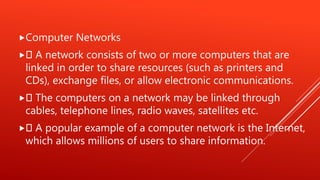
Computer Networks
 A network consists of two or more computers that are
linked in order to share resources (such as printers and
CDs), exchange files, or allow electronic communications.
 The computers on a network may be linked through
cables, telephone lines, radio waves, satellites etc.
 A popular example of a computer network is the Internet,
which allows millions of users to share information.
Every Network Includes:
1. At least two computers that have something to
share.
2. A cable or wireless pathway, called Transmission
Media, for computers to signal each other.
3. Rules, called Protocols, so that computers can use
the unified principle of data communication.
4. Networking Interface Cards (NIC)
ROLL NO. 02
MUHAMMAD ABDULLAH
Topic:
Types of Network
Types of networks
 Different types of networks
 LAN
 MANs
 WANs
Different types of networks
Different types of (private) networks are distinguished based on
their size (in terms of the number of machines), their data transfer
speed, and their reach. Private networks are networks that belong
to a single organization. There are usually said to be three
categories of networks:
LAN (local area network) MAN (metropolitan area network) WAN
(wide area network)
There are two other types of networks:
TANs (Tiny Area Network), which are the same as LANs but smaller
(2 to 3 machines), and CANs (Campus Area Networks), which are
the same as MANs (with bandwidth limited between each of the
network's LANs).
LAN
LAN stands for Local Area Network. It's a group of computers
which all belong to the same organization, and which are linked
within a small geographic area using a network, and often the same
technology (the most widespread being Ethernet).
A local area network is a network in its simplest form. Data transfer
speeds over a local area network can reach up to 10 Mbps (such as
for an Ethernet network) and 1 Gbps (as with FDDI or Gigabit
Ethernet). A local area network can reach as many as 100, or even
1000, users
By expanding the definition of a LAN to the services that it
provides, two different operating modes can be defined:
In a "peer-to-peer" network, in which communication is
carried out from one computer to another, without a
central computer, and where each computer has the same
role. in a "client/server" environment, in which a central
computer provides network services to users
ROLL NO. 36
MUHAMMAD IMRAN
Topic:
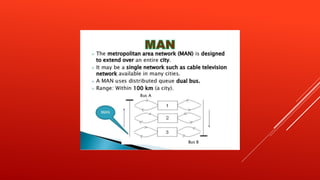
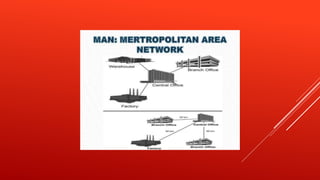
WAN & MAN
ROLL NO. 50
MUHAMMAD SHOAIB
Topic:
ADVANTAGES OF
NETWORKS
 Advantages of Computer Networks
 File Sharing: Networks offer a quick and easy way to share files directly.
 Resource Sharing: All computers in the network can share resources such as
printers, fax machines, modems and scanners.
 Communication: Those on the network can communicate with each other via
e-mail, instant messages etc.
 Flexible Access: Networks allow their users to access files from computers
throughout the network.
 Sharing of Information: Computer networks enable us to share data and
information with the computers that are located geographically large distance
apart.
Network Computing Models
Centralized Computing (Client-Server Network) ◦ A
client-server network is where every client is
connected to the server . ◦ Server or mainframe
computer has huge storage and processing
capabilities.
Distributed Computing (Peer-to-Peer Network) ◦ All
devices have same power. ◦ It interconnects one or
more computers. ◦ Centralized backup is not
possible.
Uses of Computer Network
Simultaneous Access
 Shared Peripheral Devices
 Personal Communication
 Easier Backup
ROLL NO. 16
USAMA AHMED
Topic:
APPLICATION OF
NETWORKS
APPLICATIONS OF NETWOKS
 E-mail
 Searchable Data (Web Sites)
 E-Commerce
 News Groups
 Internet Telephony (VoIP)
 Video Conferencing
 Chat Groups Instant Messengers
 Internet Radio
Network and it's Uses

Network and it's Uses

  • 1.
    GROUP NO. 5 RollNo. 36: 02: 45: 33: 16: 50: 23: 47: 19: Name: Muhammad Imran Muhammad Abdullah Haneef Shah Muhammad Junaid Usama Ahmad Muhammad Shoaib Humyun Malik Muhammad Irfan Saqib Ch
  • 2.
  • 3.
    ROLL NO. 47 MUHAMMADIRFAN Topic: COMPUTER NETWORKS
  • 4.
    Computer Networks  Anetwork consists of two or more computers that are linked in order to share resources (such as printers and CDs), exchange files, or allow electronic communications.  The computers on a network may be linked through cables, telephone lines, radio waves, satellites etc.  A popular example of a computer network is the Internet, which allows millions of users to share information.
  • 5.
    Every Network Includes: 1.At least two computers that have something to share. 2. A cable or wireless pathway, called Transmission Media, for computers to signal each other. 3. Rules, called Protocols, so that computers can use the unified principle of data communication. 4. Networking Interface Cards (NIC)
  • 6.
    ROLL NO. 02 MUHAMMADABDULLAH Topic: Types of Network
  • 7.
    Types of networks Different types of networks  LAN  MANs  WANs
  • 8.
    Different types ofnetworks Different types of (private) networks are distinguished based on their size (in terms of the number of machines), their data transfer speed, and their reach. Private networks are networks that belong to a single organization. There are usually said to be three categories of networks: LAN (local area network) MAN (metropolitan area network) WAN (wide area network) There are two other types of networks: TANs (Tiny Area Network), which are the same as LANs but smaller (2 to 3 machines), and CANs (Campus Area Networks), which are the same as MANs (with bandwidth limited between each of the network's LANs).
  • 9.
    LAN LAN stands forLocal Area Network. It's a group of computers which all belong to the same organization, and which are linked within a small geographic area using a network, and often the same technology (the most widespread being Ethernet). A local area network is a network in its simplest form. Data transfer speeds over a local area network can reach up to 10 Mbps (such as for an Ethernet network) and 1 Gbps (as with FDDI or Gigabit Ethernet). A local area network can reach as many as 100, or even 1000, users
  • 10.
    By expanding thedefinition of a LAN to the services that it provides, two different operating modes can be defined: In a "peer-to-peer" network, in which communication is carried out from one computer to another, without a central computer, and where each computer has the same role. in a "client/server" environment, in which a central computer provides network services to users
  • 11.
    ROLL NO. 36 MUHAMMADIMRAN Topic: WAN & MAN
  • 17.
    ROLL NO. 50 MUHAMMADSHOAIB Topic: ADVANTAGES OF NETWORKS
  • 18.
     Advantages ofComputer Networks  File Sharing: Networks offer a quick and easy way to share files directly.  Resource Sharing: All computers in the network can share resources such as printers, fax machines, modems and scanners.  Communication: Those on the network can communicate with each other via e-mail, instant messages etc.  Flexible Access: Networks allow their users to access files from computers throughout the network.  Sharing of Information: Computer networks enable us to share data and information with the computers that are located geographically large distance apart.
  • 19.
    Network Computing Models CentralizedComputing (Client-Server Network) ◦ A client-server network is where every client is connected to the server . ◦ Server or mainframe computer has huge storage and processing capabilities. Distributed Computing (Peer-to-Peer Network) ◦ All devices have same power. ◦ It interconnects one or more computers. ◦ Centralized backup is not possible.
  • 20.
    Uses of ComputerNetwork Simultaneous Access  Shared Peripheral Devices  Personal Communication  Easier Backup
  • 21.
    ROLL NO. 16 USAMAAHMED Topic: APPLICATION OF NETWORKS
  • 22.
    APPLICATIONS OF NETWOKS E-mail  Searchable Data (Web Sites)  E-Commerce  News Groups  Internet Telephony (VoIP)  Video Conferencing  Chat Groups Instant Messengers  Internet Radio