1
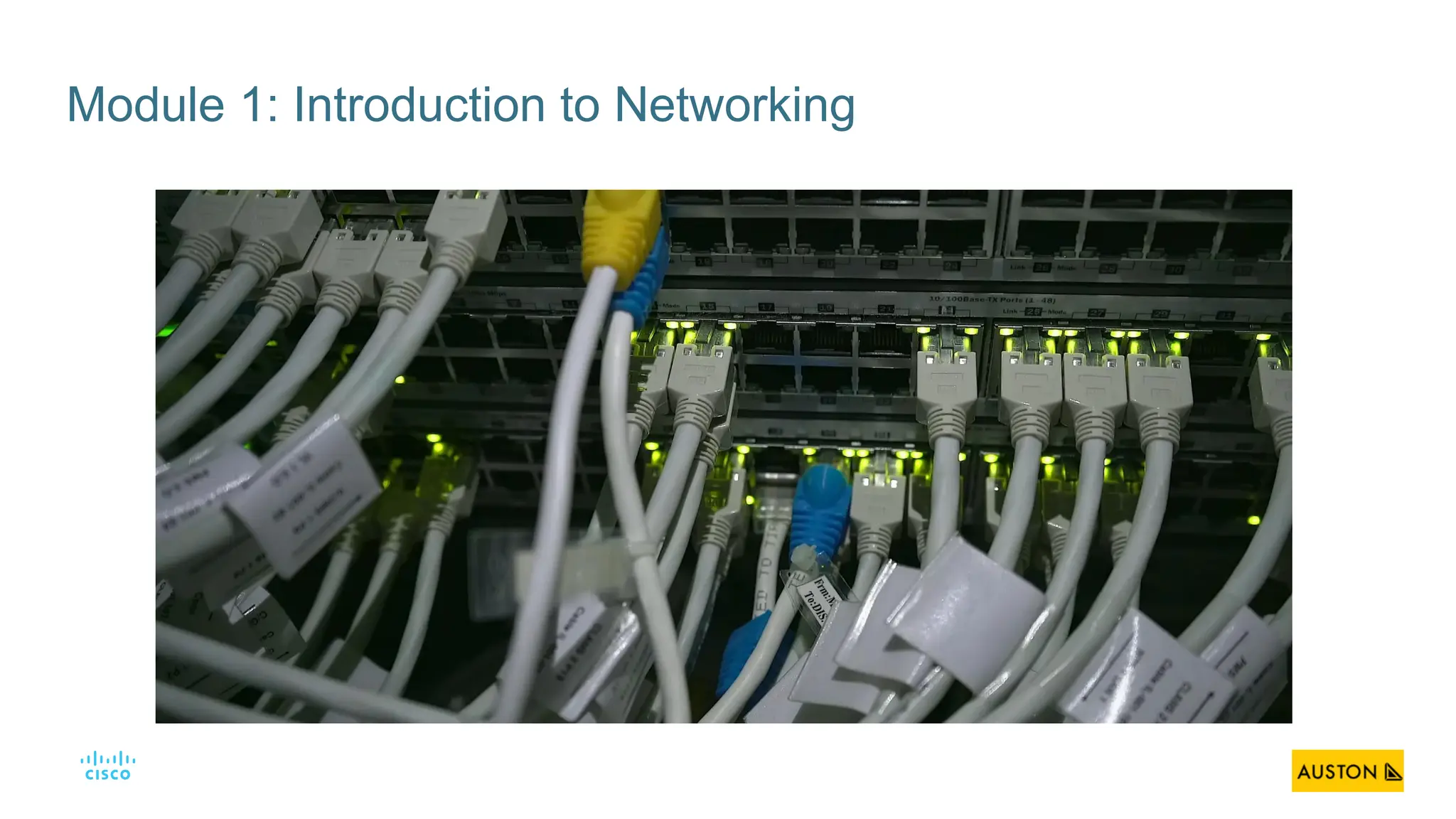
Module 1: Introduction to Networking
2
Module Objectives
Module Title: Introduction to Networking
Module Objective: Explain the advances in modern technologies.
Topic Title Topic Objective
Networks Affect our Lives Explain how networks affect our daily lives.
Network Components Explain how host and network devices are used.
Network Representations and Topologies Explain network representations and how they are used in network topologies.
Common Types of Networks Compare the characteristics of common types of networks.
Internet Connections Explain how LANs and WANs interconnect to the internet.
Reliable Networks Describe the four basic requirements of a reliable network.
Network Trends Explain how trends such as BYOD, online collaboration, video, and cloud computing
are changing the way we interact.
Network Security Identify some basic security threats and solution for all networks.
The IT Professional Explain employment opportunities in the networking field.
3
1.1 Networks Affect Our
Lives
4
Communication is almost as important to us as our reliance on air, water, food, and
shelter. In today’s world, through the use of networks, we are connected like never
before.
Networking Today
Networks Connect Us
5
Networking Today
No Boundaries
• World without boundaries
• Global communities
• Human network
6
1.2 Network Components
7
Network Components
Host Roles
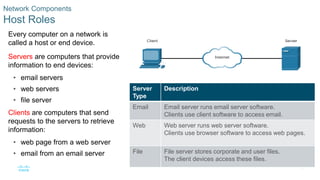
Every computer on a network is
called a host or end device.
Servers are computers that provide
information to end devices:
• email servers
• web servers
• file server
Clients are computers that send
requests to the servers to retrieve
information:
• web page from a web server
• email from an email server
Server
Type
Description
Email Email server runs email server software.
Clients use client software to access email.
Web Web server runs web server software.
Clients use browser software to access web pages.
File File server stores corporate and user files.
The client devices access these files.
8
Network Components
Peer-to-Peer
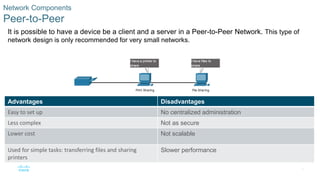
It is possible to have a device be a client and a server in a Peer-to-Peer Network. This type of
network design is only recommended for very small networks.
Advantages Disadvantages
Easy to set up No centralized administration
Less complex Not as secure
Lower cost Not scalable
Used for simple tasks: transferring files and sharing
printers
Slower performance
9
Network Components
End Devices
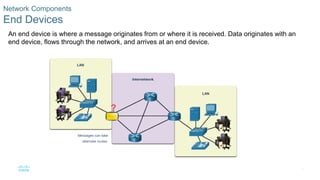
An end device is where a message originates from or where it is received. Data originates with an
end device, flows through the network, and arrives at an end device.
10
Network Components
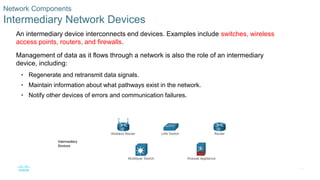
Intermediary Network Devices
An intermediary device interconnects end devices. Examples include switches, wireless
access points, routers, and firewalls.
Management of data as it flows through a network is also the role of an intermediary
device, including:
• Regenerate and retransmit data signals.
• Maintain information about what pathways exist in the network.
• Notify other devices of errors and communication failures.
11
Network Components
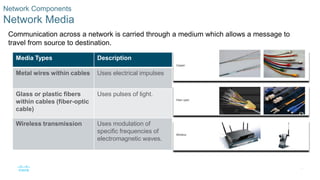
Network Media
Communication across a network is carried through a medium which allows a message to
travel from source to destination.
Media Types Description
Metal wires within cables Uses electrical impulses
Glass or plastic fibers
within cables (fiber-optic
cable)
Uses pulses of light.
Wireless transmission Uses modulation of
specific frequencies of
electromagnetic waves.
12
1.3 Network Representations and
Topologies
13
Network Representations and Topologies
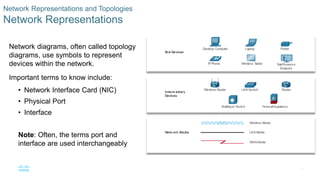
Network Representations
Network diagrams, often called topology
diagrams, use symbols to represent
devices within the network.
Important terms to know include:
• Network Interface Card (NIC)
• Physical Port
• Interface
Note: Often, the terms port and
interface are used interchangeably
14
Network Representations and Topologies
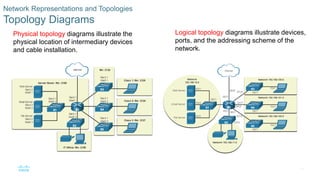
Topology Diagrams
Physical topology diagrams illustrate the
physical location of intermediary devices
and cable installation.
Logical topology diagrams illustrate devices,
ports, and the addressing scheme of the
network.
15
1.4 Common Types of Networks
16
Common Types of Networks
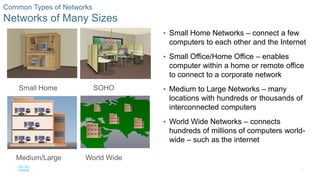
Networks of Many Sizes
• Small Home Networks – connect a few
computers to each other and the Internet
• Small Office/Home Office – enables
computer within a home or remote office
to connect to a corporate network
• Medium to Large Networks – many
locations with hundreds or thousands of
interconnected computers
• World Wide Networks – connects
hundreds of millions of computers world-
wide – such as the internet
Small Home SOHO
Medium/Large World Wide
17
Common Types of Networks
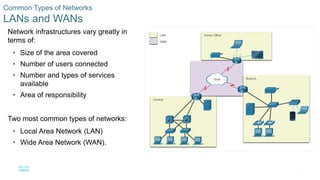
LANs and WANs
Network infrastructures vary greatly in
terms of:
• Size of the area covered
• Number of users connected
• Number and types of services
available
• Area of responsibility
Two most common types of networks:
• Local Area Network (LAN)
• Wide Area Network (WAN).
18
Common Types of Networks
LANs and WANs (cont.)
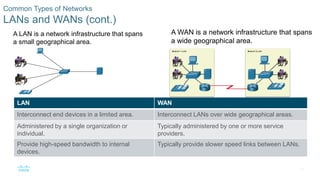
A LAN is a network infrastructure that spans
a small geographical area.
A WAN is a network infrastructure that spans
a wide geographical area.
LAN WAN
Interconnect end devices in a limited area. Interconnect LANs over wide geographical areas.
Administered by a single organization or
individual.
Typically administered by one or more service
providers.
Provide high-speed bandwidth to internal
devices.
Typically provide slower speed links between LANs.
19
Common Types of Networks
The Internet
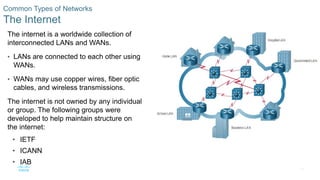
The internet is a worldwide collection of
interconnected LANs and WANs.
• LANs are connected to each other using
WANs.
• WANs may use copper wires, fiber optic
cables, and wireless transmissions.
The internet is not owned by any individual
or group. The following groups were
developed to help maintain structure on
the internet:
• IETF
• ICANN
• IAB
20
Common Types of Networks
Intranets and Extranets
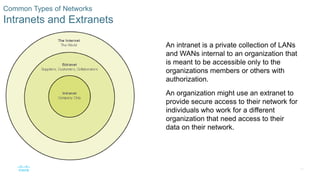
An intranet is a private collection of LANs
and WANs internal to an organization that
is meant to be accessible only to the
organizations members or others with
authorization.
An organization might use an extranet to
provide secure access to their network for
individuals who work for a different
organization that need access to their
data on their network.
21
1.5 Internet Connections
22
Internet Connections
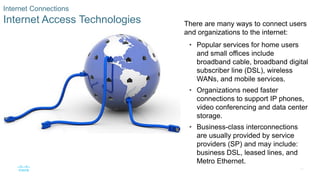
Internet Access Technologies There are many ways to connect users
and organizations to the internet:
• Popular services for home users
and small offices include
broadband cable, broadband digital
subscriber line (DSL), wireless
WANs, and mobile services.
• Organizations need faster
connections to support IP phones,
video conferencing and data center
storage.
• Business-class interconnections
are usually provided by service
providers (SP) and may include:
business DSL, leased lines, and
Metro Ethernet.
23
Internet Connections
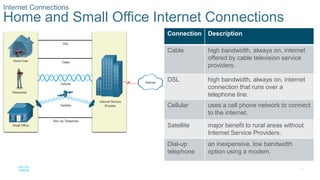
Home and Small Office Internet Connections
Connection Description
Cable high bandwidth, always on, internet
offered by cable television service
providers.
DSL high bandwidth, always on, internet
connection that runs over a
telephone line.
Cellular uses a cell phone network to connect
to the internet.
Satellite major benefit to rural areas without
Internet Service Providers.
Dial-up
telephone
an inexpensive, low bandwidth
option using a modem.
24
Internet Connections
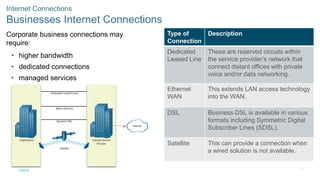
Businesses Internet Connections
Corporate business connections may
require:
• higher bandwidth
• dedicated connections
• managed services
Type of
Connection
Description
Dedicated
Leased Line
These are reserved circuits within
the service provider’s network that
connect distant offices with private
voice and/or data networking.
Ethernet
WAN
This extends LAN access technology
into the WAN.
DSL Business DSL is available in various
formats including Symmetric Digital
Subscriber Lines (SDSL).
Satellite This can provide a connection when
a wired solution is not available.
25
Internet Connections
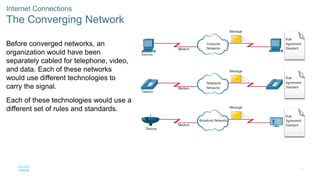
The Converging Network
Before converged networks, an
organization would have been
separately cabled for telephone, video,
and data. Each of these networks
would use different technologies to
carry the signal.
Each of these technologies would use a
different set of rules and standards.
26
Internet Connections
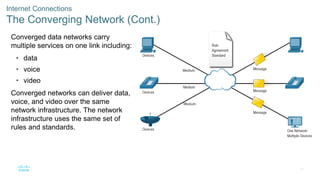
The Converging Network (Cont.)
Converged data networks carry
multiple services on one link including:
• data
• voice
• video
Converged networks can deliver data,
voice, and video over the same
network infrastructure. The network
infrastructure uses the same set of
rules and standards.
27
Internet Connections
Packet Tracer – Network Representation
In this Packet tracer you will do the following:
• The network model in this activity incorporates many of the technologies that you will
master in your CCNA studies.
Note: It is not important that you understand everything you see and do in this activity.
28
1.6 Reliable Networks
29
Reliable Network
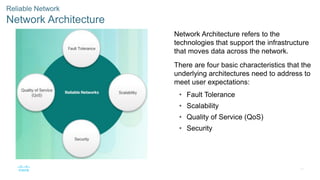
Network Architecture
Network Architecture refers to the
technologies that support the infrastructure
that moves data across the network.
There are four basic characteristics that the
underlying architectures need to address to
meet user expectations:
• Fault Tolerance
• Scalability
• Quality of Service (QoS)
• Security
30
Reliable Network
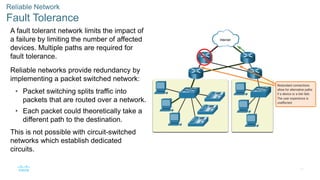
Fault Tolerance
A fault tolerant network limits the impact of
a failure by limiting the number of affected
devices. Multiple paths are required for
fault tolerance.
Reliable networks provide redundancy by
implementing a packet switched network:
• Packet switching splits traffic into
packets that are routed over a network.
• Each packet could theoretically take a
different path to the destination.
This is not possible with circuit-switched
networks which establish dedicated
circuits.
31
Reliable Network
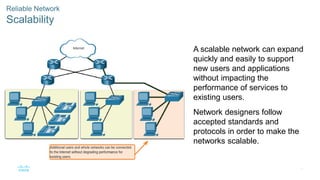
Scalability
A scalable network can expand
quickly and easily to support
new users and applications
without impacting the
performance of services to
existing users.
Network designers follow
accepted standards and
protocols in order to make the
networks scalable.
32
Reliable Network
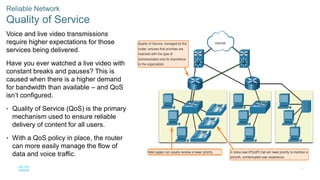
Quality of Service
Voice and live video transmissions
require higher expectations for those
services being delivered.
Have you ever watched a live video with
constant breaks and pauses? This is
caused when there is a higher demand
for bandwidth than available – and QoS
isn’t configured.
• Quality of Service (QoS) is the primary
mechanism used to ensure reliable
delivery of content for all users.
• With a QoS policy in place, the router
can more easily manage the flow of
data and voice traffic.
33
Reliable Network
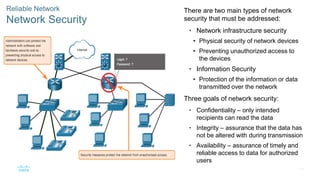
Network Security
There are two main types of network
security that must be addressed:
• Network infrastructure security
• Physical security of network devices
• Preventing unauthorized access to
the devices
• Information Security
• Protection of the information or data
transmitted over the network
Three goals of network security:
• Confidentiality – only intended
recipients can read the data
• Integrity – assurance that the data has
not be altered with during transmission
• Availability – assurance of timely and
reliable access to data for authorized
users
34
1.7 Network Trends
35
Network Trends
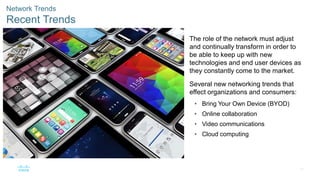
Recent Trends
The role of the network must adjust
and continually transform in order to
be able to keep up with new
technologies and end user devices as
they constantly come to the market.
Several new networking trends that
effect organizations and consumers:
• Bring Your Own Device (BYOD)
• Online collaboration
• Video communications
• Cloud computing
36
Network Trends
Cloud Computing
Cloud computing allows us to store personal files or backup our data on servers over the internet.
• Applications can also be accessed using the Cloud.
• Allows businesses to deliver to any device anywhere in the world.
Cloud computing is made possible by data centers.
• Smaller companies that can’t afford their own data centers, lease server and storage services from larger
data center organizations in the Cloud.
37
Network Trends
Cloud Computing (Cont.)
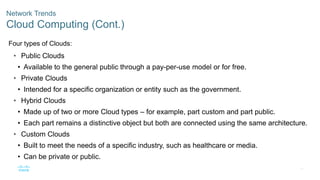
Four types of Clouds:
• Public Clouds
• Available to the general public through a pay-per-use model or for free.
• Private Clouds
• Intended for a specific organization or entity such as the government.
• Hybrid Clouds
• Made up of two or more Cloud types – for example, part custom and part public.
• Each part remains a distinctive object but both are connected using the same architecture.
• Custom Clouds
• Built to meet the needs of a specific industry, such as healthcare or media.
• Can be private or public.
38
Network Trends
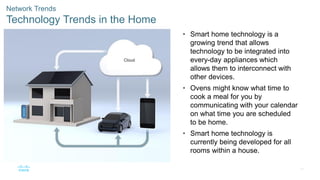
Technology Trends in the Home
• Smart home technology is a
growing trend that allows
technology to be integrated into
every-day appliances which
allows them to interconnect with
other devices.
• Ovens might know what time to
cook a meal for you by
communicating with your calendar
on what time you are scheduled
to be home.
• Smart home technology is
currently being developed for all
rooms within a house.
39
Network Trends
Powerline Networking
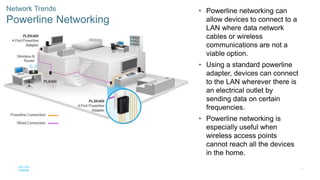
• Powerline networking can
allow devices to connect to a
LAN where data network
cables or wireless
communications are not a
viable option.
• Using a standard powerline
adapter, devices can connect
to the LAN wherever there is
an electrical outlet by
sending data on certain
frequencies.
• Powerline networking is
especially useful when
wireless access points
cannot reach all the devices
in the home.
40
Network Trends
Wireless Broadband
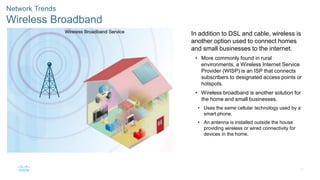
In addition to DSL and cable, wireless is
another option used to connect homes
and small businesses to the internet.
• More commonly found in rural
environments, a Wireless Internet Service
Provider (WISP) is an ISP that connects
subscribers to designated access points or
hotspots.
• Wireless broadband is another solution for
the home and small businesses.
• Uses the same cellular technology used by a
smart phone.
• An antenna is installed outside the house
providing wireless or wired connectivity for
devices in the home.
41
1.10 Module Practice and
Quiz
42
Module Practice and Quiz
What did I learn in this module?
• Through the use of networks, we are connected like never before.
• All computers that are connected to a network and participate directly in network
communication are classified as hosts.
• Diagrams of networks often use symbols to represent the different devices and
connections that make up a network.
• A diagram provides an easy way to understand how devices connect in a large network.
• The two types of network infrastructures are Local Area Networks (LANs), and Wide Area
Networks (WANs).
• SOHO internet connections include cable, DSL, Cellular, Satellite, and Dial-up telephone.
• Business internet connections include Dedicated Leased Line, Metro Ethernet, Business
DSL, and Satellite.
43
Module Practice and Quiz
What did I learn in this module? (Cont.)
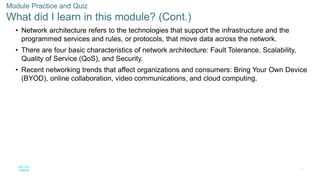
• Network architecture refers to the technologies that support the infrastructure and the
programmed services and rules, or protocols, that move data across the network.
• There are four basic characteristics of network architecture: Fault Tolerance, Scalability,
Quality of Service (QoS), and Security.
• Recent networking trends that affect organizations and consumers: Bring Your Own Device
(BYOD), online collaboration, video communications, and cloud computing.
Module 1 - Introduction to networking.pdf

Module 1 - Introduction to networking.pdf

  • 1.
  • 2.
    2 Module Objectives Module Title:Introduction to Networking Module Objective: Explain the advances in modern technologies. Topic Title Topic Objective Networks Affect our Lives Explain how networks affect our daily lives. Network Components Explain how host and network devices are used. Network Representations and Topologies Explain network representations and how they are used in network topologies. Common Types of Networks Compare the characteristics of common types of networks. Internet Connections Explain how LANs and WANs interconnect to the internet. Reliable Networks Describe the four basic requirements of a reliable network. Network Trends Explain how trends such as BYOD, online collaboration, video, and cloud computing are changing the way we interact. Network Security Identify some basic security threats and solution for all networks. The IT Professional Explain employment opportunities in the networking field.
  • 3.
  • 4.
    4 Communication is almostas important to us as our reliance on air, water, food, and shelter. In today’s world, through the use of networks, we are connected like never before. Networking Today Networks Connect Us
  • 5.
    5 Networking Today No Boundaries •World without boundaries • Global communities • Human network
  • 6.
  • 7.
    7 Network Components Host Roles Everycomputer on a network is called a host or end device. Servers are computers that provide information to end devices: • email servers • web servers • file server Clients are computers that send requests to the servers to retrieve information: • web page from a web server • email from an email server Server Type Description Email Email server runs email server software. Clients use client software to access email. Web Web server runs web server software. Clients use browser software to access web pages. File File server stores corporate and user files. The client devices access these files.
  • 8.
    8 Network Components Peer-to-Peer It ispossible to have a device be a client and a server in a Peer-to-Peer Network. This type of network design is only recommended for very small networks. Advantages Disadvantages Easy to set up No centralized administration Less complex Not as secure Lower cost Not scalable Used for simple tasks: transferring files and sharing printers Slower performance
  • 9.
    9 Network Components End Devices Anend device is where a message originates from or where it is received. Data originates with an end device, flows through the network, and arrives at an end device.
  • 10.
    10 Network Components Intermediary NetworkDevices An intermediary device interconnects end devices. Examples include switches, wireless access points, routers, and firewalls. Management of data as it flows through a network is also the role of an intermediary device, including: • Regenerate and retransmit data signals. • Maintain information about what pathways exist in the network. • Notify other devices of errors and communication failures.
  • 11.
    11 Network Components Network Media Communicationacross a network is carried through a medium which allows a message to travel from source to destination. Media Types Description Metal wires within cables Uses electrical impulses Glass or plastic fibers within cables (fiber-optic cable) Uses pulses of light. Wireless transmission Uses modulation of specific frequencies of electromagnetic waves.
  • 12.
  • 13.
    13 Network Representations andTopologies Network Representations Network diagrams, often called topology diagrams, use symbols to represent devices within the network. Important terms to know include: • Network Interface Card (NIC) • Physical Port • Interface Note: Often, the terms port and interface are used interchangeably
  • 14.
    14 Network Representations andTopologies Topology Diagrams Physical topology diagrams illustrate the physical location of intermediary devices and cable installation. Logical topology diagrams illustrate devices, ports, and the addressing scheme of the network.
  • 15.
  • 16.
    16 Common Types ofNetworks Networks of Many Sizes • Small Home Networks – connect a few computers to each other and the Internet • Small Office/Home Office – enables computer within a home or remote office to connect to a corporate network • Medium to Large Networks – many locations with hundreds or thousands of interconnected computers • World Wide Networks – connects hundreds of millions of computers world- wide – such as the internet Small Home SOHO Medium/Large World Wide
  • 17.
    17 Common Types ofNetworks LANs and WANs Network infrastructures vary greatly in terms of: • Size of the area covered • Number of users connected • Number and types of services available • Area of responsibility Two most common types of networks: • Local Area Network (LAN) • Wide Area Network (WAN).
  • 18.
    18 Common Types ofNetworks LANs and WANs (cont.) A LAN is a network infrastructure that spans a small geographical area. A WAN is a network infrastructure that spans a wide geographical area. LAN WAN Interconnect end devices in a limited area. Interconnect LANs over wide geographical areas. Administered by a single organization or individual. Typically administered by one or more service providers. Provide high-speed bandwidth to internal devices. Typically provide slower speed links between LANs.
  • 19.
    19 Common Types ofNetworks The Internet The internet is a worldwide collection of interconnected LANs and WANs. • LANs are connected to each other using WANs. • WANs may use copper wires, fiber optic cables, and wireless transmissions. The internet is not owned by any individual or group. The following groups were developed to help maintain structure on the internet: • IETF • ICANN • IAB
  • 20.
    20 Common Types ofNetworks Intranets and Extranets An intranet is a private collection of LANs and WANs internal to an organization that is meant to be accessible only to the organizations members or others with authorization. An organization might use an extranet to provide secure access to their network for individuals who work for a different organization that need access to their data on their network.
  • 21.
  • 22.
    22 Internet Connections Internet AccessTechnologies There are many ways to connect users and organizations to the internet: • Popular services for home users and small offices include broadband cable, broadband digital subscriber line (DSL), wireless WANs, and mobile services. • Organizations need faster connections to support IP phones, video conferencing and data center storage. • Business-class interconnections are usually provided by service providers (SP) and may include: business DSL, leased lines, and Metro Ethernet.
  • 23.
    23 Internet Connections Home andSmall Office Internet Connections Connection Description Cable high bandwidth, always on, internet offered by cable television service providers. DSL high bandwidth, always on, internet connection that runs over a telephone line. Cellular uses a cell phone network to connect to the internet. Satellite major benefit to rural areas without Internet Service Providers. Dial-up telephone an inexpensive, low bandwidth option using a modem.
  • 24.
    24 Internet Connections Businesses InternetConnections Corporate business connections may require: • higher bandwidth • dedicated connections • managed services Type of Connection Description Dedicated Leased Line These are reserved circuits within the service provider’s network that connect distant offices with private voice and/or data networking. Ethernet WAN This extends LAN access technology into the WAN. DSL Business DSL is available in various formats including Symmetric Digital Subscriber Lines (SDSL). Satellite This can provide a connection when a wired solution is not available.
  • 25.
    25 Internet Connections The ConvergingNetwork Before converged networks, an organization would have been separately cabled for telephone, video, and data. Each of these networks would use different technologies to carry the signal. Each of these technologies would use a different set of rules and standards.
  • 26.
    26 Internet Connections The ConvergingNetwork (Cont.) Converged data networks carry multiple services on one link including: • data • voice • video Converged networks can deliver data, voice, and video over the same network infrastructure. The network infrastructure uses the same set of rules and standards.
  • 27.
    27 Internet Connections Packet Tracer– Network Representation In this Packet tracer you will do the following: • The network model in this activity incorporates many of the technologies that you will master in your CCNA studies. Note: It is not important that you understand everything you see and do in this activity.
  • 28.
  • 29.
    29 Reliable Network Network Architecture NetworkArchitecture refers to the technologies that support the infrastructure that moves data across the network. There are four basic characteristics that the underlying architectures need to address to meet user expectations: • Fault Tolerance • Scalability • Quality of Service (QoS) • Security
  • 30.
    30 Reliable Network Fault Tolerance Afault tolerant network limits the impact of a failure by limiting the number of affected devices. Multiple paths are required for fault tolerance. Reliable networks provide redundancy by implementing a packet switched network: • Packet switching splits traffic into packets that are routed over a network. • Each packet could theoretically take a different path to the destination. This is not possible with circuit-switched networks which establish dedicated circuits.
  • 31.
    31 Reliable Network Scalability A scalablenetwork can expand quickly and easily to support new users and applications without impacting the performance of services to existing users. Network designers follow accepted standards and protocols in order to make the networks scalable.
  • 32.
    32 Reliable Network Quality ofService Voice and live video transmissions require higher expectations for those services being delivered. Have you ever watched a live video with constant breaks and pauses? This is caused when there is a higher demand for bandwidth than available – and QoS isn’t configured. • Quality of Service (QoS) is the primary mechanism used to ensure reliable delivery of content for all users. • With a QoS policy in place, the router can more easily manage the flow of data and voice traffic.
  • 33.
    33 Reliable Network Network Security Thereare two main types of network security that must be addressed: • Network infrastructure security • Physical security of network devices • Preventing unauthorized access to the devices • Information Security • Protection of the information or data transmitted over the network Three goals of network security: • Confidentiality – only intended recipients can read the data • Integrity – assurance that the data has not be altered with during transmission • Availability – assurance of timely and reliable access to data for authorized users
  • 34.
  • 35.
    35 Network Trends Recent Trends Therole of the network must adjust and continually transform in order to be able to keep up with new technologies and end user devices as they constantly come to the market. Several new networking trends that effect organizations and consumers: • Bring Your Own Device (BYOD) • Online collaboration • Video communications • Cloud computing
  • 36.
    36 Network Trends Cloud Computing Cloudcomputing allows us to store personal files or backup our data on servers over the internet. • Applications can also be accessed using the Cloud. • Allows businesses to deliver to any device anywhere in the world. Cloud computing is made possible by data centers. • Smaller companies that can’t afford their own data centers, lease server and storage services from larger data center organizations in the Cloud.
  • 37.
    37 Network Trends Cloud Computing(Cont.) Four types of Clouds: • Public Clouds • Available to the general public through a pay-per-use model or for free. • Private Clouds • Intended for a specific organization or entity such as the government. • Hybrid Clouds • Made up of two or more Cloud types – for example, part custom and part public. • Each part remains a distinctive object but both are connected using the same architecture. • Custom Clouds • Built to meet the needs of a specific industry, such as healthcare or media. • Can be private or public.
  • 38.
    38 Network Trends Technology Trendsin the Home • Smart home technology is a growing trend that allows technology to be integrated into every-day appliances which allows them to interconnect with other devices. • Ovens might know what time to cook a meal for you by communicating with your calendar on what time you are scheduled to be home. • Smart home technology is currently being developed for all rooms within a house.
  • 39.
    39 Network Trends Powerline Networking •Powerline networking can allow devices to connect to a LAN where data network cables or wireless communications are not a viable option. • Using a standard powerline adapter, devices can connect to the LAN wherever there is an electrical outlet by sending data on certain frequencies. • Powerline networking is especially useful when wireless access points cannot reach all the devices in the home.
  • 40.
    40 Network Trends Wireless Broadband Inaddition to DSL and cable, wireless is another option used to connect homes and small businesses to the internet. • More commonly found in rural environments, a Wireless Internet Service Provider (WISP) is an ISP that connects subscribers to designated access points or hotspots. • Wireless broadband is another solution for the home and small businesses. • Uses the same cellular technology used by a smart phone. • An antenna is installed outside the house providing wireless or wired connectivity for devices in the home.
  • 41.
  • 42.
    42 Module Practice andQuiz What did I learn in this module? • Through the use of networks, we are connected like never before. • All computers that are connected to a network and participate directly in network communication are classified as hosts. • Diagrams of networks often use symbols to represent the different devices and connections that make up a network. • A diagram provides an easy way to understand how devices connect in a large network. • The two types of network infrastructures are Local Area Networks (LANs), and Wide Area Networks (WANs). • SOHO internet connections include cable, DSL, Cellular, Satellite, and Dial-up telephone. • Business internet connections include Dedicated Leased Line, Metro Ethernet, Business DSL, and Satellite.
  • 43.
    43 Module Practice andQuiz What did I learn in this module? (Cont.) • Network architecture refers to the technologies that support the infrastructure and the programmed services and rules, or protocols, that move data across the network. • There are four basic characteristics of network architecture: Fault Tolerance, Scalability, Quality of Service (QoS), and Security. • Recent networking trends that affect organizations and consumers: Bring Your Own Device (BYOD), online collaboration, video communications, and cloud computing.