INT 338 Network-based Multimedia
Dr. Khaled Mostafa Reda
Sinai University (SU)
Faculty of Information Technology and Computer Science
(FIT)
E-Mail: khaled.Mostafa@su.edu.eg
Lecture (1)
TODAY
• Course information.
• Course Policy.
• Networking Overview.
2
Lecture (1) 3
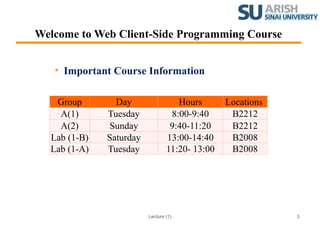
Welcome to Web Client-Side Programming Course
• Important Course Information
Group Day Hours Locations
A(1) Tuesday 8:00-9:40 B2212
A(2) Sunday 9:40-11:20 B2212
Lab (1-B) Saturday 13:00-14:40 B2008
Lab (1-A) Tuesday 11:20- 13:00 B2008
Lecture (1) 4
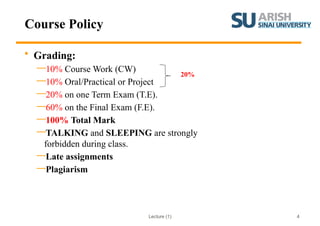
Course Policy
• Grading:
—10% Course Work (CW)
—10% Oral/Practical or Project
—20% on one Term Exam (T.E).
—60% on the Final Exam (F.E).
—100% Total Mark
—TALKING and SLEEPING are strongly
forbidden during class.
—Late assignments
—Plagiarism
20%
Lecture (1)
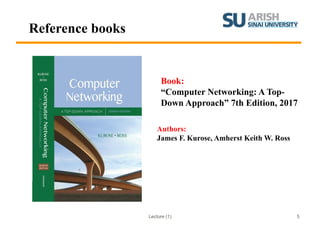
Reference books
Book:
“Computer Networking: A Top-
Down Approach” 7th Edition, 2017
Authors:
James F. Kurose, Amherst Keith W. Ross
5
Lecture 1:
Networking Overview
Slides modified from “Computer Networking: A Top-Down Approach” 7th
Edition
Lecture (1)
Outline
• What’s the Internet?
• What’s a protocol?
• Network edge
• hosts, access net, physical media
• Network core
• packet/circuit switching, Internet structure
• Performance
• loss, delay, throughput
• Protocol layers, service models
7
Lecture (1)
Outline
• What’s the Internet?
• What’s a protocol?
• Network edge
• Hosts.
• Access net.
• Physical media.
8
Lecture (1)
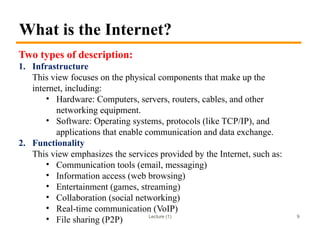
What is the Internet?
Two types of description:
1. Infrastructure
This view focuses on the physical components that make up the
internet, including:
• Hardware: Computers, servers, routers, cables, and other
networking equipment.
• Software: Operating systems, protocols (like TCP/IP), and
applications that enable communication and data exchange.
2. Functionality
This view emphasizes the services provided by the Internet, such as:
• Communication tools (email, messaging)
• Information access (web browsing)
• Entertainment (games, streaming)
• Collaboration (social networking)
• Real-time communication (VoIP)
• File sharing (P2P) 9
Lecture (1)
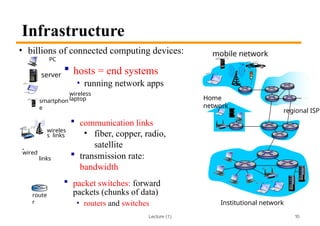
Infrastructure
 communication links
• fiber, copper, radio,
satellite
 transmission rate:
bandwidth
 packet switches: forward
packets (chunks of data)
• routers and switches
wired
links
wireles
s links
route
r
smartphon
e
PC
wireless
laptop
• billions of connected computing devices:
 hosts = end systems
• running network apps
10
Home
network
regional ISP
Institutional network
mobile network
server
Lecture (1)
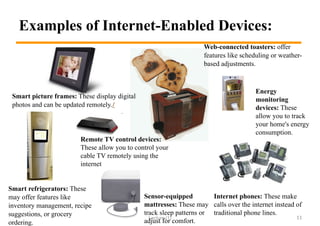
Examples of Internet-Enabled Devices:
Smart picture frames: These display digital
photos and can be updated remotely./
Web-connected toasters: offer
features like scheduling or weather-
based adjustments.
Internet phones: These make
calls over the internet instead of
traditional phone lines.
Smart refrigerators: These
may offer features like
inventory management, recipe
suggestions, or grocery
ordering.
Remote TV control devices:
These allow you to control your
cable TV remotely using the
internet
Energy
monitoring
devices: These
allow you to track
your home's energy
consumption.
Sensor-equipped
mattresses: These may
track sleep patterns or
adjust for comfort.
11
Lecture (1)
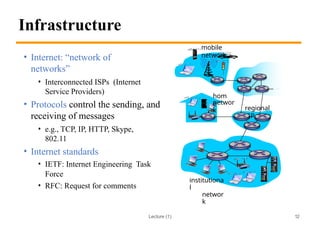
Infrastructure
• Internet: “network of
networks”
• Interconnected ISPs (Internet
Service Providers)
• Protocols control the sending, and
receiving of messages
• e.g., TCP, IP, HTTP, Skype,
802.11
• Internet standards
• IETF: Internet Engineering Task
Force
• RFC: Request for comments
mobile
network
regional
ISP
hom
e
networ
k
institutiona
l
networ
k
12
Lecture (1)
Infrastructure
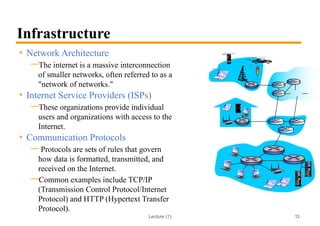
• Network Architecture
—The internet is a massive interconnection
of smaller networks, often referred to as a
"network of networks."
• Internet Service Providers (ISPs)
—These organizations provide individual
users and organizations with access to the
Internet.
• Communication Protocols
— Protocols are sets of rules that govern
how data is formatted, transmitted, and
received on the Internet.
—Common examples include TCP/IP
(Transmission Control Protocol/Internet
Protocol) and HTTP (Hypertext Transfer
Protocol).
13
Lecture (1)
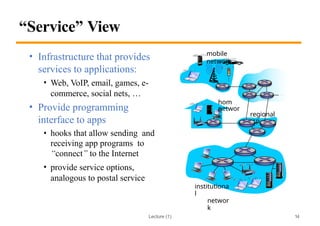
“Service” View
• Infrastructure that provides
services to applications:
• Web, VoIP, email, games, e-
commerce, social nets, …
• Provide programming
interface to apps
• hooks that allow sending and
receiving app programs to
“connect” to the Internet
• provide service options,
analogous to postal service
mobile
network
regional
ISP
hom
e
networ
k
institutiona
l
networ
k
14
Lecture (1)
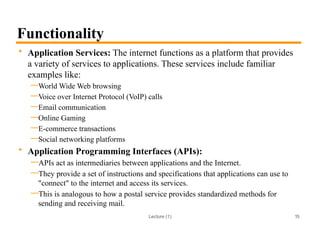
Functionality
• Application Services: The internet functions as a platform that provides
a variety of services to applications. These services include familiar
examples like:
—World Wide Web browsing
—Voice over Internet Protocol (VoIP) calls
—Email communication
—Online Gaming
—E-commerce transactions
—Social networking platforms
• Application Programming Interfaces (APIs):
—APIs act as intermediaries between applications and the Internet.
—They provide a set of instructions and specifications that applications can use to
"connect" to the internet and access its services.
—This is analogous to how a postal service provides standardized methods for
sending and receiving mail.
15
Lecture (1)
Outline
• What’s the Internet?
• What’s a protocol?
• Network edge
• Hosts.
• Access net.
• Physical media.
16
Lecture (1)
What’s a Protocol?
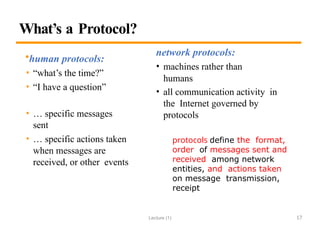
•human protocols:
• “what’s the time?”
• “I have a question”
• … specific messages
sent
• … specific actions taken
when messages are
received, or other events
network protocols:
• machines rather than
humans
• all communication activity in
the Internet governed by
protocols
protocols define the format,
order of messages sent and
received among network
entities, and actions taken
on message transmission,
receipt
17
Lecture (1)
What’s a Protocol?
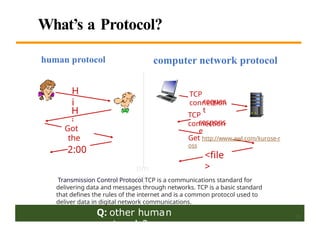
Q: other human
H
i
H
i
Got
the
time?
2:00
TCP
connection
respons
e
Get http://www.awl.com/kurose-r
oss
<file
>
tim
e
TCP
connection
reques
t
computer network protocol
human protocol
18
Transmission Control Protocol TCP is a communications standard for
delivering data and messages through networks. TCP is a basic standard
that defines the rules of the internet and is a common protocol used to
deliver data in digital network communications.
Lecture (1)
Outline
• What’s the Internet?
• What’s a protocol?
• Network edge
• Hosts.
• Access net.
• Physical media.
19
Lecture (1)
Network Structure
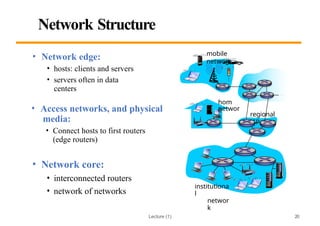
• Access networks, and physical
media:
• Connect hosts to first routers
(edge routers)
• Network core:
• interconnected routers
• network of networks
mobile
network
regional
ISP
hom
e
networ
k
institutiona
l
networ
k
• Network edge:
• hosts: clients and servers
• servers often in data
centers
20
Lecture (1)
Access Networks and Physical Media
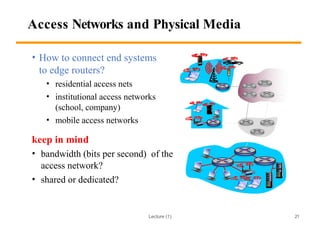
• How to connect end systems
to edge routers?
• residential access nets
• institutional access networks
(school, company)
• mobile access networks
keep in mind
• bandwidth (bits per second) of the
access network?
• shared or dedicated?
21
Lecture (1)
Access Networks
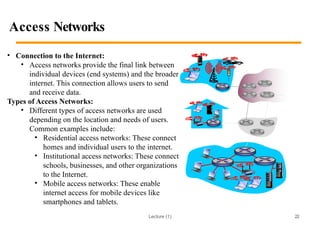
• Connection to the Internet:
• Access networks provide the final link between
individual devices (end systems) and the broader
internet. This connection allows users to send
and receive data.
Types of Access Networks:
• Different types of access networks are used
depending on the location and needs of users.
Common examples include:
• Residential access networks: These connect
homes and individual users to the internet.
• Institutional access networks: These connect
schools, businesses, and other organizations
to the Internet.
• Mobile access networks: These enable
internet access for mobile devices like
smartphones and tablets.
22
Lecture (1)
Access Networks (Alternative)
• Network Considerations:
— When choosing an access network, two key factors to consider are:
• Bandwidth: This refers to the amount of data that can be transmitted
per second, measured in bits per second (bps). Higher bandwidth
allows for faster data transfer.
• Sharing: Access networks can be shared (multiple users) or
dedicated (single user). Shared networks may experience
fluctuations in speed depending on usage, while dedicated networks
offer more consistent performance
23
Lecture (1)
Access Network: DSL
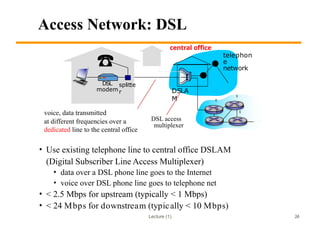
• Use existing telephone line to central office DSLAM
(Digital Subscriber Line Access Multiplexer)
• data over a DSL phone line goes to the Internet
• voice over DSL phone line goes to telephone net
• < 2.5 Mbps for upstream (typically < 1 Mbps)
• < 24 Mbps for downstream (typically < 10 Mbps)
central office
telephon
e
network
DSLA
M
voice, data transmitted
at different frequencies over a
dedicated line to the central office
DSL
modem
splitte
r
DSL access
multiplexer
24
Lecture (1)
Access Network: DSL
• Technology: DSL (Digital Subscriber Line) is a type of access network
technology that utilizes existing telephone lines to connect users to the
Internet.
• Data Transmission: DSL separates data and voice signals, allowing
simultaneous use of the phone line for both internet access and
traditional phone calls.
• Speeds: DSL offers varying data transfer speeds. Upstream speeds (data
sent from the user to the internet) are typically lower than downstream
speeds (data received from the internet). Common ranges include:
• Upstream: Less than 2.5 Mbps (often below 1 Mbps)
• Downstream: Less than 24 Mbps (often below 10 Mbps)
25
Lecture (1)
Access Network: Cable Network
cable splitter
modem
cable head end
…
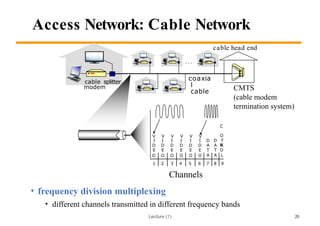
• frequency division multiplexing
• different channels transmitted in different frequency bands
V V V V V V
C
O
N
I I I I I I D D T
D D D D D D A A R
E E E E E E T T O
O O O O O O A A L
1 2 3 4 5 6 7 8 9
coaxia
l
cable CMTS
(cable modem
termination system)
26
Channels
Lecture (1)
Access Network: Cable Network
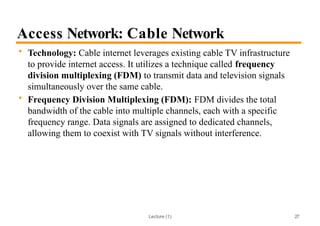
• Technology: Cable internet leverages existing cable TV infrastructure
to provide internet access. It utilizes a technique called frequency
division multiplexing (FDM) to transmit data and television signals
simultaneously over the same cable.
• Frequency Division Multiplexing (FDM): FDM divides the total
bandwidth of the cable into multiple channels, each with a specific
frequency range. Data signals are assigned to dedicated channels,
allowing them to coexist with TV signals without interference.
27
Lecture (1)
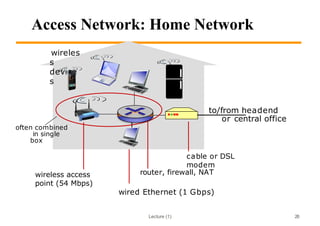
Access Network: Home Network
to/from headend
or central office
cable or DSL
modem
router, firewall, NAT
wireless access
point (54 Mbps)
wireles
s
device
s
often combined
in single
box
28
wired Ethernet (1 Gbps)
Lecture (1)
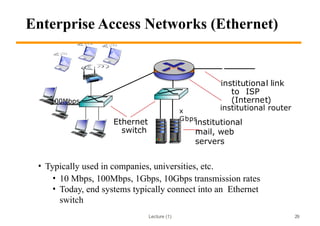
Enterprise Access Networks (Ethernet)
• Typically used in companies, universities, etc.
• 10 Mbps, 100Mbps, 1Gbps, 10Gbps transmission rates
• Today, end systems typically connect into an Ethernet
switch
Ethernet
switch
institutional
mail, web
servers
institutional link
to ISP
(Internet)
100Mbps
x
Gbps
29
institutional router
Lecture (1)
Ethernet
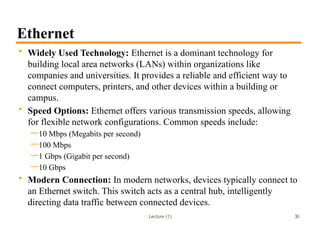
• Widely Used Technology: Ethernet is a dominant technology for
building local area networks (LANs) within organizations like
companies and universities. It provides a reliable and efficient way to
connect computers, printers, and other devices within a building or
campus.
• Speed Options: Ethernet offers various transmission speeds, allowing
for flexible network configurations. Common speeds include:
—10 Mbps (Megabits per second)
—100 Mbps
—1 Gbps (Gigabit per second)
—10 Gbps
• Modern Connection: In modern networks, devices typically connect to
an Ethernet switch. This switch acts as a central hub, intelligently
directing data traffic between connected devices.
30
Lecture (1)
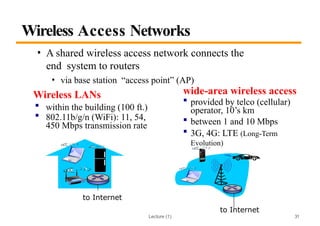
Wireless Access Networks
• A shared wireless access network connects the
end system to routers
• via base station “access point” (AP)
Wireless LANs
 within the building (100 ft.)
 802.11b/g/n (WiFi): 11, 54,
450 Mbps transmission rate
to Internet
wide-area wireless access
 provided by telco (cellular)
operator, 10’s km
 between 1 and 10 Mbps
 3G, 4G: LTE (Long-Term
Evolution)
to Internet
31
Lecture (1)
Summary
• What’s the Internet?
• What’s a protocol?
• Network edge
• Hosts.
• Access net.
• Physical media.
32
Thank You

INT 338 Network-based Multimedia Lecture (1).pptx

  • 1.
    INT 338 Network-basedMultimedia Dr. Khaled Mostafa Reda Sinai University (SU) Faculty of Information Technology and Computer Science (FIT) E-Mail: khaled.Mostafa@su.edu.eg
  • 2.
    Lecture (1) TODAY • Courseinformation. • Course Policy. • Networking Overview. 2
  • 3.
    Lecture (1) 3 Welcometo Web Client-Side Programming Course • Important Course Information Group Day Hours Locations A(1) Tuesday 8:00-9:40 B2212 A(2) Sunday 9:40-11:20 B2212 Lab (1-B) Saturday 13:00-14:40 B2008 Lab (1-A) Tuesday 11:20- 13:00 B2008
  • 4.
    Lecture (1) 4 CoursePolicy • Grading: —10% Course Work (CW) —10% Oral/Practical or Project —20% on one Term Exam (T.E). —60% on the Final Exam (F.E). —100% Total Mark —TALKING and SLEEPING are strongly forbidden during class. —Late assignments —Plagiarism 20%
  • 5.
    Lecture (1) Reference books Book: “ComputerNetworking: A Top- Down Approach” 7th Edition, 2017 Authors: James F. Kurose, Amherst Keith W. Ross 5
  • 6.
    Lecture 1: Networking Overview Slidesmodified from “Computer Networking: A Top-Down Approach” 7th Edition
  • 7.
    Lecture (1) Outline • What’sthe Internet? • What’s a protocol? • Network edge • hosts, access net, physical media • Network core • packet/circuit switching, Internet structure • Performance • loss, delay, throughput • Protocol layers, service models 7
  • 8.
    Lecture (1) Outline • What’sthe Internet? • What’s a protocol? • Network edge • Hosts. • Access net. • Physical media. 8
  • 9.
    Lecture (1) What isthe Internet? Two types of description: 1. Infrastructure This view focuses on the physical components that make up the internet, including: • Hardware: Computers, servers, routers, cables, and other networking equipment. • Software: Operating systems, protocols (like TCP/IP), and applications that enable communication and data exchange. 2. Functionality This view emphasizes the services provided by the Internet, such as: • Communication tools (email, messaging) • Information access (web browsing) • Entertainment (games, streaming) • Collaboration (social networking) • Real-time communication (VoIP) • File sharing (P2P) 9
  • 10.
    Lecture (1) Infrastructure  communicationlinks • fiber, copper, radio, satellite  transmission rate: bandwidth  packet switches: forward packets (chunks of data) • routers and switches wired links wireles s links route r smartphon e PC wireless laptop • billions of connected computing devices:  hosts = end systems • running network apps 10 Home network regional ISP Institutional network mobile network server
  • 11.
    Lecture (1) Examples ofInternet-Enabled Devices: Smart picture frames: These display digital photos and can be updated remotely./ Web-connected toasters: offer features like scheduling or weather- based adjustments. Internet phones: These make calls over the internet instead of traditional phone lines. Smart refrigerators: These may offer features like inventory management, recipe suggestions, or grocery ordering. Remote TV control devices: These allow you to control your cable TV remotely using the internet Energy monitoring devices: These allow you to track your home's energy consumption. Sensor-equipped mattresses: These may track sleep patterns or adjust for comfort. 11
  • 12.
    Lecture (1) Infrastructure • Internet:“network of networks” • Interconnected ISPs (Internet Service Providers) • Protocols control the sending, and receiving of messages • e.g., TCP, IP, HTTP, Skype, 802.11 • Internet standards • IETF: Internet Engineering Task Force • RFC: Request for comments mobile network regional ISP hom e networ k institutiona l networ k 12
  • 13.
    Lecture (1) Infrastructure • NetworkArchitecture —The internet is a massive interconnection of smaller networks, often referred to as a "network of networks." • Internet Service Providers (ISPs) —These organizations provide individual users and organizations with access to the Internet. • Communication Protocols — Protocols are sets of rules that govern how data is formatted, transmitted, and received on the Internet. —Common examples include TCP/IP (Transmission Control Protocol/Internet Protocol) and HTTP (Hypertext Transfer Protocol). 13
  • 14.
    Lecture (1) “Service” View •Infrastructure that provides services to applications: • Web, VoIP, email, games, e- commerce, social nets, … • Provide programming interface to apps • hooks that allow sending and receiving app programs to “connect” to the Internet • provide service options, analogous to postal service mobile network regional ISP hom e networ k institutiona l networ k 14
  • 15.
    Lecture (1) Functionality • ApplicationServices: The internet functions as a platform that provides a variety of services to applications. These services include familiar examples like: —World Wide Web browsing —Voice over Internet Protocol (VoIP) calls —Email communication —Online Gaming —E-commerce transactions —Social networking platforms • Application Programming Interfaces (APIs): —APIs act as intermediaries between applications and the Internet. —They provide a set of instructions and specifications that applications can use to "connect" to the internet and access its services. —This is analogous to how a postal service provides standardized methods for sending and receiving mail. 15
  • 16.
    Lecture (1) Outline • What’sthe Internet? • What’s a protocol? • Network edge • Hosts. • Access net. • Physical media. 16
  • 17.
    Lecture (1) What’s aProtocol? •human protocols: • “what’s the time?” • “I have a question” • … specific messages sent • … specific actions taken when messages are received, or other events network protocols: • machines rather than humans • all communication activity in the Internet governed by protocols protocols define the format, order of messages sent and received among network entities, and actions taken on message transmission, receipt 17
  • 18.
    Lecture (1) What’s aProtocol? Q: other human H i H i Got the time? 2:00 TCP connection respons e Get http://www.awl.com/kurose-r oss <file > tim e TCP connection reques t computer network protocol human protocol 18 Transmission Control Protocol TCP is a communications standard for delivering data and messages through networks. TCP is a basic standard that defines the rules of the internet and is a common protocol used to deliver data in digital network communications.
  • 19.
    Lecture (1) Outline • What’sthe Internet? • What’s a protocol? • Network edge • Hosts. • Access net. • Physical media. 19
  • 20.
    Lecture (1) Network Structure •Access networks, and physical media: • Connect hosts to first routers (edge routers) • Network core: • interconnected routers • network of networks mobile network regional ISP hom e networ k institutiona l networ k • Network edge: • hosts: clients and servers • servers often in data centers 20
  • 21.
    Lecture (1) Access Networksand Physical Media • How to connect end systems to edge routers? • residential access nets • institutional access networks (school, company) • mobile access networks keep in mind • bandwidth (bits per second) of the access network? • shared or dedicated? 21
  • 22.
    Lecture (1) Access Networks •Connection to the Internet: • Access networks provide the final link between individual devices (end systems) and the broader internet. This connection allows users to send and receive data. Types of Access Networks: • Different types of access networks are used depending on the location and needs of users. Common examples include: • Residential access networks: These connect homes and individual users to the internet. • Institutional access networks: These connect schools, businesses, and other organizations to the Internet. • Mobile access networks: These enable internet access for mobile devices like smartphones and tablets. 22
  • 23.
    Lecture (1) Access Networks(Alternative) • Network Considerations: — When choosing an access network, two key factors to consider are: • Bandwidth: This refers to the amount of data that can be transmitted per second, measured in bits per second (bps). Higher bandwidth allows for faster data transfer. • Sharing: Access networks can be shared (multiple users) or dedicated (single user). Shared networks may experience fluctuations in speed depending on usage, while dedicated networks offer more consistent performance 23
  • 24.
    Lecture (1) Access Network:DSL • Use existing telephone line to central office DSLAM (Digital Subscriber Line Access Multiplexer) • data over a DSL phone line goes to the Internet • voice over DSL phone line goes to telephone net • < 2.5 Mbps for upstream (typically < 1 Mbps) • < 24 Mbps for downstream (typically < 10 Mbps) central office telephon e network DSLA M voice, data transmitted at different frequencies over a dedicated line to the central office DSL modem splitte r DSL access multiplexer 24
  • 25.
    Lecture (1) Access Network:DSL • Technology: DSL (Digital Subscriber Line) is a type of access network technology that utilizes existing telephone lines to connect users to the Internet. • Data Transmission: DSL separates data and voice signals, allowing simultaneous use of the phone line for both internet access and traditional phone calls. • Speeds: DSL offers varying data transfer speeds. Upstream speeds (data sent from the user to the internet) are typically lower than downstream speeds (data received from the internet). Common ranges include: • Upstream: Less than 2.5 Mbps (often below 1 Mbps) • Downstream: Less than 24 Mbps (often below 10 Mbps) 25
  • 26.
    Lecture (1) Access Network:Cable Network cable splitter modem cable head end … • frequency division multiplexing • different channels transmitted in different frequency bands V V V V V V C O N I I I I I I D D T D D D D D D A A R E E E E E E T T O O O O O O O A A L 1 2 3 4 5 6 7 8 9 coaxia l cable CMTS (cable modem termination system) 26 Channels
  • 27.
    Lecture (1) Access Network:Cable Network • Technology: Cable internet leverages existing cable TV infrastructure to provide internet access. It utilizes a technique called frequency division multiplexing (FDM) to transmit data and television signals simultaneously over the same cable. • Frequency Division Multiplexing (FDM): FDM divides the total bandwidth of the cable into multiple channels, each with a specific frequency range. Data signals are assigned to dedicated channels, allowing them to coexist with TV signals without interference. 27
  • 28.
    Lecture (1) Access Network:Home Network to/from headend or central office cable or DSL modem router, firewall, NAT wireless access point (54 Mbps) wireles s device s often combined in single box 28 wired Ethernet (1 Gbps)
  • 29.
    Lecture (1) Enterprise AccessNetworks (Ethernet) • Typically used in companies, universities, etc. • 10 Mbps, 100Mbps, 1Gbps, 10Gbps transmission rates • Today, end systems typically connect into an Ethernet switch Ethernet switch institutional mail, web servers institutional link to ISP (Internet) 100Mbps x Gbps 29 institutional router
  • 30.
    Lecture (1) Ethernet • WidelyUsed Technology: Ethernet is a dominant technology for building local area networks (LANs) within organizations like companies and universities. It provides a reliable and efficient way to connect computers, printers, and other devices within a building or campus. • Speed Options: Ethernet offers various transmission speeds, allowing for flexible network configurations. Common speeds include: —10 Mbps (Megabits per second) —100 Mbps —1 Gbps (Gigabit per second) —10 Gbps • Modern Connection: In modern networks, devices typically connect to an Ethernet switch. This switch acts as a central hub, intelligently directing data traffic between connected devices. 30
  • 31.
    Lecture (1) Wireless AccessNetworks • A shared wireless access network connects the end system to routers • via base station “access point” (AP) Wireless LANs  within the building (100 ft.)  802.11b/g/n (WiFi): 11, 54, 450 Mbps transmission rate to Internet wide-area wireless access  provided by telco (cellular) operator, 10’s km  between 1 and 10 Mbps  3G, 4G: LTE (Long-Term Evolution) to Internet 31
  • 32.
    Lecture (1) Summary • What’sthe Internet? • What’s a protocol? • Network edge • Hosts. • Access net. • Physical media. 32
  • 33.