Computer is an electronic device which
calculates,
compares, modifies, stores and retrieve facts and
figures, is being widely used in the field of
accounting.
Application of computers in Accounting:
1. Recording of all business transactions.
2. Preparation of various ledger accounts.
3. Processing the payroll information.
4. Preparation of trial balance.
5. Preparation of final accounts.
What is computer?
• A computerized accounting system is that
accounting information system that help in
processing the financial transactions and events as
per the GAAP and leads to the generation of reports
as per the requirements of the users.
• An accounting system whether manual or
computerized has two parameters:
a) It has to follow the well defined concepts known as
the accounting principles.
b) It has to maintain the user-defined structure for
maintenance of records and generation of reports.
CONTENT
• MEANING OF COMPUTERISED ACCOUNTING
• TRADITIONAL/MANUAL SYSTEM OF ACCOUNTING
• PROCESS OF COMPUTERISED ACCOUNTING
• FEATUERES OF COMPUTERISED ACCOUNTING
• DIFFERENCE BETWEEN MANUAL ACCOUNTING
SYSTEM AND COMPUTERISED ACCOUNTING
• ADVANTAGES AND DISADVANTAGES OF
COMPUTERISED ACCOUNTING
• PROCESS/STEPS IN COMPUTERISED FINANCIAL
ACCOUNTING
• ADVANTAGES OF THE COMPUTERISED FINANCIAL
ACCOUNTING SYSTEM
• VARIOUS COMPONENTS OF A COMPUTERISED
FINANCIAL ACCOUNTING SYSTEM
TRADITIONAL/MANUAL
SYSTEM OF ACCOUNTING
• Input Processing Output
Data & instructions Manual processing Information
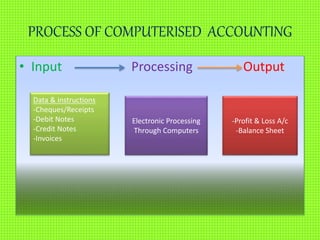
PROCESS OF COMPUTERISED ACCOUNTING
• Input Processing Output
Data & instructions
-Cheques/Receipts
-Debit Notes
-Credit Notes
-Invoices
Electronic Processing
Through Computers
-Profit & Loss A/c
-Balance Sheet
FEATUERES OF COMPUTERISED
ACCOUNTING
1. Fast, Powerful, Simple and Integrated
2. Complete Visibility Enhanced User Experience
3. Accuracy
4. Speed
5. Scalability
6. Power
7. Improved Business Performance
8. Quick Decision Making
9. Complete Reliability
• Recording of data
• Data entering
• Classification and processing of data
• Data Storage
• Reporting
• Accuracy
• Lesser paper work
• Codification of data
• Data sharing
• Adjusting entries
PROCESS/STEPS IN COMPUTERISED
FINANCIAL ACCOUNTING
• Planning and opening of an
Accounting System
• Entering of data
• Coding
• Bank reconciliation
• Posting
• Printing of trail balance
• Finalization of Accounts
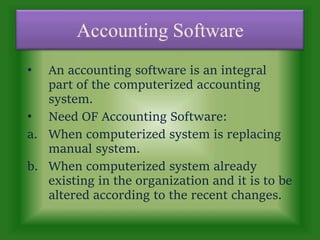
• An accounting software is an integral
part of the computerized accounting
system.
• Need OF Accounting Software:
a. When computerized system is replacing
manual system.
b. When computerized system already
existing in the organization and it is to be
altered according to the recent changes.
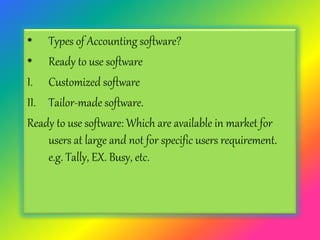
• Types of Accounting software?
• Ready to use software
I. Customized software
II. Tailor-made software.
Ready to use software: Which are available in market for
users at large and not for specific users requirement.
e.g. Tally, EX. Busy, etc.
Advantages
• Easytolearn
• Cost of installationis low
• Betteraftersale services
• Takecare ofproblem area.
Disadvantages
1.Thesesoftwareuse laser printers which are costly thanDot
matrix.
2.Levelofsecrecy is very low.
3.Offervery littlescopeoflinkingwith otherinformationsystem.
4.Suitableforsmallorganization.
Tailor-made Software
means developing a software
according to the needs and
specifications of the user.
These software are not
available off-the-shelf.
• Advantages
• Takecare of the specificneed of the enterprise.
• Level of secrecy of dataand authenticitychecks are robust in
such soft wares.
• They can be effectively linked to some other information
systems.
Disadvantages
1. Costly
2. Difficult to learn and require specialized training.
3. If the accounts are grouped in an incorrect manner, the results
will be misleading.
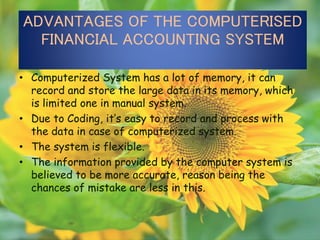
ADVANTAGES OF THE COMPUTERISED
FINANCIAL ACCOUNTING SYSTEM
• Computerized System has a lot of memory, it can
record and store the large data in its memory, which
is limited one in manual system.
• Due to Coding, it’s easy to record and process with
the data in case of computerized system.
• The system is flexible.
• The information provided by the computer system is
believed to be more accurate, reason being the
chances of mistake are less in this.
Difference between Manual and computerized
accounting system
• Speed
The main difference between manual and computerized systems is speed.
Accounting software processes data and creates reports much faster than
manual systems. Calculations are done automatically in software programs,
minimizing errors and increasing efficiency. Once data is input, you can create
reports literally by pressing a button in a computerized system.
• Cost
Another difference between manual and computerized systems is cost.
Manual accounting with paper and pencil is much cheaper than a
computerized system, which requires a machine and software. Other
expenses associated with accounting software include training and program
maintenance. Expenses can add up fast with costs for printers, paper, ink and
other supplies.
Backup
• A third difference between manual and computerized systems is the ease of
backup of a computerized system. All transactions can be saved and backed
up, in case of fire or other mishap. You cannot do this with paper records,
unless you make copies of all pages--a long and inefficient process.
• Financial Statements
In Manual accounting systems Preparation of trial
balance is essential to produce the financial
statements.. With a computerized accounting
system, financial statement are generated from the
software itself and therefore there is no need to
prepare trial.
• Reports
Reports are created in a timely manner when using a
computerized accounting system. Reports generated from
computerized accounting software allow managers to run the
company in a more efficient manner. Creating reports in a
manual accounting system may lead to more staff frustration
and result in having to work with outdated information.
What important functions does the AIS
perform in an organization
1 It collects and stores data about activities and transactions.
2 It processes data into information that is useful for making
decisions.
3 It provides adequate controls to safeguard the organization’s
assets.
4. Provide the database that is used by other information
systems.
5.Producing standard management reports that summarizes the
firm’s financial condition.
• Input: The input subsystem-deals with the
collection, arrangement and making available all
types of transactional, financial and accounting
data to the system, required for its various
functions.
• Process: The processing deals with the processing
of the information gathered by the input sub-
system which is possible with help of INTERNET
and Application software.
• Output: The output subsystem is responsible for
producing the processed data in user
understandable format.
• Control: This Component is responsible for
keeping control over AIS in following manner:
• Follow internal laws and rules of the
organization.
• Follow rules laid down by govt. and statutory
bodies.
• Ensuring quality of information by setting up
performance standards.
• Comparing actual with standard performance.
• Analyzing the variances and take corrective
measures.
• Ensure safety and security of the information
managed by AIS.
Characteristics of AIS
1.Helps in handling and manipulating accounting and
financial transactions of an organization.
2.It is responsible for meeting information needs by
generating reports. These reports are of two types:
a. Reports for outsiders.
b. Internal reports.
3. AIS is helpful in producing futuristic data in the form
of budget forecasts etc.
4. It helps in maintaining accounting information as per
the guidelines of the law.
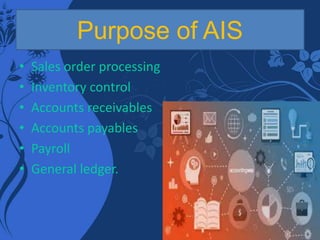
Purpose of AIS
• Sales order processing
• Inventory control
• Accounts receivables
• Accounts payables
• Payroll
• General ledger.
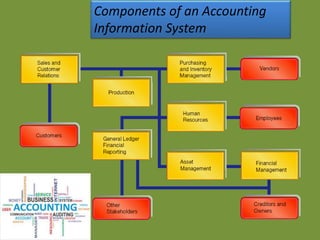
Components of an Accounting
Information System
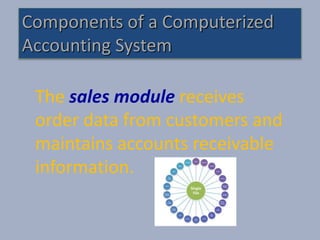
The sales module receives
order data from customers and
maintains accounts receivable
information.
Components of a Computerized
Accounting System
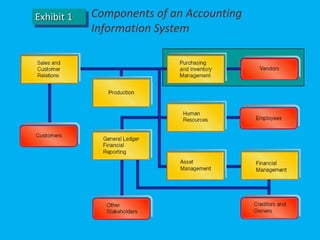
Exhibit 1 Components of an Accounting
Information System
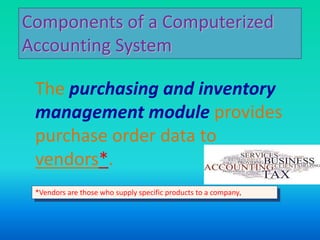
The purchasing and inventory
management module provides
purchase order data to
vendors*.
Components of a Computerized
Accounting System
*Vendors are those who supply specific products to a company.
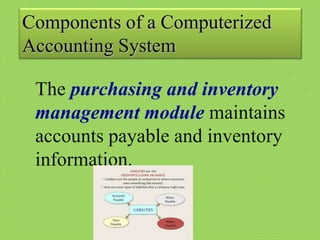
The purchasing and inventory
management module maintains
accounts payable and inventory
information.
Components of a Computerized
Accounting System
The human resources module
maintains data about
employees, including hours
worked and wage rates.
It is used for preparing payroll and payroll tax
information.
Components of a Computerized
Accounting System
The production module tracks
the flow of costs through the
manufacturing process.
Components of a Computerized
Accounting System
The asset management
module identifies long-term
asset costs, their expected
useful lives, and where these
assets are located in the
company.
Components of a Computerized
Accounting System
The financial management
module keeps track of debt,
repayment schedules, interest
rates, and shareholder
information.
The general ledger/financial
reporting module provides
information for use by external
stakeholders, including
shareholders and government
regulators.
Components of a Computerized
Accounting System
Subsidiary Accounts
Subsidiary accounts include
transactions for individual customers,
suppliers, or products. Records for all
subsidiary accounts of a particular
type are maintained in a subsidiary
ledger.
Thank you
Name: Vivek Singh chauhan
Class: XI B (Commerce)
Roll No:37

Computer in accounting

  • 2.
    Computer is anelectronic device which calculates, compares, modifies, stores and retrieve facts and figures, is being widely used in the field of accounting. Application of computers in Accounting: 1. Recording of all business transactions. 2. Preparation of various ledger accounts. 3. Processing the payroll information. 4. Preparation of trial balance. 5. Preparation of final accounts. What is computer?
  • 3.
    • A computerizedaccounting system is that accounting information system that help in processing the financial transactions and events as per the GAAP and leads to the generation of reports as per the requirements of the users. • An accounting system whether manual or computerized has two parameters: a) It has to follow the well defined concepts known as the accounting principles. b) It has to maintain the user-defined structure for maintenance of records and generation of reports.
  • 4.
    CONTENT • MEANING OFCOMPUTERISED ACCOUNTING • TRADITIONAL/MANUAL SYSTEM OF ACCOUNTING • PROCESS OF COMPUTERISED ACCOUNTING • FEATUERES OF COMPUTERISED ACCOUNTING • DIFFERENCE BETWEEN MANUAL ACCOUNTING SYSTEM AND COMPUTERISED ACCOUNTING • ADVANTAGES AND DISADVANTAGES OF COMPUTERISED ACCOUNTING • PROCESS/STEPS IN COMPUTERISED FINANCIAL ACCOUNTING • ADVANTAGES OF THE COMPUTERISED FINANCIAL ACCOUNTING SYSTEM • VARIOUS COMPONENTS OF A COMPUTERISED FINANCIAL ACCOUNTING SYSTEM
  • 5.
    TRADITIONAL/MANUAL SYSTEM OF ACCOUNTING •Input Processing Output Data & instructions Manual processing Information
  • 6.
    PROCESS OF COMPUTERISEDACCOUNTING • Input Processing Output Data & instructions -Cheques/Receipts -Debit Notes -Credit Notes -Invoices Electronic Processing Through Computers -Profit & Loss A/c -Balance Sheet
  • 7.
    FEATUERES OF COMPUTERISED ACCOUNTING 1.Fast, Powerful, Simple and Integrated 2. Complete Visibility Enhanced User Experience 3. Accuracy 4. Speed 5. Scalability 6. Power 7. Improved Business Performance 8. Quick Decision Making 9. Complete Reliability
  • 8.
    • Recording ofdata • Data entering • Classification and processing of data • Data Storage • Reporting • Accuracy • Lesser paper work • Codification of data • Data sharing • Adjusting entries
  • 9.
    PROCESS/STEPS IN COMPUTERISED FINANCIALACCOUNTING • Planning and opening of an Accounting System • Entering of data • Coding • Bank reconciliation • Posting • Printing of trail balance • Finalization of Accounts
  • 10.
    • An accountingsoftware is an integral part of the computerized accounting system. • Need OF Accounting Software: a. When computerized system is replacing manual system. b. When computerized system already existing in the organization and it is to be altered according to the recent changes.
  • 11.
    • Types ofAccounting software? • Ready to use software I. Customized software II. Tailor-made software. Ready to use software: Which are available in market for users at large and not for specific users requirement. e.g. Tally, EX. Busy, etc.
  • 12.
    Advantages • Easytolearn • Costof installationis low • Betteraftersale services • Takecare ofproblem area. Disadvantages 1.Thesesoftwareuse laser printers which are costly thanDot matrix. 2.Levelofsecrecy is very low. 3.Offervery littlescopeoflinkingwith otherinformationsystem. 4.Suitableforsmallorganization.
  • 13.
    Tailor-made Software means developinga software according to the needs and specifications of the user. These software are not available off-the-shelf.
  • 14.
    • Advantages • Takecareof the specificneed of the enterprise. • Level of secrecy of dataand authenticitychecks are robust in such soft wares. • They can be effectively linked to some other information systems. Disadvantages 1. Costly 2. Difficult to learn and require specialized training. 3. If the accounts are grouped in an incorrect manner, the results will be misleading.
  • 15.
    ADVANTAGES OF THECOMPUTERISED FINANCIAL ACCOUNTING SYSTEM • Computerized System has a lot of memory, it can record and store the large data in its memory, which is limited one in manual system. • Due to Coding, it’s easy to record and process with the data in case of computerized system. • The system is flexible. • The information provided by the computer system is believed to be more accurate, reason being the chances of mistake are less in this.
  • 16.
    Difference between Manualand computerized accounting system • Speed The main difference between manual and computerized systems is speed. Accounting software processes data and creates reports much faster than manual systems. Calculations are done automatically in software programs, minimizing errors and increasing efficiency. Once data is input, you can create reports literally by pressing a button in a computerized system. • Cost Another difference between manual and computerized systems is cost. Manual accounting with paper and pencil is much cheaper than a computerized system, which requires a machine and software. Other expenses associated with accounting software include training and program maintenance. Expenses can add up fast with costs for printers, paper, ink and other supplies. Backup • A third difference between manual and computerized systems is the ease of backup of a computerized system. All transactions can be saved and backed up, in case of fire or other mishap. You cannot do this with paper records, unless you make copies of all pages--a long and inefficient process.
  • 17.
    • Financial Statements InManual accounting systems Preparation of trial balance is essential to produce the financial statements.. With a computerized accounting system, financial statement are generated from the software itself and therefore there is no need to prepare trial. • Reports Reports are created in a timely manner when using a computerized accounting system. Reports generated from computerized accounting software allow managers to run the company in a more efficient manner. Creating reports in a manual accounting system may lead to more staff frustration and result in having to work with outdated information.
  • 18.
    What important functionsdoes the AIS perform in an organization 1 It collects and stores data about activities and transactions. 2 It processes data into information that is useful for making decisions. 3 It provides adequate controls to safeguard the organization’s assets. 4. Provide the database that is used by other information systems. 5.Producing standard management reports that summarizes the firm’s financial condition.
  • 19.
    • Input: Theinput subsystem-deals with the collection, arrangement and making available all types of transactional, financial and accounting data to the system, required for its various functions. • Process: The processing deals with the processing of the information gathered by the input sub- system which is possible with help of INTERNET and Application software. • Output: The output subsystem is responsible for producing the processed data in user understandable format.
  • 20.
    • Control: ThisComponent is responsible for keeping control over AIS in following manner: • Follow internal laws and rules of the organization. • Follow rules laid down by govt. and statutory bodies. • Ensuring quality of information by setting up performance standards. • Comparing actual with standard performance. • Analyzing the variances and take corrective measures. • Ensure safety and security of the information managed by AIS.
  • 21.
    Characteristics of AIS 1.Helpsin handling and manipulating accounting and financial transactions of an organization. 2.It is responsible for meeting information needs by generating reports. These reports are of two types: a. Reports for outsiders. b. Internal reports. 3. AIS is helpful in producing futuristic data in the form of budget forecasts etc. 4. It helps in maintaining accounting information as per the guidelines of the law.
  • 22.
    Purpose of AIS •Sales order processing • Inventory control • Accounts receivables • Accounts payables • Payroll • General ledger.
  • 23.
    Components of anAccounting Information System
  • 24.
    The sales modulereceives order data from customers and maintains accounts receivable information. Components of a Computerized Accounting System
  • 25.
    Exhibit 1 Componentsof an Accounting Information System
  • 26.
    The purchasing andinventory management module provides purchase order data to vendors*. Components of a Computerized Accounting System *Vendors are those who supply specific products to a company.
  • 27.
    The purchasing andinventory management module maintains accounts payable and inventory information. Components of a Computerized Accounting System
  • 28.
    The human resourcesmodule maintains data about employees, including hours worked and wage rates. It is used for preparing payroll and payroll tax information. Components of a Computerized Accounting System
  • 29.
    The production moduletracks the flow of costs through the manufacturing process. Components of a Computerized Accounting System
  • 30.
    The asset management moduleidentifies long-term asset costs, their expected useful lives, and where these assets are located in the company. Components of a Computerized Accounting System
  • 31.
    The financial management modulekeeps track of debt, repayment schedules, interest rates, and shareholder information.
  • 32.
    The general ledger/financial reportingmodule provides information for use by external stakeholders, including shareholders and government regulators. Components of a Computerized Accounting System
  • 33.
    Subsidiary Accounts Subsidiary accountsinclude transactions for individual customers, suppliers, or products. Records for all subsidiary accounts of a particular type are maintained in a subsidiary ledger.
  • 34.
    Thank you Name: VivekSingh chauhan Class: XI B (Commerce) Roll No:37