ULUDAG UNIVERSITY
  ENGLISH LANGUAGE TEACHING DEPARTMENT


TECHNOLOGY - BASED COURSEWARE
       COMPUTER ASSISTED
    LANGUAGE LEARNING

              - AYLİN AYDIN -
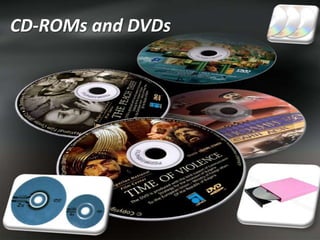
CD-ROMs and DVDs
CD-ROMs


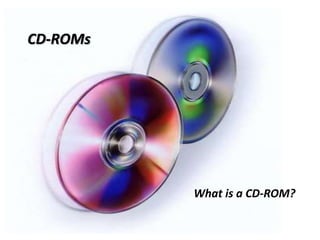
          What is a CD-ROM?
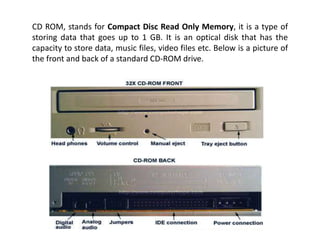
CD ROM, stands for Compact Disc Read Only Memory, it is a type of
storing data that goes up to 1 GB. It is an optical disk that has the
capacity to store data, music files, video files etc. Below is a picture of
the front and back of a standard CD-ROM drive.
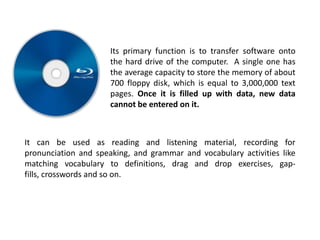
Its primary function is to transfer software onto
                      the hard drive of the computer. A single one has
                      the average capacity to store the memory of about
                      700 floppy disk, which is equal to 3,000,000 text
                      pages. Once it is filled up with data, new data
                      cannot be entered on it.


It can be used as reading and listening material, recording for
pronunciation and speaking, and grammar and vocabulary activities like
matching vocabulary to definitions, drag and drop exercises, gap-
fills, crosswords and so on.
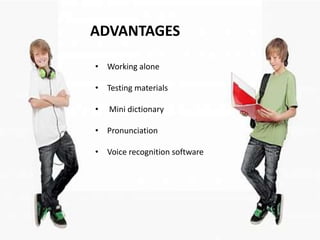
ADVANTAGES

• Working alone

• Testing materials

•   Mini dictionary

• Pronunciation

• Voice recognition software
Voice recognition software:


The learner listens to a word or short sentence and then
records his/her voice while repeating the word or
sentence. The learner’s output is then compared to a
‘model’ of correct pronunciation and the results
displayed to the learner.

But it is important to note that voice recognition
software is not always reliable in terms of feedback and
accents.
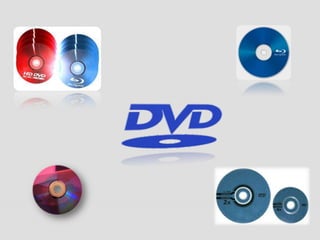
DVDs, stand for Digital Versatile Disc, are of
               the same dimensions as compact discs
               (CDs), but are capable of storing more than
               six times as much data.


They have much greater storage capacity than CD-ROMs. Its
main uses are video and data storage. DVDs also allow the
users to choose various language options.
One particularly useful feature of DVDs is that there is often
an option to view subtitles along with a video dialogue. It is
an important feature for English classes. There are a few
ideas about the use of subtitles in classroom environment:


•    During first viewing, the subtitle is hidden. How much the
    learners understood can then be checked with
    comprehension questions and the dialogue played a final
    time with the subtitles displayed.
• After listening to the DVD dialogue, learners can
  transcribe them and check right version of it.


• Learners watch a short DVD dialogue between two
  characters with the audio switched off, reading the
  subtitles several times. Pairs are then invited to each take
  a character role, and to read the subtitles for their
  character at the same time the dialogue is played again
  still with the audio switched off. This can be repeated
  several times.
Using CD-ROMs with learners in the classroom

There are several types of activities that can be done to integrate a
CD-ROM into your lessons:


• In the single computer classroom or school, pairs of learners can
  take turns to do a few CD-ROM activities. For instance; drag and
  drop activities.

• With the a help of a projector, you can do whole class activities. This
  can lead learners to use the potential of technology at home.

• If the school has a computer room, the teacher can programme in
  regular short sessions. During class time, students can work alone
  or in pairs for once a week. Concentration problem should be
  considered.
EVALUATING CD-ROMs

CD-ROMs are often cited as being particularly motivating for
learners, as they use new technology provide a multi-
sensory alternative to paper -based classroom
work,encourage self-study and autonomous learning,and
can expose learning to authentic language via audio and
video.CD-ROMS have now been around since the late 1980s
CD-ROMs are being increasingly superseded by newer
tecnologies such as blogs, podcasts,instant messaging.The
one big advantage that CD-ROMs have over these newer
Internet –based technologies is that learners can work with
CD-ROMs offline ,and thus not reliant on an Internet
connection. We will now consider how to evaluate CD-ROMs.

We should ask the following questions.

What age group is the CD-ROM aim at? Is the content
suitable for adults,adolescents or younger learners?
What linguistic level is the content aimed at-
beginners,elementary, intermediate or advantaced?
What kind of English is being focused on,eg.business
English,general English?
How interesting are the materials and how well are they
presented?
What skills and language areas are focused
on,readin,writing,listening, pronunciation,vocabulary or
grammar?
How much multimedia content,especially video and
audio,is there?
How is feedback on activities given to learners?
How is testing integrated into the CD-ROM,how dolearners
measure their own progress through the materials?
What additional resources are provided,for example a
dictionary     or   glossary,grammar    paradigms   and
explanations?
Are there non-linguistic areas,such as intercultural
communication skills learner training ordifferences in
learning styles?
Does the CD-ROM meet any accessibility laws you may
face?
Finally, we might want to consider what using a
CD-ROM really adds to your learners’language
learning experience.

We should discuss their value with our learners
directly and encourage learners to keep a
learning log of their self-access work and
achievements.
COMPUTER –BASED TESTING
    The format of a computer-based test does not differ from the
    paper one – learners complete a test with a keyboard and
    mouse. The main advantages of computer-based tests are
    user-friendliness and faster access to results.EFL learners can
    now take a range of different tests examinations via a
    computer. Some examples:

    Learners can be given diagnostic test on a computer before
    they start a course.This assesses their language levels.this
    information can then be used to assign the learner to a certain
    class or language programme.
 One commercial diagnostic text is the Quick Placement Test
  (QPT),which is available both on CD-ROM and in a pen
  paper version.learners answer multiple –choice questions
  which test their listening,reading and grammar skills.
 The other is adaptive test.
 Computer     adaptive testing constructs individualized
  examinations for each candidate based on their
  demonstrated level of knowledge and skill. The
  advantages are that all candidates take examinations
  which they find challenging improving the overall
  reliability of the examinations.
 The advantages of the format of computer adaptive
  tests is the same as the fixed form tests with regard to
  1) administration of one item per screen with visuals
  and images attached; 2) entering responses directly into
  the computer; and, 3) testing at convenient computer
  centers.
 Learners can take simple progress tests on CD-
  ROM.These tests will be based on the work that the
  learners have been doing in their coursebooks.Test are
  often included in the learner’s coursebook CD-ROM ,or
  test master CD-ROMs are made available for
  teachers.they can then use ready-made tests.
ADVANTAGES AND DISADVANTAGES OF
            COMPUTER-BASED TESTING
What are the advantages of computer based testing?
o more exam sessions available within a year
o use of technology candidates are familiar with
o attractive and user-friendly interface
o online timer on the screen
o access to help functions during the test
o easiness in editing answers on screen during the test
o use of headphones which ensures high quality of sound and
  allows candidates to adjust the volume to their needs
o faster access to results on-line
o certificate identical to the one received after the paper-based
  exam and recognised by the same institutions.
What are the disadvantages of computer based testing?

 Ensuring reliability in marking of extended pieces of
  writing and in assessing speaking.
 Initial investment costs in computer-based testing tend
  to be high.
 How does the examiner know that the person taking the
  tests online is indeed who they claim to be?
For language teacher, the main experience
of computer –based testing is using computer –
based progress tests or CD-ROMs on the market
that provide learners with exam practice that
mimics the real thing.

Computer Assisted Language Learning - CALL by AYLİN AYDIN, Uludag University

  • 1.
    ULUDAG UNIVERSITY ENGLISH LANGUAGE TEACHING DEPARTMENT TECHNOLOGY - BASED COURSEWARE COMPUTER ASSISTED LANGUAGE LEARNING - AYLİN AYDIN -
  • 2.
  • 3.
    CD-ROMs What is a CD-ROM?
  • 4.
    CD ROM, standsfor Compact Disc Read Only Memory, it is a type of storing data that goes up to 1 GB. It is an optical disk that has the capacity to store data, music files, video files etc. Below is a picture of the front and back of a standard CD-ROM drive.
  • 5.
    Its primary functionis to transfer software onto the hard drive of the computer. A single one has the average capacity to store the memory of about 700 floppy disk, which is equal to 3,000,000 text pages. Once it is filled up with data, new data cannot be entered on it. It can be used as reading and listening material, recording for pronunciation and speaking, and grammar and vocabulary activities like matching vocabulary to definitions, drag and drop exercises, gap- fills, crosswords and so on.
  • 6.
    ADVANTAGES • Working alone •Testing materials • Mini dictionary • Pronunciation • Voice recognition software
  • 7.
    Voice recognition software: Thelearner listens to a word or short sentence and then records his/her voice while repeating the word or sentence. The learner’s output is then compared to a ‘model’ of correct pronunciation and the results displayed to the learner. But it is important to note that voice recognition software is not always reliable in terms of feedback and accents.
  • 9.
    DVDs, stand forDigital Versatile Disc, are of the same dimensions as compact discs (CDs), but are capable of storing more than six times as much data. They have much greater storage capacity than CD-ROMs. Its main uses are video and data storage. DVDs also allow the users to choose various language options.
  • 10.
    One particularly usefulfeature of DVDs is that there is often an option to view subtitles along with a video dialogue. It is an important feature for English classes. There are a few ideas about the use of subtitles in classroom environment: • During first viewing, the subtitle is hidden. How much the learners understood can then be checked with comprehension questions and the dialogue played a final time with the subtitles displayed.
  • 11.
    • After listeningto the DVD dialogue, learners can transcribe them and check right version of it. • Learners watch a short DVD dialogue between two characters with the audio switched off, reading the subtitles several times. Pairs are then invited to each take a character role, and to read the subtitles for their character at the same time the dialogue is played again still with the audio switched off. This can be repeated several times.
  • 12.
    Using CD-ROMs withlearners in the classroom There are several types of activities that can be done to integrate a CD-ROM into your lessons: • In the single computer classroom or school, pairs of learners can take turns to do a few CD-ROM activities. For instance; drag and drop activities. • With the a help of a projector, you can do whole class activities. This can lead learners to use the potential of technology at home. • If the school has a computer room, the teacher can programme in regular short sessions. During class time, students can work alone or in pairs for once a week. Concentration problem should be considered.
  • 13.
    EVALUATING CD-ROMs CD-ROMs areoften cited as being particularly motivating for learners, as they use new technology provide a multi- sensory alternative to paper -based classroom work,encourage self-study and autonomous learning,and can expose learning to authentic language via audio and video.CD-ROMS have now been around since the late 1980s
  • 14.
    CD-ROMs are beingincreasingly superseded by newer tecnologies such as blogs, podcasts,instant messaging.The one big advantage that CD-ROMs have over these newer Internet –based technologies is that learners can work with CD-ROMs offline ,and thus not reliant on an Internet connection. We will now consider how to evaluate CD-ROMs. We should ask the following questions. What age group is the CD-ROM aim at? Is the content suitable for adults,adolescents or younger learners?
  • 15.
    What linguistic levelis the content aimed at- beginners,elementary, intermediate or advantaced? What kind of English is being focused on,eg.business English,general English? How interesting are the materials and how well are they presented? What skills and language areas are focused on,readin,writing,listening, pronunciation,vocabulary or grammar? How much multimedia content,especially video and audio,is there? How is feedback on activities given to learners?
  • 16.
    How is testingintegrated into the CD-ROM,how dolearners measure their own progress through the materials? What additional resources are provided,for example a dictionary or glossary,grammar paradigms and explanations? Are there non-linguistic areas,such as intercultural communication skills learner training ordifferences in learning styles? Does the CD-ROM meet any accessibility laws you may face?
  • 17.
    Finally, we mightwant to consider what using a CD-ROM really adds to your learners’language learning experience. We should discuss their value with our learners directly and encourage learners to keep a learning log of their self-access work and achievements.
  • 18.
    COMPUTER –BASED TESTING The format of a computer-based test does not differ from the paper one – learners complete a test with a keyboard and mouse. The main advantages of computer-based tests are user-friendliness and faster access to results.EFL learners can now take a range of different tests examinations via a computer. Some examples:  Learners can be given diagnostic test on a computer before they start a course.This assesses their language levels.this information can then be used to assign the learner to a certain class or language programme.
  • 19.
     One commercialdiagnostic text is the Quick Placement Test (QPT),which is available both on CD-ROM and in a pen paper version.learners answer multiple –choice questions which test their listening,reading and grammar skills.  The other is adaptive test.  Computer adaptive testing constructs individualized examinations for each candidate based on their demonstrated level of knowledge and skill. The advantages are that all candidates take examinations which they find challenging improving the overall reliability of the examinations.
  • 20.
     The advantagesof the format of computer adaptive tests is the same as the fixed form tests with regard to 1) administration of one item per screen with visuals and images attached; 2) entering responses directly into the computer; and, 3) testing at convenient computer centers.  Learners can take simple progress tests on CD- ROM.These tests will be based on the work that the learners have been doing in their coursebooks.Test are often included in the learner’s coursebook CD-ROM ,or test master CD-ROMs are made available for teachers.they can then use ready-made tests.
  • 21.
    ADVANTAGES AND DISADVANTAGESOF COMPUTER-BASED TESTING What are the advantages of computer based testing? o more exam sessions available within a year o use of technology candidates are familiar with o attractive and user-friendly interface o online timer on the screen o access to help functions during the test o easiness in editing answers on screen during the test o use of headphones which ensures high quality of sound and allows candidates to adjust the volume to their needs o faster access to results on-line o certificate identical to the one received after the paper-based exam and recognised by the same institutions.
  • 22.
    What are thedisadvantages of computer based testing?  Ensuring reliability in marking of extended pieces of writing and in assessing speaking.  Initial investment costs in computer-based testing tend to be high.  How does the examiner know that the person taking the tests online is indeed who they claim to be?
  • 23.
    For language teacher,the main experience of computer –based testing is using computer – based progress tests or CD-ROMs on the market that provide learners with exam practice that mimics the real thing.